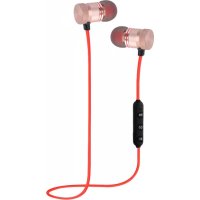
Airbeat BT7 - Earphones WOXTER - Free user manual and instructions
Find the device manual for free Airbeat BT7 WOXTER in PDF.


| Product type | Wireless Bluetooth headphones |
| Brand | Woxter |
| Model | Airbeat BT7 |
| Approximate dimensions | 5 x 4 x 2 cm |
| Approximate weight | 10 g |
| Power source | Rechargeable lithium-ion battery (via USB) |
| Battery capacity | 100 mAh |
| Playback time | Up to 6 hours |
| Charging time | Approximately 2 hours |
| Connectivity | Bluetooth 5.0 |
| Bluetooth range | 10 m |
| Bluetooth version | 5.0 |
| Supported Bluetooth profiles | A2DP, AVRCP, HSP, HFP |
| Available color(s) | Black (generally) |
| Main functions | Play/pause, volume control, track change, call management, Bluetooth pairing |
| Maintenance and cleaning | Clean with a soft dry cloth. Do not use volatile or abrasive liquids. |
| Safety | Do not modify, repair, or disassemble the device. Do not expose to liquids or excessive heat. |
| Spare parts and repairability | USB cable included. Repairs must be carried out by a qualified professional. |
| Included accessories | Headset, USB cable |
| Warranty | Standard manufacturer warranty (check with retailer) |
Frequently Asked Questions - Airbeat BT7 WOXTER
User questions about Airbeat BT7 WOXTER
0 question about this device. Answer the ones you know or ask your own.
Ask a new question about this device
Download the instructions for your Earphones in PDF format for free! Find your manual Airbeat BT7 - WOXTER and take your electronic device back in hand. On this page are published all the documents necessary for the use of your device. Airbeat BT7 by WOXTER.
USER MANUAL Airbeat BT7 WOXTER
Thank you for choosing to enjoy your favorite music with the new Woxter BT-7 irbeat headphones. This manual allows you to get advanced for your device, but you should be previously familiar with the wireless function of your mobile, tablet or BT device.
- Do not modify, repair or disassemble this device to avoid possible small explosions, fires, or electric shocks.
- Do not use any volatile or aggressive liquid to clean your headphones.
- Do not use your Airbeat BT-7 in hazardous locations.
List of accessories
Headphones, USB charging cable
MAIN FUNCTIONS
EN
- Turn on: Press the POWER button for 4 seconds when the device is OFF (the blue light will flash 3 times and the device will turn on and you will hear that it is already connected).
- Link device: turn on your Airbeat BT-7 by pressing the POWER button and then hold it down for 5 seconds. The red and blue light will flash rapidly and alternately and you will hear the link voice.
- Link device: use the Bluetooth function of the mobile device or device with which you want to link
- Play / Pause: Press the POWER button to play when the device is paused and press it again if you want to return to pause mode.
EN
- Volume: press quick and shortly the VOL + button to increase the volume and the VOL- button to lower the volume.
- Previous track / next track: press and hold for one second - to go to the previous track or the + button to go to the next track.
- Turn off headphones: press and hold the POWER button for three seconds. A beep will sound and all the lights will go out.
- Low battery warning: a beep will indicate that the battery is low and the light will flash red.
- Charging: the headphones must be charged via USB (red light).
- Answer a call: press the PHONE button once while entering the call.
EN
- Hang up call: press the PHONE button once to hang the call you are making.
- Reject call: press and hold the PHONE button to reject the call.
- Redial: Press the PHONE button twice when the device is turned on or in playback mode.
- Raise or lower the sound of the call: press the - or + button repeatedly to increase or decrease the volume as desired.
- No sound: while speaking, press and hold the button -.
- With sound: while speaking, press the + button.
EN
LOAD THE DEVICE
- Connect the charger to the headphone charging jack.
- During charging, the indicator light will turn red.
- Once charged, the light will change to blue. Unplug the charger from the headphones.
- Use only authorized chargers to avoid damaging your headphones in addition to invalidating the product warranty.
- The repeated charges and discharges of the headset, over time, will cause the battery performance to decrease. This is normal for all rechargeable batteries.