
K 700 - Keyboard WOXTER - Free user manual and instructions
Find the device manual for free K 700 WOXTER in PDF.


| Product Type | Keyboard with integrated DNIe smart card reader |
| Brand | Woxter |
| Model | K 700 |
| Interface | USB |
| Key Layout | Standard 104-key layout including numeric keypad |
| Multimedia Hot Keys | Email, Home, Favorites, Play/Pause, Volume - |
| DNIe Support | Yes, with integrated card reader for Spanish electronic ID |
| Operating System Compatibility | Windows (with DNIe certificate support) |
| Power Supply | USB powered (5V, 500mA) |
| Dimensions (approx) | 450 x 160 x 30 mm |
| Weight (approx) | 500 g |
| Warranty | 2 years (subject to terms on www.woxter.com) |
| Included Accessories | CD Driver, User Manual |
| Cleaning | Use a soft dry cloth; avoid liquids |
Frequently Asked Questions - K 700 WOXTER
User questions about K 700 WOXTER
0 question about this device. Answer the ones you know or ask your own.
Ask a new question about this device
Download the instructions for your Keyboard in PDF format for free! Find your manual K 700 - WOXTER and take your electronic device back in hand. On this page are published all the documents necessary for the use of your device. K 700 by WOXTER.
USER MANUAL K 700 WOXTER
Keyboard K 700 DNI-E
dni
electrónico


natural_image
Black WOXTER keyboard with standard keys and buttons, no visible text or symbols on the main bodyTecladoUSBparaDNIe
www.woxter.com

WOXTER
MANUAL USUARIO
Technical Support and Warranty Information
If you have some technical problem with this unit, we strongly recommend you to link our website www.woxter.com where you can access to "Frequently Asked Questions", "User Guide", "Upgrades and Drivers", etc... You will be able to find the way to solve the problem and keep your unit always upgraded.
If the problem persists, please contact to your dealer (with the ticket) for technical support and RMA form.
Warranty Specifications
- Two years of guarantee for our products, as long as all are made correctly and each one of the indicated steps in the procedure of return to the SAT WOXTER available in www.woxter.com
- The guarantee will be treated as void in case of breakage or manipulation of the seals of guarantee, if the material is damaged, without suitable packing and/or damages of transport and in the case of evident samples of an incorrect manipulation, illegal use, mistreat, blows, falls, dirt... etc
- Woxter is not responsible for the hard disks or the data contained in our optical or magnetic devices. The end user will be the only responsible for them.
- This warranty does not cover the damage done to other equipments used in conjunction with this unit.
- Terms subjected to change without previous notice.
IF YOU NEED FURTHER INFORMATION ABOUT OUR WARRANTY SPECIFICATIONS, PLEASE ENTER IN: www.woxter.com
natural_image
Black computer keyboard with standard keys and a small logo on the front (no visible text or symbols on the keyboard body)Teclado USB USB Keyboard

CD Driver CD Driver

natural_image
Computer monitor displaying a photo of multiple raised hands against a blue sky background (no text or symbols visible)Paso 1. Conecte la unidad a su PC a través de un puerto USB libre. Step 1. Connect the keyboard to an available USB port of your PC.
Step 2. Turn the PC on.
2. Hardware Hardware
Teclas numéricas: Numeric keys Incluyen los numeros del 1 al 0 y funciones especiales si se utilizan conjuntamente con las tedas "Ctrl" o "Alt Gr". Includes the numbers from 1 to 0 and special characters and signs if you use them together with "Ctrl" or "Alt Gr" keys.
Description of a key with special functions
Función 1 Function 2 Carácter principal Main Character

Función 2 Function 2

Función 1. Prasione la tacia + tacia "Shift". Function 1: Press the key together with "Shift" key.

Función 2: Presione la tecla + tecla "Alt Gr". Function 2. Press the key together with "Alt Gr" key.
3. Teclas multimedia Multimedia Hot Keys

natural_image
Illustration of global connectivity icons including a envelope, globe, coins, and calculator on a stylized cityscape background (no text or symbols)The USB Keyboard Woster KB 700 Dnie includes multimedia hot keys and another hot keys for common functions to make easier the playback of multimedia files directly from the keyboard.

- Email / Correo electrónico. Presione para abrir la ventana del programa de correo configurado en su PC.
- Home o Inicio. Presione para abrir automáticamente la página de inicio del explorador de Internet predeterminado.
- Favoritos. Presione para acceder a la lista de webs favoritas configuradas en su explorador de Internet.
- Play/pausa. Presione para pausar o reanudar la reproducción de un archivo multimedia.
-
Volumen -. Presione para disminuir el volumen.
-
Email. Press to open the main window of the email software installed in your computer.
- Home. Press to open automatically the home page of your Internet explorer program.
- Favourites. Press to access to the list of favourite websites, saved in your Internet explorer program.
- Play/pause. Press to pause or to resume a playback.
- Volume -. Press to decrease the volume.

natural_image
Close-up of a black WOXTER keyboard with standard keys and control buttons (no readable text beyond brand logo)Step 3. Restart your PC to complete the installation. When you restart the computer, the DGP Root Certificate will be installed in the navigator software installed in your PC.
You can find all the information about the DNle, features, usages and updatings in its official website:
www.dnielectronico.es
How to verify the installation of the DNle Certificate (I. Explorer)
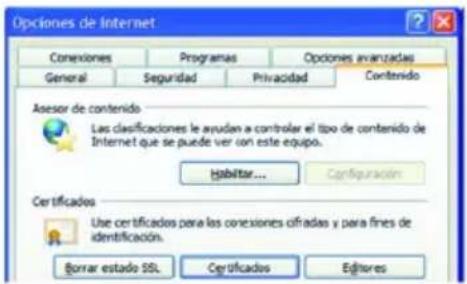
Step 1. Insert the DNle in its slot and go to Tools / Internet Options / Content / Certificates.
Step 2. If the CSP module is properly installed the DNle code will be required.
Step 3. Enter your DNle code and consult your certificates in Personal / Certification Entities:
- Authentication certificate
- Signature certificate

Step 4. In the tab "Trusted Root Certification Authorities" you can view the root certificate of AC RAIZ DNIE.
Step 5. If you have successfully completed the previous steps and you can view your certificates, it means that the CSP module and the Microsoft root certificate are properly installed.
The CD Driver provided with the unit includes some applications to make easier the installation and the usage of the unit.
From the main installation menu you will be able to download the Java applications you need to use with your DNle, a complete digital user guide in PDF format and also the Adobe Acrobat Reader software (this software is needed to open the digital user guide).


Brand : WOXTER
Model : K 700
Category : Keyboard