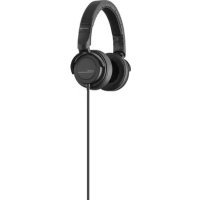
DT 240 PRO - Earphones BEYERDYNAMIC - Free user manual and instructions
Find the device manual for free DT 240 PRO BEYERDYNAMIC in PDF.


| Technical Specifications | Closed, dynamic, circumaural headphones |
|---|---|
| Frequency Response | 5 Hz - 40 kHz |
| Impedance | 34 Ohms |
| Sound Pressure | 102 dB |
| Weight | 240 g |
| Connector Type | 3.5 mm mini-jack with 6.35 mm adapter |
| Usage | Ideal for monitoring, music production, and personal listening |
| Maintenance and Repair | Regularly clean the ear pads, check cables to avoid damage |
| Safety | Avoid prolonged exposure to high sound levels to prevent hearing damage |
| General Information | Robust design, comfortable ear pads, detachable cable |
Frequently Asked Questions - DT 240 PRO BEYERDYNAMIC
User questions about DT 240 PRO BEYERDYNAMIC
0 question about this device. Answer the ones you know or ask your own.
Ask a new question about this device
Download the instructions for your Earphones in PDF format for free! Find your manual DT 240 PRO - BEYERDYNAMIC and take your electronic device back in hand. On this page are published all the documents necessary for the use of your device. DT 240 PRO by BEYERDYNAMIC.
USER MANUAL DT 240 PRO BEYERDYNAMIC
Thank you for selecting the dynamic DT 240 PRO headphone from beyerdynamic. Please take some time to read carefully through this manual before using the product. Please keep the manual. When passing on the headphone to a third party, please pass on the manual as well.
Safety instructions
- Exposure to excessive sound levels for longer periods can damage your ears resulting in permanent noise-induced hearing loss. Use a low volume!
- According to regulations to protect employees against damages caused by noise and vibrations, please follow these instructions:
85 dB SPL for max. 8 hours
88 dB SPL for max. 4 hours
91 dB SPL for max. 2 hours
94 dB SPL for max. 1 hour
97 dB SPL for max. 30 minutes
100 dB SPL for max. 15 minutes
- When connecting the headphones, please ensure that the volume is turned down to minimum. Adjust the volume after putting on the headphones.
Danger to life!
Headphones drastically reduce perception of external sounds. Using headphones in road traffic can be potentially dangerous. The user's hearing must not be impaired to the extent that it causes road safety risks. Please also make sure that you do not use headphones within the action area of potentially dangerous machines and tools.
Risk of injury!
Avoid strong movements when using wired headphones. You might seriously hurt yourself especially if you wear piercings, earrings, glasses, etc., where the wire can get caught.
Supplied accessories
1 x coiled cable, 1.25 m or 3 m (stretched)
1 x soft bag
Application
The compact DT 240 PRO is a closed headphone for professional applications. It provides studio quality in any environment, even with mobile applications. The headphone features a clean, deep bass, vivid mids and defined highs. Precise and powerful drivers ensure a high output volume on all devices such as laptops, cameras and studio interfaces. Therefore, the DT 240 PRO is ideal for producers, podcasters and
filmmakers who want to take full advantage of the potential of their equipment. A high noise attenuation prevents the penetration of ambient noise, nor does sound penetrate outwards. The lightweight ergonomic, padded headband and soft, replaceable ear pads provide a comfortable wearing, even for a longer period of time. The rugged design ensures excellent durability in tough everyday applications. The rugged design ensures excellent durability in tough everyday applications.
How to connect the cable
- At the end that connects to the headphone, the connecting cable is fitted with a mini jack connector. The cable can be connected to the right or left ear cup.
- At the other end, the cable is provided with a gold-plated mini jack plug (3.5 mm) with a 1/4" adapter (6.35 mm).
The thread of the mini jack connector (3.5 mm) is so constructed that the headphone can also be connected to smartphones with a protective cover.
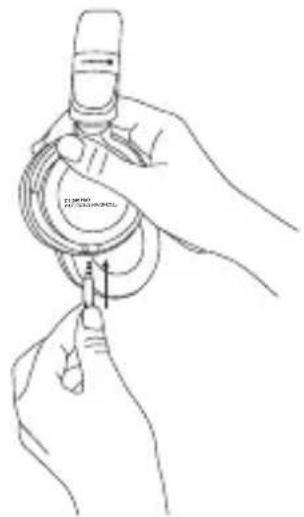
Storage
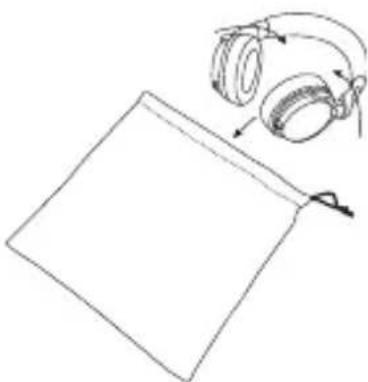
If you would like to store the headphone in the supplied soft bag, detach the cable, rotate the two ear cups as indicated by the arrows and put it into the soft bag with the ear cups first.
Maintenance
As with any equipment which will be used in close proximity to sensitive areas of the body, it is essential that the ear pads and headband are kept clean. Use a soft damp cloth for cleaning using water only taking care not to allow any water drops into the ear cups or transducers.
WARNING: Never use any solvent cleaning agents!
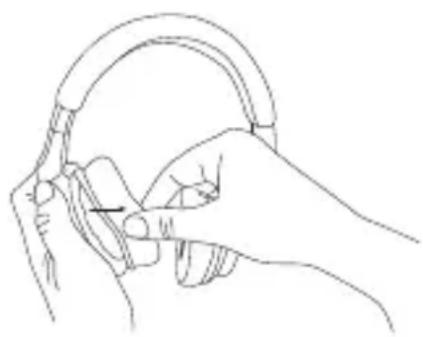
You may need to change the ear pads from time to time as a result of normal wear and tear. This is easy to do yourself:
- Remove the ear pad carefully from the mounting ring of the ear cup.
- Attach the new ear pad to the ear cup by pulling it over the mounting ring.
In the event that other components need to be replaced, please contact your local beyerdynamic representative.
Accessories and spare parts
Accessories and replacement equipment can be found at:
www.beyerdynamic.com
Service
If you require service, please contact qualified service personnel or directly:
Dismantling the headphone yourself will invalidate the guarantee.
Technical specifications (all details specifications acc. to EN 60 268-7)
Transducer type dynamic
Operating principle closed
Frequency response. 5-35,000 Hz
Nominal impedance. 34Ω
Nominal SPL. 99 dB SPL (1 mW / 500 Hz)
Max. SPL 119 dB SPL (200 mW / 500 Hz)
T.H.D. < 0.1% (1 mW / 500 Hz)
Power handling capacity. 100 mW
Sound coupling to the ear. . . . . . . circumaural
Nominal headband pressure . . . . . approx. 5.2 N
Weight (without cable) 196 g
Length and type of cable . . . . . . . . 1.25 m / coiled cable, stretched 3 m, detachable, single-sided
Connection . . . . . . . . . . . . . . . . . . . . . . . . . . . . . . . . . . . . . . . . . . . . . . . . . gold-plated mini stereo jack (3.5 mm) & 1/4" adapter (6.35 mm)
Disposal
At the end of its operating life this product may not be disposed of along with normal household waste. Please take it to a designated recycling point for electric and electronic appliances. This is indicated by the symbol on the product, the operating instructions or the packaging.
PnHnI ΦyHKcNoHnpOBaHn .3akpbItbIe
Dnana30n npepaun. 5-35000T
HomHaJIbHoe cOpOTnBneHne 34Ω
XapakTepeNCTnueckn ypoBeHb
3BykoBOrO daBneHnra. 99 dB SPL (1 MBT/500 Tc)
MaKc. ypoBHeB 3BykoBOrO daBneHnra . . . 119 dSPL (200 mBT / 500 Tc)
Ko3ΦΦnμeHT HeiHHeHbIX nckaKeHn .<0,1% (1 MBT / 500 Γι)
HomHaBHa npedeBHa harpy3ka . . . 100 mBT
TnKoHCTpyKcun . OXBaTBaIOUyu
HomHaJIbHoe ycJnne npnxIma . . . . . ok. 5,2 H
Bec (6e3 npoBoDa) 196 r
Длнани ТИп повoda. 1,25 M / спралььнй повODВ pactяHyTom COCTOЯн 3 M, BCTaBHO, NOДКЛЮЧЕпс OДНО CTOPOHы
IopcoednHeHne .no3oJoueHHbI cTepeoWTeKeP dInHO
[ \text{[W] < 0.1% (1 mW / 500 Hz)} ]
100mW
首用..
雀雀 5.2N
中龍(() 196g
For further distributions worldwide, please go to www.beyerdynamic.com
Non-contractual illustrations. Subject to change without notice.