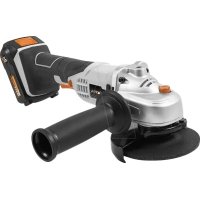
BTAG004 - Grinder Batavia - Free user manual and instructions
Find the device manual for free BTAG004 Batavia in PDF.



| Technical Features | Batavia BTAG004 shredder, power 2400W, shredding capacity up to 40 mm diameter. |
|---|---|
| Usage | Ideal for shredding branches and garden waste, easy to maneuver and use. |
| Maintenance and Repair | Regularly check blades and moving parts, lubrication recommended for optimal operation. |
| Safety | Use protective gloves, do not insert hands into the shredding opening, follow the provided safety instructions. |
| General Information | Device weight: 25 kg, dimensions: 80 x 50 x 40 cm, 2-year warranty. |
Frequently Asked Questions - BTAG004 Batavia
User questions about BTAG004 Batavia
0 question about this device. Answer the ones you know or ask your own.
Ask a new question about this device
Download the instructions for your Grinder in PDF format for free! Find your manual BTAG004 - Batavia and take your electronic device back in hand. On this page are published all the documents necessary for the use of your device. BTAG004 by Batavia.
USER MANUAL BTAG004 Batavia
Operating instructions
- Holes for Additional Handle
- (a + b) ON/OFF Switch
- Release button
- Ventilation Openings
- Carbon brush cap (2x)
- a) Grinding-Protective Hood b) Cutting-Protective Hood (not included in delivery)
- Rotating Direction Indicator
- Locking Knob
- Inner Flange
- Outer Flange
- Spindle
- Additional Handle
- Face Wrench
- Fixing Screw
- Protective Cover Tension Lock
Übersicht
1.Explanation of the symbols. 4
2-6. Safety instructions and warnings 4-8
7. Residual risks 8
8. Electrical safety 9
9.Before the first use 9
10. Contents of packing 9
11. Intended use 9
12.Installing the additional handle. 9
13. Mounting the protective cover 9
14.Inserting the grinding disc 9
15.Before startup/operatings
instructions 10
16. Startup 10
17. Replacing the protective cover 10
18.Setting the main grip. 11
19. Maintenance and cleaning 11
20. Technical data. 11
21.Disposal 11
22. EC-Declaration of conformity 12
Table des matieres
Please familiarize yourself with the proper usage of the device by reading and following each chapter of this manual, in the order presented. Keep these operating instructions for further reference.
Please read all safety instructions!
This manual contains important information on operating and handling the device. Keep these operating instructions for further reference. Please pass it on along with the unit if it is handed over to a third party.
1. Explanation of the symbols
The following symbols are used in the user manual or on the product:

Warning! To reduce the risk of injury, the user must read the instruction manual.

Denotes risk of personal injury, loss of life or damage to the tool in case of non-observation of the instructions in this manual.
Risk of electric shock.

Immediately remove the mains plug from the mains if the mains cable becomes damaged and during cleaning and maintenance.

Risk of flying objects. Keep bystanders away from the work area.

Always wear hearing protection. The effects of noise can cause hearing loss.

Wear a dust mask. When working with wood and other materials, harmful dust may be generated. Work with asbestos containing materials is not permitted!
Wear safety glasses. When working with electric power tools, sparks, splinters, chips and dust particles may be generated and these can cause loss of sight.

Wear safety gloves!

Do not press the spindle lock button while the motor is running.
Risk of fire.
Electric power tool, protection class II. This sign symbolises that this unit corresponds to Protection Class II. This means that the unit is equipped with either reinforced or double insulation between the mains circuit and output voltage or metal housing respectively.

Variable speed control.
CE stands for "Conformité Européenne", which means "In accordance with EU Regulations". With the CE marking, the manufacturer confirms that this Electric tool complies with the applicable European directives.

Do not dispose of electric power tools with domestic refuse.
2. General safety instructions for power tools

WARNING!Read all instructions!
Failure to follow all instructions listed below may result in electric
shock, fire and/or serious injury.
The term "power tool" in all of the warnings listed below refers to your mains operated (corded) power tool or battery operated (cordless) power tool.
Save these instructions for future reference!
21 Work area
a. Keep work area clean and well lit. Cluttered and dark areas invite accidents.
b. Do not operate power tools in explosive atmospheres, such as in the presence of flammable liquids, gasses or dust. Power tools create sparks which may ignite the dust of fumes.
c. Keep children and bystanders away while operating a power tool. Distractions can cause you to lose control.
2.2 Electrical safety
2.3 Personal safety
a. Power tool plugs must match the outlet. Never modify the plug in any way. Do not use any adapter plugs which earthed (grounded) power tools. Unmodified plugs and matching outlets will reduce risk of electric shock.
b. Avoid body contact with earthed or grounded surfaces such as pipes, radiators, ranges and refrigerators. There is an increased risk of electric shock if your body is earthed or grounded.
c. Do not expose power tools to rain or wet conditions. Water entering a power tool will increase the risk of electric shock.
d. Do not abuse the cord. Never use the cord for carrying, pulling or unplugging the power tool. Keep cord away from heat, oil, sharp edges or moving parts. Damaged or entangled cords increase the risk of electric shock.
e. When operating a power tool outdoors, use an extension cord suitable for outdoor use. Use of a cord suitable for outdoor use reduces the risk of electric shock.
f. Always use tool in conjunction with a residual circuit breaker device. The use of a residual circuit breaker device reduces the risk of electric shock.
a. Stay alert, watch what you are doing and use common sense when operating a power tool. Do not use a power tool while you are tired or under the influence of drugs, alcohol or medication. A moment of inattention while operating power tools may result in serious personal injury.
b. Use safety equipment. Always wear eye protection. Safety equipment such as dust mask, non-skid safety shoes, hard hat, or hearing protection used for appropriate conditions will reduce personal injuries.
c. Avoid accidental starting. Ensure the switch is in the off position before plugging in. Carrying power tools with
your finger on the switch or plugging in power tools that have the switch on invites accidents.
d. Remove any adjusting key or wrench before turning the power tool on. A wrench or a key left attached to a rotating part of the power tool may result in personal injury.
e. Do not overreach. Keep proper footing and balance at all times. This enables better control of the power tool in unexpected situations.
f. Dress properly. Do not wear loose clothing or jewellery. Keep your hair, clothing and gloves away from moving parts. Loose clothes, jewellery or long hair can be caught in moving parts.
g. If devices are provided for the connection of dust extraction and collection facilities, ensure these are connected and properly used. The use of these pieces of equipment reduce hazards caused by dust.
2.4 Power tool use and care
a. Do not force the power tool. Use the correct power tool for your application. The correct power tool will do the job better and safer at the rate for which it was designed.
b. Do not use the power tool if the switch does not turn it on and off. Any power tool that cannot be controlled with the switch is dangerous and must be repaired.
c. Disconnect the plug from the power source before making any adjustments, changing accessories, or storing power tools. Such preventive safety measures reduce the risk of starting the power tool accidentally.
d. Store idle power tools out of the reach of children and do not allow persons unfamiliar with the power tool or these instructions to operate the power tool. Power tools are dangerous in the hands of untrained users.
e. Maintain power tools. Check for misalignment or binding of moving parts, breakage of parts and any other condition that may affect the power tools
English
operation. If damaged, have the power tool repaired before use. Many accidents are caused by poorly maintained power tools.
f. Keep cutting tools sharp and clean.
Properly maintained cutting tools with sharp cutting edges are less likely to bind and are easier to control.
g. Use the power tool, accessories and tool bits etc., in accordance with these instructions and in the manner intended for the particular type of power tool, taking into account the working conditions and the work to be performed. Use of the power tool for operations different from intended could result in a hazardous situation.
2.5 Service
a. Please use a qualified expert who uses original replacement parts to repair your power tool. This will ensure proper functioning of the power tool.
3. Safety warnings common for grinding or abrasive cutting-off operations
a. This power tool is intended to function as a grinder tool. Read all safety warnings, instructions, illustrations and specifications provided with this power tool. Failure to follow all instructions listed below may result in electric shock, fire and/or serious injury.
b. Operations such as sanding, wire brushing, polishing are not recommended to be performed with this power tool. Operations for which the power tool was not designed may create a hazard and cause personal injury.
c. Do not use accessories which are not specifically designed and recommended by the tool manufacturer. Just because the accessory can be attached to your power tool, it does not assure safe operation.
d. The rated speed of the accessory must be at least equal to the maximum speed marked on the power tool. Accessories running faster than their rated speed can break and fly apart.
e. The outside diameter and the thickness of your accessory must be within the capacity rating of your power tool. Incorrectly sized accessories cannot be adequately guarded or controlled.
f. Threaded mounting of accessories must match the grinder spindle thread. For accessories mounted by flanges, the arbour hole of the accessory must fit the locating diameter of the flange. Accessories that do not match the mounting hardware of the power tool will run out of balance, vibrate excessively and may cause loss of control.
g. Do not use a damaged accessory. Before each use inspect the accessory such as abrasive wheels for chips and cracks, backing pad for cracks, tear or excess wear, wire brush for loose or cracked wires. If power tool or accessory is dropped, inspect for damage or install an undamaged accessory. After inspecting and installing an accessory, position yourself and bystanders away from the plane of the rotating accessory and run the power tool at maximum no-load speed for one minute. Damaged accessories will normally break apart during this test time.
h. Wear personal protective equipment. Depending on application, use face shield, safety goggles or safety glasses. As appropriate, wear dust mask, hearing protectors, gloves and workshop apron capable of stopping small abrasive or workpiece fragments. The eye protection must be capable of stopping flying debris generated by various operations. The dust mask or respirator must be capable of filtrating particles generated by your operation. Prolonged exposure to high intensity noise may cause hearing loss.
i. Keep bystanders a safe distance away from work area. Anyone entering the work area must wear personal protective equipment. Fragments of workpiece or of a broken accessory may fly away and cause injury beyond immediate area of operation.
j. Hold the power tool by insulated gripping surfaces only, when performing an operation where the cutting accessory may contact hidden wiring or its own cord. Cutting accessory contacting a "live" wire may make exposed metal parts of the power tool "live" and could give the operator an electric shock.
k. Position the cord clear of the spinning accessory. If you lose control, the cord may be cut or snagged and your hand or arm may be pulled into the spinning accessory.
I. Never lay the power tool down until the accessory has come to a complete stop. The spinning accessory may grab the surface and pull the power tool out of your control.
m. Do not run the power tool while carrying it at your side. Accidental contact with the spinning accessory could snag your clothing, pulling the accessory into your body.
n. Regularly clean the power tool's air vents. The motor's fan will draw the dust inside the housing and excessive accumulation of powdered metal may cause electrical hazards.
o. Do not operate the power tool near flammable materials. Sparks could ignite these materials.
p. Do not use accessories that require liquid coolants. Using water or other liquid coolants may result in electrocution or shock.
4. Kickback and related warnings
Kickback is the sudden reaction of a wedged or locked spinning attachment such as a grinding or sanding disc or a wire brush etc. This causes the spinning attachment to come to a sudden stop, which will force the electric tool against the rotating direction of the attachment.
If, for instance, a cutting disc becomes locked or jammed in the work piece, the edge of the disc may fracture inside the work piece and cause a violent kickback. The disc will then move away from or towards the operator, depending on the
direction of rotation on the locking point. This may also shatter the disc.
Kickback is caused by wrong or inappropriate use of the tool and can be avoided by following the safety advice below.
a. Hold the electric tool tightly with both hands and assume a position, in which you can compensate a kickback. If present, use the accessory handle to be able to control kickback and countermovement of the running motor. With the necessary precautions the operator can control all forces of kickback and countermovement.
b. Keep your hand away from the spinning attachment. A kickback can throw the attachment onto your hand.
c. Keep your body out of the area into which the tool is thrown by a kickback. The tool is thrown into the direction reverse to the direction of the disc at the locking point.
d. Use extreme care when working around edges or sharp corners. Make sure the attachment cannot become locked into or bounce back from the work piece. Rotating discs tend to lock into or bounce back from edges and corners. This may cause kickback or loss of control.
e. Do not attach a saw chain woodcarving blade or toothed saw blade. Such blades create frequent kickback and loss of control.
5. Safety warnings specific for grinding and abrasive cutting-off operations
a. Use only discs intended for your electric tool and the protective hood intended for these discs. Discs not intended for the electric tool cannot be covered in a suitable way and are unsafe.
b. The grinding surface of centre depressed wheels must be mounted below the plane of the guard lip. An improperly mounted wheel that projects through the plane of the guard lip cannot be adequately protected.
English
c. Always use the protective hood intended for the kind of attachment you are using. The protective hood must be securely attached and be adjusted in such a way that the highest possible degree of safety is achieved, e.g. the smallest possible part of the spinning attachment pointing to the operator is free. The protective hood is intended to protect the operator from flying debris, fragments of a fractured disc and accidental contact with the attachment.
d. Use discs only for the purpose they are intended for by the manufacturer. Never use the side of a cutting disc for grinding. Cutting discs are intended for cutting only. Lateral forces may cause fracture.
e. Always use undamaged flanges of the correct size and shape for your cutting disc. The correct flanges support the disc and reduce the risk of a disc fracture. Flanges for cutting discs can differ from those for grinding discs.
f. Do not use worn-down discs from larger electric tools. These are not intended for the fast speeds of smaller electric tools and may fracture.
6. Additional safety warnings specific for abrasive cutting-off operations

Cut-off operations are only suitable with a special protection guard (6b) (not included)
a. Avoid blocking the disc and do not use excessive pressure. Do not attempt excessively deep cuts. Excessive loads on the cutting disc increase the stress and make it more prone to jamming or blocking and increase the risk of kickback of fracture.
b. Do not position your body in line with and behind the rotating wheel. When the wheel, at the point of operation, is moving away from your body, the possible kickback may propel the spinning wheel and the power tool directly at you.
c. When wheel is binding or when interrupting a cut for any reason, switch off the power tool and hold the power tool motionless until the wheel comes to a complete stop. Never attempt to remove the cut-off wheel from the cut while the wheel is in motion otherwise kickback may occur. Investigate and take corrective action to eliminate the cause of wheel binding.
d. Do not restart the cutting operation in the workpiece. Let the wheel reach full speed and carefully re-enter the cut. The wheel may bind, walk up or kick back if the power tool is restarted in the workpiece.
e. Support panels or any oversized workpiece to minimize the risk of wheel pinching and kickback. Large workpieces tend to sag under their own weight. Supports must be placed under the workpiece near the line of cut and near the edge of the workpiece on both sides of the wheel.
f. Use extra caution when making a "pocket cut" into existing walls or other blind areas. The protruding wheel may cut gas or water pipes, electrical wiring or objects that can cause kickback.
7. Residual risks
Even when you use this electric power tool correctly, residual risks remain. The following dangers may arise in connection with the construction and application of electric power tools, among other things:
- Lung damage if no suitable protective dust mask is used.
- Damage to hearing if no suitable ear protection is used.
- Damage to health resulting from hand-arm vibrations if the electric power tool is used over a long period of time, or is incorrectly operated or maintained.
- Warning! These electric power tools produce an electromagnetic field during operation. Under certain circumstances, this field may impair the operation of active or passive medical implants. In order to reduce the danger
of serious or fatal injuries, we recommend that persons with medical implants consult their doctor and the manufacturer of the medical implant before operating the electric power tool.
8. Electrical safety

Always check that the voltage of the power supply corresponds to the voltage on the rating plate.
- Do not use the machine if the mains cable or the mains plug is damaged.
- Only use extension cables that are suitable for the power rating of the machine with a minimum thickness of 1.5mm^2 . If you use an extension cable reel, always fully unroll the cable.
9. Before the first use
Remove the machine and all accessories from the package. Keep the packaging materials out of the reach of small children. There is a danger of suffocation!
10. Contents of packing
1× AngleGrinder
1× Additional Handle
1×Face Wrench
1x Protective Cover
1× Instruction manual
11. Intended use
The angle grinder has been designed for grinding masonry and steel materials without the use of water. For cutting, a special protection guard (6b) must be used (not included)
Do not misuse the machine for other work! The angle grinder works with grinding discs with a peripheral speed of 80m / s and a maximum diameter of 230~mm .
12. Installing the additional handle
Operate the angle grinder only with the installed additional handle (12). A total of three holes (for left-handed and right-handed people) is located in the gear head, where you can screw the additional handle. Always hold the angle grinder with both hands while working.
13. Mounting the protective cover

Never use the angle grinder without the protective cover (6)!
13.1 The protective cover (6) should be aligned in such a way that it protects you from sparks and flying debris.
132 The protective cover is equipped with a quick lock (15). To open the quick lock (15) move the lever upwards and to close the quick lock pull the lever downwards.
13.3 If necessary, tighten the quick lock with the hex nut (14).
14. Inserting the grinding disc
Attention! Always disconnect the main power plug of a grinding disc prior to insertion and replacement to avoid unintentional activation.
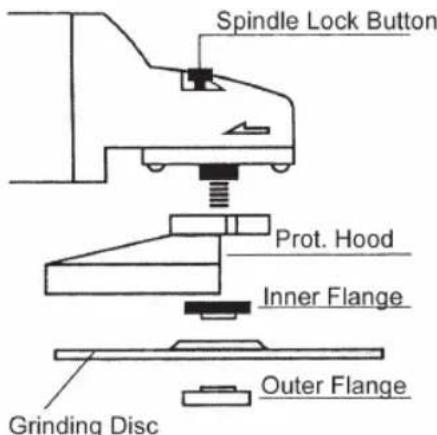
14.1 Lock the spindle (11) by pressing the locking knob (8). Hold down the locking knob.
14.2 Rotate the spindle (11) by hand until the spindle noticeably snaps into place.
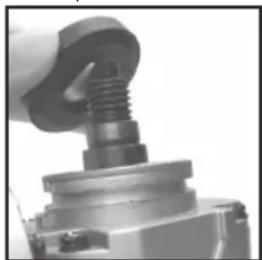
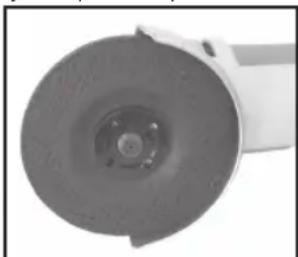
14.3 Place the inner flange (9) on the spindle (see picture) such that the inner flange cannot rotate on the spindle.
14.4 Place the grinding disc on the inner flange.
14.5 Screw the outer flange (10) onto the spindle.
14.6 Tighten the outer flange with the face pin wrench (13).
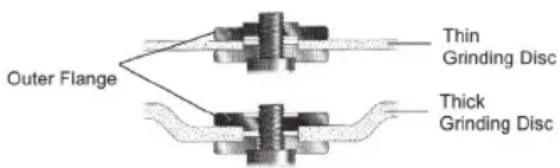
The outer flange has two different sides. Screw the outer flange on the spindle as follows:
English
If you are using thin grinding discs, screw the outer flange upwards with the collar. If you are using thick grinding discs, screw the outer flange downwards with the collar.
14.7 Spin the grinding disc by hand to check for proper installation and ease of movement.
14.8 Perform a test run (see Startup).
14.9 To change the grinding disc, go in reverse order after you have loosened the outer flange using the face pin wrench. Before changing the grinding disc, clean the outer flange and the inner flanges from grinding residue each time.
15. Before startup/operating instructions
- Ensure that the voltage of the power source matches the information on the type label.
- The diameter of the disk must not be greater than what is indicated on the type label (230 mm).
Use only grinding discs that are approved for speeds of at least 6,300 revolutions/minute. -
The device may be used only with fitted protective cover (6). Adjust the position of the protective cover with the requirements of the operation. The protective cover (6) should always be aligned so that they will protect you in the best possible way against sparks and particles.
-
To adjust the protective cover, lift the tension lock (15). Move the protective cover accordingly. If necessary, slightly loosen the locking nut with the wrench (an opening for nut fasten/loosen) or a spanner (14) and then tighten the nut again.
- Make sure that the grinding disc can always rotate freely.
- After installing a new grinding disc, let the angle grinder run for about 1 minute without load. Replace vibrating discs immediately. Protect discs from impact, shock, moisture and grease. Always make sure that the grinding disc rotates in the direction of the printed arrow. Always observe the expiration date of the grinding disc. This is stamped in the inner ring on each grinding disc.
- For best grinding results, set the angle grinder with an angle between 30^ and 40^ to the workpiece surface for coarse grinding and move it evenly back and forth.
- Never grind materials containing asbestos.
- Secure the workpiece.
- Avoid overheating of the grinding disc through sufficient cooling phases.
16. Startup
Insert the plug into the socket.
16.1 Switch ON:
Use one finger to push the lock button (2b) forward and then press the ON/OFF switch (2a).
16.2 Switch OFF:
Release the switch (2a).
17. Replacing the protective cover
For your own safety, replace a damaged protective cover immediately.
17.1 Loosen the tension lock (15) and rotate the protective cover until the latches on the protective cover are visible in the savings.
172 Pull out the protective cover straight upwards. If necessary, also loosen the locking screw (14) to better be able to remove the protective cover.
18. Setting the main grip
The main grip can be set to 3 positions.

Do not set the main grip during use.
18.1 Push the release button (3)
182 Turn the main grip to the required position until it locks into place.
18.3 Release the release button (3).
19. Maintenance and cleaning
- Always disconnect the main power plug prior to all maintenance and cleaning work.
Always keep the device clean. Make sure that the ventilation slots (4) are always open. Clean the unit with a soft, slightly moistened cloth. - Never immerse the angle grinder in liquids and prevent fluids from penetrating into the machine.
- Store the angle grinder in a dry, dust-free place.
- If an increased brush sparking occurs, it is a sign that the carbon brushes must be replaced. Have the carbon brushes replaced by a professional.
20. Technical data
Power supply: 230 V~50 Hz
Input power: 2200 W
No load speed: 6300 min
Grinding disc diameter: 230 mm
Drive shaft thread: M14
Cable length: 3 m
Weight: 5.23 kg
Sound pressure level L_pA 99 dB(A)
Uncertainty K_pA 3 dB(A)
20.1 Vibration level
The vibration emission level stated in this instruction manual has been measured in accordance with a standardised test given in EN 60745; it may be used to compare one tool with another and as a preliminary assessment of exposure to vibration when using the tool for the applications mentioned
- using the tool for different applications, or with different or poorly maintained accessories, may significantly increase the exposure level
- the times when the tool is switched off or when it is running but not actually doing the job, may significantly reduce the exposure level
Protect yourself against the effects of vibration by maintaining the tool and its accessories, keeping your hands warm, and organizing your work patterns.
21. Disposal

Do not dispose of electric power tools with domestic refuse.
The electric power tool is shipped in packaging to reduce transport damage. This packaging is a raw material and as such can either be reused or can be fed back into the raw material cycle. The electric power tool and its accessories are made from various materials such as metals and plastics. Take defective components to a special refuse collection point. Ask about these at your specialist shop or local council.
English
22. EC-Declaration of conformity
We, the Batavia GmbH, Weth. Buitenhuisstr. 2a, NL-7951 SM Staphorst, declare by our own responsibility that the product Angle grinder, Item-No 7062851, Model Nr. BT-AG004 is according to the basic requirements, which are defined in the European Directives Electromagnetic Compatibility 2014/30/EU (EMC), 2006/42/EC (Machinery), 2011/65/EU and their amendments. For the evaluation of conformity, the following harmonized standards were consulted:
EN 60745-1:2009+A11;
EN 60745-2-3:2011+A2+A11+A12+A13;
EN 55014-1:2006+A1+A2;
EN 55014-2:2015;
EN 61000-3-2:2014;
EN 61000-3-3:2013
Staphorst, 18 January 2018
Meino Seinen, QA Representative
Batavia GmbH, Weth. Buitenhuisstraat 2a, 7951 SM Staphorst, Netherlands
The product and the user manual may be subject to changes. Technical data may be changed without prior notice.
This product has got a 2 year warranty
Dear Client, if for any reason this product is not working, please ensure you contact our Client Service Centre. Ensure you have your original receipt of purchase. This warranty covers all defects in workmanship or materials in this Batavia product for a two year period from the date of purchase. The warranty does not cover any malfunction, or defect resulting from misuse, neglect, alteration, or repair.
Other European countries - Customer Services /