Greenforce Compact 2734 - Vacuum Cleaner ARIETE - Free user manual and instructions
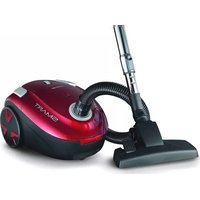
Find the device manual for free Greenforce Compact 2734 ARIETE in PDF.



| Product Type | Vacuum Cleaner |
| Brand | Ariete |
| Model | Greenforce Compact 2734 |
| Power Supply | Mains (220-240 V ~ 50/60 Hz) |
| Dust Bag | Disposable paper bag and washable cloth bag included |
| Air Outlet Filter | Washable, clean regularly and replace every 6 to 9 months |
| Included Accessories | Floor brush, crevice tool with brush, telescopic tube |
| Suction Power Adjustment | By adjustment handle and secondary air valve on the wand |
| Safety Device | Thermal cut-out protecting the motor from overheating |
| Cable Rewind | Automatic by pedal |
| Recommended Use | Household surfaces: hard floors, carpets, upholstered furniture |
| Usage Prohibitions | Do not vacuum liquids, hot ashes, sharp objects |
| Cleaning and Maintenance | Change the bag when the indicator turns red; clean the filter regularly |
| Compliance Standards | Directives 2006/95/EC and 2004/108/EC |
| Assembly | Adjustable telescopic tube, secured by release buttons |
Frequently Asked Questions - Greenforce Compact 2734 ARIETE
User questions about Greenforce Compact 2734 ARIETE
0 question about this device. Answer the ones you know or ask your own.
Ask a new question about this device
Download the instructions for your Vacuum Cleaner in PDF format for free! Find your manual Greenforce Compact 2734 - ARIETE and take your electronic device back in hand. On this page are published all the documents necessary for the use of your device. Greenforce Compact 2734 by ARIETE.
USER MANUAL Greenforce Compact 2734 ARIETE
De'Langh Appianoes St
Christine Commerdale Atele
vie San Quinco 300
0013 Cm 0025 F-11y
E-Var logit model
1
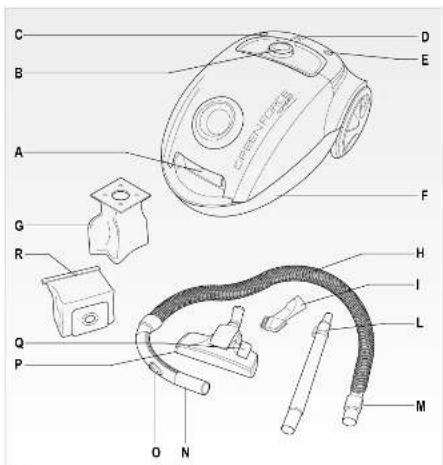
Fig.1
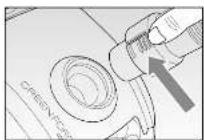
Fig. 2
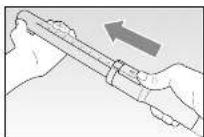
Fig. 3
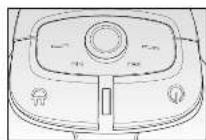
Fig. 4
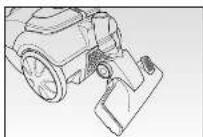
Fig.6
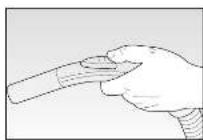
Fig.5
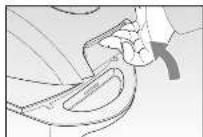
Fig.7
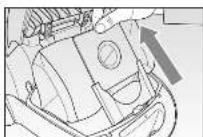
Fig. 8
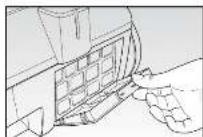
Fig. 3
AVVERTENZE IMPORTANTI
LEGGERE QUESTE ISTRUZIONI PRIMA DI USARE L'APPARECCHIO:
READ THESE INSTRUCTIONS BEFORE USING THE APPLIANCE.
A few precautions are necessary while using the appliance:
- Always make sure that the mains power voltage is the same as that listed on the appliance rating plate and that the mains system is suitable for use with the appliance power.
- This appliance conforms to the 2006/95/CE and EMC 2004/108/CE directives.
- The appliance may only be used for its intended purpose, which is for vacuuming dust from surfaces within the home. Any other use is to be considered improper and therefore, dangerous. The manufacturer may not be held liable for any damages caused by improper, incorrect or unreasonable use.
- Do not use to vacuum hot ash, large pieces of glass, rubble, sharp or pointed items or liquids.
- To prevent dangerous overheating, always unwind the power cord fully and unplug the appliance from the mains when the appliance is not in use.
- Only plug the appliance into an AC socket.
- Never use the appliance without the bag or motor filter or if the bag or filter are broken or damaged in any way.
- Never use the appliance on wet surfaces.
- Never suck up liquids.
- NEVER PLACE THE APPLIANCE IN WATER OR OTHER LIQUIDS.
- Do not touch the appliance when hands or feet are wet or moist.
- Never use the appliance with bare feet.
- Do not leave the appliance exposed to the elements (rain, sun, etc.).
- Do not keep the appliance in proximity to heat sources (e.g., radiator).
- Always disconnect the plug from the mains power before cleaning the appliance or changing the filters.
- This appliance can be used by children aged from 8 years and above and persons with reduced physical, sensory or mental capabilities or lack of experience and knowledge only if they have been given supervision or instruction concerning use of the appliance in a safe way and understand the hazards involved. Do not allow children to play with the appliance. Cleaning and user maintenance must not be carried out by children unless they are older than 8 and supervised.
- Children under age 8 should not be allowed to handle appliance and its power cord which must be kept out of their reach.
-
Never pull on the power cord to unplug the appliance from the mains power.
-
Make sure that the power cord does not come into contact with sharp or hot surfaces.
- Never use the appliance if the power cord is damaged.
- If the cord is damaged, it must be replaced by the Manufacturer, by an Authorised Technical Assistance Centre or in any case, by a similarly qualified person, in order to prevent any risks.
- Always switch on the appliance with the power regulator set to minimum.
- Unplug the appliance from the mains electricity after each use.
- In the event that you decide to dispose of the appliance, we advise you to make it inoperative by cutting off the power cord. We also recommend that any parts that could be dangerous be rendered harmless, especially for children, who may play with the appliance or its parts.
-
Packaging must never be left within the reach of children since it is potentially dangerous.
-
To dispose of product correctly according to European Directive 2012/19/EU, please refer to and read the provided leaflet enclosed with the product.
DO NOT THROW AWAY THESE INSTRUCTIONS
DESCRIPTION OF THE APPLIANCE (FIG.1)
A Lever to open the dust bag compartment
B Suction power regulation dial
C On/Off switch
D Bag full indicator
E Cord re-wind switch
F Dust bag compartment
G Paper dust bag
H Flexible hose
1 Narrow suction nozzle with brush
L Telescopic tube
M Release buttons
N Hand grip
O Suction control
P Floor brush
Q Hard floors/carpet selector
R Fabric bag
VACUUM CLEANER ASSEMBLY
Insert the hose into the suction opening, pressing it down until it slots into place. To remove the hose, press the two release buttons together and pull it out (FIG. 2).
CAUTION: Before fitting or removing attachments, always be sure to unplug the appliance from the mains power.
ATTACHMENTS
Telescopic tube (L)
Insert the extension tube onto the handgrip and then fit the required attachment, such as the crevice nozzle or the small cleaner. Once the attachment has been inserted, it is possible to extend the telescopic tube to the required length using the lever (FIG. 3). Release the lever to secure the tube at the required length.
Floor brush (P)
- Suitable to clean large areas as well as those corners that are hard to reach
- We advise against using the brush on carpets or hard floors. To retract the brush, press the power lever marked with the carpet symbol
- For better cleaning and preservation of smooth flooring, such as PVC, parquet or tiles, it is advisable to use the brush. To extract the brush, press the power lever marked with the smooth floor symbol
Narrow suction nozzle with brush (I)
This suction device is ideal for cleaning between the folds on fabrics, joints, corners or niches that are impossible to reach using the floor cleaning device. This attachment can also be fitted directly to the handle (N).
USING THE APPLIANCE
CAUTION: Before using the vacuum cleaner, remove all large or sharp objects from the floor to avoid any possible damage to the cleaner itself.
First of all, before using this appliance, unwind the power cord fully and plug it in. To switch on, press the On/Off switch on the vacuum cleaner (FIG. 4).
IMPORTANT: Sometimes the appliance will make a whistling sound when switched on; this is not a defect and will gradually go away with use.
Suction power adjustment
It is possible to regulate the suction power as required, using the relevant dial (B). We recommend using a minimum power for delicate materials. Select medium suction power for mattresses, upholstered furniture and carpets. Select maximum suction power for tiled, wood or other resistant floors.
Suction control
The secondary air valve (O) is located on the handgrip and it is used to adjust suction power (FIG. 5).
- The larger the valve opening, the lower the suction power and vice versa.
- To open the valve, push the lever upwards and to close it, push the lever downwards.
Valve adjustment depends on the type of surface:
- Minimum power for curtains and delicate materials.
- Medium power for pillows and cushions, mattresses and carpets.
- Maximum power for floors in tiles, wood or other strong, hardwearing and heavily soiled materials.
CAUTION: Switch off the vacuum cleaner immediately if the air openings, brushes or telescopic tubes become blocked. Remove the obstruction before switching the vacuum cleaner on again.
After using the cleaner
After use, switch off the vacuum cleaner using the pedal switch (C), unplug it from the mains power and wind in the cord by pressing the cord winder pedal (E) on the appliance. The cord will wind inside the appliance container.
IMPORTANT: While winding the power cord, guide it with one hand so as to prevent injury and take care in the presence of children or pets.
- The appliance can be stored using the special rear hook for the floor brush (FIG. 6).
CLEANING AND MAINTENANCE
CAUTION: Before carrying out any cleaning or maintenance operation, switch off the appliance and remove the plug from the mains socket.
Dust bag replacement/cleaning
When the indicator light turns red, the paper dust bag (G) needs changing or, according to use, the fabric dust bag (R) needs to be emptied and cleaned.
- open the bag compartment by pushing the relevant lever outwards (FIG. 7).
- Take out the bag, being careful not to tear it; slide the stiff cardboard section (or plastic section on fabric bags) along the special guides (FIG. 8). Throw away the paper dust bag or empty the fabric bag and wash it in water and a mild detergent, if necessary.
CAUTION: Always make sure that fabric dust bags are perfectly dry before refitting them.
- Insert a new bag by sliding the stiff card section in along the guides and then place the container in its seat;
- close the dust compartment lid.
Cleaning/replacing the exhaust air filter
The exhaust air filter needs cleaning on a regular basis and it should be replaced every 6 to 9 months, depending on use.
- Remove the exhaust air filter cover using the special lever (FIG. 9).
- Lift the filter out from its compartment and shake it vigorously to clean it. If the filter is extremely soiled, wash it with lukewarm soapy water and leave it to dry. NEVER use artificial means to dry the filter. To replace the filter, contact an Assistance Centre.
- Replace the filter in its compartment and refit it. When you refit the compartment, make sure that the rough surface of the filter is visible.
Make sure that the filter compartment is correctly in place before using the cleaner.
TROUBLESHOOTING
Thermal cutout switch
The vacuum cleaner is equipped with a thermal cutout switch to protect it in the event that the motor overheats. If the vacuum cleaner suddenly switches off by itself, proceed as follows:
- Switch off the vacuum cleaner and unplug it from the mains power.
- Look for the origin of the overheating (blocked suction pipe, dirty filter, etc.)
- Clean the hose, empty the dust container and clean the filters, if necessary.
- Wait for about 30-40 minutes to allow the motor to cool down.
- After 30-40 minutes, insert the plug in the mains socket and switch on the vacuum cleaner.
The vacuum cleaner should now work.
- If the vacuum cleaner still does not work, wait another 20 minutes and then try again.
- If the cleaner still does not work, contact an Assistance Centre.
NOTES IMPORTANTES
LIRE ATTENTIVEMENT CES INSTRUCTIONS AVANT D'UTILISER L'APAPREIL.
3ameHa/ouncTka nbIne6bOpHnka
Korda nHnIkaTOp cTaHOBITcR KpaCHbIM, Heo6xOJIMO 3aMeHNt b 6yMaXHbI NaKeT IIN OCBO6O-DHTb N OChNTb Nblnc6OpHnK N3 TkaHn.
- OtkpbItb OTceK MeuKa, NOTaHyB K ce6e COOTBeTCTByuOnn pbIur (PNC. 7).
- BbInytb naket, cTapaacb He npBaTb erO.ДЯ 3Toro ChrTaB KapToHnyu IIN PnactIKOByU, B Cnyuae Nblnc6opHnka n3 TkaHn, DeTaIb c HnPaBnIoox (PVC.8). Bbl6pocntb OndHopa30BbI NaKeT B MycOpHoe BeDpo IIN, B Cnyuae Nblnc6opHnka n3 TkaHn, OCBO6oJITb N BbIMbITb BOIoC NopoWKOM.
BHNMAHNE: B TOM clyuae, ecn nbIe6opHnk npuJIOcMbITb B BOe, npexde yem yctaHaBnBaTb ero Ha CBOE MEcTO, OH DOJIKeH erO HeOBxOIMO NOnHOCTbIO BblCyUHTb.
- YCTaHOBnTe HObI NaKeT, BCTaNB JxecTkN KapTOH B Na3bl, BOTCEK.
- 3akpbItb KpbIuKy OTeKa dny c6opa nbln.
Ynctka/3aMeHa BbIXoHoro qnlbTpa
BbIXoHNo ΦnIbTp cIeMyET peryIaRHO uNCTuTb N 3aMeHraTb kaxDbIe 6-9 MeCraUeB, B 3aBNCIMOCTN OT yCNOBn 3KcPnLyatauN.
- Ydaanntb KpbIuKy BbIXoHOrO funIbTpA, nobepHyB pbIur (PNC. 9).
- BbHyTb ΦnIbTp, NOHReEro, INHTeHCNBHO BbITpAcTn. EcIn ΦnIbTp CnIbHO 3aRpa3HeH, BbIMbITberoB TeNIOB OBe C MbIOM, TuaTeNbHO pOPOIoCKaTb N BbyWntb Ha Bo3dyxe. HE cyuInte erOnckycCTBeHHo.ДЯЗAMeHbI ΦnIbTpOB o6paNTbCBA LcHTp ObcnyKbaHna KJIeHTOB.
-ПомecNTbOTcEKФиЛьТраHaMeCTO.Приустановке yбeДиTбя,чTOшерховая NOВepxHOCTBФиЛьТраВИнha.Перед ИСпОЛьЗOBаHNem yбeДиTecb,чTOДерЖATEЛьФиЛьТра yCtahOBJIENправиьHO.
ПОИСК HЕЦРABHOCTEД
TennoBa 6nokpOBka
Пылесoc осашен устюctвом Teплобов 6локиравки, КOTОре 3aшиаET erO B clyuae nepereBa DBИгATEЯ.Есп Пылесoc BHe3aHNO OCTaHaBnBaETcRcam no ce6e, BbINOJIHITe cIeIyUo-ше DeICTBnI:
- BbIKIQUHTb NblIEcOC IN BbIHyTb BNJky n3 pO3eTKN.
- BbIaBtB npuHnHy nepepeBa (BCacbBAIOUaA Tpy6a 3acopeHa, rpa3HbIe fNtpbI nT.d)
- PpOuHCTnTb Tpy6y, onOpOxHnTb naket dIra nbIIN OChCTnTb 0nIbTpbl, ecnn 3TO Heo6xoJIMO.
-Подождnte 30-40 mHyT, noka DBnrgateJIb He octbIHeT. - Pocne 30-40 MInHyT BCTaBnTB BUNKy B PO3ETKU IN BKJIIOHTb PbIeCOC.
Tenepb nbIeococdoJxKeH3apa6oTaTb.
- Ecnn nbinecoc He pa6oTaet, noOxdaTb eue 20 MInHyT, a 3aTeM NOBTOPTb NOnbITky.
- Ecnn nbinecoc BCE xe He pa6oTaet, obpaTntecb B cepBnchbl n eHTp.
aale
jglal pllil jcllaol
jlll laii iil 1
aaii iiaaii aiee ie eae ae aiee aiee aee
jgl 10
.EC/)EMC·EC/90/7 1
1 1
J 1
a
a 1 1 1 1 1 1 1 1 1 1 1 1 1 1 1 1 1 1 1 1 1
Jgll gdd
Jolk g 15 k l 11 11 11 11 11 11 11 11 11 11 11 11 11
jgl
J 1
yV
logali 111 jilai
ii
jglgl 12jglgl 9
1
1 2
.
(1) (2)
.1
10
L 1
Jg no g dggag aie g aeg y ggy
i 1
p 1
jgl jgl jgl jgl jgl jgl jgl jgl jgl jgl jgl jgl jgl jgl jgl jgl jgl jgl jgl jgl jgl jgl jgl jgl jgl jgl jgl jgl jgl jgl jgl jgl jgl jgl jgl jgl jgl jgl jgl jgl jgl jgl jgl jgl jgl jgl jgl jgl jgl
J 1
J 1
J11 j 1V. Jn no JJIbJl
.
19
gddaaa aai jao aai giaaaal gaaaai baaai
1
jll aaii aie 1000
g 5
1
A
J 1
g jj g j j j j j j j j j j j j j j j j j j j j j j j j j j j j j j j j j j j j j j j
a
jlll jil
J 10
EUEU/19/1.15 4yRyRyL 1u 1u 1u 1u 1u 1u

iiill lalil
iie
jglai
A
baaii oia buae B
On/Off 1
.
.
F
G
H
a
Sulil
i
1
L
M
∴ 有间理
bail 0
P
JQ
R
auiisaii
e jy pll g. fll p a 1234567890123456789012345678901234567890123456789012345678901234567890123456789012345678901234567890123456789
()
ylll jllnne aagaaaal n no laal dla, cnaaall gj j
(L)
aaiiie aiaai iiaai iiaai iiaai iiaai iiaai
aie 1e baiy baiy kui yaiy allb! jn syy aolal 12k j ic .jaiil baii
.1Jg 1Jg 1Jg 1Jg 1Jg 1Jg
(P)
JgJgJgJgJgJgJgJgJgJgJgJgJgJgJgJgJgJgJgJgJgJgJgJgJgJgJgJgJgJgJgJgJgJgJgJgJgJgJgJgJgJgJgJgJgJgJgJgJgJgJ
1 1
J 1
J 1
y j 1
mnnnnae
(1) 3
Jz jz bzially p 1. wll Jg g 1sI y Iy jg 1sI 1y g jg 1sI
J. 1.
y:J 1
1
baii 8g bui
eLdU Ljdlgaiy B 1
J 1
a
bail
0 Jkll. 1
J 1
jaw .1 1, aeff, delta _ i g, eleftijjjjjjjjjjjjjjjjjjjjjjjjjjjjjjjjjjjjjjjjjjjjjjjjjjjjjjjjjjjjjjjjjjjjjjjjjjjjjjjjjjjjjjjjjjjjjjjjjjjj
: cball iplawallb _ a pi
∴ aaaaaaaaaaaaaaaaaaaaaaaaaaaaaaaaaaaaaaaaabbbbbbbbbbbb
. dj ωwllgijilrallgijilwowllabusgio δg
λ ω^ ijkl θ ^ abcd θ ^ abcd θ ^ abcd θ ^ abcd θ ^ abcd θ ^ abcd θ ^ abcd θ ^ abcd θ ^ abcd s s s s s s s
· . 1/2 _ i = 1 ^ n _ j = 1 ^ m _ k = 1 ^ n _ l = 1 ^ m _ r = 1 ^ n _ s = 1 ^ m _ t = 1 ^ n
. sjijiiiiiiiiiiiiiiiiiiiijiiiiiiiiiiiiii
a _ ijkl a _ klij a _ ljik a _ jikl ≠ elgin 1
. .. .. .. .. .. .. .. .. .. .. .. .. .. .. .. .. .. .. ................ i _ i ^ i ^ i ^ i ^ i ^ i ^ i ^ i ^ i ^ i ^ i ^ i ^ i ^ i ^ i ^ i ^ i ^ o ^ o ^ o ^ o ^ o ^ o ^ o ^ o ^ o ^ o ^ o ^ o ^ o ^ o ^ o ^ o ^ o ^ o ^ o ^ o ^ o ^ o ^ o ^ o ^ o ^ o ^ o ^ o ^ o ^ o ^ o ^ o ^ o ^ o _ 0 ^ o ^ o ^ o ^ o ^ o ^ o ^ o ^ o ^ o ^ o ^ o ^ o ^ o ^ o ^ o ^ o ^ (1) .............._ 0
. i _ j i _ j i _ j i _ j i _ j i _ j i _ j i _ j i _ j i _ j i _ j i _ j
. .. .................................................................
∴ a b l l l l l l l l l l
∴ i _ j i _ i i _ i i _ i i _ i i _ i i _ i i _ i i _ i i _ i i _ i, i _ i i _ i i _ i i _ i i _ i i _ i i _ i i _ i i _ i
_ 0 ^ ∞ 1/x 1/x + 1 1/x + 2 ... 1/x + n - 1
. _ 0 ^ ∞ _ 0 ^ ∞ _ 0 ^ ∞ _ 0 ^ ∞ _ 0 ^ ∞ _ 0 ^ ∞ _ 0 ^ ∞ _ 0 ^ ∞ _ 0 ^ ∞ _ 0 ^ ∞ dydzdrdsdtdudvdwdxdydzdrdsdtdudvdwdxdydzdrdsdtdudvdwdxdydzdrdsdtdudvdwdxdydzdrdsdtdudvdwdxdydzdrdsdtdudvdwdxdydzdrdsdudvdwdxdydzdrdsdtdudvdwdxdydzdrdsdtdudvdwdxdydzdrdsdtdudvdwdxdydzdrdsdtdudvdwdxdydzdrdsdtdudvdwdxd .
· a a a a a a a a a a a a a (R)
( J _ k ^ ) GHLABCDEFGHIJKLMNOPQRSTUVWXYZ
. _ 0 ^ 1 dx/x - 1 | _ 0 ^ 1 1/2 _ 0 ^ 1 dx/x - 1 = 1/2 _ 0 ^ 1 dx/x - 1 = 1/2 _ 0 ^ 1 dx/x - 1 = 1/2 _ 0 ^ 1 dx/x - 1 = 3/4
. .. .. .. .. .. .. .. .. .. .. .. ....................... 当 ]]]]]]]]]]]]]]]]]]]]]]
. .. .. .. .. .. .. ......................................................_ 0 ^ 1 = 0, 0, 0, 0, 0, 0, 0, 0, 0, 0, 0, 0, 0, 0, 0, 0, 0, 0, 0, 0, 0, 0, 0, 0, 0, 0, 0, 0, 0, 0, 0, 0, 0, 0,
. s l a o l w w w w w w w w w
∴ isjiodel | if | inadadadadadadadadadadadadadadadadad · ininininininininininininininininin · dic:
. . _ 0 ^ π/2 ^ 2 θ ^ 2 θ + _ 0 ^ π/2 ^ 2 θ ^ 2 θ + _ 0 ^ π/2 ^ 2 θ ^ 2 θ + _ 0 ^ π/2 ^ 2 θ ^ 2 θ + _ 0 1 5 0 ^ ° ^ 2 θ + _ 0 ^ π/2 ^ 2 θ + _ 0 ^ π/2 ^ 2 θ + _ 0 ^ π/2 ^ 2 θ + _ 0 ^ π/2 ^ 2 θ + _ 0 ^ π/2 ^ 2 (π/2) + _ 0 ^ π/2 ^ 2 θ + _ 0 ^ π/2 ^ 2 θ + _ 0 ^ π/2 ^ 2 θ + _ 0 ^ π/2 ^ 2 θ + _ 0 1 5 0 ^ ° ^ 2 θ + _ 0 ^ π/2 ^ 2 θ + _ 0 ^ π/2 ^ 2 θ + _ 0 ^ π/2 ^ 2 (π/2) + _ 0 ^ π/的 ^ 2 θ + _ 0 ^ π/2 ^ 2 θ + _ 0 ^ π/2 ^ 2 θ + _ 0 ^ π/2 ^ 2 θ + _ 0 ^ π/2 ^ 2 φ + 1 5 0 ^ ° - 1 5 0 ^ ° - 1 5 0 ^ ° - 1 5 0 ^ ° - 1 5 0 ^ ° - 1 5 0 ^ ° - 1 5 0 ^ ° - 1 5 0 ^ ° - 1 5 0 ^ ° - 1 5 0 ^ ° -
AlSa
∴ ijjieeeeeeeeeeeeeeeeeee
grall jita jdiscusewgo
· ρ_ i · ρ_ j · ρ_ k · ρ_ l · ρ_ m · ρ_ n · ρ_ o
9 JKIII. ABCDEFGHIJKLMNOPQRSTUVWXYZ


- AVVERTENZE IMPORTANTI
- LEGGERE QUESTE ISTRUZIONI PRIMA DI USARE L'APPARECCHIO
- READ THESE INSTRUCTIONS BEFORE USING THE APPLIANCE
- DO NOT THROW AWAY THESE INSTRUCTIONS
- DESCRIPTION OF THE APPLIANCE (FIG.1)
- VACUUM CLEANER ASSEMBLY
- ATTACHMENTS
- TELESCOPIC TUBE (L)
- FLOOR BRUSH (P)
- NARROW SUCTION NOZZLE WITH BRUSH (I)
- USING THE APPLIANCE
- SUCTION POWER ADJUSTMENT
- SUCTION CONTROL
- AFTER USING THE CLEANER
- CLEANING AND MAINTENANCE
- DUST BAG REPLACEMENT/CLEANING
- CLEANING/REPLACING THE EXHAUST AIR FILTER
- TROUBLESHOOTING
- THERMAL CUTOUT SWITCH
- NOTES IMPORTANTES
- LIRE ATTENTIVEMENT CES INSTRUCTIONS AVANT D'UTILISER L'APAPREIL
- 3AMEHA/OUNCTKA NBINE6BOPHNKA
- YNCTKA/3AMEHA BBIXOHORO QNLBTPA
- ПОИСК HЕЦРABHOCTEД
- TENNOBA 6NOKPOBKA
- AALE
Brand : ARIETE
Model : Greenforce Compact 2734
Category : Vacuum Cleaner