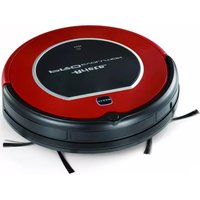
Pro Evolution 2713 - Vacuum Cleaner ARIETE - Free user manual and instructions
Find the device manual for free Pro Evolution 2713 ARIETE in PDF.


| Product Type | Cylinder Vacuum Cleaner |
| Brand | Ariete |
| Model | Pro Evolution 2713 |
| Color | Red / Black |
| Dimensions (LxWxH) | 40 x 25 x 30 cm |
| Weight | 4.5 kg |
| Power Supply | 220-240 V, 50-60 Hz |
| Power Consumption | 1200 W |
| Dust Capacity | 2.0 L |
| Filtration System | HEPA washable filter |
| Cord Length | 6 m |
| Noise Level | 78 dB |
| Operating Radius | 8 m |
| Dust Disposal | Bagless, cyclonic |
| Suction Power | 250 Air Watts |
| Included Accessories | Crevice tool, combination brush, upholstery tool |
| Floor Types | Carpets, rugs, hard floors |
| Motor Protection | Overheat protection |
| Energy Class | A |
| Certifications | CE, WEEE |
| Repairability | Spare parts available; authorized service centers |
| Maintenance | Empty container after each use; clean filter monthly |
Frequently Asked Questions - Pro Evolution 2713 ARIETE
User questions about Pro Evolution 2713 ARIETE
0 question about this device. Answer the ones you know or ask your own.
Ask a new question about this device
Download the instructions for your Vacuum Cleaner in PDF format for free! Find your manual Pro Evolution 2713 - ARIETE and take your electronic device back in hand. On this page are published all the documents necessary for the use of your device. Pro Evolution 2713 by ARIETE.
USER MANUAL Pro Evolution 2713 ARIETE
natural_image
3D rendering of a robotic vacuum cleaner with circular head and mounting feet (no text or symbols visible)PRO EVOLUTION
CE 2713
Gentile cliente,
natural_image
3D rendering of a robotic vacuum cleaner connected to a wall-mounted electrical outlet (no text or symbols visible)NOTE SULLA RICARICA E L'AUTONOMIA
natural_image
Pure electrical circuit lines without any symbolsnatural_image
Two-step diagram showing a hand using a tool to adjust or install a mechanical component, with no visible text or symbols.PULIZIA DEL CONTENITORE DELLA POLVERE PREFERIBILMENTE DOPO OGNI UTILIZZO:
natural_image
Hand pressing down on a robotic vacuum cleaner's surface (no text or symbols visible)natural_image
Illustration of a hand pressing down on a robotic vacuum cleaner's base, with an upward arrow indicating motion (no text or symbols)natural_image
Illustration of a hand opening a cylindrical device with an upward arrow indicating motion (no text or symbols)natural_image
Illustration of a hand holding a small electronic component with a grid-like structure (no text or symbols visible)Thank you for purchasing Ariete Pro Evolution, the new smart robot vacuum cleaner for cleaning floor in an autonomous and accurate manner.
Pro Evolution sucks the dirt up from floor through a vacuum motor and side rotating brushes that permit to reach even the house corners, around or underneath the furniture and along the walls.
Pro Evolution covers the whole surface to be cleaned through perimeter, linear movements and can be used on any kind of floor: parquet floors, tiles, vinyl, linoleum, carpets.
Equipped with the most advanced fall-protection sensors and mechanical anti-collision sensors, the robot moves around the obstacles found during the cleaning path and detects even any difference in level, preventing falls.
The dirt is collected into a container, which can be easily removed and emptied, equipped with a Hepa filter retaining fine particles, pollen, animal hair and micro-particles.
Pro Evolution will soon become an indispensable aid, which will permit you to have free time for other activities.
IMPORTANT SAFEGUARDS
READ THESE INSTRUCTIONS BEFORE USE. ALWAYS KEEP THESE INSTRUCTIONS.
This appliance complies with directives 2006/95/EC and EMC 2004/108/EC.
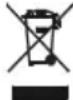
For disposing the appliance in an adequate manner, according to the European Directive 2012/19/EC, please read the appropriate leaflet attached.

DANGER FOR CHILDREN

This appliance cannot be used by people, including children, with reduced physi-1. cal, sensorial or mental capabilities, with no experience and knowledge unless supervised or trained beforehand about safe use of the appliance by a person responsible for their safety.
Make sure children do not play with the appliance.2.
Do not leave the power cord hang in a place where a child could grab it.3.
Inform all people in the house about the operation in progress of Pro Evolution. 4.
Be careful with children and animals during use.
If you decide to dispose the appliance, it is recommended that you make it 5. inoperable by cutting off the mains cord. You should also render harmless those parts of the appliance that could be dangerous, especially for children who might use the appliance as a toy.
The packing materials should be kept out of reach of children since they are 6. potential sources of danger.

DANGER FROM ELECTRICITY

Make sure the appliance voltage corresponds to the one of your electrical 7. mains.
To recharge Pro Evolution, use only the power cord supplied by Ariete.8.
Make sure hands are dry before using/setting the switches on the appliance or 9. touching the plug and the supply connections.

DANGER FROM OTHER CAUSES

Do not expose the appliance to atmospheric agents (rain, sun, etc.).10.
Never place the appliance on or near to sources of heat.11.
Never immerse the appliance body, the plug and the power cord in water or 12. other liquids, use a damp cloth for cleaning.
Even when not in use, turn the switch off, unplug the appliance from the electric 13. outlet before inserting or removing the single parts of the appliance and before cleaning.
Do not use the appliance if the power cord or the plug are damaged, or if the 14. appliance is faulty. All repairs, including power cord replacement, are to be carried out only by the Service Centre or the technicians authorized by Ariete, to prevent any risk.
In case or replacement and/or maintenance of the charger or the power cord, 15. contact an authorized Service Centre or skilled personnel to prevent ay risk. In the event that fluid should leak from the batteries, do not use the appliance; 16. take it to your nearest authorized Assistance Centre to replace the batteries.
The appliance works with rechargeable batteries, therefore it shall not be dis-17. pose with normal waste at the end of its life. Take it to appropriate differentiated waste collection centers of the local administrations or to dealers providing this service. Disposing an appliance separately means avoiding possible negative consequences both to the environment and people's health deriving from unsuitable disposal and allows to reuse the material it is made of thus saving energy and resources. The obligation to dispose of appliances separately is indicated on the appliance with the symbol representing the crossed out wheeled bin. Never throw accumulators into fire.
This appliance is designed for DOMESTIC USE only and may not be used for 18. commercial or industrial purposes.
Recharge and use the appliance only indoors.19.

ATTENTION, POSSIBLE MATERIAL DAMAGES
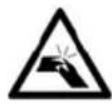
Do not suck up hot ashes, big glass pieces, rubble, sharp objects and liquids.20.
Prevent clothes or body parts from snagging in wheels or rotating brushes of Pro 21.
Evolution.
The appliance shall not meet cigarettes, lighters, matches or other flammable 22. objects.
Never put objects on the Pro Evolution body and do not sit on it.23.
Before use, collect the objects on the floor (remove all fragile, hollow objects, 24. clothes, paper, curtains, and avoid carpet fringes, as they may get stuck in the appliance and make fall objects from tables or shelves).
- Pro Evolution shall not be used without filters or when these are broken or damaged.
Never suction wet surfaces.26.
Do not suck up liquids or bleach, paint, other chemicals or damp substances.27.
Always disconnect Pro Evolution from the electric mains in case of prolonged 28. misuse or transportation.
To safeguard appliance safety, use only original spare parts and attachments, 29. approved by the manufacturer.
To unplug the appliance, take the plug directly and remove it from wall outlet. 30. Never unplug pulling the power cord.
When using extension cords, these must be suitable to the appliance power, to 31. prevent dangers to the operator and the safety of the working place. The extensions that are not suitable may cause malfunctioning.
Any changes to this product not expressly authorized by the manufacturer may 32. make void safety and warranty of the operator's use.

A Dirt container lid
B Switching-on "CLEAN" button with light and acoustic warning
C Spare brushes
D Cleaning brushes
E Infrared receiver
F Anti-collision sensor band for high obstacles
G Power cord
H Appliance body
I Rotating brushes
L Dirt suction opening
M Battery cover
N Anti-collision sensors for low obstacles and fall-protection
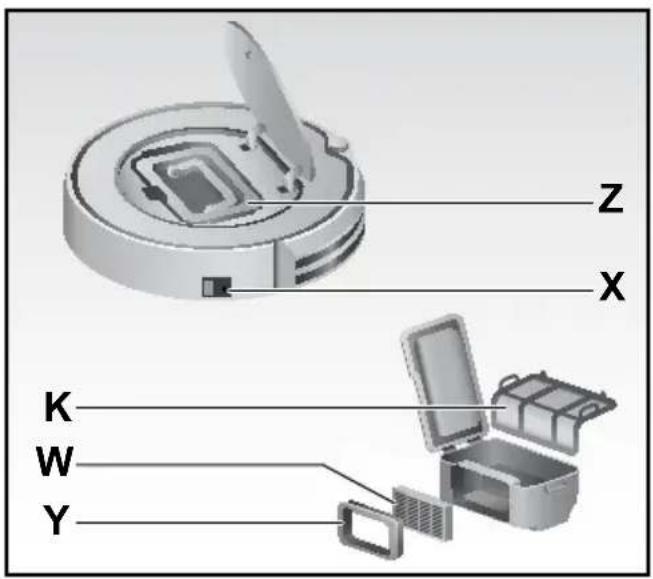
Z Dirt container
X Power cord socket and ON/OFF switch
Y HEPA filter support
- Recharge the appliance through the adapter. Plug the power cord (G) into the power socket (X) situated on the appliance body.
- Turn on the switch (X), situated on the side, and move it to ON position, in order to recharge it and the subsequent functioning. The proper switching-on is signaled through the "CLEAN" button (B) blinking for 15 seconds before entering the "pause" mode (see paragraph related to operating modes).
- Battery charging:
Pro Evolution is recharged by means of a rechargeable Li-Ion battery.

natural_image
3D rendering of a robotic vacuum cleaner connected to a wall-mounted power outlet, with grid floor and wiring visible (no text or symbols)REMARKS ON CHARGING AND AUTONOMY
ATTENZIONE: before using the appliance for the first time, recharge it for at least 12 hours. A shorter charging may jeopardize battery life.
For the following recharges, the charging time is 3 hours, which ensures a complete cleaning cycle of 1.5 hours.
| First charging time 12 h | |
| Following charging time 3 h | |
| Operating autonomy 1,5 h |
The battery lasts one hundred cleaning cycles, if properly used.
To extend its life as much as possible, by keeping its operating autonomy unchanged, follow some important operating rules:
- often recharge Pro Evolution;
- completely recharge the battery before any cleaning cycle;
- keep Pro Evolution always plugged in;
- if Pro Evolution is expected to not be used for a long period, charge batteries completely, turn the appliance off by means of the switch (X), remove batteries and store them in a fresh, dry place;
- after a long period of inactivity, proceed with a new, complete charging.
ATTENTION: do not leave the batteries discharged for a long period as they might be damaged.
ATTENTION: avoid to recharge at a temperature below 4^ C ( 40^ F) or above 40^ C ( 105^ F).
ATTENTION: In case of exhausted battery, replace it by removing its cover (M) loosening the screws. The lithium-ion batteries may be bought by the authorized Service Centers.
CHECK THE STATUS OF PRO EVOLUTION BEFORE STARTING OR STOPPING IT.
Before giving any command to Pro Evolution, check the switch (X) is in ON position and the status of the "CLEAN" button light situated on the appliance body:
| CLEAN button light Pro Evolution status | ||
| Steady orange Low battery Does not move: recharge. | ||
| Blinking orange Charging in progress It is charged: wait until charging is complete. | ||
| Steady green Charging completed It is ready for use. | ||
| Blinking green “Pause” mode It is paused, waiting for commands. | ||
| Steady or blinking green | “Cleaning” mode | It moves, cleaning in progress. |
| Off | “Sleeping” mode | It “sleeps”, must be “woken up” to be activated. |
| Red | Fault | There is a problem (see fault table). |
| Blinking red and acoustic warning | Switch (X) on OFF | It is completely off, cannot be recharged, press the switch (X). |
Pro Evolution can be activated/deactivated through the "CLEAN" button (B) on the appliance body.
Through the "CLEAN" button, it is possible to move from an operating mode to another: from cleaning to pause to rest.
Pro Evolution light and status signal the operating mode
| Operating mode CLEAN button light Pro Evolution status | ||
| “Pause” mode Blinking green It is paused, waiting for commands. | ||
| “Cleaning” mode Steady or blinking green It moves, cleaning in progress. | ||
| “Sleeping” mode Off It “sleeps”, must be “woken up” to be activated. |
a) If Pro Evolution is in “pause” mode (it does not move and the green light is blinking), it means that it is awaiting commands:
- to start a cleaning cycle, press the "CLEAN" button once;
- for moving from "pause" mode to "sleeping" mode, press the "CLEAN" button for 3 seconds or wait 15 seconds until the blinking light goes off.
b) If Pro Evolution is in “sleeping” mode (it does not move and the green light is off), it means that it is “sleeping” and it is necessary to press the “CLEAN” button twice to start the cleaning cycle: - once to "wake it up" and bring it to "pause" mode; the "CLEAN" button will start blinking in green;
- another time to activate cleaning by bringing it to “cleaning” mode: the “CLEAN” button will become steady green.
c) If Pro Evolution is in “cleaning” mode (it is cleaning and the light is steady green), press the “CLEAN” button once to stop it: - with a light pressure to enter the “pause” mode, awaiting 15 seconds so that it automatically enters the “sleeping” mode;
- with a longer 3-second pressure to enter the “sleeping” mode directly.
CLEANING MODE
The robot cleaning is automatic.
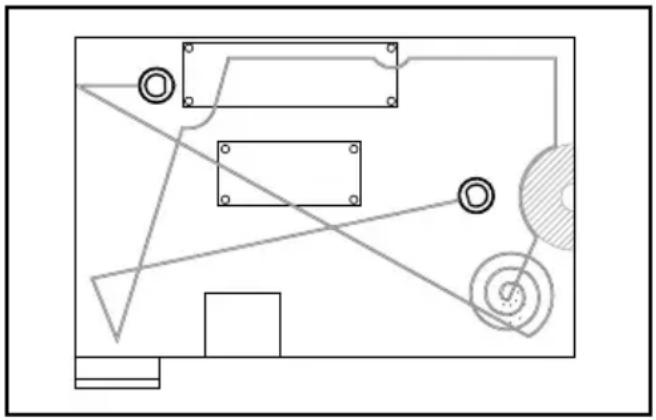
By pressing the “CLEAN” button on the appliance body, start the “cleaning” mode. Pro Evolution will clean the room autonomously by alternately applying:
- spiral movements
- linear, perimeter movements
- linear, diagonal movements
by automatically adapting its path according to obstacles on the floor:
natural_image
Pure electrical circuit lines without any symbolsATTENTION: for a more effective cleaning and to ensure Pro Evolution covers the whole surface of the room without leaving any zones in the shortest time, it is necessary to remove obstacles from the floor as much as possible.
ATTENTION: to prevent Pro Evolution from being snagged, remove or lift electric cables and wires that may wrap around the rotating brushes causing the risk of furniture fall or Pro Evolution breakage.
ATTENTION: in case the appliance is used in room subject to high solar exposure, it is recommended to close the shutters thus partially reducing the exposure to prevent infiltrations that may improperly modify the direction and path of the appliance.
PRO EVOLUTION BEHAVIOUR DURING CLEANING CYCLE
The time required to cover a room may change according to the type of floor, the obstacle amount that Pro Evolution may find on its path and the possible differences in floor level.
Thanks to its front anti-collision sensors, Pro Evolution detects surfaces (walls, furniture, etc.) by avoiding to collide with them. In presence of corners or furniture tubular parts, a light impact may be possible.
Owing to the special fall-protection sensors on the base, Pro Evolution detects differences in floor level or empty spaces thus avoiding falls from stairs or ledges.
Pro Evolution can pass different levels, as thresholds and carpets, and wiggle out of obstacles (tubes, stands, etc.) lower than 1 cm.
ATTENTION: in case of carpet cleaning, prevent Pro Evolution from coming in contact with fringes and avoid cleaning of shaggy carpets, as they ma wrap around the rotating brushes.
CLEANING AND MAINTENANCE
For a correct maintenance of Pro Evolution, follow the rules below:
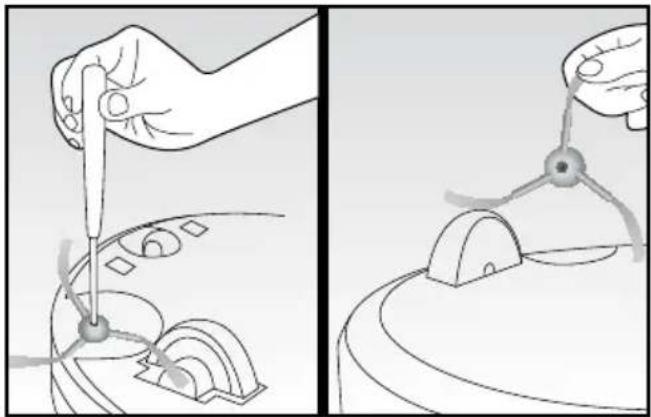
REGULAR CLEANING OF THE SIDE BRUSHES AND REPLACEMENT IN CASE OF DAMAGE.
- Remove the screw situated in the middle of each brush support.
- Remove the brushes and replace them by making sure the sign "L" (left) e "R" (right) correspond to the same signs on the appliance base.
natural_image
Illustration showing two steps of a mechanical device manipulation process, with no visible text or symbols.DUST CONTAINER CLEANING PREFERABLY AFTER EACH USE:
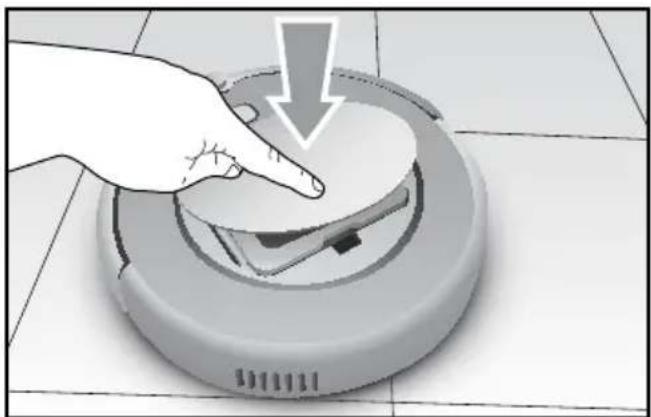
- Raise the lid (A) using a small pressure on the "push" logo: the lid will open slowly.
natural_image
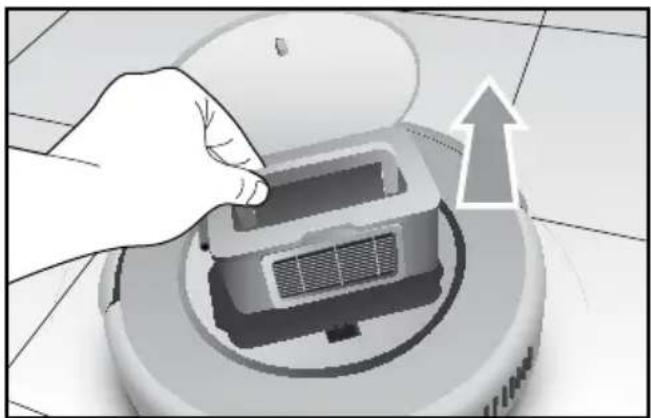
Hand pressing down on a robotic vacuum cleaner's surface (no text or symbols visible)- take the container out using the handle.
natural_image
Illustration of a hand pressing down on a robotic vacuum cleaner's base, with an upward arrow indicating motion (no text or symbols present)- Open the container by means of the appropriate side tab and extract the inner primary filter (K); clean it with the supplied brush (D) and wash it, if necessary.

natural_image
Illustration of a hand opening a cylindrical device with an upward arrow indicating motion (no text or symbols)- Remove the HEPA filter by means of the appropriate tab and clean it with the brush.
ATTENTION: wash the HEPA filter every 15-30 days and replace it every 6 months.
- Empty the container and clean it using the brush and/or wash it.
- After having wiped all components, assemble them being careful to insert the Hepa filter into the appropriate housing.

natural_image
Illustration of a hand holding a small mechanical component with a grid-like structure inside (no text or symbols visible)ATTENTION: always make sure that thee objects or the dirt do not obstruct the suction inlet and remove, if necessary.
- Clean Pro Evolution using a soft, dry cloth being careful with the sensor band (F).
- Make sure the wheels or their housing is not obstructed by dirt.
TROUBLESHOOTING
| Acoustic signal | Cause Solution | |
| • | Wheels or side brushes not operating. Check and clean the wheels and the side brushes. | |
| • • | Sensor fault. Clean the sensors (F-O) and check there are no foreign objects above. | |
| • • | •Pro Evolution jams. Move Pro Evolution and re-start. | |
Note: if errors still occur, contact the Ariete Service centre.
FEATURES
| Type Features Detail | ||
| Mechanical specifications | Diameter 300 mm | |
| Height 75 mm | ||
| Weight 2,0 Kg | ||
| Electrical specifications | Voltage 10,4 V | |
| Battery type Li-ion 2200 mAH | ||
| Cleaning specifications | Powder container capacity 0,3 l | |
| Charging type Manual | ||
| Cleaning mode Automatic | ||
| Charging time Approx.ly | 200 minutes | |
| Cleaning time Approx.ly | 90 minutes | |
| Main body button type | Rigid button | |
natural_image
3D rendering of a robotic vacuum cleaner connected to a wall-mounted power outlet (no text or symbols visible)natural_image
Pure electrical circuit lines without any symbolsnatural_image
Illustration showing two steps of a mechanical device manipulation process, with no visible text or symbols.natural_image
Hand pressing down on a robotic vacuum cleaner's surface (no text or symbols visible)natural_image
Illustration of a hand pressing down on a robotic vacuum cleaner's base, with an upward arrow indicating motion (no text or symbols)natural_image
Illustration of a hand opening a portable air conditioner unit with an upward arrow indicating airflow (no text or symbols)natural_image
Illustration of a hand holding a small electronic component with a grid-like structure inside (no text or symbols visible)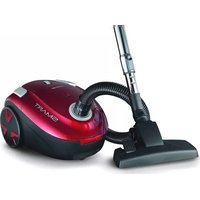


- NOTE SULLA RICARICA E L'AUTONOMIA
- PULIZIA DEL CONTENITORE DELLA POLVERE PREFERIBILMENTE DOPO OGNI UTILIZZO:
- IMPORTANT SAFEGUARDS
- READ THESE INSTRUCTIONS BEFORE USE. ALWAYS KEEP THESE INSTRUCTIONS.
- DANGER FOR CHILDREN
- DANGER FROM ELECTRICITY
- DANGER FROM OTHER CAUSES
- ATTENTION, POSSIBLE MATERIAL DAMAGES
- REMARKS ON CHARGING AND AUTONOMY
- CHECK THE STATUS OF PRO EVOLUTION BEFORE STARTING OR STOPPING IT.
- CLEANING MODE
- PRO EVOLUTION BEHAVIOUR DURING CLEANING CYCLE
- CLEANING AND MAINTENANCE
- REGULAR CLEANING OF THE SIDE BRUSHES AND REPLACEMENT IN CASE OF DAMAGE.
- DUST CONTAINER CLEANING PREFERABLY AFTER EACH USE:
- ATTENTION: wash the HEPA filter every 15-30 days and replace it every 6 months.
Brand : ARIETE
Model : Pro Evolution 2713
Category : Vacuum Cleaner