 ManualGo.com
TVS2700 - TV AIWA - Free user manual and instructions
Find the device manual for free TVS2700 AIWA in PDF.



Frequently Asked Questions - TVS2700 AIWA
Download the instructions for your TV in PDF format for free! Find your manual TVS2700 - AIWA and take your electronic device back in hand. On this page are published all the documents necessary for the use of your device. TVS2700 by AIWA.
USER MANUAL TVS2700 AIWA
For your convenience, record the model number and serial number (you will find them on the rear or your set) in the space provided below. Please Model No. EEEl refer to them when you contact your AIWAdealer in case of difficulty. Serial No. ~~ For assistance and information call toll free I-800-BUY-AIWA (United States and Puerto Rico)CAUTIONTHIS SYMBOL INDICATES THAT DANGEROUS VOLTAGECONSTITUTING A RISK OF ELECTRIC SHOCK ISPRESENT WITHIN THIS UNIT
EXPOSE THIS APPLIANCE TO RAIN OR MOISTURE.
IMPORTANT SAFETY TIPS
CAUTION: PLEASE ADHERE TO ALL WARNINGS ON THE PROOUCT ANO IN THE OPERATING INSTRUCTIONS, BEFORE OPERATING THE PROOUCT, PLEASE REAO ALL OF THE SAFETY ANO OPERATING INSTRUCTIONS. RETAIN THIS LITERATURE FOR REFERENCE. Electrical energy can perform many useful functions. This unit has been engineered and manufactured to assure your personal safety. However, improper use can result in potential electrical shock or fire hazards. in order not to defeat the safeguards incorporated in this unit, observe the following basic rules for its installation, use and servicing. Your appliance is fully transistorized and does not contain any user serviceable components. Removal of the cabinet cover may expose you to dangerous voltages. Refer all servicing to qualified service oersonnel.
This appliance should be operated only from the type of power source indicated on the unit or as indicated in this Owner’s Manual. If you are not sure of the type of power supply in your home, consult your sales- person or your local power company. For appliances designed to operate from battery power, refer to the operating instructions. The design of many appliances does not require a polarized AC line plug (one blade wider than the other). However, if your appllance is equipped with a polatized AC line plug, it is a safety feature which prevents the plug being inserted incorrectly. If you have difficulty inserting the plug, try reversing it. If the plug still does not fit fully into the outlet, contact your electrician to replace your obsolete outlet. Do not de- & Q feat the safety purpose of this polarized plug. / . Do not drop or push objects into cabinet slots or open ings. Some internal parts carry hazardous voltages and contact may result m electrical shock hazard. Never spill liquid of any hnd on the appliance.
IS connected to the receiver, be sure the antenna system is grounded so as to provide some protection against voltage surges and built up static charges. Article 810 of the National Electrical Code, ANS1/NFPA 70, provides information with respect to proper grounding of the mast and supporting structure, grounding of the lead-in wire to an antenna discharge unit, size of grounding conductors, location of antenna discharge unit, connection to grounding electrodes, and require- ments for the grounding electrode,
5. Slots and openings in the cabinet and in the back or
bottom are provided for ventilation. To ensure reli- able operation of the appliance and to protect it from overheating, these openings must not be blocked or covered. The openings should never be covered with a cloth or other material, and the bottom openings should not be blocked by placing the unit on a bed, sofa, rug, or other similar surface. This appliance should never be placed near or over a radiator or heat register. This appliance should not be placed in a built. in installation such as a bookcase unless proper ventilation is Drovided.
Do not exoose the a~oliance to rain or use near water ‘for examp(e~ near a bathtub, swimming pool, kitchen sink, in a wet basement, etc. Before cleaning, unplug the unit from the wall outlet. Do not apply liquid cleaners or aerosol cleaners directly to the unit. Use a damp cloth for cleaning. An outside antenna system should not be located in the vicinity of overhead power lines or other electric light or power circuits, or where it can fall into such power lines or circuits. When installing an outside antenna system extreme care should be taken to keep from touching such power lines or circuits as contact with them might be fatal, For added protection during a lightning storm, or when the set is left unattended and unused for long pefiods of time, unplug it from the wall outlet and disconnect the antenna, This will prevent damage to the set due to lightning or power line surges. Oo not place your appliance on an unstable cart, stand, shelf or table. Serious injury to an individual, and damage to the appliance, may result if it should fall. Your salesperson can recommend approved carts and stands or shelf and wall mounting instruc- tions, An appliance and cart combination should be moved with care, Quick stops, excessive force, and uneven surfaces may cause the appliance and cart combination to overturn.
Never add accessories that have not been specifically designed for use with this appliance. EXAMPLE OF ANTENNA GROUNDING ACCORDING TO NATIONAL
=~ * ‘ROu”O’NG-cro’$ {WC Smno. *30.? , ,O.,,,,,”,,,,,O ”,,,,,a,,,..,, SYSTEM[N,, ,,,,s0,,,,, H, NEC .,,,,0..,,,,.,,,,,,,,0, ,Note to CATV system Installer. Th,s mnndw ,s mo,,ded to call the CATV s“stem m,talle,,s Wten!lon to AM. 82040 ofthe NEC that prrwdes gudelks for proper gro”.d!ng and, m parfwlar, spe’afms that the cable ground shall be connected to the gro.ndmg system of the bulld(ng, as close to the potnt of cable entry as practl.al,11.
DO not allow anything tO rest on the power cord. Do not locate the appliance where the cord will be abused by persons waiting on it Do not olver~~~~ lw~!~ ~Qt!ets W. ex.” ,...,
trw<inn CQ@ ZS this can resulf in fire or electric shock. Unplug the appliance from the wall outlet and refer servicing t’o qualified service personnel under the following conditions:A. If the power cord or plug is damaged or frayed
6. If liquid has been spilled into the appliance,
C. If the appliance has been exposed to rain or water, D. If the appliance has been dropped or the cabinet has been damaged. E. If the appliance exhibits a distinct change in performance.f 4.
If the appliance does not operate normally by fol- lowing the operating instructions, adjust only those controls that are covered in the operating instru- ctions Improper adjustment of other controls may result in damage arm wiii often require extensive work by a qualifitd techmciim to restore the appliance to normal operation. Upon completion of any service or repair, request the service technician’s assurance that only Factory Authorized Replacement Parts that have the same characteristics as the original parts were used, and that routloe safety checks have been performed to determine that the appliance is in safe operating conctnion. unauinorized Suosiiiuilut”[s may rmtik in fire, electticai shock, or other hazards. PRECAUTION
may fall, causing setious personal injury and setious damage to the product.
VERTICAL DIM. (Height)
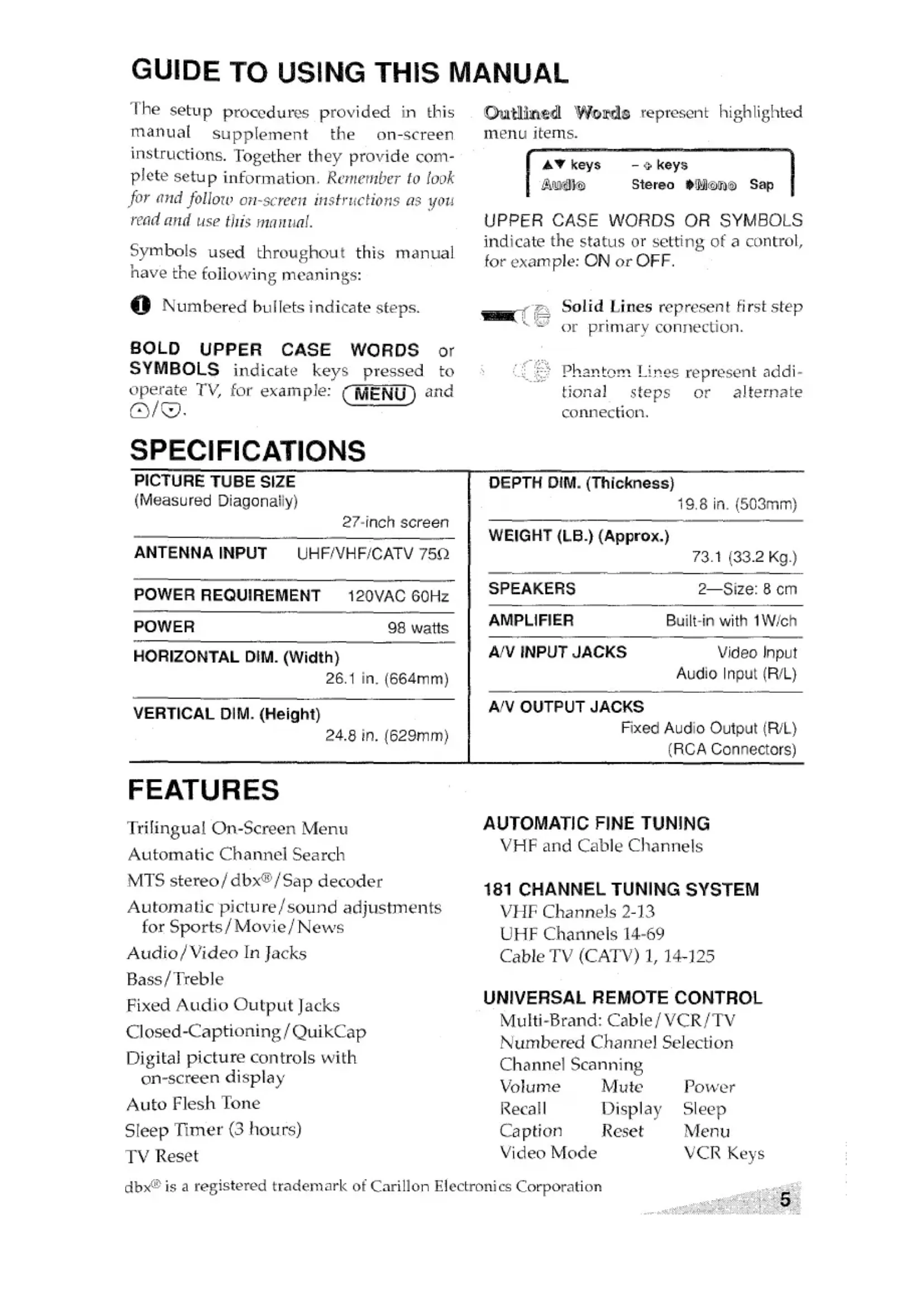
FEATURES Trilingual On-screen Menu Automatic Ch armel Search MTS stereo/ clbx~l Sap decoder Automatic picture/sound adjustments for Sports/ Movie/ News Audio/Video In Jacks Bass /Treble Fixed Audio Output Jacks Closed-Captioning /QuikCap Digital picture controls with on-screen display Auto Flesh Tone Sleep Timer (3 hours) TV Reset Solid Lines represent first step or primary connection. Pb.aRtern. Lines represent addi- tioL-Lal steps ,9~ ~!terna~e cormection. DEPTH DIM. (Thickness)
SPEAKERS 2—Size: 8 cm AMPLIFIER Built-in with 1W/ch
VHF and Cable Channels
181 CHANNEL TUNING SYSTEM
VHF Channels 2-13 UHF Channels 14-69 Cable TV (CATV) 1, 14-125
UNIVERSAL REMOTE CONTROL
Multi-Brand: Cable/ VCR/TV Numbered Channel Selection Channel Scanning Volume Mute Power Recall Display Sleep Caption Reset Menu Video Mode VCR KeysBASIC SETUP - “r CATV FRANCHISE NOTE Cable companies, Iikc public utilitms, arc franchised by local govwnnwnt 10 rectvw cable programs. even wtth equipment ,vhlch is capable of reccivmg cable than. nels, the consumm must subscribe to tho cabl<~ NOTE; TV will switch off autcx matically after 15 minutes if a signal is not being received, When Video is selected, this feature will not be active. (See page 12 for A/V hookups.) ;@;*F.w $.=,,*>,*<**;3,+#3T;/&>q..
Operates your TV, VCR or Cable converter box. For Remote key functions see page 8. To-program this remote see page 9. Installing Batteries (2 AA)
Match ~ and @ signs on the batteries with marks inside the remote.
- Do not mix old batteries with new ones or mlx different types of batteries together.
- Remove the batteries if the remote will not be used for a month or more. Weak batteries may leak and cause damage. (Normal battery life is roughly six months.)
, -------------- @Number Keys Two keys must be pressed to select a channel. For cable channels 100
throu~h 125, press and hold the 1 key until 1–– appears. Then press the other two numbers. @Recall Key Select a channel; then select another
channel using the Number keys. Press Recall to switch between the
channels. @Menu Key Use this key with the ~/w and ~/@ keys to adjust features of the on-screen menu system (see
pages 10-11). @lMute Key Press once to turn off the volume. Press again to restore. NOTE: When using the audio out jacks this key will not mute the sound. @VCR Keys These keys control Fast Forward
➤F), Rewind (<<), Play, Record (REC), Stop and Pause functions of your VCR. @Reset Key Press this key twice to restore factory settings. The TV will automatically start Channel Search and clear all customized settings. @ Sleep Key Use thk key with the “O”key to set @Mode Keys Use these keys to program the the Sleep T~mer (see page 13). remote and to”select the ‘operating mode (l”V/VCR, or CABLE). @) Caption Key (See page 13.) @Video Mode Key @ Display Key Press to select program source: TV Press once to display the Channel or VIDEO (A/V input jacks). In number. Press twice to display the VCR mode, functions as TV/VCR channel number continuous 1y. key on VCRs remote. Press again to remove the display. %%~’”$$%%., ,.. -$%!S$3*% ~~$@&*,~,programming Remote to Operate VCR and Cable BOX
1. Find your equipment’s brand name
3. Press @key to operate your VCR
code in the chart below. After pro- or press ~CAB LEj key to operate gramming is confirmed write your cable box. codes in the spaces on back of remote contro] and below. NOTES: There may be VCRs or cable boxes
“L - “L.- box. When you release the key it types of remotes. If your brand has will flash 5 times. several codes listed, repeat step z with each number until vou find the correct After entering a code number check code. the Power and Channel operations. rf +Loso A,mf14;Gn~~peraie ~roper~y, ALL,,Q L LLL,LL-L, programming is completed. If not, reprogram using another code, if available. If you enter an incorrect code number, repeat step 2.
PHILCO .,.,,,..,.,. ., ,,,18,19,26PHILIPS 18,19,26PIONEER .,.., ,,.,,,.,26,28PROSCAN 03,19,27,33,39,40
- Highlight the featuze (see @ below) using the ~/@ keys. + Change the selection (see@ below) using the D /~ keys.
- Steps @, @ and @ are for submenu adjustments and features that reWi ‘c’ additional steps. Preview of On-Screen Features with Selections AT keys
Added Menu Language $English Francais E.wanol Adjusting the Picture/Sound Follow numbered steps and on-screen instructions.
keys - + keys Press MENU key for adjustments Emkm’ lllllllilk-=--- Tint Contrast Brightness ‘“\. -Resetting the Antenna/Cable Mock and Channel Search Resetting tho A ~+omm. / ~a~le IVTO~.e or CH (~halnrl~l) search is required only if .. .. . ..- ,= “1 b~e, such as, ~,oviRg to another city or having a additional ch,anncls become ava~.a cable service installed. Adding Or Deleting Channels %1 low nl.]rn.bered c~eps and On-screeninstructions. “c~Qpr”s @E!!D Step @ press @or @ to select Gil. scamMemory
AV keys– + keys AudioPicture/SoundAntennaCH. Searchccl. %Xtml UllemloTy/C 34 AddedMenu Language Press MENU key to exit
Step @ press@ to select channel number entry. For cable channels above 99, press and hold the 1 key until Cl-– appears.
IHI* Press MENU key to exit
- Deleted channels can bc selected c ‘cyso’’theremote” manually by using the numbered Select channelUsingAW,O-9 keys
- To restore deleted channels, use i!w on-screen menu to manually add channels or startCH. (Channel) step @ exit. Search from the menu.USING AUDIO/VIDEO IN JACKS Turn off TV and external equipment before connecting cables. Back of VCR— Audio (R/L) Jacks and Video Out Jack Jacks and Video In Jack
@:,,,..y ‘p ‘s Connect the audio from VCR output (@)
—CLOSED-CAPTIONING ❑ is selected). NOTE: When captioning is turned on, the channel displaywill not -. =.. . .. .l_. .-.--- ~,-i. ~~ke-e OLCI~ “IL LILCDLL CCLL. displays to stay on the screen you must set captioning to OFF.
TIMER The Sleep Timer will switch off the TV automatically. Follow steps 6) and ~.
the TV is turned off or if a power failure occurs.
ITROUBLESHOOTING BEFORE REQUESTING SERVICE CHECK THE FOLLOWING CHART. Problem: Check these Conditions: TV turns off o Check signal (Cable/Ant. ) automatically. connection, o Check if sleep timer is ON. ● Power surge protection feature, No picture, poor o Check antenna connections. picture. ● May be station trouble, ● Possible interference from house- hold appliance. . Brightness or Contrast misadjusted. Poor color or ● Check if program is in color,
color. ● Check antenna connections. . May be station trouble, ● Color or Tint misadjusted. Black box on ● Caption Text Mode without display screen. information. Blue Screen . Check Audio/Video connections. with Video . Check external equipment, displayed No sound, ● May be station trouble. poor sound. o May be MUTE function. . Check Audio/Video connections. No TV stereo ● Check if station is broadcasting a sound. true MTS stereo signal, No TV SAP sound. No Cable channels above number 13, No UHF channels, VHF OK. Cannot select or scan some channels. . Check if station is broadcasting a SAP signal. . Cable Channel Indicator C should appear next to channel number. ● Cable Channel Indicator C should not appear next to channel number, ● Channel may be removed from memory. ● Check antenna connections, No Captioning. ● Check if station is broadcasting a Closed-Caption signal. ● Check Caption Channel. Try these Solutions: . Press POWER key, . Unplug TV momentarily. ● Adjust antenna, ● Try a different channel, ● Press RESET key. . Try a different channel . Adjust antenna, ● Press RESET key. . Switch off Captions (see page 13). . Press VIDEO MODE key. ● Switch on external equipment, . Try a different channel, ● Adjust Volume. . Select MONO from Audio on-screen menu. . Select STEREO from Audio on-screen menu, . Select SAP from audio on- screen menu, o Select CABLE from Antenna on-screen menu; then start CH, (channel) Search using menu. . Select VHF/UHF from Antenna on-screen menu; then start CH. (channel) Search using menu. ● Select CH. Scan Memory and manually add channels or start channel search using menu. ● Select CAPTION1 or CAPTION2 (see page 13).Problem: Check these Conditions: Try these Solutions: Menu System . Maybe a foreign language is ~ Reselect your menu language words seem selected. choice using the on-screen misspelled.menu. , ,._.._..,__
Control will e Check if TV set is plugged in.
Aim remote towards front of not work. 0 Press TV kev. TV. Remote control . Press VCFI or CAf3LE key. D Re-enter brand code will not operate(see page 9).ij~~ and Cable Box.
Cabinet makes e This is a normal condition during popping sound. warm-up and cool down of the plastic cabinet parts.
The surface of the cabinet can be damaged if not properly maintained. Many common household aerosol sprays, cleaning agents, solvents and polishes will cause ~ermanent damaze to the fine surface.
1. Unplug the power cord before cleaning the television.
Clean the screen with a soft cloth dampened with glass { cleaner or warm water.
3. Clean the cabinet with a soft cloth dalmpened with a mild
household detergent and warm water. Dry thoroughly NOTE: NEVER spray liquids on the screen because they can
L._. run down and drip onto the chassis. This may cause compo-
nent failure not covered under Warranty.
lu~ This symbot on the nameplate means the product is Listed by