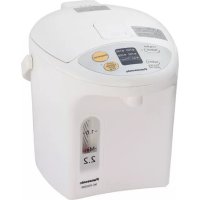
NCEG2200 - Kettle PANASONIC - Free user manual and instructions
Find the device manual for free NCEG2200 PANASONIC in PDF.


| Product type | Hot water dispenser (electric kettle) |
| Brand | Panasonic |
| Model | NC-EG2200 |
| Power supply | 120 V ~ 60 Hz |
| Power consumption | 700 W |
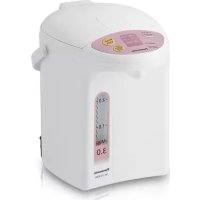
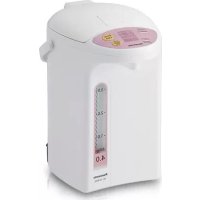
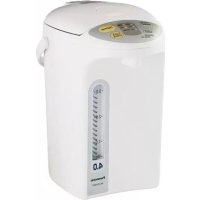
| Rated capacity | 2.2 L (2.3 pints) |
| Dimensions (H x W x D) | 23.8 x 21.7 x 28.7 cm |
| Weight (with power cord) | 1.9 kg |
| Interior coating | Charcoal non-stick (fluorine resin) |
| Spout | Electric, with automatic lock |
| Keep warm temperatures | 208°F (98°C), 190°F (88°C), 180°F (82°C), 160°F (71°C) |
| Timer | 6 hours (reboils water then keeps at 190°F) |
| Slow drip mode | For drip coffee, slow dispensing |
| Reboil function | Rapid reboil (Reboil) |
| Overheat protection | Yes, automatic shut-off if tank empty |
| Automatic lock | 10 seconds after dispensing |
| Limescale cleaning | Citric acid (80 g) - model SAN-80N |
| Replacement parts | Rubber gaskets (APH65-480), Metal filter (APB97-480-0U) |
| Average consumption on keep warm (at 190°F) | 33 Wh (max capacity, 20°C ambient) |
Frequently Asked Questions - NCEG2200 PANASONIC
User questions about NCEG2200 PANASONIC
0 question about this device. Answer the ones you know or ask your own.
Ask a new question about this device
Download the instructions for your Kettle in PDF format for free! Find your manual NCEG2200 - PANASONIC and take your electronic device back in hand. On this page are published all the documents necessary for the use of your device. NCEG2200 by PANASONIC.
USER MANUAL NCEG2200 PANASONIC
Operating Instructions
使用说明书
natural_image
Line drawing of a rice cooker with control panel and digital display (no text or symbols)Hot Water Dispenser
电子保温热水瓶
Thank you for purchasing the hot water dispenser, NC-EG4000 / NC-EG3000 / NC-EG2200.
Before using this product, please read these instructions completely. Pay particular attention to the "Important Safeguards" on pages 4 and 5. Save this manual for future use. This product is intended for household use only.
承蒙您购买NC-EG4000/NC-EG3000/NC-EG2200型号的电子保温热水瓶,衷心感谢。
Safety Precautions 11-13
Part Names and Handling Instructions ....14-15
How to Use ....16-17
Convenient use methods ....18-19
Daily Maintenance ....20-21
Troubleshooting....22
Replacement of Parts 23
Specifications 23
目录
重要的安全措施 6-7
主要特点 24
安全注意事项 25-27
各分部名称和操作方法 28-29
使用方法 30-31
方便的使用方法 32-33
日常保养方法 34-35
故障排除 36
更换易耗品 37
规格 37
Sommaire
PRÉCAUTIONS IMPORTANTES 8-9
When using electrical appliances, basic safety precautions should always be followed, including the following:
- Read all instructions.
- Do not touch hot surfaces, especially the steam vent. Use handles or knobs.
- To protect against fire, electric shock and personal injury, do not immerse cord, plugs, or main unit in water or other liquid.
Do not splash water or other liquid over them.
- Do not pour water directly from the tap.
- Do not put the unit in a sink or allow it to get wet.
-
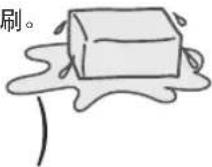
Do not turn the unit upside down when the bottom is wet.
-
Close supervision is necessary when any appliance is used by or near children.
-
Do not allow children and persons unfamiliar with the appliance to use it.
- Do not leave the unit within the reach of infants.
-
You must pay special attention to prevent infants from putting the body plug into their mouths.
-
Unplug from outlet when not in use and before cleaning. Allow to cool before putting on or taking off parts, and before cleaning the appliance.
- When unplugging, pull by the power plug - not the cord.
-
Do not operate any appliance with a damaged cord or plug or after the appliance malfunctions, or has been damaged in any manner. Return appliance to the nearest authorized service center for examination, repair or adjustment.
-
Never disassemble, repair, or modify the unit.
-
If the supply cord becomes damaged, the cord must be replaced. Refer servicing to an authorized service center, as described in the warranty.
-
The use of accessory attachments not recommended by the appliance manufacturer may result in fi re, electric shock or personal injury.
- Do not use outdoors.
- Do not let cord hang over edge of table or counter, or touch hot surfaces.
- Do not place on or near a hot gas or electric burner, or in a heated oven.
Do not place on unstable surfaces or surfaces that can be affected by heat, or near walls or furniture.
- Extreme caution must be used when moving an appliance containing hot liquids.
- When carrying the unit, do not touch the lid opening lever.
-
Always attach plug to appliance first, then plug cord into the wall outlet.
-
Make sure the power plug is correctly inserted in to the wall outlet when in use.
-
Do not connect or disconnect the power plug or the body plug with wet hands.
-
Use a single outlet that matches the power rating of the unit.
-
To prevent electric shock and/or fire, dust off power plug or body plug regularly. Water-laden dust settled on the cable or plug may cause insufficient insulation.
- Remove the plugs and clean them with a dry cloth.
- Do not allow small metal parts near the body plug.
- Only use the power cord designed specifically for the unit. Do not use a different cord and do not use this cord with any other device.
- Do not let the unit fall over.
Do not lift, tilt, or shake the unit or carry it by the lid. - Even when the dispense key is locked, hot water may leak through the dispensing spout and the steam vent, causing burns, if the unit falls over or is tilted.
- Do not use this appliance without lid properly closed. Close the lid securely, and not by force.
- Do not throw away the remaining hot water while the lid is attached.
- When opening the lid, keep hands away from the steam.
- Scalding may occur if the lid is removed during heating cycles. Do not open the lid or dispense hot water while boiling.
- Do not pour in water above the maximum water level.
- Do not block the steam vent.
- Do not rotate the unit while dispensing hot water.
- Do not use appliance for other than intended use.
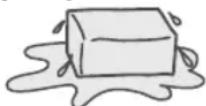
- Do not use to store ice. Condensation will occur, creating a potential source of electric shock and malfunction.
-
Do not heat tea bags, tea leaves, milk, alcohol or anything other than water which may cause it to spurt out hot liquid or steam and cause burns. The water tube may also get clogged, the inner container may burn or corrode, and the fl uororesin insulating coating may peel off.
-
This appliance is designed for indoor household use only.
SAVE THESE INSTRUCTIONS
Warning:
A. A short power-supply cord is provided to reduce the risk of entanglement or tripping over a longer cord.
B. The use of extension cords is not recommended.
C. This appliance has a polarized plug (one blade is wider than the other). To reduce the risk of electric shock, this plug is intended to fit into a polarized outlet only one way. If the plug does not fit fully into the outlet, reverse the plug. If it still does not fit, contact a qualified electrician. Do not attempt to modify the plug in any way.
重要的安全措施
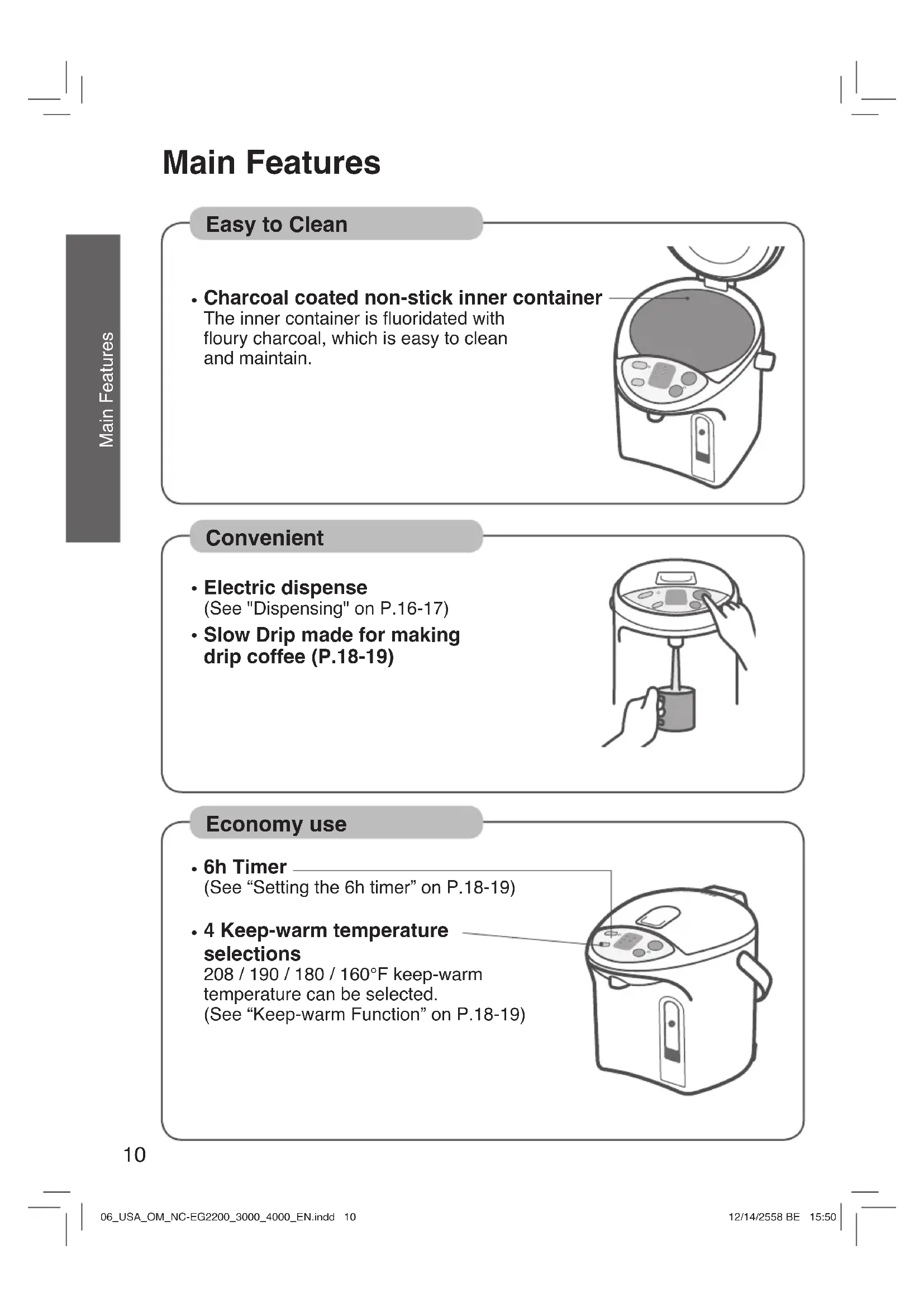
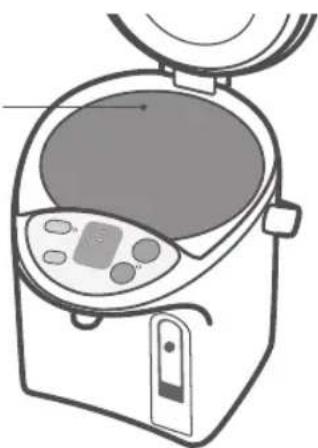
• Charcoal coated non-stick inner container
The inner container is fluoridated with floury charcoal, which is easy to clean and maintain.
natural_image
Line drawing of a kitchen appliance with control panel and lid (no text or symbols)Convenient
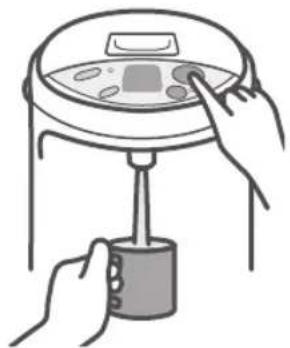
- Electric dispense
(See "Dispensing" on P.16-17)
- Slow Drip made for making drip coffee (P.18-19)
natural_image
Illustration of hands operating a portable device with a digital display (no text or symbols)Economy use
- 6h Timer
(See "Setting the 6h timer" on P.18-19)
• 4 Keep-warm temperature selections
208 / 190 / 180 / 160°F keep-warm temperature can be selected.
(See "Keep-warm Function" on P.18-19)
natural_image
Line drawing of a rice cooker with control panel and side door (no text or symbols)Safety Precautions
Please take these precautions strictly
To reduce the risk of personal injury, electric shock or fire, please observe the following:
■ The signals indicate harm and damage when the product is used incorrectly.
Indicates potential hazard that could result in serious injury or death.

Indicates potential hazard that could result in minor injury or property damage.
■ The symbols indicate specified items that must be followed.

This symbol indicates an action that must be avoided.

This symbol indicates an action that must be carried out.
WARNING
To Prevent Burns

- Do not let the unit fall over. Do not lift, tilt or shake the unit or carry it by the lid.
Even when the "Dispense" key is locked, hot water may leak through the dispensing spout and the steam vent, causing burns, if the unit falls over or is tilted.
- Do not close the lid by force.
Hot water can spill causing burns.
- Do not pour in water above the maximum water level indication line.
If the appliance is overfilled, boiling water may be ejected. Hot water can spill causing burns.
- Do not boil anything other than water.
Do not heat tea bags, tea leaves, milk, alcohol or anything other than water which may cause it to spurt out hot liquid or steam and cause burns.
The water tube may also get clogged, the inner container may burn or corrode, and the fluororesin insulating coating may peel off.
- Do not block the steam vent.
Hot water can overflow causing burns.
- Do not throw away the remaining hot water while the lid is attached.
If the lid comes off, hot water may splash causing burns.
- Do not touch the steam vent.
This may cause burns. Take special care to prevent infants from touching the steam vent.
• This product is not intended for use by
children, unless they have been given supervision or instructions concerning the use of this product by a person responsible for their safety.
- Close the lid securely.
If the unit topples, hot water may spill out causing burns.

Safety Precautions
Please take these precautions strictly

WARNING
Power Cord

- Never do anything that might cause damage to the cord, power plug or body plug.
Do not damage them, modify them, place hot objects near to them, bend them, twist them, stretch them, place heavy objects on them, or bundle them together.
If the unit is used when damaged, electrical short circuit or fire may cause.
- If the supply cord becomes damaged, the cord must be replaced. Refer servicing to an authorized service center, as described in the warranty.
- Do not connect or disconnect the power plug or the body plug with wet hands.
This may cause electric shock.
- Do not allow infants access to the body plug.
You must pay special attention to prevent infants from putting the body plug into their mouths. This may cause electric shock or injury.
- Do not allow small metal parts near the body plug.
This may cause electric shock, electrical short circuit or fire.

- Make sure the power plug is fully inserted into the wall outlet.
If the plug is inserted improperly it may cause electric shock or generate heat causing fire.
- Do not use a damaged plug or a connection in a loose outlet.
- To prevent electric shock and/or fire, dust off power plug or body plug regularly.
Water-laden dust settled on the cable or plug may cause insufficient insulation.
- Remove the plugs and clean them with a dry cloth.
- Use a single outlet that matches the power rating of the unit.
Plugging multiple appliance into one outlet may generate heat and cause fire.
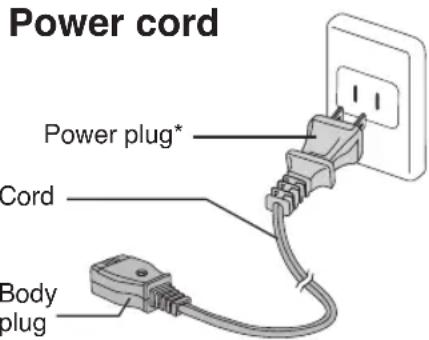
* The shape of plug differs according to region.
During use

- Do not immerse the unit, connector of power plug and body plug in water or splash water over them.
- Do not supply water directly from the tap or place the unit in a sink where the bottom may get wet.
- Do not turn the unit upside down when the bottom is wet. This may cause a short circuit and electric shock, due to water enters the electrical parts in the main unit.
- Never disassemble, repair or modify the unit.
Any attempt to do so may cause the unit to operate abnormally and may cause fire or injury.
- Refer servicing to an authorized service center, as described in the warranty.
- Do not use to store ice.
Condensation will occur, creating a potential source of electric shock and malfunction.

CAUTION
To Prevent Burns

- Do not place the unit on unstable surfaces. The appliance may topple over causing burns.
- Do not open the lid or dispense hot water while boiling. Splashing hot water or steam may cause burns.
- Do not rotate the unit while dispensing hot water. Splashing hot water may cause burns.
- Do not touch the hot parts of the unit during use or shortly after use. This may cause burns.

- When opening or closing the lid, keep hands away from the steam. Steam can cause burns.
- When carrying the unit, do not touch the lid opening lever. The lid may open causing burns and other injury.
- Wait until the unit is cooled down before maintenance. A hot appliance may cause burns.
- When disposing hot water, be careful not to get burned.
Power Cord

- Do not use a different power cord and do not use this power cord with any other device. (Do not use a power cord other than the one designed specifically for the unit.) It may cause malfunction or fire.

- When the unit is not in use, unplug the power plug from the wall outlet. Deteriorating insulation may cause electric shock and/or fire.
- When unplugging the unit, pull by the power plug - not the cord. Electric shock and short circuit may cause fire.
During use

- Do not use the unit on surfaces that can be affected by heat for a long time. The unit may get discolored or break up.
- Do not place near walls or furniture. Steam and heat could damage walls and furniture, causing a change in color and shape.

- Replace gasket if it discolors whitish. (P.23) Otherwise it may cause hot water to spill out when it is leaned or knocked down accidentally.
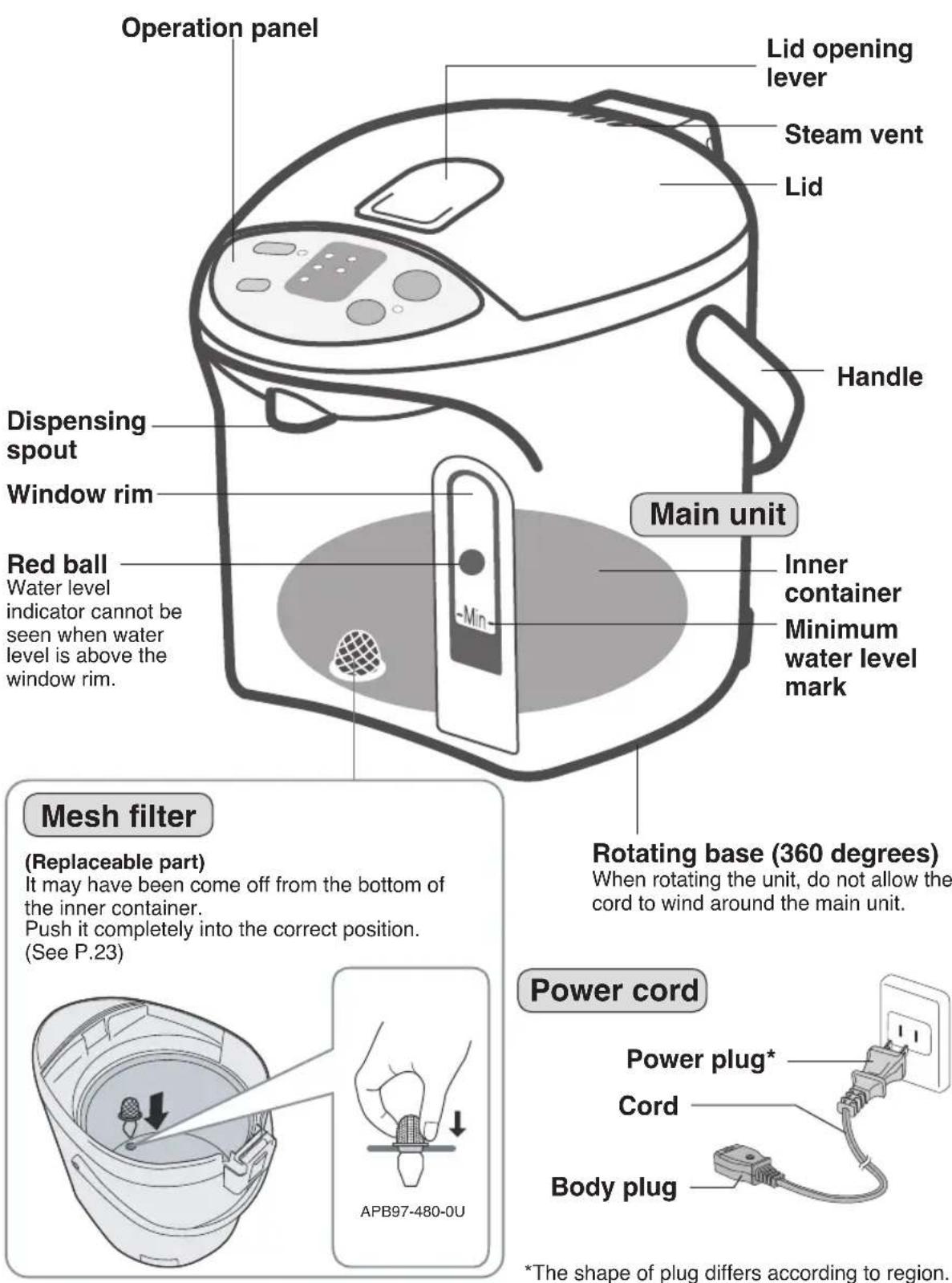
Part Names and Handling Instructions
Part Names and Handling Instructions
How to Remove the Lid
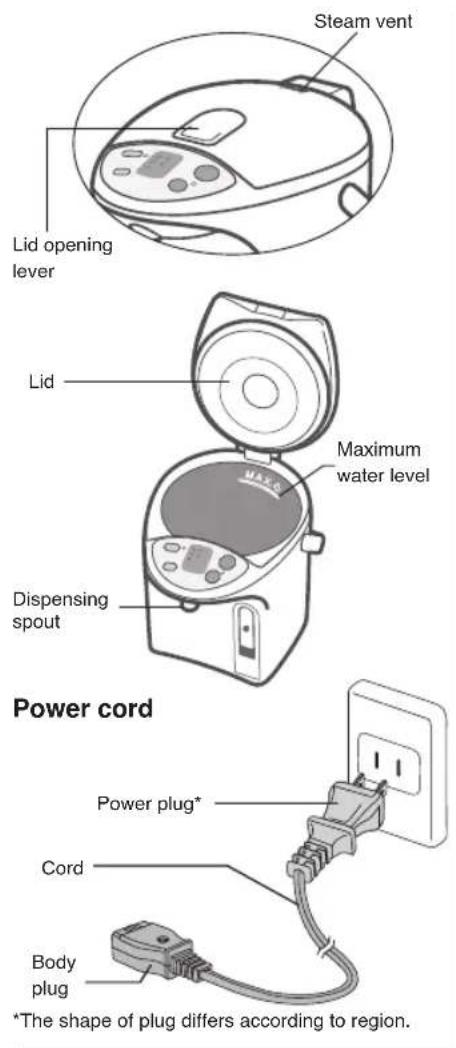
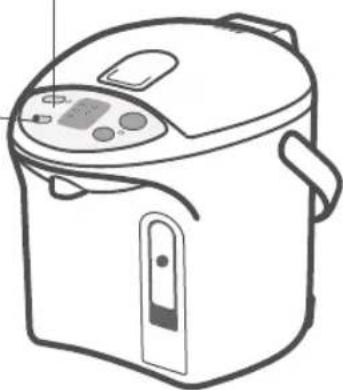
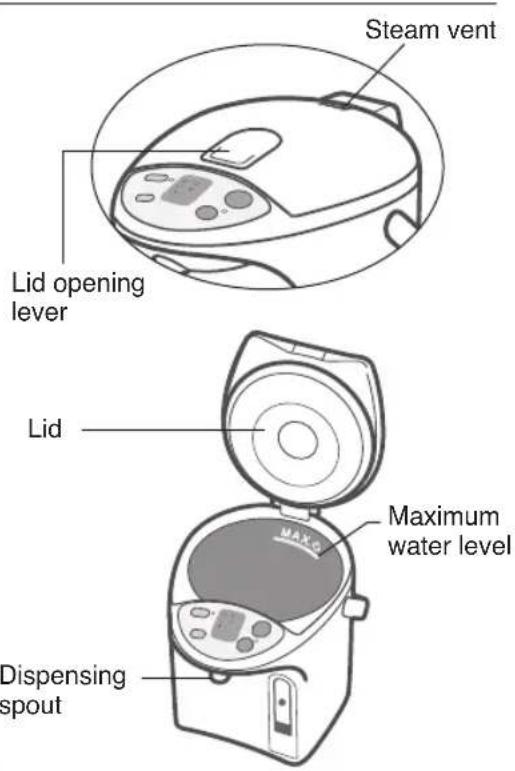
Press and lift the lid opening lever to open the lid.
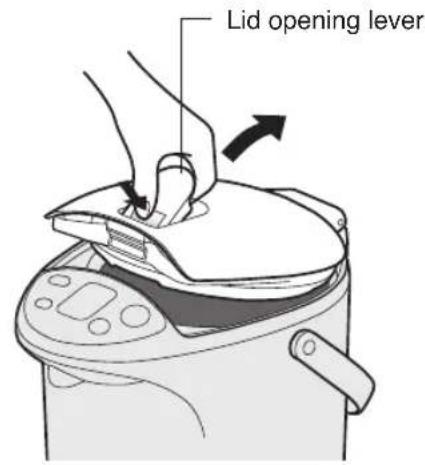
To close
Press down until hearing "click" sound.
Pull it up slantwise while pressing the lid release lever.
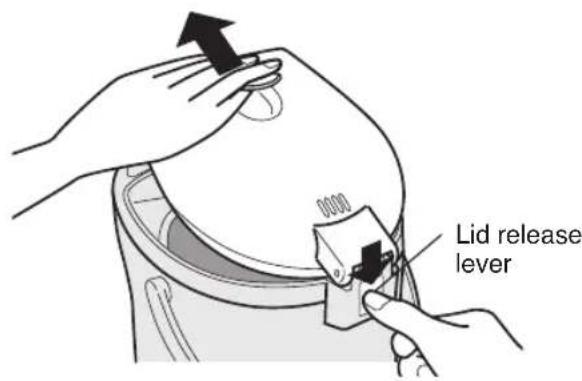
To attach
Insert the lid slantwise.
Overheating Protection
If an empty inner container is heated, the overheat safety function (which prevents an empty inner container from being overheated) will be activated. The power will be shut off automatically to prevent the problems that may occur due to overheating. This will be shown on the display as shown below.
Flashing alternately
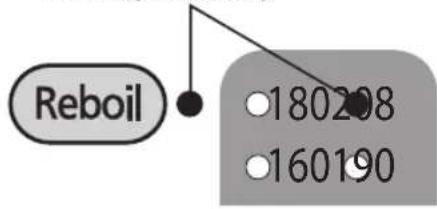
Causing
- Less than the minimum water level in the inner container was boiled.
How to cancel the display
Supply water into the container, and press Reboil
Notice
If an empty inner container is heated, an odor will be emitted and the container may be discolored.
How to Use
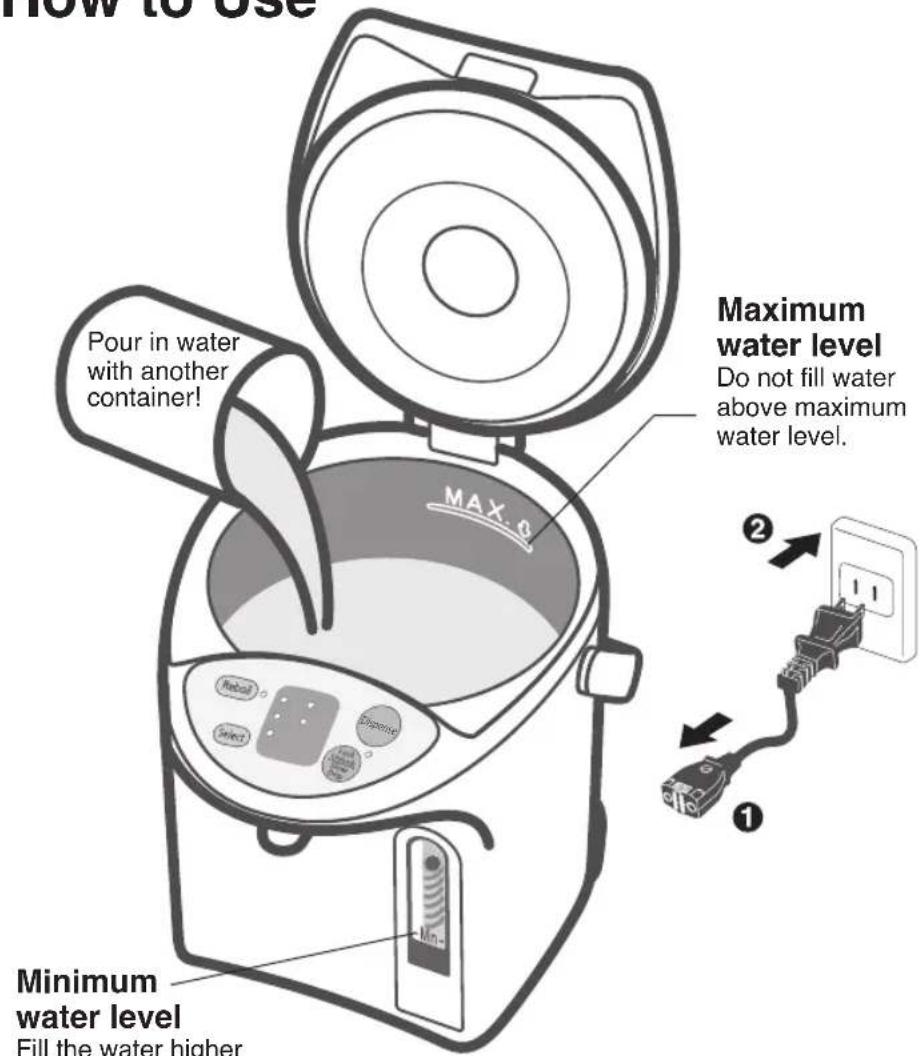
Minimum water level
Fill the water higher than the minimum water level.
Boiling water
Dispensing
(Electric dispense)
Before you use this unit for the first time
1 Pour in water with another container to the maximum level.
2 Close the lid securely.
3 Boil the water until Reboil light goes out.
4 Dispense the hot water.
5 Unplug and remove the lid.
6 Pour out any remaining hot water slowly via the DRAIN mark.
How to reduce the chlorine in the water
Press key to make the indicator light flash. (Long Boil mode)
(Press one time while water is being boiled, and press twice while water is being kept warm.
Extends the boiling time by about 6 minutes to reduce the chlorine by about 80% in the water.
- Press (Reyol) gain to boil.
Pour in water with another container. Close the lid securely.
Securely plug the body plug horizontally into the body.
Plug into wall outlet. (P.16 ①→②)
Starts boiling automatically.

Indicate as below when boiled.

The temperature will drop to approximately 190^ F and the unit switches to keep-warm function automatically.
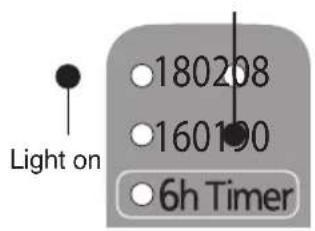
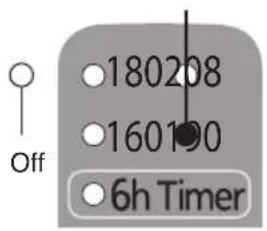
Light onFlashingFlash
(Displayed temperature is indicative.)
Time required to boil water
NC-EG4000: approx. 35 min / NC-EG3000: approx. 27 min / NC-EG2200: approx. 20 min
(Amount of water: Maximum Water / Room temperature: 68°F (20°C))

Press key to release lock. The indicator light beside the key will light up.

Press Slow Drip key twice for slow drip. The indicator light beside the key will flash. (See "slow drip" on P.18-19)

Press Dispense key to dispense the hot water.

Light on

key will automatically lock again ds after dispensing hot water.

Flash
When the unit is not in use
Unplug, and remove the lid. Pour out any remaining hot water slowly via the DRAIN mark.
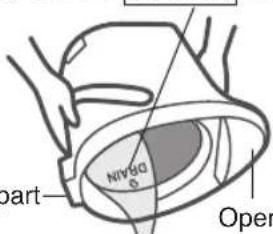
Lid release part
Operation panel
Cautions
- Do not pour out water too swiftly.
If water splashes over lid release part or operation panel, it may cause a malfunction. - Do not leave water in the inner container.
(It may cause the container to corrode or smell.)
Convenient use methods
Convenient use methods
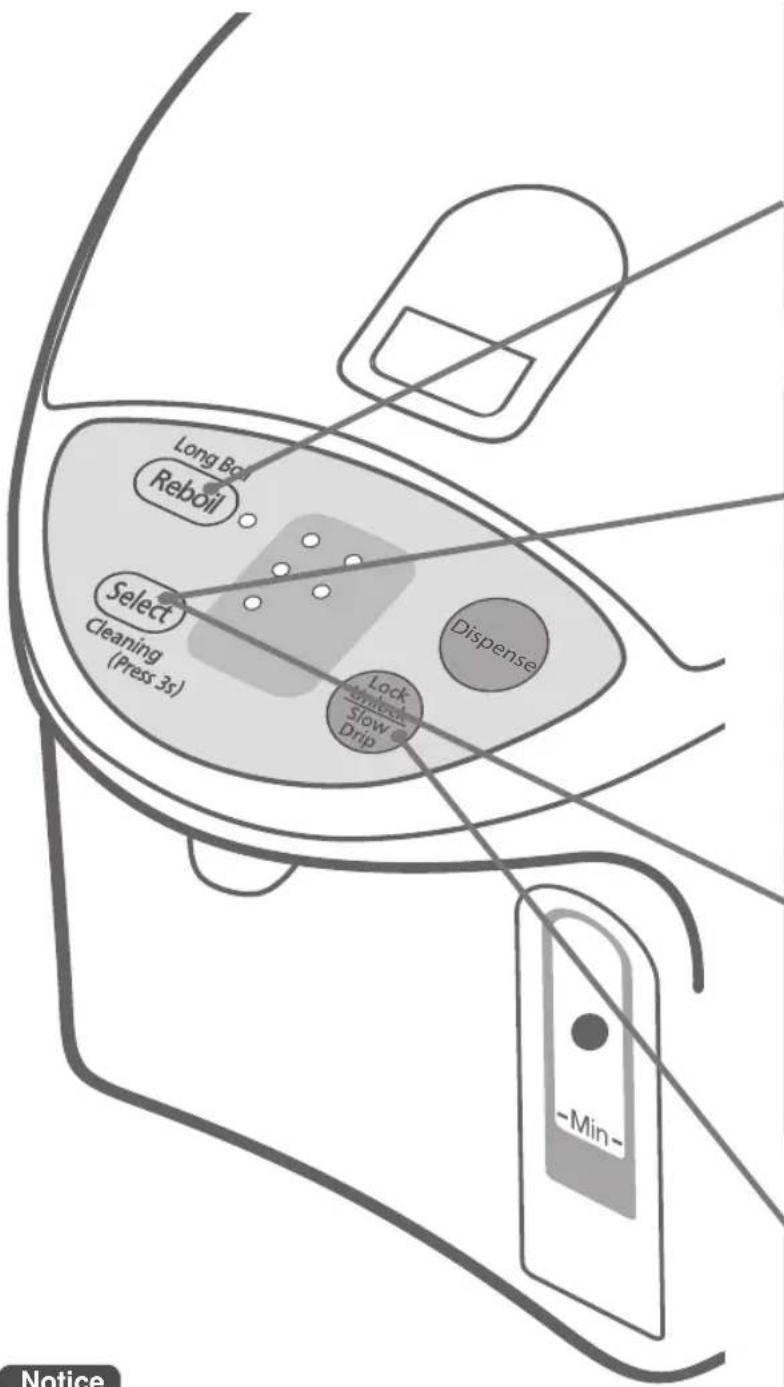
Reboil
- It is ideal to use boiling water for making coffee / tea / instant cup noodle etc.
Keep-warm function
- “180 keep-warm” is an ideal mode for making green tea.
- “160 keep-warm” is an ideal mode for making milk for a baby.
Be sure to leave milk to cool down or mix it with cool boiled water before giving it to a baby.
- When the unit will not be used for a short time, such as when you go out for a day...
Setting the 6h timer
- While setting the timer, the electrification of heater stops.
Notice
- The keep-warm temperature or the timer can be set while the water is being boiled or being kept warm.
- After power is restored in the event of a power failure, the keep-warm temperature will be automatically set to "190", even if the timer or the "208", "180" or "160" keep-warm function was previously selected.
Slow Drip mode for making drip coffee
- Dispense water slowly.
- Right after boiling, it maybe difficulty dispensed or be dispensed unsteady.
Press Light on Reboil key to reboil water that is being kept warm.
After a few minutes, water will be boiled.
• The keep-warm temperature setting is left unchanged.
(After boiled)
Time required for the reboil procedure
From 208 keep-warm: approx. 2.5-4 min
From 190 keep-warm: approx. 4-6.5 min
From 180 keep-warm: approx. 6-12 min
From 160 keep-warm: approx. 7-14 min
Amount of water: Maximum Room temperature: 68°F (20°C)
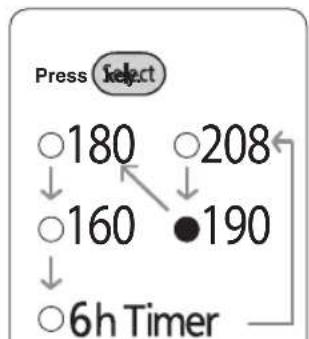
flowchart
graph TD
    A["Press Select"] --> B["180"]
    B --> C["160"]
    C --> D["6h Timer"]
    E["208"] --> F["190"]
    F --> C
Each time the key is pressed, “●” mark will shift to the next choice and change the keep-warm temperature or set the timer.
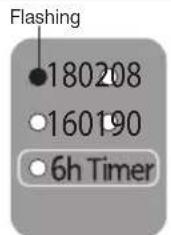
(When selecting 180 keep-warm)
Time required to reach the settled keep-warm temperature
190→208 keep-warm: approx. 2-4 min 190→180 keep-warm: approx. 0.5-1 hour 190→160 keep-warm: approx. 1.5-2.5 hours
Amount of water: Maximum Room temperature: 68°F (20°C) Previous keep-warm setting: 190°F
After a short time, water will be kept warm at approximately 180^ F.
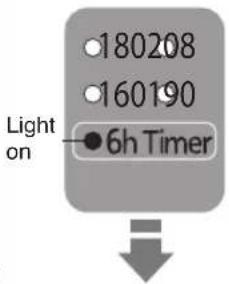
6 hours later, timer will turn off and water starts boiling When the water is brought up to boiling temperature, it will be kept warm at 190^ F.
Press

Flash
key twice, then press

key to make drip coffee.
• Automatically locked in 30 seconds after dispensing is finished.
• To dispense hot water again, press Dispense key before time count up to 30 seconds.
- The (Dispense) key will automatically lock again in 10 seconds if (Dispense) key is not pressed.
Each time is pressed, function will be switched as below.

Auto lock — Dispense (lamp lit) Slow drip (lamp flash)
Daily Maintenance
(Before cleaning, be sure to disconnect the power plug from outlet, dispense water and cool down the unit.)
Main unit and lid
Clean with a damp, well-wrung cloth.
- Do not wet or soak the main unit in water.
If water enters the main unit from the bottom or from the dispensing spout, it can also get into the electrical components in the main unit and may cause a malfunction.
- Do not use detergents. (They may leave an odor.)
- Do not use benzine or thinner. (They may damage the surface.)
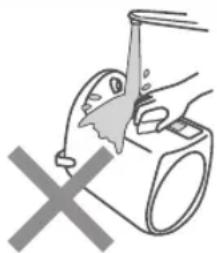
natural_image
Illustration of a hand washing a small appliance with a cross mark below (no text or symbols)Inner container
Clean with a wet soft sponge.
- Do not use polishing powder, a scrub brush or a nylon brush.
They may damage the fluororesin finish of the inner container.
About "Scale"
While you are using this unit, minerals contained in the water (like calcium) can get stuck on the inner container or on the mesh filter. This is called "scale", and it is harmless.
- Milky-white gritty surface (caused by calcium)
- White or glittering floating material (crystals of minerals)
- Discoloration in the finish like dark brown, gray, or green areas (metallic ion made on the fluororesin covering)
These are not discoloration or corrosion of the inner container itself, nor are they flakes from the fluororesin covering.

Clean the inner container using citric acid. (See P.21)
Mesh filter
Clean the filter with a brush.
When filter is clogged, water does not flow smoothly.
* After cleaning the filter, be sure to reattach it to the inner container.
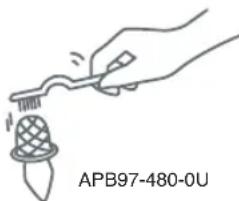
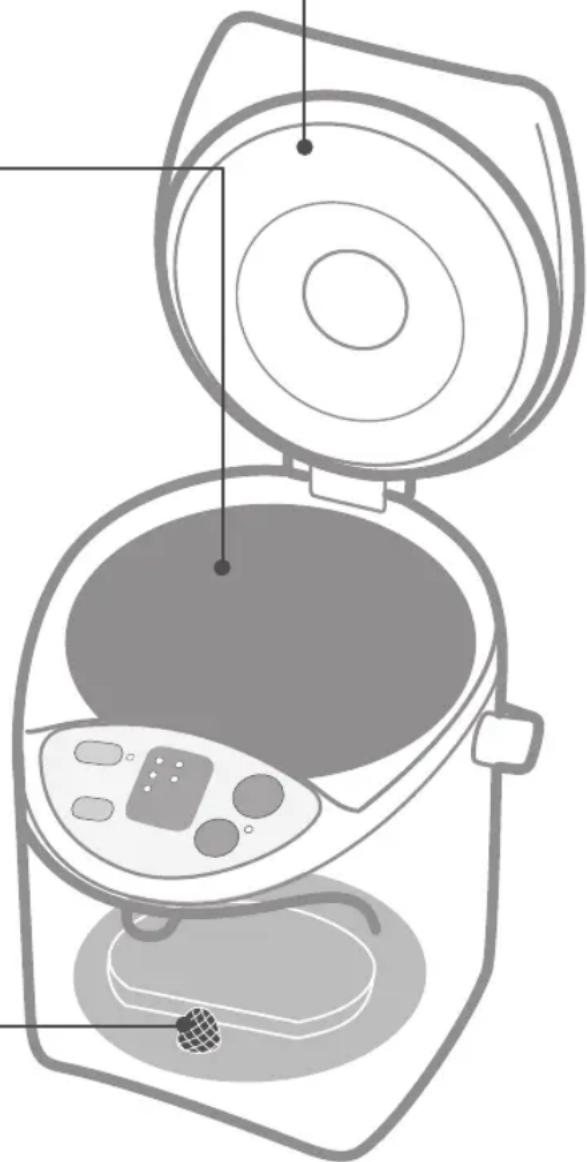
natural_image
Line drawing of a kitchen appliance with open lid and internal components (no text or symbols)When storing the unit
- Dry it thoroughly.
- Put it into a plastic bag and seal the bag to keep insects from getting in.
How to clean the inner container using citric acid.
Once every two or three months to clear scale.
1 Make sure that the mesh filter is attached to the inner container.
2 Put citric acid in the inner container.
- Amount of citric acid to be used at one time: 80 g (two packages) or seven level tablespoons
* In case that our citric acid is not available, place 1-2 sliced lemons wrapped with a thin cloth into the inner container instead. (The detergency of lemon is less effective than using the citric acid.)
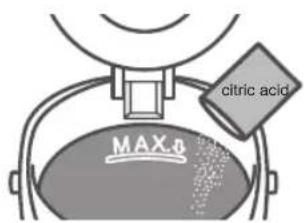
The citric acid is available from an authorized dealer (as described in the warranty). (Model No: SAN-80N)
* Follow the directions for cleaning printed on the citric acid package.
* Since the citric acid used for cleaning is a food additive, it is harmless to humans.
3 Add water to the maximum water level mark, and mix the citric acid and water well. Close the lid.
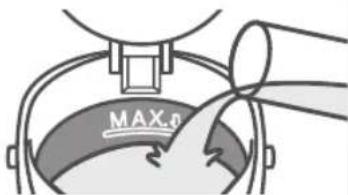
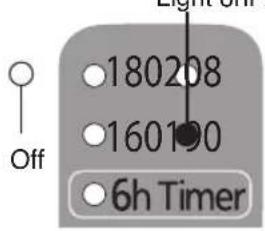
4 Connect the plug immediately after stirring and press key for more than 3 seconds.
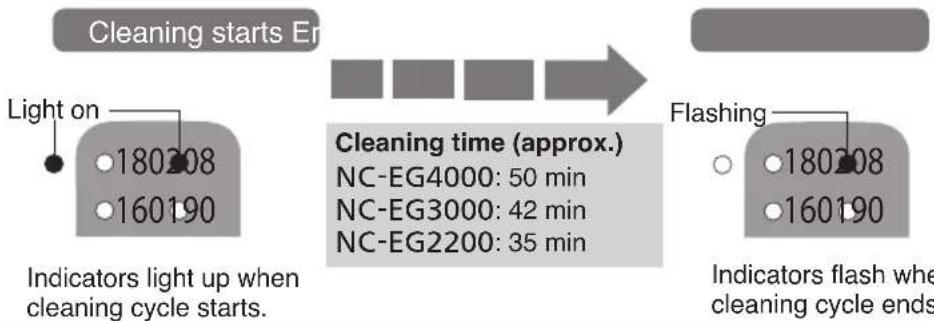
flowchart
graph LR
    A["Light on"] --> B["180208"]
    A --> C["160190"]
    D["Indicators light up when cleaning cycle starts."] --> E["Cleaning starts Er"]
    F["Cleaning time (approx.)"] --> G["NC-EG4000: 50 min"]
    F --> H["NC-EG3000: 42 min"]
    F --> I["NC-EG2200: 35 min"]
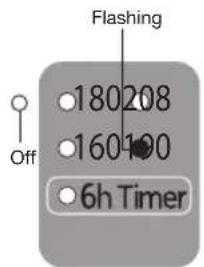
    J["Flashing"] --> K["180208"]
    J --> L["160190"]
    M["Indicators flash when cleaning cycle ends"] --> N["End"]
5 Dispense some water, then unplug, remove the lid and drain away the hot water via the 'DRAIN' mark.
6 Refill with water and boil it to remove the smell of the citric acid or lemons. Then throw the hot water away as same as step 5.
- To remove any discoloration from the area above the maximum water level, rub the inside lightly with a wet soft sponge.
- If the discoloration cannot be removed by rubbing, clean the inner container several times using citric acid or lemons.
Cautions
- Please use our citric acid to clean the inner container of this unit.
- Do not fill with water above maximum water level.
- Fill the inner container only with tap water (do not fill with hot water). Hot water may spout out causing burns.
Troubleshooting
Before calling a service supplier, please check the following possible causes.
| If... Possible cause | ||
| White or glittering flakes floating in the hot water. Rough milky white substances are adhered to inner container. | ·The cause of this is "scale". (see P.20) It is not flakes of fluororesin. * Water with a large content of minerals in it such as mineral water or ionized water, is more likely to cause a scale or white layer in the hot water. | ·Clean the inner container with a wet soft sponge. (See P.20) ·If the "scale" still remains, clean with citric acid. (See P.21) |
| Boiling sounds become louder. | ·When "scale" adheres, boiling sounds become louder. | |
| Hot water has odors of chlorine. | ·Odors of chlorine remain depending on the amount of chlorine in tap water. | ·Press Rev to reduce the chlorine. (See P.16) |
| Hot water has an unpleasant odor. | ·When the unit is new, resin used in the manufacturing process may give off a mild odor. This will disappear with use. ·If the unit is placed on surfaces such as a vinyl sheet, the odor may be carried over into the water. | |
| Hot water comes out by itself. | ·Water has been added above maximum water level. | ·Lower the water level. |
| Hot water does not flow out smoothly. | ·The mesh filter may be clogged with "scale". (See P.20) ·When scale accumulates in the inner container and remaining hot water is low, hot water does hot flow out smoothly. ·Immediately after boiling, hot water may not flow out smoothly. | ·Clean the filter with a brush. ·If the "scale" cannot be removed, replace the filter (See P.23) |
| The indicator lights flash alternately. | ·Overheating protection has been activated (See P.15) | ·Add water and press Revol |
| ·The indicator lights may flash alternately by adding boiling water or the way the water is supplied. | ·Press Revol | |
| ·When the inner container is cleaned with citric acid, citric acid has built up on the bottom. | ·Disconnect the plug, and stir the citric well to dispose. | |
| Hot water does not dispense. | ·The automatic lock has been engaged. | ·Press Key Drip |
- If the problem is not fixed after checking the above possible causes, or if you think something is strange, disconnect the body plug from the unit. Wait at least 10 seconds and then re-connect the plug.
- The semi-transparent inner part inside the lid may become yellowish. This does not affect operation of the unit.
- The rattling noise in the lid is made by small ball-shaped components which prevent water from flooding out if the unit topples over.
- If the room temperature is very high, the outside of the main unit may reach about 130^ (55°C).
The unit does not turn on.
- It is broken if the electric components are immersed in water. Contact the store where you purchased the unit for repair.
"Reboil" and "180" indicator lights flash alternately.
- You poured in water directly from a tap.
- You put the unit on the sink.
- You turn the unit upside down with its bottom wet.
- You washed the unit in water.
• This is malfunction of the sensor. - Contact the stores where you purchased.
Replacement of Parts
Rubber gasket set
Replace gaskets if they crack, lose their pliability or, for any other reasons which allow steam to escape from between the container and the lid.
Mesh filter
Replace the filter, if foreign matter which clog the filter cannot be removed, even after you scrub with a cleaning brush, etc.
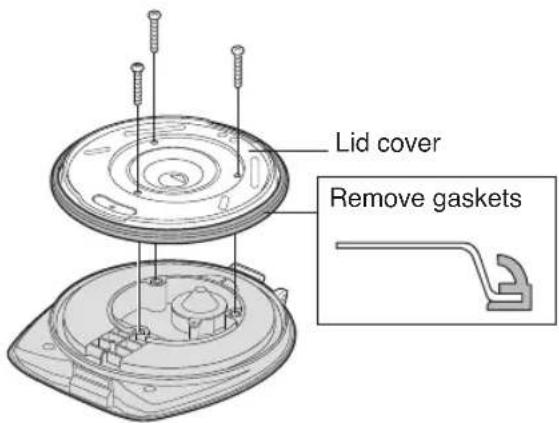
Remove lid, unscrew 3 tapping screws and remove the lid cover.
Exchange the gaskets and then place the lid cover back and secure with the tapping screws.
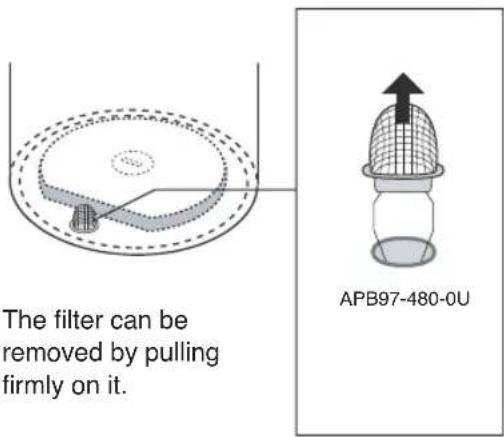
For replacement parts, please contact an authorized service center (as described in the warranty).
| Part name Part | No. |
| Rubber gasket set | APH65-480 |
| Mesh filter APB | 97-480-0U |
Specifications
| Model No. | NC-EG4000 | NC-EG3000 NC-EG2200 | |||
| Power supply 120 V | ~60 Hz | ||||
| Power consumption 700 W | |||||
| Average power consumption in keeping warm (approx.) (Amount of water: maximum Room temperature: 68°F (20°C) | at 208 | 49 Wh | 45 Wh 40 Wh | ||
| at 190 | 43 Wh | 39 Wh 33 Wh | |||
| at 180 | 35 Wh | 31 Wh 27 Wh | |||
| at 160 | 30 Wh | 26 Wh 23 Wh | |||
| Dimensions (when the handle is tilted) | Height (approx.) | 12.8 in (32.4 cm) | 10.8 in (27.5 cm) | 9.4 in (23.8 cm) | |
| Width (approx.) | 8.5 in (21.7 cm) | 8.5 in (21.7 cm) | 8.5 in (21.7 cm) | ||
| Depth (approx.) | 11.3 in (28.7 cm) | 11.3 in (28.7 cm) | 11.3 in (28.7 cm) | ||
| Weight (including power cord) (approx.) | 4.9 lb (2.2 kg) | 4.4 lb (2.0 kg) | 4.2 lb (1.9 k g) | ||
| Rated capacity (approx.) | 4.2 qt (4.0 L) | 3.2 qt (3.0 L) | 2.3 qt (2.2 L) | ||
* Under certain conditions, such as at very high altitudes and in intense cold, the unit may not function properly. Please avoid using the unit in such conditions.
* If the unit is not used during cold conditions, make sure to empty it of water. The water left in the inner container may freeze causing damage.
主要特点
易于清洁
natural_image
Line drawing of a kitchen appliance with control panel and lid (no text or symbols)方便
natural_image
Illustration of hands using a handheld device to press or install a circular device (no text or symbols visible)使用经济
natural_image
Line drawing of a rice cooker with control panel and door (no text or symbols)安全注意事项
务必遵守
natural_image
Illustration of a hand using a device to lift a machine, with a cross symbol indicating no change or prohibition (no text or symbols present)内瓶
用含水的塑料海棉擦拭。
- 不要使用去污粉、草刷、尼龙刷。
素 否则,可损伤氟树脂涂层。
关于“水垢”
natural_image
Hand holding a tool interacting with a textured object, labeled APB97-480-0U (no other text or symbols)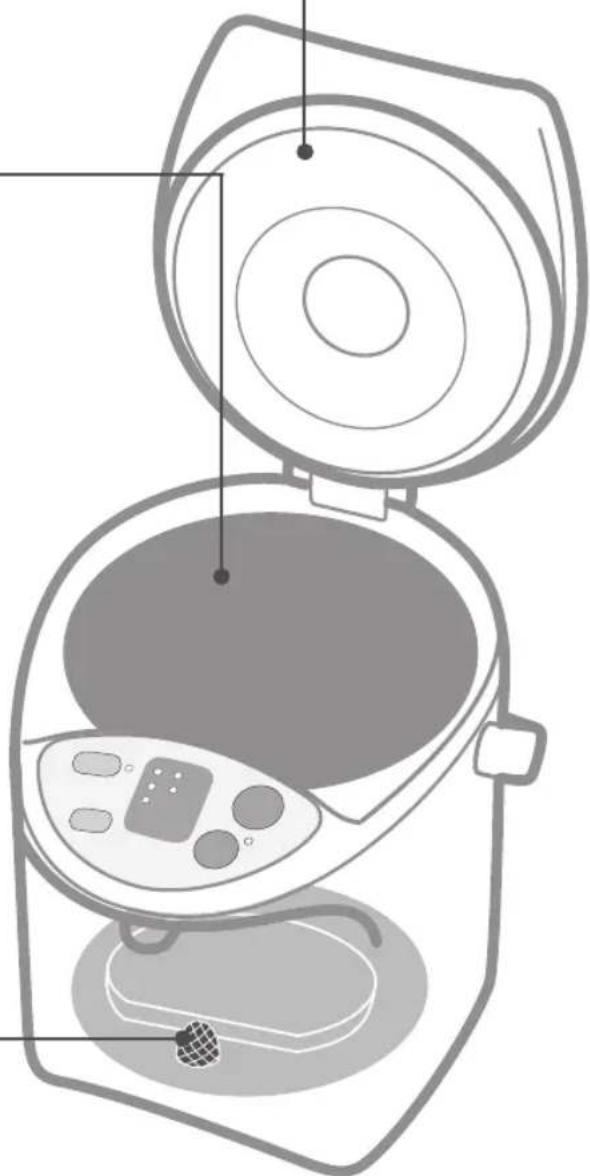
natural_image
Line drawing of a portable kitchen appliance with open lid and internal compartments (no text or symbols)保管本机时
natural_image
Line drawing of a kitchen appliance with control panel and lid (no text or symbols)Pratique
natural_image
Illustration of hands using a handheld device to press or install a circular device (no text or symbols visible)Écono-énergie
natural_image
Line drawing of a rice cooker with control panel and side door (no text or symbols)Réébullition
natural_image
Illustration of a hand using a showerhead to lift a shower, with a cross symbol indicating no text or symbols.Réservoir intérieur
natural_image
Hand holding a tool interacting with a textured object, labeled APB97-480-0U (no other text or symbols)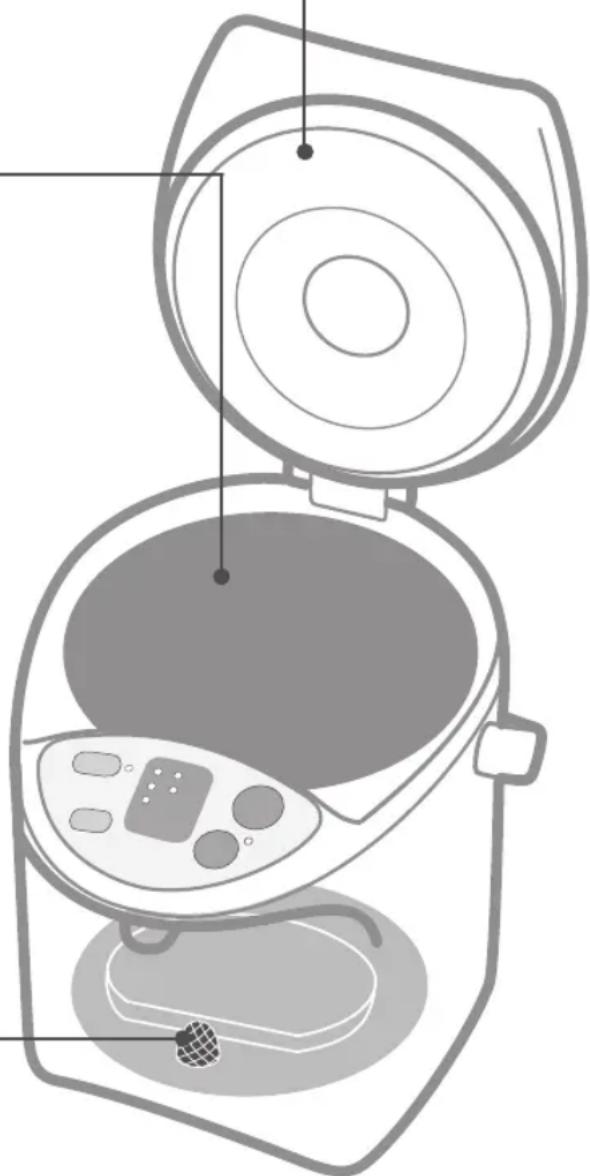
natural_image
Line drawing of a portable kitchen appliance with open lid and internal compartments (no text or symbols)For product information and operation assistance in the USA or Canada, please contact the support page listed below.
In Canada, please contact: www.panasonic.ca/english/support
Panasonic Canada Inc.
5770 Ambler Drive,
Mississauga, Ontario, L4W 2T3
www.panasonic.com
Panasonic Corporation of North America
Two Riverfront Plaza, Newark, NJ 07102-5490
www.panasonic.com
© Panasonic Corporation 2015
PZ05A6931
TP0915E11215
Printed in Thailand

- Operating Instructions
- 使用说明书
- 目录
- Sommaire
- SAVE THESE INSTRUCTIONS
- Warning:
- 重要的安全措施
- Convenient
- Economy use
- Safety Precautions
- Please take these precautions strictly
- WARNING
- To Prevent Burns
- Power Cord
- During use
- CAUTION
- Part Names and Handling Instructions
- How to Remove the Lid
- Overheating Protection
- Causing
- How to cancel the display
- Notice
- How to Use
- Minimum water level
- Boiling water
- Dispensing
- (Electric dispense)
- Before you use this unit for the first time
- How to reduce the chlorine in the water
- Press key to make the indicator light flash. (Long Boil mode)
- Securely plug the body plug horizontally into the body.
- Plug into wall outlet. (P.16 ①→②)
- Time required to boil water
- When the unit is not in use
- Cautions
- Convenient use methods
- Reboil
- Keep-warm function
- Setting the 6h timer
- Slow Drip mode for making drip coffee
- Time required for the reboil procedure
- Time required to reach the settled keep-warm temperature
- Press
- key twice, then press
- key to make drip coffee.
- Daily Maintenance
- Main unit and lid
- Clean with a damp, well-wrung cloth.
- Inner container
- Clean with a wet soft sponge.
- About "Scale"
- Clean the inner container using citric acid. (See P.21)
- Mesh filter
- Clean the filter with a brush.
- When storing the unit
- Make sure that the mesh filter is attached to the inner container.
- Put citric acid in the inner container.
- Add water to the maximum water level mark, and mix the citric acid and water well. Close the lid.
- Connect the plug immediately after stirring and press key for more than 3 seconds.
- Dispense some water, then unplug, remove the lid and drain away the hot water via the 'DRAIN' mark.
- Refill with water and boil it to remove the smell of the citric acid or lemons. Then throw the hot water away as same as step 5.
- Troubleshooting
- Replacement of Parts
- Rubber gasket set
- 主要特点
- 易于清洁
- 方便
- 使用经济
- 安全注意事项
- 务必遵守
- 内瓶
- 用含水的塑料海棉擦拭。
- 关于“水垢”
- 保管本机时
- Pratique
- Écono-énergie
- Réébullition
- Réservoir intérieur
Brand : PANASONIC
Model : NCEG2200
Category : Kettle