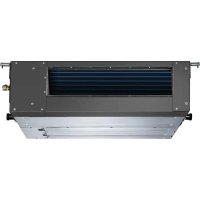
EXU09JEIWI - Air conditioner ELECTROLUX - Free user manual and instructions
Find the device manual for free EXU09JEIWI ELECTROLUX in PDF.



| Brand | Electrolux |
| Model | EXU09JEIWI |
| Category | Split air conditioner |
| Refrigerant type | R410A |
| Global warming potential (GWP) | 2,087.5 |
| Refrigerant weight | 1.9 to 3.5 kg (depending on model) |
| Power supply voltage | 220-240 V / 50 Hz (estimate) |
| Operating modes | Auto, Cooling, Heating (reversible), Dehumidification, Fan |
| Fan speeds | Auto, Low, Medium, High |
| Special features | Turbo, Economy/Sleep, Swing (horizontal and vertical louver), Timer (ON/OFF), Ion (on certain models), Follow Me (temperature detection) |
| Display | LED on indoor unit (temperature, timer, alarm) |
| Remote control | Infrared, max range 8 m, AAA 1.5 V batteries (x2) |
| Installation | By a certified installer only |
| Air filter cleaning | Every 2 weeks (vacuum or water, dry in shade) |
| Fresh filter replacement | Every 4 to 5 months (if present) |
| Compressor protection | Restart after 3-4 minutes |
| Automatic defrost | Yes (heating models) |
| Automatic restart after power failure | Yes (on certain models) |
| Safety | Automatic shutdown in case of fault, remote lock |
| Operating temperatures | Cooling: 17-32°C (indoor) / 0-50°C (outdoor); Heating: 0-30°C (indoor) / -15-30°C (outdoor); Dehumidification: 10-32°C (indoor) / 0-50°C (outdoor) |
Frequently Asked Questions - EXU09JEIWI ELECTROLUX
User questions about EXU09JEIWI ELECTROLUX
0 question about this device. Answer the ones you know or ask your own.
Ask a new question about this device
Download the instructions for your Air conditioner in PDF format for free! Find your manual EXU09JEIWI - ELECTROLUX and take your electronic device back in hand. On this page are published all the documents necessary for the use of your device. EXU09JEIWI by ELECTROLUX.
USER MANUAL EXU09JEIWI ELECTROLUX
WE'RE THINKING OF YOU
Thank you for purchasing an Electrolux appliance. You've chosen a product that brings with it decades of professional experience and innovation. Ingenious and stylish, it has been designed with you in mind. So whenever you use it, you can be safe in the knowledge that you'll get great results every time.
Welcome to Electrolux.
Visit our website to:

Get usage advice, brochures, trouble shooter, service information: www.electrolux.com

Register your product for better service: www.electrolux.com/productregistration

Buy Accessories, Consumables and Original spare parts for your appliance: www.electrolux.com/shop
CUSTOMER CARE AND SERVICE
We recommend the use of original spare parts.
When contacting Service, ensure that you have the following data available.
The information can be found on the rating plate. Model, PNC, Serial Number

Warning / Caution-Safety information.

General information and tips

Environmental information.
Subject to change without notice.
1. SAFETY INSTRUCTIONS
Before the installation and use of the appliance, carefully read the supplied instructions. The manufacturer is not responsible if an incorrect installation anduse causes injuries and damages. Always keep the instructions with the appliance for future reference.
1.1 Children and vulnerable people safety

WARNING!
Risk of suffocation, injury or permanent disability.
- This appliance can be used by children aged from 8 years and above and persons with reduced physical, sensory or mental capabilities or lack of experience and knowledge if they have been given supervision or instruction concerning use of the appliance in a safe way and understand the hazards involved.
Children shall not play with the appliance. - Cleaning and user maintenance shall not be made by children without supervision.
1.2 Installation and Use

WARNING!
Risk of suffocation, injury or permanent disability.
- Contact an authorised installer for installation of this unit.
- Contact an authorised service technician for repair or maintenance of this unit.
- The socket outlet required to supply power must be connected and commissioned by a licenced contractor.
- If the supply cord is damaged, it must be replaced by the manufacturer, its service agent or similarly qualified persons in order to avoid a hazard.
- Installation work must be performed in accordance with the national wiring standards and the electricity suppliers service rules by authorised personnel only.
-
If the unit is to be moved to another location or disposed of, only a suitably qualified person is permitted to undertake such work.
-
If you notice an unusual situation, such as a burning smell, please switch off the power to the air conditioner and contact an Electrolux service agent. If this abnormal status continues the air conditioner may be damaged or even cause electric shock or fire.
- Do not operate the air conditioner with wet hands. This may cause electric shock.
- Do not damage or cut off the power cord or other wires. If this occurs, please have it repaired or replaced by an accredited technician.
- Do not connect this air conditioner to a multi outlet powerboard.
- Please switch off the power supply to the air conditioner if it is not to be used for an extended period. Otherwise, it will accumulate dust and may cause a fire.
-
Before cleaning the air conditioner, please disconnect the power supply in order to eliminate the possibility of electric shock.
-
The power supply should be matched with the air conditioner according to the installation manual. Air conditioners provided with a supply cord should be connected directly to a power outlet with a suitable safety switch. Air conditioners that are hard wired must be connected to a suitable safety circuit breaker according to the installation manual.
- Please ensure that the power supply to the air conditioner is stable and meets the requirements set out in the installation manual.
- Always ensure the product is installed with appropriate earthing.
- For safety, be sure to turn off the circuit breaker before performing any maintenance or cleaning or when the product is not used for an extended period of time. Accumulated dust may cause fire or electric shock.
-
Select the most appropriate temperature. It can save electricity.
-
Do not keep windows and doors open for a long time during operation. It will result in insufficient performance.
- Do not block the air inlet or outlet. It will result in insufficient performance and cause malfunctions.
- Keep combustible materials away from the units at least 1m. It may cause fire.
- Do not step on the top of the outdoor unit or place heavy things on it. It may cause damage or injury.
- Do not attempt to repair the air conditioner by yourself. Incorrect repairs may cause electric shock or fire. Please contact your local authorised service centre.
- Do not insert your hands or objects into the air inlet or outlet. It may cause injury.
- Do not expose animals or plants directly to the airflow.
- Do not use the unit for any other purpose, such as preserving food or drying clothes.
-
Do not splash water on the air conditioner. It may cause electric shock or malfunction.
-
For safety, be sure to turn off the circuit breaker before performing any maintenance or cleaning or when the product is not used for an extended period of time. Accumulated dust may cause fire or electric shock.
- Installs, Services, maintains, repairs, checks for leaks or decommissions equipment and product recycling should be carried out by natural persons that hold the relevant certificates.
- Leak checks with the following frequency: where a leakage detection system is installed, at least every 12 months.
- Operators of equipment which is required to be checked for leaks, shall establish and maintain records for each piece of such equipment.
- This unit contains a R410A refrigerant fluid with a GWP equal to 2087.5. Refrigerant weight: 1.9 3.5KG (depending on different models)
You can also get this manual through your local distributor or by visiting our website.
Please find the Electrolux web addresses to your local country from below table.
| Country Website address | Country Website address |
| Albania www.electrolux.al Neth | er- www.electrolux.nl lands |
| Austria www.electrolux.at Norw | ay www.electrolux.no |
| Belgium www.electrolux.be Pol | and www.electrolux.pl |
| Bulgaria www.electrolux.bg Portugal www.electrolux.pt | |
| Croatia www.electrolux.hr Romania www.electrolux.ro | |
| Czech www.electrolux.cz Republik | Serbia www.electrolux.rs |
| Denmark www.electrolux.dk S | ovakia www.electrolux.sk |
| Finland www.electrolux.fi | Slovenia www.electrolux.si |
| France www.electrolux.fr | pain www.electrolux.es |
| Germany www.electrolux.de | sweden www.electrolux.se |
| Greece www.electrolux.gr Switz | zer- www.electrolux.ch land |
| Hungary www.electrolux.hu | Turkey www.electrolux.com. tr |
| Italy www.electrolux.it | UK & www.electrolux. Ireland co.uk |
| Luxem- bourg | |
Please visit www.electrolux.com for more information
2.PRODUCT DESCRIPTION

All the pictures in this manual are for explanation purposes only. The actual shape of the indoor unit you purchased may be slight different on front panel and display window. The actual shape shall prevail.
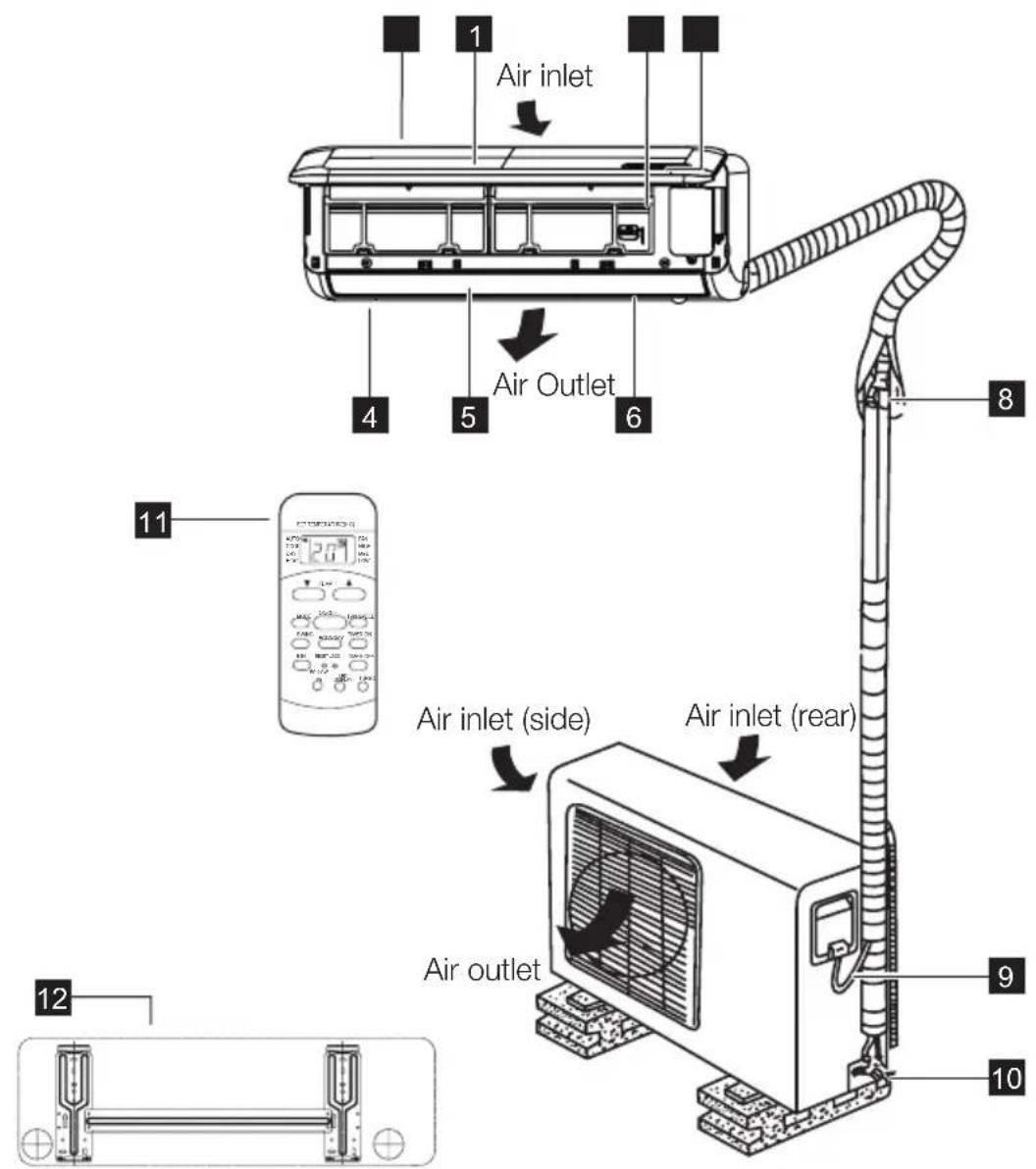
2.1 Split Type
1 Front panel
2 Air inlet
3 Air filter
4 Air outlet
5 Horizontal air flow grille
6 Vertical air flow louver(inside)
7 Display panel
8 Connecting pipe (optional)
9 Connecting cable (optional)
10 Stop Valve
Remote controller
12 Mounting plate
2.2 Cassette Type

1 Air flow louver (at air outlet)
2 Drain pump (drain water from indoor unit)
3 Drain pipe (optional)
4 Air outlet
5 Air filter(inside air-in grill)
6 Air inlet
7 Air-in grill
8 Display panel
9 Refrigerant pipe (optional)
10 Remote controller
11 Air inlet
12 Air outlet
2.3 Duct Type
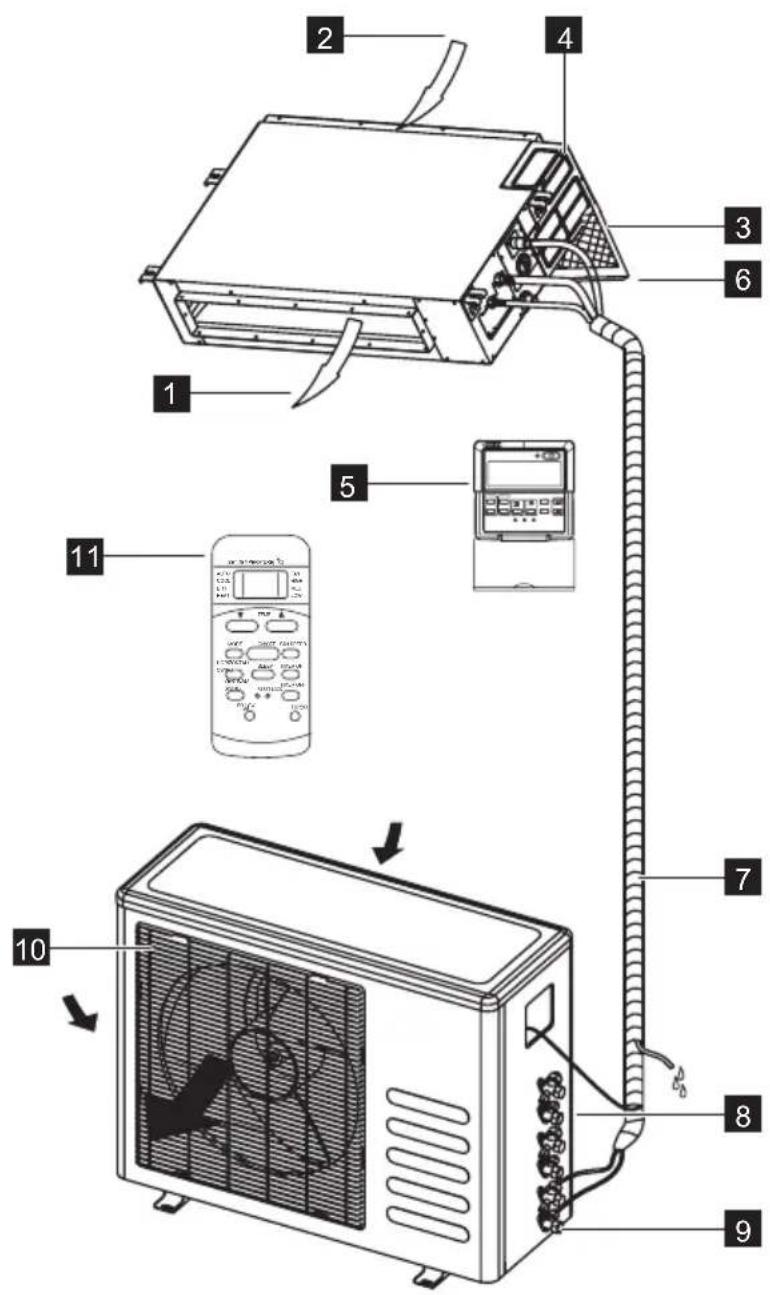
1 Air outlet
2 Air inlet
3 Air filter
4 Electric control cabinet
5 Wire controller (optional)
6 Drain pipe (optional)
7 Drain hose, refrigerant connecting pipe (optional)
8 Connective cable (optional)
9 Stop valve
10 Fan hood
11 Remote controller
3. CONTROL PANEL
3.1 Split Type

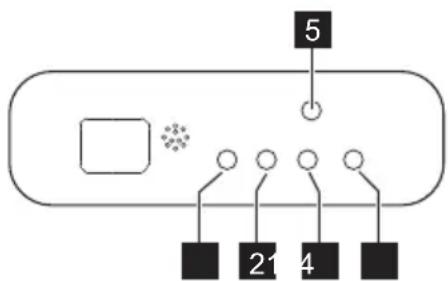
1 ION indication lamp(optional)
Lights up when Clean Air feature is activated.
2 DEFROST indication lamp
(Enabled on cooling & heating models only) Lights up when the air conditioner starts defrosting automatically or when the warm air control feature is activated in heating operation.
3 TEMPERATURE indication lamp
- Displays the temperature settings when the air conditioner is operational.
- Displays the malfunction code when fault occurs.
4 OPERATION indication lamp
This lamp illuminates when the air conditioner is in operation.
5 TIMER indication lamp
Lights up during Timer operation.
3.2 Cassette Type
1 OPERATION lamp
This indicator illuminates when the unit is operational.
2 TIMER indication lamp
Lights up during Timer operation.
3 PRE-DEF./FAN indication lamp
Lights up when the air conditioner starts defrosting automatically in heating operation(applicable to cooling & heating models only)or fan only mode is selected (applicable to cooling only models).
4 ALARM indication lamp
Flashes when malfunction occurs.
5 TEMPORARY button
This button is used to operate the unit temporarily in case you misplace the remote controller or its batteries are exhausted. One press of the manual control button will lead to the forced AUTO operation. If press the button twice within five seconds, the unit will operate under forced COOL operation. The forced COOL operation is used for testing purposes only, please do not choose it unless it is necessary.
3.3 Duct Type
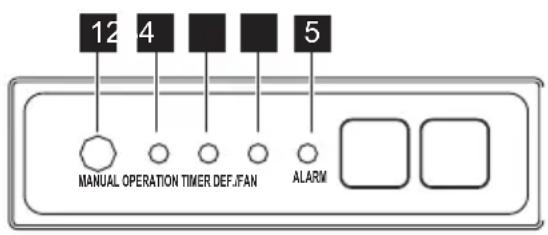
1 MANUAL button
This button is used to operate the unit temporarily in case you misplace the remote controller or its batteries are exhausted. One press of the manual control button will lead to the forced AUTO operation. If press the button twice within five seconds, the unit will operate under forced COOL operation. The forced COOL operation is used for testing purposes only, please do not choose it unless it is necessary.
2 OPERATION indication lamp
This indicator illuminates when the unit is operational.
3 TIMER indication lamp
Lights up during Timer operation.
4 DEF./FAN indication lamp
Lights up when the air conditioner starts defrosting automatically in heating operation (applicable to cooling & heating models only) or fan only mode is selected(applicable to cooling only models).
5 ALARM indication lamp
Flashes when malfunction occurs.
4. REMOTE CONTROL
4.1 How to use the Remote control
- Keep the remote control where its signal can reach the receiver of the indoor unit.
- When operate the air conditioner, make sure the remote control is pointing to the signal receiver of the indoor unit.
- When the remote control sends out a signal, the symbol will blink for about 1 second on the display of the remote control.
- The indoor unit will acknowledge the signal with a beep when it receives the signal from the remote control.
- Please press the button of the remote control and resend the signal if you did not hear a beep from the indoor unit.

- The air conditioner will not operate if curtains, doors or other materials block the signals from the remote control to the indoor unit.
- Prevent any liquid from falling into the remote control. Do not expose the remote control to direct sunlight or heat.
- If the infrared signal receiver on the indoor unit is exposed to direct sunlight, the air conditioner may not function properly. Use curtains to prevent the sunlight from falling on the receiver.
- If other electrical appliances react to the remote control, either move these appliances or consult your local dealer.
4.2 Location of the Remote Control

Fig.01
- Keep the remote control where its signal can reach the receiver of the indoor unit (a maximum distance of 8 m is allowed).
- When you select the timer operation, the remote control automatically transmits a signal to the indoor unit at the specified time.
- If you keep the remote control in a position that hinders proper signal transmission, a time lag of up to 15 minutes may occur.
- When the remote control sends out a signal, the symbol will blink for about 1 second on the display. The indoor unit will acknowledge the signal with a beep when it receives an effective signal.
4.3 Battery installation/replacement
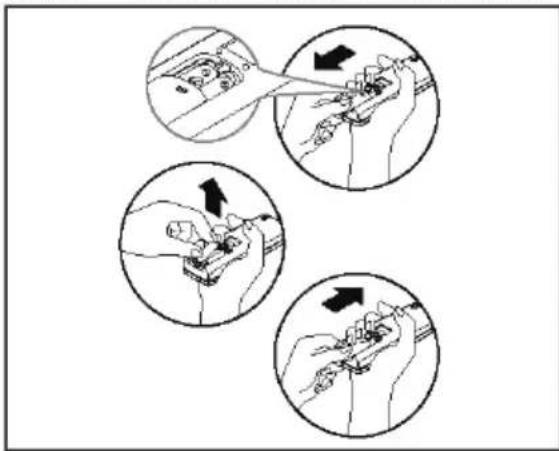
Fig.02 • Slide the battery compartment cover
off and insert two new alkaline dry batteries (2x AAA 1.5 Volt). Make sure that the polarity of (+) or (-) is installed correctly.
- Slide the battery compartment cover back on.

- When changing batteries, do not use old or varied ones, otherwise, it may cause problems with the remote control.
- If the remote control is not used for a long time, remove the batteries as old batteries may leak or corrode and damage the remote control.
- The battery life during normal use is about six months.
- If the remote control does not operate normally, please remove and refit the batteries. If abnormal operation continues, replace with new batteries.
5. REMOTE CONTROL DESCRIPTION
5.1 Split Type
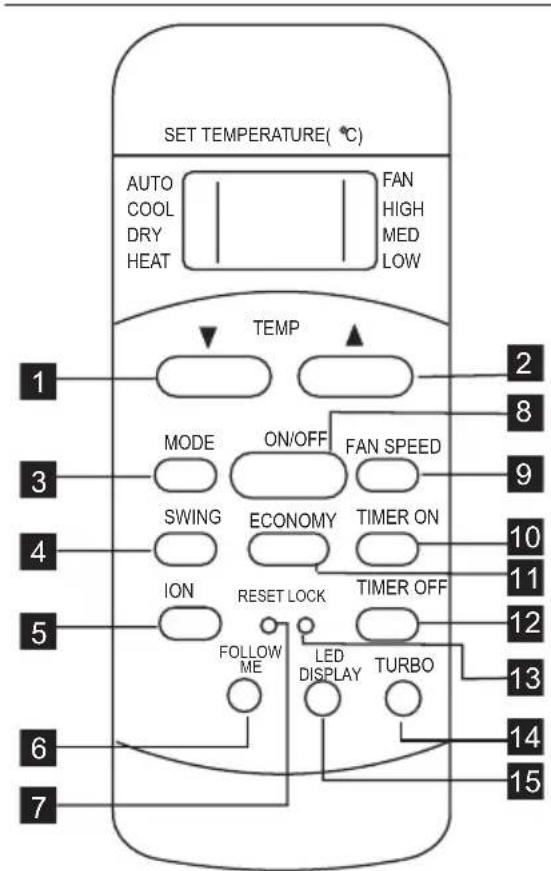
| 1 | TEMP DOWN Button |
| 2 | TEMP UP Button |
| 3 | MODE Button |
| 4 | SWING Button |
| 5 | ION Button(on some models) |
| 6 | FOLLOW ME Button |
| 7 | RESET Button |
| 8 | ON/OFF Button |
| 9 | FAN SPEED Button |
| 10 | TIMER ON Button |
| 11 | ECONOMY/SLEEP Button |
| 12 | TIMER OFF Button |
| 13 | LOCK Button |
| 14 | Turbo Button |
| 15 | LED Display Button |
TEMP DOWN BUTTON
Push this button to decrease the indoor temperature setting in 1^ (2^) increments to 17^(62^) .
TEMP UP BUTON
Push this button to increase the indoor temperature setting in 1^ (2^) increments to 30^(88^) .
MODE BUTTON
Each time the button is pressed, the operation mode is selected in the sequence of the following:


Heat mode is for reverse cycle models only.
SWING BUTTON
Press this button once and quickly to change the air flow direction of the horizontal louver a little. The moving angle of the louver is 6^ for each press. Press the button without releasing for
2 more seconds, the horizontal louver would swing automatically. Press it again, it would stop moving. When the louver swing/moving at a certain position which would affect the cooling and heating effect of the air conditioner, it would automatically change the swing direction (upward or downward).
ION BUTTON (on some models) When push this button, the ion generator is energized and will help to remove pollen and impurities from the air.
FOLLOW ME BUTTON
Push this button to initiate the Follow Me function, the remote controller begins to detect the actual temperature at its location. The remote controller will send this signal to the air conditioner every 3 minutes interval until press the Follow Me button again. The air conditioner will beep to indicate the Follow Me feature has ended if it does not receive the signal during any 7 minutes interval.
RESET BUTTON
Once the recessed RESET button is pressed, all of the current settings will be cancelled and the controller will return to the initial settings.
ON/OFF BUTTON
Operation starts when this button is pressed and stops when the button is pressed again.
FAN SPEED BUTTON
Used to select the fan speed in four steps.

TIMER ON BUTTON
Press this button to activate the Auto-on time setting. Each press will increase the time setting in 30 minutes increments, up to 10 hours, then at 1 hour increments up to 24 hours. To cancel the Auto-on time setting, just press the button until the time setting is 0.0.
ECONOMY/SLEEP BUTTON
Press this button to activate the Energy-Saving mode. Press again to stop the function. This function is available on COOL, HEAT or AUTO mode only and maintain the most comfortable temperature for you.
TIMER OFF BUTTON
Press this button to activate the Auto-off time setting. Each press will increase the time setting in 30 minutes increments, up to 10 hours, then at 1 hour increments up to 24 hours. To cancel the Auto-off time setting, just press the button until the time setting is 0.0.
LOCK BUTTON
When you press the Lock button, all current settings are locked in and the remote controller does not accept any operation except that of the Lock. Press again to cancel the Lock mode.
TURBO BUTTON
Push this button to activate the Turbo function which enables the unit to reach the preset temperature at cooling or heating operation in the shortest time (if the unit has no this function, there is no corresponding operation happened when press Turbo button.)
LED DISPLAY BUTTON
Press this button to clear the display on the unit, press it again to light the display.
5.2 Cassette/Duct Type
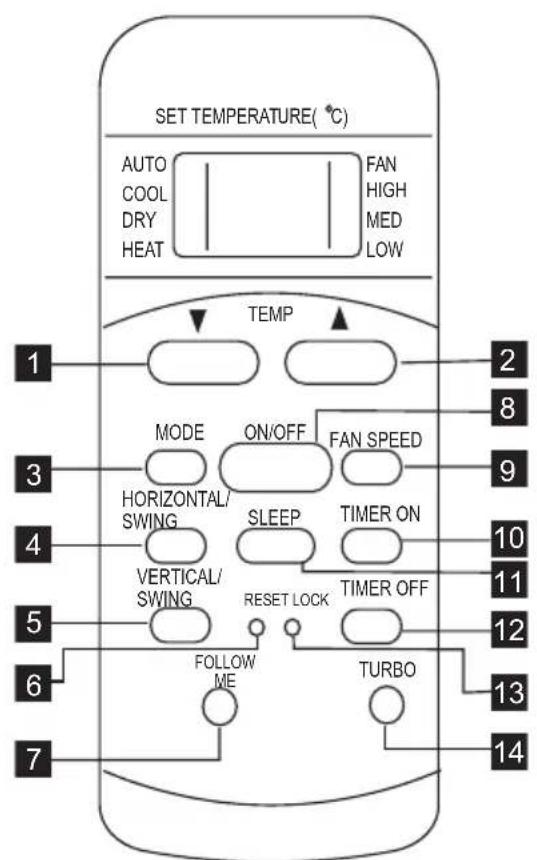
1 TEMP DOWN Button
2 TEMP UP Button
3 MODE Button
4 HORIZONTAL/SWING Button
5 VERTICAL/SWING Button
6 RESET Button
7 FOLLOW ME Button
8 ON/OFF Button
9 FAN SPEED Button
10 TIMER ON Button
11 ECONOMY/SLEEP Button
12 TIMER OFF Button
13 LOCK Button
14 Turbo Button
TEMP DOWN Button
Push this button to decrease the indoor temperature setting in 1^(2^) increments to 17^(62^) .
TEMP UP Button
Push this button to increase the indoor temperature setting in 1^(2^) increments to 30^(88^) .
MODE BUTTON
Each time the button is pressed, the operation mode is selected in the sequence of the following:


Heat mode is for reverse cycle models only.
HORIZONTAL/SWING BUTTON
When press the button once and quickly, the air flow direction setting feature of the louver is activated. The moving angle of the louver is 6^ for each press. Keep pressing the button to move the louver to the desired position. If keep pressing the button without releasing for 2 more
seconds, the auto swing feature of the louver is activated. The horizontal louver would swing up/down automatically. Press it again to stop.
VERTICAL/SWING BUTTON
When press the button once and quickly, the air flow direction setting feature of the louver is activated. The moving angle of the louver is 6^ for each press. Keep pressing the button to move the louver to the desired position. If keep pressing the button without releasing for 2 more seconds, the auto swing feature of the louver is activated. The vertical louver would swing right/left automatically. Press it again to stop.
RESET BUTTON
Once the recessed RESET button is pressed, all of the current settings will be cancelled and the controller will return to the initial settings.
FOLLOW ME BUTTON
Push this button to initiate the Follow Me function, the remote controller begins
to detect the actual temperature at its location. The remote controller will send this signal to the air conditioner every 3 minutes interval until press the Follow Me button again. The air conditioner will beep to indicate the Follow Me feature has ended if it does not receive the signal during any 7 minutes interval.
ON/OFF BUTTON
Operation starts when this button is pressed and stops when the button is pressed again.
FAN SPEED BUTTON
Used to select the fan speed in four steps.

TIMER ON BUTTON
Press this button to activate the Auto-on time setting. Each press will increase the time setting in 30 minutes increments, up to 10 hours, then at 1 hour increments up to 24 hours. To cancel the Auto-on time setting, just press the button until the time setting is 0.0.
ECONOMY/SLEEP BUTTON
Press this button to activate the Energy-Saving mode. Press again to stop the function. This function is available on COOL, HEAT or AUTO mode only and maintain the most comfortable temperature for you.
TIMER OFF BUTTON
Press this button to activate the Auto-off time setting. Each press will increase the time setting in 30 minutes increments, up to 10 hours, then at 1 hour increments up to 24 hours. To cancel the Auto-off time setting, just press the button until the time setting is 0.0.
LOCK BUTTON
When you press the Lock button, all current settings are locked in and the remote controller does not accept any operation except that of the Lock. Press again to cancel the Lock mode.
TURBO BUTTON
Push this button to activate the Turbo function which enables the unit to reach the preset temperature at cooling or heating operation in the shortest time(if the unit has no this function, there is no corresponding operation happened when press Turbo button.)
6. REMOTE CONTROL DISPLAY INDICATOR

1 MODE display
2 Transmission Indicator
3 Temp./Timer display
4 ON/OFF display
5 MODE display(FAN mode)
6 FAN SPEED display
7 FOLLOW ME display
8 TIMER display
9 LOCK Indicator
MODE DISPLAY
Displays the current selected mode. Including AUTO, COOL, DRY, HEAT (cooling & heating models only) and FAN.
TRANSMISSION INDICATOR
This transmission indicator will light when remote controller transmits signals to the indoor unit.
TEMP./TIMER DISPLAY
The temperature setting (from 17^ / 62^ to 30^ / 88^ ) or timer setting (0 24h) will be displayed. If FAN only mode is selected, there will be no display.
ON/OFF DISPLAY
This indicator will be displayed when the unit is operating.
FAN SPEED DISPLAY
Displays the selected fan speed: AUTO, HIGH, MED and LOW. Nothing displays when the fan speed is selected in AUTO speed. When AUTO or DRY Mode is selected, there will be no signals displayed.
7. FIRST USE
- Ensure the unit is plugged in and power is available.
- Be sure the batteries are inserted correctly in the remote control (the lights on the remote control will be on).
- Set the time by Control buttons and confirm by pressing the Clock button.
- Point the remote control to the indoor unit and press ON/OFF button to turn the unit on.

- In case of energy cut off or product shut down when removing the power cord, or even when changing the remote control batteries the microprocessor will return back to the AUTO mode.
FOLLOW ME DISPLAY
When pressing FOLLOW ME button in COOL or HEAT mode, the remote sensing function is activated and this indicator displays.
TIMER DISPLAY
This display area shows the settings of the TIMER. That is, if only the Auto-on time function is set, it will display TIMER ON. If only the Auto-off time function is set, it will display TIMER OFF. If both functions are set, it will display TIMER ON OFF which indicates you have chosen both the Auto-on time and Auto-off time.
LOCK INDICATOR
LOCK display is displayed when pushing the LOCK button. Push the LOCK button to clear display.
- The default operating mode is AUTO. Once you select the operating mode with remote control, the operating conditions will be saved in the indoor unit's microcomputer memory. The next time the air conditioner will start operating under the same conditions when you simply push the ON/OFF button of the remote control.
8. HOW TO USE THE REMOTE CONTROL
8.1 Split Type

Ensure the unit is plugged in and power is available. The OPERATION indicator on the display panel of the indoor unit illuminates.
Automatic Operation
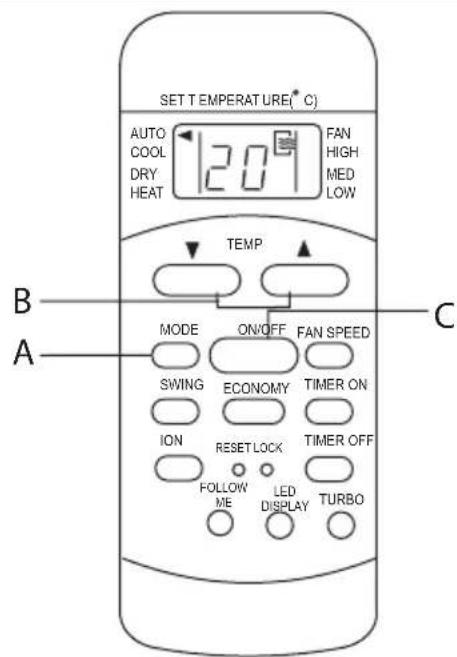
- Press the MODE button (A) to select Auto.
- Press the TEMP button (B) to set the desired temperature. The temperature can be set within a range of 17^ / 62^ 30^ / 88^ in 1^ / 2^ increments.
- Press the ON/OFF button (C) to start the air conditioner.

- In the Auto mode, the air conditioner can logically choose the mode of Cooling, Fan, Heating and Dehumidifying by sensing the difference between the actual ambient room temperature and the set temperature on the remote controller.
- In the Auto mode, you can not switch the fan speed. It has already been automatically controlled.
- If the Auto mode is not comfortable for you, the desired mode can be selected manually.
Dehumidifying Operation

- Press the MODE button (A) to select DRY mode.
- Press the TEMP button (B) to set the desired temperature. The temperature can be set within a range of 17^ / 62^ 30^ / 88^ in 1^ / 2^ increments.
- Press the ON/OFF button (C) to start the air conditioner.
In the Dehumidifying mode, you can not switch the fan speed. It has already been automatically controlled.
Cooling/Heating/Fan Operation
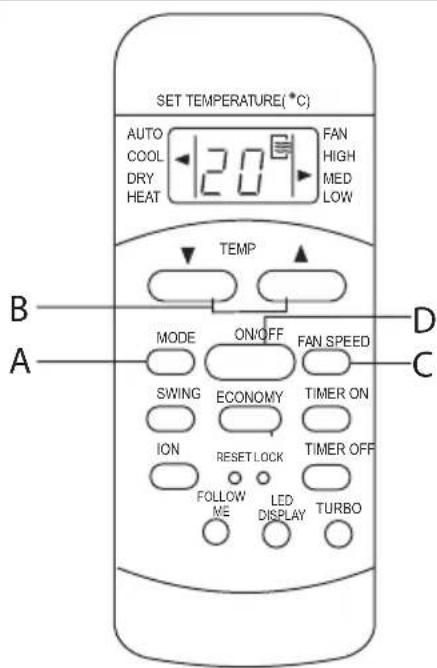
- Press the MODE button (A) to select COOL, HEAT (Reverse cycle models only) or FAN mode.
- Press the TEMP button (B) to set the desired temperature. The temperature can be set within a range of 17^ / 62^ 30^ / 88^ in 1^ / 2^ increments.
- Press the FAN SPEED button (C) to select the fan speed in four steps - Auto, Low, Med, or High.
- Press the ON/OFF button (D) to start the air conditioner.
i In the Fan mode, the setting temperature is not displayed in the remote controller and you are not able to control the room temperature either. In this case, only step 1, 3 and 4 may be performed.
Swing Operation

- When press the button (A) once and quickly, the air flow direction setting feature of the louver is activated. The moving angle of the louver is 6^ for each press. Keep pressing the button to move the louver to the desired position.
- If keep pressing the SWING button without releasing for 2 more seconds, the auto swing feature of the louver is activated. The horizontal louver would swing up/down automatically. Press it again to stop.

When the Louver swing or move to a position which would affect the cooling and heating effect of the air conditioner, it would automatically change the swing/ moving direction.
Timer Operation

Press the TIMER ON button (A) can set the auto-on time of the unit. And press the TIMER OFF button (B) can set the auto-off time of the unit.
To set the Auto-on time.
- Press the TIMER ON button. The remote controller shows TIMER ON, the last Auto-on setting time and the signal "h" will be shown on the LCD display area. Now it is ready to reset the Auto-on time to START the operation.
- Push the TIMER ON button again to set desired Auto-on time. Each time you press the button, the time increases in 30 minutes increments, up to 10 hours, then at 1 hour increments up to 24 hours.
- After setting the TIMER ON, there will be a one-half second delay before the remote controller transmits the signal to the air conditioner. Then, after approximately another 2 seconds, the signal "h" will disappear and the set temperature will re-appear on the LCD display window.
To set the Auto-off time.
- Press the TIMER OFF button. The remote controller shows TIMER OFF, the last Auto-off setting time and the signal "h" will be shown on the LCD display area. Now it is ready to reset the Auto-off time to START the operation.
-
Push the TIMER OFF button again to set desired Auto-off time. Each time you press the button, the time increases in 30 minutes increments, up to 10 hours, then at 1 hour increments up to 24 hours.
-
After setting the TIMER OFF, there will be a one-half second delay before the remote controller transmits the signal to the air conditioner. Then, after approximately another 2 seconds, the signal "h" will disappear and the set temperature will re-appear on the LCD display window.
The effective operation time set by the remote controller for the timer function is limited to the following settings: 0.5, 1.0, 1.5, 2.0, 2.5, 3.0, 3.5, 4.0, 4.5, 5.0, 5.5, 6.0, 6.5, 7.0, 7.5, 8.0, 8.5, 9.0, 9.5, 10, 11, 12, 13, 14, 15, 16, 17, 18, 19, 20, 21, 22, 23 and 24.
Example of Timer setting

Fig.03

Fig.05
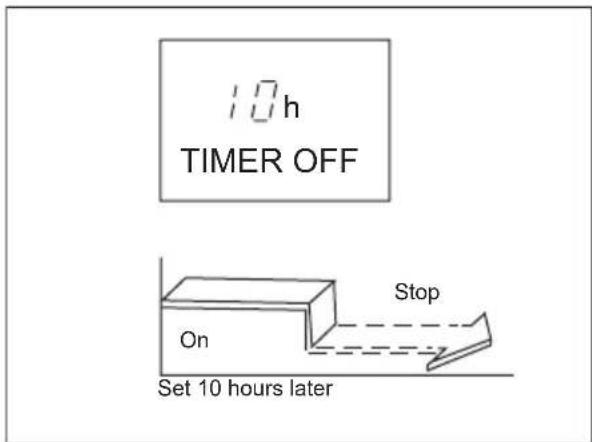
Fig.04

Fig.06
TIMER ON (Auto-on Operation)
The TIMER ON feature is useful when you want the unit to turn on automatically before say when you return home. The air conditioner will automatically start operating at the set time.
Example (refer to Fig.03):
To start the air conditioner in 6 hours.
- Press the TIMER ON button, the last setting of starting operation time and the signal "h" will show on the display area.
- Press the TIMER ON button to display "6:0h" on the TIMER ON display of the remote controller.
- Wait for 3 seconds and the TIMER ON indicator stops flashing and this function is activated. The digital display area will show the temperature again.
TIMER OFF (Auto-off Operation)
The TIMER OFF feature is useful when you want the unit to turn off automatically after you go to bed. The air conditioner will stop automatically at the set time.
Example (refer to Fig.04):
To stop the air conditioner in 10 hours.
- Press the TIMER OFF button, the last setting of stopping operation time and the signal "h" will show on the display area.
- Press the TIMER OFF button to display "10h" on the TIMER OFF display of the remote controller.
- Wait for 3 seconds and the TIMER OFF indicator stops flashing and this function is activated. The digital display area will show the temperature again.
COMBINED TIMER (Setting both ON and OFF timers simultaneously)
TIMER OFF TIMER ON (On Stop Start operation)
This feature is useful when you want to stop the air conditioner after you go to bed, and start it again in the morning when you wake up or when you return home.
Example (refer to Fig.05):
To stop the air conditioner 2 hours after setting and start it again 10 hours after setting.
- Press the TIMER OFF button.
- Press the TIMER OFF button again to display 2.0h on the TIMER OFF display.
- Press the TIMER ON button.
- Press the TIMER ON button again to display 10h on the TIMER ON display.
- Wait for the remote control to display the setting temperature.
TIMER ON TIMER OFF (Off Start Stop operation)
This feature is useful when you want to start the air conditioner before you wake up and stop it after you leave the house.
Example (refer to Fig.06):
To start the air conditioner 2 hours after setting, and stop it 5 hours after setting.
- Press the TIMER ON button.
- Press the TIMER ON button again to display 2.0h on the TIMER ON display.
- Press the TIMER OFF button.
- Press the TIMER OFF button again to display 5.0h on the TIMER OFF display.
- Wait for the remote control to display the setting temperature.

The timer setting(TIMER ON or TIMER OFF) that in sequence occurs directly after the set time will be activated first.
ECONOMY/SLEEP Operation

When you press the ECONOMY/SLEEP button (A), the economic running function will be activated, the set temperature will increase(cooling) or decrease(heating) by 1^ (2^) over the next 30 minutes and by another 1^ (2^) after an additional 30 minutes. This new temperature will be maintained for 7 hours before it returns to the originally selected temperature.
(NOTE:On some models, the set temperature will increase (cooling) or decrease(heating) by 1^ (2^) per hour for 2 hours. This new temperature will be maintained for 5 hours, then the unit is off.)
The ECONOMY/SLEEP function is only available under Cooling, Heating and AUTO operation.
8.2 CASSETTE / DUCT Type

Ensure the unit is plugged in and power is available. The OPERATION indicator on the display panel of the indoor unit illuminates.
Automatic Operation

- Press the MODE button to select Auto (A).
- Press the TEMP button (B) to set the desired temperature. The temperature can be set within a range of 17^ / 62^ 30^ / 88^ in 1^ / 2^ increments.
-
Press the ON/OFF button (C) to start the air conditioner.
-
In the Auto mode, the air conditioner can logically choose the mode of Cooling, Fan, Heating and Dehumidifying by sensing the difference between the actual ambient room temperature and the set temperature on the remote controller.
-
In the Auto mode, you can not switch the fan speed. It has already been automatically controlled.
- If the Auto mode is not comfortable for you, the desired mode can be selected manually.
Dehumidifying Operation

- Press the MODE button to select DRY mode.
- Press the TEMP button to set the desired temperature. The temperature can be set within a range of 17^ / 62^ 30^ / 88^ in 1^ / 2^ increments.
- Press the ON/OFF button to start the air conditioner.

In the Dehumidifying mode, you can not switch the fan speed. It has already been automatically controlled.
Cooling/Heating/Fan Operation
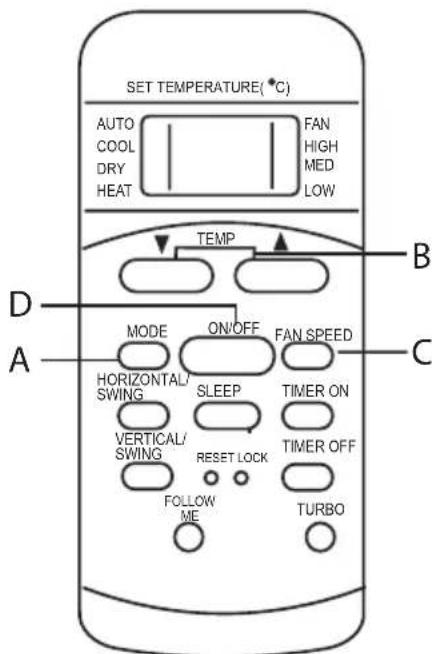
- Press the MODE button (A) to select COOL, HEAT (Reverse cycle models only) or FAN mode.
- Press the TEMP button (B) to set the desired temperature. The temperature can be set within a range of 17^ / 62^ 30^ / 88^ in 1^ / 2^ increments.
- Press the FAN SPEED button (C) to select the fan speed in four steps - Auto, Low, Med, or High.
- Press the ON/OFF button (D) to start the air conditioner. The OPERATION indicator on the display panel of the indoor unit illuminates. The operating mode is selected in accordance with the room temperature and operation starts after approximately 3 minutes (If you select FAN mode, the unit will start immediately).

In the Fan mode, the setting temperature is not displayed in the remote controller and you are not able to control the room temperature either. In this case, only step 1, 3 and 4 may be performed.
Horizontal/swing and Vertical/swing button function
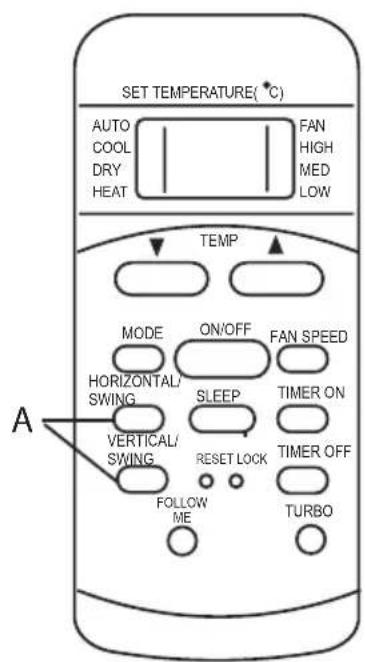
-
When press the button (A) once and quickly, the air flow direction setting feature of the louver is activated. The moving angle of the louver is 6^ for each press. Keep pressing the button to move the louver to the desired position.
-
If press the button without releasing for 2 more seconds, the auto swing feature of the louver is activated. The horizontal/vertical louver would swing (up/down or left/right) automatically. Press it again to stop.
When the louver swing or move to a position which would affect the cooling and heating effect of the air conditioner, it would automatically change the swing/ moving direction.
Timer Operation

Press the TIMER ON button (A) can set the auto-on time of the unit. And press the TIMER OFF button (B) can set the auto-off time of the unit.
To set the Auto-on time.
- Press the TIMER ON button. The remote controller shows TIMER ON, the last Auto-on setting time and the signal "h" will be shown on the LCD display area. Now it is ready to reset the Auto-on time to START the operation.
- Push the TIMER ON button again to set desired Auto-on time. Each time you press the button, the time increases in 30 minutes increments, up to 10 hours, then at 1 hour increments up to 24 hours.
- After setting the TIMER ON, there will be a one-half second delay before the remote controller transmits the signal to the air conditioner. Then, after approximately another 2 seconds, the signal "h" will disappear and the set temperature will re-appear on the LCD display window.
To set the Auto-off time.
-
Press the TIMER OFF button. The remote controller shows TIMER OFF, the last Auto-off setting time and the signal "h" will be shown on the LCD display area. Now it is ready to reset the Auto-off time to START the operation.
-
Push the TIMER OFF button again to set desired Auto-off time. Each time you press the button, the time increases in 30 minutes increments, up to 10 hours, then at 1 hour increments up to 24 hours.
-
After setting the TIMER OFF, there will be a one-half second delay before the remote controller transmits the signal to the air conditioner. Then, after approximately another 2 seconds, the signal "h" will disappear and the set temperature will re-appear on the LCD display window.
The effective operation time set by the remote controller for the timer function is limited to the following settings: 0.5, 1.0, 1.5, 2.0, 2.5, 3.0, 3.5, 4.0, 4.5, 5.0, 5.5, 6.0, 6.5, 7.0, 7.5, 8.0, 8.5, 9.0, 9.5, 10, 11, 12, 13, 14, 15, 16, 17, 18, 19, 20, 21, 22, 23 and 24.
Example of Timer setting

Fig.07

Fig.08

Fig.08
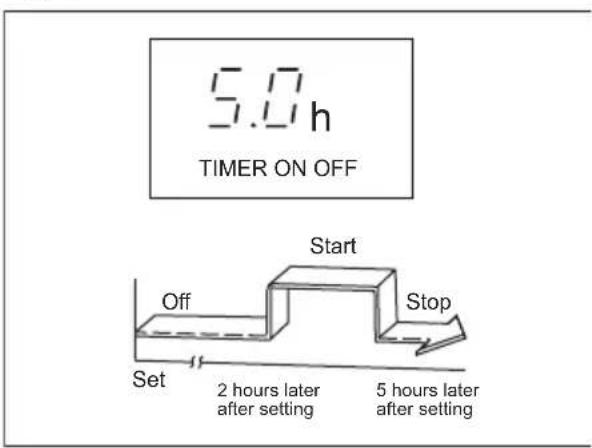
Fig.10
TIMER ON (Auto-on Operation)
The TIMER ON feature is useful when you want the unit to turn on automatically before say when you return home. The air conditioner will automatically start operating at the set time.
Example (refer to Fig.07):
To start the air conditioner in 6 hours.
- Press the TIMER ON button, the last setting of starting operation time and the signal "h" will show on the display area.
- Press the TIMER ON button to display "6:0h" on the TIMER ON display of the remote controller.
- Wait for 3 seconds and the TIMER ON indicator stops flashing and this function is activated. The digital display area will show the temperature again.
TIMER OFF (Auto-off Operation)
The TIMER OFF feature is useful when you want the unit to turn off automatically after you go to bed. The air conditioner will stop automatically at the set time.
Example (refer to Fig.08):
To stop the air conditioner in 10 hours.
- Press the TIMER OFF button, the last setting of stopping operation time and the signal "h" will show on the display area.
- Press the TIMER OFF button to display "10h" on the TIMER OFF display of the remote controller.
- Wait for 3 seconds and the TIMER OFF indicator stops flashing and this function is activated. The digital display area will show the temperature again.3
COMBINED TIMER (Setting both ON and OFF timers simultaneously)
TIMER OFF TIMER ON (On Stop Start operation)
This feature is useful when you want to stop the air conditioner after you go to bed, and start it again in the morning when you wake up or when you return home.
Example (refer to Fig.09):
To stop the air conditioner 2 hours after setting and start it again 10 hours after setting.
- Press the TIMER OFF button.
- Press the TIMER OFF button again to display 2.0h on the TIMER OFF display.
- Press the TIMER ON button.
- Press the TIMER ON button again to display 10h on the TIMER ON display.
- Wait for the remote control to display the setting temperature.
TIMER ON TIMER OFF (Off Start Stop operation)
This feature is useful when you want to start the air conditioner before you wake up and stop it after you leave the house.
Example (refer to Fig.10):
To start the air conditioner 2 hours after setting, and stop it 5 hours after setting.
- Press the TIMER ON button.
- Press the TIMER ON button again to display 2.0h on the TIMER ON display.
- Press the TIMER OFF button.
- Press the TIMER OFF button again to display 5.0h on the TIMER OFF display.
- Wait for the remote control to display the setting temperature.

The timer setting(TIMER ON or TIMER OFF) that in sequence occurs directly after the set time will be activated first.
ECONOMY/SLEEP OPERATION
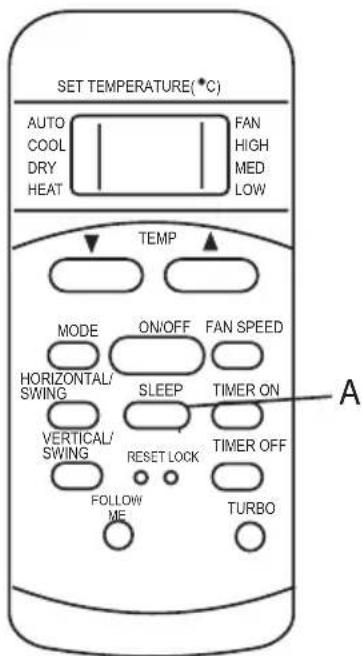
When you press the SLEEP button (A), the economic running function will be activated. During Cooling, Heating or AUTO operation, the set temperature of the air conditioner will automatically increase or decrease 1C per hour for 2 hours. After 2 hours, the set point will continue at that temperature and the fan motor will be set to LOW speed. The sleep mode function can maintain the most comfortable temperature and save more energy for you.

The ECONOMY/SLEEP function is only available under Cooling, Heating and AUTO operation.
Reset and Lock buttons function

- When you press the recessed LOCK button (A), all current settings are locked in and remote controller does not accept any operation except that of the LOCK. Use the LOCK mode when you want to prevent settings from being changed accidentally. Press the LOCK button again when you want to cancel the LOCK mode. A lock symbol will appear on the bottom right hand side of the remote controller display when the LOCK function is activated.
- When you press the recessed RESET button (B), all current settings are cancelled and return to original factory settings.
9. HOW TO USE THE INDOOR UNIT
9.1 Split Type

Fig.11
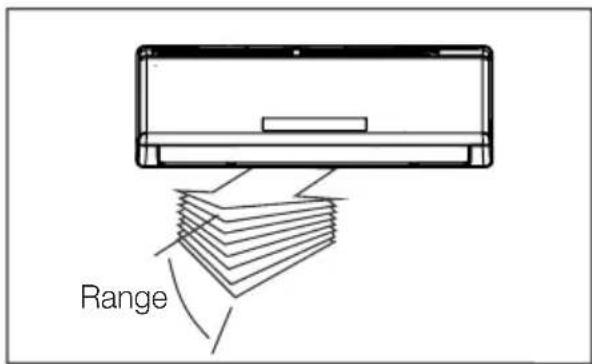
Fig.12

Fig.13

WARNING!
- Do not operate the air conditioner for long periods with the air flow direction set downward in cooling or dehumidifying mode. Otherwise, condensation may occur on the surface of the horizontal louver causing moisture to drop on to the floor or on furnishings.
-
When the air conditioner is started immediately after it was stopped, the horizontal louver might not move for approximately 10 seconds. louver in closed position.
-
Adjust the air flow direction properly otherwise it might cause discomfort or cause uneven room temperatures.
- Adjust the horizontal louver using the remote controller.
- Adjust the vertical louver manually.
To set the vertical air flow (Up-- Down) direction
Perform this function while the unit is in operation. Use the remote controller to adjust the air flow direction. The horizontal louver can be moved at a range of 6^ for each press, or swing up and down automatically.
To set the horizontal air flow direction (left - right)
Move the deflector rod manually to adjust the air flow in the direction you prefer.
IMPORTANT!
Do not put your fingers into the panel of blower and suction side. The high-speed fan inside may cause danger.
- Open angle of the horizontal louver should not be set too small, as COOLING or HEATING performance may be impaired due to too restricted air flow area.
- Do not move the horizontal louver manually, otherwise the horizontal louver will be out of sync. Please cease operating, unplug power for a few seconds, then restart the air conditioner.
- Do not operate unit with horizontal louver in closed position.
9.2 Cassette Type

Fig.14 Cooling operation Fig.15 Heating operation
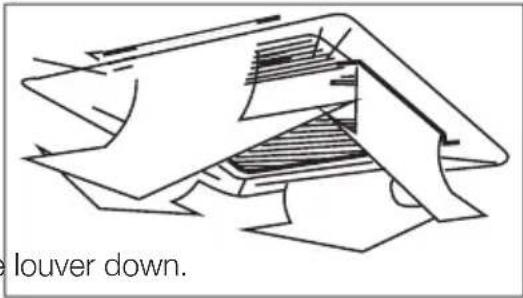
When using the panel with auto.louver, press SWING button, the auto.louver will swing automatically and the best cooling(heating) effects will be achieved.
9.3 Duct Type
The following is how to adjust the air flow direction when the air outlet parts (sold separately) is used with the indoor unit.

Fig.16 Cooling operation

Fig.17 Heating operation
-
Optimum performance will be achieved within these operating temperatures. If air conditioner is used outside of the above conditions, certain safety protection features might come into operation and cause the unit to function abnormally.
-
If the air conditioner runs for a long time in cooling mode and the humidity is high (over 80% ), condensed water may drip out of the unit. Please sets the vertical air flow louver to its maximum angle (vertically to the floor), and set HIGH fan mode.
Suggestion:
For the unit adopts an Electric Heater, when the outside ambient temperature is below 0^(32^) , we strongly recommend you to keep the machine plugged in order to guarantee it running smoothly.
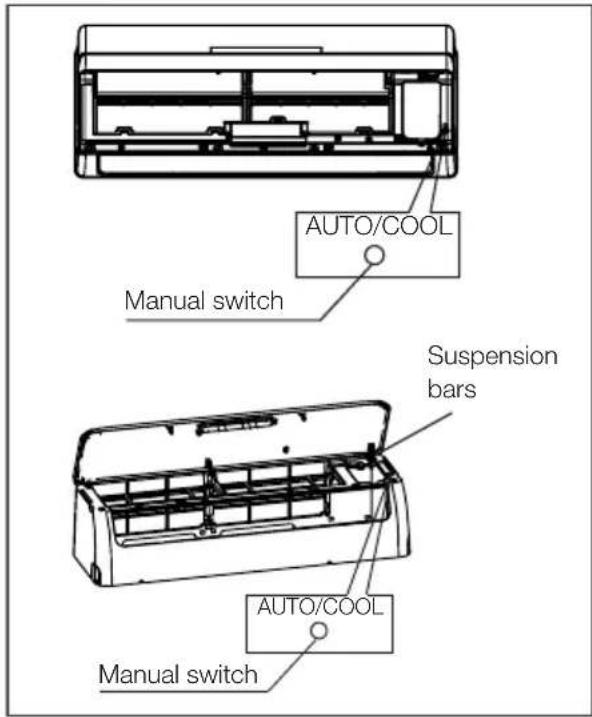
Fig.18 Units are equipped with a switch to run
emergency operation mode. It can be accessed by opening the front panel. This switch is used for manual operation in case the remote controller fails to work or maintenance necessary.
- Open and lift the front panel up to an angle until it remains fixed with a clicking sound. For some models, please use suspension bars to prop up the panel.
- One press of the manual control switch will lead to the forced AUTO operation. If press the switch twice within five seconds, the unit will operate under forced COOL operation.
- Close the panel firmly to its original position.
i
- The unit must be turned off before operating the manual control button. If the unit is operational, continue pressing the manual control button until the unit is off.
- This switch is used for testing purposes only. You had better not choose it.
To restore the remote controller operation, use the remote controller directly.
To achieve optimal performance, please note the following:
- Adjust the air flow direction correctly so that it is not forwards people.
- Adjust the temperature to achieve the highest comfort level. Do not adjust the unit to excessive temperature levels.
- Close doors and windows on COOL or HEAT modes, or performance may be reduced.
-
Use TIMER ON button on the remote controller to select a time you want to start your air conditioner.
-
Do not put any object near air inlet or air outlet, as the efficiency of the air conditioner may be reduced and the air conditioner may stop running.
- Clean the air filter periodically, otherwise cooling or heating performance may be reduced.
- Do not operate unit with horizontal louvre in closed position.
13. CLEANING AND MAINTENANCE
13.1 Before Mainatenance
Turn the system off before cleaning. To clean, wipe with a soft, dry cloth. Do not use bleach or abrasives.

WARNING!
Power supply must be disconnected before cleaning the indoor unit.

-
A cloth dampened with cold water may be used on the indoor unit if it is very dirty. Then wipe it with a dry cloth.
-
Do not use a chemically treated cloth or duster to clean the unit.
13.3 Cleaning the Filters
13.3.1 Split Type

Fig.19
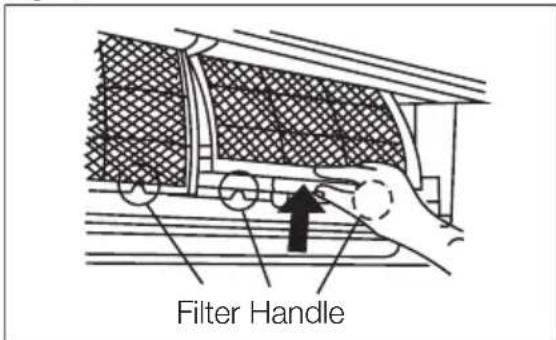
Fig.20

Fig.21
- Do not use benzine, thinner, polishing powder, or similar solvents for cleaning. These may cause the plastic surface to crack or deform.
- Never use water hotter than 40^ / 104^ to clean the front panel, it could cause deformation of discoloration.
13.2 Cleaning the Unit
Wipe the unit with a soft dry cloth only. If the unit is very dirty, wipe it with a cloth soaked in warm water.
A clogged air filter reduces the cooling efficiency of this unit. Please clean the filter once every 2 weeks.
- Lift the indoor unit panel up to an angle until it stops with a clicking sound. For some models, please use suspension bars to prop up the panel.
- Take hold of the handle of the air filter and lift it up slightly to take it out from the filter holder, then pull it downwards.
- Remove the AIR FILTER from the indoor unit.
Clean the AIR FILTER once two weeks.
Clean the AIR FILTER with a vacuum cleaner or water, then dry it up in cool place.
- Remove the Air Freshening Filter from its supporting frame (on some models).
- Clean the air freshening filter at least once a month, and replace it every 4-5 months.
- Clean it with vacuum cleaner, then dry it in cool place.

Fig.22
- Install the air freshening filter back into position.
- Insert the upper portion of air filter back into the unit, taking care that the left and right edges line up correctly and place filter into position.
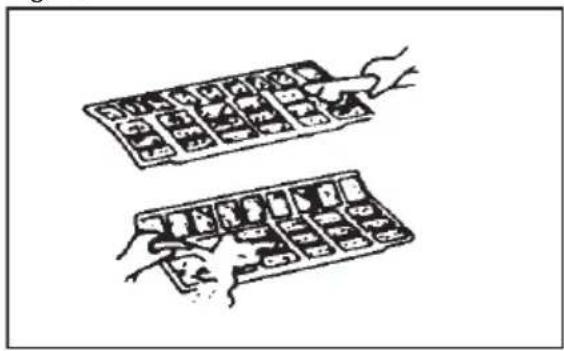
Fig 23

Fig.24
13.3.2 Cassette Type

Fig.25
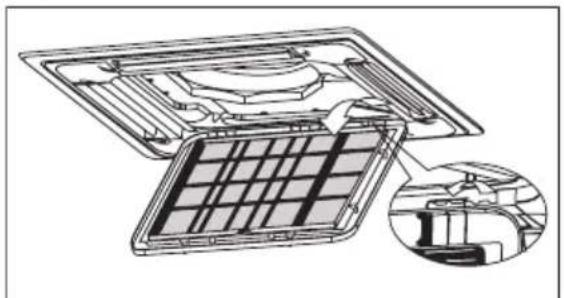
Fig.26
- The air filter can prevent the dust or other particles from going inside. In case of blockage of the filter, the working efficiency of the air conditioner may greatly decrease. Therefore, the filter must be cleaned once two weeks during long time using.
- If the air conditioner is positioned in a dust place, the cleaning frequency of the air filter must be increased.
- If the accumulated dust is too heavy to be cleaned, please replace the filter with a new one (the replaceable air filter is an optional fitting).
- Take out the air-in grill
Push the grill switches towards the middle simultaneously as indicated in Fig. A. Then pull down the air-in grill.
Important!
The control box cables, which are originally connected with the main body electrical terminators must be pulled off before doing as indicated above.

Fig.27
Fig.28
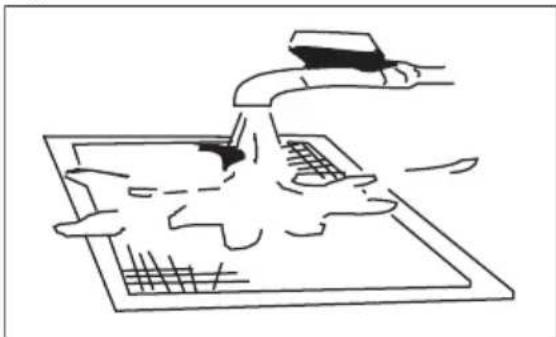
- Take out the air-in grill(together with the air filter shown in Fig.B). Pull the air-in grill down at 45^ and lift it up to take out the grill.
- Dismantle the air filter.
- Clean the air filterVacuum cleaner or pure water may be used to clean the air filter. If the dust accumulation is too heavy, please use soft brush and mild detergent to clean it and dry out in the cool place).
- The air-in side should face up when using vacuum cleaner.
- The air-in side should face down when using water.
- Re-install the air filter
- Install and close the air-in grill in the reverse order of step 1 and 2 and connect the control box cables to the corresponding terminators of the main body.
13.3.3 Duct Type

Fig.29

Fig.30
- For the unit is a rear ventilated one, please remove the screws (2 pieces) fixed on the filter and take down the filter away from the unit.
- For the unit is a descensional ventilated one, please push the filter up slightly to let the position retainer escape away from the flange fixed holes, and take off the filter according to the arrow direction.
- Clean the air filterVacuum cleaner or pure water may be used to clean the air filter. If the dust accumulation is too heavy, please use soft brush and mild detergent to clean it and dry out in the cool place).
- The air-in side should face up when using vacuum cleaner.
The air-in side should face down when using water. - Re-install the air filter
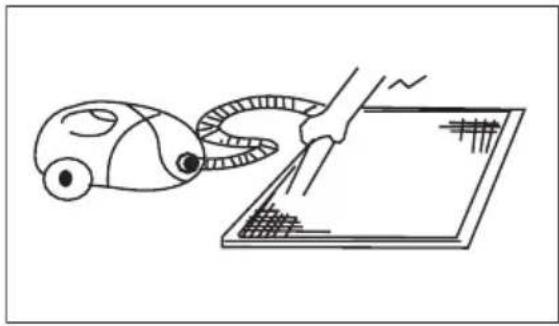
Fig.31 Fig.32
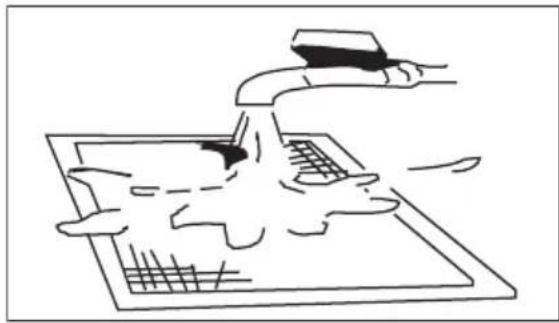
13.4 Cleaning the air outlet and the panel
- Use a dry and soft cloth to wipe it.
- Pure water or mild detergent may be used if it is very dirty.

WARNING!
- Do not use benzene, thinner, polishing power, or similar solvents for cleaning. These may cause the surface to crack or deform.
- To avoid the risk of electrical shock or fire, do not let water fall into the indoor unit.
- Never wipe the air flow louver violently.
- An air conditioner without air filter can not expel the dust out of the room, which would cause malfunctions by accumulation.
13.5 Replacement the filters
- Remove the air filter.
- Remove the air freshening filter.
- Install a new air freshening filter.
- Reinstall the air filter and securely close the front panel.
13.6 Preparation for extended non-operation
If you plan to idle the unit for a long time, perform the following:
-
Clean the indoor unit and filters.
-
Operate the fan for about half a day to dry the inside of the unit.
- Stop the air conditioner and disconnect power.
- Remove the batteries from the remote controller. The outdoor unit requires periodic maintenance and cleaning. Do not attempt to do this yourself. Contact your dealer or service provider.
13.7 Pre-season inspection
- Check that the wiring is not broken off or disconnected.
- Clean the indoor unit and filters.
- Check that the air filter is installed.
- Check if the air outlet or inlet is blocked after the air conditioner has not been used for a long time.

WARNING!
- Do not touch the metal parts of the unit when removing the filter. Injuries can occur when handling sharp metal edges.
- Do not use water to clean inside the air conditioner. Exposure to water can destroy the insulation, leading to possible electric shock.
- When cleaning the unit, first make sure that the power and circuit breaker are turned off.
- Do not wash air filter with hot water at more than 40^ / 104^ . Shake off moisture completely and dry it in the shade. Do not expose it directly to the sun, it may shrink.
14. OPERATION TIPS
The following events may occur during normal operation.
1. Protection of the air conditioner Compressor protection
- The compressor can't restart for 3-4 minutes after it stops.
Anti-cold air (Cooling and heating models only)
- The unit is designed not to blow cold air on HEAT mode, when the indoor heat exchanger is in one of the following three situations and the set temperature has not been reached.
A) When heating has just started.
B) Defrosting.
C) Low temperature heating.
- The indoor or outdoor fan stop running when defrosting (Cooling and heating models only).
Defrosting (Cooling and heating models only)
- Frost may be generated on the outdoor unit during heat cycle when outdoor temperature is low and humidity is high resulting in lower heating efficiency of the air conditioner.
- During this condition air conditioner will stop heating operation and start defrosting automatically.
- The time to defrost may vary from 4 to 10 minutes according to the outdoor temperature and the amount of frost built up on the outdoor unit.
2. A white mist coming out from the indoor unit
- A white mist may generate due to a large temperature difference between air inlet and air outlet on COOL mode in an indoor environment that has a high relative humidity.
- A white mist may generate due to moisture generated from defrosting process when the air conditioner restarts in HEAT mode operation after defrosting.
3. Low noise of the air conditioner
- You may hear a low hissing sound when the compressor is running or has just stopped running. It is the sound of the refrigerant flowing or coming to a stop.
- You can also hear a low "squeak" sound when the compressor is running or has just stopped running. This is caused by heat expansion and cold contraction of the plastic parts in the unit when the temperature is changing.
- A noise may be heard due to louver restoring to its original position when power is turned on.
4. Dust is blown out from the indoor unit
This is a normal condition when the air conditioner has not been used for a long time or during first use of the unit.
5. A peculiar smell comes out from the indoor unit
This is caused by the indoor unit giving off smells permeated from building material, from furniture, or smoke.
6. The air conditioner turns to FAN only mode from COOL or HEAT (For cooling and heating models only) mode
When indoor temperature reaches the temperature setting on air conditioner, the compressor will stop automatically, and the air conditioner turns to FAN only mode. The compressor will start again when the indoor temperature rises on COOL mode or falls on HEAT mode (For cooling and heating models only) to the set point.
7. The air conditioner runs Anti-mildew function after turning off the unit.
When turning off the unit under COOL(AUTO COOL, FORCED COOL) and DRY mode, the air conditioner will run Anti-mildew function for 7-10 minutes, if turns off on HEAT mode, the unit will continue operating for about 30 seconds at LOW fan speed, then stop the operation and turn off the unit automatically.
Dripping water may generate on the surface of the indoor unit when cooling in a high relatively humidity (relative humidity higher than 80% ). Adjust the horizontal louver to the maximum air outlet position and select HIGH fan speed.
8. Heating mode (For cooling and heating models only)
The air conditioner draws in heat from the outdoor unit and releases it via the indoor unit during heating operation. When the outdoor temperature falls, heat drawn in by the air conditioner decreases accordingly. At the same time, heat loading of the air conditioner increases due to larger difference between indoor and
outdoor temperature. If a comfortable temperature can't be achieved by the air conditioner, we suggest you use a supplementary heating device.
9. Auto_restart function
- Power failure during operation will stop the unit completely.
- For the unit without Auto_restart feature, when the power restores, the OPERATION indicator on the indoor unit starts flashing. To restart the operation, push the ON/OFF button on the remote controller. For the unit with Auto_restart feature, when the power restores, the unit restarts automatically with all the previous settings preserved by the memory function.
15. TROUBLESHOOTING
| Trouble | OPERATION (RUN) indicator or other indicators continue flashing. | The unit may stop operation or continue to run in a safety condition(depending on models). Waiting for about 10 minutes, the fault may be recovered automatically, if not, disconnect the power and then connect it in again. If the problem still exists, disconnect the power and contact the nearest customer service center. |
| If one of the following code appears on the display area: E0,E1,E2, E3..., P0, P1, P2, P3..., or F0, F1, F2, F3.... | ||
| Fuse blows frequently or circuit breaker trips frequently. | Stop the air conditioner immediately, disconnect the power and contact the nearest customer service center. | |
| Other objects or water fall into the air conditioner. | ||
| Terrible odors are smelled or abnormal sounds are heard. | ||
| Malfunctions Cause What should be done? | ||
| Unit does not start | Power cut Wait for power to be restored. | |
| Unit may have become Unplugged. | Check that plug is securely in wall receptacle. | |
| Fuse may have blown. Replace the fuse. | ||
| Battery in Remote controller may have been exhausted. | Replace the battery. | |
| The time you have set with timer is incorrect. | Wait or cancel timer setting. | |
| Unit not cooling or heating (Cooling/heating models only) room very well while air flowing out from the air conditioner | Inappropriate temperature setting. | Set temperature correctly. For detailed method please refer to "Using remote control" section. |
| Air filter is blocked. Clean the air filter. | ||
| Doors or Windows are open. Close the doors or windows. | ||
| Air inlet or outlet of indoor or outdoor unit has been blocked. | Clear obstructions away first, then restart the unit. | |
| Compressor 3 minutes protection has been activated. | Wait | |
| If the trouble has not been corrected, please contact a local dealer or the nearest customer service center. Be sure to inform them of the detailed malfunctions and unit model number. | ||
Notes: Do not attempt to repair the unit yourself.
Always consult an authorized service provider.
16. CORRECT DISPOSAL OF THIS PRODUCT
This marking indicates that this product should not be disposed with other household wastes throughout the EU. To prevent possible harm to the environment or human health from uncontrolled waste disposal, recycle it responsibly to promote the sustainable reuse of material resources. To return your used device, please use the return and collection systems or contact the retailer where the product was purchased. They can take this product for environmental safe recycling.
TABLE DES MATIÈRES
- CONSIGNES DE SECURITE 41
2.DESCRIPTION DE L'APPAREIL 45
3.BANDEAU DE COMMANDE 48 - TELECOMMANDE 49
5.DESCRIPTION DE LA TELÉCOMMANDE 51 - VOYANT DE L'AFFICHAGE DE LA TELÉCOMMANDE 55
7.PREMIÈRE UTILISATION 56
8.COMMENT UTILISER LA TELÉCOMMANDE. 56
9.COMMENT UTILISER L'ELEMENT INTERIEUR 67 - TEMPERATURE DE FONCTIONNEMENT 68
- FONCTIONNEMENT D'URGENCE 69
- UTILISATION OPTIMALE 69
- NETTOYAGE ET ENTRETIEN 70
- CONSEILS D'UTILISATION 74
15.DEPANNAGE 75 - ÉLIMINATION CORRECTE DE CE PRODUIT 76
NOUS PENSES À VOUS
13.3.3 Type Gainable

Fig.29
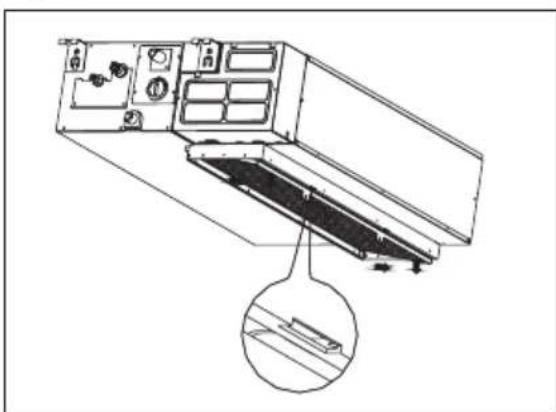
Fig.30
Kataxwpiote To Tpoiov oac, wote va exete Kautepeo epic: www.electrolux.com/productregistration

ayopaoTe Eapntmuata, avawoiqa kai yvnoia avtalaktiKa yia tn ouakeun oac: www.electrolux.com/shop
YNOETHPIEH IENATQN KAI SEPBIZ
Uviotatai n xpnon yvnoiow avtaaaktkwv.
Otav eikovweite to epbiC, baiwtheta otexteiaeoiua ta akoloua otoixia.
Auta ta oToiexia utapxouv otnv Tivakiδa TeXVIKωv xapaktnpiotikωv. MovTeLo, Kwokoc Tpoiovtoc (PNC), apiθμoç σεipac

PpOeioiOn / PpOoX - PAnpoopoe c aOaAiaC.

IIAHKTPO VERTICAL/SWING
Eav pntnoet auTo TnAnktpo mia oopa ynpyopa, evpyoTIOeITai n aeitoupyia puOmuans tnc kateuBuvongpoc aepa Tng TpeoiDac. H ywvia kivnons Tns TpeoiDac aAalaZei kata 60 eK aTe PAtnoTE pntnevo to nnktpo yia va eTakivnoTe Tnv TpeoiDaaon thcN Tou HeleTe. Eav KpatnoTe To TnAnktpo Tatnevo ia akoua 2 deutepoAETTTa, evpyoTIOeITai n aeitoupyia autOpatng kivnocs Tns TpeoiDac. H katakopupn TpeoiDa KiveiTai autOpata TpOcs Ta dEsia/ apiotepa. PatnoTe to gava yia va otapatnoeI.
IAHKTPORESET
NATWvTACTOXwveuTo PAnktpo RESET, oAeOI TpexouoeCputhetaicakupovovtaikai O EAVKTnsETavepxetaiOTi apxikecputhetaic.
NAHKTPO FOLLOW ME
Pntote auto to TnKpo yia va EKKivnoet
tn aeitoupyia Follow Me (napakooutheta).
To nExeiptio xekiva v avixveuei tvv
tpayatikn 0epokpaia otn thon otyn
toia piakeai. To nExeiptio npio oTcAvei
autoTo onma oTo kaiiataitikok aThe 3 aeTTa meXpi va TnOeTe gava to nAnktpo Follow Me.To kaiatiotko EaKTIemuEi evav npo yia va uTodEiEoi n eitoupyia Follow Me exi Tepuatiotei eav dEvAaeI to onma yia 7 aeTTa.
IIAHKTPO ON/OFF
Pntote auto to TAnkpo yia va Eekivnoet e Tn aeitoupyia kai patne To xava yia va tn Otapatnoe.
ΠΑΗΚΤΡΟ FAN SPEED
Xpnaioioieiayia nV eTiloyn TcTaxuTntac Tou aeviotnpa oE Teoepa bmuata.

ПАнКТРОТIMERON
PntnoTe auto to TnKpo yia va evpyoTioaet Ee Tn puOuion wpaac autOpatnc evpyoTioan. Me KaTe TTnua, n puOuion Tns wpaac auXavetai oE Bnata twv 30 aeTTW vexpi 10 wpckai, otn ouvexia, eBnata Tns 1 wpaucexpi 24 wpc. Ia va akupwote tn puOuion wpaac autOpatns evpyoTioanc, aTtWc TnTne To TnKtpo expi n puOuion wpaac va yivei O.0.
IIAHKTPO ECONOMY/SLEEP
Pntote to PAnktopo auto yia va evpyotoineTe Tn aeitoupyia eoikovoungc evpeyia. Pntote to pai ia va diaoktei n aeitoupyia. H aeitoupyia autn eivai diaheoiu muvo otic kataotaeic
11.1 DiapouEvou TUTOU

Eik. 18
Ta kaiatiotika eivai eioiaoueva diakottnn aeitoupyiac ektaiknc avayknc. Mtopeite va tov bpieite avoiyovtac to ptpootivo tlaiaio. O diakottnnc autoc xnpoiotnoietai yia xeipokivtnn aeitoupyia oe ppiwn Ttou to tnlexeiipotnpio dev aeitoupyi n otav attaiteiai ouvtnpon.
www.electrolux.com/productregistration

Premere Anything to do.
TASTO MODE
Przycisk RESET (RESETOWANIE)
Przycisk RESET (RESETOWANIE)
www.electrolux.com/productregistration

- WE'RE THINKING OF YOU
- Visit our website to:
- CUSTOMER CARE AND SERVICE
- SAFETY INSTRUCTIONS
- Children and vulnerable people safety
- WARNING!
- Installation and Use
- 2.PRODUCT DESCRIPTION
- Cassette Type
- Duct Type
- CONTROL PANEL
- Split Type
- ION indication lamp(optional)
- DEFROST indication lamp
- TEMPERATURE indication lamp
- OPERATION indication lamp
- TIMER indication lamp
- Cassette Type
- OPERATION lamp
- TIMER indication lamp
- PRE-DEF./FAN indication lamp
- ALARM indication lamp
- TEMPORARY button
- Duct Type
- MANUAL button
- OPERATION indication lamp
- TIMER indication lamp
- DEF./FAN indication lamp
- ALARM indication lamp
- REMOTE CONTROL
- How to use the Remote control
- Location of the Remote Control
- Battery installation/replacement
- REMOTE CONTROL DESCRIPTION
- Split Type
- TEMP DOWN BUTTON
- TEMP UP BUTON
- MODE BUTTON
- SWING BUTTON
- FOLLOW ME BUTTON
- RESET BUTTON
- ON/OFF BUTTON
- FAN SPEED BUTTON
- TIMER ON BUTTON
- ECONOMY/SLEEP BUTTON
- TIMER OFF BUTTON
- LOCK BUTTON
- TURBO BUTTON
- LED DISPLAY BUTTON
- Cassette/Duct Type
- TEMP UP Button
- HORIZONTAL/SWING BUTTON
- VERTICAL/SWING BUTTON
- REMOTE CONTROL DISPLAY INDICATOR
- MODE DISPLAY
- TRANSMISSION INDICATOR
- TEMP./TIMER DISPLAY
- ON/OFF DISPLAY
- FAN SPEED DISPLAY
- FIRST USE
- FOLLOW ME DISPLAY
- TIMER DISPLAY
- LOCK INDICATOR
- HOW TO USE THE REMOTE CONTROL
- Split Type
- Automatic Operation
- Dehumidifying Operation
- Cooling/Heating/Fan Operation
- Swing Operation
- Timer Operation
- To set the Auto-on time.
- To set the Auto-off time.
- Example of Timer setting
- TIMER ON (Auto-on Operation)
- TIMER OFF (Auto-off Operation)
- TIMER OFF → TIMER ON (On → Stop → Start operation)
- Example (refer to Fig.05):
- TIMER ON → TIMER OFF (Off → Start → Stop operation)
- Example (refer to Fig.06):
- ECONOMY/SLEEP Operation
- CASSETTE / DUCT Type
- Horizontal/swing and Vertical/swing button function
- Example (refer to Fig.07):
- Example (refer to Fig.08):
- Example (refer to Fig.09):
- Example (refer to Fig.10):
- Reset and Lock buttons function
- HOW TO USE THE INDOOR UNIT
- Split Type
- To set the vertical air flow (Up-- Down) direction
- To set the horizontal air flow direction (left - right)
- IMPORTANT!
- Cassette Type
- Duct Type
- Suggestion:
- i
- CLEANING AND MAINTENANCE
- Before Mainatenance
- Cleaning the Filters
- Split Type
- Cleaning the Unit
- Cassette Type
- Duct Type
- Cleaning the air outlet and the panel
- Replacement the filters
- Preparation for extended non-operation
- Pre-season inspection
- OPERATION TIPS
- Protection of the air conditioner Compressor protection
- Anti-cold air (Cooling and heating models only)
- Defrosting (Cooling and heating models only)
- A white mist coming out from the indoor unit
- Low noise of the air conditioner
- Dust is blown out from the indoor unit
- A peculiar smell comes out from the indoor unit
- The air conditioner turns to FAN only mode from COOL or HEAT (For cooling and heating models only) mode
- The air conditioner runs Anti-mildew function after turning off the unit.
- Heating mode (For cooling and heating models only)
- Auto_restart function
- TROUBLESHOOTING
- CORRECT DISPOSAL OF THIS PRODUCT
- TABLE DES MATIÈRES
- NOUS PENSES À VOUS
- Type Gainable
- YNOETHPIEH IENATQN KAI SEPBIZ
- IIAHKTPO VERTICAL/SWING
- IAHKTPORESET
- NAHKTPO FOLLOW ME
- IIAHKTPO ON/OFF
- ΠΑΗΚΤΡΟ FAN SPEED
- ПАнКТРОТIMERON
- IIAHKTPO ECONOMY/SLEEP
- DiapouEvou TUTOU
- TASTO MODE
- Przycisk RESET (RESETOWANIE)
Brand : ELECTROLUX
Model : EXU09JEIWI
Category : Air conditioner