
EEPW700 - Cellphone SAMSUNG - Free user manual and instructions
Find the device manual for free EEPW700 SAMSUNG in PDF.
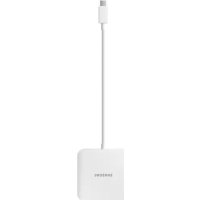


| Product Type | Multi-port Adapter |
| Brand | Samsung |
| Model | EEPW700 |
| Connectors | Mobile device connector, USB port, HDMI port, External power connector |
| Power Supply | 12 V / 2.1 A (Samsung approved power adapter) |
| Main Use | Charging, HDMI connection to HD TV, USB peripheral connection |
| Compatibility | Samsung (and other) mobile devices with multi-function connector |
| HDMI Output | Display mobile screen on HD TV |
| USB Port | 5 V, less than 900 mA for mouse, keyboard, etc. |
| Mobile Charging | Via external charger (sold separately) connected to power port |
| Power Consumption | Increases when mobile is connected |
| Software Update | Possible on connected mobile device |
| Box Contents | Device, Quick Start Guide |
| Safety | Do not use with a computer via USB cable; do not disconnect the charger during use |
| Maintenance | Clean with a dry cloth, avoid moisture |
| Operating Temperature | Not specified (estimated: 0-40°C) |
| Country of Manufacture | Not specified (likely Korea) |
| Warranty | Standard manufacturer warranty (subject to change) |
Frequently Asked Questions - EEPW700 SAMSUNG
User questions about EEPW700 SAMSUNG
0 question about this device. Answer the ones you know or ask your own.
Ask a new question about this device
Download the instructions for your Cellphone in PDF format for free! Find your manual EEPW700 - SAMSUNG and take your electronic device back in hand. On this page are published all the documents necessary for the use of your device. EEPW700 by SAMSUNG.
USER MANUAL EEPW700 SAMSUNG
Please read this manual before using the device to ensure safe and proper use.
- Images may differ in appearance from the actual product. Content is subject to change without prior notice.
- Before using the Multiport Adapter, make sure the mobile device you want to connect to is compatible with this Multiport Adapter.
Instructional icons

Warning: situations that could cause injury to yourself or others

Caution: situations that could cause damage to your device or other equipment

Notice: notes, usage tips, or additional information
Getting started
Package contents
Check the product box for the following items:
- Device
- Quick start guide

- The items supplied with the device and any available accessories may vary depending on the region or service provider.
- Appearances and specifications are subject to change without prior notice.
- You can purchase additional accessories from your local Samsung retailer. Make sure they are compatible with the device before purchase.
- Use only Samsung-approved accessories. Using unapproved accessories may cause performance problems and malfunctions that are not covered by the warranty.
- Availability of all accessories is subject to change depending entirely on manufacturing companies. For more information about available accessories, refer to the Samsung website.
Device layout
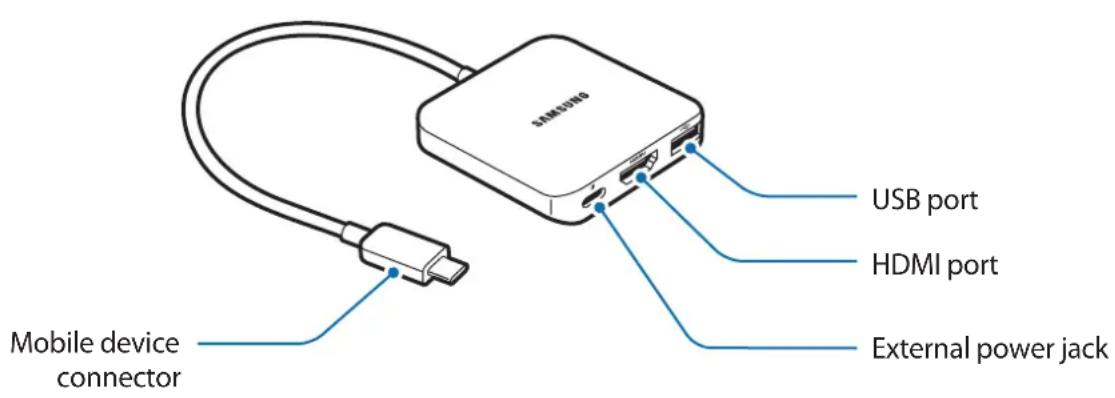
Using the device
Connecting to a mobile device
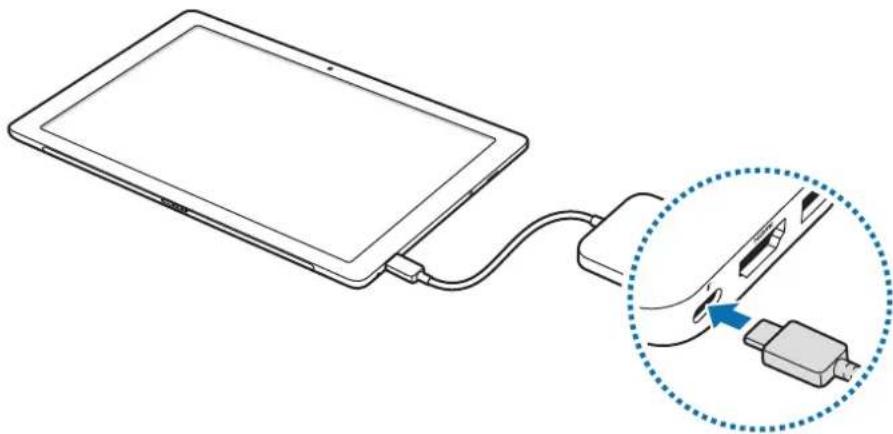
1. Plug the mobile device connector into the multipurpose jack on the mobile device.
2. Connect a charger to the external power jack on the Multiport Adapter and use the ports for each port's designed function.

Use only Samsung-approved travel adaptors (12 V/2.1 A).

Do not use the Multiport Adapter by connecting it to a computer using a data cable. This may damage the connected computer.

• The mobile device can be updated to the latest software. - You can charge the mobile device using the charger (sold separately). - When the mobile device is connected to the Multiport Adapter, the battery consumption increases.
- Charging the mobile device through the Multiport Adapter may take longer than charging it directly.
- To save energy, unplug the charger when not in use. The charger does not have a power switch, so you must unplug the charger from the electric socket when not in use to avoid wasting power. The charger should remain close to the electric socket and easily accessible while charging.
Connecting to an HD TV
Use the HDMI port on the Multiport Adapter to view videos and other media stored on the mobile device via a compatible HD TV.
1. Connect an HDMI cable (sold separately) to the HDMI port on the Multiport Adapter and on the HD TV.

- Connect the HDMI cable directly to the HD TV. If it is not directly connected, media might not display properly.
- For more details about connecting the HDMI cable, see the TV's user manual.
2 The TV screen instantly displays what is on the mobile device's screen.

- Do not unplug the charger while using the Multiport Adapter. The connected devices may be reconnected.
- If the TV has multiple HDMI ports, use any of them. Ensure the TV settings have the right HDMI port selected. For more details, see the TV's user manual.
- Any incoming calls or messages freeze media output. Media restarts after interrupted actions are complete.
Connecting to a USB device
Connect a USB device such as a mouse or keyboard to the USB port on the Multiport Adapter.

Do not connect any other devices except a USB device (5 V, less than 900 mA). This may damage the device.

Do not unplug the charger while using the Multiport Adapter. Doing so may cause data loss stored in the connected device.
Copyright
Copyright © 2016 Samsung Electronics
This manual is protected under international copyright laws.
No part of this manual may be reproduced, distributed, translated, or transmitted in any form or by any means, electronic or mechanical, including photocopying, recording, or storing in any information storage and retrieval system, without the prior written permission of Samsung Electronics.
Trademarks
• SAMSUNG and the SAMSUNG logo are registered trademarks of Samsung Electronics. • All other trademarks and copyrights are the property of their respective owners.


Copyright © 2016 Samsung Electronics

Copyright © 2016 Samsung Electronics


Use only travel adapters approved by Samsung (12 V/2.1 A).


Use only travel adapters specified by Samsung (12 V/2.1 A).

Do not use a multi-port adapter by connecting it to a computer with a data transfer cable. This may damage the connected computer.

- The mobile device can be updated to the latest software.
- You can charge the mobile device using a charger (sold separately).
- When the mobile device is connected to a multi-port adapter, battery consumption will increase.
- Charging the mobile device via a multi-port adapter may take longer than direct charging.
- To save energy, unplug the charger when not in use. The charger does not have a power switch, so you must unplug it from the electrical outlet when not in use to avoid energy consumption. During charging, keep the charger near the electrical outlet for easy access.


Use only Samsung-approved travel adapters (12 V/2.1 A).


Copyright © 2016 Samsung Electronics


Copyright © 2016 Samsung Electronics
.__SUPPRIMER__
youth (A 1.2)


Please read this manual before using the device to ensure safe and proper use.
- Images may differ in appearance from the actual product. Content is subject to change without prior notice.
- Before using the Multiport Adapter, make sure the mobile device you want to connect to is compatible with this Multiport Adapter.
Instructional icons

Warning: situations that could cause injury to yourself or others

Caution: situations that could cause damage to your device or other equipment

Notice: notes, usage tips, or additional information
Getting started
Package contents
Check the product box for the following items:
- Device
- Quick start guide

- The items supplied with the device and any available accessories may vary depending on the region or service provider.
- Appearances and specifications are subject to change without prior notice.
- You can purchase additional accessories from your local Samsung retailer. Make sure they are compatible with the device before purchase.
- Use only Samsung-approved accessories. Using unapproved accessories may cause performance problems and malfunctions that are not covered by the warranty.
- Availability of all accessories is subject to change depending entirely on manufacturing companies. For more information about available accessories, refer to the Samsung website.
Device layout
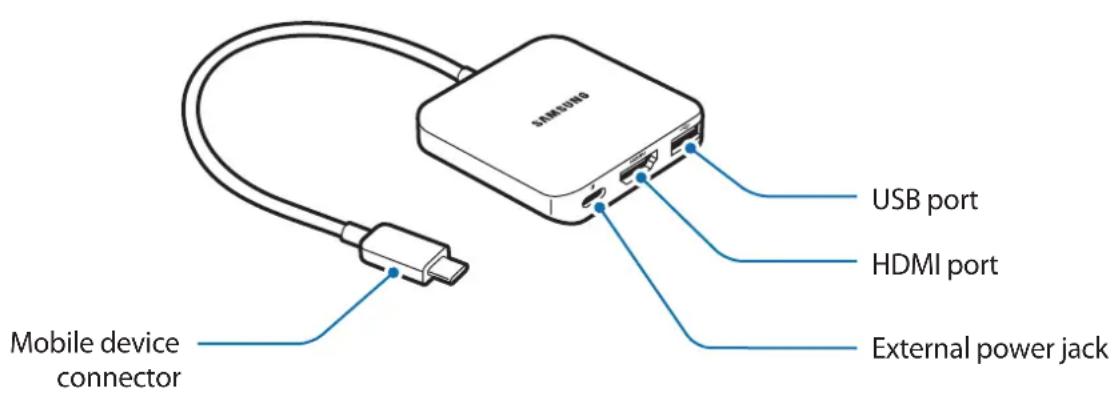
Using the device
Connecting to a mobile device
1 Plug the mobile device connector into the Power/Accessory Interface port on the mobile device.
2 Connect a charger to the external power jack on the Multiport Adapter and use the ports for each port's designed function.


Use only Samsung-approved travel adapters (12 V/2.1 A).

Do not use the Multiport Adapter by connecting it to a computer using a data cable. This may damage the connected computer.

- The mobile device can be updated to the latest software. - You can charge the mobile device using the charger (sold separately). - When the mobile device is connected to the Multiport Adapter, the battery consumption increases.
- Charging the mobile device through the Multiport Adapter may take longer than charging it directly.
- To save energy, unplug the charger when not in use. The charger does not have a power switch, so you must unplug the charger from the electric socket when not in use to avoid wasting power. The charger should remain close to the electric socket and easily accessible while charging.
Connecting to an HD TV
Use the HDMI port on the Multiport Adapter to view videos and other media stored on the mobile device via a compatible HD TV.
1 Connect an HDMI cable (sold separately) to the HDMI port on the Multiport Adapter and on the HD TV.

- Connect the HDMI cable directly to the HD TV. If it is not directly connected, media might not display properly.
- For more details about connecting the HDMI cable, see the TV's user manual.
2 The TV screen instantly displays what is on the mobile device's screen.

- Do not unplug the charger while using the Multiport Adapter. The connected devices may be reconnected.
- If the TV has multiple HDMI ports, use any of them. Ensure the TV settings have the right HDMI port selected. For more details, see the TV's user manual.
- Any incoming calls or messages freeze media output. Media restarts after interrupted actions are complete.
Connecting to a USB device
Connect a USB device such as a mouse or keyboard to the USB port on the Multiport Adapter.

Do not connect any other devices except a USB device (5 V, less than 900 mA). This may damage the device.

Do not unplug the charger while using the Multiport Adapter. Doing so may cause data loss stored in the connected device.
Copyright
Copyright © 2016 Samsung Electronics
This manual is protected under international copyright laws.
No part of this manual may be reproduced, distributed, translated, or transmitted in any form or by any means, electronic or mechanical, including photocopying, recording, or storing in any information storage and retrieval system, without the prior written permission of Samsung Electronics.
Trademarks
• SAMSUNG and the SAMSUNG logo are registered trademarks of Samsung Electronics. - All other trademarks and copyrights are the property of their respective owners.
Read first

Copyright © 2016 Samsung Electronics
This manual is protected under international copyright laws.

© Samsung Electronics, 2016.



Brand : SAMSUNG
Model : EEPW700
Category : Cellphone