SKM 10 B1 - Wireless Earbuds SILVERCREST - Free user manual and instructions
Find the device manual for free SKM 10 B1 SILVERCREST in PDF.



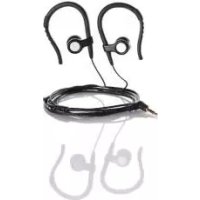
| Product type | Wired in-ear headphones |
| Impedance | 32 Ω ± 4 Ω |
| Sensitivity | 100 dB ± 10% at 1 kHz |
| Frequency range | 20 Hz – 20 kHz |
| Max. input power | 50 mW |
| Connector | 3.5 mm jack |
| Cable length | Approx. 110 cm |
| Weight | Approx. 21 g |
| Operating temperature | 5 °C – 35 °C |
| Humidity (non-condensing) | 5 % – 80 % |
| Key functions | Play/pause, track skip, call answer, call reject, voice control, built-in microphone |
| Supplied accessories | Earbuds with M-size ear tips, 2 additional pairs (S and L), user manual |
| Care and cleaning | Clean with a slightly damp cloth; ear tips can be washed under running water |
| Safety | Do not use while driving; risk of hearing damage if volume is too high; keep out of reach of children |
| Spare parts and repairability | Repairs only by authorized service; use original spare parts |
| General information | 3-year warranty; France after-sales service: 0800 919270; disposal via selective collection |
Frequently Asked Questions - SKM 10 B1 SILVERCREST
User questions about SKM 10 B1 SILVERCREST
0 question about this device. Answer the ones you know or ask your own.
Ask a new question about this device
Download the instructions for your Wireless Earbuds in PDF format for free! Find your manual SKM 10 B1 - SILVERCREST and take your electronic device back in hand. On this page are published all the documents necessary for the use of your device. SKM 10 B1 by SILVERCREST.
USER MANUAL SKM 10 B1 SILVERCREST
Operating instructions
SE
IN-EAR-HÖRLURAR
Bruksanvisning
FR BE
ÉCOUTEURS INTRA-AURICULAIRES
Mode d'emploi
DE AT CH
IN-EAR-KOPFHÖRER
Bedienungsanleitung
F
KUULOKKEET
Käyttoohje
DK
IN-EAR HØRETELEFONER
Before reading, unfold the page containing the illustrations and familiarise yourself with all functions of the device.
F1
GB/IE Operating instructions Page 1
| FI | Käytöohje | Sivu |
| SE | Bruksanvisning | Sidan |
| DK | Betjeningsvejledning | S |
| FR/BE Mode d'emploi Page 81 | ||
| NL/BE Gebruiksaanwijzing Pagina 101 | ||
| DE/AT/CH | Bedienungsanleitung | Seite 121 |
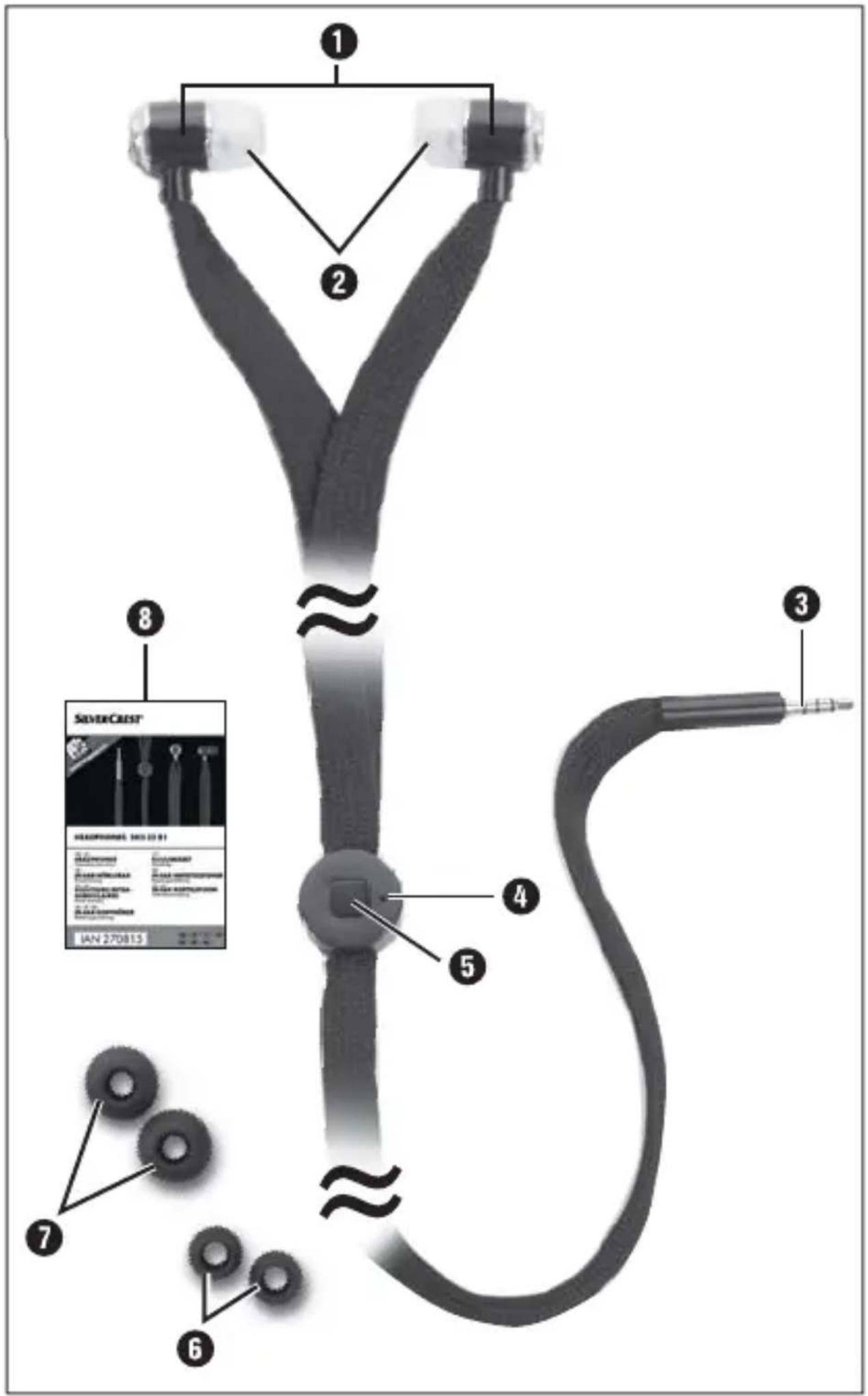
Table of contents
Introduction 2
Information about these operating instructions . . .2
Copyright 2
Limitation of liability 3
Use for intended purpose 3
Warnings 4
Safety instructions 5
Descriptions of components 8
Commissioning 9
Package contents (see fold-out page) 9
Disposal of packaging 9
Using the headphones 10
Replacing the ear cushions 10
Connecting the headphones 1 1
Multi-function button functions 11
Microphone 12
Fault rectification 13
Fault causes and rectification 13
Cleaning 14
Storage when not in use 14
Disposal 15
Appendix 16
Technical details 16
Notes on the Declaration of Conformity 17
Warranty 17
Service 19
Impor ter 19
GBIE
Introduction
Information about these operating instructions
Congratulations on the purchase of your new device.
You have decided to purchase a high-quality product. The operating instructions are a constituent of this product. They contain important information with regard to safety, use and disposal. Before using the product, familiarise yourself with all operating and safety instructions. Use this device only as described and only for the specified areas of application. Retain these instructions for future reference. Please also pass these operating instructions on to any future owner(s).
Copyright
This documentation is subject to copyright protection. Any copying or reproduction, including extracts of the documentation, and the reproduction of images or modified versions thereof, is only permitted with the written authorisation of the manufacturer.
Limitation of liability
The manufacturer assumes no liability for damage caused by failure to observe these instructions, non-intended use, improper repairs, making unauthorised modifications or using non-approved replacement parts.
Use for intended purpose
These headphones are a consumer electronics device. They are intended for non-commercial use for listening to audio material. The headphones can also be used as a hands-free set in order to accept calls thanks to the integrated microphone. Any other or additional usage is considered to be improper use and can lead to damage. Claims of any kind for damage arising as a result of non-intended use will not be accepted.
GBIE
Warnings
The following warnings are used in these operating instructions:
DANGER
A warning at this risk level indicates a potentially hazardous situation.
Failure to avoid this hazardous situation could result in physical injury or death.
Follow the instructions in this warning to prevent physical injury.
CAUTION
A warning at this risk level indicates potential damage to property.
Failure to avoid this situation could result in damage to property.
Follow the instructions in this warning to prevent damage to property.
NOTE
A note indicates additional information that will assist you in handling the device.
Safety instructions
For safe handling of the device, follow the safety information below:
GBIE
Check the headphones for external signs of damage before use. Do not operate damaged headphones or earphones that have been dropped.
If the cables or connections are damaged, have them replaced by an authorised specialist or customer service.
■ Persons who are incapable of operating the headphones safely due to their physical, intellectual or motor abilities must only use them under the supervision or direction of a responsible adult.
Children may only be permitted to use the headphones if they are under supervision.
Repairs to the headphones should only be carried out by authorised specialist personnel or by the customer service department. Failure to make proper repairs can put the user at risk. This will also invalidate warranty claims.
GBIE
Repairs to the headphones during the warranty period may only be carried out by a customer service department that has been authorised by the manufacturer, otherwise no additional warranty claims can be considered for subsequent damage.
Defective components must always be replaced with original replacement parts. It can only be guaranteed that safety requirements are being complied with if using original replacement parts are used.
No unauthorised design changes or modifications must be made to the headphones.
- Protect the headphones from penetration by moisture and liquids.
Do not use the headphones in the vicinity of naked flames (e.g. candles).
ADANGER! The packaging material is not a plaything. Keep plastic sheeting, bags and all other packaging material away from children. There is a risk of suffocation.
Risk of hearing damage
DANGER
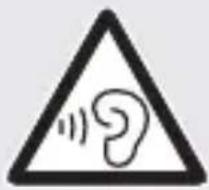
Risks as a result of extremely high sound levels!
Loud music can lead to hearing damage.
- Avoid extreme sound levels, especially over long periods of time, when you are using these headphones.
Risk of accidents
DANGER
Danger as a result of affected perception!
- Acoustic warning and indication signals and ambient noise may be perceived differently when headphones are being worn. It is important to be aware of how these signals can differ so that you can recognise them in the relevant situations.
GBIE
DANGER
Do not use the headphones while driving a vehicle, riding a bicycle, operating machinery or in any other situation in which impaired perception of ambient noise could put you or other people in danger. Please also observe the statutory provisions and regulations of the country in which you are using the headphones.
Descriptions of components
1 Headphones
2 Ear cushions (medium)
3 3.5 mm jack plug
4 Microphone
Multi-function button
6 Ear cushions (small)
Ear cushions (large)
8 Set of operating instructions
Commissioning
Package contents (see fold-out page)
The headphones are delivered with the following components as standard:
-
Headphones ① with pre-installed ear cushions (medium size ②)
-
2 pairs of ear cushions (small 6 and large 7)
These operating instructions 8
NOTE
- Check contents for completeness and for signs of visible damage.
If the contents are incomplete or damaged due to defective packaging or through transportation, contact the Service Hotline (see chapter Service).
Disposal of packaging
The packaging protects the appliance from transport damage.

Recirculating the packaging into the material cycle conserves raw materials and reduces the amount of waste that is generated.
Dispose of packaging material that is no longer needed in accordance with applicable local regulations.
GBIE
Using the headphones
When putting on the headphones 1, pay attention to the side indicators "R" (right) and "L" (left) on the earpieces.
Carefully slide one of the headphones 1 deep into the ear canal. In order to straighten the ear channel somewhat and therefore make the earphone easier to insert, pull auricle backwards and upwards a little.
■ Proceed in the same way to insert the otherearphone 1.
Replacing the ear cushions
In the as-delivered condition, the headphones 1 are provided with medium size ear cushions 2. Depending on the size of your auricle you can use ear cushions (6 or 7) of a different size from the ones supplied.
NOTE
The better the ear cushion seals off the ear canal, the better the sound quality, particularly at lower frequencies.
Use your fingers to carefully pull on the ear cushions 2 to detach them from the headphones 1 (see fig. 1).
- Select suitable ear cushions (6 or 7) from the ones that are supplied. Push these directly onto the headphones until they slip into the recesses on the headphones (see fig. 2).
GBIE
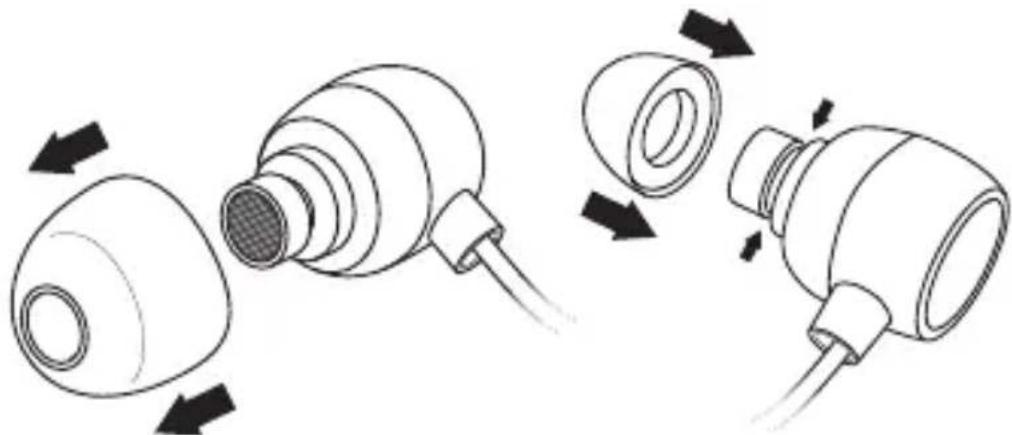
Fig. 1 Fig. 2
Connecting the headphones
The headphones ① are equipped with a 3.5 mm jackplug. Many electronic entertainment devices are provided with an appropriate headphone socket. If your audio device has been equipped with a different headphone connector, you may need to use a suitable adapter (not supplied).
Multi-function button functions
The multifunction button 5 can be used to carry out basic functions for playing music and making telephone calls.
GBIE
NOTE
The functions available from the multifunction button 5 depend on the device connected. Depending on the device connected (e.g. smartphone), it could be that not all functions are supported, or that more functions are available.
| Telephone | Press ⑤ multifunction button |
| Accept call Press once | |
| End call Press once | |
| Reject call | Keep multifunction button pressed |
| Activate voice control | Keep multifunction button pressed |
| Music | |
| Play/pause Press once | |
| Next title Press twice rapidly | |
| Previous title Press rapidly 3 x | |
Microphone
The microphone can be used during telephone calls. The nearer to your mouth it is the better the communication.
Fault rectification
Fault causes and rectification
The following table will help with localising and remedying minor malfunctions:
| Defect Cause/remedy | |
| No sound coming from headphones ①. | The volume control of the play-back device is set to the minimum volume. Increase the playback volume. |
| The 3.5 mm jackplug is not fully inserted into the playback device's headphone socket. Push the 3.5 mm jackplug all the way into the socket. | |
| Sound is only coming from one side of the headphones ①. | The 3.5 mm jackplug is not fully inserted into the playback device's headphone socket. Push the 3.5 mm jackplug all the way into the socket. |
| The Stereo-Balance-Control on the playback device is incorrectly adjusted. Adjust it to the setting you desire. | |
GBIE
GBIE
NOTE
If the malfunction cannot be remedied with the described solution proposals or if other types of malfunctions occur please contact our service department (see chapter Service).
Cleaning
CAUTION
- Do not allow any liquids to penetrate the interior of the headphones ①. This could cause irreparable damage to them.
Clean the headphones ① with a slightly damp cloth.
- Remove the ear cushions (2, 6 or 7) for cleaning. Clean the ear cushions under running water. Dry the ear cushions properly. Do not fold the ear cushions back over the headphones until they are properly dry.
Storage when not in use
Store the headphones 1 in a dry and dust-free location.
Disposal
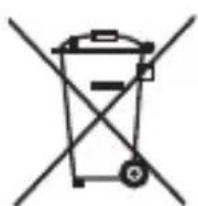
The symbol of a crossed-out wheelie bin means that this product is subject to European Directive 2012/19/EU and may not be disposed of in the domes
waste. The product must be taken to a dedicated collection point for electrical and electronic appliances.
This disposal is free of charge for the user. You will be helping to protect both the environment and your personal health and recycling valuable raw materials.
More information on disposal and the nearest collection point is available from your town council.
Appendix
Technical details
| Impedance 32 Ω +/- 4 Ω | |
| Sensitivity 100 dB +/- 10% at 1 kHz | |
| Frequency response 20 Hz - 20 kHz | |
| Input power max. 50 mW | |
| Wide band charac-teristic voltage | approx. 100 mV +/- 10% |
| Connector 3.5 mm jackplug | |
| Cable length approx. | 110 cm |
| Weight approx. 21 g | |
| Operating temper-ature | 5 - 35 °C |
| Humidity (no con-densation) | 5 - 80 % |
Notes on the Declaration of Conformity
Regarding conformity with essential requirements and other relevant provisions, this appliance complies with RoHS Directive 2011/65/EU.
The complete original Declaration of Conformity is available from the importer and may be requested if required (see Chapter Importer).
CE
Warranty
The warranty provided for this appliance is 3 years from date of purchase. This appliance has been manufactured with care and inspected meticulously prior to delivery. Please retain your receipt as proof of purchase. In the event of a warranty claim, please call Customer Service. This is the only way to ensure that your goods will be dispatched free of charge.
GBIE
NOTE
The warranty only covers claims for material and manufacturing defects, not for transport damage, wearing parts or for damage to fragile components such as switches and batteries.
This appliance is exclusively intended for private use and not for commercial purposes. The warranty is deemed void if this product has been subjected to improper or inappropriate handling, abuse or modifications that were not carried out by one of our authorised service centres. Your statutory rights are not restricted in any way by this warranty.
The warranty period is not extended by repairs made under the warranty. This also applies to replaced and repaired parts. Damage and defects present at the time of purchase must be reported immediately after unpacking, or no later than two days after the date of purchase. Repairs made after expiry of the warranty period are chargeable.
Service

Service Great Britain
Tel.: 0871 5000 720 (£ 0.10/Min.)
E-Mail: kompernass@lidl.co.uk
IAN 270815

Service Ireland
Tel.: 1890 930 034
(0,08 EUR/Min., (peak))
(0,06 EUR/Min., (off peak))
E-Mail: kompernass@lidl.ie
IAN 270815
Hotline availability:
Monday to Friday 08:00 - 20:00 (CET)
Importer
KOMPERNASS HANDELS GMBH
BURGSTRASSE 21
44867 BOCHUM
GERMANY
www.kompernass.com
Sisällysluettelo
Johdanto 22
KOMPERNASS HANDELS GMBH
BURGSTRASSE 21
44867 BOCHUM
GERMANY
www.kompernass.com
FI
KOMPERNASS HANDELS GMBH
BURGSTRASSE 21
44867 BOCHUM
GERMANY
www.kompernass.com
SE
Indholdsfortegnelse
Introduktion 62
KOMPERNASS HANDELS GMBH
BURGSTRASSE 21
44867 BOCHUM
GERMANY
www.kompernass.com
Table des matieres
Introduction 82
KOMPERNASS HANDELS GMBH
BURGSTRASSE 21
44867 BOCHUM
GERMANY
www.kompernass.com
Inhoud
Inleiding 102
KOMPERNASS HANDELS GMBH
BURGSTRASSE 21
44867 BOCHUM
GERMANY
www.kompernass.com
NL BE
Inhaltsverzeichnis
Einführung 122
KOMPERNASS HANDELS GMBH
BURGSTRASSE 21
44867 BOCHUM
DEUTSCHLAND
www.kompernass.com
KOMPERNASS HANDELS GMBH
BURGSTRASSE 21
44867 BOCHUM
DEUTSCHLAND/GERMANY
www.kompernass.com
Last Information Update · Tietojen tila · Informationsstatus
Tilstand af information · Version des informations
Stand van de informatie · Stand der Informationen:
09/2015.Ident.-No.:SKIS32B1-072015-3


- IN-EAR-HÖRLURAR
- ÉCOUTEURS INTRA-AURICULAIRES
- IN-EAR-KOPFHÖRER
- KUULOKKEET
- IN-EAR HØRETELEFONER
- F1
- Table of contents
- Introduction 2
- Safety instructions 5
- Descriptions of components 8
- Commissioning 9
- Microphone 12
- Fault rectification 13
- Cleaning 14
- Storage when not in use 14
- Disposal 15
- Appendix 16
- GBIE
- Introduction
- Information about these operating instructions
- Copyright
- Limitation of liability
- Use for intended purpose
- Warnings
- DANGER
- A warning at this risk level indicates a potentially hazardous situation.
- CAUTION
- A warning at this risk level indicates potential damage to property.
- NOTE
- Safety instructions
- Risk of hearing damage
- Risks as a result of extremely high sound levels!
- Risk of accidents
- Danger as a result of affected perception!
- Descriptions of components
- Commissioning
- Package contents (see fold-out page)
- Disposal of packaging
- Using the headphones
- Replacing the ear cushions
- Connecting the headphones
- Multi-function button functions
- Microphone
- Fault rectification
- Fault causes and rectification
- Cleaning
- Storage when not in use
- Disposal
- Appendix
- Technical details
- Notes on the Declaration of Conformity
- CE
- Warranty
- Service
- Service Great Britain
- Service Ireland
- Hotline availability:
- Importer
- Sisällysluettelo
- Johdanto 22
- Indholdsfortegnelse
- Introduktion 62
- Table des matieres
- Introduction 82
- Inhoud
- Inleiding 102
- Inhaltsverzeichnis
- Einführung 122
- KOMPERNASS HANDELS GMBH
Brand : SILVERCREST
Model : SKM 10 B1
Category : Wireless Earbuds