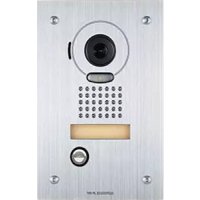
JPDVF - Intercom Aiphone - Free user manual and instructions
Find the device manual for free JPDVF Aiphone in PDF.


| Product Type | Vandal-resistant video door station |
| Brand | Aiphone |
| Model | JPDVF (JP-DVF) |
| Weight (main unit) | Approximately 570 g |
| Weight (flush mount box) | Approximately 450 g |
| Power supply | Supplied by the master station |
| Operating temperature | -10 °C to 60 °C |
| Camera | CMOS, 525 scanning lines |
| Minimum illumination | 5 Lux at 50 cm |
| Durability | Vandal-resistant front face |
| Mounting | Wall or flush mount (box included) |
| Recommended cable | LYT1 8/10 telephone cable (diameter 0.65 mm to 1.2 mm) |
| Max distance door station to master station | Up to 100 m (depending on diameter) |
| Included accessories | Special screwdriver, transparent nameplate labels (x2), installation manual |
| Maintenance | Soft cloth and mild cleaner; do not spray high-pressure water |
| Precautions | Do not disassemble; call a qualified technician for wiring |
| Warranty | 2 years |
| Functions | Video intercom, zoom, wide-angle view (170°) |
Frequently Asked Questions - JPDVF Aiphone
User questions about JPDVF Aiphone
0 question about this device. Answer the ones you know or ask your own.
Ask a new question about this device
Download the instructions for your Intercom in PDF format for free! Find your manual JPDVF - Aiphone and take your electronic device back in hand. On this page are published all the documents necessary for the use of your device. JPDVF by Aiphone.
USER MANUAL JPDVF Aiphone
MANUEL D'INSTALLATION
natural_image
Line drawing of a rectangular electronic device with a circular top and internal circuitry (no text or symbols)JP-DA
Video door station
natural_image
Line drawing of a rectangular electronic device with a circular vent and button (no text or symbols)JP-DVF
Vandal-resistant video door station
natural_image
Line drawing of a mobile phone receiver with keypad and control panel (no text or symbols)JP-DV
Vandal-resistant video door station
General Prohibitions

Prohibition to Dismantle the Unit

Prohibition on Subjecting the Unit to Water

General Precautions

WARNING
Negligence could result in death or serious injury.
- Do not dismantle or alter the unit. Fire or electric shock could result.
- Existing wiring such as chime wiring, etc. may contain high voltage AC electricity. Damage to the unit or electric shock could result. Wiring and installation should be done by a qualified technician.
- This unit is not an explosion-proof unit. Do not install or use the unit in locations that are filled with flammable gas such as oxygen rooms. Fire or an explosion could result.

CAUTION
Negligence could result in injury to people or damage to property.
- Before turning on power, make sure wires are not crossed or shorted. If not, fire or electric shock could result.
- Do not install or make any wire terminations while power supply is plugged in. It can cause electrical shock or damage to the unit.
GENERAL PRECAUTIONS
- The door station is weather resistant, but do not spray high pressure water on door station directly. Unit trouble could result.
PACKAGE CONTENTS
Verify that the following parts are included.
JP-DA
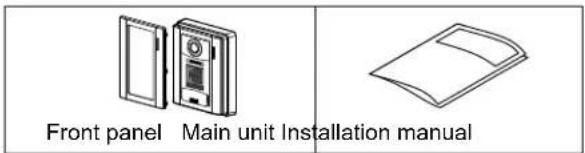
JP-DV
| The unit | Special screwdriver Transparent nameplate (x2) Installation manual | ||
JP-DVF
| The unit | Flush mount back box | Special screw (x4) | Transparent nameplate (x2) Installation manual |
| Hexagonal wrench |
INSTALLATION
Mounting locations
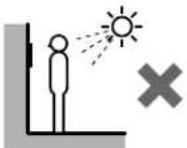
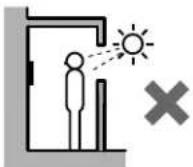
"Do not install video door station in any of the following locations where lighting or the ambient environment could impact the display on the video monitor due to the characteristics of the door station's camera."
a
Locations subject to direct sunlight
b
Under street lights or door lights
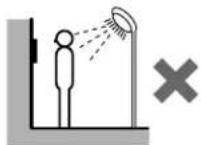
C
Other locations subject to strong lighting or backlighting conditions
Mounting positions and image view area
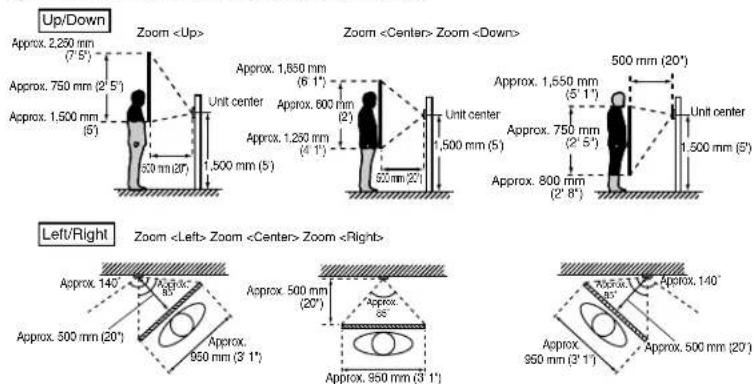
◇ Wide picture
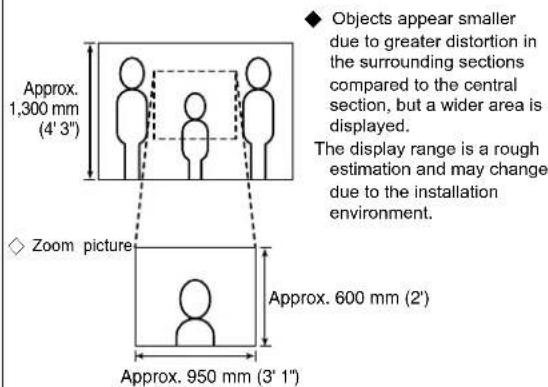
◆ The zoom position can be changed. (Refer to the master station's operation manual.) The factory setting is "Center" for Zoom mode.
◇ Wide picture
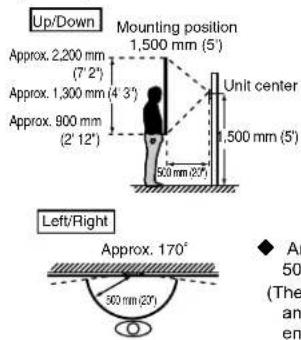
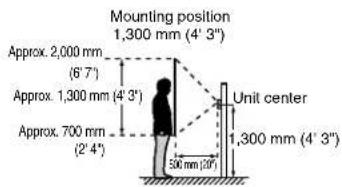
An area over a range of approx. 170° in a 500 mm radius from the camera displays. (The display range is a rough estimation and may change due to the installation environment.)
◇ Zoom picture (when mounting position is 1,500 mm (5'))
Cable
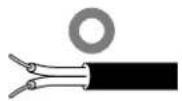
- Use PE (polyethylene)-insulated PVC jacket cable. Parallel or jacketed 2-conductor, mid-capacitance, non-shielded cable is recommended.
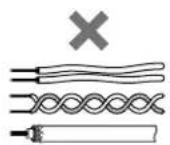
- Never use individual conductors, twisted pair cable, or coaxial cable.
flowchart
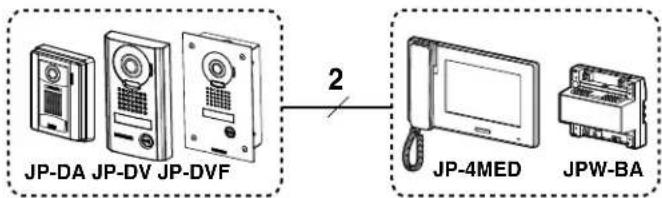
graph LR
    A["JP-DA JP-DV JP-DVF"] -->|2| B["JP-4MED JPW-BA"]
Wiring distance
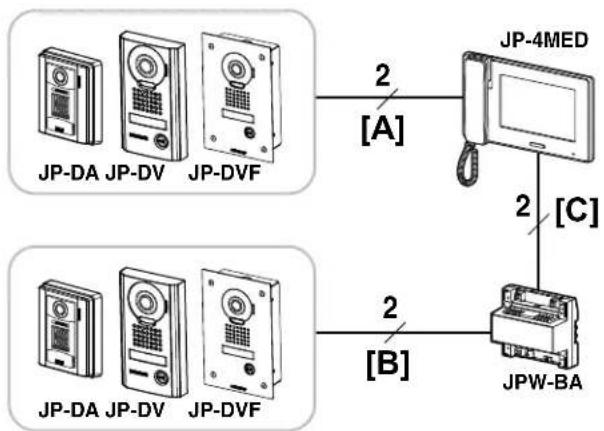
flowchart
graph TD
    A["JP-DA JP-DV JP-DVF"] -->|2["A"]| B["JP-4MED"]
    C["JP-DA JP-DV JP-DVF"] -->|2["B"]| D["JPW-BA"]
    B -->|2["C"]| D
| Wire diameter | |||||
| ∅0.65 mm(22 AWG) | ∅0.8 mm(20 AWG) | ∅1.0 mm(18 AWG) | ∅1.2 mm(16 AWG) | ||
| [A] | Door station - master station | 50 m(165') | 100 m(330') | 100 m(330') | 100 m(330') |
| [B] | Door station - long distance adaptor | 100 m(330') | 150 m(490') | 200 m(650') | 200 m(650') |
| [C] | Long distance adaptor - master station | 50 m(165') | 75 m(245') | 100 m(330') | 100 m(330') |
MOUNTING
JP-DA
① Removing the main unit from the mounting frame
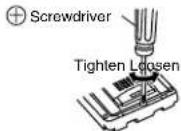
Remove the main unit. (Loosen the locking screws.)
Mounting screw × 2 (not included)
Screw shaft: ∅4.1 or less
Slotted head: ∅8.2 or less, 3.0mm or less in height
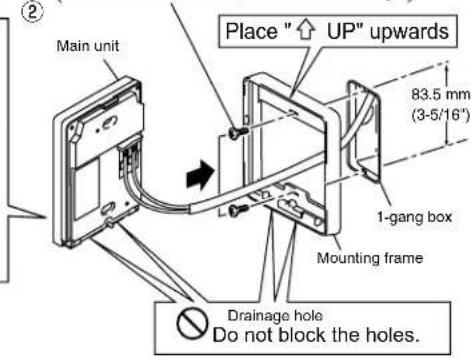
③ Mount the main unit on the mounting frame, and fit the front panel on.
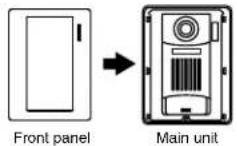
Removing the front panel
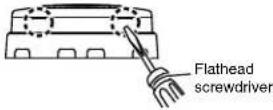
Pry off the front panel with a flathead screwdriver.
JP-DV
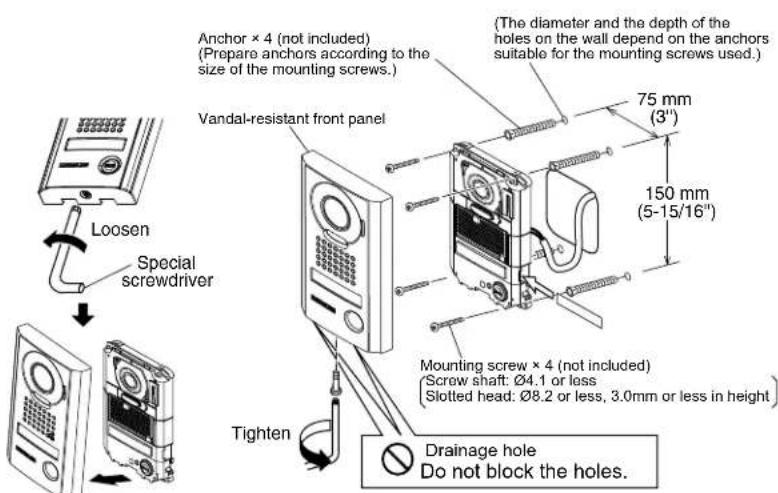
* Remove protective fi lm from camera before use.
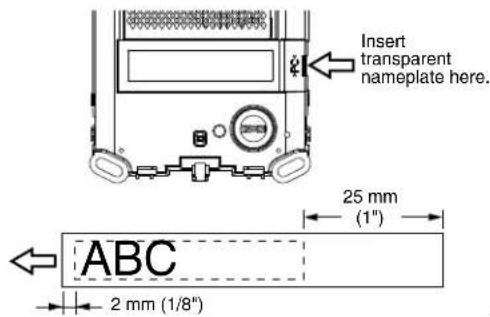
Using the transparent nameplates
Inserting the transparent nameplates
① Remove the vandal-resistant front panel.
② Peel off the protective seals on the plate (both sides).
③ Fill in the name of the resident on the transparent nameplate.
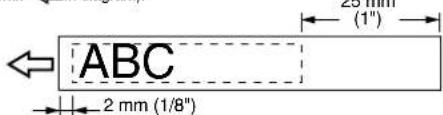
⚠️ Be sure to leave 25 mm (1") of white space on the right end to account for insertion.
④ Insert the filled-in transparent nameplate at the specified insertion opening (indicated with in diagram) as below.
JP-DVF
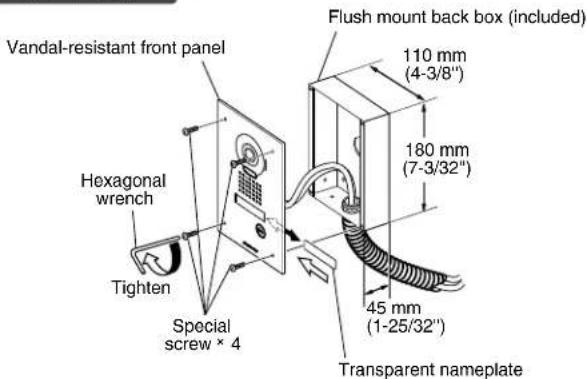
* Remove protective fi lm from camera before use.
Using the transparent nameplates
Inserting the transparent nameplates
① Remove the vandal-resistant front panel from the flush mount back box.
② Peel off the protective seals on the plate (both sides).
③ Fill in the name of the resident on the transparent nameplate.
⚠️ Be sure to leave 25 mm (1") of white space on the right end to account for insertion.
④ Insert the filled-in transparent nameplate at the specified insertion opening on the rear side of the vandal-resistant front panel (indicated with in diagram). 25 mm
WIRING
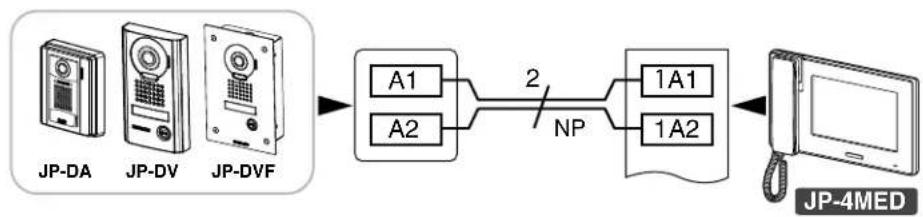
flowchart
graph LR
    A["JP-DA"] --> B["JP-DV"]
    B --> C["JP-DVF"]
    C --> D["A1"]
    C --> E["A2"]
    D --> F["2"]
    E --> F
    F --> G["NP"]
    G --> H["1A1"]
    G --> I["1A2"]
    H --> J["JP-4MED"]
    I --> J
NP: Non-polarized
TECHNICAL PRECAUTIONS
- Door station is weather resistant. However, do not spray high pressure water on door station directly. Unit trouble could result.
- Cleaning:
- Clean units with a soft cloth and gentle cleaner. Do not spray cleaner directly on unit. Do not use an abrasive cleanser or cloth.
-
Wipe away dirt from the lens softly with a soft cloth. Observe the following points for lens care.
-
Take care not to scratch the lens.
- Do not use organic solvents other than isopropyl alcohol (IPA) and methanol.
- Do not use thinner, benzene, etc. It may cause damage or discoloration to the surface of the unit.
SPECIFICATIONS
| Power supply Supplied from master station | ||
| Operating temperature - 10 - 60°C (+14°F - +140°F) | ||
| Camera unit Complementary metal oxide semiconductor (CMOS) | ||
| Scanning lines 525 lines | ||
| Minimum subject illumination 5 Lux at 50 cm (1'6") distance | ||
| Dimensions JP-DA 129 (H) x 97 (W) x 30.5 (D) (mm)5-1/8 (H) x 3-7/8 (W) x 1-3/16 (D) (inches) | ||
| JP-DV 173 (H) x 98 (W) x 27.1 (D) (mm)6-13/16 (H) x 3-7/8 (W) x 1-1/16 (D) (inches) | ||
| JP-DVF | 209 (H) x 135 (W) x exposed area 5.6 (D) (mm)8-1/4 (H) x 5-5/16 (W) x 7/32 (D) (inches) | |
| Flush mount back box (JP-DVF) | 180 (H) x 110 (W) x 45 (D) (mm)7-3/32 (H) x 4-3/8 (W) x 1-25/32 (D) (inches) | |
| Mass | JP-DA Approx. 170 g (0.37 lbs.) | |
| JP-DV Approx. 650 g (1.43 lbs.) | ||
| JP-DVF | Approx. 570 g (1.26 lbs.) | |
| Flush mount back box (JP-DVF) | Approx. 450 g (1.0 lbs.) | |
PRECAUTIONS

CABLAGE
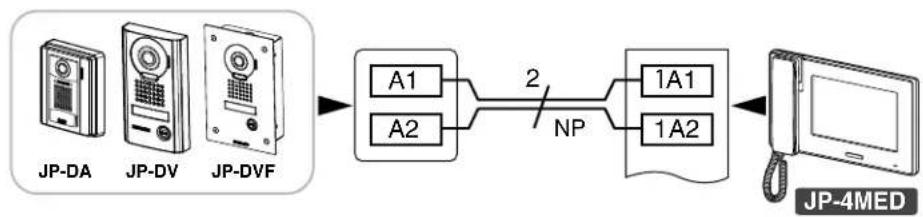
flowchart
graph LR
    A["JP-DA"] --> B["JP-DV"]
    B --> C["JP-DVF"]
    C --> D["A1"]
    C --> E["A2"]
    D --> F["2"]
    E --> F
    F --> G["NP"]
    G --> H["1A1"]
    G --> I["1A2"]
    H --> J["JP-4MED"]
    I --> J
NP: non polarisé
PRECAUTIONS TECHNIQUES
CABLEADO
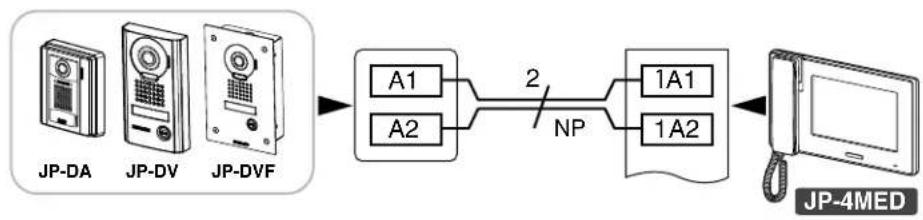
flowchart
graph LR
    A["JP-DA"] --> B["JP-DV"]
    B --> C["JP-DVF"]
    C --> D["A1"]
    C --> E["A2"]
    D --> F["2"]
    E --> F
    F --> G["NP"]
    G --> H["1A1"]
    G --> I["1A2"]
    H --> J["JP-4MED"]
    I --> J
NP: No polarizado
PRECAUCIONES DE ORDEN TÉCNICO
JP-DVF
BEDRADING
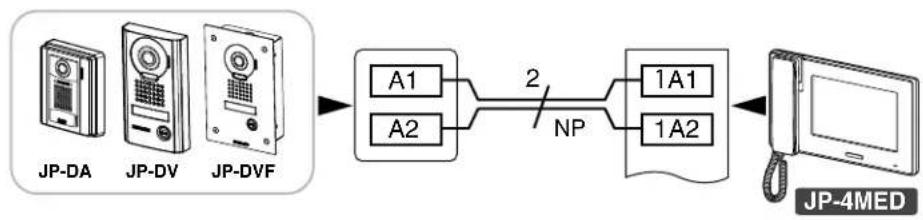
flowchart
graph LR
    A["JP-DA"] --> B["JP-DV"]
    B --> C["JP-DVF"]
    C --> D["A1"]
    C --> E["A2"]
    D --> F["2"]
    E --> F
    F --> G["NP"]
    G --> H["1A1"]
    G --> I["1A2"]
    H --> J["JP-4MED"]
    I --> J
CABLAGGIO
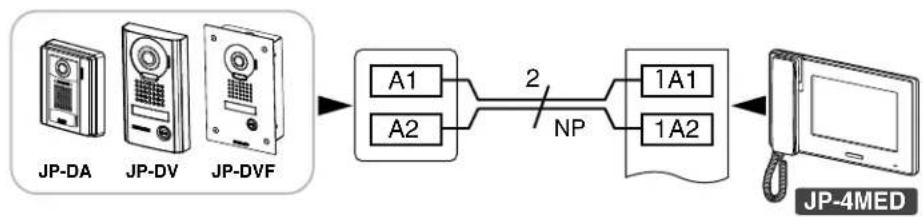
flowchart
graph LR
    A["JP-DA"] --> B["JP-DV"]
    B --> C["JP-DVF"]
    C --> D["A1"]
    C --> E["A2"]
    D --> F["2"]
    E --> F
    F --> G["NP"]
    G --> H["1A1"]
    G --> I["1A2"]
    H --> J["JP-4MED"]
    I --> J
NP: Non polarizzato
PRECAUZIONI TECNICHE
Aiphone warrants its products to be free from defects of material and workmanship under normal use and service for a period of two years after delivery to the ultimate user and will repair free of charge or replace at no charge, should it become defective upon which examination shall disclose to be defective and under warranty. Aiphone reserves unto itself the sole right to make the final decision whether there is a defect in materials and/or workmanship; and whether or not the product is within the warranty. This warranty shall not apply to any Aiphone product which has been subject to misuse, neglect, accident, power surge, or to use in violation of instructions furnished, nor extended to units which have been repaired or altered outside of the factory. This warranty does not cover batteries or damage caused by batteries used in connection with the unit. This warranty covers bench repairs only, and any repairs must be made at the shop or place designated in writing by Aiphone. This warranty is limited to the standard specifications listed in the operation manual. This warranty does not cover any supplementary function of a third party product that is added by users or suppliers. Please note that any damage or other issues caused by failure of function or interconnection with Aiphone products is also not covered by this warranty. Aiphone will not be responsible for any costs incurred involving on site service calls. Aiphone will not provide compensation for any loss or damage incurred by the breakdown or malfunction of its products during use, or for any consequent inconvenience or losses that may result.
The object area of ✗ is the EU.
GARANTIE
Français
This device complies with Part 15 of the FCC Rules. Operation is subject to the following two conditions: (1) this device may not cause harmful interference, and (2) this device must accept any interference received, including interference that may cause undesired operation.
This equipment has been tested and found to comply with the limits for a Class B digital device, pursuant to Part 15 of the FCC Rules. These limits are designed to provide reasonable protection against harmful interference in a residential installation. This equipment generates, uses, and can radiate radio frequency energy, and if not installed and used in accordance with the instructions, may cause harmful interference to radio communications. However, there is no guarantee that interference will not occur in a particular installation. If this equipment does cause harmful interference to radio or television reception, which can be determined by turning the equipment off and on, the user is encouraged to try to correct the interference by one or more of the following measures:
- Reorient or relocate the receiving antenna
- Consult the dealer or an experienced radio/TV technician for help.
- Connect the equipment to an outlet on a circuit different from that to which the receiver is connected. Increase the separation between the equipment and receiver.