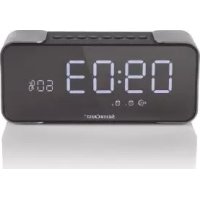
SRW 10 A1 - Clock SILVERCREST - Free user manual and instructions
Find the device manual for free SRW 10 A1 SILVERCREST in PDF.



Frequently Asked Questions - SRW 10 A1 SILVERCREST
User questions about SRW 10 A1 SILVERCREST
0 question about this device. Answer the ones you know or ask your own.
Ask a new question about this device
Download the instructions for your Clock in PDF format for free! Find your manual SRW 10 A1 - SILVERCREST and take your electronic device back in hand. On this page are published all the documents necessary for the use of your device. SRW 10 A1 by SILVERCREST.
USER MANUAL SRW 10 A1 SILVERCREST
Operation and safety notes
FR BE
RADIO-RéVEIL
GB/IE Operation and safety notes Page 14
TRAGEN SIE SCHUTZHANDSCHUHE!

Warnings and symbols used 15
Trademark notices.. 16
Safety instructions. 16
Scope of delivery. 18
Description of parts. 18
Technical data 19
Before use. 19
Operation. 20
Storage when not in use 23
Cleaning 23
Disposal. 23
Simplified EU declaration of conformity 24
CLOCK RADIO
Introduction
We congratulate you on the purchase of your new product. You have chosen a high quality product. The instructions for use are part of the product. They contain important information concerning safety, use and disposal. Before using the product, please familiarise yourself with all of the safety information and instructions for use. Only use the product as described and for the specified applications. If you pass the product on to anyone else, please ensure that you also pass on all the documentation with it.
Intended use
That product, a consumer electronic, is intended to render audio transmitted via Bluetooth. The product is also suitable as a hands-free device for mobiles; the mobile or the computer must support Bluetooth® 4.2 Standard to do so. The buttons built into the product allow you to select the piece of music from the playlist selected on the play back device. They are further used to adjust the volume of the product.
The built-in rechargeable battery allows for cordless operation.
This product may only be used privately and not for industrial or commercial purposes. Furthermore, this product may not be used in tropical climates. Any other use is considered improper. Any claims resulting from improper use or due to unauthorised modification of the product will be considered unwarranted. Any such use is at your own risk.
-Warnings and symbols used
These instructions for use contain the following warnings:
DANGER!
This symbol with the signal word indicates a hazard with a high level of risk which, if not avoided, will result in serious injury or death.
WARNING!
This symbol with the signal word indicates a hazard with a medium level of risk which, if not avoided, could result in serious injury or death.
CAUTION!
This symbol with the signal word indicates a hazard with a low level of risk which, if not avoided, could result in minor or moderate injury.
① NOTE:
This symbol with the signal word provides additional useful information.
CAUTION! EXPLOSION HAZARD!
A warning with this symbol and word "CAUTION! EXPLOSION HAZARD" indicates the potential threat of explosion. Failure to observe this warning may result in serious or fatal injuries and potential property damage. Follow the instructions in this warning to prevent serious injuries, a danger to life or property damage!

This action sign indicates to wear suitable protective gloves! Follow the instructions to avoid hands striking or being struck by objects or being in contact with thermal or chemical materials!
Trademark notices
忍 USBregistered trademark of USB Implementers Forum, Inc.
The Bluetooth mark and logos are registered trademarks of Bluetooth SIG, Inc. and any use of such marks by OWIM GmbH & Co. KG is under license.
The SilverCrest trademark and trade name is the property of their respective owners.
Any other names and products may be trademarks or registered trademarks of their respective owners.

Safety instructions
Before using the product, please familiarize yourself with all of the safety instructions and instructions for use! When passing this product on to others, please also include all the documents!
WARNING! DANGER TO LIFE AND RISK OF ACCIDENT FOR INFANTS AND CHILDREN!
DANGER! RISK OF SUFFOCATION!
Never leave children unsupervised with the packaging material. The packaging material poses a suffocation hazard. Children frequently underestimate the dangers. The packaging material is not a toy.
This product may be used by children age 8 years and up, as well as by persons with reduced physical, sensory or mental capacities or lacking experience and/or knowledge, so long as they are supervised or instructed in the safe use of the product and understand the associated risks. Do not allow children to play with the product. Cleaning and user maintenance should not be performed by children without supervision. The product is not a toy.
RISK OF PROPERTY DAMAGE
This product does not contain any parts which can be serviced by the user. The rechargeable battery cannot be replaced.
- Keep the product away from moisture, dripping and splash water!
- Do not place burning candles or other open fire on or next to the product.
Check the product before every use! Discontinue use if any damage to the product or the charging cable is detected!
If you notice smoke or unusual noise or odour, switch the product off immediately and remove the USB cable.
Sudden temperature changes may cause condensation inside the product. In this case, allow the product to acclimate for some time before using it again to prevent short circuits!
- Do not operate the product near heat sources, e.g. radiators or other devices emitting heat!
Do not throw the product into fire and do not expose to high temperatures.
DANGER
Do not try to open the product! It has no internal parts requiring maintenance.
DANGER! Radio interference
- Switch the product off on aeroplanes, in hospitals, service rooms, or near medical electronic systems. The wireless signals transmitted could impact the functionality of sensitive electronics.
- Keep the product at least 20~cm from pacemakers or implantable cardioverter defibrillators, as the electromagnetic radiation may impair the functionality of pacemakers.
The radio waves transmitted could cause interference in hearing aids.
Do not place the product near flammable gasses or potentially explosives areas (e.g. paint shops) with the wireless components on, as the radio waves emitted can cause explosions and fire.
The range of the radio waves varies by environmental conditions. In the event of wireless data transmission, unauthorised third parties receiving the data cannot be excluded.
DANGER! Risk of explosion!
The product must not be thrown into a fire because the built-in battery may explode.
Safety instructions for built-in rechargeable batteries
- Never open the product, repairs may only be carried out by qualified personnel.
DANGER! RISK OF EXPLOSION!
The product must not be thrown into a fire because the built-in battery may explode.
- Avoid extreme environmental conditions and temperatures, which could affect rechargeable batteries, e.g. radiators / direct sunlight.
If rechargeable batteries have leaked, avoid contact with skin, eyes and mucous membranes with the chemicals! Flush immediately the affected areas with fresh water and seek medical attention! - Do not cover the product during operation or charging. Otherwise the product can be heated.
This product contains a rechargeable battery, which can lead to fire, explosion or leakage of hazardous substances in case of incorrect application.
WARNING! Ensure that
no direct heat sources (e.g. heating) can affect the product.
the product is not exposed to bright artificial light.
any contact with splashed and dripping water and corrosive liquids is avoided and the product are not operated in the vicinity of water. In particular, the product should never be submerged in liquid; do not place any vessels filled with liquid, for example, vases or drinks, on or near the product.
the product is not used in the immediate vicinity of magnetic fields (e.g. speakers).
no fire sources (e.g. burning candles) are placed on or near the product.
no foreign objects penetrate the product.
the product is never subjected to extreme temperature fluctuations as this could result in condensation and electrical short circuits. If the product were subjected to extreme temperature fluctuations, however, wait (approx. 2 hours) until the product have reached ambient temperature before use.
the product is never subjected to excessive shocks and vibrations.
when using an optional USB power supply, its operating instructions are observed.
connected cables are always laid in such a manner that nobody can step on them or trip over them. There is a risk of injury.
no objects are placed on a connected cable and cables are not connected over sharp edges because they could be damaged otherwise.
The OWIM GmbH & Co KG is not responsible for interference with radios or televisions due to unauthorised modification of the product. The OWIM GmbH & Co KG further assumes no liability for using or replacing cables and products not distributed by OWIM. The user of the product is fully responsible for correcting interference caused by such unauthorised modification of the product, as well as replacement of such products.
This product contains a rechargeable battery, which can lead to fire, explosion or leakage of hazardous substances in case of incorrect application.
CAUTION! EXPLOSION HAZARD!
Never recharge non-rechargeable batteries. Do not short-circuit batteries / rechargeable batteries and / or open them. Overheating, fire or bursting can be the result. Never throw batteries / rechargeable batteries into fire or water. Do not exert mechanical loads to batteries / rechargeable batteries.
Risk of batteries / rechargeable batteries leakage
- Avoid extreme environmental conditions and temperatures, which could affect batteries / rechargeable batteries, e.g. radiators / direct sunlight.
Avoid contact with the skin, eyes and mucous membranes. In the event of contact with battery acid, thoroughly flush the affected area with plenty of clean water and seek immediate medical attention.
WEAR PROTECTIVE GLOVES!

Leaked or damaged batteries / rechargeable batteries can cause burns on contact with the skin. Wear suitable protective gloves at all times if such an event occurs.
This product has a built-in rechargeable battery which cannot be replaced by the user.
This product contains a rechargeable battery which cannot be removed. The removal or replacement of the rechargeable battery may only be carried out by the manufacturer or his customer service or by a similarly qualified person in order to avoid hazards. When disposing of the product, it should be noted that this product contains a rechargeable battery.
Do not cover the product during operation or charging. Otherwise the product can be heated. Only charge the battery in a dry environment, as the product is not splash-proof.

Scope of delivery
1 Clock radio
1 Micro-USB charging cable
1 Audio cable
1 Instructions for use

Description of parts
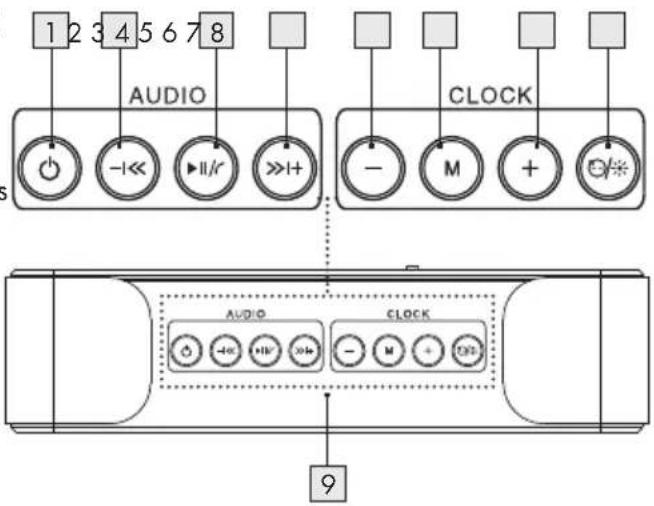
Speaker on/off
Previous track/volume down
3 Play/pause/calling
4 1+ Next track/volume up
5 Down
6 M Clock mode
7 + Up
8 Snoopze/dimming
9 Microphone
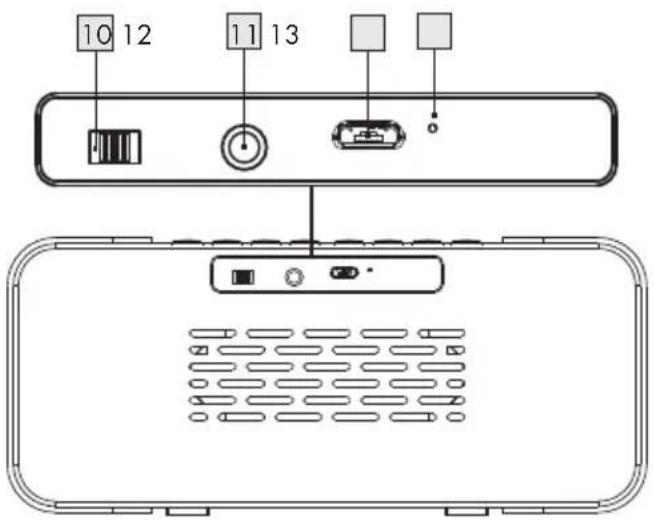
10 ON/OFF switch
11 3.5 mm stereo jack (AUX)
12 Micro-USB socket
13 LEDindicator
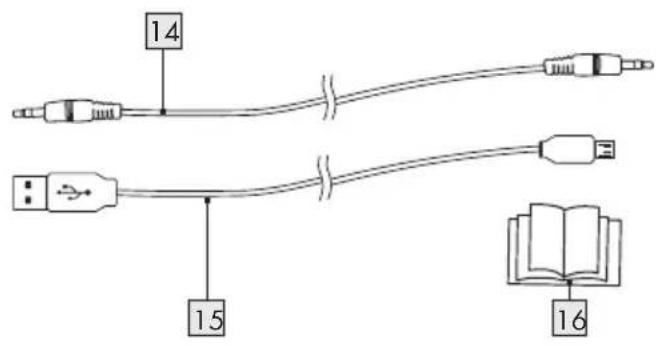
14 Audio cable
1.5 Micro-USB cable
16 Instructions for use
Technical data
Rechargeable battery type: Lithium Ion
Battery capacity: 2200 mAh
Output power: 2 × 5W (RMS)
Bluetooth® version: Bluetooth 4.2
Bluetooth device name: SRW 10 A1
Operation distance: approx. 10m
Frequency response: 80Hz - 18kHz
Impedance: 4 Ω
Net weight: 558 g
Dimension: 190 × 84 × 54 ~mm
Frequency band: 2402 MHz -
2480MHz
Max. transmitted power: 3 mW
The specification and design may be changed without notification
Before use
NOTES:
All parts have to be unpacked and the packaging material has to be removed completely.
Before use, verify the package contents are complete and undamaged!
- Charging
This product is equipped with a built-in rechargeable Lithium Ion battery. Fully charge the product before use:
Connect the micro-USB cable 15 with the micro-USB socket 12 and the USB port of a PC or a suitable USB charging power source.
The operating time for the product is 6 hours playback at medium volume.
① NOTES:
The LED indicator 13 lights up red when charging and goes out once charging is completed. The charging time takes 4 hours.
The product reminds you with an icon flashing if the battery is lower than 15% . If the battery is very low, a voice prompt reminds you to recharge the battery and the product switches off.
Battery capacity lower than 15%
The 15% (remaining battery capacity) icon is flashing; a voice prompt says "Voltage is insufficient, please charge" and the display switches off automatically. Briefly pressing any key will display the clock for approx. 3 seconds before the display goes off again
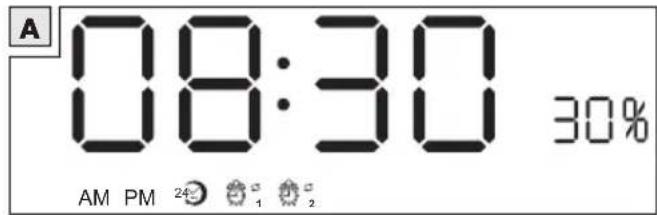
AM AM setting
PM PM setting
24 hours
Alarm clock 1
Alarm clock 2
30% Remaining battery capacity (in%)

NOTE:
The product only has the clock function when the battery capacity is lower than 15% (see Fig. A).
Once charging is complete, disconnect the micro-USB cable from the power source.

AUX/LINE-IN connection

Operation

Bluetooth connection
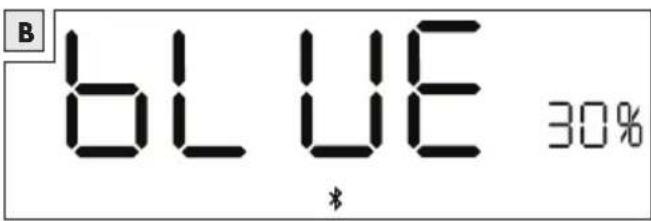
Switching on: Position the ON/OFF switch 10 to ON. Press and hold 1 to enter the Bluetooth mode; a voice prompt says "Enter the Bluetooth"; "BLUE" is displayed for approx. 30 seconds and the Bluetooth icon is flashing in the display during pairing mode (see Fig. B).
Activate Bluetooth your Bluetooth device.
Search for the products' Bluefoxme
SRW 10 A1 to enable pairing. The voice prompt "Connection successful" indicates that a connection is successfully established; the Bluetooth® icon is lit steadily in the display.
When playing music, the Blue button is flashing in the display.
De-activating Bluetooth and hold to leave the Bluetooth mode. The Bluetooth icon goes off in the display.
Switching off the product: Set the ON, OFF switch to the OFF position.
NOTES:
The product automatically connects with devices it has already been paired with before.
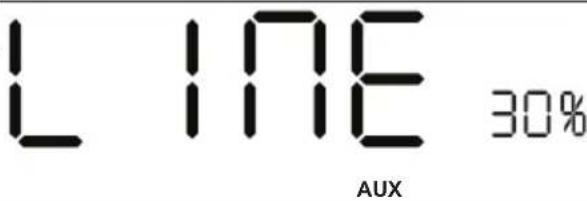
Connect the audio with the 3.5mm stereo jack (AUX) [1] and your device. The "AUX" icon lights up; "LINE" is displayed for approx. 30 seconds (see Fig. C).
NOTE:
Bluetooth has a higher priority over the line-in connection. When removing the audio cable [14], the product automatically enters into Bluetooth mode.

FM mode

Function Operation
Toggle to FM mode
Searching for channels:
Switching between channels: Increasing / decreasing volume
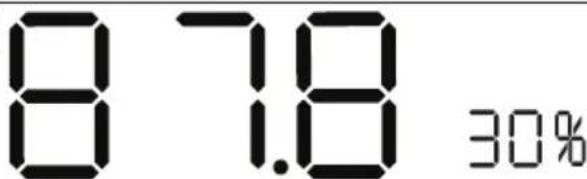
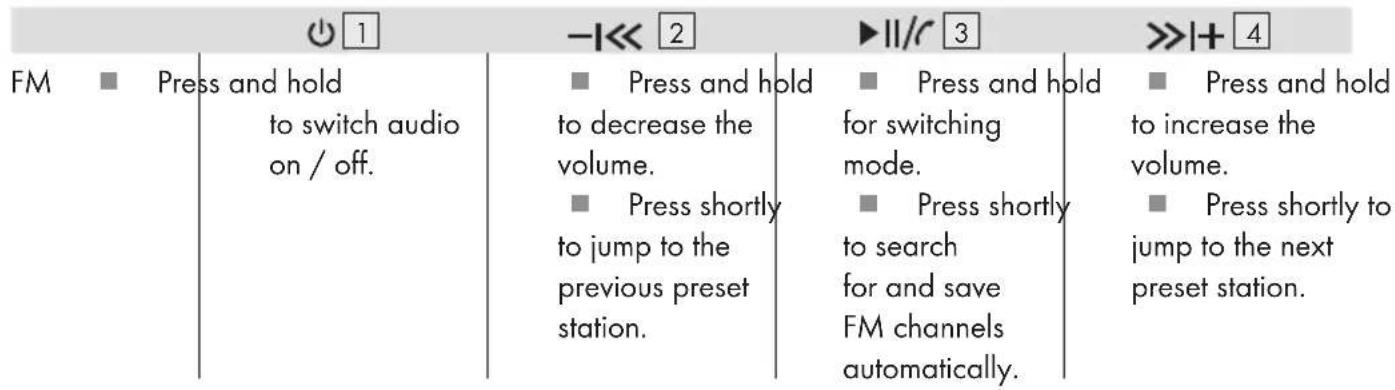
In Bluetooth mode, press and hold 11/3. A voice prompt says "Radio"; the frequency of the tuned station is shown for approx. 30 seconds; the "FM" icon lights up (see Fig. D).
Press 3 . Preset FM radio stations are saved automatically.
Press-1<<2/>>+4.
Press and hold -1 2 / >>I+4.
NOTE: Beeps sound while reaching min./max. volume.

Clock
Function Operation
Time setting:
Press and hold until the hour digits are flashing.
Pres enter into hours setting.
Preser+7to adjust the hours.
Pres confirm and set the minutes same as above.
Pres confirm the minutes and continue with time mode setting.
Time mode setting:
WhenAM"PMor 24 hours ^24 icon is flashing,press-5 or +7 to choose the time mode.Press M6to confirm the setting.
Press and hold finish and exit the setting.

Alarm
Function Operation
Setting "Alarm Clock 1":
Press enter the "Alarm Clock 1" mode; the "Alarm Clock 1" icon lights up.
Press times to enter the "Alarm Clock 2" mode; the "Alarm Clock 2" icon lights up.
PresM times to exit the alarm setting mode.
Press and hold until the hours are flashing.
Preser+to adjust the hours.
Function Operation
Setting "Alarm Clock 1":
Pres confirm and set the minutes same as above.
Pres confirm the minutes and continue with the alarm setting.
Alarm signals selection
Preser+7 to select the alarm signals.
There are 6 alarm signals available. Number 1 to 5 are built-in ring tones.
Choosing number 6 enables the radio being activated in the set alarm time. Press M to confirm and continue with the next setting.
Circulation option: Wdarm Clock 1 is flashing, press -5 or +7 to choose:
Icon Function
| Circulation icon | Alarm clock is working everyday |
| No circulation icon | Alarm clock on that day only. |
Press M 6 to confirm and continue with next setting.
Alarm Clock 1 on/off: Press -5 or +7 to choose:
Icon Function
| "ON" | "Alarm Clock 1" on |
| "OFF" | "Alarm Clock 1" off |
Press and hold M to save and confirm the "Alarm Clock 1" setting.
① NOTE:
Follow the instruction"Seeling Alarm Clock 1" to set "Alarm Clock 2".
Snoopze function
When the alarm is ringing, press any key to enter into snooze mode; the corresponding alarm clock icon is flashing. The alarm will ring again after 10 minutes.
Press and holo cancel the snooze function.

Functions
Alarm
| -5 | M6 | +7 | 8 | ||||
| Clock | Press shortly to decrease the values. | Press shortly confirming or entering to next setting. Press and hold to finish the setting / exit. | for | Press shortly to increase the values. | Press shortly for increasing. | ||
| Alarm 1 | Press shortly to decrease the values. | Press shortly confirming or entering to next setting. Press and hold to finish the setting / exit. | for | Press shortly to increase the values. | 3 dimming levels can be selected. | ||
| Alarm 2 | Press shortly to decrease the values. | Press shortly confirming or entering to next setting. Press and hold to finish the setting / exit. | for | Press shortly to increase the values. | Press any key to switch on the display again. | ||
Audio
| Bluetooth® | ■ Press and hold to switch product on / off. ■ Press shortly to disconnect Bluetooth® (voice prompt says "Disconnected"). | ■ Press and hold to decrease the volume. ■ Press shortly to jump to the previous track. | ■ Press shortly to play / pause music or answering / hanging up calls. ■ Press and hold for switching mode. ■ Double click for redialling. | ■ Press and hold to increase the volume. ■ Press shortly to jump to the next track. |
| Aux/Line-In | ■ Press and hold to switch audio on / off. | ■ Press and hold to decrease the volume. | ■ Press and hold for switching mode. ■ Press shortly to mute. | ■ Press and hold to increase the volume. |
Storage when not in use
Store the product in a dry location from dust, protected from direct sunlight.
- Cleaning
- Switch the product off, remove all plugs before cleaning!
No acid, chafing or solvent cleaning agents should be used or the product can be damaged.
Only clean the outside of the product using a soft, dry cloth!
At persistent soiling, a mild cleaning agent can be used.
It is necessary to repair the product if they have been damaged in any way, for example, if the housing is damaged, if liquid or objects have penetrated the device or if the product has been exposed to rain or moisture.
Repair work is also required if the device is not working properly or has been dropped. If smoke is produced, or there are any unusual sounds or smells, turn the product off immediately. In such cases, the product should not be used until they have been inspected by authorised service personnel. Only have the device repaired by qualified personnel. Never open the housing of the product.
Only use a clean, dry cloth for cleaning the product and never use any corrosive liquids. Use a slightly moistened cloth and a mild cleaning agent to remove stubborn dirt.
Disposal
The packaging is made of environmentally friendly materials, which may be disposed of through your local recycling facilities.
Contact your municipality for information on how to dispose of your worn-out product.

The adjacent symbol of a crossed out dustbin on wheels indicates this device is subject to Directive 2012/19/EU. This directive states at the end of the life this device must not be disposed of through regular household refuse but must be returned to special collection sites, recycling depots or waste management companies.
This disposal is free of charge to you. Protect the environment and dispose properly.
Please contact your local waste management company or the city / municipal administration for more information.
Think about the environment and your personal health. Dispose empty batteries in separate collecting boxes. These can be found in many public buildings or in shops where batteries are sold.
Improper disposal of batteries can harm the environment!
Never dispose of batteries in your household waste. They may contain toxic heavy metals and are subject to hazardous waste regulations. The chemical symbols of the heavy metals are: Cd = cadmium, Hg = mercury, Pb = lead. Therefore dispose of used batteries through your local collection site.
- Simplified EU declaration of conformity
Hereby, OWIM GmbH & Co. KG, Stiftsbergstraße 1, DE-74167 Neckarsulm, GERMANY, declares that the product CLOCK RADIO HG03072 is in compliance with Directives 2014/53/EU and 2011/65/EU.
The full text of the EU declaration of conformity is available at the following internet address: www.owim.com

Introduction 26
"Wekker 1"
installen:
NOSTE OCHRANNÉ RUKAVICE!