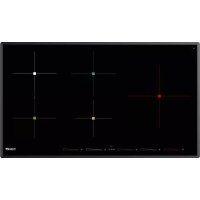
S4000.IS.5.Bridge - Cooker Foster - Free user manual and instructions
Find the device manual for free S4000.IS.5.Bridge Foster in PDF.



| Brand | Foster |
| Model | S4000.IS.5.Bridge |
| Product type | Built-in induction hob |
| Number of cooking zones | 4 zones + bridge zone (180 x 220 mm) |
| Zone diameters | 145 mm, 180 mm, 210 mm, 260 mm |
| Power supply | 220-240 V ~ 50/60 Hz (1 Ph+N) or 380-415 V ~ 50/60 Hz (2 or 3 Ph+N) |
| Required power cable | 3 x 4 mm² (230 V) or 4 x 2.5 mm² (400 V 2Ph) or 5 x 1.5 mm² (400 V 3Ph) |
| Controls | Touch with sliders and keys |
| Power levels | 9 positions (1 to 9) |
| Booster function | Maximum power for 10 minutes, indicated by 'P' |
| Bridge function | Connects two zones to use large pots |
| Timer | From 1 minute to 1h59, automatic zone shut-off |
| Egg timer / Reminder | Audible reminder from 1 to 99 minutes |
| Pause function | Interrupts cooking for 10 minutes |
| Special programs | Melt (42°C), Warm (70°C), Boil (94°C) |
| Settings recall | Possibility to restore previous settings after accidental shutdown |
| Child lock | Locks keys to prevent changes |
| Residual heat display | Symbol 'H' when the zone is still hot |
| Pan detection | Indicates if the pan is suitable or absent |
| Automatic safety shut-off | Time limit according to power (e.g., 6h at power 1-2, 1.5h at power 9) |
| Surface | Ceramic glass |
| Cleaning | Special scraper, non-abrasive products; do not use steam cleaner |
| Installation | Built-in, requires ventilation, insulation if above an oven |
| Standards | Compliant with WEEE directives (2002/96/EC) |
Frequently Asked Questions - S4000.IS.5.Bridge Foster
User questions about S4000.IS.5.Bridge Foster
0 question about this device. Answer the ones you know or ask your own.
Ask a new question about this device
Download the instructions for your Cooker in PDF format for free! Find your manual S4000.IS.5.Bridge - Foster and take your electronic device back in hand. On this page are published all the documents necessary for the use of your device. S4000.IS.5.Bridge by Foster.
USER MANUAL S4000.IS.5.Bridge Foster
GB INDUCTION GLASS COOKTOP - Use and maintenance instructions
(^*) calculated with the simultaneous factor following the standard EN 60 335-2-6
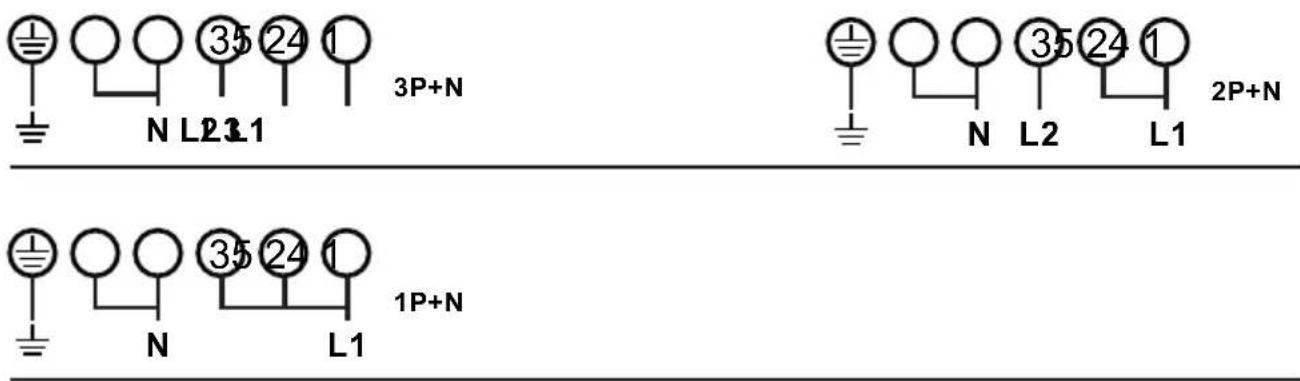
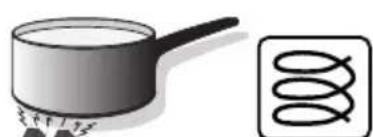
Fig. 6
Induction
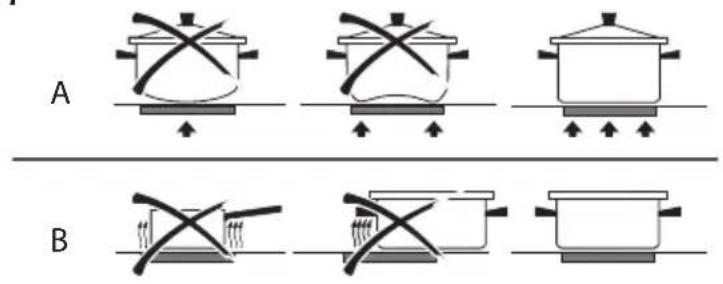
Fig. 7
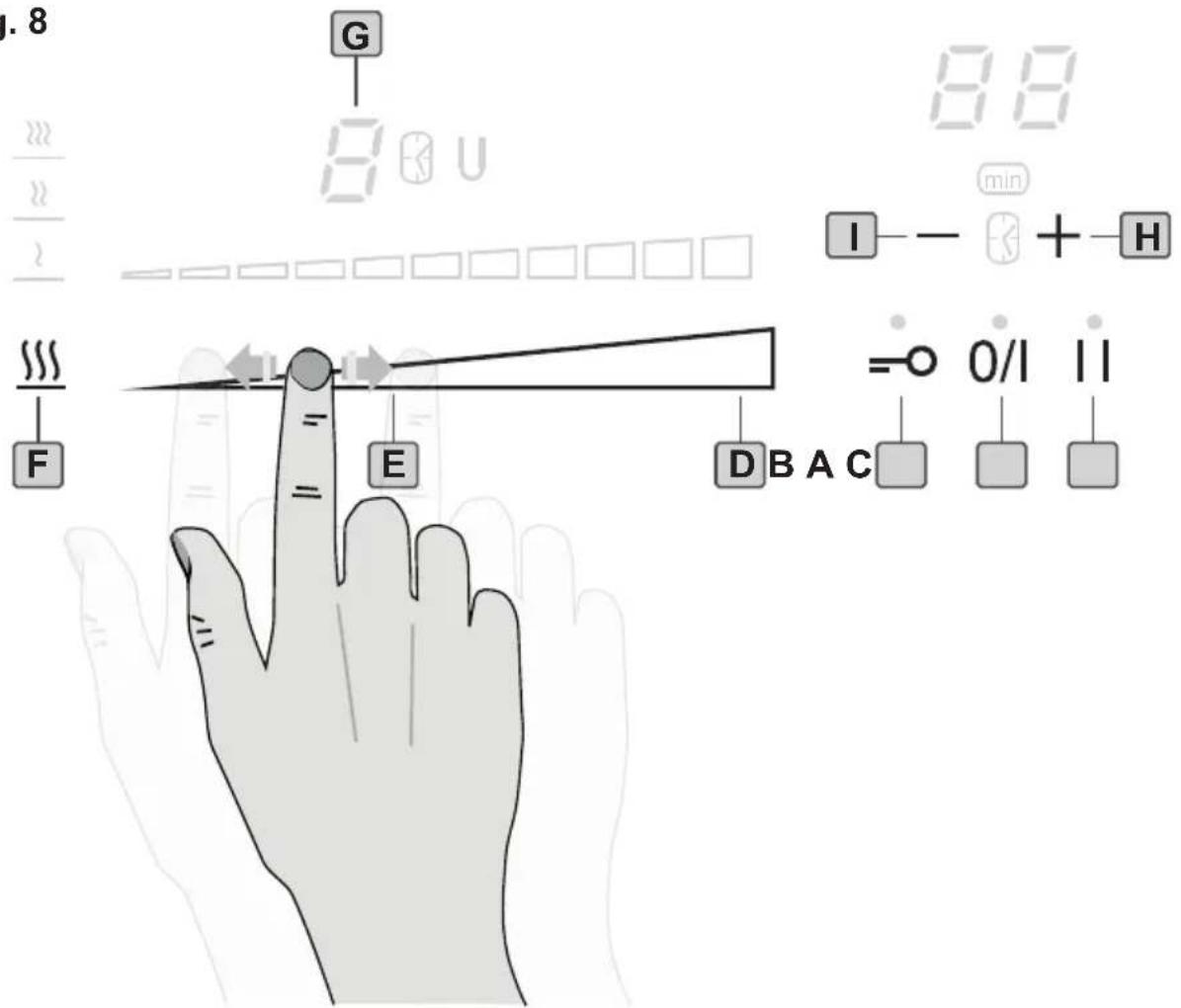
Fig. 8
A - ON/OFF key > switch the appliance on and off
B - Control Lock key > activate control panel lock /child lock
C - Pause/Recall Key > pause the appliance, recall last used appliance settings
D-Booster
E - Cooking Zone Display > slider zone display power level
F - Special programmes Zone
G-Cooking zone Identification cooking zone activated
H - Timer Plus key > increase timer value
I - Timer Minus key > decrease timer value
GENERALITA
Carefully read the contents of this leaflet since it provides important instructions regarding safety of installation, use and maintenance.
Keep the leaflet for possible future consultation. All the operations relating to installation (electrical connections) must be carried out by specialised personnel in accordance with current regulations.
SAFETY INSTRUCTIONS
-This appliance is designed exclusively for cooking food, with the express exclusion of any other domestic, commercial or industrial.
- Pay attention to cooking using grease or oil, can ignite easily.
- Metal objects such as knives, forks, spoons and lids should not be placed on the device because it may become very hot.
- Avoid the overflow of liquids by reducing the heat supply when boiling or warming liquids.
- Do not leave any heating element switched on, if there are no pots, or if the pots are empty.
- Once cooking is completed, turn the concerned heating element off, by using the control shown below.
- This appliance is not intended for use by people (children included) with limited physical, sensorial or mental abilities, or lacking of experience and knowledge, unless they are supervised or well instructed about the use of the appliance, by a person who is responsible for their safety.
- Children should be supervised to assure that they do not play with the appliance.
- If the hob surface is cracked, turn the appliance off and disconnect it from the electric network, so as to avoid the possibility of electric shock.
IMPORTANT: After use, switch the cooking top off with the command device.
IMPORTANT:
- Avoid spilling liquid, therefore to boil or heat liquids, reduce the heat.
- Please ensure when the appliance is turned on, that there are no empty pots left on top.
- When you have finished cooking, switch off the relevant heating element with the command indicated below.
WARNING
If the surface of the hob is cracked, turn off the appliance and disconnect from the electrical main in order to avoid any possible electric shocks.
INSTALLATION INSTRUCTIONS
These instructions are for a specialized installer and are a guide for the installation process, regulations and maintenance in accordance with the law and current standards.
If the built-in oven or any other appliances that produce heat, need to be installed directly underneath the cooking hobs in ceramic glass, IT IS NECESSARY THAT THE APPLIANCE (oven) AND THE COOKING HOBS
IN CERAMIC GLASS ARE ADEQUATELY ISOLATED, in such a way that the heat generated from the oven, measured on the right hand side of the bottom of the cooking hobs, does not exceed 60^ .
Failure to follow this precaution, could cause a malfunction in the TOUCH CONTROL system.
POSITIONING
The domestic appliance was built in order to be encased on a work surface, the way it is illustrated in the graph (Fig.1). Predispose sealing material (Fig.2) along the whole perimeter (for dimensions of the cut see Fig.1). Lock the domestic appliance into place with 4 supporters, keeping in mind the width of the surface (Fig.4). If the lower part of the appliance after installation, is accessible via the lower part of the furniture, it is necessary to mount a separating panel keeping in mind the distances indicated (Fig.3).
This is not necessary if underneath the induction hob is installed an oven.
VENTILATION
the distance between the cooktop and built-in kitchen's furnitures or cooking apparatuses must guarantee sufficient ventilation of the air. Not to use the cooktop if in the oven is in course the pyrolysis process.
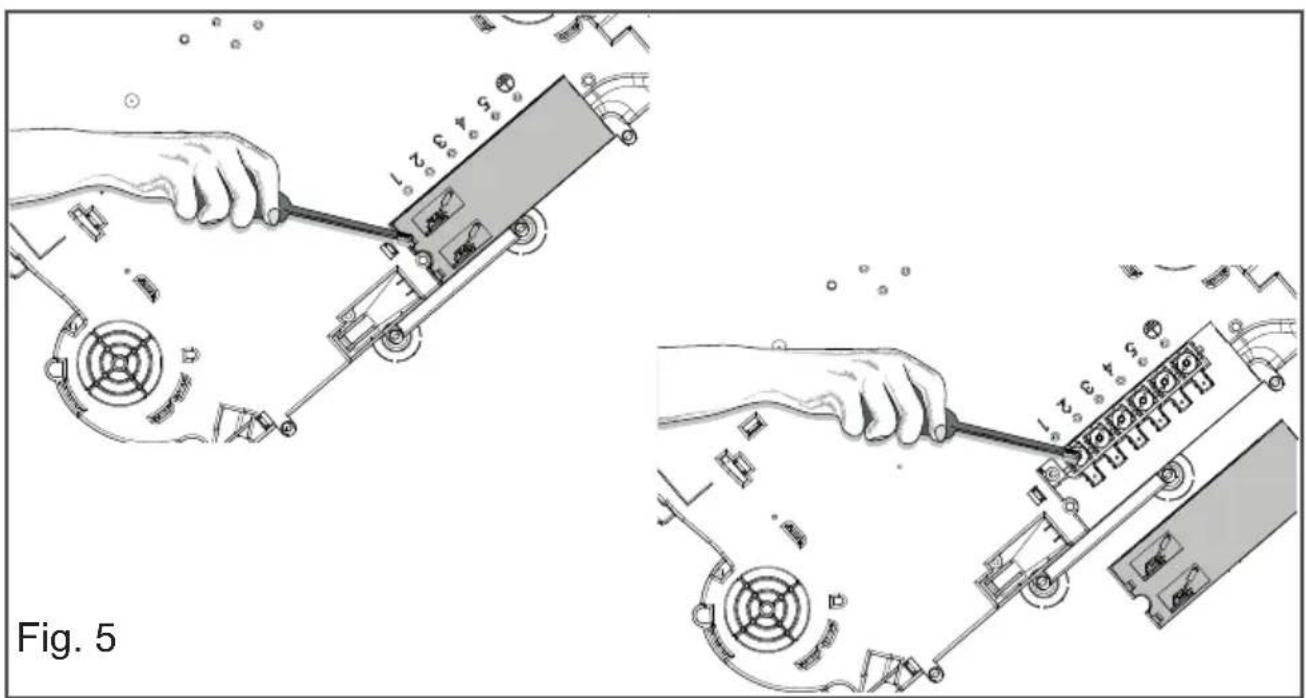
ELECTRICAL CONNECTIONS (Fig.5)
Before making the electrical connections, check that:
-
the ground wire is 2cm longer than the other cables;
-
the system ratings meet the ratings indicated on the identification plate fixed on the lower part of the worktop;
- the system is fitted with efficient ground wires in accordance with the laws and current standards.
Grounding is mandatory by law. If the domestic appliance is not supplied with a cable and/or suitable plug, use material suitable for the absorption value indicated on the identification plate and the operating temperature. If wishing to make a direct connection to the mains, an omnipolar switch must be installed with a minimum 3 mm opening between the contacts and appropriate for the load indicated on the plate and in accordance with current standards (the yellow/green ground conductor must not be disconnected by a switch). When the appliance has been installed, the omnipolar switch must be easily reachable.
USE
The fundamental characteristic of the induction system is the direct transference of heat from the generator to the cooking recipient.
Advantages:
- The transference of power takes place only when the recipient is placed on the cooking zone.
- The heat is generated only at the base of the recipient and transferred directly to the food to be cooked.
- Reduced heating time and low consumption of power during the beginning of cooking, allowing a global saving of power.
- The fiberglass top remains cold, the heat felt on the cooking top is that reflected from the base of the recipient.
COOKING RECIPIENTS
The use of appropriate recipients is an essential factor for induction cooking. Check that your pots are suitable for the induction system.
The recipients must contain iron. You can check whether the material of the pot is magnetic with a simple magnet (Fig.6).
We advise recipients having a flat base (Fig.7A).
This way you can use the power optimally.
Do not use recipients with a rough base to avoid scratching the thermal surface of the top.
A very important factor in induction cooking is the dimension of the pot compared to the plate used (Fig.7B). The
cooking zones allow the use of recipients with bases of various diameters. It is, however, preferable to use the appropriate cooking zone for the dimension of the pot:
- if pot diameter is 160~mm , the Pot.detection. is 90 mm and the Pot.max is 180 mm;
- if pot diameter is 200mm the Pot.detection is 120mm , and Pot. max. 210mm .
SWITCHING THE COOKING TOP ON
- Connect the stovetops to the mains


- SWITCHING THE COOKING TOP ON
Press A key to switch the top on.
All the displays relative to the cooking zones switch on in the standby position.
The control unit remains active for 10 seconds.
If no cooking zone is selected within this time, the cooking top switches off automatically.
- SWITCHING THE COOKING AREA ON
Select the desired cooking zone and press or crawl one of the E keys.
Press key E to go to position 9 (max. power) or to go to position 1 (min. power).
The power of the single cooking zone can be adjusted in 9 different positions and will be shown on the relative luminous display E with a number from "1 to 9".
To increase / decrease the power of the cooking zone selected, crawl in a clockwise / counterclockwise
E keys. The power can be set from 0 to 9.
- QUICK / BOOSTER HEATING
This function further reduces cooking time in a given area taking the temperature to the maximum power for a 10 minute interval. At the end of this interval, the cooking area power automatically returns to level 9.
The use of this function is indicated for the short time heating of large quantities of liquid (eg water for cooking pasta) or dishes.
After selecting a cooking zone can be selected by pressing the D booster function, this function for a time of 10 minutes the plate selected feeds at
maximum power
- PAUSE
When at least one cooking zone is operating it is possible to momentarily pause the appliance switching off the heating elements by pressing the C key. When the pause function is active the relative led is on. The pause may last for 10 minutes. If the status is not terminated within this time the appliance switches off. The pause function can be deactivated by pressing the C key and within 10 seconds any of the control keys. Previously programmed timers will be stopped during the pause.
- TIMER
This function allows establishing the time (from 1 to 99 minutes) for automatically switching the selected cooking zone off. Switch on at least one cooking zone and adjust the temperature.
Press simultaneously the H and I key to enter the timer function. Press either button to adjust the cooking time is shown on its display. Select the required cooking zone with one of the buttons and LED bar under the display of the area activated, indicating the selection. Set
the power of the area between 1 and 9 keys with the same E. Set at this point the desired sleep time using the keys H or I timers in the area. The inclusion of the timer with the clock symbol will appear next to the display of the cooking zone selected. The countdown will be displayed on the display above the keys H - I. The timer will automatically turn off the cooking area and you will hear a beep that can be turned off by pressing any of the commands. To disable the timer, press the keys H and I of the timer.
- EGG TIMER / REMINDER
To set a 'reminder time' press simultaneously the C and D key. The led located at the bottom-center of the timer display will be flashing. Set the 'reminder time' (from 1 to 99 minutes) by pressing the C or D key. An acoustic signal will indicate the 'reminder time' expiration. Press any key to stop the acoustic signal. The egg timer remains active even if the appliance is switched off. In order to disable the egg timer press simultaneously the C and D key to enter the egg timer function. Press the D key until reaching position
- RECALL
When the appliance has been switched off by mistake it is possible to quickly recall the previously active settings by pressing the on-off A key withing 6 seconds, then pressing the C key within another 6 seconds. If the recall function is available the relative led C will be enlightened when the appliance is swithcehd on again.
- CONTROL PANEL LOCK
It is possible to block the controls to prevent the risk of unintentional modification of the settings (children, cleaning etc.). By pressing the B key, the controls are blocked and the relative warning light switches on.
To release the controls and change the settings (e.g.interrupt cooking), the B key must be pressed. The cooking top can however be switched off even when the controls block is activated. In this case the controls block remains active when the top is switched on again.
- RESIDUAL HEAT
If the temperature of the cooking zone is still high (over 50^ ) after it has been switched off, the relative display will indicate the H symbol (residual heat). The symbol will only switch off when the burn risk in no longer present.
POT DETECTION
If the symbol should appear on one of the cooking area displays, it means that:
1)The recipient being used is not suitable for induction cooking.
2)The diameter of the recipient used is inferior to that allowed by the appliance.
3) No recipient is present.
| COOKING ZONE DIAMETER MINIM | UM PAN DIAMETER |
| Ø 145 mm 120 mm | |
| Ø 180 mm 145 mm | |
| Ø 210 mm 145 mm | |
| Ø 260 mm 180 mm | |
| 180 x 220 mm | 115 mm / 245mmUN |
BRIDGE FUNCTION
This feature allows you to connect, vertically, the two cooking zones enlarging the area where to put the pots, it is particularly suitable when it comes to cooking with large pans. The function is activated by pressing the D key areas of the two adjacent kitchenette, has been selected is displayed to the side to display the symbols U and The power control of the cooking zone is only enabled by the firing button and the area below. The function can be disabled keys pressed together D.
SPECIAL PROGRAMS
The cooktop has three special programs that can be set by pressing the F key. The programs have already been set and the temperatures are melting, working at 42 degrees to melt chocolate, butter or the like; warming, working at 70 degrees, when reheating previously cooked; simmering, working at 94 degrees, to bring to a boil slowly preparing sauces or soups and stews.
- SWITCHING THE COOKING AREA OFF
To switch a cooking zone off, press or crawl the E key of the relative zone until reaching position
SWITCHING THE COOKING TOP OFF
To turn off the cooking top entirely hold down the A key.
SAFETY SWITCH
The appliance has a safety switch that automatically switches off the cooking zones when they have been operating for a certain amount of time at a given power level.
| POWER LEVEL OPE | RATING TIME LIMIT (hours) |
| 1 - 2 6 | |
| 3 - 4 5 | |
| 5 | 4 |
| 6 - 7 - 8 - 9 1,5 |
MAINTENANCE
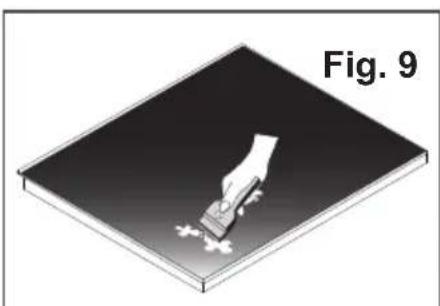
Remove any residues of food and drops of grease from the cooking surface by using the special scraper supplied on request (Fig.9).
Clean the heated area as thoroughly as possible using suitable products, and a cloth/paper, then rinse with water and dry with a clean cloth.
Using the special scraper immediately remove any fragments of aluminium and plastic material that have unintentionally melted on the heated cooking area, or residues of sugar or food with a high sugar content.
In this way, any damage to the cooktop surface can be prevented. Under no circumstances should abrasive sponges, or corrosive chemical detergents, such as oven sprays or stain removers, be used.
- WARNING: STEAM CLEANERS MUST NOT BE USED.
DISPOSALOFOLDELECTRICALAPPLIANCES
The European Directive 2002/96/EC on Waste Electrical and Electronic Equipment (WEEE), requires that old household electrical appliances must not be disposed of in the normal unsorted municipal waste stream. Old appliances must be collected
separately in order to optimise the recovery and recycling of the materials they contain and reduce the impact on human health and the environment.
The crossed-out dustbin symbol on the product reminds you of your obligation regarding separated waste collection. Consumers should contact their local public service or their local dealer for more information on the correct disposal of exhausted household appliances.
THE MANUFACTURER DECLINES ALL RESPONSIBILITY FOR EVENTUAL DAMAGES CAUSED BY BREAKING THE ABOVE WARNINGS. THE WARRANTY IS NOT VALID IN THE CASE OF DAMAGE CAUSED BY FAILURE TO COMPLY WITH THE ABOVE-MENTIONED WARNINGS.
1. MONTAGE
| Information for household electric hobs In acc. with regulation (EU) No. 66/2014 | |||||
| Model name / identifier | |||||
| Type of hob | built-in | ||||
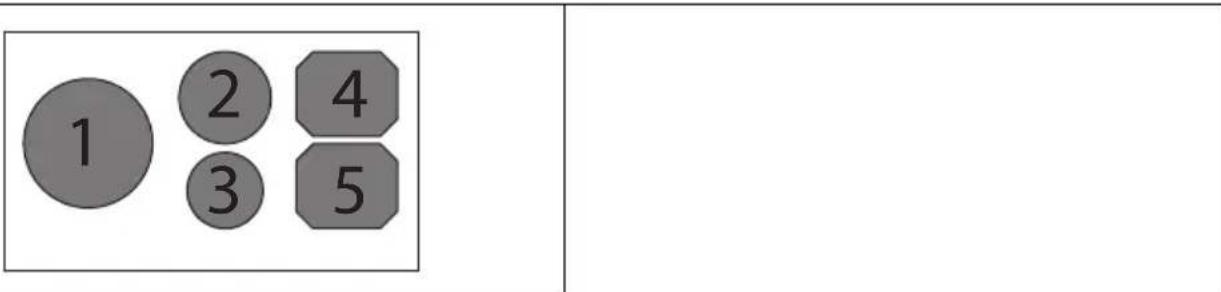
| Number of cooking zones and/or areas | 5 | ||||
| Heating technology Induction cooking zones and cooking areas, radiant cooking zones. | 1. = Induction 2. = Induction 3. = Induction 4. = Induction 5. = Induction | ||||
| For circular cooking zones: diameter of useful surface area/ mm cooking zone For non-circular cooking zones or areas: length and width of useful surface area per electric cooking zone or area | 1. = Ø 260 2. = Ø 180 3. = Ø 145 4. = 180 x 220 5. = 180 x 220 | ||||
| Energy consumption per cooking zone or area Wh/kg calculated per kg (ECeletricooking) | 1. = 191 2. = 181 3. = 191 4. = 171 5. = 171 | ||||
| Energy consumption for the hob calculated per kg (ECelecricoob) Wh/kg | 181 | ||||
- GENERALITA
- SAFETY INSTRUCTIONS
- IMPORTANT:
- WARNING
- INSTALLATION INSTRUCTIONS
- POSITIONING
- VENTILATION
- ELECTRICAL CONNECTIONS (Fig.5)
- USE
- Advantages:
- COOKING RECIPIENTS
- SWITCHING THE COOKING TOP ON
- - Connect the stovetops to the mains
- - SWITCHING THE COOKING TOP ON
- - SWITCHING THE COOKING AREA ON
- - QUICK / BOOSTER HEATING
- - PAUSE
- - TIMER
- - EGG TIMER / REMINDER
- - RECALL
- - CONTROL PANEL LOCK
- - RESIDUAL HEAT
- POT DETECTION
- BRIDGE FUNCTION
- SPECIAL PROGRAMS
- - SWITCHING THE COOKING AREA OFF
- SWITCHING THE COOKING TOP OFF
- SAFETY SWITCH
- MAINTENANCE
- DISPOSALOFOLDELECTRICALAPPLIANCES
- MONTAGE
Brand : Foster
Model : S4000.IS.5.Bridge
Category : Cooker