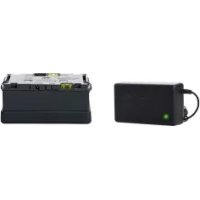
LiIon Charger Set - Battery charger Elinchrom - Free user manual and instructions
Find the device manual for free LiIon Charger Set Elinchrom in PDF.


| Product Type | Charger and Lithium-ion battery for Ranger Quadra flash generator |
| Brand | Elinchrom |
| Model | LiIon Charger Set (battery ref. EL-19295) |
| Battery Technology | Lithium-ion |
| Battery Capacity | 48 Wh / 3.3 Ah |
| Nominal / Full Charge Voltage | 14.4 V / 16.8 V |
| Battery Module Dimensions | 15 x 8.5 x 6.5 cm |
| Weight of Battery Module Only | 730 g |
| Protection Fuse | 20 A (ATP), with spare fuse holder |
| Operating Temperature Range | -10°C to +60°C |
| Charging Temperature Range | 0°C to +45°C (approx.) |
| Typical Charging Time | Approximately 1h 30 at 16.8V / 3.5A |
| Charge Level Indication | 4 LEDs on battery; test button |
| Generator Compatibility | Elinchrom Ranger Quadra RX / AS (depending on head version) |
| Built-in Protection | Safety mode and Protect Failure Mode (against overheating, short circuit, overvoltage) |
| Charger Features | Elinchrom specific multi-voltage charger for Li-ion battery |
| Maintenance and Cleaning | Clean with a dry cloth; avoid moisture and dust |
| Safety | Do not disassemble, short-circuit, expose to water or extreme temperatures |
| Spare Parts and Repairability | Spare fuse included; repair by Elinchrom authorized center |
| Warranty | 24 months on device; battery: 12 months or 500 cycles (30% capacity loss) |
| General Information | CE, FCC, IATA compliant (transport); recycling at end of life |
Frequently Asked Questions - LiIon Charger Set Elinchrom
User questions about LiIon Charger Set Elinchrom
0 question about this device. Answer the ones you know or ask your own.
Ask a new question about this device
Download the instructions for your Battery charger in PDF format for free! Find your manual LiIon Charger Set - Elinchrom and take your electronic device back in hand. On this page are published all the documents necessary for the use of your device. LiIon Charger Set by Elinchrom.
USER MANUAL LiIon Charger Set Elinchrom
Declaration of conformity 3
CE / Disposal 3
Notational Conventions 4
User Safety Information 4
Travelling in general and by Air 6
Outdoors 6
Battery Li-Ion Characteristics 6
Before You Start 7
Troubleshooting 9
Li-Ion Compatibility Chart for Ranger Quadra Models 11
Li-Ion Compatibility Chart for Ranger Quadra Heads A & S 12
Ranger Quadra 13
Warranty Information 14
Warranty
71
INTRODUCTION
Dear photographer
Thank you for buying the ELINCHROM Ranger Lithium Ion Battery Box. All Elinchrom products are manufactured using the most advanced technology. Carefully selected components are used to ensure the highest quality and the equipment is submitted to many tests both during and after manufacture. We trust that it will give you many years of reliable service.
Please read the instructions carefully, before use, for your safety and to obtain maximum benefit from the many features.
Your Elinchrom-Team
Please read carefully the notes about this manual...
This manual may show images of products with accessories, which are not part of Sets or single units.
Elinchrom set and single unit configurations may change without advice and may differ in other countries.
Please find actual configurations at www.elinchrom.com
For further details, upgrades, news and the latest information about the Elinchrom System, please regularly visit the Elinchrom website. The latest user guides and technical specifications can be downloaded in the "Support" area.
Technical data, features and functions of Elinchrom flash units, accessories and the EL-Skyport system may change without advice.
The listed values can differ due to tolerances in components, or measuring instruments.
Technical data, subject to change. No guarantee for misprints.
Keep this user manual for later information and reference.
DECLARATION OF CONfORMITY
This device complies with Part 15 of the FCC Rules. Operation is subject to the following two conditions:
This device may not cause harmful interference.
- This device must accept any interference received, including interference that may cause undesired operation.
| Product name: Ranger Quadra Lithium Ion Battery Box | |
| Trade name: ELINCHROM | |
| Model number(s): EL-19295 | |
| Name of responsible party: | Elinchrom S.A. Av. De Longemalle 11 CH - 1020 Renens / Switzerland |
| Phone: +41 21 637 26 77 | |
| Fax: +41 21 637 26 81 | |
| E-Mail: elinchrom@elinchrom.ch | |
ELINCHROM S.A. hereby declares that the equipment bearing the trade name and model number specified above was tested conforming to the applicable FCC rules, and that all the necessary steps have been taken and are in force to assure that the production units of the same equipment will continue to comply with the Commissions requirements.
CE MARKING

The shipped version of this device complies with the requirements of EMC directives
(EMC 2004/108/EC) «Electromagnetic compatibility» and (Low voltage 2006/95/EC) «Low voltage directive».
DISPOSAL AND RECYCLING
This device has been manufactured to the highest standards from materials, which can be recycled or disposed of in a manner that is not environmentally damaging. The device may be taken back after use to be recycled,
provided that it is returned in a condition that is the result of normal use.
Any components not reclaimable will be disposed of in an environmentally acceptable manner.
If you have any question on disposal, please contact your local office or your local ELINCHROM Agent (please visit our website for a list of all ELINCHROM agents worldwide).
NOTATIONAL CONVENTIONS
The meaning of the symbols and fonts used in this manual are as follows:

Pay particular attention to text marked with this symbol. Failure to observe this warning may endanger your life, destroy the device, or may damage other equipment

Supplementary information, remarks, and tips follow this symbol. Text which follows this symbol describes activities that must be performed in the order shown.
«Quotation marks» indicate names of chapters or terms
USER SAFETY INFORMATION
Carefully read this instruction manual before using the Lithium Ion Battery Box for the first time.

Important:
For your safety observe all cautionary information provided in this manual. The following information is intended to highlight potential safety hazards that can be associated with the misuse, misapplication or damage to Lithium Ion Batteries. Please carefully evaluate the information in this section when using Lithium Ion Battery Box.
DANGER!

- Do not disassemble, open or modify the Battery Box. The
Battery Box is equipped with the latest built-in safety/protection features.
Do not connect the positive (+) and negative (-) terminals with a metal object such as wire. Do not transport or store the Battery Box together with metal objects such as necklaces, hairpins, etc. - Do not use, charge or leave the Battery Box near a heat source such as a
fire or a heater (+60^ or higher) or direct sun light. - Do not immerse the Battery Box in water or seawater and do not allow it to get wet. The Battery Box must be protected in this case.
- Do not pierce the Battery Box with a nail or other sharp objects, strike it with a hammer, or stand on it.
- Do not strike or throw the Battery Box.
DO NOT USE an apparently damaged or deformed Battery Box.
If the Battery Box leaks and electrolyte gets into the eyes, do not rub them.
Instead, rinse the eyes with clean running water and immediately seek medical attention. Otherwise, eye injury may result. - Do not put the Battery Box into a microwave oven or pressurized container.
- If the Battery Box gives off odors, generates heat, becomes discolored or deformed, or in any way appears abnormal during use, recharging or storage, immediately remove it from the equipment or Battery Charger and stop using it. Remove the fuse, to deactivate the Li-Ion Battery.
- Do not use the Battery Box for a purpose other than those specified, use with Elinchrom equipment only!
- To recharge the Battery Box, use only the Elinchrom Li-Ion Battery Charger.
- The recharging operation fails to complete even when a specified recharging time has elapsed, immediately stop further recharging and disconnect the charger. Do not use a faulty Battery.
CAUTION
- This product is designed for dry use only and should not come into contact with water or dust. Protect the Battery Box against humidity!
- To prevent overheating the product should not be covered whilst in charge mode or in general use!
- Store the Battery Box in a location where children cannot reach it. Also, make sure that a child does not take the Battery Box or equipment to play with.
TRAVELLING IN GENERAL AND BY AIR
Due to strict security regulations, please note:
- Remove the 20 A fuse from the top side of the Battery Box, this avoids short circuit possibilities.
The Battery Box complies fully with the UN regulations. - The Battery Box complies fully with UN Manual of Tests and Criteria Part III Subsection 38.3 for the IATA Dangerous Goods Regulation.
- Always add a printed copy of the UN-Transportation documentation to the Li-Ion Battery Box when you travel. This may prevent delays or trouble with the Airport Security or shipping agent.
OUTDOORS

- The Lithium-Ion Battery circuitry protects the battery.
- In humid conditions cover or otherwise protect the battery. The humidity protection conforms to the norms of IP20.
- If the Battery Box has been exposed to very cold conditions, sudden exposure to warm or humid air may cause condensation and malfunction.
BATTERY LI-ION CHARACTERISTICS
| Weight (Battery Box include. Batteries) | approx. 730 g |
| Dimension (L * l * h) 15 x 8.5 x 6.5 cm // 5.91 x 3.35 x 2.55 inch. | |
| Cells Technology Lithium-lon | |
| Battery Energy 48 Wh / 3.3 Ah | |
| Battery voltage standard / full 14.4 V / 16.8 V | |
BEFORE you START

- Before starting any operation you must first fit the Battery fuse. To charge the Battery Box to full capacity, follow the instructions in chapter Battery Charging / Fuse!
- The Battery Box can be used at an ambient temperature from -10^ to +60^ , if the temperature is exceeded, the safety circuitry of the Battery Box will cut off completely to avoid damage to the Li-Ion cells.
- The number of flashes may vary from Battery to Battery (due to aging, recycling speed etc.).
- Even new Batteries may vary; N.B. The full capacity of the Battery is available only after some charge cycles.
Used Batteries may need to be recycled. Check your local regulations! - USE ONLY THE ORIGINAL MULTI-VOLTAGE ELINCHROM LITHIUM BATTERY CHARGER!
BATTERY CHARGING / fUSE
- The Battery can be charged at an ambient temperature from 0^ to +45^ , if the temperature is exceeded, the safety circuitry of the Battery Box will cut off completely to avoid damages to the Li-Ion cells
- There is no Memory-Effect; the Lithium-Ion Battery can be recharged from any charge level.
-
A completely charged Battery Box will need to be recharged latest every 6 months.
-
Insert the 20 A fuse to the Battery Box.
- Connect first the Elinchrom Li-Ion charger with the Battery Box, and then connect the charger to the mains.
- Charge the Battery Box until the Elinchrom Li-Ion Charger status light turns to green.
- Press the Battery Box push button to check, if the battery capacity is at 100% (4 green LEDs).
- Remove first the mains connection, and then remove the charger from the battery.
The Li-lon Battery Box implements a full-integrated monitoring circuitry, which allows the user to know exactly the available capacity of the battery when pressing the push button, located on the right side of the Battery Box LED's. If the charge level is checked whilst the Battery recharges, 1 to 4 LED's might light up, whereby always the last LED flashes depending on the charge level.
| 75% -100% | |
| 50% -75% | |
| 25% - 50% | |
| 10% - 25% | |
| < 10% | flashes |
EN
IMPORTANT
- Ranger Quadra does not show the correct charge level on the top display when a Li-Ion Battery Box is connected. The correct charge level can be checked directly on the Li-Ion Battery Box, when the push button is shortly pressed on the right side of the LED's.
- For further information please read the "Li-Ion Compatibility of Ranger Quadra Packs and Heads" chapter.
BATTERY Box fUSE

The Battery Box is secured with an ATO 20 A fuse. The topside of the Battery Box includes transport pockets for two ATO 20 A fuses. When travelling by air and in general, remove the fuse to deactivate the Battery Box and place the fuse into the free transport pocket!
BATTERY Box EXCHANGE
- Place the Ranger Quadra pack on a flat, dry and clean surface.
- Simultaneously press the central security lock down before pressing on the outer releases to separate the Battery Box.
- Place the new, charged Li-Ion Battery Box on a clean surface.
- Place the Ranger Quadra housing over the Battery Box.
- Press smoothly down on the Ranger Quadra pack until you hear two clicks (left/right) activating the locking mechanism.
- Check, that the Battery Box is well connected on both sides of the unit.
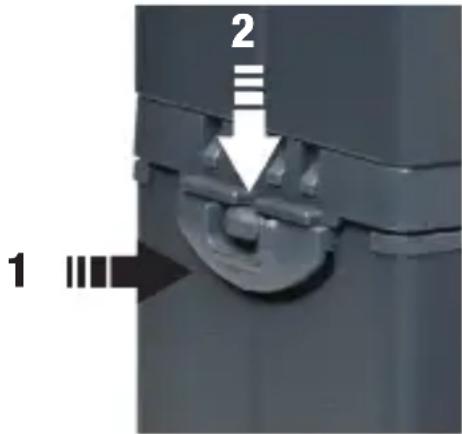
- Push Button
- Security Lock
TROUBLESHOOTING
The Battery Box offers two protection modes.
- Safety Mode which will deactivate the Battery Box to avoid damages
- Protect Failure Mode, which will deactivate the Battery Box to avoid a danger for the user. The Battery Box cannot be recovered from this mode.
SAfETy MODE

The Safety Mode activates..
If there is a short cut on the output contacts.
Over voltage whilst charging, or if the temperature is over +45^ whilst charging.
Over current during discharging or if the temperature is over +65^ during discharge.
- Once the Battery Box "Safety Mode" is active, the Battery Box can be reactivated:
- Remove the Battery Box from the unit to perform a reset of the internal protection circuit and reattach the Battery Box to the unit again after a few seconds.
- If the Safety Mode was activated by overheating the Battery Box, please wait until the unit cooled down and the temperature is below +45^ .
PROTECT FAILURE MODE
If the temperature is below -30^
If the temperature is over +65^
If the Charger voltage is over 18V
If BATTERY BOX CANNOT BE REACTIVATED, PLEASE CHECK WHICH FAILURE MODE IS ACTIVE:
Press and hold Battery status push button for approx.. 4 seconds. Depending on the battery charge level 1 - 4 LED's might light up.
Release immediately the push button soon the status of the LED lights changes; this gives information of the failure status. (Repeat this procedure in case the push button was pressed for too long.)

If only LED 3 is flashing, the Battery Box seems to be ok. Just check the fuse and wait until the Battery Box cooled down. The Battery Box can overheat due to extreme hard usage or due to hot ambient temperatures.
The Battery Box is defect, if no LED lights up, or any other LED light information appears. The "Protect Failure mode" is active. The Battery Box cannot be recovered and should be replaced, or contact an authorised Elinchrom Service agent.
LI-ION COMPATIBILITY CHART FOR RANGER QUADRA MODELS
- Ranger Quadra does not show the correct charge level on the top display when a Li-Ion Battery Box is connected. In this case, the correct charge level can be checked directly on the Li-Ion Battery Box, when the push button is shortly pressed on the right side of the LED's.
| MODEL | BATTERY CHARGE INDICATOR AT THE DISPLAY OF THE QUADRA BATTERY POWER PACK | BATTERY CHARGE INDICATOR AT THE LI-ION BATTERY BOX |
| QUADRA RX / AS | Correct charge display with Lead-Gel Batteries | Correct values |
| QUADRA AS | Correct charge display with Lead-Gel Batteries | Correct values |
LI-ION COMPATIBILITY CHART FOR RANGER QUADRA HEADS A & S
The first versions of the Ranger Quadra A / S Heads may switch off the unit, when used with the Li-lon Battery Box. Those Heads can be modified at the authorised Elinchrom Repair Service! The modification is chargeable.
| MODEL SERIAL N° LI-ION COMPATIBILITY | ||
| RANGER QUADRA HEADS & A VERSION (SECOND GENERATION) | S Version: from SN. 1701 A Version: from SN. 5401 | Compatible, in case the Battery Box switches off, the RQ Heads can be modified. The upgrade modification is chargeable. |
| RANGER QUADRA HEADS & A VERSION (FIRST GENERATION) | S Version: up to S.N.1700 A Version: up to S.N. 5400 | Not recommended, the Li-Ion Battery may switch off! Previous RQ Heads can be modified. The upgrade modification is chargeable. |
SOLUTIONS IN CASE OF MALFUNCTION:
- Ranger Quadra Heads of the first generation can be upgraded at the authorised Elinchrom service provider with a special electronic upgrade Kit. This Service is chargeable.
| RANGER QUADRA | ||
| TyPE Of BATTERY | Lead-Gel PB Battery | Li-Ion Battery |
| FLASH POWER | 400 J (Ws) 400 J (Ws) | |
| f-STOP, 1M, 100ISO WITH RefLECTOR 48° | 64.5 64.5 | |
| POWER RANGE | 100% A Output: 25-400 J (Ws) | 100% A Output: 25-400 J (Ws) |
| 33% B Output: 8.2-132 J (Ws) | 33% B Output: 8.2-132 J (Ws) | |
| VARIABLE fFLASH POWER | 6.6 f-stop / 8.2 - 400 Ws | 6.6 f-stop / 8.2 - 400 Ws |
| RECyCLING, 100% fAST AT MIN. / MAX. POWER (A OR A+B OUTPUT) | 0.41 s / 2.26 s 0.36 s / 2.0 s | |
| RECyCLING, 100% SLOW AT MIN. / MAX. POWER (A OR A+B OUTPUT) | 0.95 s / 7.8 s 0.86 s / 6.6 s | |
| RECyCLING, 33% fAST AT MIN. / MAX. POWER (B OUTPUT) | 0.18 s / 0.8 s 0.17 s / 0.73 s | |
| RECyCLING, 33% SLOW AT MIN. / MAX. POWER (B OUTPUT) | 0.37 s /2.7 s 0.33 s / 2.3 s | |
| FLASHES OUT OF ONE CHARGED BATTERY AT MIN POWER SLOW / fast | 2000 / 1500 4800 - 4200 | |
| FLASHES OUT OF ONE CHARGED BATTERY AT MAX POWER SLOW / fast | 150 / 110 320 / 280 | |
| QUICK CHARGER, RECHARGING TIME | 2 h | 1 h 30 min @ 16.8 V / 3.5 A |
| EL-SkyPORT BUILT IN | Built-In Built-In | |
EN
| DIMENSION: RQ INCLUDING BATTERY BOX | 15 x 8.5 x 21 cm | 15 x 8.5 x 18.5 cm |
| DIMENSION OF THE BATTERY BOX | 15 x 8.5 x 9 cm | 15 x 8.5 x 6.5 cm |
| WEIGHT: RQ WITH BATTERY BOX | 3 kg 2 kg | |
| WEIGHT: BATTERY BOX | 1.7 kg 0.73 kg |
WARRANTY INFORMATION
Elinchrom will guarantee 500 charge cycles in 12 months with a capacity loss of about 30% .
Inhalt
DE
Einleitung 16
Trade name: ELINCHROM
Model number(s): EL-19295
Name of responsible
party:
Elinchrom S.A.
Av. De Longemalle 11
CH - 1020 Renens / Switzerland
Phone: +41 21 637 26 77
Fax: +41 21 637 26 81
GARANTIE INFORMATION
| 75% -100% | |
| 50% -75% | |
| 25% - 50% | |
| 10% - 25% | |
| < 10% | clignote |
INFORMATIONS IMPORTANTES
Notational Conventions 46
Trade name: ELINCHROM
Model number(s): EL-19295
Name of responsible
party:
Elinchrom S.A.
Av. De Longemalle 11
CH - 1020 Renens / Switzerland
Phone: +41 21 637 26 77
Fax: +41 21 637 26 81
Trade name: ELINCHROM
Model number(s): EL-19295
Name of responsible party:
Elinchrom S.A.
Av. De Longemalle 11
CH - 1020 Renens / Switzerland
Phone: +41 21 637 26 77
Fax: +41 21 637 26 81
This ELINCHROM product will be repaired free of charge by the vending agent if during a period of 24 months from date of purchase its working order is impaired through a manufacturing or material defect. The faulty product should be immediately sent to the authorized dealer or ELINCHROM agent. This guarantee is not valid for equipment which has been misused, dismantled, modified, or repaired by persons not belonging to the ELINCHROM distribution network. It does not cover flash tubes, lamps and the normal ageing of capacitors. No responsibilities can be accepted for damage, resulting from unsatisfactory operation of the equipment, such as wasted film or other expenses.
In case you cannot register your Elinchrom unit via internet, please fill in the Guarantee card and post it to ELINCHROM.
| Please return this registration card directly to | : | ELINCHROM S.A. |
| These Registrierkarteitte direkt zurücksenden an | : | P.O. Box 458 |
| Veuiliez returner cette carte d'enregistrement directement à | : | Avenue de Longemalle 11 |
| Vi preghiamo di far pervenire esta cartolina di iscrizione direttamente a | : | CH-1020 Renens |
| Por favor envie esta tarjeta de registrar directamente a: | : | Switzerland |
| Elinchrom model | : | N° |
| Elinchrom Modell | : | |
| Elinchrom modèle | : | |
| Modello di Elinchrom | : | |
| Modelo de Elinchrom | : | |
| Date of purchase | : | Dealer |
| Kaufdatum | : | Händler |
| La date d'achat | : | Négociant |
| La data di acquisto | : | Il distributore |
| La Fecha de la compra | : | El commerciente |
| Your full name and address | : | |
| Name und Adresse | : | |
| Votre nom completet et adresse | : | |
| Il suo nome pieno ed indirizza | : | |
| Su nombre completo y direccion | : |

elinchrom®
creative image lighting technology