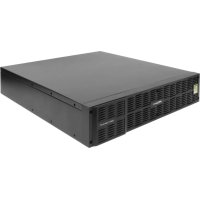
BATT1500EXT - Power bank Furman - Free user manual and instructions
Find the device manual for free BATT1500EXT Furman in PDF.



Frequently Asked Questions - BATT1500EXT Furman
User questions about BATT1500EXT Furman
0 question about this device. Answer the ones you know or ask your own.
Ask a new question about this device
Download the instructions for your Power bank in PDF format for free! Find your manual BATT1500EXT - Furman and take your electronic device back in hand. On this page are published all the documents necessary for the use of your device. BATT1500EXT by Furman.
USER MANUAL BATT1500EXT Furman
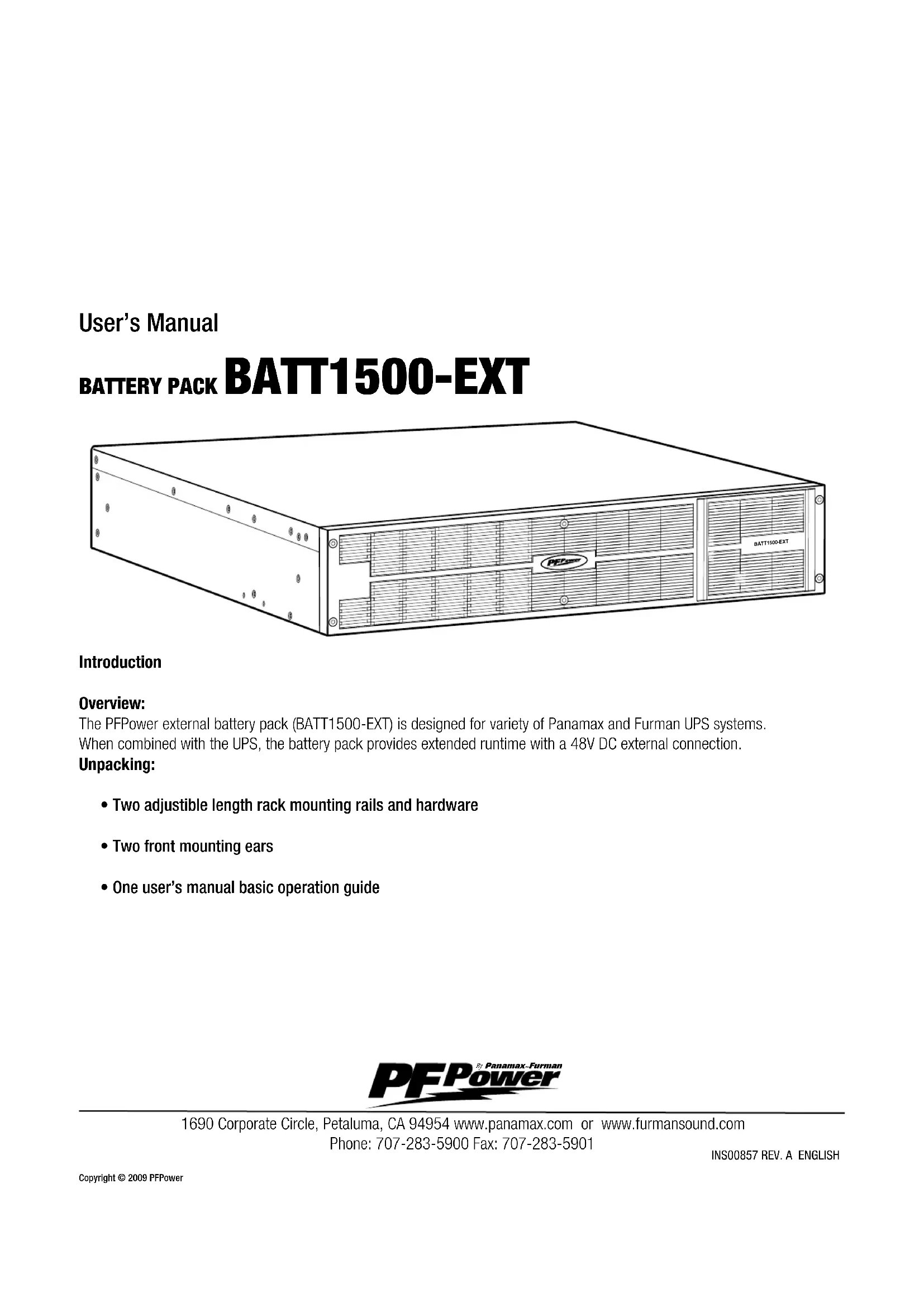
The PFPower external battery pack (BATT1500-EXT) is designed for variety of Panamax and Furman UPS systems. When combined with the UPS, the battery pack provides extended runtime with a 48V DC external connection.
Unpacking:
- Two adjustable length rack mounting rails and hardware
- Two front mounting ears
- One user's manual basic operation guide

1690 Corporate Circle, Petaluma, CA 94954 www.panamax.com or www.furmansound.com
Phone: 707-283-5900 Fax: 707-283-5901
INS00857 REV.A ENGLISH
Installation Guide
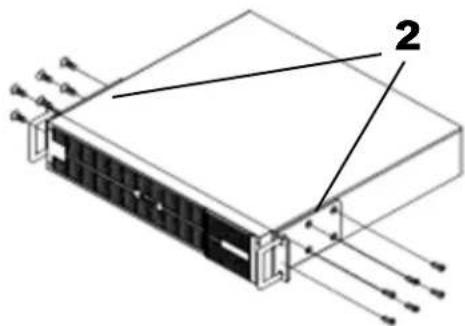
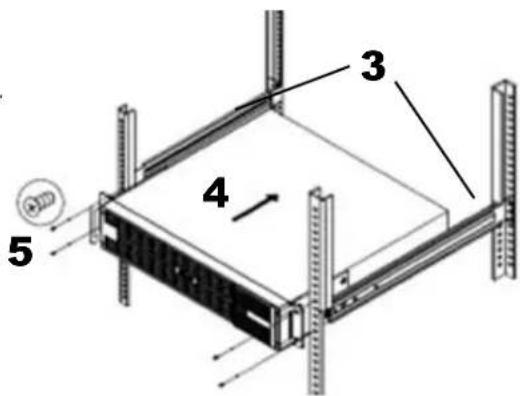
The UPS is supplied with rack mounting rails, mounting ears, and all the hardware. Follow the below steps to complete the rack installation.
INSTALLING BATT1500-EXT INTO RACK
- BATT1500-UPS must be installed directly underneath the UPS
- Attach the mounting ears to each side of BATT1500-EXT
- Attach the adjustable length rack mounting rails to the rack.
- Slide the BATT1500-EXT into the rack on the rails
- Use screws to secure the mounting ears to the rack
TURNUPSANDBATT1500-EXTOFF
- CAUTION! - Turn off the UPS that BATT1500-UPS will be connected to
- CAUTION! - Switch the circuit breaker on BATT1500-UPS to the OFF position.
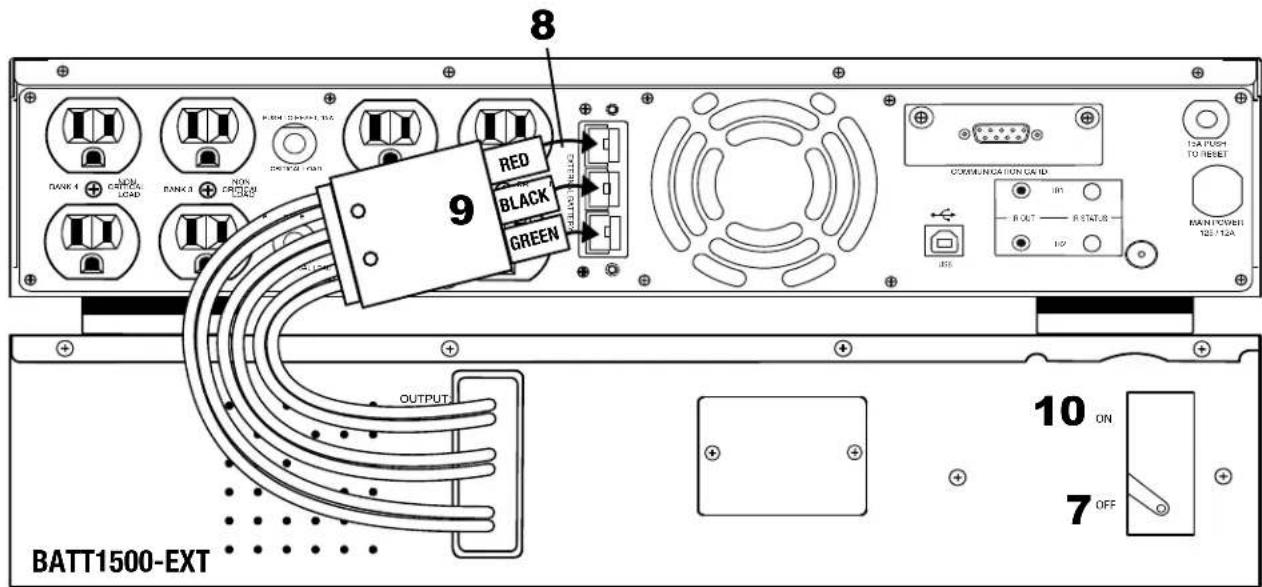
CONNECT THE BATT1500-EXT TO THE UPS
- Connect the battery pack's output cable assembly into the UPS's input port
- Ensure that the colors of the battery pack cable and UPS input port are matched: red-red, black-black, green-green.
TURN UPS AND BATT1500-EXT ON
- Switch the circuit breaker on BATT1500-EXT to the ON position
- Turn on the UPS on.
- In the UPS setup menu, configure the UPS to use an external battery pack. Refer to the UPS manual for details.
UPS
| TROUBLE SHOOTING | ||
| PROBLEM | POSSIBLE CAUSE | SOLUTION |
| The UPS LCD does not per-form expected runtime. | Do not set the UPS to recognize the battery. | Verify that the UPS is setup to use the External Battery. Refer to the UPS manual for details. |
| The battery pack does not work. | Batteries are not fully charged. | Allow the battery pack to charge for 24 hours. Do not expect full runtime during this initial charge period. |
| Specified battery pack models can use AC to shorten charge time. | ||
| The status of circuit breaker is off. | Switch on the circuit breaker. | |
| The fuse blew. | Contact PFPower, Panamax, Furman. | |
| Open the cover on the rear panel and replace with new fuse. | ||
| SPECIFICATIONS |
| AC POWER |
| Voltage 48V |
| PHYSICAL |
| Dimensions (in) |
| Weight (lbs) |
| BATTERY |
| Sealed Maintenance Free Lead Acid Battery 12V/9.0AHX8 |
| Interface PP75 |
| ENVIRONMENTAL |
| Operating Temperature 32°F to 104°F |
| Operating Relative Humidity 0 to 95% |
| SAFTEY APPROVALS Certifications FCC Class B certified, cUL, UL1778 |
| RoHS RoHS Compliant |
| WARRANTY |
| 2 year warranty, Free Tech Support |
Contacting Customer Service
Please contact Panamax Customer Service for information regarding battery replacement.
2U Rack, 17"x19"x3.5"
If you require technical support or equipment service, please contact the Panamax Service Department at 800-472-5555. You may also email info@Panamax.com.
All equipment being returned for repair must have a Return Authorization (RA) number. To get an RA number, please call the Panamax Service Department. 40
Before returning any equipment for repair, please be sure that it is adequately packed and cushioned against damage in shipment, and that it is insured. We suggest that you save the original packaging and use it to ship the product for servicing. Also, please enclose a note giving your name, address, phone number and a description of the problem.
Warranty Information
LIMITED PRODUCT WARRANTY
PFPower warrants to the purchaser of this PFPower audio/video component style uninterrupted power supply, for a period of two (2) years from the date of purchase, that the unit shall be free of defects in design, material, or workmanship, and PFPower will repair or replace any defective unit.
You must notify PFPower within ten days of any event precipitating request for product replacement. A return authorization (RA) number must first be obtained from the PFPower Customer Relations Department at www.panamax.com before returning the protector to PFPower. Once you obtain an RA number, please mark the number on the bottom of the unit and pack it in a shipping carton/box with enough packing material to protect it during transit. The RA number must also be clearly marked on the outside of the carton. Ship the unit to PFPower. Please note that you are responsible for any and all charges related to shipping the unit to PFPower. Original purchase receipts must accompany any product return.
Upgrade Policy
Valid only in the United states and Canada
If your PTPower UPS sacrifices itself while protecting your connected equipment, you have an option to upgrade to the latest technology.
Please go to our web sites www.panamax.com or contact Customer Relations at 800-472-5555 for details.
2 Year Battery Warranty
PFPower warrants to the purchaser of this uninterruptible power supply for a period of two (2) years from the date of purchase, that the batteries shall be free of defects in design, material or workmanship, and Panamax will replace any defective battery.
Warning Notice
WARRANTY LIMITATION FOR INTERNET PURCHASERS
PPPower audio video products purchased through the Internet do not carry a valid Warranty unless purchased from an Authorized Panamax/Furman Internet Dealer! Authorized Panamax/Furman Audio Video Internet Dealers have sufficient expertise to insure warranty compliant installations. For a list of Authorized Panamax/Furman Audio Video Internet Dealers go to www.panamax.com or www.furmansound.com.
CAUTION: AudioVideo, computer and/or telephone system installations can be very complex systems, which consist of many interconnected components. Due to the nature of electricity and surges, a single protector may not be able to completely protect complex installations. In those cases, a systematic approach using multiple protectors must be employed. Systematic protection requires professional design. AC power, satellite cables, CATV cables, AV signal line cables or telephone/network lines entering the system must pass through a Panamax surge protector. For additional information on how to protect your system, please contact Panamax before connecting your equipment to the surge protector.
THE LIMITED PRODUCT WARRANTY IS THE ONLY WARRANTY PROVIDED WITH THIS PANAMAX PRODUCT AND ANY OTHER IMPLIED OR EXPRESSED WARRANTY ARE NON-EXISTENT.
This warranty may not be modified except in writing, signed by an officer of the Panamax Corporation.
More detailed information is available at www.panamax.com. If you have any questions regarding these requirements, please contact Customer Relations.

FCC Notice
This device complies with part 15 of the FCC Rules. Operation is subject to the following two conditions: (1) This device may not cause harmful interference, and (2) this device must accept any interference that may cause undesired operation. WARNING!! This equipment has been tested and found to comply with the limits for a Class B Digital Device, pursuant to Part 15 of the FCC Rules. These limits are designed to provide reasonable protection against harmful interference in residential installation. This equipment generates, uses and can radiate radio frequency energy and, if not installed and used in accordance with the instructions, may cause harmful interference to radio communications. However, there is no guarantee that interference will not occur in a particular installation. If this equipment does cause harmful interference to radio or television reception, which can be determined by turning the equipment off and on, the user is encouraged to try to correct the interference by one or more of the following measures: (1) Reorient or relocate the receiving antenna. (2) Increase the separation between the equipment and receiver. (3) Connect the equipment into an outlet on a circuit different from that to which the receiver is connected. (4) Consult the dealer or an experienced radio/ TV technician for help. Any special accessories needed for compliance must be specified in the instruction.
Need Additional Help?
Feel free to contact our Tech Support department with installation, troubleshooting, or general product questions. PFPower Customer Service
Phone: 1-707-283-5900
Web: www.panamax.com or furmansound.com
Mail: 1690 Corporate Circle, Petaluma, CA Hours of Operation:
Monday-Friday,8:00am-5:00pm (PST)
Entire contents copyright © 2009 PFPower, Inc.
All rights reserved. Reproduction in whole or in part without permission is prohibited.
Warranty Information
LIMITED PRODUCT WARRANTY
PFPower warrants to the purchaser of this PFPower audio/video component style uninterrupted power supply, for a period of two (2) years from the date of purchase, that the unit shall be free of defects in design, material, or workmanship, and PFPower will repair or replace any defective unit.
You must notify PPFower within ten days of any event precipitating request for product replacement. A return authorization (RA) number must first be obtained from the PPFower Customer Relations Department at www.panamax.com before returning the protector to PPFower. Once you obtain an RA number, please mark the number on the bottom of the unit and pack it in a shipping carton/box with enough packing material to protect it during transit. The RA number must also be clearly marked on the outside of the carton. Ship the unit to PPFower. Please note that you are responsible for any and all charges related to shipping the unit to PPFower. Original purchase receipts must accompany any product return.
Upgrade Policy
Valid only in the United states and Canada
If your PFPower UPS sacrifices itself while protecting your connected equipment, you have an option to upgrade to the latest technology.
Please go to our web sites www.panamax.com or contact Customer Relations at 800-472-5555 for details.
2 Year Battery Warranty
PFPower warrants to the purchaser of this uninterruptible power supply for a period of two (2) years from the date of purchase, that the batteries shall be free of defects in design, material or workman ship, and Panamax will replace any defective battery.