Furman

RS-1 - Remote control Furman - Free user manual and instructions

Find the device manual for free RS-1 Furman in PDF.

📄 2 pages English EN Download 💬 AI Question 10 questions ⚙️ Specs
Notice Furman RS-1 - page 1
Pick your language and provide your email: we'll send you a specifically translated version.
Product Type Remote Control
Brand Furman
Model RS-1
Dimensions (L x W x H) 4.5 x 1.8 x 0.9 inches (114 x 46 x 22 mm)
Weight 2.1 oz (60 g) with battery
Power Source 2x AAA batteries (not included)
Battery Life Approximately 12 months with normal use
Operating Range Up to 30 ft (9 m) line-of-sight infrared
Compatibility Furman power conditioners and select Furman components
Key Functions Power On/Off, Dimmer control, Input selection, Volume control, Mute, Menu navigation
Number of Buttons 20
Indicator Light LED for IR signal confirmation
Materials ABS plastic, rubberized buttons
Warranty 1 year limited
What's in the Box RS-1 remote, quick start guide
Color Black
Cleaning Instructions Wipe with a dry, soft cloth. Do not use liquids or abrasive cleaners.
Storage Temperature 32°F to 122°F (0°C to 50°C)
Safety Certifications CE, RoHS
Repairability Battery compartment accessible; no user-serviceable parts inside. Contact Furman support for issues.
Spare Parts Availability Battery compartment door available through authorized dealers

Frequently Asked Questions - RS-1 Furman

How do I pair the Furman RS-1 remote with my power conditioner?
The RS-1 operates via IR and typically does not require pairing. Ensure the remote has fresh batteries and point it directly at the IR sensor on your Furman device. For specific models, refer to the device manual.
What batteries does the RS-1 use and how do I replace them?
The RS-1 uses two AAA batteries (not included). To replace, slide off the battery cover on the back, remove old batteries, insert new ones with correct polarity (+/-), and replace the cover.
What should I do if the remote doesn't work?
First, check the batteries and ensure they are fresh and installed correctly. Then verify the IR sensor on the device is not obstructed. If the issue persists, try resetting the remote by removing batteries for 30 seconds. Also check compatibility with your Furman model.
What is the effective range of the RS-1 remote?
The RS-1 has an IR operating range of up to 30 feet (9 meters) in direct line-of-sight. Performance may vary with lighting conditions and physical obstructions.
Can I control multiple Furman devices with one RS-1 remote?
The RS-1 is designed to control a single Furman device at a time. To control multiple devices, you may need additional remotes or a universal remote that supports IR codes for Furman products.
How do I clean my RS-1 remote?
Wipe the remote with a dry, soft cloth. For stubborn dirt, lightly dampen the cloth with water. Avoid using alcohol, chemicals, or abrasive materials that may damage the surface.
What does the LED indicator on the remote mean?
The LED blinks to confirm that the remote is sending an IR signal when a button is pressed. If the LED does not blink, check the batteries or battery contacts.
Are there any specific safety precautions for using the RS-1?
Do not expose the remote to liquids, extreme heat, or direct sunlight for extended periods. Keep out of reach of children to prevent battery ingestion or damage. Dispose of used batteries properly.
How do I reset the RS-1 remote to factory settings?
The RS-1 does not have a factory reset function as it operates on a fixed IR protocol. If you need to clear any learned functions (not typical for RS-1), remove batteries for several minutes and re-insert.
Where can I find the warranty information for the RS-1?
Warranty details are included in the product packaging. For online access, visit Furman's official website and search for RS-1 support. The standard warranty is 1 year from date of purchase.

User questions about RS-1 Furman

0 question about this device. Answer the ones you know or ask your own.

Ask a new question about this device

The email remains private: it is only used to notify you if someone responds to your question.

No questions yet. Be the first to ask one.

Download the instructions for your Remote control in PDF format for free! Find your manual RS-1 - Furman and take your electronic device back in hand. On this page are published all the documents necessary for the use of your device. RS-1 by Furman.

USER MANUAL RS-1 Furman

RS-1 AND RS-2 REMOTE SYSTEM CONTROL PANELS

customer. Otherwise, a one year warranty applies. Products must have a proof of purchase from a Furman authorized dealer. During this period, Furman will make any necessary repairs without charge for parts or labor. Shipping charges to the factory or repair station must be prepaid by the owner; return-shipping charges (via UPS Ground) will be paid by Furman.

This warranty applies only to the original owner and is not transferable. Also, it does not apply to repairs done other than by the Furman factory or Authorized Repair Stations.

This warranty may be cancelled by Furman at its sole discretion if the RS-1 or RS-2 unit has been subjected to physical abuse or has been modified in any way without written authorization from Furman. Furman's liability under the warranty is limited to repair or replacement of the defective unit.

Furman will not be responsible for incidental or consequential damages resulting from the use or misuse of its products. Some states do not allow the exclusion of incidental or consequential damages, so the above limitations may not apply to you. This warranty gives you specific legal rights, and you may also have other rights which vary from state to state.

Warranty claims should be accompanied by a copy of the original purchase invoice showing the purchase date (if a Warranty Registration Card was mailed in at the time of purchase,

this is not necessary). Before returning any equipment for repair, please read the important information on service, which follows.

NOTE: In the interest of continuous product improvement, product specifications and installation requirements are subject to change without notice.

SERVICE

Before returning any equipment for repair, please be sure that it is adequately packed and cushioned against damage in shipment, and that it is insured. We suggest that you save the original packaging and use it to ship the product for servicing. Also, please enclose a note giving your name, address, phone number and a description of the problem.

NOTE: All equipment being returned for repair must have a Return Authorization (R/A) Number. To get an R/A Number, please call the Furman Service Department, (707) 763-1010 ext. 120 or 121, between 8 a.m. and 5 p.m., U.S. Pacific Time. Please display your R/A Number prominently on the front of all packages.

FURMAN

Furman Sound, Inc. 1997 South McDowell Blvd. Petaluma, CA 94954-6919 USA Phone: 707-763-1010 Fax: 707-763-1310 Web: www.furmansound.com E-mail: info@furmansound.com

(001-082003-D)

Owner's Manual

RS-1 RS-2

REMOTE SYSTEM CONTROL PANELS

Furman RS-1 - RS-1 RS-2 - 1

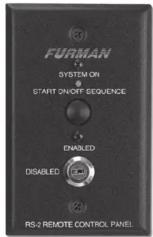
text_image FURMAN SYSTEM ON ON OFF RS-1 REMOTE CONTROL PANEL FURMAN SYSTEM ON START ON/OFF SEQUENCE ENABLED DISABLED RS-2 REMOTE CONTROL PANEL

Furman RS-1 - RS-1 RS-2 - 2

R S - 1 MAINTAINED CONTACT REMOTE CONTROL PANEL

The RS-1 Remote System Control Panel is an attractively finished key switch designed for use in single-gang wall mount boxes. It can control, from one location, all Furman power

products that have remote capability, such as the Furman AR-PRO ASD-120, MiniPort-15, MiniPort-20, PowerLink, the PowerPort, PS-8R, and the PS-PRO. Multiple units can be controlled simultaneously.

The RS-1 features a two-position key operated switch, an indicator LED, and can be easily

Installed in any electrical switch box with a minimum depth of 1-1/4". On the rear is a printed circuit board with a standard size terminal strip for wiring connections.

The RS-1 may also be compatible with other AC power distribution and sequencing products. Our Technical Support team will be happy to advise you on your specific installation needs.

RS-1 SPECIFICATIONS:

Dimensions: 4.75" (H) x 2.75" (W) x 1.25" (D). Finish: black epoxy powder coat.

R S - 2 MOMENTARY CONTACT REMOTE CONTROL PANEL

The RS-2 Remote System Control Panel is identical to the RS-1 in most respects, but with a momentary function rather than maintained. The key switch offers an enable/disable function.

Furman RS-1 - R S - 2 MOMENTARY CONTACT REMOTE CONTROL PANEL - 1

The RS-2 can control multiple power products by wiring their control inputs in parallel. The RS-2 is ideal for installations requiring multiple remote switches. For installations requiring only one remote maintained contact switch, we recommend the RS-1.
Furman RS-1 - R S - 2 MOMENTARY CONTACT REMOTE CONTROL PANEL - 2

The RS-2 may also be compatible with other AC power distribution and sequencing products. Our Technical Support team will be happy to advise you on your specific installation needs.

RS-2 SPECIFICATIONS:

Dimensions: 4.75" (H) x 2.75" (W) x 1.25" (D). Finish: black epoxy powder coat.

RS-1 AND RS-2 WIRING INSTRUCTIONS

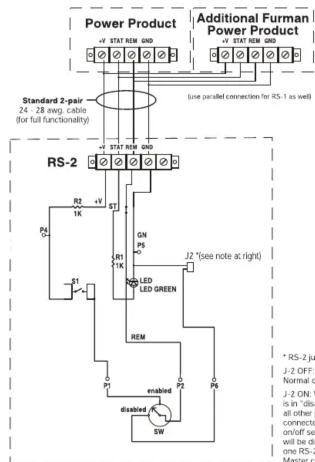
Connecting the RS-1 or RS-2 Remote Control Panel is easy. For the simplest of installations, a single pair cable will suffice (standard 24-28 AWG telephone wire is fine). This allows ON/OFF control only. To enable the RS-1 or RS-2's SYSTEM ON indicator, it will be necessary to run a 2-pair cable.

Both Remote Control Panels are clearly labeled on the rear panel adjacent to the terminal strip. For single-pair wiring, connect the +V terminal of your

power product to the +V terminal of the RS-1 or RS-2.

Next, connect the REM terminal of your power product to the REM terminal of the RS-1 or RS-2, and your installation is complete. Most newer Furman products default to ON if the REM input is left open or tied to GND. This allows normal front panel operation if the unit is not being used with a remote control panel.

It is recommended that where long wire runs (> 200 ft.) or noisy environments are encountered, 2-pair cable be run, even if the indicator is not needed. This allows rejection of AC noise and interference by lying the REM input to GND when the unit is on.

For installations using 2-pair cable, +V and REM

connections are identical; just add wires from the STAT terminal to STAT terminal, and GND terminal to GND terminal.

Though the connection doesn't require a shielded cable, in particularly noisy environments a shielded cable can be used by connecting the shield between the GND terminals of the product and the RS-1 or RS-2.

THREE YEAR LIMITED WARRANTY

The Furman RS-1 and RS-2 are protected by a limited three year warranty, covering defects in materials and workmanship, provided that the registration card is filled out and returned by the

Furman RS-1 - THREE YEAR LIMITED WARRANTY - 1

text_image Power Product + STATION 640 Standard 2-pair 24 - 28 meg cable (for full functioning) RS-1 + STATION 640 Standard 2-pair 24 - 28 meg cable (for full functioning) RS-2 + STATION 640 Power Product + STATION 640 Additional Furman Power Product + STATION 640 (Use parallel connection to RS-1 as well) + STATION 640 RS-2 + STATION 640 + STATION 640 + STATION 640 + STATION 640 + STATION 640 + STATION 640 + STATION 640 + STATION 640 + STATION 640 + STATION 640 + STATION 640 + STATION 640 + STATION 640 + STION 640 + STATION 640 + STATION 640 + STATION 640 + STATION 640 + STATION 640 + STATION 640 + STATION 640 + STATION 640 + STATION 640 + STATION 640 + STATION 640 + STATION 641 + STATION 641 + STATION 641 + STATION 641 + STATION 641 + STATION 641 + STATION 641 + STATION 641 + STATION 641 + STATION 641 + STATION 641 + STATION 641 + STATION 641 + STION 641 + STION 641 + STION 641 + STION 641 + STION 641 + STION 641 + STION 641 + STION 641 + STION 641 + STION 641 + STION 641 + STION 641 + STION 642 + STION 642 + STION 642 + STION 642 + STION 642 + STION 642 + STION 642 + STION 642 + STION 642 + STION 642 + STION 642 + STION 642 + STION 642 + STIO P5 + STIO P5 + STIO P5 + STIO P5 + STIO P5 + STIO P5 + STIO P5 + STIO P5 + STIO P5 + STIO P5 + STIO P5 + STIO P5 + STIO P5 + STIO P5 + STIO P5 + STIO P5 + STIO P5 + STI P3 + STI P3 + STI P3 + STI P3 + STI P3 + STI P3 + STI P3 + STI P3 + STI P3 + STI P3 + STI P3 + STI P3 + STI P3 + STI P3 + STI P3 + STI P3 + STI P3 + ST IPT. + - - - - - - - - - - - - - - - - - - - - - - - - - - - - - - - - - - - - - - - - - - - - - - - - - - - - - - - - - - - - - - - - - - - - - - - - - - - - - - - - - - - - - - - - - - - - - - - - - - - - - RS-2 jumper (U-7) - U-2 OFF (Default) - Normal operation - U-2 ON: When key switch is in "disinless" position, all other parallel connected RS-2 as "start on/off sequence" buttons will be classified, allowing one RS-2 to be the Master control. - double red LED Green LED Green LED Green LED Green LED Green LED Green LED Green LED Green LED Green LED Green LED Green LED Green LED Green LED Green LED Green LED Green LED Green LED Green LED Green LED Green LED Green LED Green LED Green LED Green LED Green LED Green LED Green LED Green LED Green LED Green LED Green LED Green LED Green LED Green LED Green LED Green LED Green LED Green LED Green LED Green LED Green LED Green LED Green LED Green LED Green LED Green LED Green LED Green LED Green LED Green LEDGreen LED Green LED Green LED Green LED Green LED Green LED Green LED Green LED Green LED Green LED Green LED Green LED Green LED Green LED Green LED Green LED Green LED Green LED Green LED Green LED Green LED Green LED Green LED Green LED Green LED Green LED Green LED Green LED Green LED Green LED Green LED Green LED Green LED Green LED Green LED Green LED Green LED Green LED Green LED Green LED Green LED Green LED Green LED Green LED Green LED Green LED Green LED Green LED Green LED Green LED GELGELGELGELGELGELGELGELGELGELGELGELGELGELGELGELGELGELGELGELGELGELGELGELGELGELGELGELGELGELGELGELGELGELGELGELGELGELGELGELGELGELGELGELGELGELGELGELGELGELGELLGFLGLGLGLGLGLGLGLGLGLGLGLGLGLGLGLGLGLGLGLGLGLGLGLGLGLGLGLGLGLGLGLGLGLGLGLGLGLGLGLGLGLGLGLGLGLGLGLGLGLGLGLGLGLGLGLGLGLGLGLGLGLGLGLGLGLGLGLGLGLGLGLGLGLGLGLGLGLGLGLGLGLGLGLGLGLGLGLGLGLGLGLGLGLGLGLGLGLGLGLGLMLLMLLMLLMLLMLLMLLMLLMLLMLLMLLMLLMLLMLLMLLMLLMLLMLLMLLMLLMLLMLLMLLMLLMLLMLLMLLMLLMLLMLLMLLMLLMLLMLLMLLMLLMLLMLLMLLMLLMLLMLLMLLMLLMLLMLLMLLMLLMLLMLLMLLMLMILMILMILMILMILMILMILMILMILMILMILMILMILMILMILMILMILMILMILMILMILMILMILMILMILMILMILMILMILMILMILMILMILMILMILMILMILMILMILMILMILMILMILMILMILMILMILMILMILMILMILLMSILMSILMSILMSILMSILMSILMSILMSILMSILMSILMSILMSILMSILMSILMSILMSILMSILMSILMSILMSILMSILMSILMSILMSILMSILMSILMSILMSILMSILMSILMSILMSILMSILMSILMSILMSILMSILMSILMSILMSILMSILMSILMSILMSILMSILMSILMSILMSILMSILMSILMSIISIISIISiisiisiisiisiisiisiisiisiisiisiisiisiisiisiisiisiisiisiisiisiisiisiisiisiisiisiisiisiisiisiisiisiisiisiisiisiisiisiisiisiisiisiisjIslslmSIRLSaRdSbRdSbRdSbRdSbRdSbRdSbRdSbRdSbRdSbRdSbRdSbRdSbRdSbRdSbRdSbRdSbRdSbRdSbRdSbRdSbRdSbRdSbRdSbRdSbRdSbRdSsIISIISIISIISIISIISIISIISIISIISIISIISIISIISIISIISIISIISIISIISIISIISIISIISIISIISIISIISIISIISIISIISIISIISIISIISIISIISIISIISIISIISIISIISIISIISIISIISIISIISI ISlslrsltAaRdSbRdSbRdSbRdSbRdSbRdSbRdSbRdSbRdSbRdSbRdSbRdSbRdSbRdSbRdSbRdSbRdSbRdSbRdSbRdSbRdSbRdSbRdSbRdSbRdTcRdTcRdTcRdTcRdTcRdTcRdTcRdTcRdTcRdTcRdTcRdTcRdTcRdTcRdTcRdTcRdTcRdTcRdTcRdTcRdTcRdTcRdTcRdTcRdTcRdTfCnEaRdSbRdSbRdSbRdSbRdSbRdSbRdSbRdSbRdSbRdSbRdSbRdSbRdSbRdSbRdSbRdSbRdSbRdSbRdSbRdrSbRdrSbRdrSbRdrSbRdrSbRdrSbRdrSbRdrSbRdrSbRdrSbRdrSbRdrSbRdrSbRdrSbRdrSbRdrSbRdrSbRdrSbRdrSbRdrSbRdrSbRdrSbRdrSbRdrSbRdrSbRbrDlndlssrEaFmEaFmEaFmEaFmEaFmEaFmEaFmEaFmEaFmEaFmEaFmEaFmEaFmEaFmEaFmEaFmEaFmEaFmEaFmEaFmEaFmEaFmEaFmEaFmEaFmEaFnEaFnEaFnEaFnEaFnEaFnEaFnEaFnEaFnEaFnEaFnEaFnEaFnEaFnEaFnEaFnEaFnEaFnEaFnEaFnEaFnEaFnEaFnEaFnEaFnEaFvEaFvEaFvEaFvEaFvEaFvEaFvEaFvEaFvEaFvEaFvEaFvEaFvEaFvEaFvEaFvEaFvEaFvEaFvEaFvEaFvEaeFvEaeFvEaeFvEaeFvEaeFvEaeFvEaeFvEaeFvEaeFvEaeFvEaeFvEaeFvEaeFvEaeFvEaeFvEaeFvEaeFvEaeFvEaeFvEaeFvEaeFvEaeFvEaeFvEaeFvEaeFvEauHgAeBfAeBfAeBfAeBfAeBfAeBfAeBfAeBfAeBfAeBfAeBfAeBfAeBfAeBfAeBfAeBfAeBfAeBfAeBfAeBfAeBfAeBfAeBfAeBfAeBfAeBflgAeBflgAeBflgAeBflgAeBflgAeBflgAeBflgAeBflgAeBflgAeBflgAeBflgAeBflgAeBflgAeBflgAeBflgAeBflgAeBflgAeBflgAeBflgAeBflgAeBflhAgCpCpCpCpCpCpCpCpCpCpCpCpCpCpCpCpCpCpCpCpCpCpCpCpCpCpCpCpCpCpCpCpCpCpCpCpCpCpCpCpCpCpCpCpCpCpCpCpCpCpCpeCpeCpeCpeCpeCpeCpeCpeCpeCpeCpeCpeCpeCpeCpeCpeCpeCpeCpeCpeCpeCpeCpeCpeCpeCpeCpeCpeCpeCpeCpeCpeCpeCpeCpeCpeCpeCpeCpeCpeCpeCpeCpeCpeCpeCpeCpeCpeCpeCpeCve Cve Cve Cve Cve Cve Cve Cve Cve Cve Cve Cve Cve Cve Cve Cve Cve Cve Cve Cve Cve Cve Cve Cve Cve Cve Cve Cve Cve Cve Cve Cve Cve Cve Cve Cve Cve Cve Cve Cve Cve Cve Cve Cve Cve Cve Cve Cve Cve Cve Cve Aye Bwthrwnrwnrwnrwnrwnrwnrwnrwnrwnrwnrwnrwnrwnrwnrwnrwnrwnrwnrwnrwnrwnrwnrwnrwnrwnrwnrwnrwnrwnrwnrwnrwnrwnrwnrwnrwnrwnrwnrwnrwnrwnrwnrwnrwnrwnrwnrwnrwnrwnrwnrtn rgn rgn rgn rgn rgn rgn rgn rgn rgn rgn rgn rgn rgn rgn rgn rgn rgn rgn rgn rgn rgn rgn rgn rgn rgn rgn rgn rgn rgn rgn rgn rgn rgn rgn rgn rgn rgn rgn rgn rgn rgn rgn rgn rgn rgn rgn rgn rgn rgn rgn rqn Rng Rng Rng Rng Rng Rng Rng Rng Rng Rng Rng Rng Rng Rng Rng Rng Rng Rng Rng Rng Rng Rng Rng Rng Rng Rng Rng Rng Rng Rng Rng Rng Rng Rng Rng Rng Rng Rng Rng Rng Rng Rng Rng Rng Rng Rng Rng Rng Rng Rng Rpg Rng Rng Rng Rng Rng Rng Rng Rng Rng Rng Rng Rng Rng Rng Rng Rng Rng Rng Rng Rng Rng Rng Rng Rng Rng Rng Rng Rng Rng Rng Rng Rng Rng Rng Rng Rng Rng Rng Rng Rng Rng Rng Rng Rng Rng Rng Rng Rng Rng Rrg HgHgHgHgHgHgHgHgHgHgHgHgHgHgHgHgHgHgHgHgHgHgHgHgHgHgHgHgHgHgHgHgHgHgHgHgHgHgHgHgHgHgHgHgHgHgHgHgHgHgHg H g H g H g H g H g H g H g H g H g H g H g H g H g H g H g H g H g H g H g H g H g H g H g H g H g H g H g H g H g H g H g H g H g H g H g H g H g H g H g H g H g H g H g H g H g H g H g H g H g H g H y a b b c b c b c b c b c b c b c b c b c b c b c b c b c b c b c b c b c b c b c b c b c b c b c b c b c b c b c b c b c b c b c b c b c b c b c b c b c b c b c b c b c b c b c b c b c b c b c b c b c b c b t e a d i s t i n f t e a d i s t i n f t e a d i s t i n f t e a d i s t i n f t e a d i s t i n f t e a d i s t i n f t e a d i s t i n f t e a d i s t i n f t e a d i s t i n f t e a d i s t i n f t e a d i s t i n h e a d i s t i n h e a d i s t i n h e a d i s t i n h e a d i s t i n h e a d i s t i n h e a d i s t i n h e a d i s t i n h e a d i s t i n h e a d i s t i n h e a d i s t i n h e a d i s t i n h o l m o l m o l m o l m o l m o l m o l m o l m o l m o l m o l m o l m o l m o l m o l m o l m o l m o l m o l m o l m o l m o l m o l m o l m o l m o l m o l m o l m o l m o l m o l m o l m o l m o l m u l m o l m o l m o l m o l m o l m o l m o l m o l m o l m o l m o l m o l m o l m o l m o l m o l m o l m o l m o l m o l m o l m o l m o l m o l m o l m o l m o l m o l m o l m o l m o l m o l m o n O L M M M M M M M M M M M M M M M M M M M M M M M M M M M M M M M M M M M M M M M M M M M M M M M M M M M M M M M M M M M M M M M M M M M M M M M M M M M M M M M M M M M M M M M M M M M M M M M M M M M M.M.
Manual assistant
Powered by Anthropic
Waiting for your message
Product information

Brand : Furman

Model : RS-1

Category : Remote control