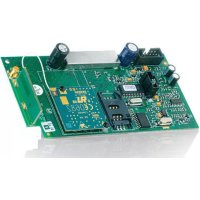
GSM800 - Electronic module MARMITEK - Free user manual and instructions
Find the device manual for free GSM800 MARMITEK in PDF.


| Product Type | Cellular communications module for alarm system |
| Brand | Marmitek |
| Model | GSM800 |
| Frequency band | E-GSM 900 / GSM1800 / GSM1900 |
| External antenna connector | MCX |
| Operating temperature | -20°C to +55°C |
| Power supply | Via the ProGuard800 control panel |
| Main functions | Send and receive SMS, upload/download, two-way voice communications |
| Installation | By a certified installer |
| Usage | Indoor only, dry places |
| Safety | Disconnect the circuit breaker before installation; danger of 230 V voltage |
| SIM card support | Yes |
| Indicator LED | Yes |
| Flash programming connector | Yes |
| Ribbon cable interface connector | Yes |
| Compatibility | ProGuard800 alarm system |
| Standards | Compliant with directives 1999/5/EC, 89/336/EEC, 73/23/EEC |
| Warranty | Void in case of improper use or modification |
| Maintenance and cleaning | Not required; avoid moisture and extreme temperatures |
Frequently Asked Questions - GSM800 MARMITEK
User questions about GSM800 MARMITEK
0 question about this device. Answer the ones you know or ask your own.
Ask a new question about this device
Download the instructions for your Electronic module in PDF format for free! Find your manual GSM800 - MARMITEK and take your electronic device back in hand. On this page are published all the documents necessary for the use of your device. GSM800 by MARMITEK.
USER MANUAL GSM800 MARMITEK
- The wiring of your electrical installation is live (230 V) and extremely dangerous. Never connect the module when plugged into the mains. Always turn off the main switch before starting the installation.
- This product is for professional use and should be installed by a certified installer.
- To prevent short circuits, this product should only be used inside and only in dry spaces. Do not expose the components to rain or moisture. Do not use the product close to a bath, swimming pool etc.
- Do not expose the components of your systems to extremely high temperatures or bright light sources.
- In case of improper usage or if you have altered and repaired the product yourself, all guarantees expire. Marmitek does not accept responsibility in the case of improper usage of the product or when the product is used for purposes other than specified. Marmitek does not accept responsibility for additional damage other than covered by the legal product responsibility.
- This product is not a toy. Keep out of reach of children.
- Automatic switching devices provide comfort, but can also be dangerous. They can surprise people or can ignite clothing hanging over an electric heat source. Please be careful and take appropriate measures to avoid accidents.
INTRODUCTION
This product is a part of the Marmitek ProGuard800 series, and operates together with the ProGuard800 alarm system. When you wish to know more about the complete system, its possibilities and its settings, then you can check out the installation manual or visit www.marmitek.com.
GSM Module (GSM800)
The GSM module enables the control panel to communicate via cellular networks. This offers the ability to send or receive SMS messages, perform up/downloading, implement cellular 2-way voice applications.
- SIM card holder
- SIM card release
- Status LED
- Flash programming connector
- Flat-cable interface connector to Main Board
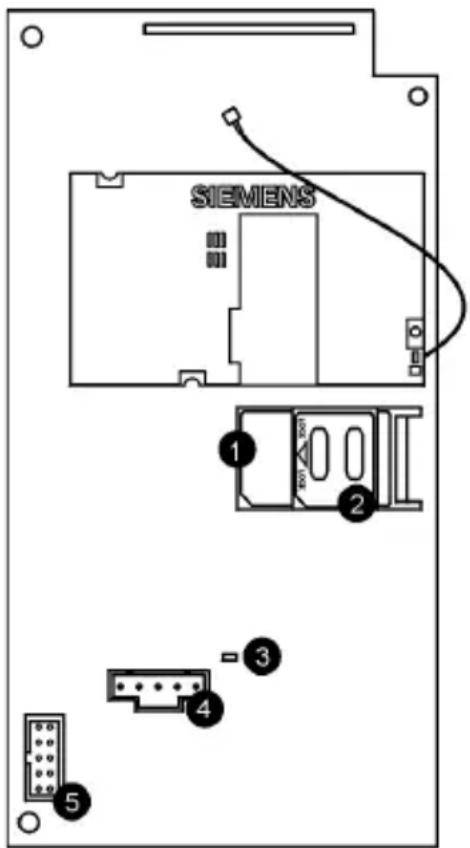
Figure 1.6: Cellular Communications Module
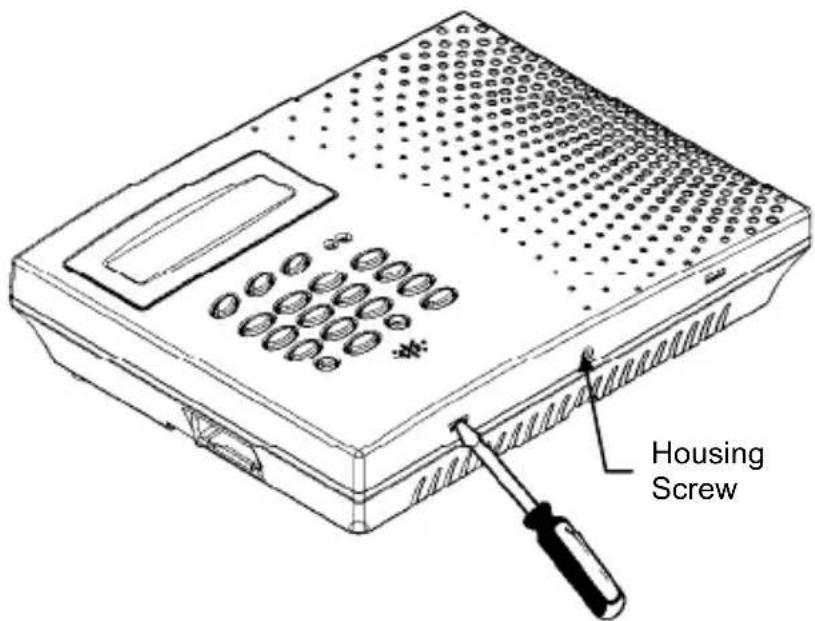
Figure 2.4: Opening the Housing
Switching off the siren
- Press followed by 1111.
- Now enter 9155 (the display shows: 5.WIRED SIREN ENABLED).
- Now press (the display shows: 5.WIRED SIREN DISABLED).
- Press for confirmation.
- Press × 4 times to leave the installation menu.
INSTALLATION
- Disconnect the AC power from the ProGuard800 control panel.
- Remove the housing screw located at the bottom of the front cover.
- Using a screwdriver carefully press the release tabs as shown in Figure 2.4.
- Lift the front cover away from the back of the housing. You will notice that the front cover is attached to the back with two fastening bands and the keypad's flat cable.
- Disconnect the backup battery pack connector to the Control Panel.
- Slide the GSM800 PCB at it's place by first putting the right side of the pcb in place and then clicking the left side in it's holder. Make sure connectors are at the bottom of the PCB.
- Connect the small flat cable between the GSM800 PCB (5) and the Control Panel (Main Board) PCB.
- Put the plug in the socket.
- Follow these steps in the ProGuard800 Installation manual:
12.5: Find Modules
10.7.2: PIN Code
10.7.3:SMS Center
-
Place the SIM card in the SIM card holder.
-
Connect the battery pack to the connector on the Main Board.
- Position the front cover's top holding hooks onto the back cover and snap the front cover closed.
- Follow this step in the ProGuard800 Installation manual:
4.7.9: GSM Signal Strength
- Refer to the installation manual for further configuration of the GSM800.
Activating the siren
- Press followed by 1111
- Press 9155 now (the display now shows: 5.WIRED SIREN DISABLED).
- Press now (the display now shows: 5.WIRED SIREN ENABLED).
- Press to confirm.
- Press √4 times to leave the installation menu.
TECHNICAL SPECIFICATIONS
Frequency range: E-GSM 900
GSM1800
GSM1900
External antenna connector: MCX connector
Ambient temperature: -20°C to +55°C (operation)
-20°C to + 70°C (storage)
Specifications may be modified without prior notice.

Environmental Information for Customers in the European Union
European Directive 2002/96/EC requires that the equipment bearing this symbol on the product and/or its packaging must not be disposed of with unsorted municipal waste. The symbol indicates that this product should be disposed of separately from regular household waste streams. It is your responsibility to dispose of this and other electric and electronic equipment via designated
collection facilities appointed by the government or local authorities. Correct disposal and recycling will help prevent potential negative consequences to the environment and human health. For more detailed information about the disposal of your old equipment, please contact your local authorities, waste disposal service, or the shop where you purchased the product.
GSM800
SICHERHEITSHINWEISE
VEILIGHEIDSWAARSCHUWINGEN
DECLARATION OF CONFORMITY
Hereby, Marmitek BV, declares that this GSM800 is in compliance with the essential requirements and other relevant provisions of the following Directives:
Directive 1999/5/EC of the European Parliament and of the Council of 9 March 1999 on radio equipment and telecommunications terminal equipment and the mutual recognition of their conformity
Council Directive 89/336/EEC of 3 May 1989 on the approximation of the laws of the Member States relating to electromagnetic compatibility
Council Directive 73/23/EEC of 19 February 1973 on the harmonization of the laws of Member States relating to electrical equipment designed for use within certain voltage limits
Marmitek is a trademark of Marmidenko B.V. I GSM800 is a trademark of Marmitek B.V. All rights reserved.
Copyright and all other proprietary rights in the content (including but not limited to model numbers, software, audio, video, text and photographs) rests with Marmitek B.V. Any use of the Content, but without limitation, distribution, reproduction, modification, display or transmission without the prior written consent of Marmitek is strictly prohibited. All copyright and other proprietary notices shall be retained on all reproductions.



Brand : MARMITEK
Model : GSM800
Category : Electronic module