 EasyManual
SPD2417BD - DVD player PHILIPS - Free user manual and instructions
Find the device manual for free SPD2417BD PHILIPS in PDF.


User questions about SPD2417BD PHILIPS
0 question about this device. Answer the ones you know or ask your own.
Ask a new question about this device
Download the instructions for your DVD player in PDF format for free! Find your manual SPD2417BD - PHILIPS and take your electronic device back in hand. On this page are published all the documents necessary for the use of your device. SPD2417BD by PHILIPS.
USER MANUAL SPD2417BD PHILIPS
How to... for Internal ReWriters using Nero 7
EN Install Guide
DE Installationsanleitung
FR Guide d'installation
IT Guida d'installazione
NL Installatiegids
ES Guia de instalacion
PT Guia de Instalação
TR Kurulum Kilavuzu
PL Instrukcja montazu
SV Installationsguide
SC 安装指南
RU INHctpyKUINIO INHCTaAIAUIN
DK Installationsvejledning
TC 安装指南
PHILIPS
EN
Contents
How to install? 5
Up to date? 15
How to make a video disc? 19
How to make a data or audio disc? 27
How to copy a disc? 31
More info or help needed 34
DE
Inhalt
Kak co3aTb BnAeOAnck? 87
Kak co3aTb dNCK aHHbIX mnn aydnoNDck? 95
KaK co3aTb KOIIIO dIcKa? 99
Hyka dnoanhteBha HOpmaunn nnomoub 104
DK
Indhold
Installation 73
Updatering 83
Sadan laves en videodisc 87
Sadan laves en data-ller lyddisc 95
Sadan kopieres en disc 99
How to make a video disc? 87
How to make a data or audio disc? 95
How to copy a disc? 99
More info or help needed 107
How to install?
Please refer to your PC manual or contact your local dealer for more information.
#
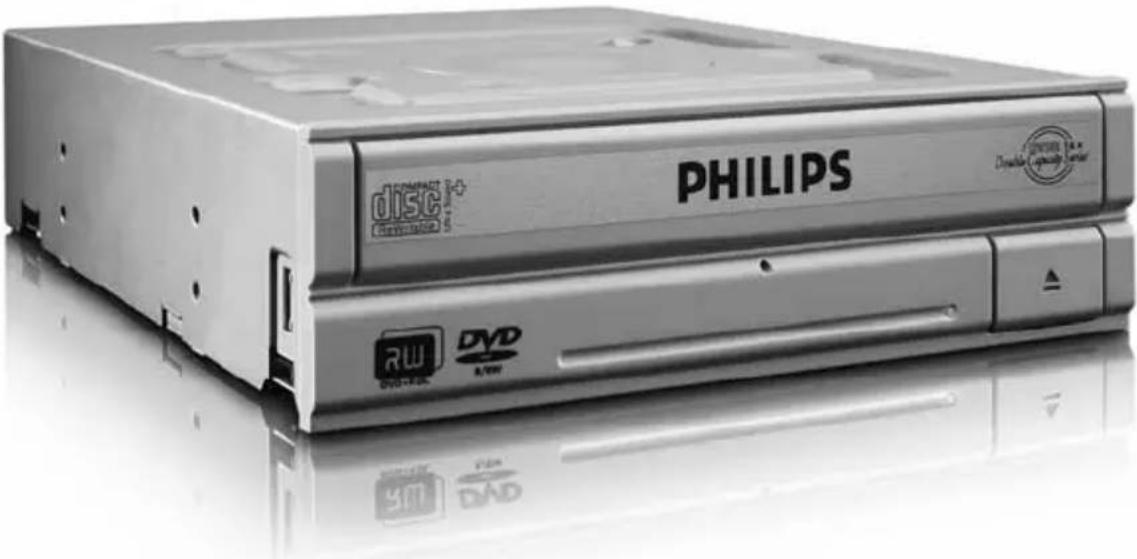
EN This can be found in the box: A:Your new drive C:The Nero software disc B:This manual D:4 screws in a small bag
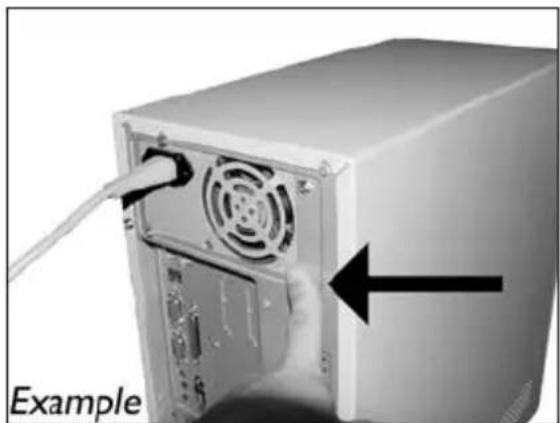
EN Touch an unpainted metal part (eg. your heating or an unpainted part of your computer case). This will avoid any damage to your computer by electrostatic discharge.
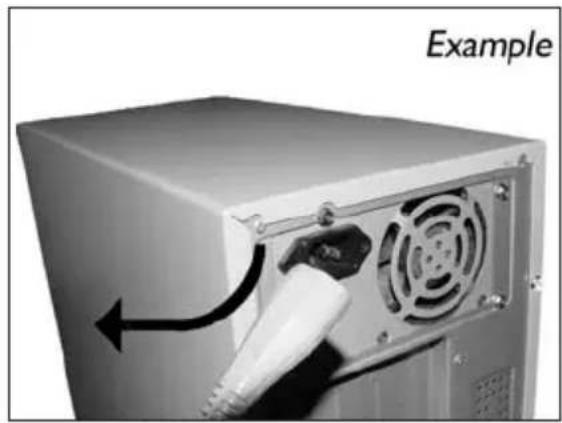
4 EN Disconnect the power cable from the PC.
DE Ziehen Sie das Netzkabel vom Computer ab.
FR Debranche le cable d'alimentation de I'ordinateur.
IT Disconnettere il cavo di alimentazione dal PC.
NL Trek de netstekkeruit de PC.
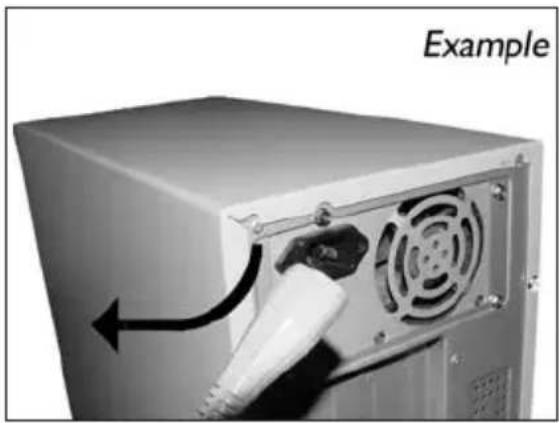
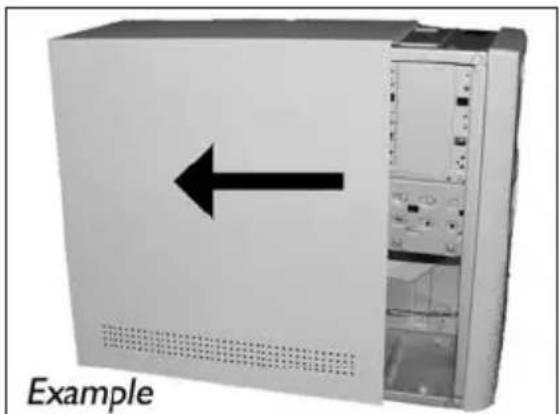
5 EN Open your computer. You may have to unleash screws which are mostly located at the back of your computer.
See your computer manual for more details.
DE Öffnen Sie ihren Computer. Eventuell müssen Sie hierzu Schrauben Herausdrehen, die sich meistens an der Rückseite Ihr's Computers befinden.
Weitere Informationen hierzu finden Sie in Ihr Computerhandbuch.
FR Ouvrez I'ordinateur. Pour cela, il peut etre nécessaire de desserrer une ou plusieurs vis a I'amere de I'ordinateur.
Pour plus de détaill, reportez-vous au mode d'emploi de l'ordinateur.
IT Apriere il computer. E possibile che si dovanno svitare delle viti che in genere si trovano sul pannello posteriore del computer.
Per ulteriori informazioni fare nferimento al manuale del computer.
NL Maak uw computer open. Meestal moet u de schroeven aan de achterkant van uw computer loschroeven.
Raadpleeg de handleiding van uw PC voor details over het openen van de PC.
EN Take off the cover of the computer.
DE Nehmen Sie die Abdeckung des Computers ab.
FR Retirez le capot de I'ordinateur.
IT Togliere il coperchio del computer.
NL Verwijder de kast van de computer.
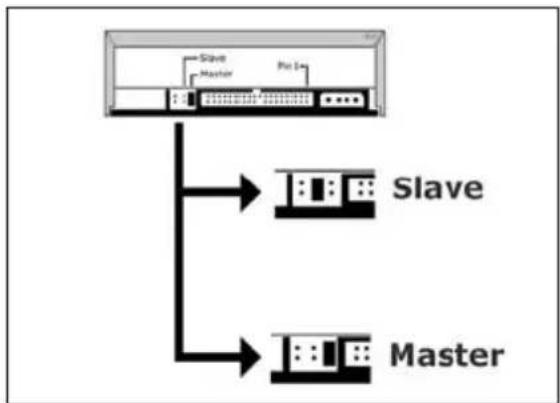
EN If you replace a drive, take it out and check which setting it has ("Master" or "Slave"). Remember this setting and go to step 10.
DE Wenn Sie ein Laufwerk ersetzen, bauen Sie es aus und überprüfen Sie seine Einstellung ("Master" oder "Slave"). Merken Sie sich diese Einstellung und gehen Sie zu Schritt 10.
FR Si vous remplacez un lecteur, sortez-le et vérifie ses réglages ("Maitre" ("Master") ou "Esclave" ("Slave"). Notez ces réglages et passez à l' étape 10.
In caso di sostituzione di un'unità, estrarla e verificare le impostazioni ("Master" o "Slave"). Annotare l'impostazione e andare al punto 10.
EN Find the IDE-cable which may look like this example:
A: Coloured line.
B: Notch and closed hole.
C:Pin1.
EN Connect the IDE cable
A: Coloured line.
B: Notch and closed hole.
C:Pin1.
EN Find a free power cable like this example.
Please note the edges of the connector.
EN Secure the drive with the screws (if possible on both sides).
18
DE Befestigen Sie das Laufwerk mit den Schrauben (wenn möglich an beiden Seiten).
FR Fixez l'appareil à l'aide des vis (si possible des deux côtes).
Fissare l'unita con le viti (se possible su entrambi i lati).
NL Schroef het station vast (zo mogelijk aan beiden zijden).
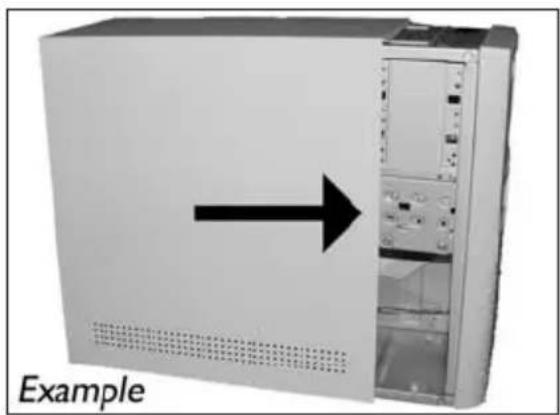
EN Put the cover you took off in step 5 back on.
19
EN Put the screws (if there were any) back in and reconnect the cables.
20
21 EN Restart your computer.
DE Starten Sie Ihr Computer neu.
FR Allumez l'ordinateur.
IT Riaviare il computer.
NL Start uw computer opnieuw op.
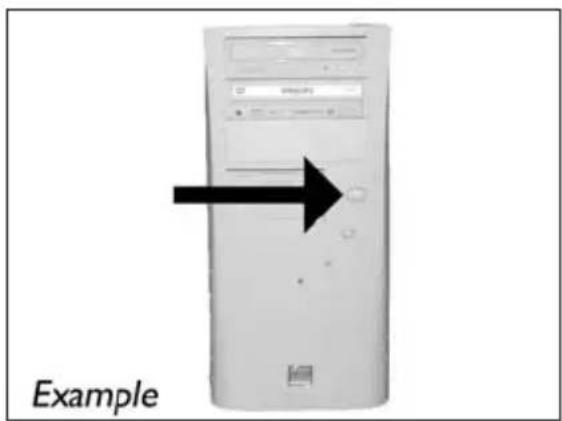
EN Insert the Nero disc when Windows is loaded.
DE Legen Sie die Nero CD ein, wenn Windows geladen ist.
FR Insérez le disque Nero une fois que Windows a démame.
IT Inserire il disco Nero dopo il caricamento di Windows.
NL Plaats de Nero-disc nadat Windows is gestart.
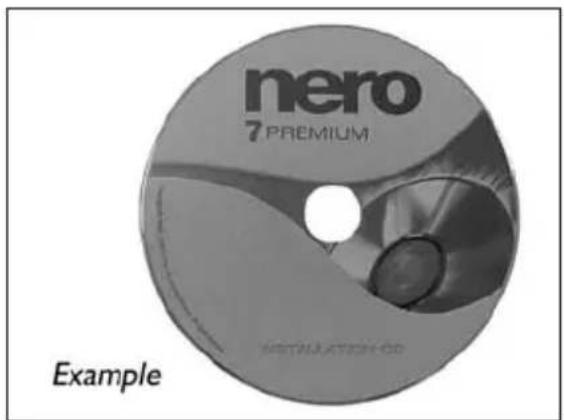
23 Choose "Nero 7 Essentials" and follow the instructions on the screen. When finished, continue with the next chapter.
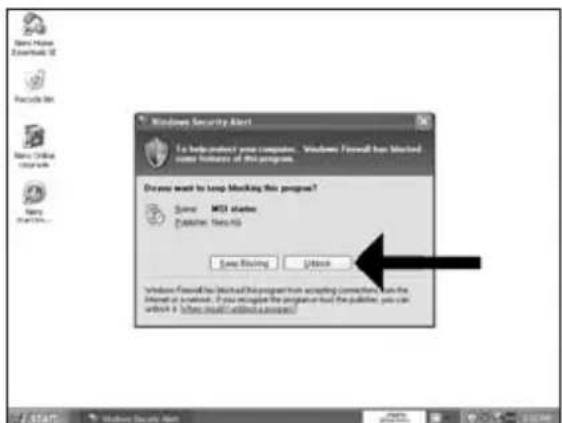
8 EN The Windows Firewall may warn you. Click "Unblock" to allow your Nero to be updated.
DE Sie erhalten evtl. eine Warnung von der Windows Firewall. Klichen Sie auf "Sperne deaktivieren", damit sich Nero aktualisieren kann.
FR Le pare-feu de Windows affichera peut-être un avertissement. Cliquez sur "Débloquer" pour activer la mise à jour de Nero.
IT É possibile Windows Firewall visualizzi un messaggio di averimento. Fare cli "Unblock" (Sblocca) per consentire l'aggiomamento di Nero.
How to make a video disc?
Be responsible Respect copyrights
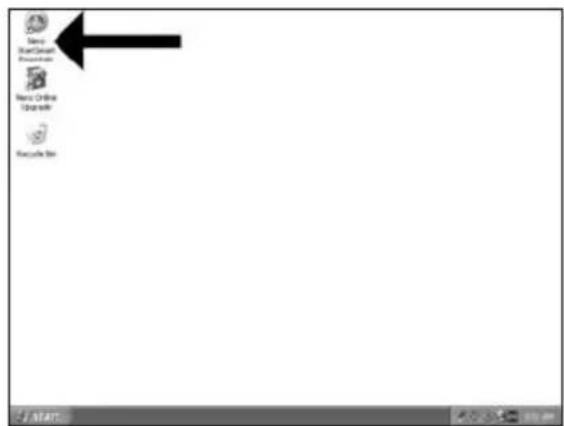
1 EN Start "Nero StartSmart Essentials".
DE Starten Sie "Nero StartSmart Essentials".
FR Lancez "Nero StartSmart Essentials",
IT Awviare "Nero StartSmart Essentials".
NL Start "Nero StartSmart Essentials".
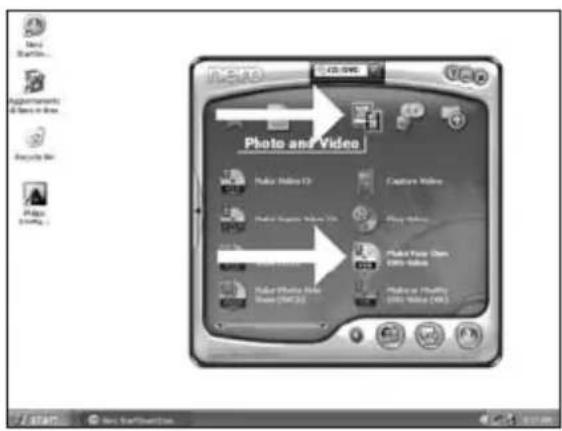
EN Choose "Photo and Video" and "Make your own DVD-Video".
DE Wahlen Sie "Foto und Video" und "Eigenes DVD-Video erstehen".
FR Choisissez "Photo et Video" et "Crerer vous propre DVD-Video".
IT Selezionare "Foto e video" e "Creare il proprio DVD-Video".
NL Kies "Foto en video" en "Maak uw eigen DVD-Video".
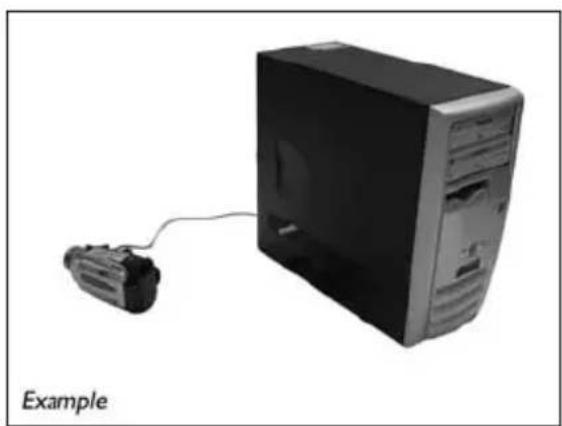
EN If you want to capture video from a camera, connect it to your PC. Otherwise go to step 8.
DE SchlieBen Sie Ihr PC an, wenn Sie Video von einer Kamera aufnehmen möchten. Ansonsten fahren Sie mit Schritt 8 fort.
FR Si vous souhaitez capturer de la video a partir d'uneamera, raccordez-la a l'ordinateur. Sinon, allez à l'etape 8.
IT Se si desidera catturare il video da una camera, collegarla al PC. Altrimenti passare al punto 8.
NL Als u video wilt laden vanaf een camera, moet u hem op uw PC aansluiten. Ga anders verder met stap 8.
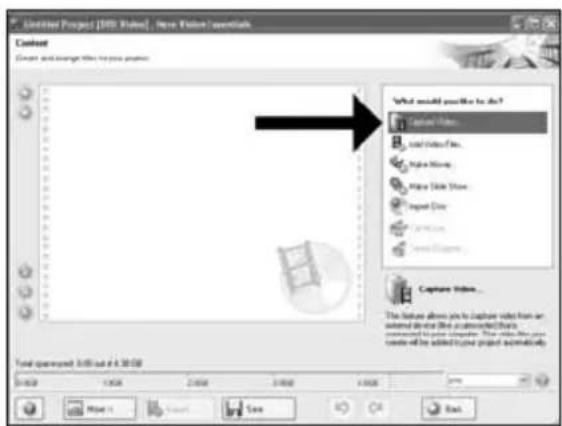
EN Choose"Capture video".
DE Wahlen Sie "Capture video".
FR Choisissez "Capture video".
IT Selezionare "Cattura video".
NL Kies"Capture video".
5
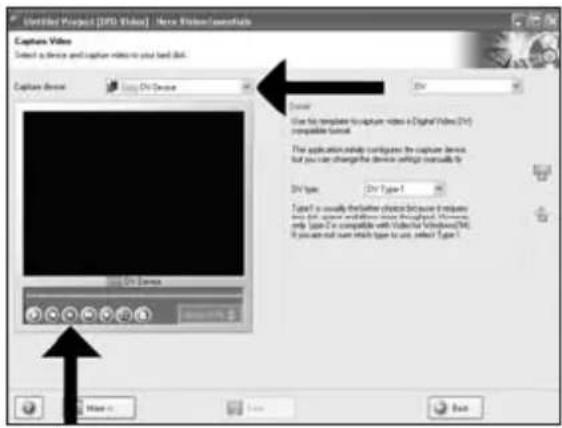
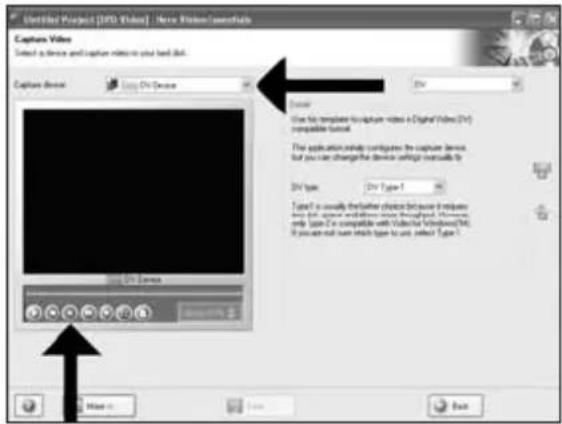
EN Select the capture device and press the record button.
DE Wahlen Sie das Aufnahmegerät und drücken Sie die Aufnahmetaste.
FR Sélectionnez le périhérique de capture et appuyez sur le bouton d'enregistrement.
IT Selezionare il dispositivo di cattura e premere il pulsante Registra.
NL Selecteer het apparaat waar u video vanaf wilt laden en druk op de opnameknop.
6
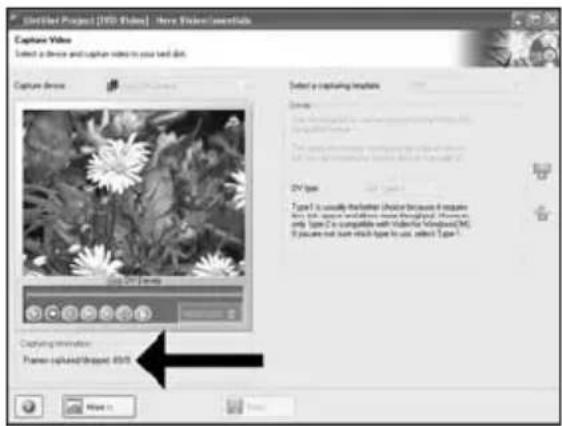
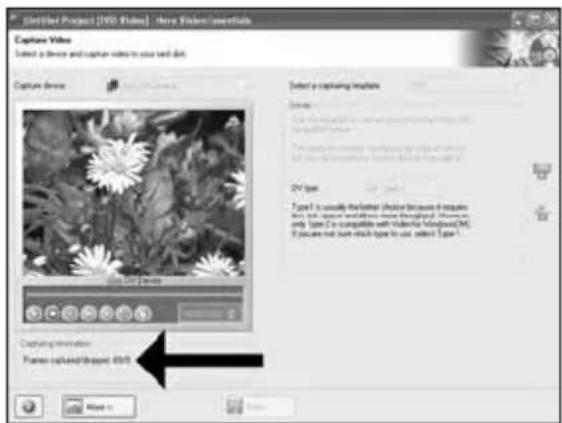
EN During capturing, you will see the progress here.
DE Wahrrend der Aufnahme sehen Sie hier den Fortschnitt.
FR Pendant la capture, l'avancement s'affiche ici.
IT Durante il processo di cattura, qui sare possibile visualizzare l'avanzamento.
NL Tijdens het laden ziet u hier de voortgang.
7
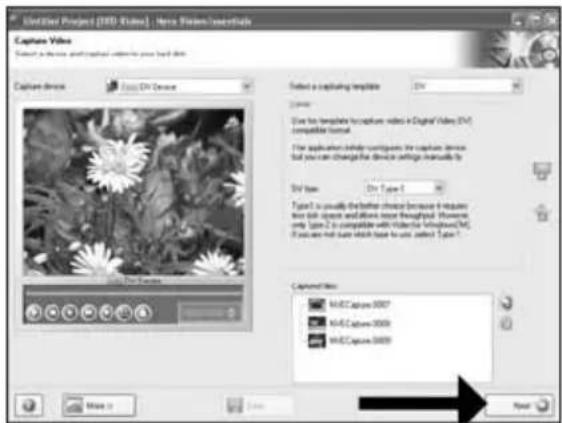
EN Click "Next" when all video sequences are captured.
DE Klichen Sie auf "Weiter", sobald alle Videosequenzen aufgenommen sind.
FR Cliqueur "Suvant" quand toutes les séquences video sont capturées.
IT Fare cli su "Avanti" se tutte le sequenze video sono state catturate.
NL Klik op "Volgende" wonneer alle videoreeksen zich geladen.
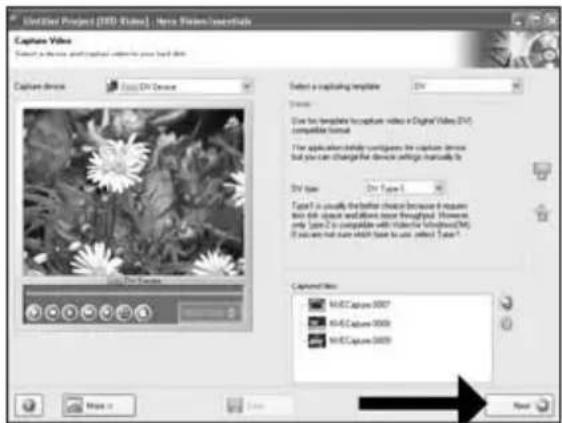
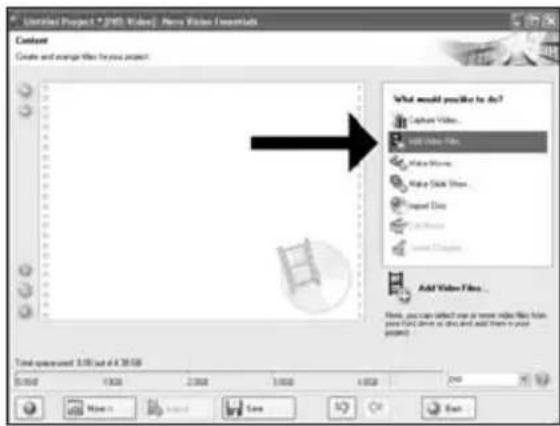
EN You can also trim the recorded video by sliding the markers. When done, choose "Next".
13 EN After editing all files,choose "Next".
17 Choose "Bum to", choose your recorder and choose "Bum".
18 EN NeroVision Express is transcoding and burning your disc.
DE NeroVision Express fuhrt ein Transcoding durch und brennt ihre Disc.
FR NeroVision Express proceeds au transcodage et grave le disque.
IT NeroVision Express esgue la codifica intermedia e la masterizzazione del disco.
NeroVision Express transcodeert en brandt uw cd.
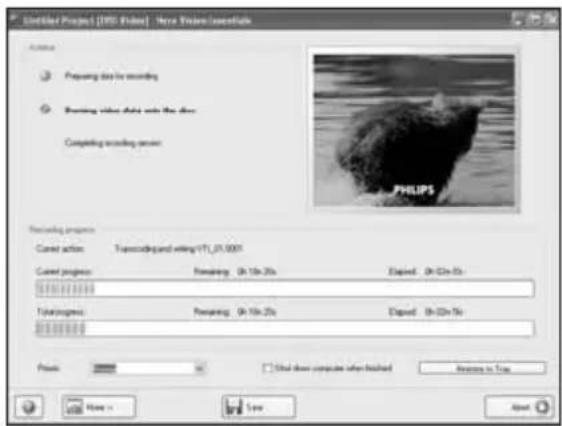
19 EN Congratulations, your disc has been written successfully. You may exit the application now.
How to make a data or audio disc?
Be responsible Respect copyrights
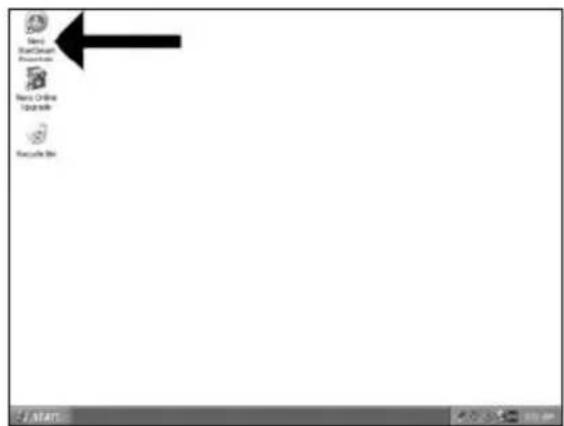
1 EN Start "Nero StartSmart".
DE Starten Sie "Nero StartSmart".
FR Lancez "Nero StartSmart".
IT Awiare "Nero StartSmart".
NL Start "Nero StartSmart".
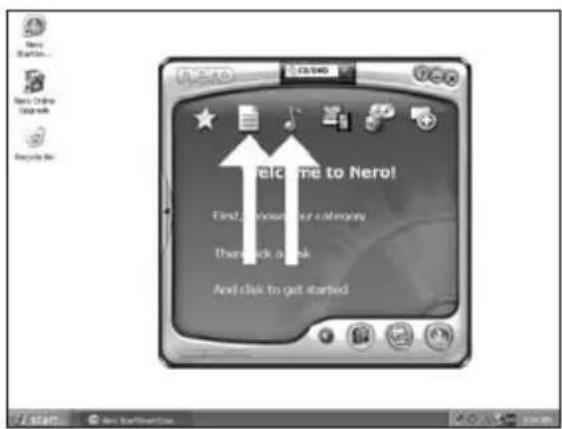
EN Choose "Data" or "Audio",
DE Wahlen Sie "Datum" oder "Audio".
FR Choisissez "Données" ou "Audio".
IT Selezionare "Dati" o "Audio".
NL Kies "Data" of "Audio".
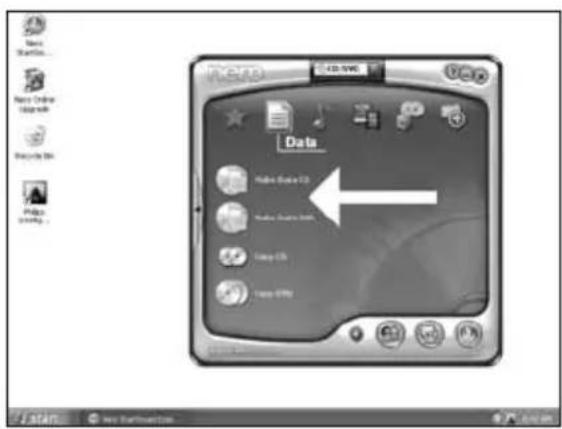
EN Select all the files to burn and click "Add". Click "Close" when finished.
7 Check your files and click "Next".
Be responsible Respect copyrights
1 EN Start "Nero StartSmart Essentials".
DE Starten Sie "Nero StartSmart Essentials".
FR Lancez "Nero StartSmart Essentials",
IT Awiare "Nero StartSmart Essentials".
NL Start "Nero StartSmart Essentials".
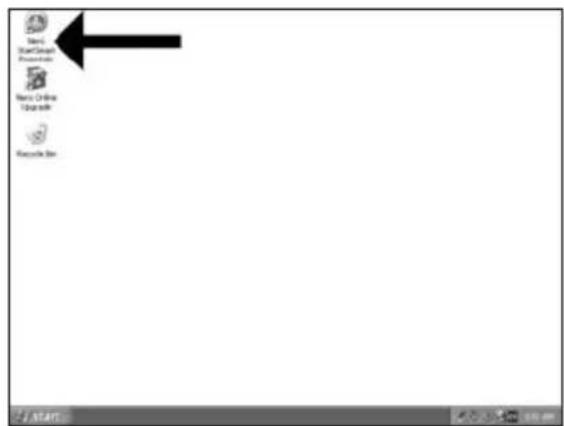
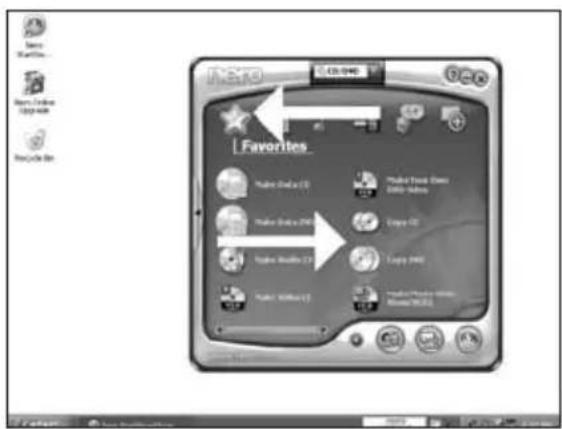
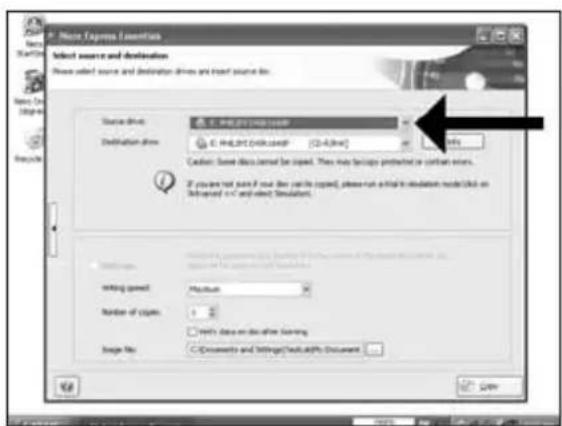
EN Choose "Favorites" and "Copy CD" or "Copy DVD".
2
DE Wahlen Sie "Favoriten" und "CD kopieren" oder "DVD kopieren".
FR Choisissez "Favoris" et "Copier CD" ou "Copier DVD".
IT Selezionare "Preferiti" e "Copia CD" o "Copia DVD".
NL Kies "Favorieten" en "CD Kopieren" of "DVD Kopieren".
More info or help needed
Visit www.philips.com/storageupdates
Troubleshooting
Philips optical disc drives are manufactured with utmost care. In case of problems, it often appears that the drive itself is not defective. You can simply solve most of these problems by using the support tools offered by Philips.
When you're experiencing problems:
Please check the information in the "How to..." manual.
2 Check the Philips support websites www.philips.com/storageupdates and www.philips.com/support for interactive support, troubleshooting, and the newest software updates.
3 Should you encounter any more difficulties during installation or use, please contact Philips Customer Care via the e-mail address or telephone numbers that can be found at www.philips.com/contact.
Prior to claiming a drive for warranty, you must request a return reference number at www.philips.com/support or contact Philips Customer Care.
Additional warranty information is available in the "Philips Warranty" folder on the Nero software disc.
"The making of unauthorised copies of copy-protected material, including computer programmes, files, broadcasts and sound recordings, may be an infringement of copyrights and constitute a criminal offence. This equipment should not be used for such purposes."
WEEE mark:Disposal of your old product
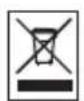
Your product is designed and manufactured with high quality materials and components, which can be recycled and reused. Please inform yourself about the local separate collection system for electrical and electronic products, including those marked by following symbol. Please act according to your local rules and do not dispose of your old products with your normal household waste.
WARNING
Plastic bags can be dangerous.
To avoid danger of suffocation, keep this bag away from babies and small children.

Gaaar www.philips.com/storageupdates
Probleemoplossing
Be responsible Respect copyrights
Be responsible Respect copyrights
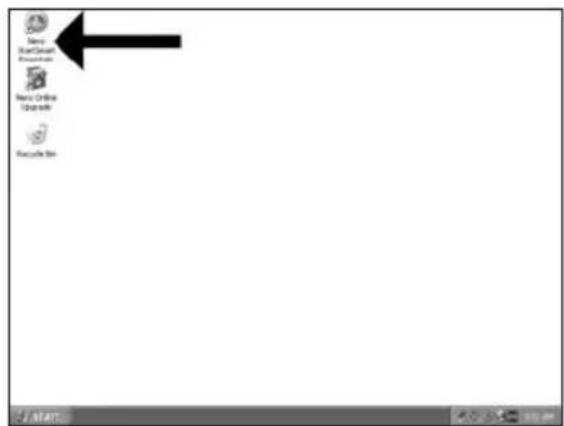
1 ES Inicie "Nero StartSmart Essentials".
PT Inicie o "Nero StartSmart Essentials".
TR "Nero StartSmart Essentials"!baslat.
PL Uruchom program "Nero StartSmart Essentials".
SV Starta "Nero StartSmart Essentials".
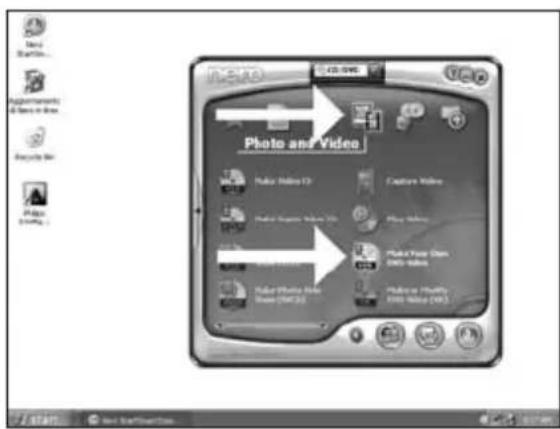
ES Elija "Foto y video" y "Crear DV de video propio".
PT Selecione "Foto e video" e "Crie seu propre DVD de video".
TR "Fotografia ve Video"ve "Keni DVD-Video'nu Yaratyu sec.
PL Kliknij "Foto i video" i "Twórz wąsne DVD-Video".
SV Valj"Foto och video" och "Gör din egen DVD-video".
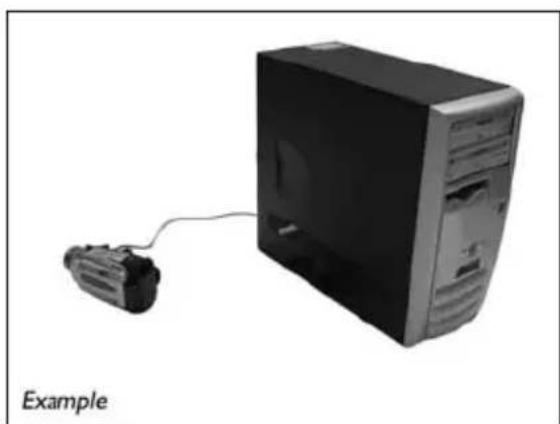
ES Si quiere capturar video desde una camarara, conectela a su PC. De lo contrario, vaya al paso 8.
PT Se desejar capturar video de unaamera, conecte-a ao seu PC. Caso contrario, va para a etapa 8.
TR Kameradan video yakalamak istiyorsaniz, bunu PC'nize baglayin. Aksi halde 8.adima gidin.
PL Jesli chcesz przechwycic video z kamery, podlacz ja do komputera. W przyciwnym razie przyzejdz do kroku 8.
Sv Om du vill hamta video fran en kamera ansluter du den till datom.l annat fall gár du till steg 8.
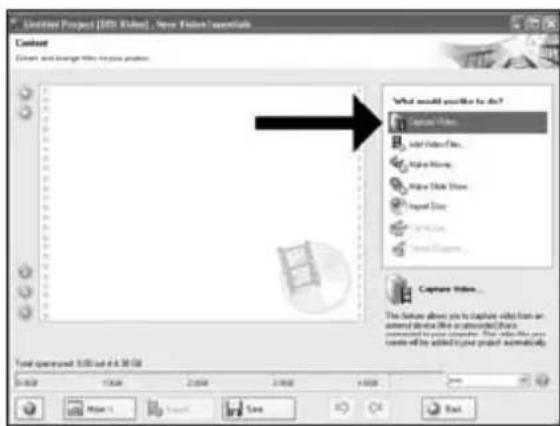
ES Elija "Capture video".
PT Sezione "Capture video".
TR "Capture video"yu se.
PL Kliknj "Capture video".
SV Valj"Capture video".
5
ES Selectione el dispositivo de captura y pulse el botón Record.
PT SeLECTIONO dispositivo de captura e aperte o botao de gravacao.
TR Yakalanan aygit secin ve kayit duğmesine basin.
PL Wybierz urzadzenie do przechwytwnia i nacinij przycisk nagrywnia.
SV Valj den enchet som du vill hamta video fran och tryck pa inspelningsknappen.
6
ES Durante la captura,quiry veré el proceso.
PT Durante a captura, você está o progresso muito bem.
TR Yakalama sirasinda, ilerlemede durumunu buradan goreceksiniz.
PL W trakcie przechwywnia, tutaj mozesz observwowac postep operaci.
SV När hamtningen pagar ser du forloppet hare.
7
ES Haga Cli en "Siguiente" cuando se hayan capturado todas las secuencias de video.
PT Clique em "Avançar" quando todas as sequências de video tiverem sido capturadas.
TR Tum video siralariy yakalandiginda "Ilen"ye tiklayin.
PL Po przechwyceni wszystkich sekwenci video, kliknj "Dalej".
SV Klicka pa "Nasta" när alla videosekvenser har hamtats.
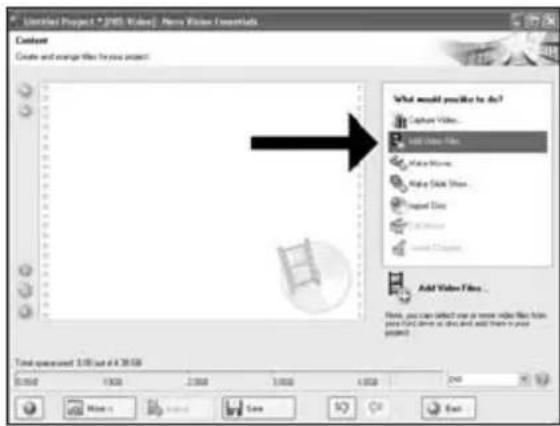
ES Si quiere anadir ARCHivos desde el disco duro, elija"Añadir archivos de video".De lo contrario, vaya al paso 10.
PT Se quiser adcionar arquivos do disco rigido, selecione "Adcionar arquivos de video".
Caso contrario, va para a etapa 10.
TR TSabit diskten dosya eklemek istiyorsaniz, "Vidyo Dosyasi Ekle"1 secin. Aksi halde 10. adima gjidin.
PL Ješli chcesz dodać pliki z dysku twardego, kliknj "Dodaj pliki video". W przyciwnym razie przyzejź do kroku 10.
Sv Om du vill lagga till filer fran hardsiden valjer du "Addera videofiler". Annars gár du till steg 10.
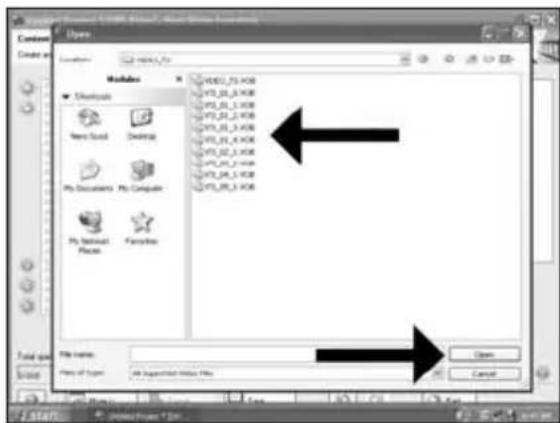
ES Seleccione los ficheros y haga tic en "Abrir".
PT Selecione os arquivos e clique em "Abrir".
TR Dosyalari segin ve "Aca tiklayin.
PL Wybierz pliki kliknij "Otworz".
SV Markera filerna och klicka pa "Oppna".
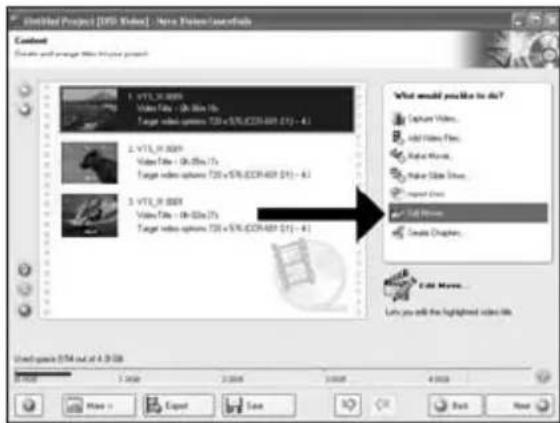
ES Puede editor laspelliculascargadas, escogiendo "Editarpellicula".
PT Voce pode editor os filmes carregados的选择回 "Editar这部电影".
TR "Filmi Düzenle"yi seçerek yüklenen filmleri duzenleyebilirsiniz.
PL Mozesz edytowac załadowane filmy, klikajac "Edytuj film".
SV Du kan redigera de laddade filmerna genom att valja "Redigera film".
Be responsible Respect copyrights
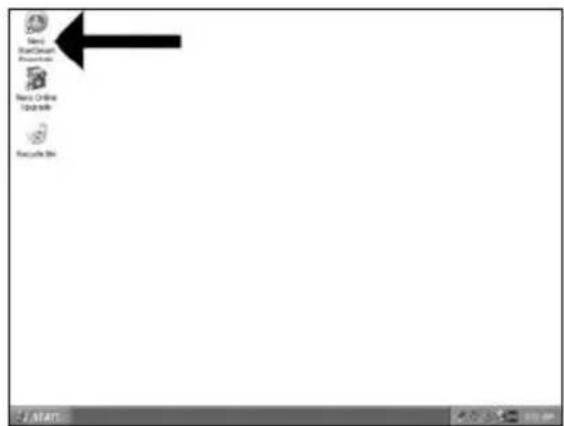
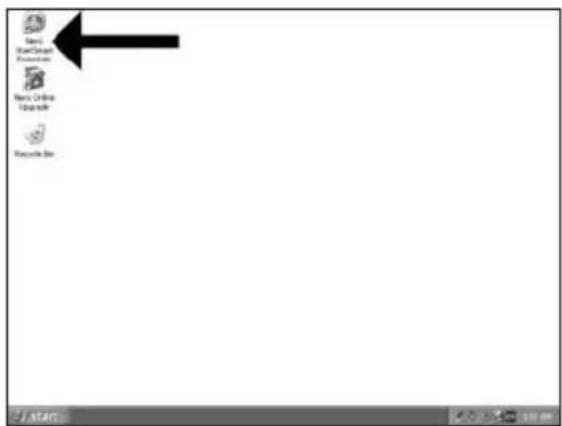
1 ES Inicia "Nero StartSmart".
PT Iniciao "Nero StartSmart".
TR "Nero StartSmart" baslatin.
PL Uruchom program "Nero StartSmart".
SV Starta "Nero StartSmart".
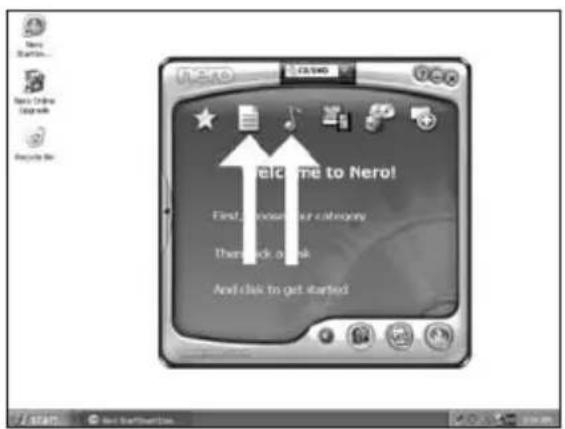
ES Elija "Datas" o "Audio".
PT Selecione "Dados" ou "Audio".
TR "Ven" veya "Ses"yu segin.
PL Kliknj "Dane" lub "Audio".
SV Valj "Data" eller"Audio".
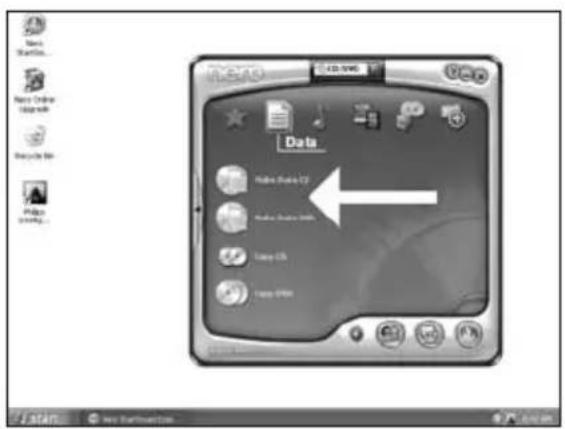
ES Para datos, elija "Crear CD de datos" o "Crear DVD de datos".
PT Para dados, selezione "Ciar CD de dados" ou "Criar DVD de dados".
TR Veriler ici "Veri CD'si Yarat" veya "Veri DVD'si Yarat" i seci.
PL W przypadku danych, kliknij "Utworz dysk CD z danymi" lub "Utworz dysk DVD z danymi".
SV For data valjer du "Skapa Data-CD"ller "Skapa Data-DVD".
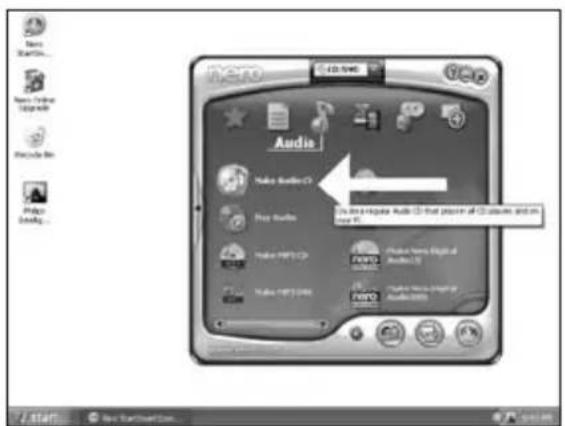
ES Para un disco de audio, elija "Crear CD de audio".
PT Para um disco de audio, selecione "Criar CD de audio".
TR Ses diski icin, "Muzik/SeS CD'si Yarat" secin.
PL W przypadku pfy audio, kliknij "Utworz Audio CD".
SV For en ljudskiva valjer du "Skapa Audio-CD".
Be responsible Respect copyrights
1 ES Inicie "Nero StartSmart Essentials".
PT Inicie o "Nero StartSmart Essentials".
TR "Nero StartSmart Essentials" i baslatn.
PL Uruchom program "Nero StartSmart Essentials".
SV Starta "Nero StartSmart Essentials".
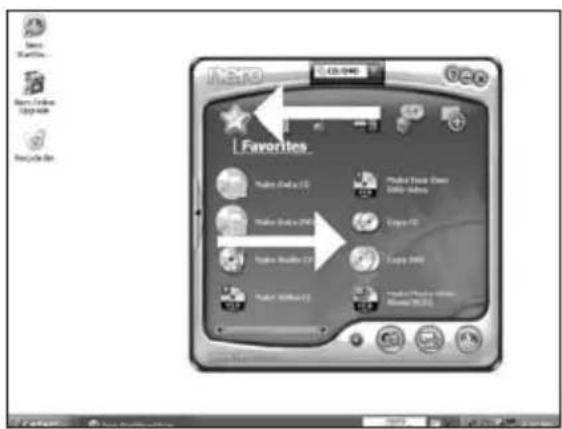
ES Elija "Favoritos" y "Copiar CD" o "Copiar DVD".
PT Selecione "Favoritos" e "Copiar CD" ou "Copiar DVD".
TR "Sik Kullanilanlar"ve "CD Kopyala" veya DVD Kopyala"yi segin.
PL Kliknj "Ulubione" i "Kopiuj CD" lub "Kopiuj DVD".
SV Valj "Favoriter" och "Kopiera CD" aller "Kopiera DVD".

Be responsible Respect copyrights
Please refer to your PC manual or contact your local dealer for more information.
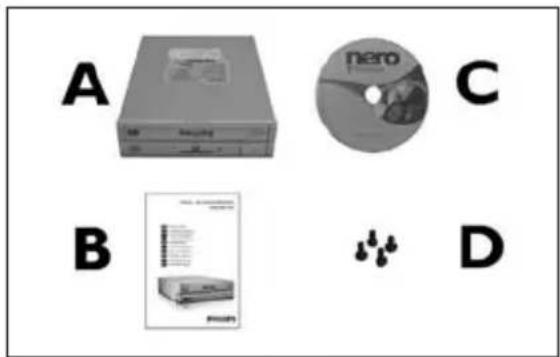
EN This can be found in the box: A:Your new drive C:The Nero software disc B:This manual D:4 screws in a small bag
SC 关闭计算机。
RU BbIKAOHTe BaI KOMTbIOTeP.
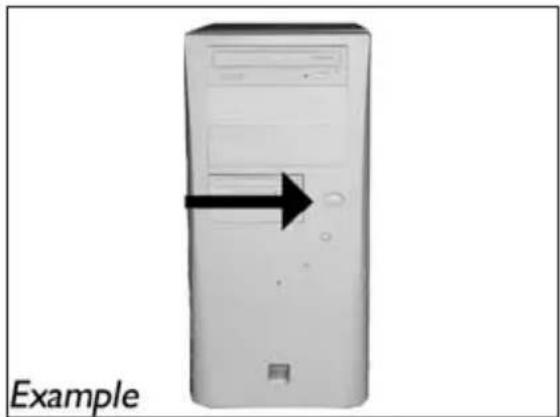
EN Switch your computer off.
觸摸未塗漆的金屬部分(例如,您的電腦外殼發熱或未塗漆的部分)。這可避免靜電釋放而損壞您的電腦。
EN Touch an unpainted metal part (eg, your heating or an unpainted part of your computer case). This will avoid any damage to your computer by electrostatic discharge.
4 断开计算机电源。
RU OTcoeAHHTe Ka6eAb NITaHnO T BaIIero PC.
DK Tag strømkabet fra computeren ud.
TC 拔掉電腦電源線。
EN Disconnect the power cable from the PC.
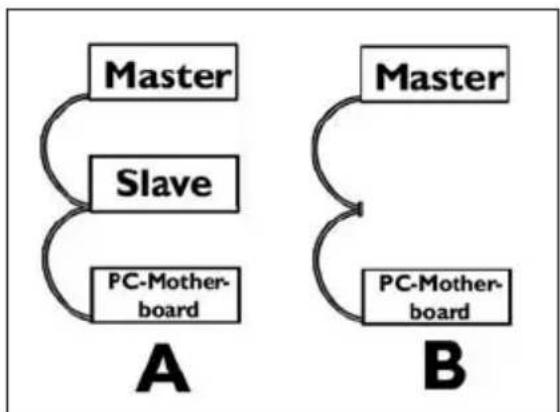
EN If you replace a drive, take it out and check which setting it has ("Master" or "Slave"). Remember this setting and go to step 10.
如未安装任何驱动器,则记住“Master(主驱动器)”并转至步骤10。
RU Ean Bbl He HnHCTaMpyeTe AACKOBDA. 3aONMHTE yTaHOBky "Master" npepeAHTe K wary 10.
DK Husk blot pa "Master", hvis du/DDne noget drev installereret, og g til pkt. 10.
TC 若您未安裝光碟機,請記下“Master”,然後至步驟10。
EN If you have no drive installed, remember "Master" and go to step 10.
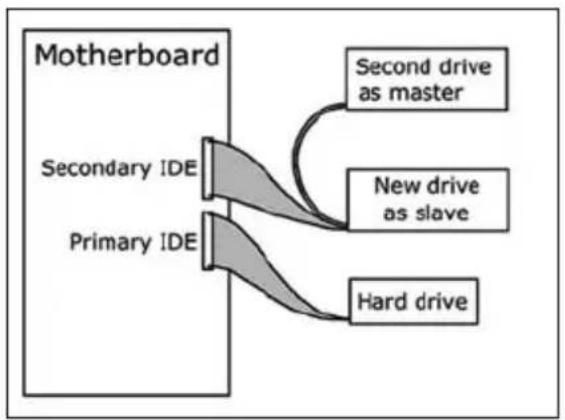
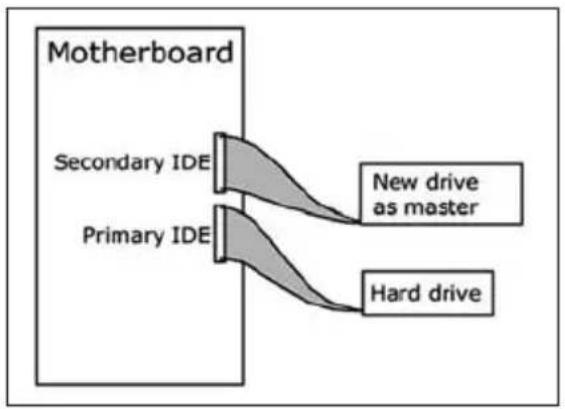
EN If you add a drive, check the drive has which remains in the PC ("Master" or "Slave", see step 11), remember the OTHER setting.
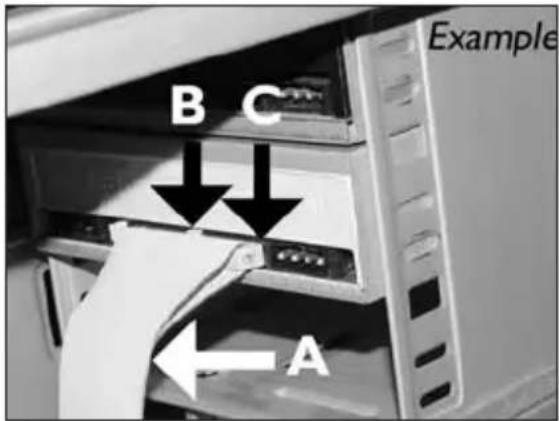
EN Find the IDE-cable which may look like this example:
A: Coloured line.
B: Notch and closed hole.
C:Pin1.
A: Coloured line.
B: Notch and closed hole.
C:Pin1.
Kak co3aTb BnaeOAnck?
Sādan laves en videodisc
如何製作視訊光碟?
How to make a video disc?

Be responsible Respect copyrights
KaK co3aTb Anck AaHHbIX nAn ayAnoAnck?
Sādan laves en data-ller lyddisc
如何製作資料或音樂光碟?
How to make a data or audio disc?

Be responsible Respect copyrights
Be responsible Respect copyrights
Be responsible Respect copyrights
O: Indicates that this toxic or hazardous substance contained in all of the homogeneous materials for this part is below the limit requirement in SJ/T11363 - 2006.
X: Indicates that this toxic or hazardous substance contained in at least one of the homogeneous materials used for this part is above the limit requirement in SJ/T11363 - 2006.

环使用期限 Environmental Protection Use Period
This logo refers to the period (10 years)
This logo refers to the period ( 10 years ) during which the toxic or hazardous substances or elements contained in electronic information products will not leak or mutate so that the use of these substances or elements will not result in any severe environmental pollution, any bodily injury or damage to any assets.

HyЖна ДОПОАНTEьная ИФОмаця ИА ПOMоць
PocetTe www.philips.com/storageupdates
BbIaHne HeNCppaBHOCTe
AIOOeckn AOKOB Philips nroTaBAHOTc C OOCo TuataeBHOCTb. Pn BO3HKHOBeHH Ip6aem Yacto OKa3bIaebTc, TTO AOKOBd CAM No Ce6e NcnpaBeH. Boauyio aactb 3TNX Ip6aEM Bbl MoKeTe npocTo peuNTb C NOMOJIbIO INCTpyMeHTaHBix CpeACTB NOAepKKn, IpeAAraembx fipmOn Philips
EcamyBaBCBo3HNKANnpo6aMbl:
IpoHTaIte HOpMaIIIO, coAepXHaIyIOcB COOTBeTCTByIOeM pa3Aepe pyKOBOCTBa "KaK
2 O6paTntecb K Be6-calam IOAePKn Philips www.philips.com/storageupdates n www.philips.com/support: AHHTEpAKTNBHOI IOAePKK, BBAEHNH HcnpaBHOCTeN I NOCAADHX AKTyAAH3AUH.
3 EAN BO BPEM NHCATAAALIM NAM 3KCNAYAaLIMBbl CTOANKHYNCb C DNOAOHHTeABHbIMN TpyHOCTTMM, Bam CaJeMyET o6paTnTBcB P Philips Customer Care No 3AekTPOHHo NOpTe Nm NO TeAeOHy, KOToPbIe MOXHO HaTN B VInTEpHHeTe no aDpecy www.philips.com/contact.
PpeKDe, Yem PpeAbBnTb NpeTeH3n B paMKax rapaHTn Ha AnCKOBoA, Bbl AOxKbI 3anPoCnTb CcbIAOuHbI Homep BO3BpaTa no aApecy www.philips.com/support nAN CBra3aTbcra c Philips Customer Care.
AonoAHHTeAbHn HhOpMaun no rapaHTn npeAcTaBAeHa B nanKe "Philips Warranty" kaTAlora Ha nporpaMMHom dNcke Nero.

Be responsible Respect copyrights
"He3aKOHHe N3ROTOBaeHHe KOIN MaTePnaAOB, 3auuueHHbIX OT KONIPOBAHn, BKAIOyA KOMIbIOTepHbIe IporpamMbI, faiMbI, TeAE-, paADNtpaHCAUHN 3ByKO3aNNCH MOXkET paccMaTpNbBaTbCak HApuyEHe ABTOPCKHX Pab IN PpeCAeOBA TbCn IOYROBOMy 3aKoHOdaTeAbCTBy. HAcToaUee O6OpdyOBaHHe He DOAnxHo NCIOABaTcBn IOAObHix LCEAA."
IPIEAOCTEPEXKEHNE
IaactNKOBbIe MeUKM OMyT IpeCTaBArTB ONaCHOCTb JAAK3HN. Bo 36ekHHe ONaCHOCTn ydyuEHH He dOpyckaiTe HaxoKdEHn 3TNX MeUKOB PpOM C MaAeHuaM N MaEhBkIMN AeTbM.
www.philips.com/storageupdates

Be responsible Respect copyrights
Be responsible Respect copyrights
More info or help needed
Visit www.philips.com/storageupdates
Troubleshooting
Philips optical disc drives are manufactured with utmost care. In case of problems, it often appears that the drive itself is not defective. You can simply solve most of these problems by using the support tools offered by Philips.
When you're experiencing problems:
Please check the information in the "How to..." manual.
2 Check the Philips support websites www.philips.com/storageupdates and www.philips.com/support for interactive support, troubleshooting, and the newest software updates.
3 Should you encounter any more difficulties during installation or use, please contact Philips Customer Care via the e-mail address or telephone numbers that can be found at www.philips.com/contact.
Prior to claiming a drive for warranty, you must request a return reference number at www.philips.com/support or contact Philips Customer Care.
Additional warranty information is available in the "Philips Warranty" folder on the Nero software disc.
"The making of unauthorised copies of copy-protected material, including computer programmes, files, broadcasts and sound recordings, may be an infringement of copyrights and constitute a criminal offence. This equipment should not be used for such purposes."
WEEE mark:Disposal of your old product
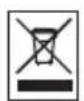
Your product is designed and manufactured with high quality materials and components, which can be recycled and reused. Please inform yourself about the local separate collection system for electrical and electronic products, including those marked by following symbol. Please act according to your local rules and do not dispose of your old products with your normal household waste.
WARNING
Plastic bags can be dangerous.
To avoid danger of suffocation, keep this bag away from babies and small children.
FCC Compliance
FCC 15.105 rule:
This equipment has been tested and found to comply with the limits for a Class B digital device, pursuant to Part 15 of the FCC Rules. These limits are designed to provide reasonable protection against harmful interference in a residential installation. This equipment generates, uses and can radiate radio frequency energy and, if not installed and used in accordance with the instructions, may cause harmful interference to radio communications. However, there is no guarantee that interference will not occur in a particular installation. If this equipment does cause harmful interference to radio or television reception, which can be determined by turning the equipment off and on, the user is encouraged to try to correct the interference by one or more of the following measures:
- Reorient or relocate the receiving antenna.
- Increase the separation between the equipment and receiver.
- Connect the equipment into an outlet on a circuit different from that to which the receiver is connected.
- Consult the dealer or an experienced radio/TV technician for help.
Warning: Changes or modifications made to this equipment not expressly approved by Philips may void the FCC authorization to operate this equipment.
FCC 15.19 rule:
This device complies with Part 15 of the FCC Rules and with RSS-210 of Industry Canada. Operation is subject to the following two conditions:
(1) this device my not cause harmful interference, and
(2) this device must accept any interference received, including interference that may cause undesired operation.
C
Electric-, Magnetic- and Electromagnetic Fields ("EMF")
- Philips Royal Electronics manufactures and sells many products targeted at consumers, which, like any electronic apparatus, in general have the ability to emit and receive electro magnetic signals.
- One of Philips' leading Business Principles is to take all necessary health and safety measures for our products, to comply with all applicable legal requirements and to stay well within the EMF standards applicable at the time of producing the products.
- Philips is committed to develop, produce and market products that cause no adverse health effects.
- Philips confirms that if its products are handled properly for their intended use, they are safe to use according to scientific evidence available today.
- Philips plays an active role in the development of international EMF and safety standards, enabling Philips to anticipate further developments in standardization for early integration in its products.
Safety Precautions
USA/Canada: This player is for use only with IBM compatible UL listed Personal Computers or Macintosh UL listed workstations, weighing less than 18kg .
LASER SAFETY
This unit employs a laser. Do not remove the cover or attempt to service this device when connected due to the possibility of eye damage.
LASER-SICHERHEIT
USE OF CONTROLS OR ADJUSTMENTS OR PERFORMANCE OF PROCEDURES OTHER THAN THOSE SPECIFIED HEREIN MAY RESULT IN HAZARDOUS LASER RADIATION EXPOSURE.
WARNING
Output power (measured above the objective lens)
Read: 1,4 mW - 2,5 mW
Write: 90mW (CD)-27 mW (DVD)
Beam divergence 60 degree
Additional information available at our website:
www.philips.com/storageupdates
www.philips.com/storage
Specifications subject to change without notice.
All dimensions shown are approximate.
All rights reserved.
Reproduction, copying, usage, modifying, hiring, renting,
public performance, transmission and/or broadcasting in whole or part is prohibited without the written consent of Philips Electronics N.V.