49L3763 - Television TOSHIBA - Free user manual and instructions
Find the device manual for free 49L3763 TOSHIBA in PDF.



| Product Type | LED LCD Television |
| Brand | Toshiba |
| Model | 49L3763 |
| Screen Size | 49 inches (124 cm) |
| Resolution | 1920 x 1080 pixels (Full HD) |
| Backlight | LED |
| Power Supply | 220-240 V AC, 50 Hz |
| Energy Consumption (estimated) | Approx 70 W (standby < 0.5 W) |
| Dimensions (approx., without stand) | 110 x 65 x 8 cm |
| Weight (approx., without stand) | 10 kg |
| Operating System | Smart TV (proprietary) |
| Smart Functions | HbbTV, Internet portal, Web browser, Netflix, YouTube, Smart Center, wireless display |
| Connectivity | HDMI (x3), USB (x2), LAN Ethernet, built-in Wi-Fi (2.4/5 GHz), optical digital audio output, antenna input, CI+ |
| Audio | Dolby Audio (Dolby Digital Plus), DTS TruSurround, stereo speakers |
| TV Functions | PVR (USB recording), EPG (program guide), teletext, subtitles, HDMI-CEC control |
| Remote Control | Infrared remote control (with AAA batteries) |
| Included Accessories | Remote control, batteries (2 x AAA), quick start guide, product sheet, AV cable (depending on model) |
| Wall Mount Compatibility | Yes (VESA standard, screws not included) |
| Maintenance | Clean with a soft dry cloth; do not use abrasive or liquid products |
| Safety | Do not expose to humidity; unplug during thunderstorms; do not obstruct ventilation openings |
| Spare Parts and Repairability | Contact Toshiba after-sales service (number 0809100111) for parts or repairs |
| Warranty | See terms at www.toshiba-TV.com/warranty |
Frequently Asked Questions - 49L3763 TOSHIBA
User questions about 49L3763 TOSHIBA
0 question about this device. Answer the ones you know or ask your own.
Ask a new question about this device
Download the instructions for your Television in PDF format for free! Find your manual 49L3763 - TOSHIBA and take your electronic device back in hand. On this page are published all the documents necessary for the use of your device. 49L3763 by TOSHIBA.
USER MANUAL 49L3763 TOSHIBA
Safety Information 2
Markings on the Product 2
Connections. 4
TV Control & Operation 4
First Time Installation. 4
Network Connection 4
Remote Control (TV - DVD) 5
Accessories Included.. 6
Feature Overview 6
Licenses 6
Wireless LAN Transmitter Specifications******7
Safety Information
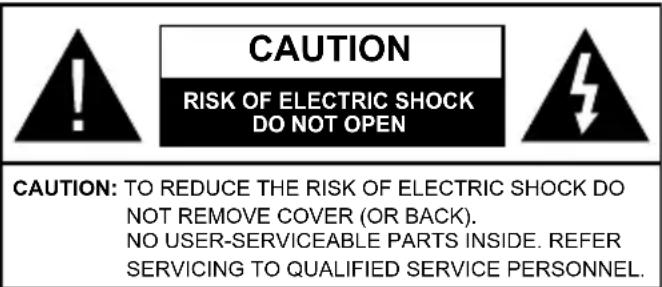
In extreme weather (storms, lightning) and long inactivity periods (going on holiday) disconnect the TV set from the mains.
The mains plug is used to disconnect TV set from the mains and therefore it must remain readily operable. If the TV set is not disconnected electrically from the mains, the device will still draw power for all situations even if the TV is in standby mode or switched off.
Note: Follow the on screen instructions for operating the related features.
IMPORTANT - Please read these instructions fully before installing or operating
WARNING: This device is intended to be used by persons (including children) who are capable / experienced of operating such a device unsupervised, unless they have been given supervision or instruction concerning the use of the device by a person responsible for their safety.
- Use this TV set at an altitude of less than 2000 meters above the sea level, in dry locations and in regions with moderate or tropical climates.
- The TV set is intended for household and similar general use but may also be used in public places.
- For ventilation purposes, leave at least 5cm of free space around the TV.
- The ventilation should not be impeded by covering or blocking the ventilation openings with items, such as newspapers, table-cloths, curtains, etc.
- The power cord plug should be easily accessible. Do not place the TV, furniture, etc. on the power cord. A damaged power cord/plug can cause fire or give you an electric shock. Handle the power cord by the plug, do not unplug the TV by pulling the power cord. Never touch the power cord/plug with wet hands as this could cause a short circuit or electric shock. Never make a knot in the power cord or tie it with other cords. When damaged it must be replaced, this should only be done by qualified personnel.
- Do not expose the TV to dripping or splashing of liquids and do not place objects filled with liquids, such as vases, cups, etc. on or over the TV (e.g., on shelves above the unit).
-
Do not expose the TV to direct sunlight or do not place open flames such as lit candles on the top of or near the TV.
-
Do not place any heat sources such as electric heaters, radiators, etc. near the TV set.
- Do not place the TV on the floor and inclined surfaces.
- To avoid danger of suffocation, keep plastic bags out of the reach of the babies, children and domestic animals.
- Carefully attach the stand to the TV. If the stand is provided with screws, tighten the screws firmly to prevent the TV from tilting. Do not over-tighten the screws and mount the stand rubbers properly.
- Do not dispose of the batteries in fire or with hazardous or flammable materials.
Warning: Batteries must not be exposed to excessive heat such as sunshine, fire or the like.
WARNING - excessive sound pressure from earphones or headphones can cause hearing loss.
ABOVE ALL - NEVER let anyone, especially children, push or hit the screen, push anything into holes, slots or any other openings in the case.
| Caution | Serious injury or death risk |
| Risk of electric shock | Dangerous voltage risk |
| Maintenance | Important maintenance component |
Markings on the Product
The following symbols are used on the product as a marker for restrictions and precautions and safety instructions. Each explanation shall be considered where the product bears related marking only. Note such information for security reasons.

Class II Equipment: This appliance is designed in such a way that it does not require a safety connection to electrical earth.

Class II Equipment With Functional Earthing: This appliance is designed in such a way that it does not require a safety connection to electrical earth, the earth action is used for functional purposes.

Protective Earth Connection: The marked terminal is intended for connection of the protective earthing conductor associated with pply wiring.

Hazardous Live Terminal: The marked terminal(s) is/are hazardous live under normal operating conditions.

Caution, See Operating Instructions: The marked area(s) contain(s) user replaceable coin or button cell batteries.
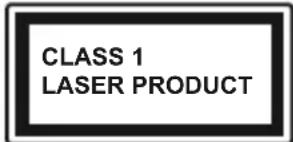
Class 1 Laser Product:
This product contains Class 1 laser source that is safe under reasonably foreseeable conditions of operation.
WARNING
Do not ingest the battery, Chemical Burn Hazard This product or the accessories supplied with the product may contain a coin/button cell battery. If the coin/button cell battery is swallowed, it can cause severe internal burns in just 2 hours and can lead to death.
Keep new and used batteries away from children. If the battery compartment does not close securely, stop using the product and keep it away from children.
If you think batteries might have been swallowed or placed inside any part of the body, seek immediate medical attention.

Never place a television set in unstable or inclined locations. A television set may fall, causing serious personal injury or death. Many injuries, particularly to children, can be avoided by taking simple precautions such as;
- Using cabinets or stands recommended by the manufacturer of the television set.
- Only using furniture that can safely support the television set.
- Ensuring the television set is not overhanging the edge of the supporting furniture.
- Not placing the television set on tall furniture (for example, cupboards or bookcases) without anchoring both the furniture and the television set to a suitable support.
- Not standing the television set on cloth or other materials placed between the television and supporting furniture.
- Educating children about the dangers of climbing on furniture to reach the television set or its controls. If your existing television set is being retained and relocated, the same considerations as above should be applied.
Apparatus connected to the protective earthing of the building installation through the MAINS connection or through other apparatus with a connection to protective earthing - and to a television distribution system using coaxial cable, may in some circumstances create a fire hazard. Connection to a television distribution system has therefore to be provided through a device providing electrical isolation below a certain frequency range (galvanic isolator, see EN 60728-11)
Using the special functions to change the size of the displayed image (i.e. changing the height/width ratio) for the purposes of public display or commercial gain may infringe on copyright laws.
The LCD display panels are manufactured using an extremely high level of precision technology; however, sometimes some parts of the screen may be missing picture elements or have luminous spots. This is not a sign of a malfunction.
The set should be operated only from a 220-240 V AC 50Hz outlet. Ensure that the television is not standing on the mains lead. Do not cut off the mains plug from this equipment, this incorporates a special Radio Interference Filter, the removal of which will impair its performance. It should only be replaced by a correctly rated and approved type. IF IN DOUBT PLEASE CONSULT A COMPETENT ELECTRICIAN.
WALL MOUNTING WARNINGS
- Read the instructions before mounting your TV on the wall.
- The wall mount kit is optional. You can obtain from your local dealer, if not supplied with your TV.
- Do not install the TV on a ceiling or on an inclined wall.
- Use the specified wall mounting screws and other accessories.
- Tighten the wall mounting screws firmly to prevent the TV from fall. Do not over-tighten the screws.
Specification is subject to change without notice.
Connections
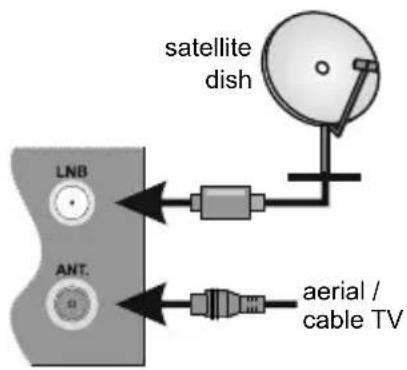
Antenna
Connect the antenna cable/s to your TV.
Power
After unpacking, allow the TV set to reach the ambient room temperature before you connect the set to the mains. Plug the power cable to the mains socket outlet.
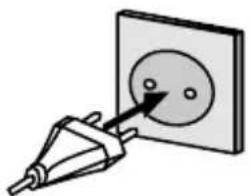
The TV set is designed to operate on a 220-240V AC, 50Hz supply.
External Devices
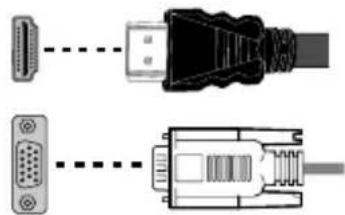
Use the proper cable to connect two units together.
Example Connections
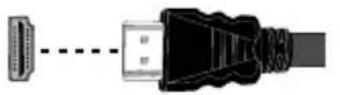

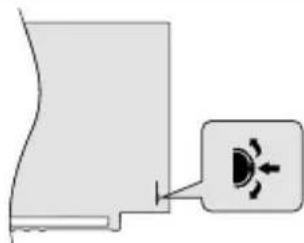
To select the desired input source, press the Source button on the remote control. Or press the switch in consecutively until the Sources list is displayed.

PLEASE ENSURE BOTH UNITS ARE SWITCHED OFF BEFORE CONNECTING
TV Control & Operation
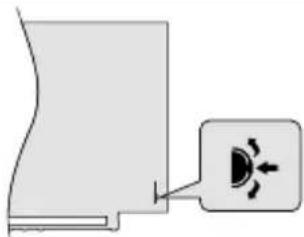
The control switch allows you to control basic functions of your TV. Press the centre of the control switch in or the Standby button on the remote to turn the TV on from standby mode.
First Time Installation
When turned on for the first time, Welcome Screen will be displayed. Select your language and press OK. Follow the on screen instructions to set your TV and install channels. The installation wizard will guide you through the setup process. You can perform First Time Installation anytime using the related option in the Installation menu.
Network Connection
You can set up your TV so that it can access the Internet through your local area network (LAN) using a wired or wireless connection.
Wired
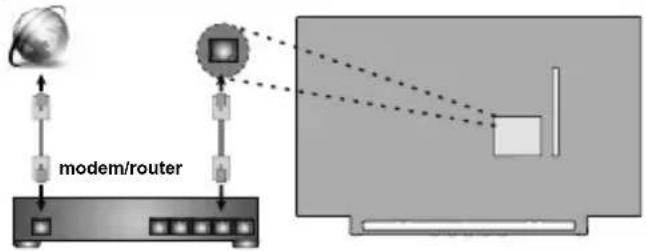
Wireless
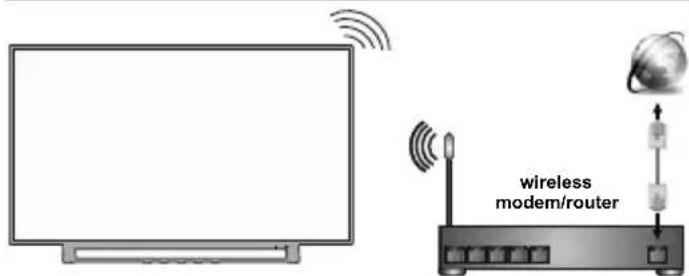
Note: The figures are for representation only
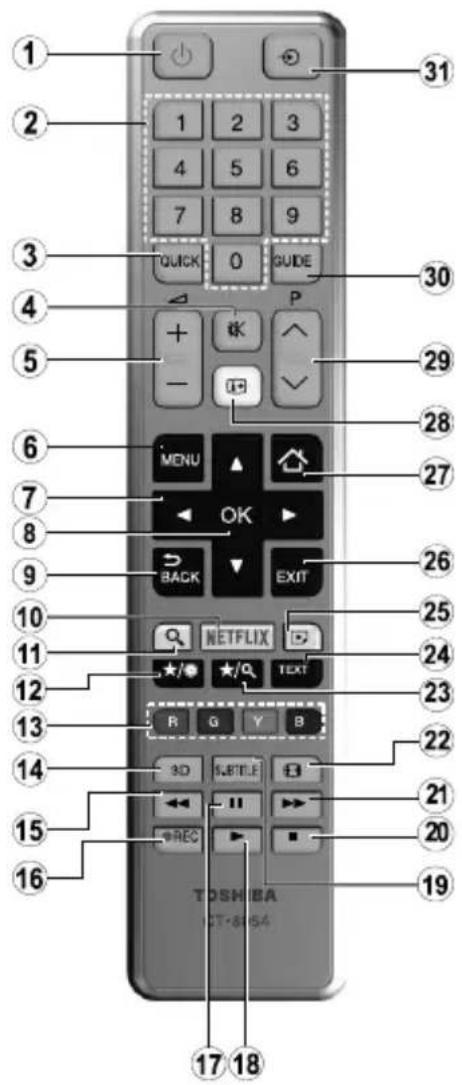
- Standby: Switches On / Off the TV Standby
- Numeric buttons: Switches the channel, enters a number or a letter in the text box on the screen. Numeric buttons
- Quick Menu: Displays a list of menus for quick access
- Mute: Completely turns off the volume of the TV Mute
- Volume +/- Volume +/-
- Menu: Displays TV menu TV Menu
- Directional buttons: Helps navigate menus, content etc. and displays the subpages in TXT mode when pressed Right or Left Navigation buttons
- OK: Confirms user selections, holds the page (in TXT mode), views channel list (DTV mode) OK/Select
- Back/Return: Returns to previous screen, opens index page (in TXT mode)
- Netflix: Launches the Netflix application, if this feature is supported by your TV
- Search: Opens the search page in the browser
- My button 1 (*) Display time / DVD menu
- Coloured Buttons: Follow the on-screen instructions for coloured button functions Red button - Zoom Green button - Repeat Yellow button - Root Blue button - Title
- Favourites: Displays favourite lists menu / Switches between favourite lists
- Rapid reverse: Moves frames backwards in media such as
movies Rapid reve
- Record: Records programmes
- Pause: Pauses the media being played, starts timeshift recording Pause
- Play: Starts to play selected media Play
19.Subtitles:Turns subtitles on and off (where available) Subtitles - Stop: Stops the media being played Stop
- Rapid advance: Moves frames forward in media such as movies Rapid advance
- Screen: Changes the aspect ratio of the screen Screen
- My button 2 (*) Search mode
- Text: Displays teletext (where available), press again to superimpose the teletext over a normal broadcast picture (mix)
- Media browser: Opens the media browsing screen Angle
- Exit: Closes and exits from displayed menus or returns to previous screen Exit
- Internet: Opens the portal page, where you can reach many web based applications
- Info: Displays information about on-screen content, shows hidden information (reveal - in TXT mode) Info / Time
- Programme +/-
- EPG (Electronic programme guide): Displays the electronic programme guide
- Source: Shows all available broadcast and content sources Source
Note: The references in Bold are for models with and in DVD operation.
(*) MY BUTTON 1 & MY BUTTON 2:
These buttons may have default functions depending on the model. However you can set a special function to these buttons by pressing on them for five seconds when on a desired source or channel. A confirmation message will be displayed on the screen. Now the selected MY BUTTON is associated with the selected function. Note that if you perform First Time Installation, MY BUTTON 1&2 will return to their default function.
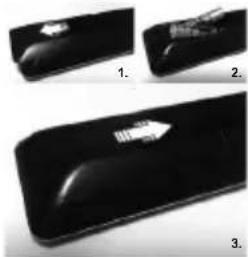
Inserting the Batteries into the Remote
Remove the back cover to reveal the battery compartment. Insert two size AAA batteries. Make sure the (+) and (-) signs match (observe correct polarity). Do not mix old and new batteries. Replace only with same or equivalent type. Place the cover back on.
Accessories Included
Remote Control
- Batteries: 2 x AAA
Quick Start Guide
Product Fiche
- Side AV Connection Cable
(^) Limited Models Only
Feature Overview
Media Browser
Browse the media content stored on USB devices that are connected to your TV
Common Interface
Decode encrypted digital TV channels with a Conditional Access Module(CAM) and a card provided by a digital TV service operator
Personal Video Recorder (PVR)
Record your favourite TV programmes
Electronic Programme Guide (EPG)
Display the scheduled digital TV programmes
CEC
Control basic functions of the connected HDMI-CEC compatible audio/video devices with the remote control of the TV
Audio Video Sharing
Access your media files stored on media server devices, such as PC's or handheld devices, that are connected to your home network
HbbTV
Access to HbbTV services (services are dependant on broadcast)
Internet Portal
Access to the portal for internet content and services (services are dependant on country)
Open Browser
Browse the internet from the comfort of your sofa
Wireless Display
Wirelessly stream video and sound content and use your TV as a second screen for your compatible PC or handheld device
Smart Center
Use the Smart Center application installed on your mobile device to launch your portal applications, control your TV, share media files and stream TV programmes
Virtual Remote
Control your TV via a wireless handheld device
Audio Link and Smart Remote
Connect audio devices or remote controllers wirelessly to your TV.
Some features may not be available dependant on your TV model, please check the product fiche for your product specifications
For more detailed information on installation, function and control refer to the full manual on our the website at http://www.toshiba-TV.com
Licenses
The terms HDMI and High-Definition Multimedia Interface, and the HDMI Logo are trademarks or registered trademarks of HDMI Licensing Administrator, Inc. in the United States and other countries.

Manufactured under license from Dolby Laboratories. Dolby Audio and the double-D symbol are trademarks of Dolby Laboratories.
Dolby Audio™ (supporting Dolby Digital Plus™)
DOLBY AUDIO
YouTube and the YouTube logo are trademarks of Google Inc.
For DTS patents, see http://patents.dts.com. Manufactured under license from DTS Licensing Limited. DTS, the Symbol, & DTS and the Symbol together are registered trademarks, and DTS TruSurround is a trademark of DTS, Inc. DTS, Inc. All Rights Reserved.

For DTS patents, see http://patents.dts.com. Manufactured under license from DTS Licensing Limited. DTS, the Symbol, & DTS and the Symbol together are registered trademarks, and DTS 2.0+Digital Out is a trademark of DTS, Inc. DTS, Inc. All Rights Reserved.

For DTS patents, see http://patents.dts.com. Manufactured under license from DTS Licensing Limited. DTS, DTS-HD, the Symbol, & DTS or DTS-HD and the Symbol together are registered trademarks of DTS, Inc. DTS, Inc. All Rights Reserved.

DVB is a registered trademark of the DVB Project.
[1] EIA/CEA-861-D compliance covers the transmission of uncompressed digital video with high-bandwidth digital content protection, which is being standardized for reception of high-definition video signals. Because this is an evolving technology, it is possible that some devices may not operate properly with the television.
(^**) This product incorporates copyright protection technology that is protected by U.S. patents and other intellectual property rights. Use of this copyright protection technology must be authorized by Rovi Corporation, and is intended for home and other limited viewing uses only unless otherwise authorized by Rovi Corporation. Reverse engineering and disassembly are prohibited.
(^**) Limited Models Only
This product contains technology subject to certain intellectual property rights of Microsoft. Use or distribution of this technology outside of this product is prohibited without the appropriate license(s) from Microsoft.
Content owners use Microsoft PlayReady™ content access technology to protect their intellectual property, including copyrighted content. This device uses PlayReady technology to access PlayReady-protected content and/or WMDRM-protected content. If the device fails to properly enforce restrictions on content usage, content owners may require Microsoft to revoke the device's ability to consume PlayReady-protected content. Revocation should not affect unprotected content or content protected by other content access technologies. Content owners may require you to upgrade PlayReady to access their content. If you decline an upgrade, you will not be able to access content that requires the upgrade.
Wireless LAN Transmitter Specifications**
| Frequency Ranges | Max Output Power |
| 2400 - 2483,5 MHz (CH1-CH13) < 100 | mW |
| 5150 - 5250 MHz (CH36 - CH48) < 200 | mW |
| 5250 - 5350 MHz (CH52 - CH64) < 200 | mW |
| 5470 - 5725 MHz (CH100 - CH140) < 200 | mW |
Country Restrictions
This device is intended for home and office use in all EU countries (and other countries following the relevant EU directive) without any limitation except for the countries mentioned below.
| Country Restriction | |
| Bulgaria | General authorization required for outdoor use and public service |
| France In-door use only for 2454-2483.5 MHz | |
| Italy | If used outside of own premises, general authorization is required |
| Greece | In-door use only for 5470 MHz to 5725 MHz band |
| Country Restriction | |
| Luxembourg | General authorization required for network and service supply(not for spectrum) |
| Norway | Radio transmission is prohibited for the geographical area within a radius of 20 km from the centre of Ny-Ålesund |
| Russian Federation | In-door use only |
The requirements for any country may change at any time. It's recommended that user checks with local authorities for the current status of their national regulations for both 2.4 GHz and 5 GHz wireless LAN's.
(**) Limited Models Only
Find out all you need to know about the latest, trend-setting TV technology on our website.
www.toshiba-TV.com
You can review your TV user manual online or download as you like
Disposal...
The following information is only for EU-member states:
Disposal of products
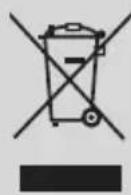
The crossed out wheeled dust bin symbol indicates that products must be collected and disposed of separately from household waste. Integrated batteries and accumulators can be disposed of with the product. They will be separated at the recycling centres.
The black bar indicates that the product was placed on the market after August 13, 2005.
By participating in separate collection of products and batteries, you will help to assure the proper disposal of products and batteries and thus help to prevent potential negative consequences for the environment and human health.
For more detailed information about the collection and recycling programmes available in your country, please contact your local city office or the shop where you purchased the product.
Disposal of batteries and/or accumulators
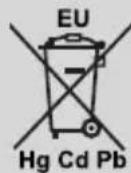
The crossed out wheeled dust bin symbol indicates that batteries and/or accumulators must be collected and disposed of separately from household waste.
If the battery or accumulator contains more than the specified values of lead (Pb), mercury (Hg), and/or cadmium (Cd) defined in the European Battery Directive, then the chemical symbols for lead (Pb), mercury (Hg) and/or cadmium (Cd) will appear below the crossed out wheeled dust bin symbol.
By participating in separate collection of batteries, you will help to assure the proper disposal of products and batteries and thus help to prevent potential negative consequences for the environment and human health. For more detailed information about the collection and recycling programmes available in your country, please contact your local city office or the shop where you purchased the product.
REACH information
The European Union (EU) chemical regulation, REACH (Registration, Evaluation, Authorization and Restriction of Chemicals), entered into force on 1 June 2007, with phased deadlines to 2018.
Toshiba will meet all REACH requirements and is committed to provide our customers with information about the presence in our articles of substances included on the candidate list according to REACH regulation.
Please consult the following website www.toshiba-TV.com for information about the presence in our articles of substances included on the candidate list according to REACH in a concentration above 0.1% weight by weight.
EU Conformity Statement

This product is carrying the CE-Mark in accordance with the related European Directives.
Responsible for CE-Marking is Vestel UK, Langley, Berkshire, SL3 6EZ.
This product is labeled with the CE Mark in accordance with the related European Directives, notably RoHS Directive 2011/65/EU. Furthermore the product complies with the Ecodesign Directive 2005/32/EC (EuP) and 2009/125/EC (ErP) and its related implementing measures.
This equipment corresponds to requirements of the Technical Regulation on limitation of usage of certain dangerous substances in electrical and electronic equipment.
Inhaltsverzeichnis
Restrictions relatives aux pays
TV-bediening & Operation
Neem uw favorite television programma's op
MapknpoBKn Bbpx npOdyKta
CneHnTe CmBOJn Ce n3noJ3BaT Bbpxy npOyKtAto Mapkep 3a OrpaHnueHn I npEJa3Hn MEPKN yka3aHnna 3a 6e3oNaChocT. BcKO o6rCheHne Tp6Ba Da ce B3eme npEdBnD cAmO TaM, KbDeTo Bbpy npOyKta NMa CbOTBeTHaTa MapKnpoBka. B3emTe Ta3n INΦopMaζn IpeBnD OT Cbo6paKeHn 3a cnrypHOCT.

Obopydbane Knac II:To3n ypeJe npoeKtupan no TaKbB NaunH,Ye da He n3nCKBa npedna3Ha Bpb3Ka KbM 3a
6e30nacHOCT KbM eJekTpueckcTo 3a3EmraBaHe.

06opydBaHe KlaC c cyHKcnoHaHNo 3a3eMaBaHe:To3n ypeI e npoeKtnpaH no TaKbB HaunH,Ye Da He N3NCKBa npeDna3Ha Bpb3Ka KbM 3a 6e3OpanachOCT KbM
eNEKtpnueckOTO 3a3EmBaHe. 3a3EmBaHeto Ce H3No13Ba 3aФyHKUHOHaJIHN UeIN.

3aunTHo 3aemBaHe: MapKnpaHnT n3BOD e npedHa3NaueH 3a Cbbp3BaHe Ha 3aunTHn 3a3eMnteJen PNOBOdNHK, Cbbp3aH CbC HbaunKa6eJ.

Onachn n3BOOn 3a pa3ata: MapknpaHnT(Te) n3BOd(n) e/ca onaceH(n) pa3n npn HopMaHn ycNoBna Ha ekCnIooatauia.

BHHMaHHe, BIXTe NHCtpyKcUNTe 3a ynotpe6a: MapknpaHaTa 30Ha(N) cbDbpxKa(T) 6aTePnC φopMaTa Ha KOnYe/KNeTka, KOUTO nTEJrT MoKe Da 3aMeHr.
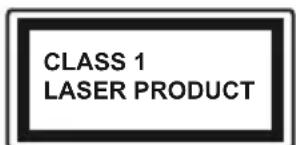
Ja3epen npoDyKT KnaC 1:To3n npoDyKT cBdBpKa Ja3epen n3TOUHk KnaC 1, KOIto e6e3onaceH npn HopMaJIHH ycNoBnHa ynoTpe6a.
PPEyPExEHEHNE
He rIbTaIe 6aTepeRyTa, cIeCTByBa onaCHOcOT XIMUeCKO n3rapAHe
To3n npOdyKT, nIi BkJIIOUeHInTe B o6ema Ha DoCTaBkata My akcecoapn, MORAT Da CbIbpxKaT 6aTepeN TIN TabJeTKA/6yTOH. Ako 6aTepeNraT 6bDe NOrbNHata, TOBa MoKe Da npEiN3BnKa TeKKn BbTpEshN H3rapHnB pAMKInTe Ha 2 yaca N MoKe Da DOBeDe Do CMBpT.
Paa3eTe HOBHTe n ynoTpe6BaHHTe 6aTeepn nnaneue ot deca.
Ako OTdeHenTo 3a 6aTePnraTa He ce 3aTbaprdo6pe, cnpete Da n3noJ3BaTe npOdyKta n roDpbkTe daJeue ot deua.
Ako MncnTe, Ye cTe NOrbHann6aTeepnnte nn nCTe Tn NOCTaBnN , KbDeTo N Da 6NuO B TraIOTo CN,NOTbpcTe He3a6abHO MeuHcNcKa NOMou.

Hnkora He noctabraye TeleBn3opa Ha HectaunHa ochoba. TeleBn3opbT MOKe da naDHe Na npuHH cepno3HN HapaHBAHn nn cMbpt. MHoro HapaHbAHN, Oco6eHO npi Deata, Moat Da 6bDaT n36erHaTn C BImaHe Ha npocTn PpePna3Hm MepKn, KaTO HAp..
-ИзнолзВанeto HaшkaфОBE Ии CTойКe e npenopbЧNTeHNo OT npoN3BOДNTeЯ HaTeLEBn3Opa.
- ɪnərɪsɪbærɪe c a m o Mæbæn, kɔnɪtə 6e3oɪaCHO MORaT Da nɒdɪbɒpʌkT TeɪneBɪnʒopɑ.
- YBepeTe ce, Ye TeIeBn3OpbT He ce HaIaBecBa Ha p6a Ha NOBbpxHOCTTa, Ha KOrTo e NoCTaBeH.
- He noctabraye TeJeBn3opa Bbpxy Me6jN (Hanpimep ukafoBe) 6e3 da cTe 3axBaHaNn HEnoDbuxHo camITE Me6jN n CToiKaTa Ha TeJeBn3opa.
He noctabnTe TeneBn3opa Bbpxy nla npI npI npI MaTePnaII, NoCTaBeHm MExdy TeneBn3opa n Me6eNITE, KOINTO CnyKaT 3a HerOba Onopa.
Ja ce 6pa3OBaT DecaTa 3a OnaCHOCTNe O KATEpeHe N0 Me6eNITE B ONIT Da DOCTnIHAT Do TEJEBn3Opa NII KOHTPOJHnTe My 6yToHn. Ako CTe 3ana3nn CTapn Bn TeJEBn3Op, To Te3n HAnbTCTBnB BaxKat n 3a Hero.
Upei, KOItoe CBbp3aHcBc 3auiTHOTo3a3EmBaHe Ha cgradHaTnHCTanauny Upe3 Ka6eHa Bpb3ka IIN Ppe3 Dpyr Upei, IMaun 3aunTHO 3a3EmBaHe , KAKTO IN KbM TeNeBn3uONHn pa3npedeJya CnCTema, N3NON3Baua KoAKCnaJeN Ka6en, MOKe B HnKoN Cnyau n Da Cb3daJe ONaCHOCT OT NOxap. Cbbp3BaHTo KbM CNCTema 3a TeJIeBn3n CneIOBaTeJIHO Tp6Ba Da ce OcnHyprn Upe3 YcTPOiCTBO, KOeTO OCNHyprBa eJNEKTPnuecka N3OJaun PoD ONpeJeIneY cectOTeH dnaPAnOH (raJIbaHnueH n3OJaTOP, BIX CTaNdApTa EN 60728-11).
Bb3MOxHO e n3nO3BaHeTo Ha cneuHaJIHnTe fynKUIN 3a npomraHa pa3Mepa Ha n3BeJdaHnHa ekpaH o6pa3 (t.e. npomraHa Ha cboTHoWeHnTo BucOunHa/ unpHa) 3a ceiNte Ha npoxeKTupaHe nped ny6nka Hn TbPROBcKO pa3npocTpaHene Da DoBeDe do HapuBaHe Ha aBTOpCKn nn CpOHN ppBa.
DinCnneTe C TeuHKnKpIcTaJI Na npOn3BeDeHn Upe3 BnCOK OpeuN3Ha TexHoNOrn. BbnpEkn ToBa, NOHkOra B HApKo yAcTbUHa Ha DnCnJIe MoRat Da JINCBaT qActN OT KapTInHHa Ta NII Nb Ka Ce NoBbT CBETn NeTHa. TOBa He e npn3HaK Ha DeΦeKT.
AnapatbTp6Ba Da pa60Tu cMo C HanpeXeHne 220-240V AC n YecToTa Ha ToKa 50Hz. YBepTe ce, ye TeIeBn3OpbT He e NocTabeH Bbpxy 3axpaHbAunia Ka6en. HE maxaTe Ka6enHna Uencen ot ypeDa, TOn cbDbpka PaINO-nHTeppeHent HpnTbp, 6e3 KOITO ypeBbT Hma Da pa60Tu npabInHo. Tp6Ba Da ce 3aMeHc TnKabEn Cbc CbOTBeTHoN Odo6peHO HOMHaJIHO HanpeXeHne. AKO HE CTE CNYPHN, CBbPKeTE CE C BAJNA EJEKTPOTEXHNI.
Инстукциз 3A MOHTNPAHE HA CTEHA
- ПюочeteTe ИСТрукциITE,пpeДи Да мОНтураTe TeNeБИЗОРа на CTeHATA.
- KomnJIeKbT 3a MoHTax Ha CTeHa He e 3aIbJxHtEnHe. MoXeTe Da ro 3akynite o MeCTHnA DnIbP, TbN KaTo He E BKNIOueH B O6ema Ha DoCTaBkA Ha TeJIeBn3Opa.
He MoHTnpaIte TeJIeBn3opa Ha TaBaHa IJIN Ha HAKNoHeHa CTeHa. - I3noI3BaIte cneuaIaHnTe 6oITOBe 3a MoHTaK Ha CTeHaT, KaKTo n DpyrInTe akceCoapN.
3aterheTe 3dpabo 6oTobete 3a MOHTax Ha cteHaTa, 3a da npedna3nte TeneBn3opa or nadaHe. He npes3aTaraTe 6oTobete.
CneuФнkaцЯTa e npedMeT ha npomna 6e3 npedBapntelno npedn3BecTne.
Bpb3kn
AHTeHa
CbpxeTe aHTeHHn/Te Ka6en/n KbM Baunr TeJebu3Op.
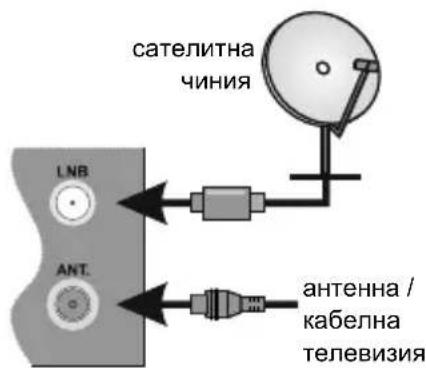
BbHsHn yctpOcTba
N3non3BaTe npabunHna Ka6en, 3a da CbpxKeTe nBe yCTpoiCTba.
Ppimepn Cbpb3BaHn
3a da n36epete XeHaHn BXOeH n3TOUHk, HATNCHETe 6yToHa N3TOUHk Ha dNCTaHcNoHHOTo ynpabBneHne. Inn HaTNCHeTe npEBKIOuBaTEIg HBKOJNO nbTN, DOKaTO Ce NOBn CnncbkbT C n3TOUHnCtne.

IPEIN CBbP3BAHE CE YBEPETE, YE IN DBATA YPEDA CA N3KJIHOUHEN.
3axpaHBaHe
Cne KaTo n3BaInTe TeIeBn3Opa OT onaKOBkata, OCTabete ro da IOCTnIHe cTaNHa Tempepatya, npEi Da ro BKnIOHTe KbM eJKeKTPnCeKaTa MpeXa. BKnIOUeTe ⅡeNcena Ha 3axpaHbAun Ka6en B KOHTaKA.
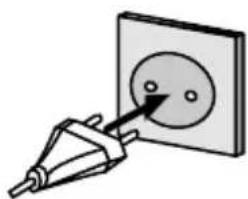
TepeBn3OpbTe npoeKtpaH da pa60tn npn HappeKeHne 220-240V AC c yecToTa 50 Hz.
YnpaBHeHne Ha TeJeBn3opa & pa6ota
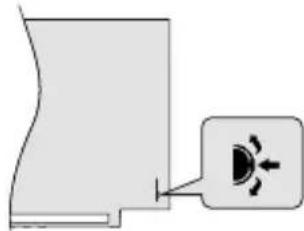
KoHTpOHNrI npEbkHIOvBaTeJ Bn no3BOJRA da ynpaBnaBaTe oCHOBHNe ΦyHKcNn Ha Ba7nra TeJIeBn3Op. HatncHete KOHTpOHNr InpEbkHIOvBaTeB CpeDaTa Hn6yToHa Standby Ha nCTaHcNHOHOT OynpaBHeHne, 3a Da BkIOuHTe TepEBn3Opa OT peKIM HA rTOBHOCT.
PbBOHaJaHa HcTaJaCnA
Korato BKJIOHTe TeJIeBUN3Opa 3a IIbPBI NT, Ic ce NOBn EKpAH 3a Do6pe D0sII. N36epTe JxelaHnO T Bac e3NK n HATNCHEt OK. CJIeDBAIte INHCTpykUInTe Ha ekpHa, 3a a HAcTPOnte TEJIeBUN3Opa n INHCTaIInpate KaHAnITE. CbBETNIKB T 3a INHCTaIInpaHe Ie Bn BOIN NO BpeMe Ha npoueca Ha HAcTPOka. MoKeTe da IN3BbPUnTe IIbPBOHaayanHa INHCTaIIauCnI NO BCRAKO BpeMe C NOMOuTa HA CbOTBeTHaTA ONuN B MeHIO "INHCTaIIauN".
MpexKoBa Bpb3Ka
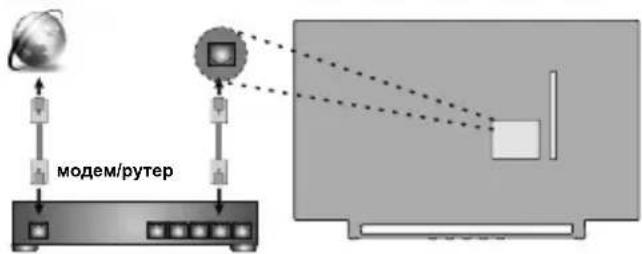
MoKeTe Na HacptponTe TeJIeBn3opa Taka, Ye da Ima DoCTbI Do nHTepHET npe3 BaWata NaokaHa mpeka (LAN) c nomoTa Ha Ka6eHa nn 6e3KuHa Bpb3ka.
Ka6eHen
Be3KnueH
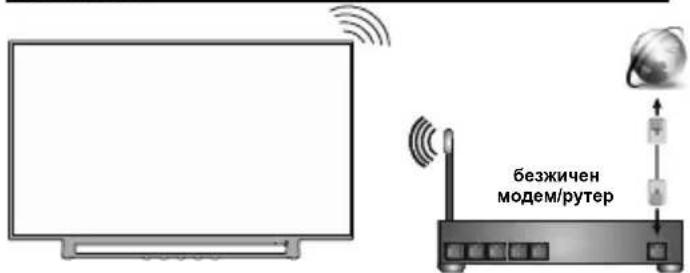
3a6eIekka: Fuaypume ca cmo c npedcmaeumHn uenu
MeiHOBb3npOn3BexKaHe
ПерлесаиTe MeДиHOTO CBДьрЖанe,ЗАпamTeHoHa USB yctpoiCtBaTа, KOnTO ca CBbP3aHn KbMTeJIeBn3opa.
06u nHTepcne
Audio Link a Smart Remote
Videotallennin (PVR)
PVR (Personal Video Recorder)
Ta opp TV-programmene du liker best
Elektronisk programguide (EPG)
Vis planlage, digitale TV-programmer
CEC
Open Browser (Apen nettleser)
(*) MIN KNAP 1 & MIN KNAP 2:
Personal Video Recorder (PVR)
Optag dine foretrukne TV-programmer
Elektronisk programguide (EPG)
Vise planagte digitale TV-programmer