
Helium Lite 101 - Tablet ARCHOS - Free user manual and instructions
Find the device manual for free Helium Lite 101 ARCHOS in PDF.
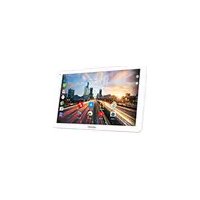


| Product Type | Touchscreen Tablet |
| Brand | ARCHOS |
| Model | Helium Lite 101 |
| Screen | 10.1 inches (diagonal) |
| Operating System | Android |
| Wi-Fi Connectivity | Wi-Fi 802.11 b/g/n |
| Bluetooth Connectivity | Bluetooth |
| Mobile Network | 3G/4G (via SIM card) |
| Ports | 1x Micro-USB (charging/sync), 1x 3.5mm headphone jack |
| Front Camera | Webcam (resolution not specified) |
| Rear Camera | Camera (resolution not specified) |
| Physical Buttons | Volume +/-, Power, Reset (accessible via pinhole) |
| Speaker | Built-in |
| Battery | Rechargeable lithium-ion, charges via included AC adapter |
| Box Contents | Tablet, Quick Start Guide, Warranty Guide, USB Cable, AC Charger |
| Care and Cleaning | Use a soft, dry cloth. Do not use abrasive products. |
| Safety | Do not expose to moisture or extreme temperatures. Use only the supplied charger. |
| After-Sales Service | Contact via www.archos.com, Support > After-Sales Service section |
| Regulatory Information | Declaration of conformity available at www.archos.com |
Frequently Asked Questions - Helium Lite 101 ARCHOS
User questions about Helium Lite 101 ARCHOS
0 question about this device. Answer the ones you know or ask your own.
Ask a new question about this device
Download the instructions for your Tablet in PDF format for free! Find your manual Helium Lite 101 - ARCHOS and take your electronic device back in hand. On this page are published all the documents necessary for the use of your device. Helium Lite 101 by ARCHOS.
USER MANUAL Helium Lite 101 ARCHOS
Congratulations on the purchase of an ARCHOS device! This quick start guide helps you start using your device properly. If you have more questions about using your device,
- You can consult the frequently asked questions on our website: go to http://faq.archos.com/
- You can send us a message on Facebook:
go to www.facebook.com/ARCHOS
- You can contact our After-sales department: go to www.archos.com, click Support > After-sales support >
- You can consult the declaration of conformity: go to www.archos.com, click Support > Downloads >
As we are often updating and improving our products, your device's software may have a slightly different appearance or modified functionality than presented in this Quick Start Guide.
Package Contents
ARCHOS 101 Helium Lite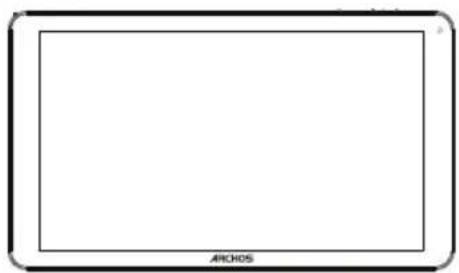
QSG booklet
Warranty, legal & safety booklet
USB cable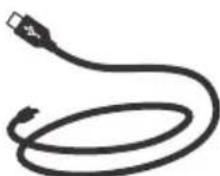
Charger
Getting Started
Charging
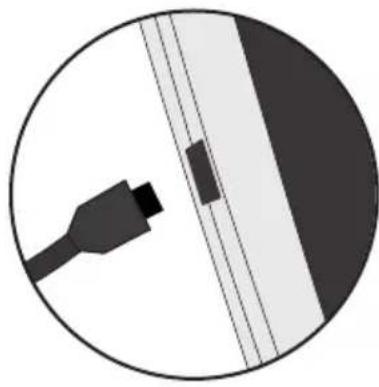
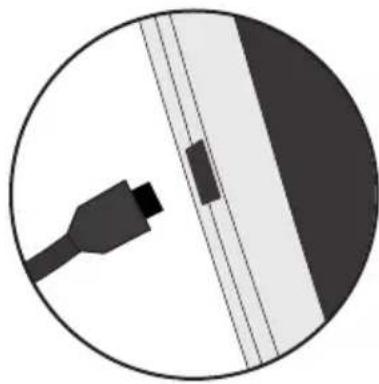
- Charge your device by plugging your power cable into the micro-USB port. The ARCHOS device will start charging.
- Press the Power button to turn on the device.
-You can use your ARCHOS whilst it charges. - Let your device charge completely the first time you use it. -Use only the supplied charger.
When your device is completely discharged, you need to charge it for at least 10 minutes before the charging battery icon can be displayed.
TIP:
To receive more complete service, please register your product.
From a computer, go to www.archos.com/register.
Description of the device
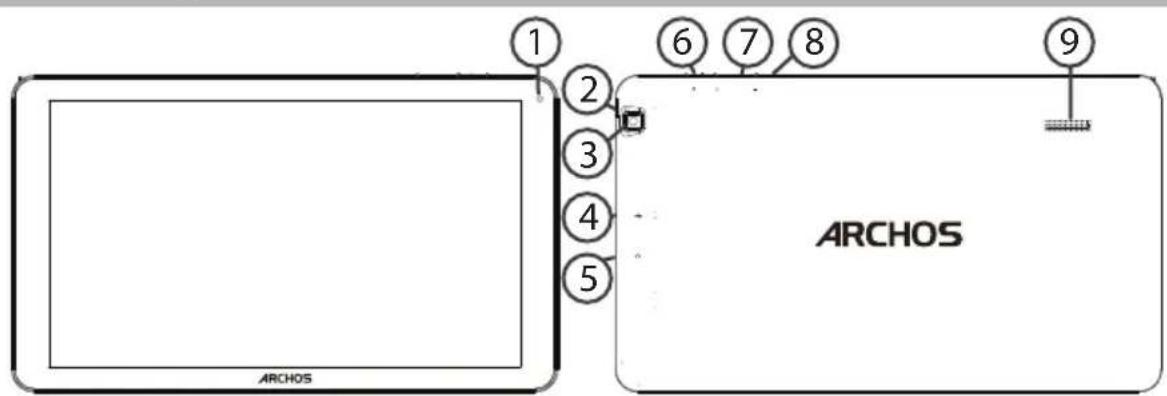
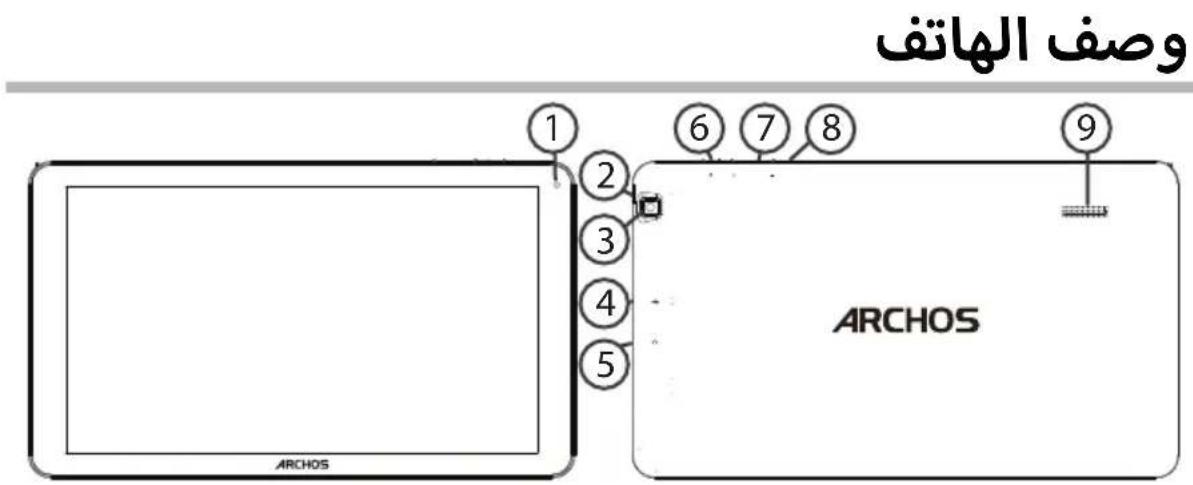
①Webcam
Micro-USB port
Volume buttons
Notch
Headphone jack
Reset button
3Camera
ON/OFF button
9 Loudspeaker
Inserting SIM & Micro-SD cards
WARNING: Make sure to turn off your device before inserting the SIM & memory cards.
Opening
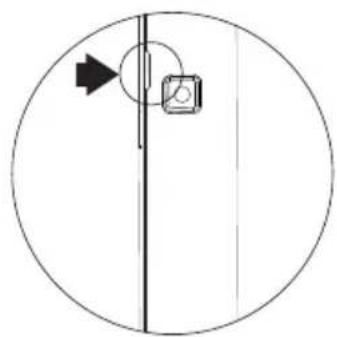
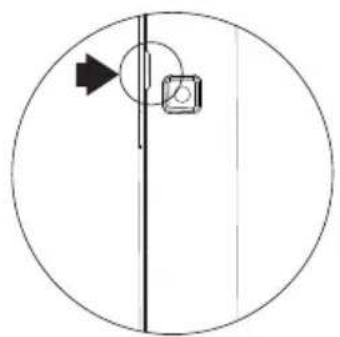
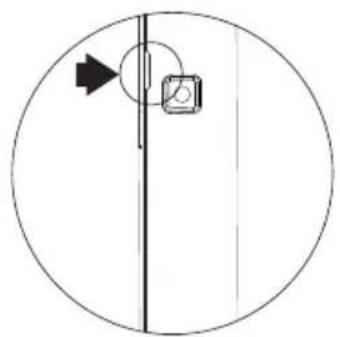
Use the notch to remove the back cover.
Do not bend or twist the back cover excessively. Doing so may damage the cover.
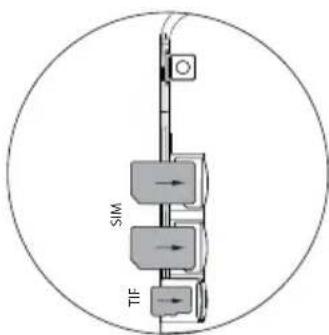
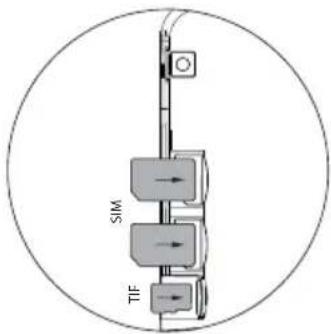
Inserting a SIM card
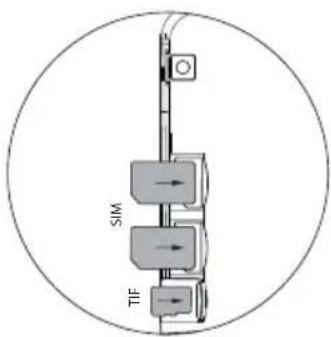
For your SIM card, slide it facing downwards in the slot.
Inserting a Memory card
Slide it facing downwards in the slot TIF
Closing
Replace the back cover clicking it back into position.
4G & WiFi connection
Mobile data connection
If your mobile phone subscription includes a mobile data option, you should be connected to the Internet without any further setup. The ARCHOS will only have signal if you are in an area covered by your provider's 4G or 3G network.
Activating/Deactivating the mobile data
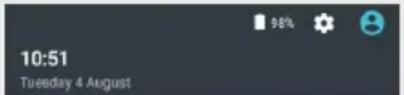
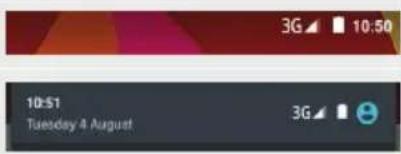
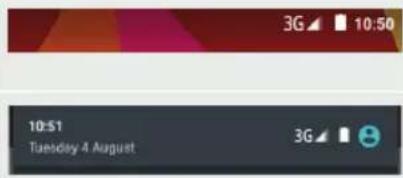
- Touch and pull down the status bar to display it.
- Touch again the bar to reveal the quick settings.
- Select the Settings icon.
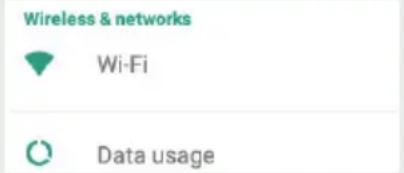
- In Wireless & networks, select Data usage, then the SIM card tab.
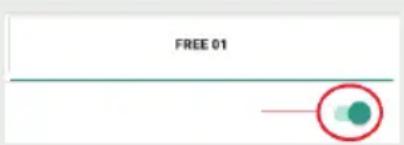
- Slide the Mobile data switch to turn on/off.


WiFi connection
WARNING: Make sure that you are in a WiFi zone. You can access the WiFi settings quickly from the status bar.
- Touch and pull down the status bar to display it.
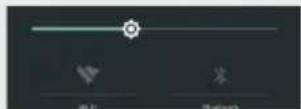
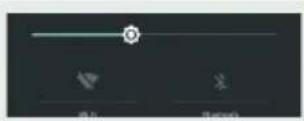
- Touch again the bar to reveal the quick settings.
- Select the WiFi icon to activate the WiFi connection
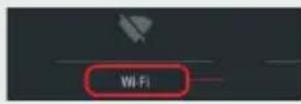
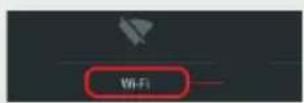
- Select "WiFi" below the WiFi icon.
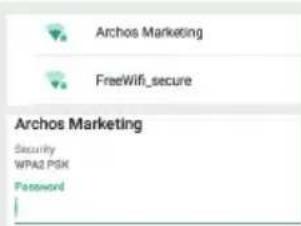
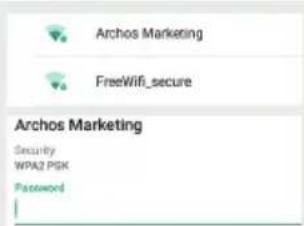
- Touch the name of network you want to connect to. Private networks are shown with a lock icon and will require you to enter your password.
The Android™ Interface
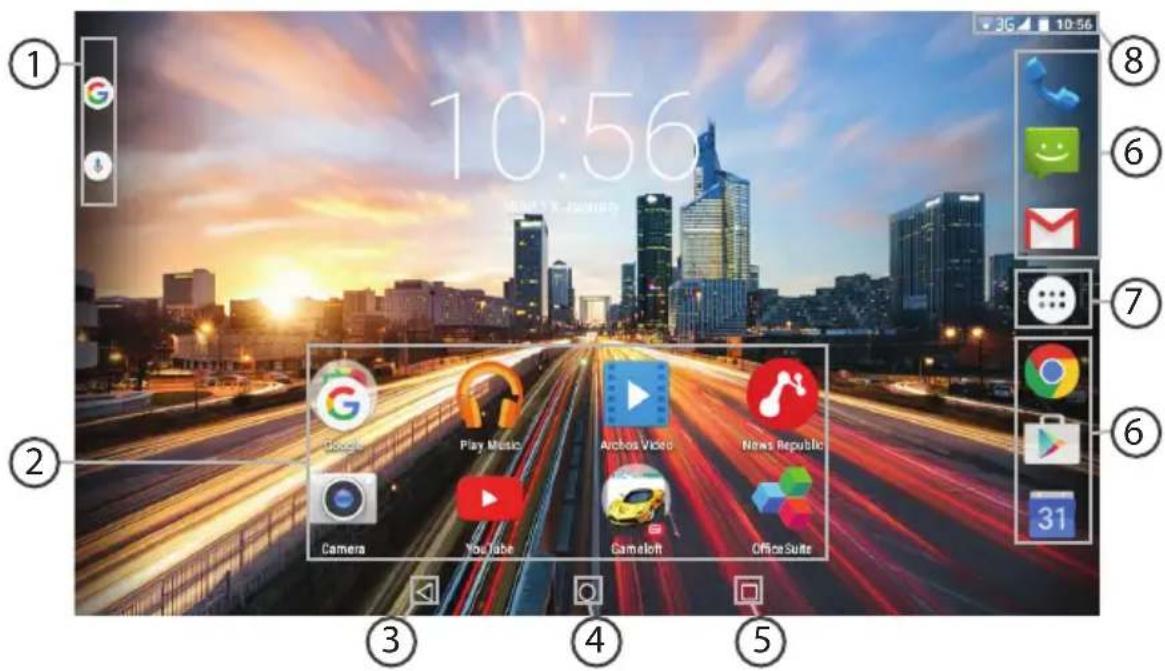
GoogleTM Search
Touch "Google" for text search or touch the microphone icon for voice search.
2 AndroidTM apps shortcuts
Touch to start an application.
3 Back button
Home button
(5) Recent apps buttons
6 Permanent Android™ apps shortcuts
Touch to start an application
All Apps button
Touch this icon to show all the applications and widgets installed on your ARCHOS. All your downloaded applications are here.
The status bar
Displays notifications and quick settings
The Android™ Interface
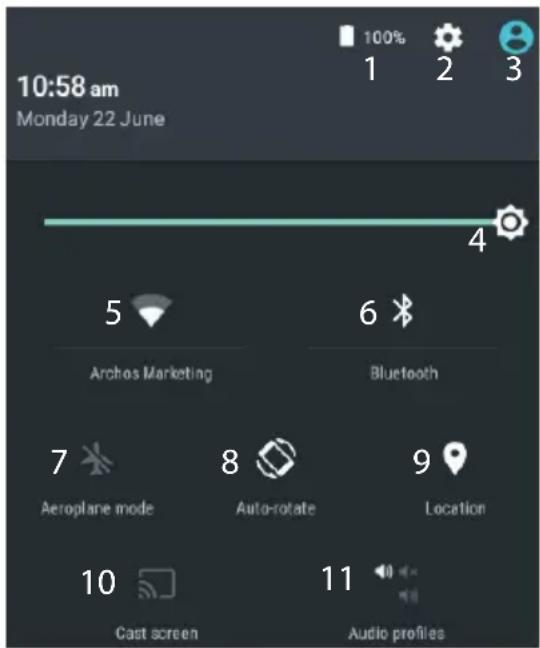
*New multi-user support for tablets lets different users have their own separate, customizable spaces on a single device. Add users in Settings > Device.
The Quick settings
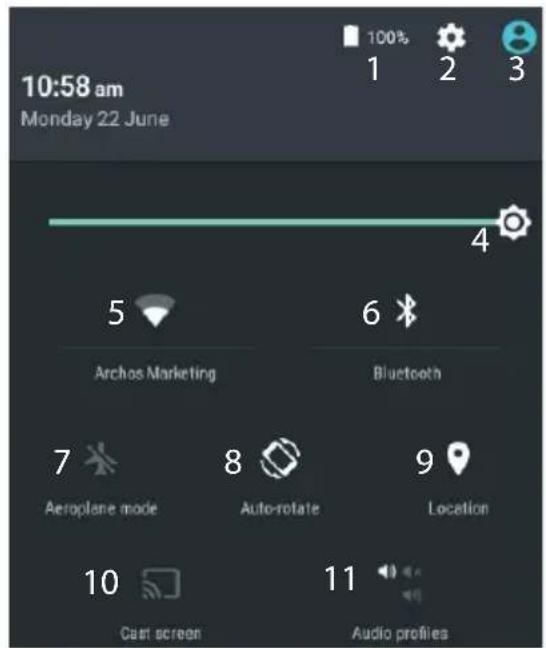
1 Percentage of battery remaining 2 To access all your settings. 3 Current user 4 To adjust the screen brightness. 5 To turn on/off your WiFi connection. 6 To turn on/off your Bluetooth connection. 7 To activate/deactivate all wireless connections, especially when flying. 8 To activate/deactivate automatic screen orientation as you turn your ARCHOS. 9 Location services 10 To mirror your Android device to the TV so you can enjoy your great content exactly as you see it on your mobile device. 11 To select a notification type

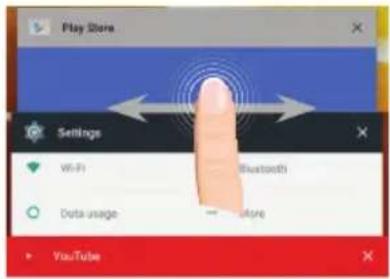
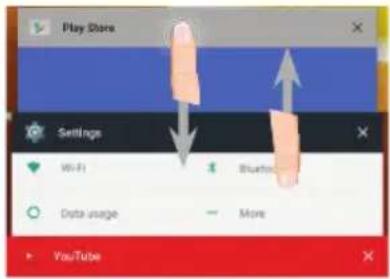
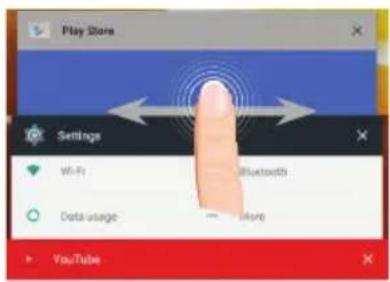
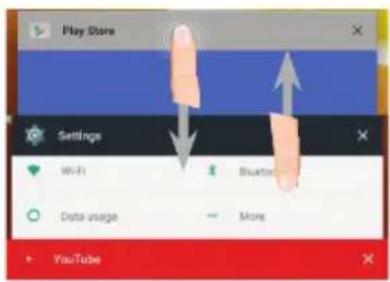
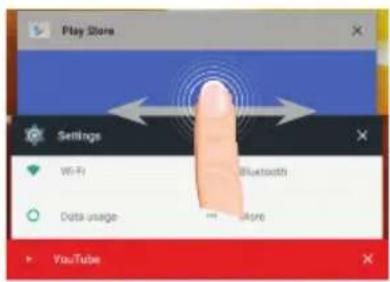
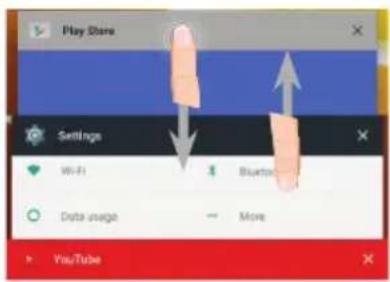
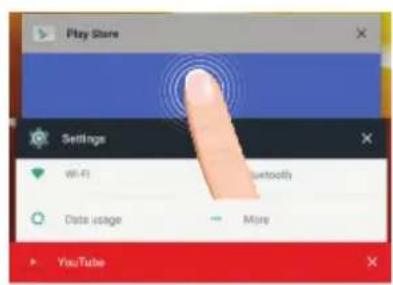
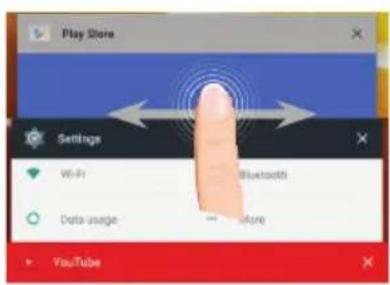
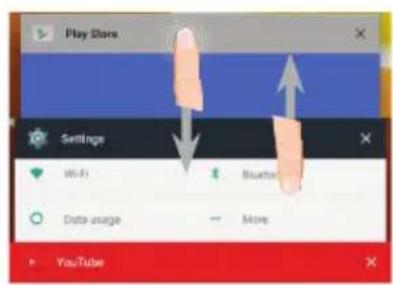
The Recent Apps
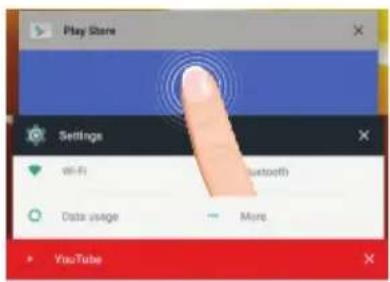
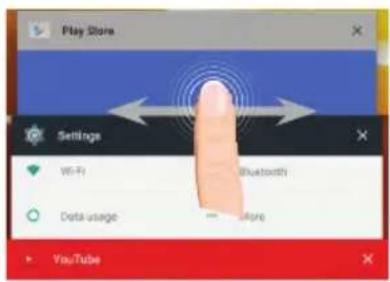
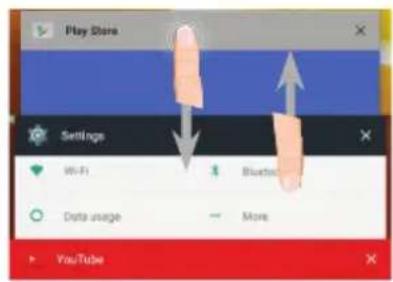
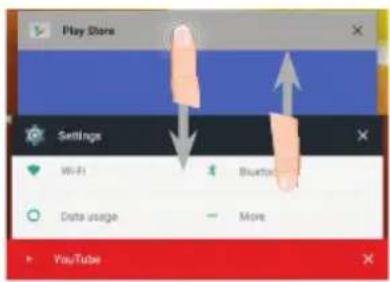
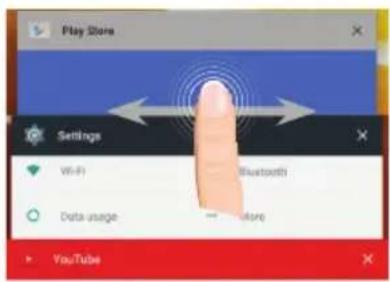
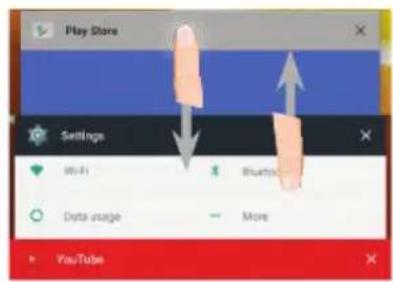
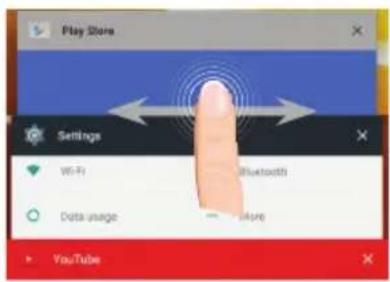
Opens a list of thumbnail images of apps you've worked with recently:
Another Game-End 2 Loboting
Department 7-1456-0201,2300-0000
Author Game-Part 2 Unraveling
Treatment 1. optimal pro- CDRN inhibitors
Anthony GamePad 2 Unrehearing
Junkas TILWES
Touch: to open an app.
Swipe left or right: to close an app.
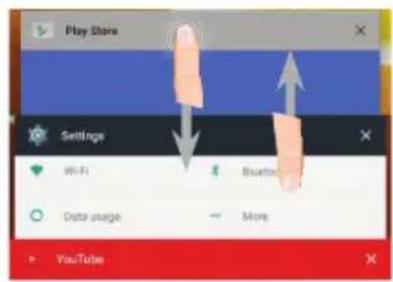
Scroll up or down: to view other recent apps
Getting familiar with Android™
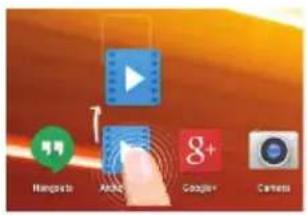
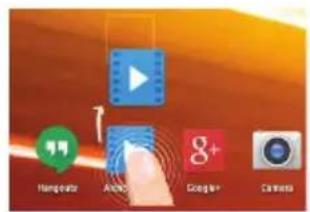
Moving a home screen item:
Touch and hold your finger onto it until the positioning gridlines appear, then slide it to the desired location, and release your finger.
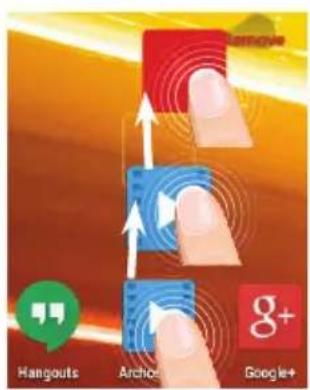
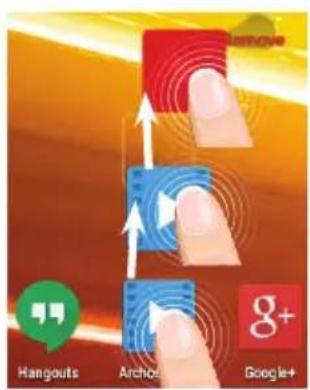
Removing a home screen item:
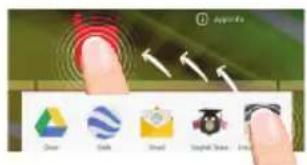
Touch and hold it, slide your finger towards the top of the screen and drop it over the Remove icon.
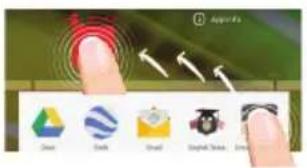
Uninstalling an item:
From the All apps screens, touch and hold it, slide your finger towards the top of the screen and drop it over Uninstall bin.
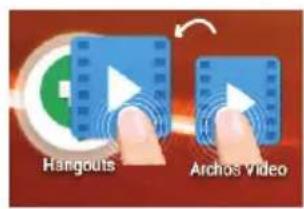
Creating application folders:
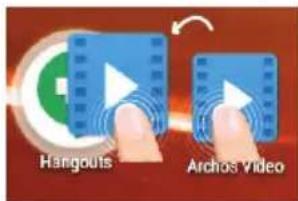
Drop one app icon over another on a home screen and the two icons will be combined.
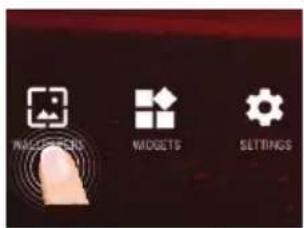
Changing your wallpaper:
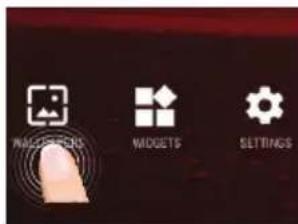
Hold your finger on a home screen at an empty location, then choose from the list: Wallpaper.
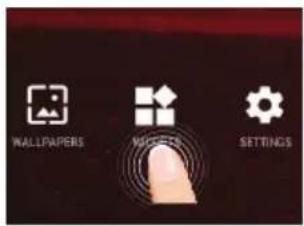
Widgets:
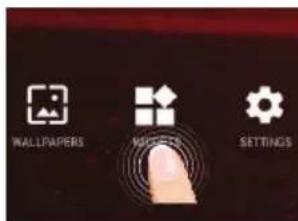
Hold your finger on a home screen at an empty location, then choose from the list: Widgets.
Troubleshooting
If your device is frozen:
Press the ON/OFF button for 10 seconds or use the reset button. To use the reset button, press the "pinhole reset" button by using a sharp object such as a toothpick.
If your device doesn't turn on:
- Charge your device.
- Press the ON/OFF button for 10 seconds or use the reset button. To use the reset button, press the "pinhole reset" button by using a sharp object such as a toothpick.
My tablet cannot connect to a network or "No service" is displayed
Try connecting in another location. Verify the network coverage with your operator.
Unable to make outgoing calls
Make sure your phone is connected to a network, and the network is not overloaded or unavailable.
Unable to receive incoming calls
Make sure your phone is switched on and connected to a network (check for overloaded or unavailable network).
SIM card PIN locked
Contact your network operator to obtain the PUK code (Personal Unblocking Key).
If your WiFi reception is too low:
Make sure you are not far from the WiFi hotspot. Update the firmware of the device: http://www.archos.com/support. Reset and redefine your connection parameters. Contact your WiFi connection provider.
Welcome
Congratulations, you have just purchased an ARCHOS device!
Artha GamePad 2 Unveiling
Anteas GamePad 2 Unloading
Artha GamePad 2 Unveiling
go to www.archos.com, click Support > After-sales support >
Anteas GamePad 2 Unloading
Antibio GamePad 2 Unveiling
support [After Sales] >
mixture 1 natural gas 200 words
Location 1 total area pre 2014 surveys
Session:10.54 hours
- 06paTntbCRA K DeKnapaunu COOTBeTCTBnA:
nepennte ha Be6-caNT www.archos.com, ueKHTe Support (noDepkka) > Downloads (3arpy3kn) >
IocKobKy Mbl yacto yctaHaBnBaem 6HOBHeHn I yCOBepseHCTByeM CBOI npOyKtbl, INTepeic n fYHKUHOHaBbIe BO3MOxHOctn PO BaWero ycTpoiCTBa MOrYT He3HaHTeNbHO OTnuaTbcra OT BepCn, npNBedeHHbIX B KpaTKOM pyKOBoDCTBe IOnb3OBaTeJIa.
CodelpKIMoe ynaKOBKn
ARCHOS 101 Helium Lite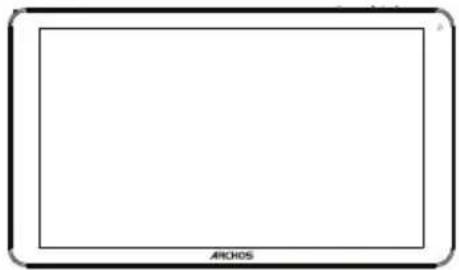
KpaTKoe pyKOBOdCTBO
Safety instructions
USB cable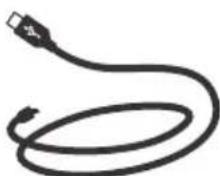
Charging device
Getting started
Charging
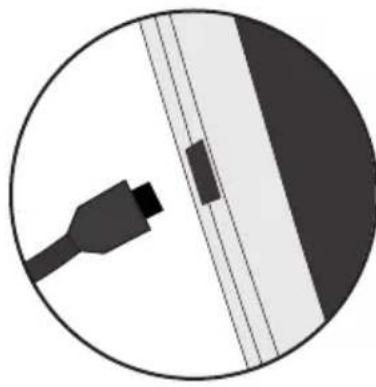
1. Charge your device by connecting the power cable to the power socket. The ARCHOS device will start charging. 2. Press the power button to turn on the device. - You can use your ARCHOS device while it is charging. - Before first use, the device must be fully charged. - Only use the charging device from the package contents.
If your device is completely discharged, you must charge it for at least 10 minutes before the charging indicator can be displayed.
TIP:
Register your product to receive more comprehensive service. When working with a computer, go to www.archos.com/register.
Device description
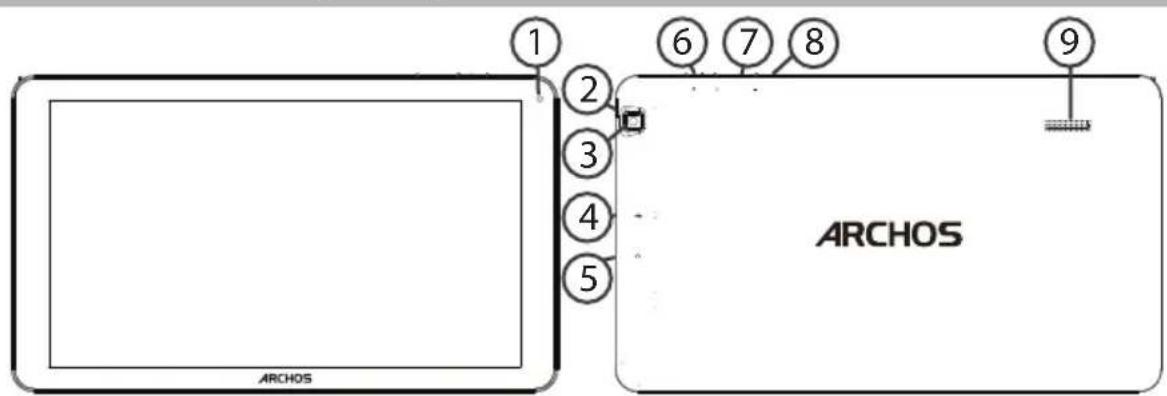
①Webcam
4 Micro-USB port
7Volume buttons
23Headphone jack
5Headphone jack
8 Speaker
Camera
6 Power button
9 Loudspeaker
SIM card slot & memory card slot
Warning: Disconnect power before cleaning
Opening
1. Remove the back cover.
Do not bend or twist the cover excessively. This may cause damage.
Inserting the SIM card
To install the SIM card, insert it with the gold contacts facing down into the SIM slot.
Inserting the memory card
Insert the memory card into the TF card slot.
Closing
Replace the battery cover, ensuring it clicks into place.
4G & Wi-Fi
Turning on/off mobile data
If your subscription to mobile phone services includes mobile data, you should be connected to the Internet without any additional settings. The ARCHOS device establishes the connection only when you are in the coverage area of the 4G or 3G network of your chosen mobile service provider.
Activating/deactivating mobile data
| 1. KocHTecb CTPOKU COCTOHNU IN NOTAHNTe ee BHN3, чTO6bl OTOBpa3NtB CTPOKU. | 3G 10:50 |
| 2. ПовТорно КOCHTecb CTPOKU COCTOHNU,чTO6bl OTKpbTb 6bICTPbIe HAcTpoiKN. | 10:51 Tuesday 4 August 3G 10:51 Tuesday 4 August |
| 3. Вb6epITE ПИKTORpAMMy HAcTpoE.K. | 10:51 Tuesday 4 August |
| 4. Вb6epITE Data usage (ИспOLTZOBaHne дaHHbIX) В раздени Wireless & networks (БеспровODны и пproBoIDnble cetn).Посné отого Вь6epITE BknaDky SIM- КарТы. | Wireless & networks Wi-Fi Data usage |
| 5. ПеретянITE NepeKlIoUaTeNB Mobile data (MobINbHbIe dANHbIe)對於 BKVIOUeHry пIL NвКПIOUeHry ДaHHoI OnцIn. | FREE 01 —— |
Turning on/off Wi-Fi
WARNING! Make sure you are in an area with Wi-Fi coverage. Use the status bar to quickly access Wi-Fi settings.
- Touch the status bar and pull it down to display the notification panel.
- Touch the status bar again to open the quick settings.
- Select the Wi-Fi icon to activate or deactivate Wi-Fi.
- Select Wi-Fi under the Wi-Fi icon.
- Touch the name of the network you want to connect to. Private networks are displayed with a lock icon; to connect to them, you must enter a password.
Android™ interface
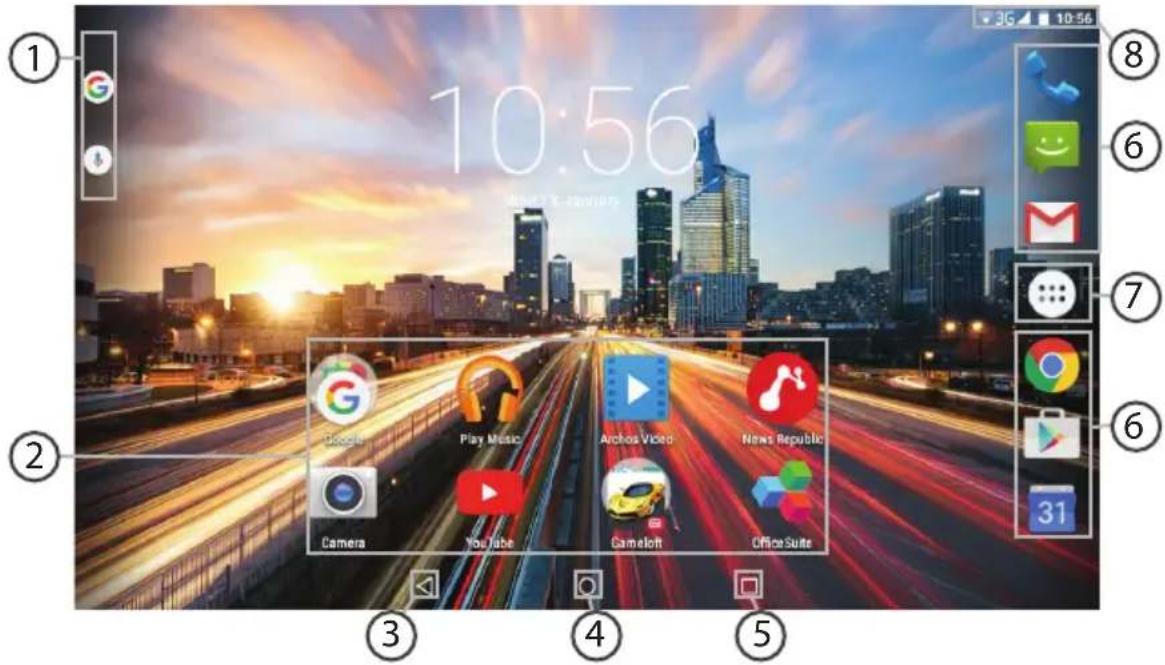
1 Google™ search
Andrew Gansfield 2 University
000007
Anteess GamePad 2 Unloading
Bannana 1st vital note: 2019 history
Anthes GamePad 2 Unveiling
treatment Tumor size (mm)
Tip: To open an application.
Swipe left or right.
Close the application.
Swipe up or down on the screen to view other recent applications.
Getting to know Android™
Moving a home screen element:
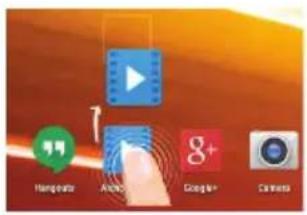
Touch and hold the element until the positioning grid appears, then move it to the desired position and release.
Deleting a home screen element:
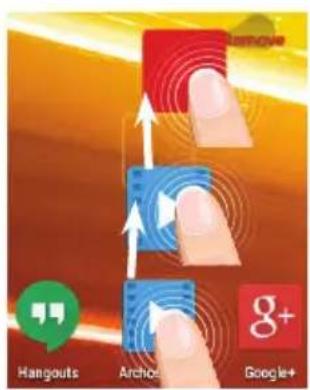
If the device does not turn on:
1. Charge the device for at least 10 minutes. 2. Press and hold the power button for 10 seconds or use the reset button.
1.3 Leave the device on for at least 10 minutes. 2. Press and hold the ON/OFF button for 10 seconds or use the reset button.
If the phone cannot connect to the network, the message 'No service' (no network) is displayed.
Try to establish a connection in another place. Check with the operator for the presence of network coverage. Check with the operator if the SIM card is valid. Try to select an available network (networks) manually. Try to establish a connection later if the network is overloaded.
Cannot make outgoing calls
Make sure that the phone is connected to the network, and that the network is available and not overloaded.
Cannot receive incoming calls
Make sure that the phone is turned on and connected to the network (check that the network is available and not overloaded).
SIM card PIN code blocked
Contact your mobile operator to obtain the PUK code (Personal Unblocking Key - personal unblocking code).
If the received Wi-Fi signal is too weak:
Make sure that you are not too far from the Wi-Fi access point.
Update the built-in device firmware:
http://www.archos.com/support.
Reset and re-enter the connection parameters.
Contact the Wi-Fi network provider.
Welcome
*New multi-user support for tablets lets different users have their own separate, customizable spaces on a single device. Add users in Settings > Device.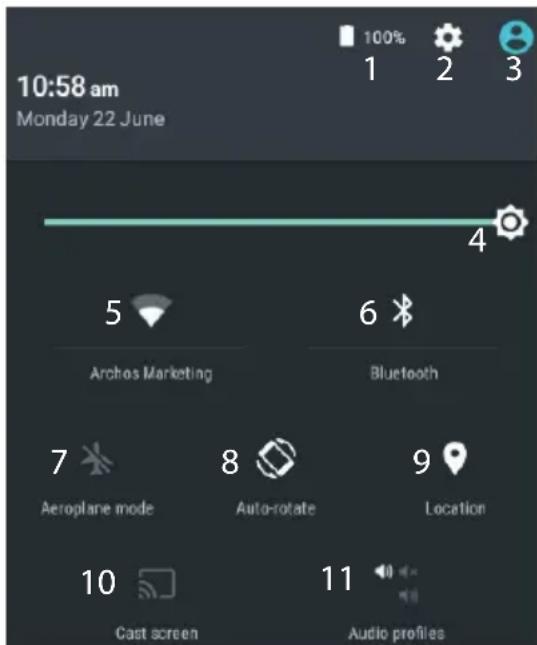
Quick setup
Archer GamePad 2 Unboxing
A
Ants GamePad 2 UWBing
References: 1. D'Arnois, 2004.
Antenna GamePad 2 Unlearning
TANMAMATZ
Arnes GamePad 2 Unboxing tools 1 year ago 300 views
www.archos.com, click Support > After-sales support >

www.archos.com, click Support > Downloads >

ARCHOS 101 Helium Lite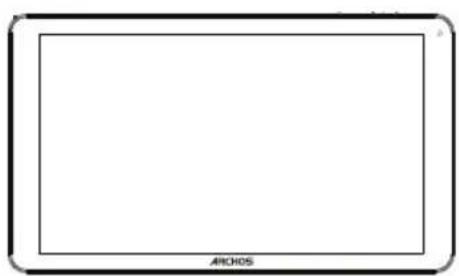
Therefore, j1ω1 = ω1ω2.
j > |ẇ|
. 2
. .1gJyol yol .
Therefore, ab = 30.
USB
(4)
(5)
(6)
15

Anthes GamePad 2 Unwidelng
Android™
l>xx|g=|b-y| JALLgGgA Joo ooiuui Jx no buaill oolgl ciao ouai g i kylg jkauu 10 ouiu ∴ 16 = w0d0 : ∴ j4 = 21 j5 = 7 .16 10 oJb20.2 :aa a y gl aallll llaa .4a a b c d g >g o o sll l j, j < k o g s j o o gl all iJlKcJrJr . :JlKo JjAaJg . 4g jss sll g, kwlj Jao g Jao jol no no :dduPINjRd .PUK jooJgauuUduiuUjuaui : a. slwul 1 . www.archos.com/support JLJoo jilal JUaYI Uslcl bO Ocl .4SLWU iduJUdoJ Jduy j g jll 3 o g s i l l a l l j j j j j j j j j j j j j j j j j j j j j j j j j j j j j j j j j j j j j j j j j j j j j j j j j . yIg aIg wIg cIg oIg oIg IaI  sL1sL1sL1sL1sL1sL1sL1sL1sL1sL1sL1sL1sL1sL1sL1sL1sL1sL1sL1sL1sL1sL1sL1sL1sL1sL1sL1sL1sL1sL1sL1sL1sL1sL1  111111101010101010101010101010101010101010101010101010101010101010  aaii 2020 wio 1020 rool oogot cic uwrA: aagow jgugjgugjgno auiuui iuivnlo gus jogilal:  a00000000000000000000000000000000000000000000000  10000000000000000000000000000000000000000  aJyauyoo ARCHOS Entertainment year way U ... 9  Uni-Group  www.uni-grp.com  /ArchosEgypt  /ArchosEgypt aJyooJooJooJooJooJooJooJooJooJooJoo JUULU UoSulgUolalIOJIOJgAuaaIJIuOJgIeIaIyUoo JuaJduoJU JauuOaJxuGooauiuIoojuloo Jaeelal 100 100 100 100 100 100 100 100 100 100 100 100 100 100 100 100 100 100 100 100 100 100 100 100 100 100 Jaaa aae aae aae ae aae aae aae aae aae aae aae aae aae aae aae aae aae aae aae aae aae aae aae aae aae aae aae aae aae aae aae aae aae aae aae aae aae aae aae aae aae aae aae aae aae aae aae aae aae aae aae aae aae aae aee aagaaagaaagaaagaaagaaagaaagaaagaaagaaagaaagaaagaaagaaagaaagaaagaaagaaagaaagaaagaaagaaagaaagaaagaaagaaagaaagaaagaaagaaagaaagaaagaaagaaagaaagaaagaaagaaagaaagaaagaaagaaagaaagaaagaaagaaagaaagaaagaaagaaagaaagaaa :JywnwawuW: e 10000000000000000000000000000000000000000000000000000000000 U 1/ jUJUJU90 :Ejogallw! JUULI auiuiei jgiol uqol qulil gqulol uulul oulaldo . bdoacunllugcnuuululolaoaloojagwUolao auiuuiuuiuieuaoloojiojglusuy y aaii 1 LaooUc Uqiuu u uololill llll 10o ooo bocacunllugcucuullulucuul JUJIJIJIJIJIJIJIJIJIJIJIJIJIJIJIJIJIJIJIJIJIJIJIJIJIJIJIJIJIJIJIJIJIJIJIJIJIJIJIJIJIJIJIJIJIJIJIJIJIJIJIJIJIJIJIJIJIJIJIJIJIJIJIJIJIJIJIJIJIJIJIJIJIJIJIJIJIJIJIJIJIJIJIJIJIJIJIJIJIJIJIJIJIJIJIJIJIJIJIJIJ JUaJUgglalglgglg uOgUyIgUo-JuaJUcUeJIgAul-0a120muCugCogwOoiyrol aalulululululululololololololololololololololololololololololololololololololololol aiuul uohui ghuu uohau Egaiiaaasaaiaaaaaeae aalaaa National restrictions This device is intended for home and office use in all EU countries (and other countries following the EU directive 1999/5/EC) without any limitation except for the countries mentioned below: Country Restriction ReasonRemark Bulgaria None General authorization required for outdoor use and public service France Outdoor use limited to 10mW e.i.r.p. within the band 2454-2483.5 MHz Military Radiolocation use. Refarming of the 2.4 GHz band has been ongoing in recent years to allow current relaxed regulation. Full implementation planned 2012 Italy None If used outside of own premises, general authorization is required. Luxembourg None General authorization required for network and service supply (not for spectrum) Norway Implemented This subsection does not apply for the geographical aera within a radius of 20km from the centre of Ny-Alesund Russian Federation None Only for indoor applications Note: Frequency 2454-2483.5MHZ are restricted to indoor use in France. Consult the declaration of conformity on http://www.archos.com/products/declaration_conformity.html Open Source Software Offer The software bundled with this product includes software files subject to certain open source license requirements. Such open source software files are subject solely to the terms of the relevant open source software license. Such open source software is provided on an "AS IS" basis to the maximum extent permitted by applicable law. For the open source files contained herein, please access "Open source license" section located at: Settings\About tablet\Legal information on the device for the relevant copyright and licensing terms. You may obtain a copy of Apache License, Version 2.0 at http://www.apache.org/licenses/License-2.0. You may also obtain a copy of GNU General Public License, Version 2 at the Free Software Foundation, INC, 51 Franklin Street, Fifth Floor, Boston, MA 02110-1301, USA. Until the date that is three years after our last shipment of this product, you may obtain a copy of the source code corresponding to the binaries for any GPL-Licensed file by contacting ARCHOS customer service at http://www.archos.com and ARCHOS will send you a link to such source code or will provide instructions to get the source on a physical medium. This offer is valid to anyone in receipt of this information. Archos company declares that this device is in compliance with the essential requirements and other relevant provisions of Directive 1999/5/EC: http://www.archos.com/support/download/conformity/CE_DOC_AC101HEL.pdf. Par la presente, ARCHOS déclare que l'appareil est conforme aux exigences essentielles et aux autres dispositions pertinentes de la directive 1999/5/CE. La déclaration de conformité peut être consultée sur le site: http://www.archos.com/support/download/conformity/CE_DOC_AC101HEL.pdf SAR 1.351 W/kg C€1313
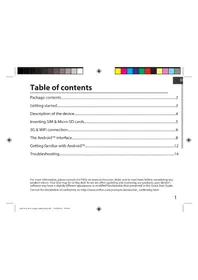
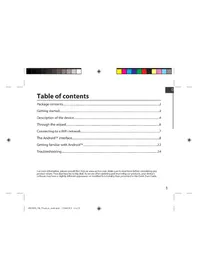
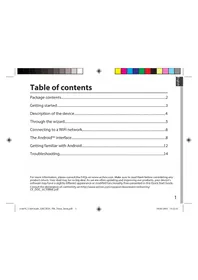

- PACKAGE CONTENTS
- GETTING STARTED
- CHARGING
- TIP
- DESCRIPTION OF THE DEVICE
- INSERTING SIM & MICRO-SD CARDS
- OPENING
- INSERTING A SIM CARD
- INSERTING A MEMORY CARD
- CLOSING
- G & WIFI CONNECTION
- MOBILE DATA CONNECTION
- ACTIVATING/DEACTIVATING THE MOBILE DATA
- WIFI CONNECTION
- THE ANDROID™ INTERFACE
- THE QUICK SETTINGS
- THE RECENT APPS
- GETTING FAMILIAR WITH ANDROID™
- MOVING A HOME SCREEN ITEM
- REMOVING A HOME SCREEN ITEM
- UNINSTALLING AN ITEM
- CREATING APPLICATION FOLDERS
- CHANGING YOUR WALLPAPER
- WIDGETS
- TROUBLESHOOTING
- IF YOUR DEVICE IS FROZEN
- IF YOUR DEVICE DOESN'T TURN ON
- MY TABLET CANNOT CONNECT TO A NETWORK OR "NO SERVICE" IS DISPLAYED
- UNABLE TO MAKE OUTGOING CALLS
- UNABLE TO RECEIVE INCOMING CALLS
- SIM CARD PIN LOCKED
- IF YOUR WIFI RECEPTION IS TOO LOW
- WELCOME
- CODELPKIMOE YNAKOBKN
- DEVICE DESCRIPTION
- SIM CARD SLOT & MEMORY CARD SLOT
- INSERTING THE SIM CARD
- INSERTING THE MEMORY CARD
- G & WI-FI
- TURNING ON/OFF MOBILE DATA
- ACTIVATING/DEACTIVATING MOBILE DATA
- TURNING ON/OFF WI-FI
- ANDROID™ INTERFACE
- SWIPE LEFT OR RIGHT
- SWIPE UP OR DOWN ON THE SCREEN TO VIEW OTHER RECENT APPLICATIONS
- MOVING A HOME SCREEN ELEMENT
- TOUCH AND HOLD THE ELEMENT UNTIL THE POSITIONING GRID APPEARS, THEN MOVE IT TO THE DESIRED POSITION AND RELEASE
- IF THE DEVICE DOES NOT TURN ON
- CHARGE THE DEVICE FOR AT LEAST 10 MINUTES. 2. PRESS AND HOLD THE POWER BUTTON FOR 10 SECONDS OR USE THE RESET BUTTON
- IF THE PHONE CANNOT CONNECT TO THE NETWORK, THE MESSAGE 'NO SERVICE' (NO NETWORK) IS DISPLAYED
- CANNOT MAKE OUTGOING CALLS
- CANNOT RECEIVE INCOMING CALLS
- SIM CARD PIN CODE BLOCKED
- IF THE RECEIVED WI-FI SIGNAL IS TOO WEAK
- QUICK SETUP
- ANDROID™
- L>XX|G=|B-Y| JALLGGGA JOO OOIUUI JX NO BUAILL OOLGL CIAO OUAI G I KYLG JKAUU 10 OUIU ∴ 16 = W0D0 : ∴ J4 = 21 J5 = 7 .16 10 OJB20.2 :AA A Y GL AALLLL LLAA .4A A B C D G >G O O SLL L J, J < K O G S J O O GL ALL IJLKCJRJR . :JLKO JJAAJG . 4G JSS SLL G, KWLJ JAO G JAO JOL NO NO :DDUPINJRD .PUK JOOJGAUUUDUIUUJUAUI : A. SLWUL 1 . WWW.ARCHOS.COM/SUPPORT JLJOO JILAL JUAYI USLCL BO OCL .4SLWU IDUJUDOJ JDUY J G JLL 3 O G S I L L A L L J J J J J J J J J J J J J J J J J J J J J J J J J J J J J J J J J J J J J J J J J J J J J J J J J . YIG AIG WIG CIG OIG OIG IAI  SL1SL1SL1SL1SL1SL1SL1SL1SL1SL1SL1SL1SL1SL1SL1SL1SL1SL1SL1SL1SL1SL1SL1SL1SL1SL1SL1SL1SL1SL1SL1SL1SL1SL1  111111101010101010101010101010101010101010101010101010101010101010  AAII 2020 WIO 1020 ROOL OOGOT CIC UWRA: AAGOW JGUGJGUGJGNO AUIUUI IUIVNLO GUS JOGILAL:  A00000000000000000000000000000000000000000000000  10000000000000000000000000000000000000000  AJYAUYOO ARCHOS ENTERTAINMENT YEAR WAY U ... 9  UNI-GROUP  WWW.UNI-GRP.COM  /ARCHOSEGYPT  /ARCHOSEGYPT AJYOOJOOJOOJOOJOOJOOJOOJOOJOOJOOJOO JUULU UOSULGUOLALIOJIOJGAUAAIJIUOJGIEIAIYUOO JUAJDUOJU JAUUOAJXUGOOAUIUIOOJULOO JAEELAL 100 100 100 100 100 100 100 100 100 100 100 100 100 100 100 100 100 100 100 100 100 100 100 100 100 100 JAAA AAE AAE AAE AE AAE AAE AAE AAE AAE AAE AAE AAE AAE AAE AAE AAE AAE AAE AAE AAE AAE AAE AAE AAE AAE AAE AAE AAE AAE AAE AAE AAE AAE AAE AAE AAE AAE AAE AAE AAE AAE AAE AAE AAE AAE AAE AAE AAE AAE AAE AAE AAE AAE AAE AEE AAGAAAGAAAGAAAGAAAGAAAGAAAGAAAGAAAGAAAGAAAGAAAGAAAGAAAGAAAGAAAGAAAGAAAGAAAGAAAGAAAGAAAGAAAGAAAGAAAGAAAGAAAGAAAGAAAGAAAGAAAGAAAGAAAGAAAGAAAGAAAGAAAGAAAGAAAGAAAGAAAGAAAGAAAGAAAGAAAGAAAGAAAGAAAGAAAGAAAGAAAGAAA :JYWNWAWUW: E 10000000000000000000000000000000000000000000000000000000000 U 1/ JUJUJU90 :EJOGALLW! JUULI AUIUIEI JGIOL UQOL QULIL GQULOL UULUL OULALDO . BDOACUNLLUGCNUUULULOLAOALOOJAGWUOLAO AUIUUIUUIUIEUAOLOOJIOJGLUSUY Y AAII 1 LAOOUC UQIUU U UOLOLILL LLLL 10O OOO BOCACUNLLUGCUCUULLULUCUUL JUJIJIJIJIJIJIJIJIJIJIJIJIJIJIJIJIJIJIJIJIJIJIJIJIJIJIJIJIJIJIJIJIJIJIJIJIJIJIJIJIJIJIJIJIJIJIJIJIJIJIJIJIJIJIJIJIJIJIJIJIJIJIJIJIJIJIJIJIJIJIJIJIJIJIJIJIJIJIJIJIJIJIJIJIJIJIJIJIJIJIJIJIJIJIJIJIJIJIJIJIJ JUAJUGGLALGLGGLG UOGUYIGUO-JUAJUCUEJIGAUL-0A120MUCUGCOGWOOIYROL AALULULULULULULULOLOLOLOLOLOLOLOLOLOLOLOLOLOLOLOLOLOLOLOLOLOLOLOLOLOLOLOLOLOLOLOLOL AIUUL UOHUI GHUU UOHAU EGAIIAAASAAIAAAAAEAE AALAAA NATIONAL RESTRICTIONS THIS DEVICE IS INTENDED FOR HOME AND OFFICE USE IN ALL EU COUNTRIES (AND OTHER COUNTRIES FOLLOWING THE EU DIRECTIVE 1999/5/EC) WITHOUT ANY LIMITATION EXCEPT FOR THE COUNTRIES MENTIONED BELOW: COUNTRY RESTRICTION REASONREMARK BULGARIA NONE GENERAL AUTHORIZATION REQUIRED FOR OUTDOOR USE AND PUBLIC SERVICE FRANCE OUTDOOR USE LIMITED TO 10MW E.I.R.P. WITHIN THE BAND 2454-2483.5 MHZ MILITARY RADIOLOCATION USE. REFARMING OF THE 2.4 GHZ BAND HAS BEEN ONGOING IN RECENT YEARS TO ALLOW CURRENT RELAXED REGULATION. FULL IMPLEMENTATION PLANNED 2012 ITALY NONE IF USED OUTSIDE OF OWN PREMISES, GENERAL AUTHORIZATION IS REQUIRED. LUXEMBOURG NONE GENERAL AUTHORIZATION REQUIRED FOR NETWORK AND SERVICE SUPPLY (NOT FOR SPECTRUM) NORWAY IMPLEMENTED THIS SUBSECTION DOES NOT APPLY FOR THE GEOGRAPHICAL AERA WITHIN A RADIUS OF 20KM FROM THE CENTRE OF NY-ALESUND RUSSIAN FEDERATION NONE ONLY FOR INDOOR APPLICATIONS NOTE: FREQUENCY 2454-2483.5MHZ ARE RESTRICTED TO INDOOR USE IN FRANCE. CONSULT THE DECLARATION OF CONFORMITY ON HTTP://WWW.ARCHOS.COM/PRODUCTS/DECLARATION_CONFORMITY.HTML OPEN SOURCE SOFTWARE OFFER THE SOFTWARE BUNDLED WITH THIS PRODUCT INCLUDES SOFTWARE FILES SUBJECT TO CERTAIN OPEN SOURCE LICENSE REQUIREMENTS. SUCH OPEN SOURCE SOFTWARE FILES ARE SUBJECT SOLELY TO THE TERMS OF THE RELEVANT OPEN SOURCE SOFTWARE LICENSE. SUCH OPEN SOURCE SOFTWARE IS PROVIDED ON AN "AS IS" BASIS TO THE MAXIMUM EXTENT PERMITTED BY APPLICABLE LAW. FOR THE OPEN SOURCE FILES CONTAINED HEREIN, PLEASE ACCESS "OPEN SOURCE LICENSE" SECTION LOCATED AT: SETTINGS\ABOUT TABLET\LEGAL INFORMATION ON THE DEVICE FOR THE RELEVANT COPYRIGHT AND LICENSING TERMS. YOU MAY OBTAIN A COPY OF APACHE LICENSE, VERSION 2.0 AT HTTP://WWW.APACHE.ORG/LICENSES/LICENSE-2.0. YOU MAY ALSO OBTAIN A COPY OF GNU GENERAL PUBLIC LICENSE, VERSION 2 AT THE FREE SOFTWARE FOUNDATION, INC, 51 FRANKLIN STREET, FIFTH FLOOR, BOSTON, MA 02110-1301, USA. UNTIL THE DATE THAT IS THREE YEARS AFTER OUR LAST SHIPMENT OF THIS PRODUCT, YOU MAY OBTAIN A COPY OF THE SOURCE CODE CORRESPONDING TO THE BINARIES FOR ANY GPL-LICENSED FILE BY CONTACTING ARCHOS CUSTOMER SERVICE AT HTTP://WWW.ARCHOS.COM AND ARCHOS WILL SEND YOU A LINK TO SUCH SOURCE CODE OR WILL PROVIDE INSTRUCTIONS TO GET THE SOURCE ON A PHYSICAL MEDIUM. THIS OFFER IS VALID TO ANYONE IN RECEIPT OF THIS INFORMATION. ARCHOS COMPANY DECLARES THAT THIS DEVICE IS IN COMPLIANCE WITH THE ESSENTIAL REQUIREMENTS AND OTHER RELEVANT PROVISIONS OF DIRECTIVE 1999/5/EC: HTTP://WWW.ARCHOS.COM/SUPPORT/DOWNLOAD/CONFORMITY/CE_DOC_AC101HEL.PDF. PAR LA PRESENTE, ARCHOS DÉCLARE QUE L'APPAREIL EST CONFORME AUX EXIGENCES ESSENTIELLES ET AUX AUTRES DISPOSITIONS PERTINENTES DE LA DIRECTIVE 1999/5/CE. LA DÉCLARATION DE CONFORMITÉ PEUT ÊTRE CONSULTÉE SUR LE SITE: HTTP://WWW.ARCHOS.COM/SUPPORT/DOWNLOAD/CONFORMITY/CE_DOC_AC101HEL.PDF SAR 1.351 W/KG C€
Brand : ARCHOS
Model : Helium Lite 101
Category : Tablet