
VP4200 - Broom Concept - Free user manual and instructions
Find the device manual for free VP4200 Concept in PDF.


| Product type | 3-in-1 stick vacuum |
| Model | VP4200 |
| Brand | Concept |
| Battery voltage | DC 14.4 V |
| Charger input voltage | AC 100–240 V ~ 50/60 Hz |
| Charger output voltage | DC 17.5 V, 1 A |
| Rated power | 15 W |
| Sound level | Max. 80 dB |
| Suction performance | ≥ 3 kPa |
| Full charge time | Approx. 2.5 h |
| Continuous runtime | Approx. 20 min |
| Usage modes | Handheld vacuum, stick vacuum, mop function |
| Included accessories | Long flat nozzle, upholstery nozzle, small brush nozzle, short flat nozzle |
| Filter type | Washable filter |
| Rotating brush | Yes, with hair cleaning system |
| Safety | Overheat protection, automatic stop in case of blockage |
| Usage | Domestic use only |
| Warranty | 24 months |
| Maintenance | Washable filters and brush, emptyable dust container |
Frequently Asked Questions - VP4200 Concept
User questions about VP4200 Concept
0 question about this device. Answer the ones you know or ask your own.
Ask a new question about this device
Download the instructions for your Broom in PDF format for free! Find your manual VP4200 - Concept and take your electronic device back in hand. On this page are published all the documents necessary for the use of your device. VP4200 by Concept.
USER MANUAL VP4200 Concept
3in1 Rod Vacuum Cleaner
natural_image
White and blue vacuum cleaner with a gray handle, displayed against a plain background (no text or symbols on the device itself)CZ SK PL HU LVEN DE FR IT ES
concept
PODĚKOVÁNÍ
NÁVOD K OBSLUZE
PŘED PRVNÍM POUŽITÍM
natural_image
Line drawing of a handheld device with a handle and internal components, showing a downward arrow (no text or symbols)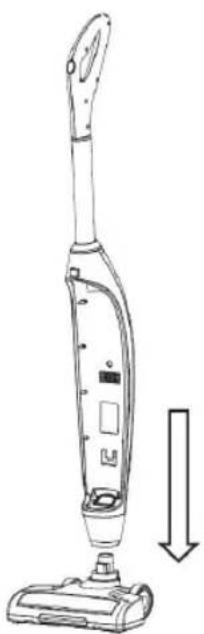
natural_image
Line drawing of a vacuum cleaner with a downward arrow indicating motion (no text or symbols)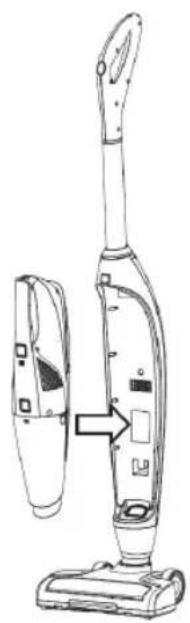
natural_image
Line drawing of a vacuum cleaner with attached device, showing front and side views (no text or symbols)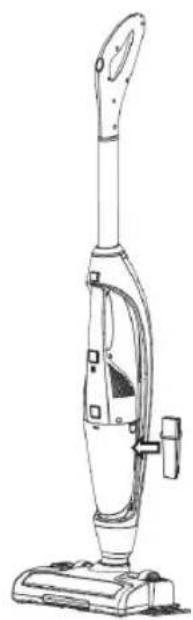
natural_image
Line drawing of a vacuum cleaner with handle and base (no text or symbols)POSTUP NABÍJENÍ
natural_image
Line drawing of a vacuum cleaner with attached cable and connector (no text or symbols)natural_image
Line drawing of a handheld device with a handle and connector (no text or symbols)VP 4200
CZ
concept
natural_image
Line drawing of a handheld vacuum cleaner (no text or symbols)3
natural_image
Line drawing of a handheld vacuum cleaner with a pointed tip and arrow indicating motion (no text or symbols)natural_image
Technical line drawing of a vacuum cleaner device (no text or symbols on the diagram itself)concept
CZ
POUŽITÍ
natural_image
Line drawing of a vacuum cleaner with labeled parts (no text or symbols present)POUŽITÍ
(funkce mopu)
natural_image
Line drawing of a vacuum cleaner with handle and base, showing internal components and a downward arrow (no text or symbols)natural_image
Line drawing of a car door handle with a curved arrow indicating rotation (no text or symbols)3 Vyndejte filtr.
natural_image
Line drawing of a mechanical component with an arrow indicating direction (no text or symbols)natural_image
Simple line drawing of a cylindrical object with an arrow indicating downward motion (no text or symbols)POUŽITÍ
(čištění)
natural_image
Diagram of a mechanical component with an upward arrow indicating direction (no text or symbols present)natural_image
Technical line drawing of a mechanical component with cutaway views (no text or symbols)natural_image
Technical line drawing of a vehicle chassis with wheels and internal components (no text or symbols)natural_image
Line drawing of a streamlined object with no visible text or symbols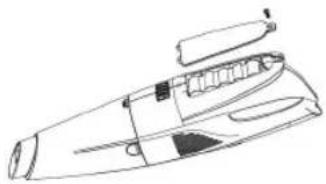
natural_image
Line drawing of a mechanical device with no visible text or symbols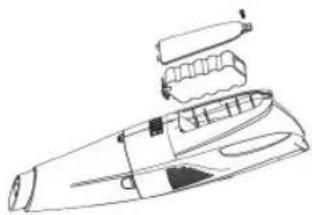
natural_image
Line drawing of a handheld electronic device with internal components (no text or symbols)ŘEŠENÍ POTÍŽÍ
VP 4200
9
CZ
concept
OCHRANA ŽIVOTNÍHO PROSTŘEDÍ
NÁVOD NA OBSLUHU
PRED PRVÝM POUŽITÍM
-
Zasuňte trubicu s rukovätou do tela spotrebiča.
-
Nasad'te telo vysávača do sacej hubice.
-
Vložte do tela vysávača ručný vysávač.
-
Do tela vysávače vložte štrbinovú hubicu.
natural_image
Line drawing of a handheld device with a handle and internal components, showing a downward arrow (no text or symbols)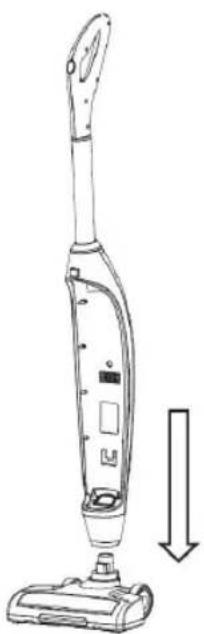
natural_image
Line drawing of a vacuum cleaner with a downward arrow indicating motion (no text or symbols)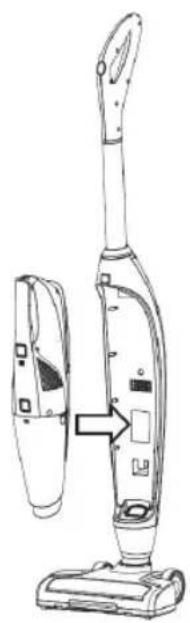
natural_image
Line drawing of a vacuum cleaner with attached device, showing front and side views (no text or symbols)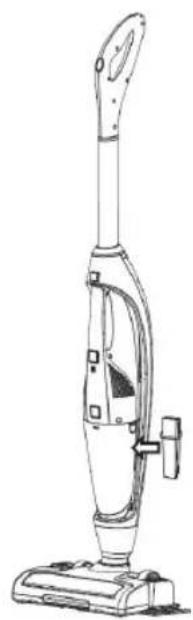
natural_image
Line drawing of a vacuum cleaner with handle and base (no text or symbols)POSTUP PRI NABÍJANÍ
natural_image
Line drawing of a vacuum cleaner with attached cable and connector (no text or symbols)natural_image
Line drawing of a handheld device with a handle and connector (no text or symbols)SK
concept
natural_image
Line drawing of a handheld vacuum cleaner (no text or symbols)3
natural_image
Line drawing of a handheld vacuum cleaner with a pointed tip and arrow indicating motion (no text or symbols)Nasadte do ručného vysávača štrbinovú hubicu.
4

natural_image
Line drawing of a handheld vacuum cleaner with a black cover and metallic end (no text or symbols)concept
SK
POUŽITIE
natural_image
Line drawing of a vacuum cleaner with labeled parts (no text or symbols present)POUŽITIE
(funkcie mopu)
natural_image
Technical line drawing of a mechanical device with no visible text or symbolsnatural_image
Line drawing of a car door handle with a curved arrow indicating rotation (no text or symbols)3 Vyberte filter.
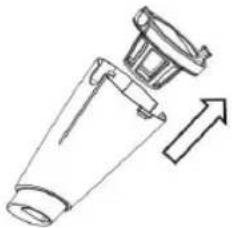
natural_image
Diagram of a mechanical component with an arrow indicating direction (no text or symbols)natural_image
Simple line drawing of a cylindrical object with an arrow indicating downward motion (no text or symbols)POUŽITIE
(čistenie)
natural_image
Cross-sectional diagram of a mechanical component with an upward arrow indicating direction (no text or symbols)2 Filter aj držiak vyčistite, oba možno umyt.
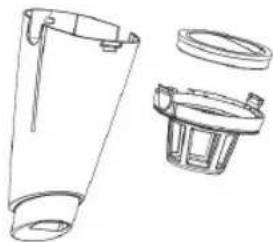
natural_image
Technical line drawing of a mechanical component with cutaway views (no text or symbols)natural_image
Technical line drawing of a vehicle chassis with wheels and internal components (no text or symbols)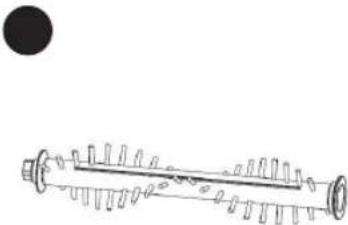
natural_image
Pure mechanical component diagram without any text, numbers, or symbolsnatural_image
Line drawing of a streamlined object with no visible text or symbols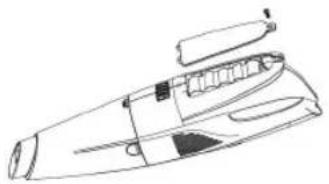
natural_image
Line drawing of a mechanical component or device with no visible text, numbers, or symbols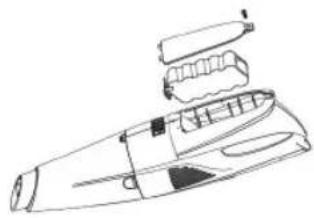
natural_image
Line drawing of a handheld electronic device with internal components (no text or symbols)RIEŠENIE PROBLÉMOV
17VP 4200
SK
concept
OCHRANA ŽIVOTNÉHO PROSTREDIA
INSTRUKCJA OBSŁUGI
PRZED PIERWSZYM UŻYCIEM
natural_image
Line drawing of a handheld device with a handle and internal components, showing a downward arrow (no text or symbols)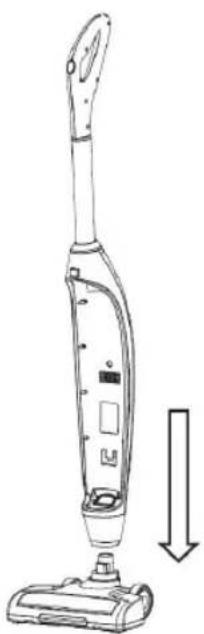
natural_image
Line drawing of a vacuum cleaner with a downward arrow indicating motion (no text or symbols)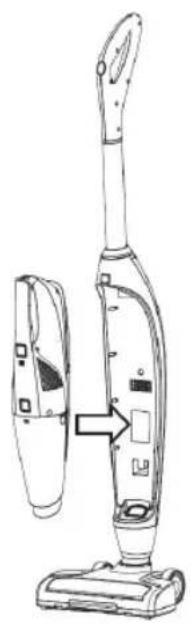
natural_image
Line drawing of a vacuum cleaner with attached device, showing front and side views (no text or symbols)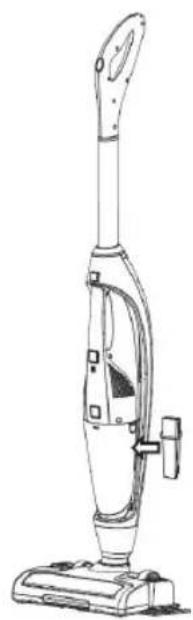
natural_image
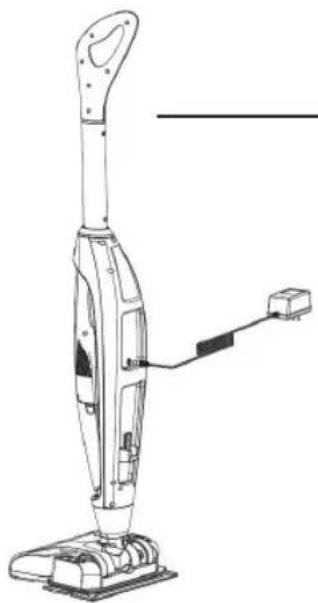
Line drawing of a vacuum cleaner with handle and base (no text or symbols)PROCEDURA LADOWANIA
natural_image
Line drawing of a vacuum cleaner with attached cable and connector (no text or symbols)natural_image
Technical line drawing of a mechanical device with no visible text or symbolsPL
concept
natural_image
Technical line drawing of a vacuum cleaner (no text or symbols)3
natural_image
Line drawing of a handheld vacuum cleaner with a pointed tip and arrow indicating motion (no text or symbols)natural_image
Technical line drawing of a handheld vacuum cleaner (no text or symbols on the diagram itself)concept
PL
UŻYWANIE
natural_image
Line drawing of a vacuum cleaner with handle and base mount (no text or symbols)UŻYWANIE
(funkcja mopa)
natural_image
Technical line drawing of a handbag with internal components and mounting holes (no text or symbols)natural_image
Line drawing of a car door handle with a curved arrow indicating rotation (no text or symbols)3 Wyjmij filtr.
natural_image
Diagram of a mechanical component with an arrow indicating direction (no text or symbols)natural_image
Simple line drawing of a cylindrical object with an arrow indicating downward motion (no text or symbols)UŻYWANIE
(czyszczenie)
1 Wyjmij filtr i z uchwytem.
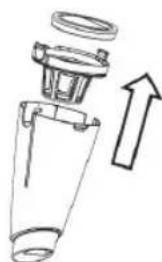
natural_image
Cross-sectional diagram of a mechanical component with an upward arrow indicating direction (no text or symbols)natural_image
Technical line drawing of a mechanical component with cutaway views (no text or symbols)natural_image
Technical line drawing of a vehicle chassis with wheels and internal components (no text or symbols)natural_image
Line drawing of a streamlined object with no visible text or symbols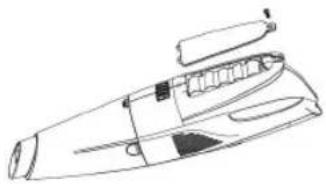
natural_image
Line drawing of a mechanical device with no visible text or symbols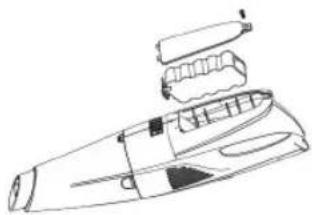
natural_image
Line drawing of a handheld electronic device with internal components (no text or symbols)ROZWIĄZYWANIE PROBLEMÓW
25VP 4200
OCHRONA ŚRODOWISKA
HASZNÁLATI ÚTMUTATÓ
AZ ELSŐ HASZNÁLAT ELŐTT
natural_image
Line drawing of a handheld device with a handle and internal components, showing a downward arrow (no text or symbols)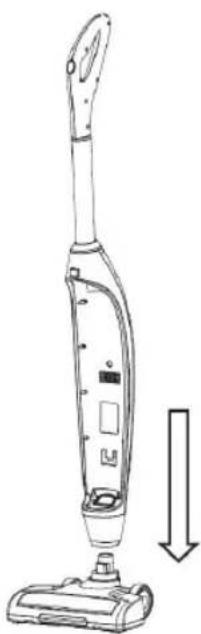
natural_image
Line drawing of a vacuum cleaner with a downward arrow indicating motion (no text or symbols)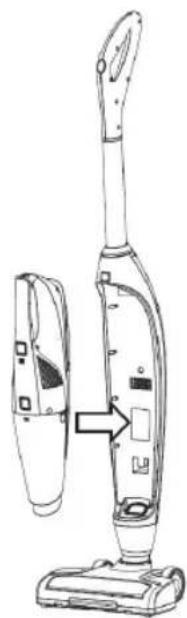
natural_image
Line drawing of a vacuum cleaner with attached device, showing front and side views (no text or symbols)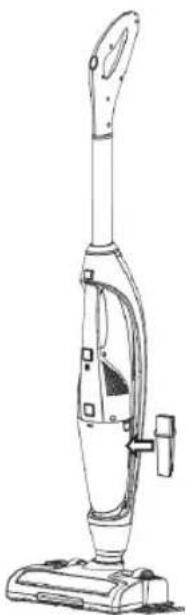
natural_image
Line drawing of a vacuum cleaner with handle and base mount (no text or symbols)A TÖLTÉS FOLYAMATA
natural_image
Line drawing of a vacuum cleaner with attached cable (no text or symbols)natural_image
Line drawing of a handheld electronic device with a cable and connector (no text or symbols)HU
concept
natural_image
Line drawing of a handheld vacuum cleaner (no text or symbols)3
natural_image
Line drawing of a handheld vacuum cleaner with a pointed tip and arrow indicating motion (no text or symbols)natural_image
Line drawing of a Elkezdheti a porszíve device (no text or symbols on the diagram itself)concept
HU
HASZNÁLAT
natural_image
Line drawing of a vacuum cleaner with labeled parts (no text or symbols present)HASZNÁLAT
(mop funkció)
natural_image
Technical line drawing of a mechanical device with no visible text or symbolsnatural_image
Line drawing of a car door handle with a curved arrow indicating rotation (no text or symbols)natural_image
Line drawing of a mechanical component with an arrow indicating direction (no text or symbols)natural_image
Simple line drawing of a cylindrical object with an arrow indicating downward motion (no text or symbols)HASZNÁLAT
(tisztítás)
natural_image
Cross-sectional diagram of a mechanical component with an upward arrow indicating direction (no text or symbols)natural_image
Technical line drawing of a mechanical component with multiple views (no text or symbols)natural_image
Technical line drawing of a vehicle chassis with wheels and internal components (no text or symbols)natural_image
Line drawing of a streamlined object with no visible text or symbols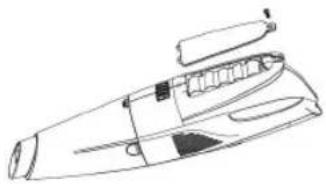
natural_image
Line drawing of a mechanical device with no visible text or symbols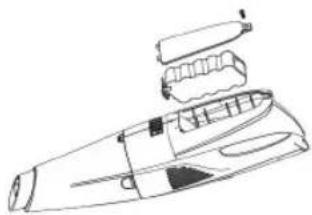
natural_image
Line drawing of a handheld electronic device with internal components (no text or symbols)HIBAELHÁRÍTÁS
33VP 4200
A KÖRNYEZET VÉDELME
LIETOŠANAS INSTRUKCIJA PIRMS PIRMĀS IZMANTOŠANAS
natural_image
Line drawing of a handheld device with a handle and internal components, showing a downward arrow (no text or symbols)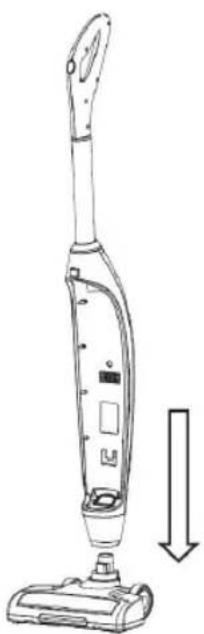
natural_image
Line drawing of a vacuum cleaner with a downward arrow indicating motion (no text or symbols)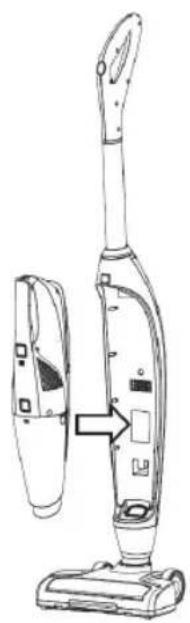
natural_image
Line drawing of a vacuum cleaner with attached device, showing front and side views (no text or symbols)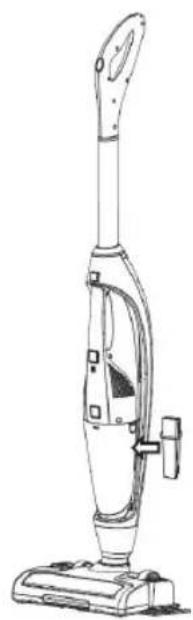
natural_image
Line drawing of a vacuum cleaner with handle and base (no text or symbols)UZLĀDĒŠANAS NORĀDĪJUMI
natural_image
Line drawing of a vacuum cleaner with attached cable (no text or symbols)natural_image
Line drawing of a handheld electronic device with a connector and cable (no text or symbols)LV
concept
natural_image
Technical line drawing of a mechanical component or housing (no text or symbols)3
natural_image
Line drawing of a handheld vacuum cleaner with a pointed tip and arrow indicating motion (no text or symbols)Piestipriniet rokas puteklusucējam rievoto sprauslu.
4
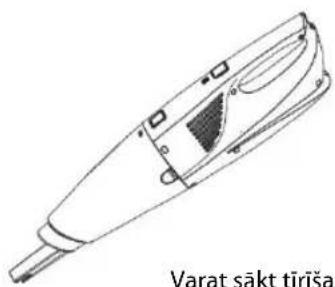
natural_image
Line drawing of a handheld vacuum cleaner device (no text or symbols on the device itself)concept
LV
IZMANTOŠANA
natural_image
Line drawing of a vacuum cleaner with labeled parts (no text or symbols present)IZMANTOŠANA
natural_image
Line drawing of a car door handle with a curved arrow indicating rotation (no text or symbols)3 Iznemiet filtru.
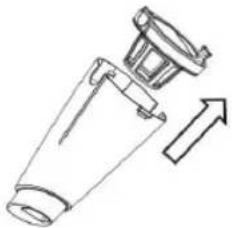
natural_image
Diagram of a mechanical component with an arrow indicating direction (no text or symbols)natural_image
Simple line drawing of a cylindrical object with an arrow indicating downward motion (no text or symbols)IZMANTOŠANA
(tīrīšana)
natural_image
Cross-sectional diagram of a mechanical component with an upward arrow indicating direction (no text or symbols)natural_image
Technical line drawing of a mechanical component with cutaway views (no text or symbols)natural_image
Technical line drawing of a vehicle chassis with wheels and internal components (no text or symbols)natural_image
Line drawing of a streamlined object with no visible text or symbols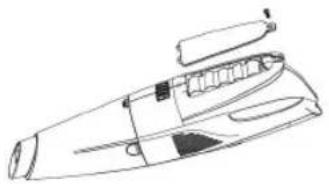
natural_image
Line drawing of a mechanical component or device with no visible text, numbers, or symbols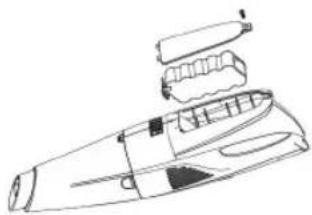
natural_image
Line drawing of a handheld electronic device with internal components (no text or symbols)TRAUCĚJUMU NOVĚRŠANA
41VP 4200
VIDES AIZSARDZİBA
Thank you for purchasing the Concept product. We want you to be satisfied with everything we make every day you use it.
Please read the instructions carefully before initial use. You should retain them for future reference. Ensure that anyone using this product is familiar with the instructions.
| Technical specifications | |
| Accumulator voltage DC 14,4 V | |
| Charger voltage | input: AC 100–240 V ~ 50/60 Hzoutput: DC 17,5 V, 1 A |
| Input | 15 W |
| Noise level | max. 80 dB |
| Suction power | ≥ 3 kPa |
| Full charging time | approx. 2.5 h |
| Operation time | approx. 20 min. |
IMPORTANT SAFETY PRECAUTIONS
- Do not use the appliance in any other way than as described in this manual. - Make sure the mains voltage and current protection correspond to the values on the rating plate of the charging station.
- Do not leave the appliance without supervision when it is turned on.
- When disconnecting the unit from the wall outlet, never pull the power cord, grasp the charger and disconnect it by removing it from the receptacle.
- Do not allow children or unauthorized people to handle the appliance, use it out of their reach.
- Pay extra attention if the appliance is used near children.
• Do not allow the appliance to be used as a toy.
- Do not use any accessories other than those recommended by the manufacturer.
- Do not use a charger with a damaged cord or plug and have it repaired immediately by an authorized service centre.
- Keep the appliance away from heat sources such as radiators, ovens, etc. Protect it from direct sunlight and humidity.
- Do not touch the appliance with wet hands.
- Do not insert any objects into the openings. Do not use the appliance if any of the openings is clogged.
• Take extra caution when vacuuming on stairs.
• If the appliance intake is clogged, switch off the appliance and remove the dirt before switching on again.
- When attaching accessories during cleaning or in the event of a malfunction, switch off the appliance and disconnect the charger from wall socket.
• The appliance is only suitable for home use and is not intended for commercial use.
- Do not vacuum anything burning like cigarettes, matches or hot ash.
- Do not use the appliance in rooms with increased air humidity, do not vacuum flammable liquids (such as petrol) and do not use the appliance in rooms where these substances may be present.
- Never vacuum without vacuum cleaner filters. Every time you use the appliance, make sure the vacuum cleaner filters are properly installed.
- Do not immerse the power cord or the charger in water or any other liquid.
EN
concept
- Check the appliance and the charger cord for damage regularly. Do not switch on the appliance if it has been damaged.
• Before cleaning and after use of the appliance, switch off the appliance and allow it to cool down. - Before vacuuming, remove all large or sharp objects from the surface intended for vacuum cleaning, such objects may damage one of the vacuum cleaner filters.
- Do not use the appliance with dirty filters.
- Do not put the battery in fire or expose it to temperatures above 40 °C.
- Do not touch the moving parts of the appliance during operation.
- Do not repair the appliance yourself. Contact an authorized service centre.
- This appliance can be used by children aged from 8 years and above if they have been given supervision or instruction concerning the use of the appliance in a safe way and understand the hazards involved. Cleaning and user maintenance shall not be made by children unless they are older than 8 years and supervised. Children under the age of 8 must be kept away from the appliance and its power cord. Children shall not play with the appliance.
If you fail to follow these instructions, any possible repair cannot be recognized as a warranty repair.
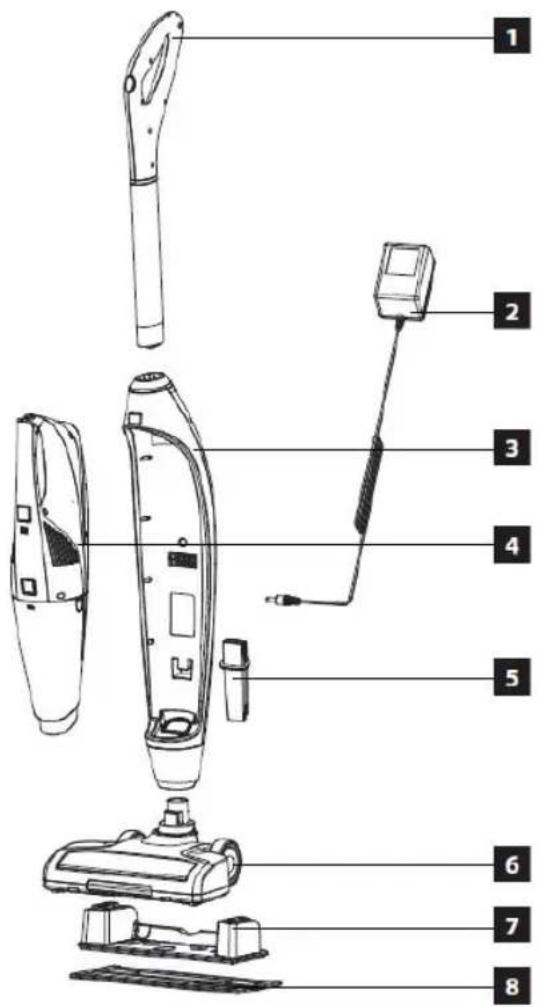
PRODUCTION DESCRIP
1 Handle
2 Charger
3 Appliance body
4 Hand vacuum cleaner
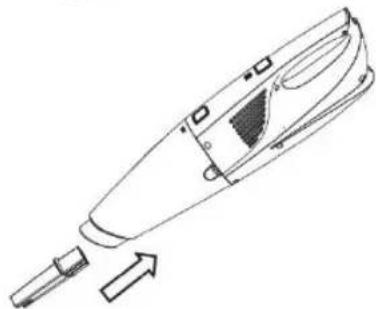
5 Slot nozzle
6 Suction nozzle
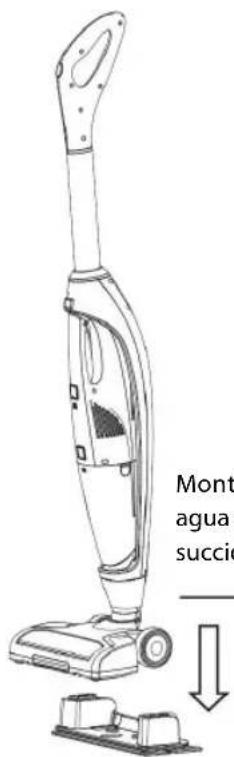
7 Water tank
8 Mop
USER'S MANUAL
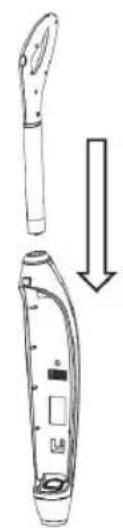
BEFORE FIRST USE
-
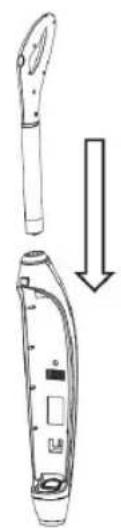
Insert the rod with the handle into the appliance body.
-
Insert the appliance body into the suction nozzle.
-
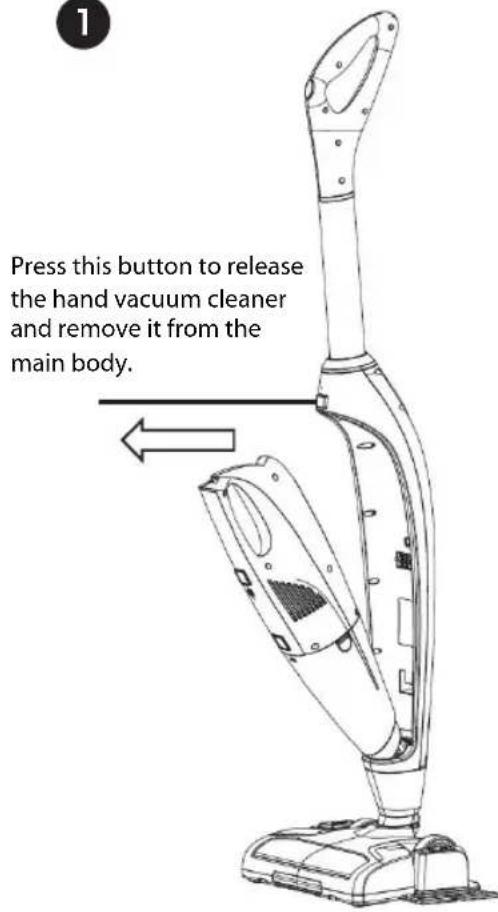
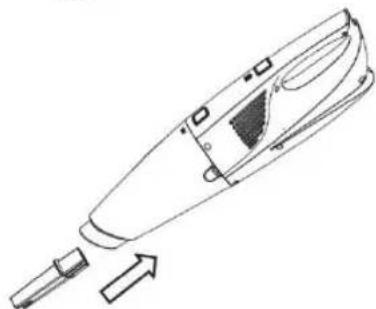
Put the hand vacuum cleaner in the appliance body.
-
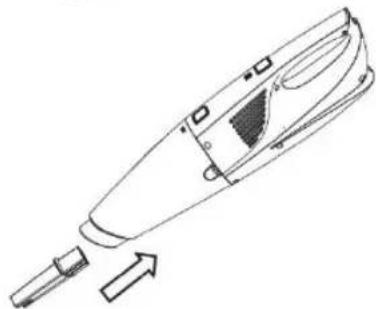
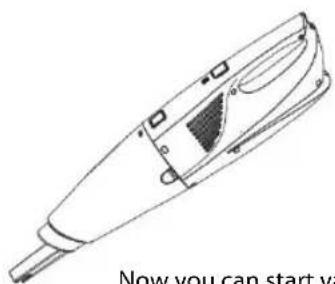
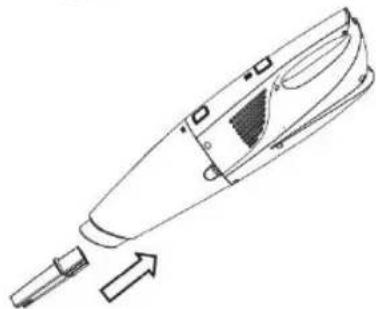
Put the slot nozzle into the appliance body.
natural_image
Line drawing of a handheld device with an arrow indicating downward motion (no text or symbols)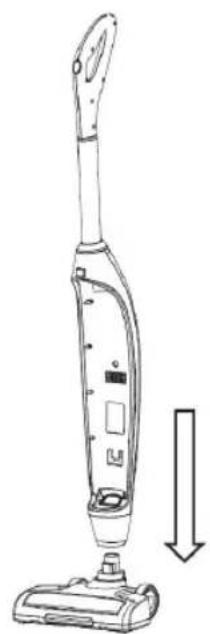
natural_image
Line drawing of a vacuum cleaner with a downward arrow indicating motion (no text or symbols)
natural_image
Line drawing of a vacuum cleaner with attached device, showing front and back views (no text or symbols)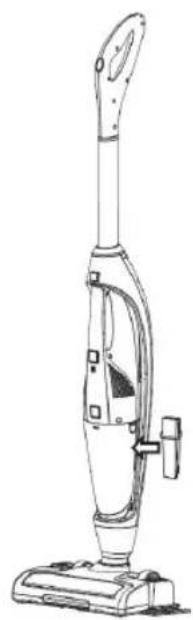
natural_image
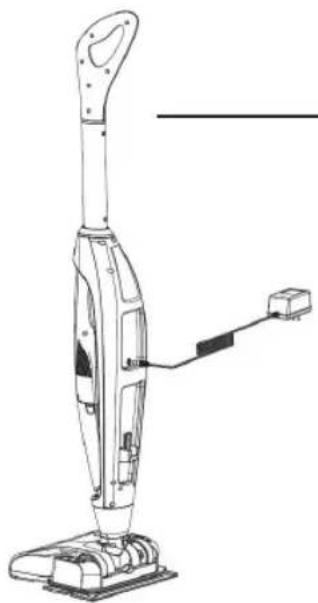
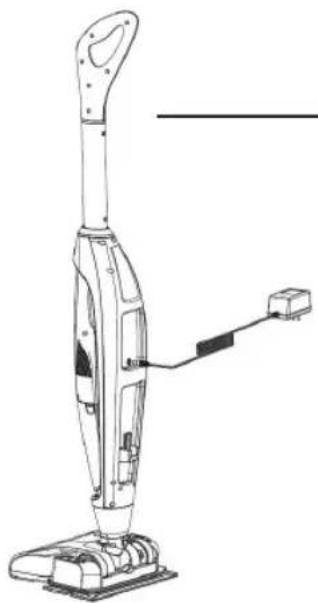
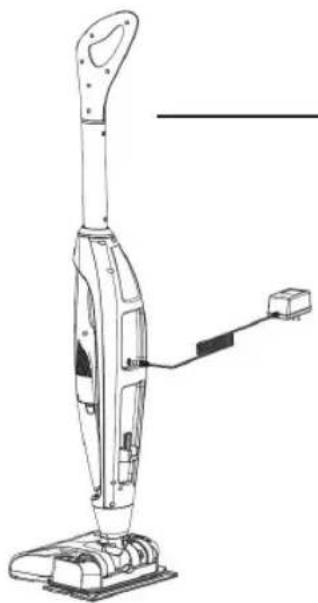
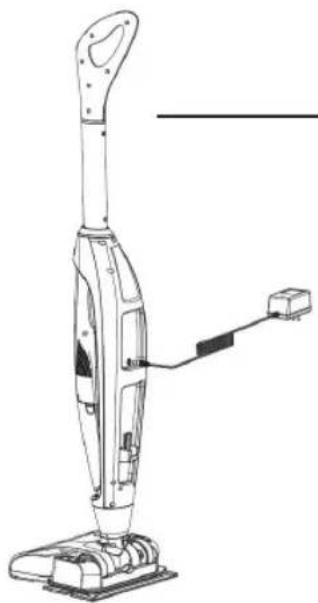
Line drawing of a vacuum cleaner with handle and base (no text or symbols)CHARGING
natural_image
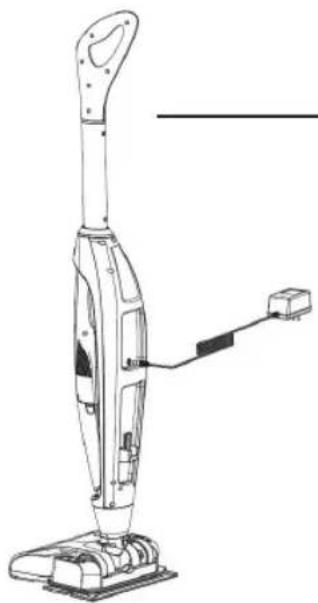
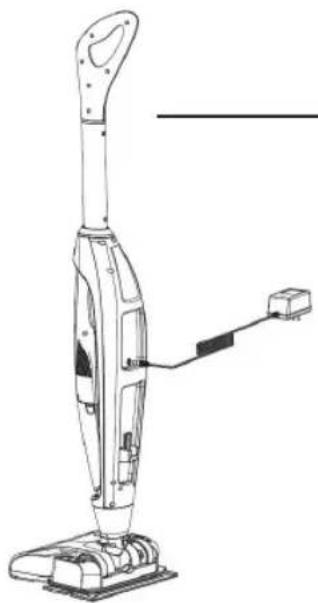
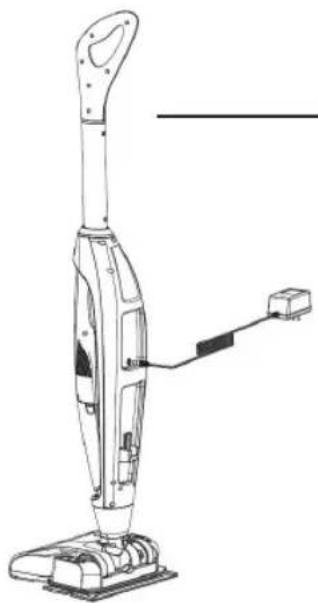
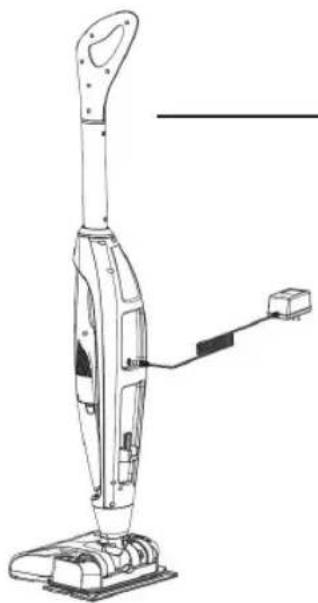
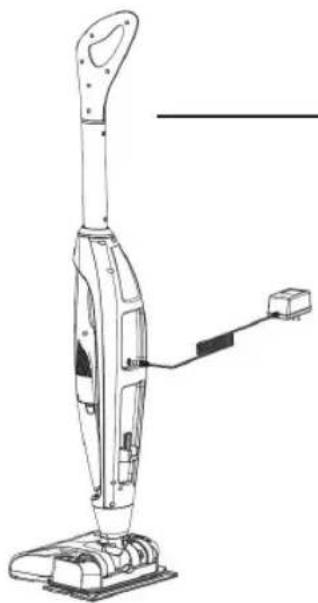
Line drawing of a vacuum cleaner with attached cable and connector (no text or symbols)- Put the hand vacuum cleaner in the appliance body and start charging.
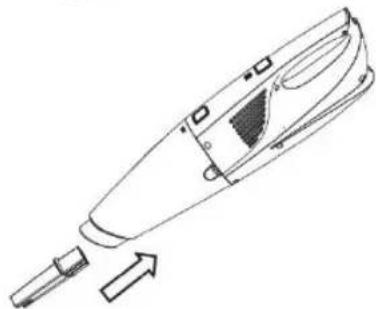
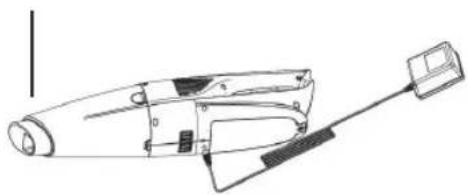
- The hand vacuum cleaner can also be charged separately.
natural_image
Line drawing of a handheld device with a handle and connector (no text or symbols)EN
concept
If the blue diode starts flashing during operation, it means that the battery is empty and the vacuum cleaner needs to be charged.
- Press the button on the handle and turn off the appliance.
- Disconnect the appliance plug from the wall socket.
- Connect the charger connector to the accumulator in the vacuum cleaner body.
- The blue LED will flash, indicating that the appliance is charging normally.
- As soon as the blue LED stops flashing and starts to shine continuously, the battery is fully charged.
- Disconnect the charger from the battery and store it in a safe place.
- The hand vacuum cleaner can be charged individually and when attached to the body of the main vacuum cleaner.
Attention:
Do not pour water into the charging slot on the body of the appliance to avoid damaging the appliance. Do not store or recharge the appliance in environment with temperatures below 0 °C or higher than 40 °C. These temperatures may damage the appliance.
During the charging process, the temperature of the appliance may increase, this is normal.
USE
(for hand vacuum cleaner)
1
2
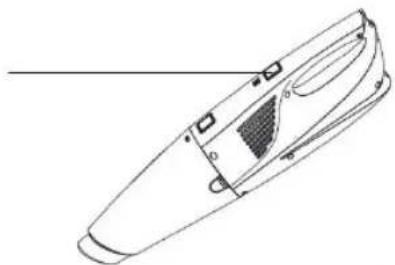
Press the button to turn the appliance on or off.
natural_image
Technical line drawing of a mechanical component with no visible text or symbols3
natural_image
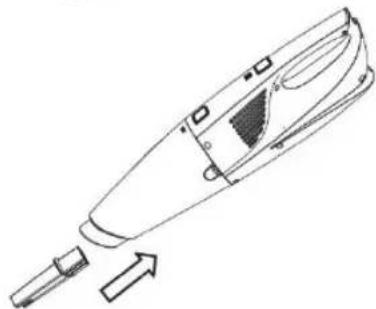
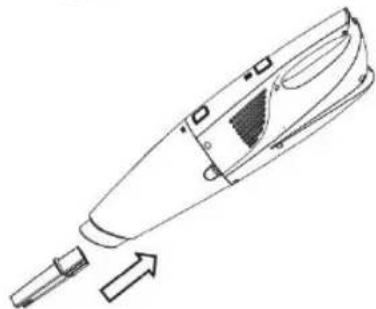
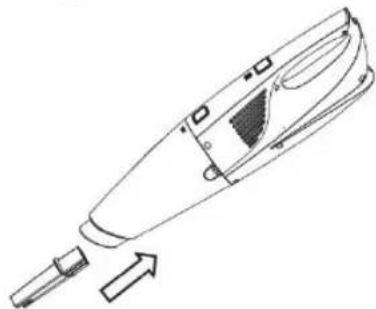
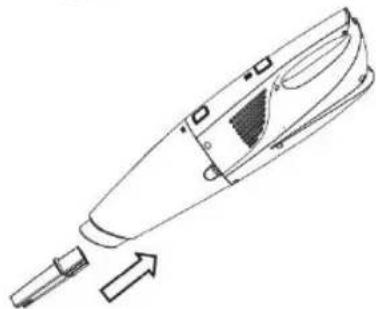
Line drawing of a handheld vacuum cleaner with a pointed tip and arrow indicating motion (no text or symbols)Put the slot nozzle into the hand vacuum cleaner.
4
natural_image
Line drawing of a handheld vacuum cleaner with a pointed tip and handle (no text or symbols)concept
EN
USE
(of the whole appliance with an inserted hand vacuum cleaner)
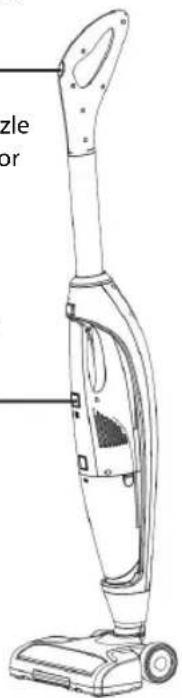
Press the button once to turn the vacuum cleaner on, the LED on the vacuum cleaner will light up, the suction nozzle and the vacuum cleaner will start vacuuming. Press it for the second time to launch the rotary brush.
Once the hand vacuum cleaner is inserted into the body of the main vacuum cleaner, this button has no function.
USE
(mop function)
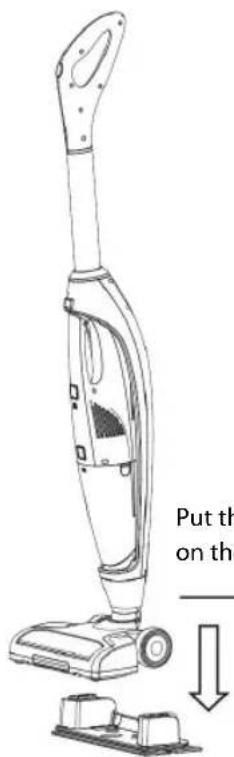
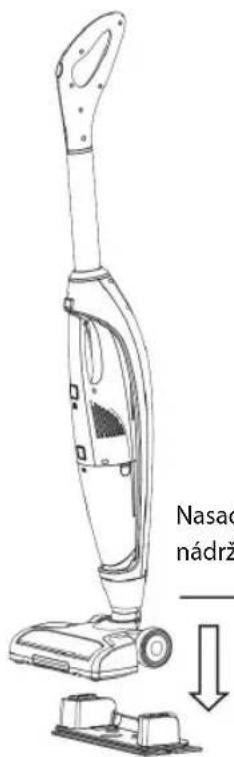
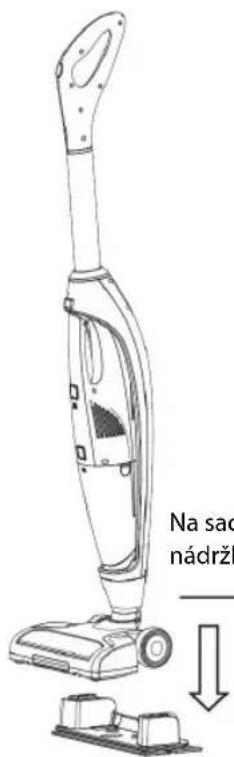
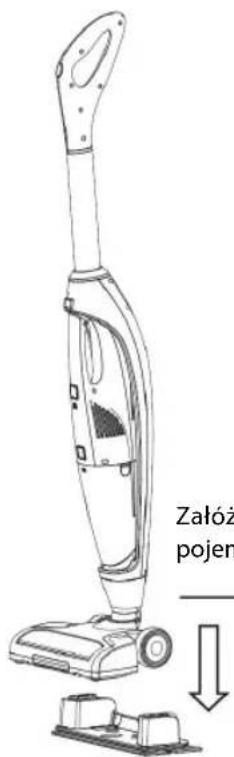
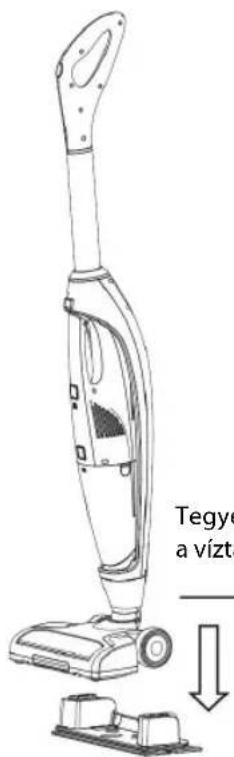
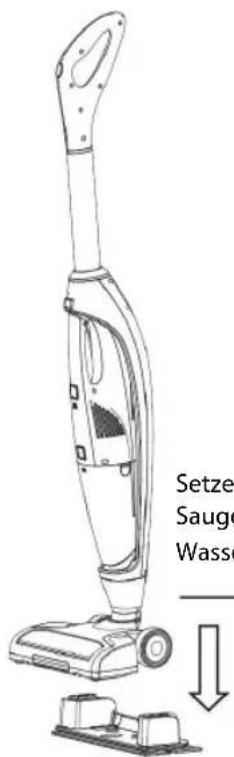
Put the suction nozzle on the water tank.
If you press this button, water from the water tank moistens the mop.
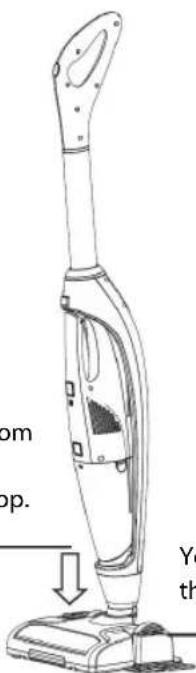
You can fill water through this opening.
EN
concept
USE
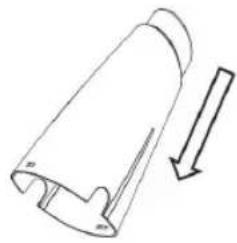
(emptying the dirt container)
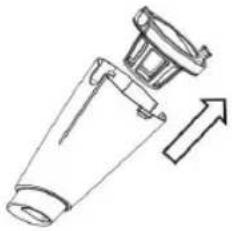
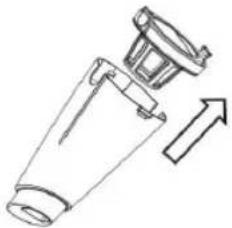
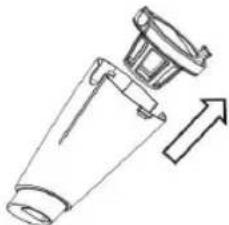
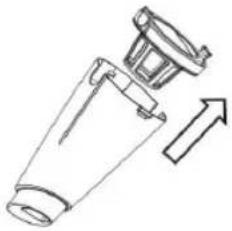
1 Press this button.
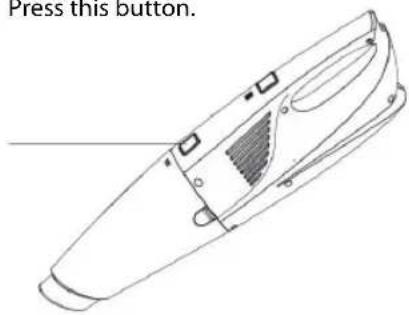
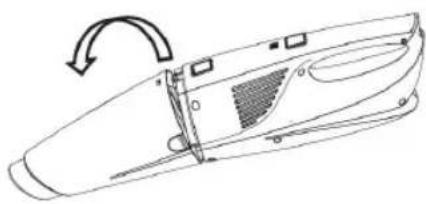
2 Release the dirt container.
natural_image
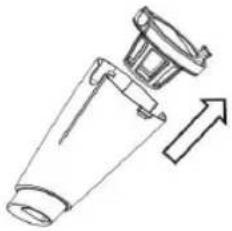
Line drawing of a car door handle with a curved arrow indicating rotation (no text or symbols)3 Remove the filter.
natural_image
Simple line drawing of a mechanical component with an arrow indicating direction (no text or symbols)4 Empty the dirt container.
natural_image
Simple line drawing of a cylindrical object with an arrow indicating downward motion (no text or symbols)USE
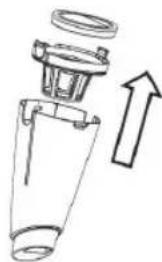
(cleaning)
1 Remove the filter with the holder.
natural_image
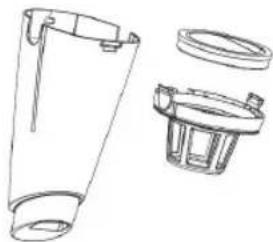
Diagram of a blender with an arrow indicating upward motion (no text or symbols present)2 Clean the filter and the holder, both are washable.
natural_image
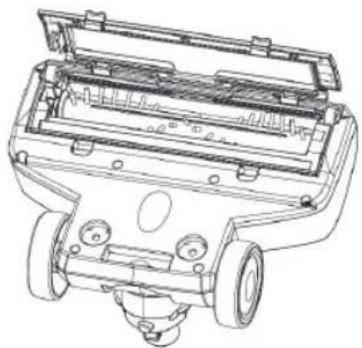
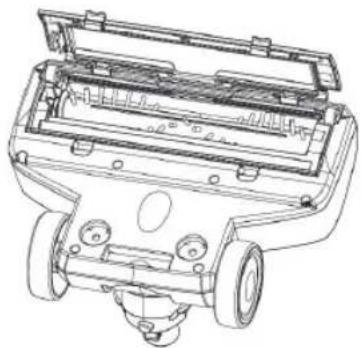
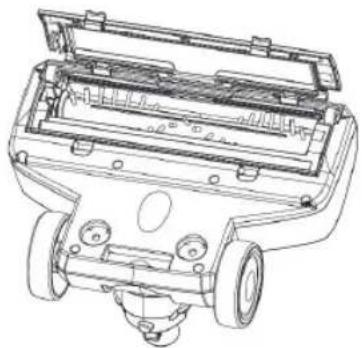
Technical line drawing of a mechanical component with cutaway views (no text or symbols)3 Remove the rotary brush. Clean the rotary brush.
natural_image
Technical line drawing of a vehicle chassis with internal components and mounting holes (no text or symbols)-ush.
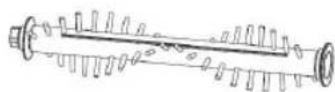
If hair gets on the brush, remove the centre rod and use a knife or scissors to cut hair and clean the rod.
concept
EN
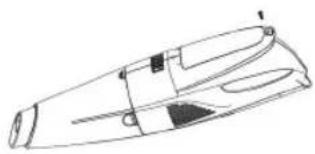
BATTERY REPLACEMENT
-
Unscrew the screw on the bottom of the appliance.
-
Remove the battery cover.
-
Remove the battery.
natural_image
Line drawing of a streamlined object with no visible text or symbols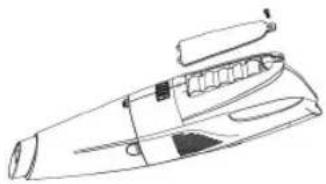
natural_image
Line drawing of a mechanical device with no visible text or symbols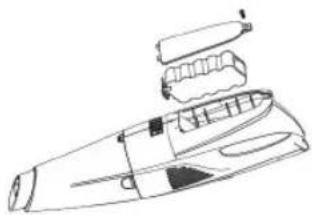
natural_image
Line drawing of a handheld electronic device with internal components (no text or symbols)TROUBLESHOOTING
Before taking a broken appliance to an authorized service centre, read these operating instructions and check the following:
| Problem Cause Solution | ||
| Operation time of the vacuum cleaner shortens. | Battery capacity has decreased. | Contact the dealer and replace the battery. |
| The control diode shines for only 30 seconds. | The battery is inefficient. | The battery needs to be charged. |
| The control diode flashes at higher frequencies (faster) during charging. | Charging failure. Contact the dealer. | |
| Control diode is flashing at higher frequencies (faster). | Rotary brush is blocked. | Clean the rotary brush. |
| Control diode is flashing at higher frequencies (faster). | The battery overheats (overheat control). | Stop vacuuming and let the vacuum cleaner cool down. |
ACCESSORIES
1 Long slot nozzle
2 Upholstery nozzle
3 Nozzle with a brush
4 Short slot nozzle
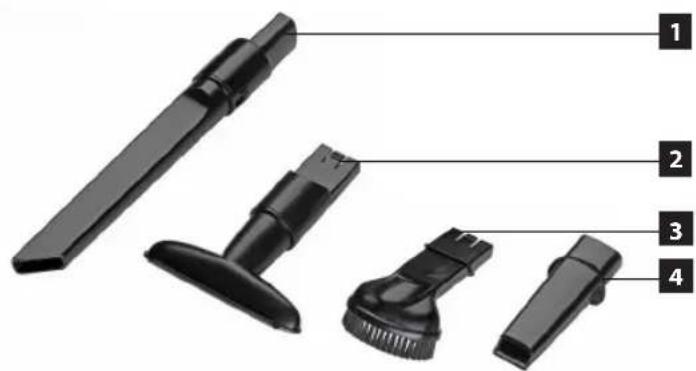
49VP 4200
ENVIRONMENTAL PROTECTION
- Prefer recycling of packaging materials and old appliances.
- Packaging materials may be disposed of as sorted waste.
- Dispose the plastic bags made of polyethylene (PE) of as sorted waste.
Recycling of the appliance at the end of its lifespan

The symbol on the product or its packaging indicates that this product may not be treated as household waste. It is necessary to take it to a container park for the recycling of electrical and electronic equipment. By ensuring the correct disposal of this appliance you will help prevent potential negative consequences to the environment and human health, which could otherwise result from inappropriate disposal of this product. For more detailed information about recycling of this appliance see the authorized local office or service for household waste disposal or the shop, where you purchased the appliance.
Disposal of batteries and power supplies
If the appliance contains an accumulator or a battery cell, these components contain substances which may be harmful to the environment when disintegrated. Before disposing of the appliance or replacing the accumulator or the battery cell, it is necessary to remove the original component and hand over to a suitable collection point.
Caution!
Accumulator or battery cell:
- Do not throw into a fire!
- Never disassemble!
- Never shorten the wires!
If leakage occurs when the accumulator or battery cell is damaged, the electrolyte is of an alkaline character. If the electrolyte gets on your skin, wash it gently with soap and water and seek medical attention.

The product meets all the necessary requirements of the EU directives applicable to the specific product.
Changes in text, design, and technical specifications are subject to change without notice and we reserve the right to change them.
DANKSAGUNG
BEDIENUNGSANLEITUNG
VOR DEM ERSTEN GEBRAUCH
natural_image
Line drawing of a handheld device with a handle and internal components, showing a downward arrow (no text or symbols)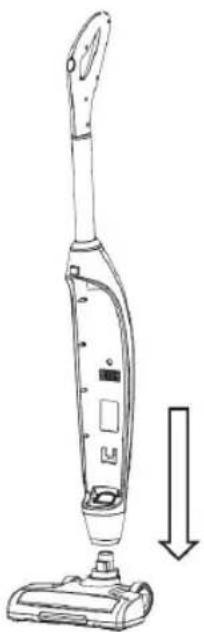
natural_image
Line drawing of a vacuum cleaner with a downward arrow indicating motion (no text or symbols)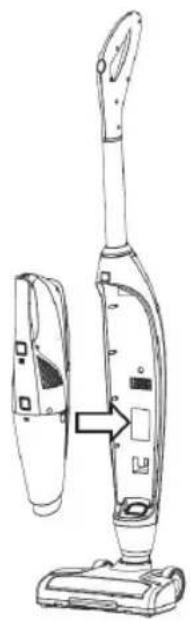
natural_image
Line drawing of a vacuum cleaner with attached device, showing handle and base components (no text or symbols)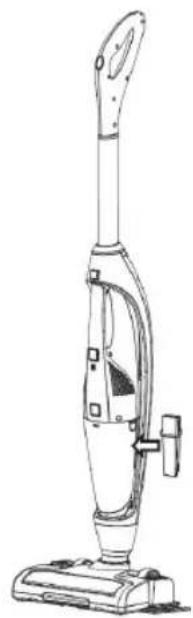
natural_image
Line drawing of a vacuum cleaner with handle and base (no text or symbols)LADEVORGANG
natural_image
Line drawing of a vacuum cleaner with attached cable and connector (no text or symbols)natural_image
Line drawing of a handheld device with a handle and connector (no text or symbols)DE
concept
natural_image
Line drawing of a handheld vacuum cleaner (no text or symbols)3
natural_image
Line drawing of a handheld vacuum cleaner with a pointed tip and arrow indicating motion (no text or symbols)natural_image
Technical line drawing of a handheld vacuum cleaner device (no text or symbols on the diagram itself)concept
DE
ANWENDUNG
natural_image
Line drawing of a vacuum cleaner with labeled parts (no text or symbols present)ANWENDUNG
(Wischfunktion)
natural_image
Line drawing of a car door handle with a circular arrow indicating rotation (no text or symbols)natural_image
Simple line drawing of a mechanical component with an arrow indicating direction (no text or symbols)natural_image
Simple line drawing of a cylindrical object with an arrow indicating downward motion (no text or symbols)ANWENDUNG
(Reinigung)
natural_image
Diagram of a blender with an arrow indicating upward motion (no text or symbols present)natural_image
Technical line drawing of a mechanical component with cutaway views (no text or symbols)natural_image
Technical line drawing of a vehicle chassis with internal components and mounting holes (no text or symbols)natural_image
Line drawing of a streamlined object with no visible text or symbols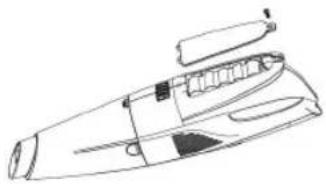
natural_image
Line drawing of a mechanical component or tool with no visible text, numbers, or symbols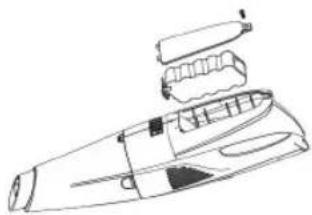
natural_image
Line drawing of a handheld electronic device with internal components (no text or symbols)PROBLEMLÖSUNGEN
57VP 4200
UMWELTSCHUTZ
MODE D'EMPLOI
AVANT LA PREMIÈRE UTILISATION
natural_image
Line drawing of a handheld device with a handle and internal components, showing a downward arrow (no text or symbols)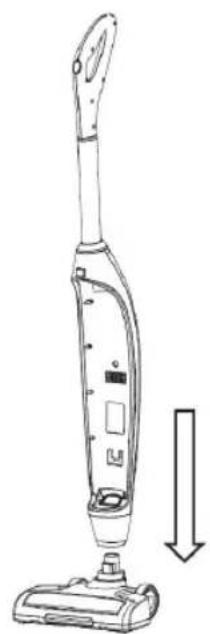
natural_image
Line drawing of a vacuum cleaner with a downward arrow indicating motion (no text or symbols)
natural_image
Line drawing of a vacuum cleaner with attached device, showing front and side views (no text or symbols)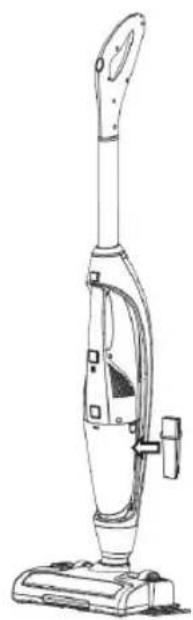
natural_image
Line drawing of a vacuum cleaner with handle and base (no text or symbols)MODE D'EMPLOI POUR LE CHARGEMENT
natural_image
Line drawing of a vacuum cleaner with attached cable and connector (no text or symbols)natural_image
Line drawing of a handheld device with a handle and connector (no text or symbols)FR
concept
natural_image
Technical line drawing of a mechanical component with no visible text or symbols3
natural_image
Line drawing of a handheld vacuum cleaner with a handle and screwdriver, showing internal components and an arrow indicating motion (no text or symbols)natural_image
Line drawing of a handheld vacuum cleaner (no text or symbols)natural_image
Line drawing of a vacuum cleaner with labeled parts (no text or symbols present)MODE D'EMPLOI
natural_image
Line drawing of a handbag with a textured handle and mounting feet (no text or symbols)natural_image
Line drawing of a car door handle with a curved arrow indicating rotation (no text or symbols)3 Retirez le filtre.
natural_image
Diagram of a mechanical component with an arrow indicating direction (no text or symbols)natural_image
Simple line drawing of a cylindrical object with a downward arrow indicating direction (no text or symbols)MODE D'EMPLOI
(nettoyage)
natural_image
Diagram of a mechanical component with an upward arrow indicating direction (no text or symbols present)natural_image
Technical line drawing of a mechanical component with cutaway views (no text or symbols)3 Retirez la brosse rotative.

natural_image
Technical line drawing of a vehicle chassis with internal components and mounting holes (no text or symbols)natural_image
Line drawing of a streamlined object with no visible text or symbols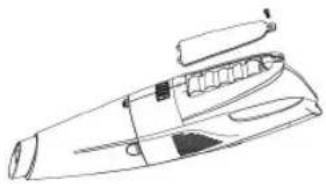
natural_image
Line drawing of a mechanical component or tool with no visible text, numbers, or symbols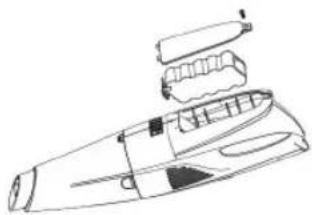
natural_image
Line drawing of a handheld electronic device with internal components (no text or symbols)GUIDE DE RÉSOLUTION DES PROBLÈMES
65VP 4200
PROTECTION DE L'ENVIRONNEMENT
natural_image
Diagram showing a handheld device with a handle and internal components, no text or symbols present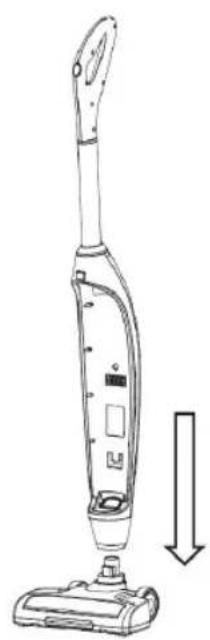
natural_image
Line drawing of a vacuum cleaner with a downward arrow indicating motion (no text or symbols)
natural_image
Line drawing of a vacuum cleaner with attached device, showing front and side views (no text or symbols)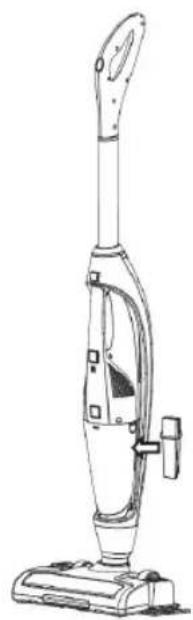
natural_image
Line drawing of a vacuum cleaner with handle and base (no text or symbols)PROCEDURA DI RICARICA:
natural_image
Line drawing of a vacuum cleaner with attached cable and base mount (no text or symbols)natural_image
Line drawing of a handheld electronic device with a cable and connector (no text or symbols)IT
concept
natural_image
Line drawing of a handheld vacuum cleaner with a downward arrow indicating motion (no text or symbols)natural_image
Line drawing of a vacuum cleaner with labeled parts (no text or symbols present)UTILIZZO
natural_image
Line drawing of a car door handle with a curved arrow indicating rotation (no text or symbols)natural_image
Diagram of a mechanical component with an arrow indicating direction (no text or symbols)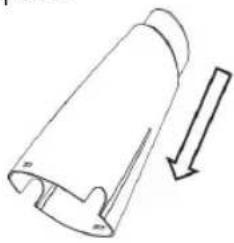
natural_image
Simple line drawing of a cylindrical object with an arrow indicating downward motion (no text or symbols)UTILIZZO
(pulizia)
natural_image
Diagram of a mechanical device with an upward arrow indicating direction (no text or symbols present)natural_image
Technical line drawing of a mechanical component with cutaway views (no text or symbols)3 Estrarre la spazzola rotante.
natural_image
Technical line drawing of a vehicle chassis with internal components and mounting holes (no text or symbols)natural_image
Line drawing of a streamlined object with no visible text or symbols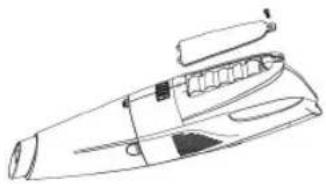
natural_image
Line drawing of a mechanical device with no visible text or symbols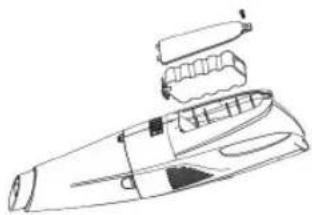
natural_image
Line drawing of a handheld electronic device with internal components (no text or symbols)SOLUZIONE DEI PROBLEMI
73VP 4200
IT
concept
MANUAL DE USO
natural_image
Line drawing of a handheld device with a handle and internal components, showing a downward arrow (no text or symbols)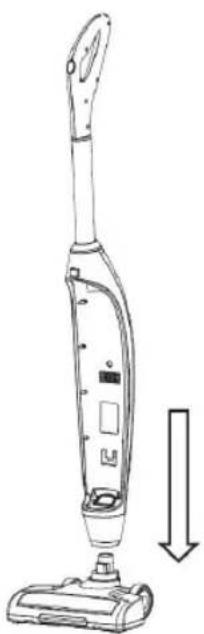
natural_image
Line drawing of a vacuum cleaner with a downward arrow indicating motion (no text or symbols)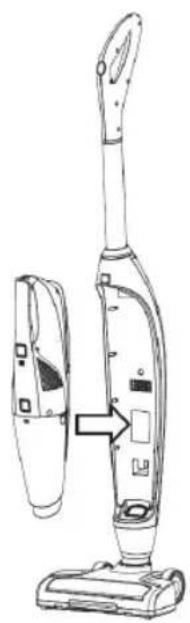
natural_image
Line drawing of a vacuum cleaner with attached device, showing front and side views (no text or symbols)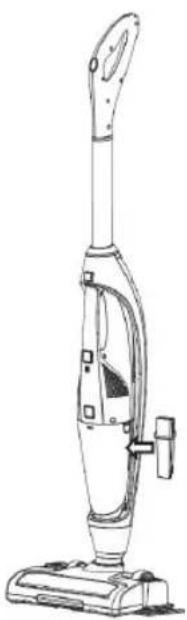
natural_image
Line drawing of a vacuum cleaner with handle and base (no text or symbols)CARGA
natural_image
Line drawing of a vacuum cleaner with attached cable and connector (no text or symbols)natural_image
Line drawing of a handheld device with a handle and connector (no text or symbols)ES
concept
natural_image
Technical line drawing of a mechanical component with no visible text or symbols3
natural_image
Line drawing of a handheld vacuum cleaner with a pointed tip and arrow indicating motion (no text or symbols)concept
ES
USO
USO
(función fregona)
natural_image
Line drawing of a mechanical device with a textured internal feature, labeled 'Presione este boton.' (no other text or symbols)natural_image
Line drawing of a car's front panel with a curved arrow indicating rotation (no text or symbols)3 Retire el filtro.
natural_image
Simple line drawing of a mechanical component with an arrow indicating direction (no text or symbols)natural_image
Simple line drawing of a cylindrical object with an arrow indicating downward motion (no text or symbols)USO
(limpieza)
natural_image
Diagram of a mechanical component with an upward arrow indicating direction (no text or symbols present)natural_image
Technical line drawing of a mechanical component with cutaway views (no text or symbols)3 Retire el cepillo giratorio.
natural_image
Technical line drawing of a vehicle chassis with internal components and mounting holes (no text or symbols)natural_image
Line drawing of a streamlined object with no visible text or symbols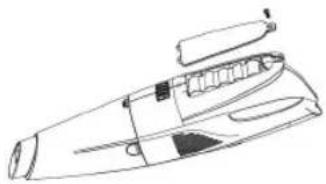
natural_image
Line drawing of a mechanical device with no visible text or symbols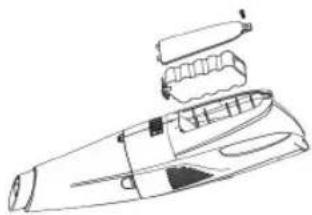
natural_image
Line drawing of a handheld electronic device with internal components (no text or symbols)81VP 4200
The manufacturer (or importer) is responsible for ensuring the product complies with the requirements of applicable legal regulations as well as those of the relevant technical standards. Moreover, they are responsible for ensuring the product has the properties the manufacturer described in documents related to the goods or those reasonably expected by the customer with regard to the nature of the goods or based on advertising produced by the manufacturer, and further they are responsible for ensuring the product is fit for the purpose proposed by the manufacturer or that a product of the same type is normally used for.
The quality warranty term is 24 months from product takeover by the customer.
The warranty does not apply to wear and tear caused by regular use. The customer shall not be entitled to any warranty claims if, prior to taking the product over, they knew the product contained a defect or if the defect is attributable to the customer.
The warranty specifically does not apply:
- if the product installation, operation and service conditions stipulated in the product operating manual have not been adhered to,
• to malfunctions caused due to mechanical, heat or chemical damage, short circuit, over voltage or incorrect installation,
• to malfunctions caused by an inexpert third-party intervention,
• to malfunctions caused by natural disaster,
• to malfunctions caused by insufficient or inappropriate maintenance in violation of the operating manual, including malfunctions caused by water and other sediments,
• to changes in colour of the heating surface or to scratching of the surface caused as a result of using the products in an unusual manner,
• to appearance and functional changes caused by exposure to sunlight, thermal radiation of water and other sediments, - if the service life of certain product parts expires, e.g. for accumulators, bulbs, etc.
The warranty does not apply to any products and services provided along with the product (gifts, promotional articles, etc.).
Filing a complaint
A complaint against a product defect must be filed as soon as identified, yet no later than before the end of the warranty term.
The customer must file a product complaint with the dealer from which they have purchased the product, or with any authorised service centre, a list of which is included in the product package, or available at www.my-concept.com.
While filing a product complaint, the product must be duly cleaned and securely packed so as to prevent any damage during its transport to an authorised service centre, where relevant, unless the product is delivered in person.
The customer must submit proof of having concluded a purchase contract for the product by producing the receipt.
While filing their complaint, the customer must indicate the noted defect and identify the preferred complaint application method.
Complaints processing
As long as the noted defect may be removed, the user has the right to have the defect duly removed free of charge on a timely basis.
Where such a procedure is not reasonable with re-gard to the nature of the defect, the user may require to be supplied a new defect-free product (replacement), or, where the defect applies to a part of the product only, replacement of the part concerned. However, if replacement of the product or any part thereof is not proportionate with regard to the nature of the defect, especially if the defect can be removed without undue delay, the customer has the right to have the defect removed free of charge.
concept
If the noted defect is not removable, or if the customer becomes entitled to replacement of the product or a part thereof, yet the replacement is not possible, for example due to the product having been sold out, the customer has the right to return the product (withdrawal from the contract).
The customer shall have the right to a new product (replacement) or to replacement of a part of the product even if the defect can be removed, provided they cannot properly use the product due to repeated occurrence of the defect or due to a high number of such defects. In such a case, the customer also has the right to return the product (by withdrawing from the contract).
If the product is not returned (the customer does not withdraw from the contract), or if the customer does not apply the right to a new defect-free product (replacement), to replacement of a part thereof or to repair of the product, they may request a reasonable discount. The customer also has a right to a reasonable discount if a new defect-free product cannot be supplied to them, or if a product part cannot be replaced or the product repaired unless the situation is remedied within a reasonable time limit, or if remedying the situation would create major discomfort on the part of the customer.
The seller, authorised service centre or a staff member authorised by them must decide about each complaint immediately or within three business days in complicated cases. This term does not include reasonable period of time, depending on the type of product concerned, required for the defect to be assessed by an expert. A complaint, including defect removal, must be dealt with without any undue delay, yet no later than within 30 calendar days of the complaint filing date, unless the seller and the customer agree on a later deadline.
On returning the product (withdrawing from the contract) the customer must return any accessories and documents supplied along with the product.
The customer does not have the right to keep the defective parts and components of the product replaced as part of a repair of the product.
This shall be without prejudice to any other rights the customer may have in relation to the purchase of the product.
Remark: Complaints against products damaged in transport are governed by the carrier's complaints procedure.
Manufacturer
Jindřich Valenta - Concept
Vysokomýtská 1800, 565 01 Choceň
Czech Republic
tel.: +420 465 471 400
fax +420 465 473 304
Company ID No. 13216660
email: servis@my-concept.cz
www: www.my-concept.com
Product data
| Model: | |
| Production number: | |
| Date of purchase: | Seal and signature of vendor: |