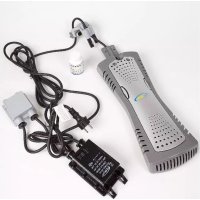
AR2084 - Swimming Pool GRE - Free user manual and instructions
Find the device manual for free AR2084 GRE in PDF.



| Product type | Salt chlorinator for above-ground pool |
| Brand | Gre |
| Model | AR2084 |
| Category | Pool |
| Power supply | 120 V AC, 6 A, 6 V transformer |
| Usage | Automatic salt water chlorination |
| Required salt concentration | 3,400 to 4,000 ppm (ideal 3,600 - 4,000 ppm) |
| Maximum ambient temperature | 115°F (46°C) – protect from direct sunlight |
| Compatible pool volume | Up to 18,000 gal (≈ 68,000 L) |
| Chlorination cell | Titanium electrodes |
| Electrical protection | Residual current circuit breaker required |
| Warranty | 3-year limited (full replacement first year, then 50% and 75% of price) |
| Maintenance | Clean cell with acid solution if scale deposits |
| Water testing frequency | Weekly |
| Winterization | Remove the module from water before freezing |
| Included accessories | Hex key, mounting bracket, plastic tool |
| Safety | Do not leave children unattended; do not use extension cord |
Frequently Asked Questions - AR2084 GRE
User questions about AR2084 GRE
0 question about this device. Answer the ones you know or ask your own.
Ask a new question about this device
Download the instructions for your Swimming Pool in PDF format for free! Find your manual AR2084 - GRE and take your electronic device back in hand. On this page are published all the documents necessary for the use of your device. AR2084 by GRE.
USER MANUAL AR2084 GRE
IMPORTANT SAFETY INSTRUCTIONS READ AND FOLLOW ALL INSTRUCTIONS
WARNING: To reduce the risk of injury, do not permit children to use this product unless they are closely supervised at all times
WARNING: If ambient air temperature exceeds 115^ F., protect the transformer from direct sunlight with a well ventilated cover.
WARNING: The sole purpose of this product is for use as a salt water chlorinator as described in this manual; any modification or other use will void the warranty.
WARNING: Do not allow children to use, touch, or play near or around the units' power pack.
WARNING: Plug only into 110 V receptacles protected by a ground fault circuit interrupter.
WARNING: Do not connect unit to AC power until installation is complete
WARNING: Do not use if unit is damaged in any way.
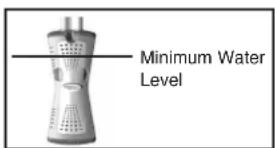
WARNING: Unit must be completely submerged in water or warranty is void.
WARNING: DO NOT USE EXTENSION CORDS, DEATH OR INJURY CAN RESULT.
WARNING: Make sure ChlorEase is unplugged from its power supply before opening the unit or performing any other maintenance.
WARNING: To protect risk of electrical shock, do not put the transformer in water or other liquid.
WARNING: To avoid damage to the transformer and cord, never carry the transformer by the cord or pull on the cord to disconnect from an outlet. Instead, disconnect by pulling the plug itself from the outlet. Do not pull cord around sharp corners or edges.
WARNING: Do not operate with a damaged cord or transformer.
CAUTION: Disconnect transformer from outlet when not in use.
CAUTION: If ChlorEase is not working as it should or has been dropped or damaged in any way, contact SmartPool customer service before using at 1-732-730-9880.
Introduction
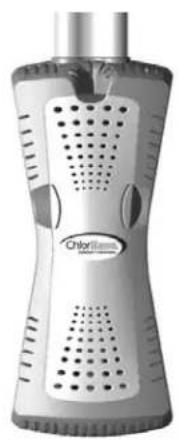
ChlorEase is an automated chlorine generation system that has been specifically designed to operate in the above ground or storable pool environment. The system requires a low concentration of salt (sodium chloride) in the pool water. The salt levels are generally below the taste level of most people, but have the effect of softening the water so it feels silkier and leaves hair and skin feeling much smoother than with other chlorine chemical products.
The ChlorEase unit sanitizes your water by converting the sodium chloride (salt) in your pool to chlorine ions by electrolysis. The chlorine ions generated form hypochlorous acid, killing bacteria and algae in the pool that are then removed mechanically by the pool filter. The chlorine then reconstitutes itself as sodium chloride and begins the process from the beginning, in a virtually unending cycle, resulting in rarely having to add sanitizer to your pool again. The only way that salt is lost from the pool is through backwashing, splash out or drainage. Thus, salt replenishment is needed only periodically.
ChlorEase has been designed to introduce sanitizer 24 hours a day 7 days a week to keep your pool sparkling clear. It has been designed to work on a wide variety of pools with minimal installation time.
Installation
Note: For additional help with installation, you may wish to download our installation video on our website by typing the following link in your browser window: http://www.smartpool.com/website/recwatertec/chlorease/video/chlorease.wmv
1) First insure that chemical levels of the pool are correct. If the composition is not correct, the unit will not be able to maintain sanitizer conditions.
2) Locate an area of the pool that will allow for convenient access to a reliable steady supply of electricity with a GIFC socket. Note: You may plug your ChlorEase unit into an appropriate timer that is able to handle a 6V/6A output. The timer must be plugged into a 120V GFCI receptacle. DO NOT PLUG IN YET!
3) Install ChlorEase in reasonably close proximity to filter return fitting to maximize circulation of the chlorine being produced.
4) Remove screws and caps securing the top ledge of the pool in the desired area.
5) Gently lift one end of the ledge and slide the ChlorEase unit onto the pool wall. For best results position the ChlorEase unit in the middle of the top ledge.
6) Turn screws on back of mounting bracket in to secure the unit against the top of the pool wall using Allen wrench provided. It is recommended that your aboveground pool be grounded for safety. Consult your local electrician for details.
7) Replace the top rail and all hardware.
8) Plug ChlorEase in to 120vac GFCI socket.
9) Place the transformer in a protected area at least 3 feet from the pool. Bubbles should rise from submerged cell. Initially a soft milky cloud may appear around the ChlorEase unit. This will stop after a few days of use. This is normal and a good indicator that the unit is working properly.
WARNING: DO NOT OPERATE CHLORINATOR IF SALT LEVEL IS BELOW 2,500 ppm. FAILURE TO MAINTAIN PROPER SALT LEVELS IN POOL WATER MAY VOID WARRANTY.
Water Chemistry
The ChlorEase system will automate the introduction of sanitizer into your pool, but it is very important that you check and regularly maintain the chemical make up of your pool water. Table 1 shows the recommended levels to be maintained in your pool.
It is essential to maintain these levels to maximize the life of your product. Test your water weekly or bring a sample to your local pool store so they may assist you in maintaining proper pool chemistry.
Be sure to inform the pool professional testing your water that you are using a ChlorEase salt water system. Cyanuric acid or conditioner takes a few days to totally dissolve and level off. Please monitor it closely for the first few days of operation (See Table 4). Cyanuric acid stabilizes the presence of chlorine in your pool water and is essential for proper disinfection.
Table 1 Optimum Water Chemistry
ITEM
RECOMMENDED LEVEL (ppm= parts per million)
| Salt | 3400 to 4000 ppm |
| Free Chlorine | 1.0 to 4.0 ppm |
| pH | 7.2 to 7.6 |
| Total Alkalinity | 80 to 120 ppm |
| Calcium Hardness | 150 to 300 ppm |
| Cyanuric Acid | 80 ppm |
| Metals | 0 ppm |
NOTE: It may be necessary to unplug your ChlorEase Chlorine Generator if over- chlorination occurs. If this should happen, unplug the transformer from the GFCI receptacle and test the level of free chlorine in the water daily until a desired range of 1.0 - 4.0 PPM of free available chlorine is achieved (See Table 2). Once a desired level of free chlorine is reached, plug the transformer back into the GFCI receptacle. If there is not enough chlorine in the water or you cannot keep a chlorine reading in your pool (high chlorine demand), refer to Table 2.1 to determine how much shock should be added to your pool to increase the free available chlorine (FAC) level in the water. Contact Smartpool at 1-732-730-9880 for additional help should this fail to correct the problem.
Table 2
Increasing Free Available Chlorine (FAC) Residual
| Type of Chlorine | Amount to add for 1 ppm in 5,000 gallons | Amount to add for 1 ppm in 10,000 gallons | Amount to add for 1 ppm in 15,000 gallons |
| Liquid Chlorine 12% | 5.3 oz. | 10.6 oz. | 15.9 oz. |
| Cal-Hypo 65% | 1 oz. | 2 oz. | 3 oz. |
| Lithium Hypo 35% | 1.9 oz. | 3.8 oz. | 5.7 oz. |
| Sodium Dichlor 56% | 1.9 oz. | 2.38 oz. | 4.28 oz. |
| Trichloro 90% | .75 oz. | 1.5 oz. | 2.25 oz. |
The table above should be used to maintain a FAC residual. Please refer to Table 2-1 if you have ZERO FAC residual.
Table 2.1
Achieving Breakpoint or Superchlorination
| Type of Chlorine | Amount to add for 10 ppm in 5,000 gallons | Amount to add for 10 ppm in 10,000 gallons | Amount to add for 10 ppm in 15,000 gallons |
| Liquid Chlorine 12% | .5 gallons | 1 gallon | 1.5 gallons |
| Cal-Hypo 65% | 10 oz. | 1 lb. 4 oz. | 2 lbs. |
| Lithium Hypo 35% | 1 lb. 3 oz. | 2 lb. 6 oz. | 3 lb. 9 oz. |
| Sodium Dichlor 56% | 12 oz. | 1 lb. 8 oz. | 2 lbs. 4 oz. |
| Trichloro 90% | 7.5 oz. | 15 oz. | 1 lb 6.5 oz. |
Salt Level
Refer to table 3 to determine how much salt should be added to your pool for proper performance. Use the equation below to determine the gallons or liters of water in your pool. Note: Always test for salt levels PRIOR to adding salt to the water.
How to Calculate Pool Size
| Pool Type Gallons Liters |
| Rectangular Length (ft.) x Width (ft.) x Length (m) x Width (m) x Average Depth (ft.) x 7.5 Average Depth (m) x 1000 |
| Round Diameter (ft.) x Diameter (ft.) x Diameter (m) x Diameter (m) x Average Depth (ft.) x 5.9 Average Depth (m) x 785 |
| Oval Length(ft.) x Width(ft.) x Length (m) x Width (m) x Average Depth (ft.) x 6.7 Average Depth (m) x 840 |
The optimum salt level is between 3600 and 4000ppm . The salt level can easily be checked using test strips commonly sold at your local pool store. If the salt level is low, use Table 3 to determine how much salt must be added to achieve the desired level.
On Table 3 first locate on the top row the gallonage of your pool. Then look in the first column marked current salt level and find your current salt level. Follow that row over to where it intersects with your pool gallon column. The number in that box shows the number of pounds of salt you must add in order to achieve the ideal salinity. Remember that the only way that your pool will lose salt is if:
- You backwash your filter • Splash out • Overfill the pool • Drain the pool
Type of Salt to Use
It is imperative that you use only sodium chloride (NaCL) that is 99% pure. This is commonly available at most reputable pool stores or home centers in a variety of sizes. Do not use rock salt, salt with more than 1% yellow prussiate of soda, salt with more than 1% anti caking additives. DO NOT USE IODIZED SALT.
Adding Salt
Turn pool filter on and add salt directly to the pool. Use a brush to dissolve and disperse salt throughout pool. A pool vacuum or robotic pool cleaner will serve the same purposes. Run the pump for the next 24 hours using the main drain for suction. If no main drain is available, use the pool vacuum. Do not add salt through your skimmer; add directly into pool and brush to dissolve.
Removing Salt
The only way to remove salt or lower salinity is to drain water off and fill with fresh water.
Table 3
LBS OF SALT REQUIRED TO RAISE LEVELS 4000ppm
(KG) OF SALT REQUIRED TO RAISE LEVELS 4000ppm
| Current 6,000 gal 8,000 Gal 10,000 Gal 12,000 Gal 14,000 Gal 16,000 Gal 18,000 Gal Salt level (22,500 L) (30,000 L) (37,500 L) (45,000 L) (52,500 L) (60,000 L) (67,500 L) | |||||||
| 0 200 256 335 400 465 535 600(93) (115) (153) (181) (214) (242) (274) | |||||||
| 200 190 243 318 380 442 508 570(88) (109) (145) (172) (203) (230) (260) | |||||||
| 400 180 230 301 360 419 481 540(83) (103) (137) (163) (192) (218) (246) | |||||||
| 600 170 227 284 340 396 454 510(78) (97) (129) (154) (181) (206) (232) | |||||||
| 800 160 213 267 320 373 427 480(73) (97) (121) (145) (170) (194) (218) | |||||||
| 1000 150 200 250 300 350 400 450(69) (91) (114) (136) (159) (182) (205) | |||||||
| 1200 140 187 233 280 327 373 420(64) (85) (106) (127) (148) (170) (191) | |||||||
| 1400 130 173 217 260 303 347 390(59) (79) (98) (118) (138) (158) (177) | |||||||
| 1600 120 160 200 240 280 320 360(55) (72) (91) (109) (127) (145) (164) | |||||||
| 1800 110 147 183 220 257 293 330(51) (66) (83) (100) (117) (133) (150) | |||||||
| 2000 100 133 167 200 233 267 300(46) (60) (76) (91) (106) (121) (136) | |||||||
| 2200 90 120 150 180 210 240 270(41) (54) (68) (82) (95) (109) (123) | |||||||
| 2400 80 107 133 160 187 213 240(36) (48) (61) (73) (85) (97) (109) | |||||||
| 2600 70 | 93 117 140 163 187 210(32) (42) (53) (64) (74) (85) (95) | ||||||
| 2800 60 | 80 100 120 140 160 180(27) (36) (45) (55) (64) (73) (82) | ||||||
| 3000 50 | 6783 100 117 133 150(23) (30) (38) (45) (53) (61) (68) | ||||||
| 3200 | 4053678093107120 | ||||||
| (18) (24) (30) (36) (42) (48) (55) | |||||||
| 3400 | 30405060708090 | ||||||
| (14) (18) (23) (27) (32) (36) (41) | |||||||
| 3600 | 20273340475360 | ||||||
| (9) (12) (15) (18) (21) (24) (27) | |||||||
| 3800 | 10131720232730 | ||||||
| (4)(6)(8)(9)(11)(12)(14) | |||||||
| 4000 | 0000000000000000000000000000000000000000000000000000000000000000000000000000000000000000000000000000 | ||||||
| 4200 | DiluteDiluteDiluteDiluteDiluteDiluteDiluteDiluteDiluteDiluteDiluteDiluteDiluteDiluteDiluteDiluteDiluteDiluteDiluteDiluteDiluteDiluteDiluteDiluteDiluteDilateDilateDilateDilateDilateDilateDilateDilateDilateDilateDilateDilateDilateDilateDilateDilateDilateDilateDilateDilateDilateDilateDilateDilateDilateDilateDilateDilateDilateDilateDilateDilateDilateDilate DillateDilateDilateDilateDilateDilateDilateDilateDilateDilateDilateDilateDilateDilateDilateDilateDilateDilateDilateDilateDilateDilateDilateDilateDilateDilateDilateDilateDilateDilateDilateDilateDilateDilATEDILATEDILATEDILATEDILATEDILATEDILATEDILATEDILATEDILATEDILATEDILATEDILATEDILATEDILATEDILATEDILATEDILATEDILATEDILATEDILATEDILATEDILATEDILATEDILATEDILATEDILATEDILATEDILATEDILATEDILATEDILATEDILATEDILATEDILATIDLATEDILATEDILATEDILATEDILATEDILATEDILATEDILATEDILATEDILATEDILATEDILATEDILATEDILATEDILATEDILATEDILATEDILATEDILATEDILATEDILATEDILATEDILATEDILATEDILATEDILATEDILATEDILATEDILATEDILATEDILATEDILATEDILATEDILateDILATEDILATEDILATEDILATEDILATEDILATEDILATEDILATEDILATEDILATEDILATEDILATEDILATEDILATEDILATEDILATEDILATEDILATEDILATEDILATEDILATEDILATEDILATEDILATEDILATEDILATEDILATEDILATEDILATEDILATEDILATEDILATEDILATE DILATEDILATEDILATEDILATEDILATEDILATEDILATEDILATEDILATEDILATEDILATEDILATEDILATEDILATEDILATEDILATEDILATEDILATEDILATEDILATEDILATEDILATEDILATEDILATEDILATEDILATEDILATEDILATEDILATEDILATEDILATEDILATEDILATEDIDLATEDILATEDILATEDILATEDILATEDILATEDILATEDILATEDILATEDILATEDILATEDILATEDILATEDILATEDILATEDILATEDILATEDILATEDILATEDILATEDILATEDILATEDILATEDILATEDILATEDILATEDILATEDILATEDILATEDILATEDILATEDILATEDILATE DILATIDLATEDILATEDILATEDILATEDILATEDILATEDILATEDILATEDILATEDILATEDILATEDILATEDILATEDILATEDILATEDILATEDILATEDILATEDILATEDILATEDILATEDILATEDILATEDILATEDILATEDILATEDILATEDILATEDILATEDILATEDILATEDILATEDIDLATEDIDLATEDILATEDILATEDILATEDILATEDILATEDILATEDILATEDILATEDILATEDILATEDILATEDILATEDILATEDILATEDILATEDILATEDILATEDILATEDILATEDILATEDILATEDILATEDILATEDILATEDILATEDILATEDILATEDILATEDILATEDILATEDILATEDIDLATIDLATEDILATEDILATEDILATEDILATEDILATEDILATEDILATEDILATEDILATEDILATEDILATEDILATEDILATEDILATEDILATEDILATEDILATEDILATEDILATEDILATEDILATEDILATEDILATEDILATEDILATEDILATEDILATEDILATEDILATEDILATEDILATEDILATIDLATIDLATEDILATEDILATEDILATEDILATEDILATEDILATEDILATEDILATEDILATEDILATEDILATEDILATEDILATEDILATEDILATEDILATEDILATEDILATEDILATEDILATEDILATEDILATEDILATEDILATEDILATEDILATEDILATEDILATEDILATEDILATEDILATE DILATIDLATIDLATIDLATIDLATIDLATIDLATIDLATIDLATIDLATIDLATIDLATIDLATIDLATIDLATIDLATIDLATIDLATIDLATIDLATIDLATIDLATIDLATIDLATIDLATIDLATIDLATIDLATIDLATIDLATIDLATIDLATIDLATIDLATIDL ATIDLATIDLATIDLATIDLATIDLATIDLATIDLATIDLATIDLATIDLATIDLATIDLATIDLATIDLATIDLATIDLATIDLATIDLATIDLATIDLATIDLATIDLATIDLATIDLATIDLATIDLATIDLATIDLATIDLATIDLATIDLATIDLATIDLAT IDLATIDLATIDLATIDLATIDLATIDLATIDLATIDLATIDLATIDLATIDLATIDLATIDLATIDLATIDLATIDLATIDLATIDLATIDLATIDLATIDLATIDLATIDLATIDLATIDLATIDLATIDLATIDLATIDLATIDLATIDLATIDLATIDLATID LATIDLATIDLATIDLATIDLATIDLATIDLATIDLATIDLATIDLATIDLATIDLATIDLATIDLATIDLATIDLATIDLATIDLATIDLATIDLATIDLATIDLATIDLATIDLATIDLATIDLATIDLATIDLATIDLATIDLATIDLATIDLATIDLATIDLatIDLATIDLATIDLATIDLATIDLATIDLATIDLATIDLATIDLATIDLATIDLATIDLATIDLATIDLATIDLATIDLATIDLATIDLATIDLATIDLATIDLATIDLATIDLATIDLATIDLATIDLATIDLATIDLATIDLATIDLATIDLATIDLATIDLATidLATIDLATIDLATIDLATIDLATIDLATIDLATIDLATIDLATIDLATIDLATIDLATIDLATIDLATIDLATIDLATIDLATIDLATIDLATIDLATIDLATIDLATIDLATIDLATIDLATIDLATIDLATIDLATIDLATIDLATIDLATIDLATIDLATIDLDLATIDLATIDLATIDLATIDLATIDLATIDLATIDLATIDLATIDLATIDLATIDLATIDLATIDLATIDLATIDLATIDLATIDLATIDLATIDLATIDLATIDLATIDLATIDLATIDLATIDLATIDLATIDLATIDLATIDLATIDLATIDLATIDLATIDLGALGALGALGALGALGALGALGALGALGALGALGALGALGALGALGALGALGALGALGALGALGALGALGALGALGALGALGALGALGALGALGALGALGALGALGALGALGALGALGALGALGALGALGALGALGALGALGALGALGALGALGLGALGALGALGALGALGALGALGALGALGALGALGALGALGALGALGALGALGALGALGALGALGALGALGALGALGALGALGALGALGALGALGALGALGALGALGALGALGALGALGALGALGALGALGALGALGALGALGALGALG | 83 100 117 133 150(68) (73) (85) (97) (109) (123) (240)(36) (48) (51) (62) (73) (85) (97) (109) (123) (240)(36) (48) (51) (62) (73) (85) (97) (109) (123) (240)(32) (42) (53) (64) (74) (85) (95) | |||||
| 3200 | 4053678093107120 | ||||||
| (18) (24) (30) (36) (42) (48) (55) | |||||||
| 3400 | 30405060708090 | ||||||
| (14) (18) (23) (27) (32) (36) (41) | |||||||
| 3600 | 20273340475360 | ||||||
| (9) (12) (15) (18) (21) (24) (27) | |||||||
| 3800 | 1013172023273730 | ||||||
| (4) (6) (8) (9) (11) (12) (14) | |||||||
| 4000 | 00000000000000000000000000000000000000000000000000000000000000000000000000000000000 | 8380093107120 | |||||
| 4200 | DiluteDiluteDiluteDiluteDiluteDiluteDiluteDiluteDiluteDiluteDiluteDiluteDiluteDiluteDiluteDiluteDiluteDiluteDilateDilateDilateDilateDilateDilateDilateDilateDilateDilateDilateDilateDilateDilateDilate Dldate Dldate Dldate Dldate Dldate Dldate Dldate Dldate Dldate Dldate Dldate Dldate Dldate Dldate Dldate Dldate Dldate Dldate Dldate Dldate Dldate Dldate Dldate Dldate Dldate Dldate Dldate Dldate Dldate Dldate Dldate Dldate Dldate Dldates Dldates Dldates Dldates Dldates Dldates Dldates Dldates Dldates Dldates Dldates Dldates Dldates Dldates Dldates Dldates Dldates Dldates Dldates Dldates Dldates Dldates Dldates Dldates Dldates Dldates Dldates Dldates Dldates Dldates Dldates Dldates Dldates Dldates | ||||||

WARNING: DO NOT OPERATE CHLORINATOR IF SALT LEVEL IS BELOW 2,500 ppm. FAILURE TO MAINTAIN PROPER SALT LEVELS IN POOL WATER MAY VOID WARRANTY.
Stabilizer (Cyanuric Acid)
When checking salt level, always check the level of Cyanuric acid as well since it is likely that they will decline together. Use Table 4 to determine how much stabilizer must be added to raise levels to the optimum level of 80ppm . First find the column that represents the gallons or liter of your pool. Then locate the row that shows your current level of Cyanuric Acid. The box that intersects those two will tell you the lbs or (kg) needed to raise levels in your pool to 80ppm . Remember that Cyanuric Acid or conditioner takes some time to dissolve so check levels for several days after adding, or before adding more.
Table 4 POUNDS AND (KG) OF STABILIZER (CYANURIC ACID) NEEDED TO RAISE LEVELS TO 80 PPM
| Current 6,000 gal 8,000 Gal 10,000 Gal 12,000 Gal 14,000 Gal 16,000 Gal 18,000 Gal Stabilizer (22,500 L) (30,000 L) (37,500 L) (45,000 L) (52,500 L) (60,000 L) (67,500 L) | |||||||
| 0 ppm | 4.0(1.8) | 5.3(2.4) | 6.7(3.0) | 8.0(3.6) | 9.4(4.3) | 10.7(4.9) | 12.0(5.4) |
| 10 ppm | 3.5(1.6) | 4.7(2.1) | 5.8(2.6) | 7.0(3.2) | 8.2(3.7) | 9.4(4.3) | 10.5(4.8) |
| 20 ppm | 3.0(1.4) | 4.0(1.8) | 5.0(2.3) | 6.0(2.7) | 7.0(3.2) | 8.0(3.6) | 9.0(4.2) |
| 30 ppm | 2.5(1.1) | 3.3(1.5) | 4.2(1.9) | 5.0(2.3) | 5.9(2.7) | 6.7(3.0) | 7.5(3.4) |
| 40 ppm | 2.0(0.9) | 2.7(1.2) | 3.3(1.5) | 4.0(1.8) | 4.7(2.1) | 5.4(2.4) | 6.0(2.7) |
| 50 ppm | 1.5(0.7) | 2.0(0.9) | 2.5(1.1) | 3.0(1.4) | 3.5(1.6) | 4.0(1.8) | 4.5(2.0) |
| 60 ppm | 1.0(0.5) | 1.3(0.6) | 1.7(0.8) | 2.0(0.91) | 2.4(1.1) | 2.7(1.2) | 3.0(1.4) |
| 70 ppm | 0.5(0.2) | 0.7(0.3) | 0.8(0.4) | 1.0(0.45) | 1.2(0.54) | 1.4(0.64) | 1.5(0.68) |
| 80 ppm | 0.0 | 0.0 | 0.0 | 0.0 | 0.0 | 0.0 | 0.0 |
Startup and Spring Opening
Add a saltwater- compatible chlorinating product initially to bring chlorine level to 3ppm . This is likely the only time you'll need to add chlorine to your pool. This will charge the water with chlorine as the ChlorEase begins to generate chlorine in the pool. ChlorEase will then maintain your chlorine level after the initial shock treatment.
Troubleshooting
If bubbles are not rising from the submerged part of the unit, follow these troubleshooting tips:
- Unplug the unit and verify that you have power at the socket. Use a voltmeter to determine that you have 115vac output from the socket. If a voltmeter is not available, use a lamp or other appliance to verify that there is enough voltage being supplied to the socket. If there is no supply voltage, either repair the socket or plug the ChlorEase in elsewhere.
- If the socket is active, call 1-732-730-9880 for service or consult our ChlorEase FAQ's on our website at: www.smartpool.com/website/recwatertec/chlorease/faq.htm
Maintenance of your ChlorEase System
Adding Salt
Begin by testing the salt levels of the pool using saline test strips available at your local pool store. The salt level must be above 3600ppm . If the salt level is low, refer to Table 3 for amount of salt to add.
Cleaning the Cell DO NOT REMOVE THE MESH COVERING THE CELL! INSIDE ELEMENT IS SHARPI
If proper chlorine levels cannot be maintained, and if salt levels and pH readings are correct, the cell must be cleaned. FIRST UNPLUG THE CHLOREASE UNIT FROM THE AC SOCKET. THE UNIT SHOULD ONLY BE SERVICED AFTER IT HAS BEEN UNPLUGGED.
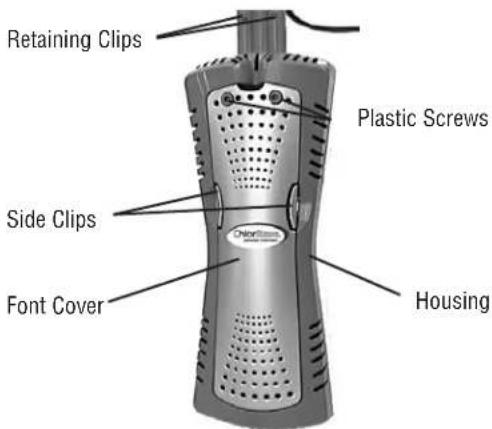
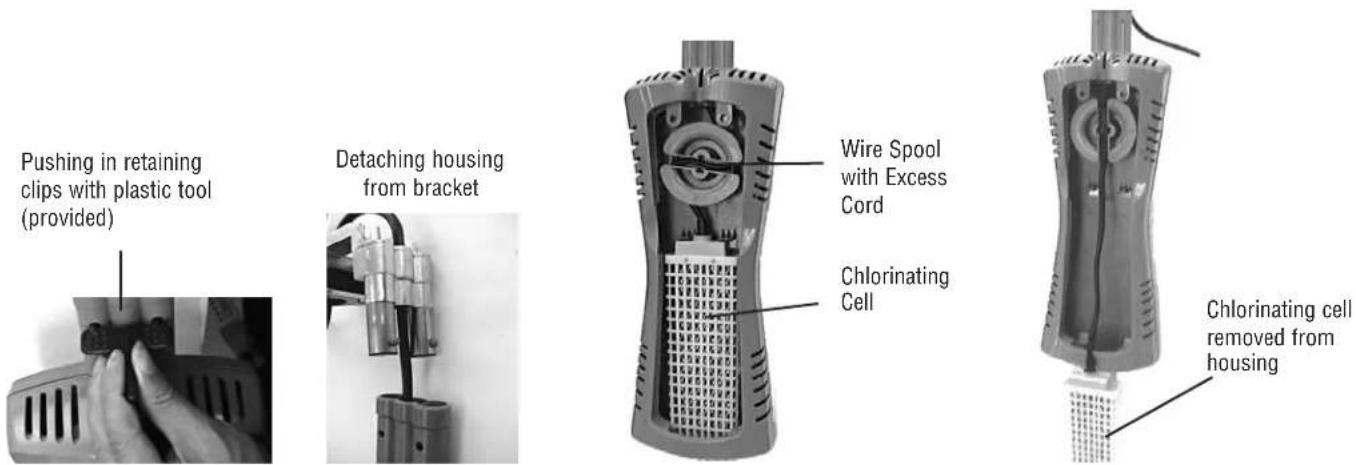
Remove the ChlorEase housing from the pool by pushing in the retaining clips to unlock the housing from the metal bracket, using the plastic tool provided. Grasp the housing and pull down, detaching it from the metal bracket. Remove the front cover from the housing by first unscrewing the two plastic screws on the front using the plastic key provided, and then grasp the two side clips to remove the front cover. Next, pull out the wire spool and unwind the excess cord allowing the housing to be pulled over outside of pool. Visually inspect the metal elements inside the mesh covering of the chlorinating cell. If heavy scale is present, the scale should be removed (see next section).
Removing Scale from Elements
Unsnap chlorinating cell from housing. Fill a deep container such as a milk carton with a mildly acidic product. Immerse the chlorinating cell only (NOT the housing) and let it set for 45 minutes. Hose off and inspect cell.
All scale (cake-like white mineral buildup) should have dissolved. If scale remains, change cleaning solution and repeat process. DO NOT SCRAPE SCALE WITH ANY TYPE OF TOOLS OR BRUSHES AS IT WILL DAMAGE TITANIUM COATING AND VOID WARRANTY!
To reinstall, rewind extra wire around spool neatly. Replace cell into housing. Replace locking pin and replace front cover. Plug unit into GFCI outlet.
Winterizing
It is preferable to remove the entire ChlorEase system for winter. Simply reverse the installation procedure and store the system in a shed or garage. ALWAYS CLEAN THE CELL BEFORE WINTER!
If you do not remove the entire system for winterization, the ChlorEase housing and cellmust be removed from the pool. The unit will be damaged if left in freezing water and should be removed following the instructions for cleaning the cell (above).
Use some twine or wire ties to attach the housing and cell securely to the cable that holds the cover onto the pool. Secure it in a way that the housing and cell will not swing around in the wind and cause damage.
NOTE: FAILURE TO REMOVE CELL FROM WATER FOR WINTERIZATION WILL VOID WARRANTY Regular Water testing
Test your pool water weekly just as you would with any chemical maintenance program for your pool. The production of chlorine by ChlorEase is directly affected by how well water balance is maintained (pH, Total Alkalinity and Calcium Hardness). IF PROPER WATER BALANCE IS NOT MAINTAINED, CORROSION AND/OR SCALING CAN OCCUR IN THE ENTIRE POOL ENVIRONMENT.

THREE YEAR LIMITED WARRANTY
ChlorEase
Three year limited warranty from date of original purchase for manufacturing defects under normal and reasonable use, and subject to the maintenance requirements and installation guidelines set forth in the product instruction manual. This warranty covers full replacement of the product for one year from the original purchase date of the product; 50% of the MSRP will be payable by the purchaser towards replacement of the product after one year from original purchase date until the end of the second year; 75% of the MSRP will be paid by the purchaser towards replacement of the product after two years from original purchase date until the end of the third year.
THIS WARRANTY IS SUBJECT TO THE TERMS, LIMITATIONS AND EXCLUSIONS DESCRIBED BELOW, AND THERE ARE NO OTHER WARRANTYES OR REPRESENTATIONS, EITHER EXPRESS OR IMPLIED, WHETHER OF MERCHANTABILITY, FITNESS FOR A PARTICULAR PURPOSE, OR OTHER, MADE BY THE MANUFACTURER, OTHER THAN THOSE SPECIFICALLY SET FORTH IN THIS WRITTEN WARRANTY
What is Covered: SmartPool, Inc. (SmartPool) warrants its electronic product to be free from defects in material and workmanship when leaving the factory.
What is not Covered: Any type of damage to the product due to improper installation, maintenance, or failure to provide necessary and reasonable maintenance; any damage or injury caused by misuse and/or unreasonable use of the product; batteries (if applicable); damage due to or related to improper draining, winterizing, storage or Acts of God; SmartPool will not honor any claims for damage to any products in transit unless damage to the shipping container is noted at the time of delivery on the transfer company's delivery bill.
THE WARRANTY OBLIGATIONS OF SMARTPOOL ARE LIMITED TO REPAIR OR REPLACEMENT OF THE PRODUCT OR OF ANY DEFECTIVE COMPONENT, AT THE OPTION OF SMARTPOOL. UNDER NO CIRCUMSTANCES WILL SMARTPOOL BE LIABLE OR RESPONSIBLE FOR ANY CONSEQUENTIAL OR INCIDENTAL DAMAGES, AND/OR CHARGES FOR LABOR. SMARTPOOL SHALL NOT BE LIABLE OR RESPONSIBLE UNDER ANY CIRCUMSTANCES OR ANY AMOUNT FOR ANY CONSEQUENTIAL OR INCIDENTAL DAMAGES, OR FOR ANY INJURIES OR DAMAGES TO PERSON OR PROPERTY USING OR USED IN CONNECTION WITH THE PRODUCT, OR FOR ANY OTHER LOSS OF PROFITS OR OTHER COSTS OR EXPENSES OF ANY KIND OR CHARACTER. IF SMARTPOOL DETERMINES THAT EITHER REPAIR OR REPLACEMENT OF THE PRODUCT IS NECESSARY, SMARTPOOL MAY EITHER REPAIR THE PRODUCT AT A NOMINAL CHARGE TO THE OWNER OR REPLACE THE PRODUCT AS PER THE REPLACEMENT COST SCHEDULE DESCRIBED ABOVE. SMARTPOOL RESERVES THE RIGHT TO SUPPLY REFURBISHED PRODUCTS OR PARTS. THE OWNER BEARS THE SOLE RESPONSIBILITY FOR PRE-PAID RETURN OF THE PRODUCT TO SMARTPOOL, AND ALL REARIED OR REPLACED PRODUCTS WILL BE RETURNED AT THE OWNER'S EXPENSE.
NO PERSON, FIRM, OR CORPORATION IS AUTHORIZED TO MAKE REPRESENTATIONS OR INCUR ANY OBLIGATIONS IN THE NAME OF OR ON BEHALF OF SMARTPOOL, EXCEPT AS STATED HEREIN. THE REMEDIES SET FORTH IN THIS WARRANTY ARE EXPRESSLY UNDERSTOOD TO BE THE EXCLUSIVE REMEDIES AVAILABLE TO THE OWNER, AND THIS WARRANTY CONTAINS THE FULL AND COMPLETE AGREEMENT BETWEEN SMARTPOOL AND THE OWNER. THIS WARRANTY SETS FORTH THE ONLY OBLIGATIONS OF SMARTPOOL, WITH REGARD TO THIS PRODUCT, AND THERE ARE NO WARRANTYES WHICH EXTEND BEYOND THE DESCRIPTION ON THE FACE HEREOF.
The representations set forth herein are the only representations made by SmartPool, with respect to the product, and this warranty does not constitute either a performance or satisfaction guarantee. It is the responsibility of the product owner to regularly test and check the product for proper function and safety.
This warranty gives the original owner specific legal rights. You may have other rights depending on where you live.
What you must do to file a claim: Call 1-732-730-9880 to initiate a claim.

MODE D'EMPLOI
Table des matieres
Avertissements 10
Installation 11



- IMPORTANT SAFETY INSTRUCTIONS READ AND FOLLOW ALL INSTRUCTIONS
- Introduction
- Installation
- Water Chemistry
- Table 2
- Table 2.1
- Salt Level
- How to Calculate Pool Size
- Type of Salt to Use
- Adding Salt
- Removing Salt
- Stabilizer (Cyanuric Acid)
- Startup and Spring Opening
- Troubleshooting
- Maintenance of your ChlorEase System
- Cleaning the Cell DO NOT REMOVE THE MESH COVERING THE CELL! INSIDE ELEMENT IS SHARPI
- Removing Scale from Elements
- Winterizing
- NOTE: FAILURE TO REMOVE CELL FROM WATER FOR WINTERIZATION WILL VOID WARRANTY Regular Water testing
- THREE YEAR LIMITED WARRANTY
- ChlorEase
- MODE D'EMPLOI
- Table des matieres
Brand : GRE
Model : AR2084
Category : Swimming Pool