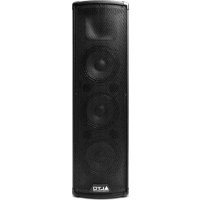
Trouper - Loudspeaker ALTO - Free user manual and instructions
Find the device manual for free Trouper ALTO in PDF.



| Product Type | Powered active speaker |
| Brand | Alto Professional |
| Model | Trouper |
| Power Supply | Mains (power cable included) |
| Bluetooth | Yes, range up to 24 m (80 ft) |
| Audio Inputs | 2x XLR/TRS combo (6.35 mm) for Ch.1 and Ch.2; 1x RCA/3.5 mm for Ch.3 |
| Audio Output | Link Output (XLR) to connect a second speaker |
| Controls | Master volume, per-channel input volume, Bass, Treble |
| Wireless Functions | Bluetooth pairing, stereo linking (Stereo Link) |
| Mounting | On a stand (respect the stand's maximum weight) |
| Safety | Complies with OSHA noise exposure standards; do not use with the grille removed |
| Fuse | Replaceable, rating indicated under the power input |
| Microphone | Compatible with dynamic microphones; no +48V phantom power |
| Recommended Use | Music playback, vocals, guitar (preferably with active pickup) |
| Box Contents | Trouper speaker, power cable, user guide, safety instructions |
| Warranty | See included safety instructions and warranty information guide |
| Support | Website: altoprofessional.com/support |
Frequently Asked Questions - Trouper ALTO
User questions about Trouper ALTO
0 question about this device. Answer the ones you know or ask your own.
Ask a new question about this device
Download the instructions for your Loudspeaker in PDF format for free! Find your manual Trouper - ALTO and take your electronic device back in hand. On this page are published all the documents necessary for the use of your device. Trouper by ALTO.
USER MANUAL Trouper ALTO
User Guide (English)
Introduction
Box Contents
Trouper
Power Cable
User Guide
Safety & Warranty Manual
Support
For the latest information about this product (system requirements, compatibility information, etc.) and product registration, visit altoprofessional.com.
For additional product support, visit altoprofessional.com/support.
Setup
Connection Diagrams
Items not listed under the Box Contents are sold separately.
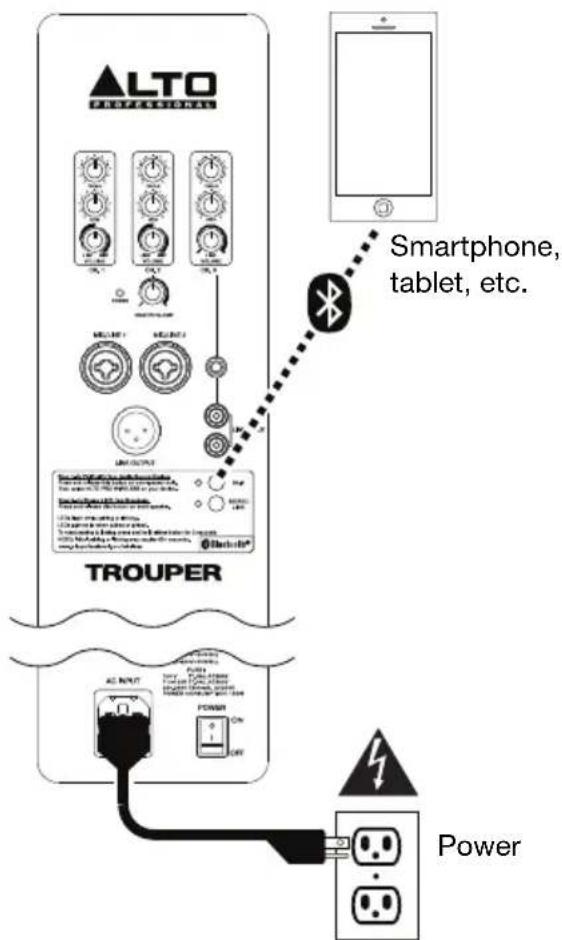
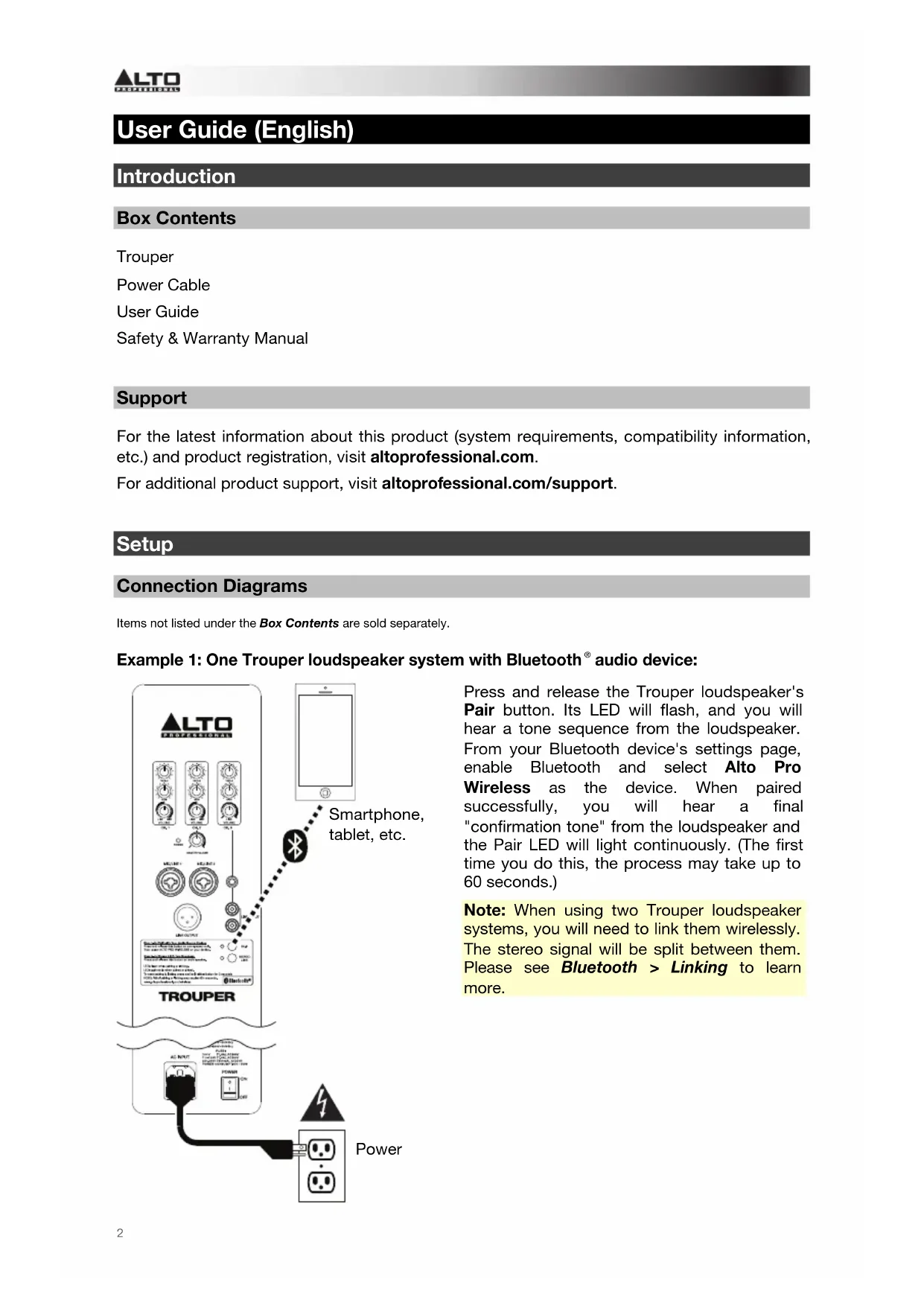
Example 1: One Trouper loudspeaker system with Bluetooth® audio device:
Press and release the Trouper loudspeaker's Pair button. Its LED will flash, and you will hear a tone sequence from the loudspeaker. From your Bluetooth device's settings page, enable Bluetooth and select Alto Pro Wireless as the device. When paired successfully, you will hear a final "confirmation tone" from the loudspeaker and the Pair LED will light continuously. (The first time you do this, the process may take up to 60 seconds.)
Note: When using two Trouper loudspeaker systems, you will need to link them wirelessly. The stereo signal will be split between them. Please see Bluetooth > Linking to learn more.
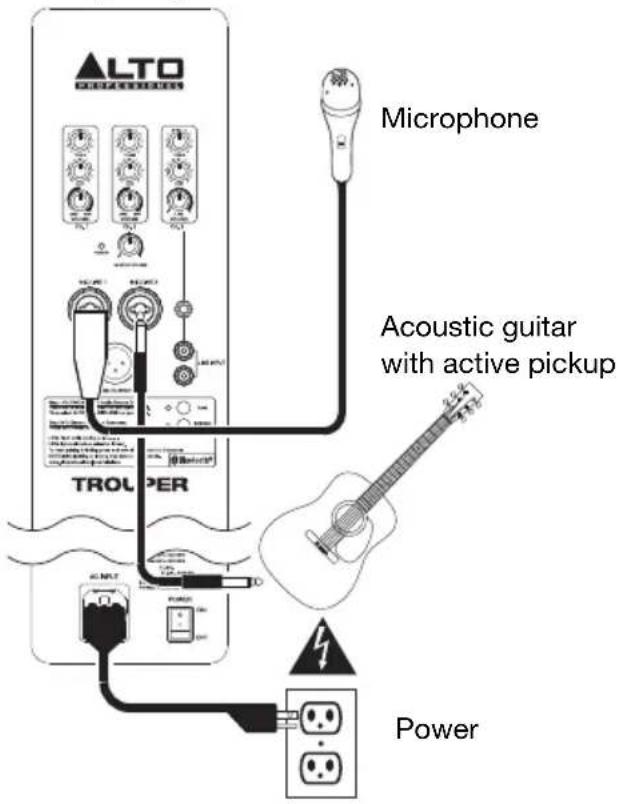
Example 2: One Trouper loudspeaker system with vocal microphone and guitar with active pickup:
Connect a dynamic microphone to the Ch. 1 Input using an XLR or 1 / 4'' (6.35 mm) TRS cable. Connect a guitar with an active pickup to the Ch. 2 Input using a 1 / 4'' (6.35 mm) TS cable.
Note: When using the Trouper loudspeaker system with a guitar, we recommend using one with active pickups rather than passive pickups. If you use a guitar with passive pickups, connect it to an external preamp or direct input (DI) box, and connect the line-level output to the loudspeaker.
We recommend using dynamic microphones with the Trouper loudspeaker rather than condenser microphones. If you use a microphone that requires +48V of phantom power, you must connect it to an external phantom power supply. Trouper does not supply any phantom power.
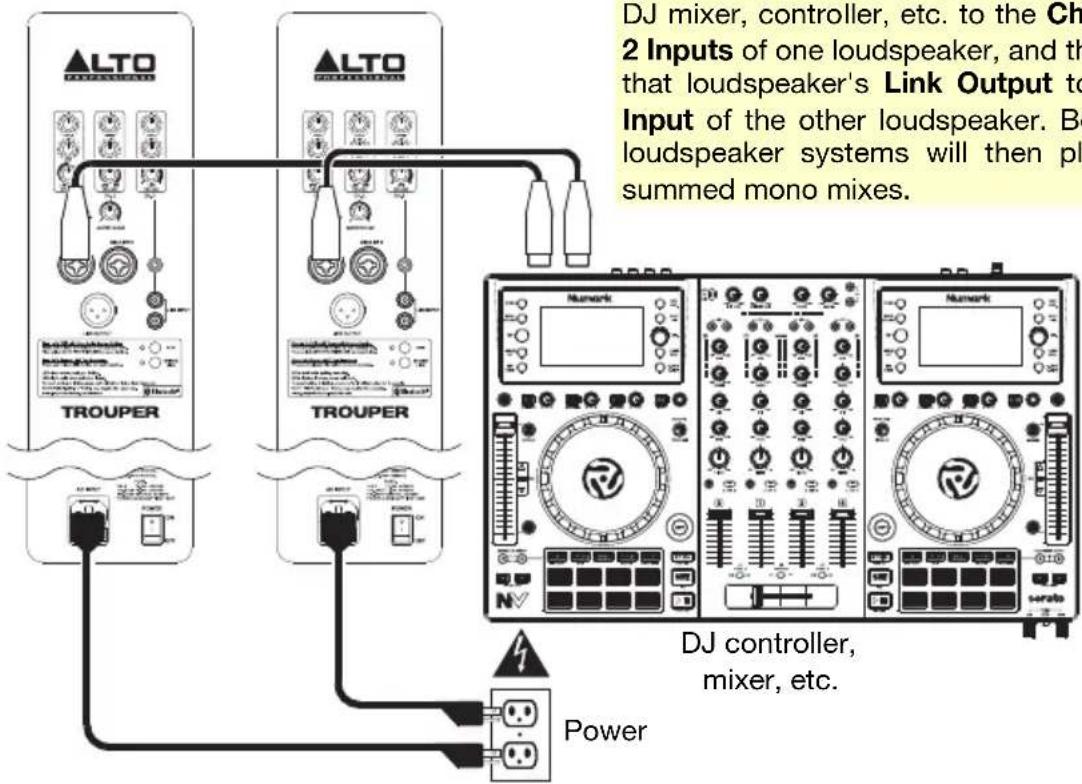
Example 3: Two Trouper loudspeaker systems with remote mixer, DJ controller, etc.:
Connect the left and right output of your DJ mixer, controller, etc. to Ch. 1 Input of each loudspeaker system using XLR or 1/4'' (6.35 mm) TRS cables.
Tip: To send the same mix to both Trouper loudspeakers, connect both channels of your DJ mixer, controller, etc. to the Ch. 1 and Ch. 2 Inputs of one loudspeaker, and then connect that loudspeaker's Link Output to the Ch. 1 Input of the other loudspeaker. Both Trouper loudspeaker systems will then play identical summed mono mixes.
Important Safety Precautions
Please note: Alto Professional and inMusic are not responsible for the use of its products on the misuse of this information for any purpose. Alto Professional and inMusic are not responsible for the misuse of its products caused by avoiding compliance with inspection and maintenance procedures. Please also refer to the included safety and warranty manual for more information.

Caution: To reduce the risk of electric shock, do not connect TROUPER to a power outlet while the grille is removed.

Note: For electrostatic discharge (ESD) tests ETSI EN 301 489-1 & ETSI EN 301 489-17, if the unit receives ESD, you may need to use your Bluetooth device's Settings menu to manually reconnect.
Stand-Mounting
Always install loudspeakers in accordance with applicable electrical and building codes.
- Install the loudspeaker according to its maximum weight. Check the specifications of your stand or pole to ensure it can support the loudspeaker's weight. Also, observe all safety precautions specified by the manufacturer.
- Do not mount multiple loudspeakers on the same stand or pole.
Always verify that the stand or pole is on a flat, level, and stable surface. Also, fully extend the legs of tripod-style stands, and ensure its legs do not present a trip hazard.
- Inspect the stand (or pole and associated hardware) before each use and do not use equipment with worn, damaged, or missing parts.
- Always be cautious in windy, outdoor conditions. You may need to place additional weight (e.g., sandbags) on stand's base to improve stability. Do not attach banners or similar items to any part of a loudspeaker system. Such attachments could act as a sail and topple the system.
Unless you are confident that you can handle the loudspeaker's weight, ask another person to help you lift it onto the stand or pole.
- Make sure your cables are out of the way of performers, production crew, and audience so they will not trip over them, pulling the loudspeaker off the stand or pole.
Sound Level
Permanent hearing loss may be caused by exposure to extremely high noise levels. The U.S. Occupational Safety and Health Administration (OSHA) has specified permissible exposures to certain noise levels. According to OSHA, exposure to high sound pressure levels (SPL) in excess of these limits may result in hearing loss. When using equipment capable of generating high SPL, use hearing protection while such equipment is under operation.
| Hours per day | SPL (dB) | Example | |
| 8 | 90 | Small | gig |
| 6 | 92 | Train | train |
| 4 | 95 | Subway | |
| 3 | 97 | desktop monitors | music |
| 2 | 100 | Classical | |
| 1.5 | 102 | Riveting | machine |
| 1 | 105 | Machine | factory |
| 0.50 | 110 | Airport | |
| 0.25 or less | 115 | Rock concert |
Bluetooth
Important:
- These steps are for wireless audio streaming only.
- When pairing or linking, do only one process at a time. Starting one process before the other is finished will cancel the first.
- The tone sequences for pairing and linking are different, so you can easily distinguish between the two.
About Range
Trouper loudspeaker systems use an advanced, extended-range Bluetooth antenna design, allowing for ranges far greater than traditional Bluetooth devices. The typical range is 60-80 feet (18-24 meters) with a clear line of sight. However, the range may vary depending on your source device and the environment.
To maximize the range:
- Set your source device on a flat surface and make sure there are no obstacles between the loudspeaker and your device (e.g., walls, furniture, etc.).
- Turn off your source device's Wi-Fi.
- Turn off any unneeded 2.4 GHz devices in the nearby vicinity (e.g., other Bluetooth devices, baby monitors, Wi-Fi access points, microwave ovens, etc.).
- Try using a different Bluetooth source device. Bluetooth signal strength varies between different devices.
Pairing
To pair Trouper to your Bluetooth device:
- Do this on one loudspeaker system only: With the loudspeaker powered on, press and release its Pair button. Its LED will flash, and you will hear a tone sequence from the loudspeaker. (If you are using two Trouper loudspeaker systems, this one will be the "master." Also see the Linking section below.)
- From your Bluetooth device's settings page, enable Bluetooth and select Alto Pro Wireless as the device. When paired successfully, you will hear a final "confirmation tone" from the loudspeaker and the Pair LED will light continuously. (This process may take up to 60 seconds.)
Note: If your device prompts you to enter a PIN code to pair it to the speaker, enter 0000 (four zeros). If your device prompts you to select the connection type, select stereo speakers, advanced audio, or a similar option.
- Turn the loudspeaker's Ch 3. Input Volume knob to its lowest setting.
- On your Bluetooth device, play music. We recommend setting the playback volume at its maximum setting.
- Once your device is paired to the loudspeaker, the loudspeaker will remember the device even after power-cycling it. To reconnect it, go to your device's Bluetooth settings page and select Connect to re-establish the connection.
Linking
Note: The loudspeaker system that is connected to your source device is the "master"; the linked loudspeaker system is the "slave." The source device sends its signal to the master, and the master relays the signal to the slave.
If you are using two Trouper loudspeaker systems:
- Make sure no audio is playing from your Bluetooth device. If it is, pause/stop playback and wait 5 seconds.
- Press and release the Stereo Link button on each loudspeaker.
- Both loudspeakers' LEDs will flash while "searching" for each other, and you will hear a tone sequence from both loudspeakers. (This process may take up to 60 seconds. However, the very first time you link the loudspeakers, the process may take up to 3 minutes.)
- When they are successfully linked, you will hear a final "confirmation tone" from both loudspeakers and the Stereo Link LEDs on both loudspeakers will light continuously.
Note: The stereo signal will be split between the two loudspeakers: the master loudspeaker will play the left channel; the slave loudspeaker will play the right channel.
Tip: When using two loudspeakers, we recommend labeling the master loudspeaker so you can distinguish between the two in future setups.
Additional Information
Trouper loudspeaker systems will remember their pairing and linking settings even after they are powered off. When you turn the loudspeakers back on, they will automatically reconnect to each other. When the connections are re-established between the loudspeakers, the LEDs next to the Stereo Link buttons will light continuously.
Tip: Once your device is paired to the loudspeaker, the loudspeaker will remember the device even after power-cycling it. To reconnect, go to your device's Bluetooth settings page and select Connect to re-establish the connection.
If the connection is lost between the loudspeakers, or between the loudspeaker and the source device, and if they do not reconnect automatically, power-cycle both loudspeakers and allow them to reconnect.
When the two loudspeakers are linked, you can only pair your source device to the master loudspeaker. The slave loudspeaker's Pair button will be disabled; if you press it, you will hear 3 rapid "beeps" to indicate that the button is "locked out."
To erase all previous pairing and linking settings, press and hold either the Pair button on the Stereo Link button for 3 seconds. You will hear a long tone to confirm its pairing and linking settings have been erased. The LEDs will also turn off. Do this on both the master and the slave loudspeakers. Now, you can pair to a new source device or link the loudspeakers again.
Note: The volume of the pairing and linking tones are pre-set to an optimal level.
Features
Rear Panel
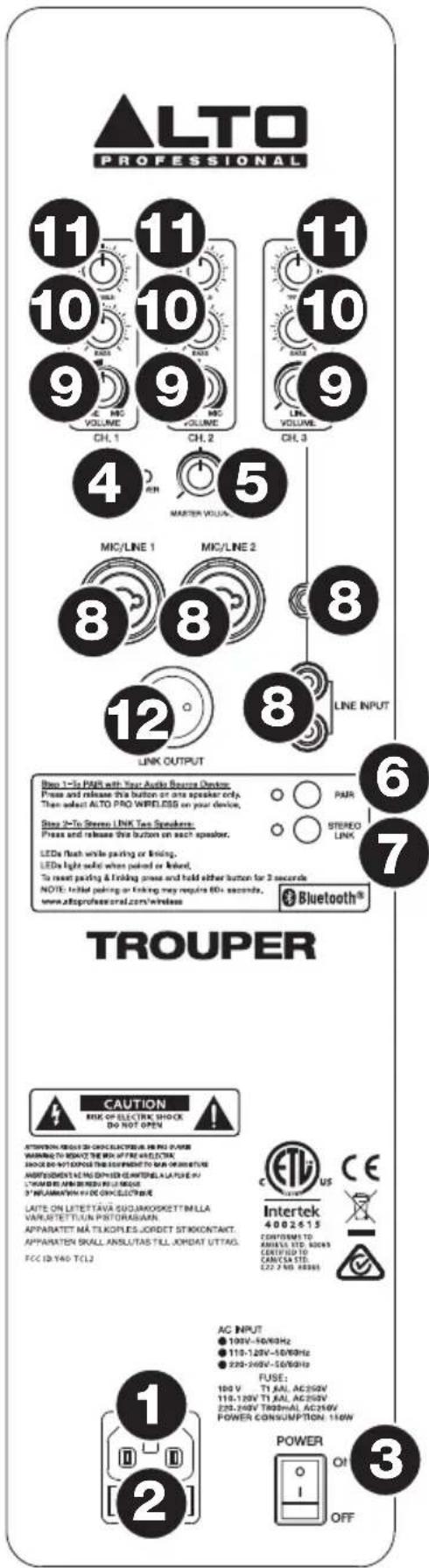
- Power Input: Connect the included power cable to this input and connect the other end of the cable to a power source. Make sure the loudspeaker's Power Switch is set to "off" when plugging and unplugging the cable.
- Fuse: If the unit's fuse is broken, lift this tab to replace the fuse. Replace it with a fuse with an appropriate rating (printed under the unit's power cable input). Using a fuse with an incorrect rating can damage the unit and/or fuse.
- Power Switch: Turns the loudspeaker system on/off. Make sure the Master Volume knob is set to "zero" before turning it on.
- Power LED: Illuminates when the loudspeaker system is on.
- Master Volume: Turn this knob to adjust the output volume of the loudspeaker system. This does not affect the Link Output volume.
- Pair: Press and release this button to pair the loudspeaker system to your Bluetooth device. See the Bluetooth > Pairing section for pairing instructions.
- Stereo Link: When using a pair of Trouper loudspeaker systems, press and release this button on each loudspeaker to "link" them for wireless stereo audio. See the Bluetooth > Linking section for more information.
- Input: Use a standard 1/4'' (6.35 mm) TRS, TS, or XLR cable (not included) to connect your sound source to Channel 1 or 2. Use a standard 1/8'' (3.5 mm) TRS or RCA cable (not included) to connect a sound source to Channel 3. If you use a microphone that requires +48V of phantom power, you must connect it to an external phantom power supply. Trouper does not supply any phantom power.
- Input Volume: Turn this knob to adjust the input volume of the channel. (The signal from a paired Bluetooth device is sent to Channel 3.)
- Input Treble: Adjusts the high/treble frequencies of the channel. (The signal from a paired Bluetooth device is sent to Channel 3.)
- Input Bass: Adjusts the low/bass frequencies of the channel. (The signal from a paired Bluetooth device is sent to Channel 3.)
- Link Output: Use a standard XLR cable (not included) to connect this output to the input of another loudspeaker. The signal sent from this output is a summed mono signal of all three Inputs, post-Input Volume.
Technical Specifications
| System Type | 2-way bi-amplified powered loudspeaker | |
| Power Amplifier | Bi-amplified; 200 W peak: 130 W LF + 70 W HF | |
| High-Frequency | 1 1" (25.4 mm) neodymium compression driver | |
| Low-Frequency | 3 6.5" (165 mm) with 1" (25.4 mm) voice coil | |
| Frequency Response | 65 Hz - 20 kHz | |
| Crossover Frequency | 1.8 KHz, electronic | |
| Maximum SPL | 117 dB-SPL @ 1 m (continuous), 120 dB-SPL @ 1M (peak) | |
| Connections | 2 XLR-1/4" (6.35 mm) TRS combination inputs (Channels 1 & 2) 1 1/8" (3.5 mm) TRS/stereo input (Channel 3) 1 RCA (line-level) stereo input pair (Channel 3) 1 XLR link output 1 IEC AC power connection | |
| Equalization | 2-band (LF, HF) for Channels 1 & 2 | |
| Bluetooth | A2DP streaming audio with full stereo link when using 2 Trouper loudspeakers | |
| Protections | Thermal, overload | |
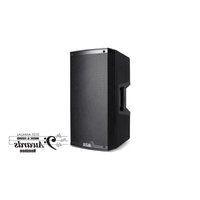
| Enclosure | Trapezoidal wood cabinet MDF enclosure with vinyl wrap; black metal protective corners; molded, ergonomically designed plastic handle; 4 rubber feet; 36 mm pole socket for stand mounting | |
| Power | AC Input: | 100 V AC, 50/60 Hz (±10%) 110-120 V AC, 50/60 Hz (±10%) 220-240 V AC, 50/60 Hz (±10%) |
| Fuse: | 100-120 V T1.6AL AC250V 220-240 V T800mAL AC250V | |
| Power Consumption: | 150 W | |
| Dimensions Height x width x depth) | 29.16" x 8.36" x 10.12" 741 mm x 212 mm x 257 mm | |
| Weight | 22.5 lbs. 10.2 kg | |
Specifications are subject to change without notice.
Trademarks and Licenses
Alto Professional is a trademark of inMusic Brands, Inc., registered in the U.S. and other countries. The Bluetooth word mark and logo are owned by the Bluetooth SIG, Inc. All other product or company names are trademarks or registered trademarks of their respective owners.
altoprofessional.com
- USER GUIDE (ENGLISH)
- INTRODUCTION
- BOX CONTENTS
- SUPPORT
- SETUP
- CONNECTION DIAGRAMS
- EXAMPLE 3: TWO TROUPER LOUDSPEAKER SYSTEMS WITH REMOTE MIXER, DJ CONTROLLER, ETC
- IMPORTANT SAFETY PRECAUTIONS
- STAND-MOUNTING
- SOUND LEVEL
- BLUETOOTH
- IMPORTANT
- ABOUT RANGE
- TO MAXIMIZE THE RANGE
- PAIRING
- TO PAIR TROUPER TO YOUR BLUETOOTH DEVICE
- LINKING
- IF YOU ARE USING TWO TROUPER LOUDSPEAKER SYSTEMS
- ADDITIONAL INFORMATION
- FEATURES
- REAR PANEL
- TECHNICAL SPECIFICATIONS
- TRADEMARKS AND LICENSES
- ALTOPROFESSIONAL.COM
Brand : ALTO
Model : Trouper
Category : Loudspeaker