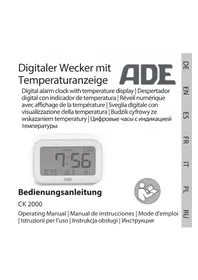
CK 2000 - Alarm Clock ADE - Free user manual and instructions
Find the device manual for free CK 2000 ADE in PDF.




| Product type | Clock radio |
| Brand | ADE |
| Model | CK 2000 |
| Dimensions (L × H × D) | 108 × 38 × 71 mm |
| Power supply | 2 LR03 (AAA) batteries, 1.5 V |
| Display | Time, date, indoor temperature, alarm icon, 12/24h format |
| Alarm | Alarm with adjustable volume (LO1/LO2), snooze function 9 min, repeat |
| Weekend function | Alarm deactivation on Saturday and Sunday |
| Backlight | Touch (SNOOZE/LIGHT button), duration about 5 seconds |
| Temperature | Measurement range: -10 °C to 50 °C (14 °F to 122 °F), display in °C or °F |
| Automatic alarm stop | After 3 minutes if no button is pressed |
| Cleaning | Soft dry cloth, do not immerse |
| Safety | Keep out of reach of children, risk of battery ingestion |
| Warranty | 2 years, free support by repair or exchange |
| Distributor | Waagen-Schmitt GmbH, Hamburg, Germany |
Frequently Asked Questions - CK 2000 ADE
User questions about CK 2000 ADE
0 question about this device. Answer the ones you know or ask your own.
Ask a new question about this device
Download the instructions for your Alarm Clock in PDF format for free! Find your manual CK 2000 - ADE and take your electronic device back in hand. On this page are published all the documents necessary for the use of your device. CK 2000 by ADE.
USER MANUAL CK 2000 ADE
2x LR03 (AAA), 1,5 V ---
22143 Hamburg, Germany
You have chosen to purchase a high-quality ADE brand product, which combines intelligent functions with an exceptional design. With this alarm clock, you always have a precise time in view. The wealth of experience of the ADE brand ensures a high technical standard and proven quality.
We wish you easy timing at any time!
Your ADE Team
General information
About this operating manual

This operating manual describes how to operate and maintain your product safely.
Keep this operating manual in a safe place for future reference. If you pass this product on to someone else, pass on this operating manual as well. Failure to observe this operating manual may result in injuries or damage to your product.
- Remove the protective film from the display.
Explanation of symbols

This symbol combined with the word DANGER warns of serious injuries.

This symbol combined with the word WARNING warns of moderate and mild injuries.

This symbol combined with the word NOTE warns of material damage.

This symbol indicates additional information and general notes.
Table of contents
General information 27
Intended use 30
Safety. 30
Overview 34
Scope of delivery. 36
Start-up 36
Setting the time 37
Selecting the time format. 38
Set date 39
Alarm 40
Other functions 43
Cleaning. 44
Fault and remedy 45
Technical data 45
Declaration of conformity 46
Warranty 47
Disposal 48
Intended use
This alarm clock is designed for private use in dry indoor environments.
Safety
- This product may be used by children aged 8 and above, as well as by persons with reduced physical, sensory, or mental capacities or lacking experience and knowledge if they are supervised or have been instructed in the safe use of the product and understand the risks that may arise.
Children must not play with the product.
- Cleaning and user maintenance must not be carried out by children, unless they are 8 years of age or older and are being supervised.
- Batteries, when swallowed, can be life-threatening. Keep the product and batteries out of reach of small children. If batteries have been swallowed, seek medical help immediately.
DANGER for children
- Keep children away from packaging material. There is a risk of choking if swallowed.
RISK of fire/burning and/or explosion
- There is a risk of explosion if the batteries are replaced improperly. Replace the batteries only with the same or an equivalent battery type. Observe the "Technical Data".
-
Batteries must not be recharged, reactivated by other means, dismantled, thrown into fire, or short-circuited. Otherwise, there is an increased risk of explosion and leakage; furthermore, gases may escape!
-
Avoid contact of the battery fluid with skin, eyes, and mucosa. In case of contact, immediately rinse the affected areas with plenty of clean water and consult a doctor.
BEWARE of material damage
- Protect the alarm clock from strong shocks, vibrations, and moisture.
- Remove the batteries from the item when they are exhausted or if you will not use the alarm clock for an extended period of time. This prevents damage that may be caused by leakage.
- When inserting and changing batteries, pay attention to the correct polarity (+/-) .
-
Do not expose the batteries to extreme conditions, for example, by storing them on radiators or under direct sunlight. Increased risk of leakage!
-
Clean the battery and device contacts, as needed, before inserting the battery.
-
Only use batteries of the same type. Do not use different types or used and new batteries together.
-
Do not make any changes to the product. Only allow repairs to be carried out by a specialist workshop. Repairs carried out improperly can considerably endanger the user.
Overview
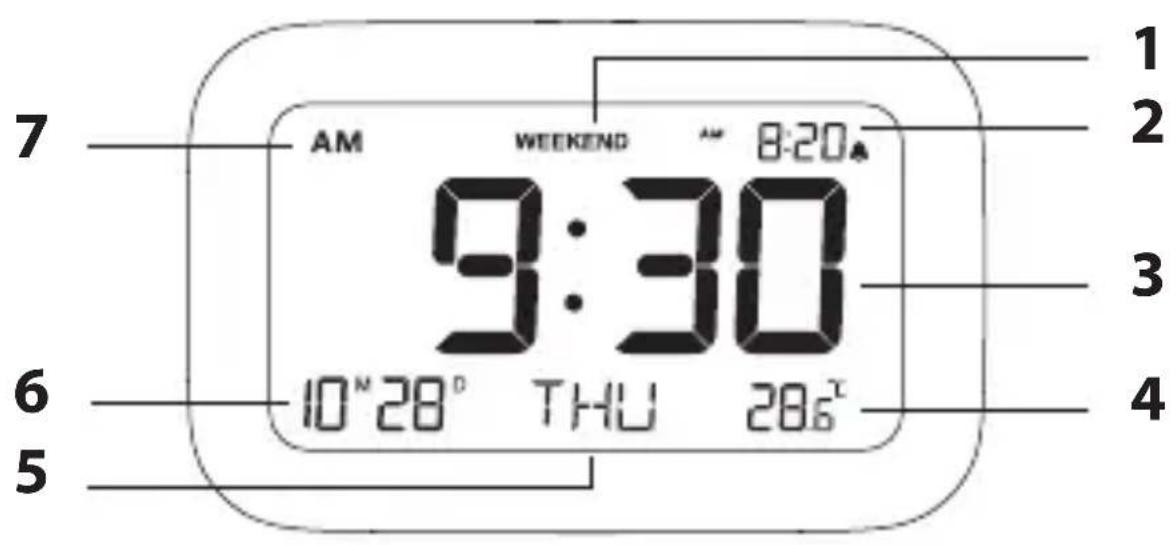
1 Weekend mode WEEKEND active
2 Set alarm time
3 Time
4 Indoor temperature (^ or ^ F)
5 Day of the week
6 Date display (month/day)
7 AM/PM (only for 12-hour time format)
34
Z
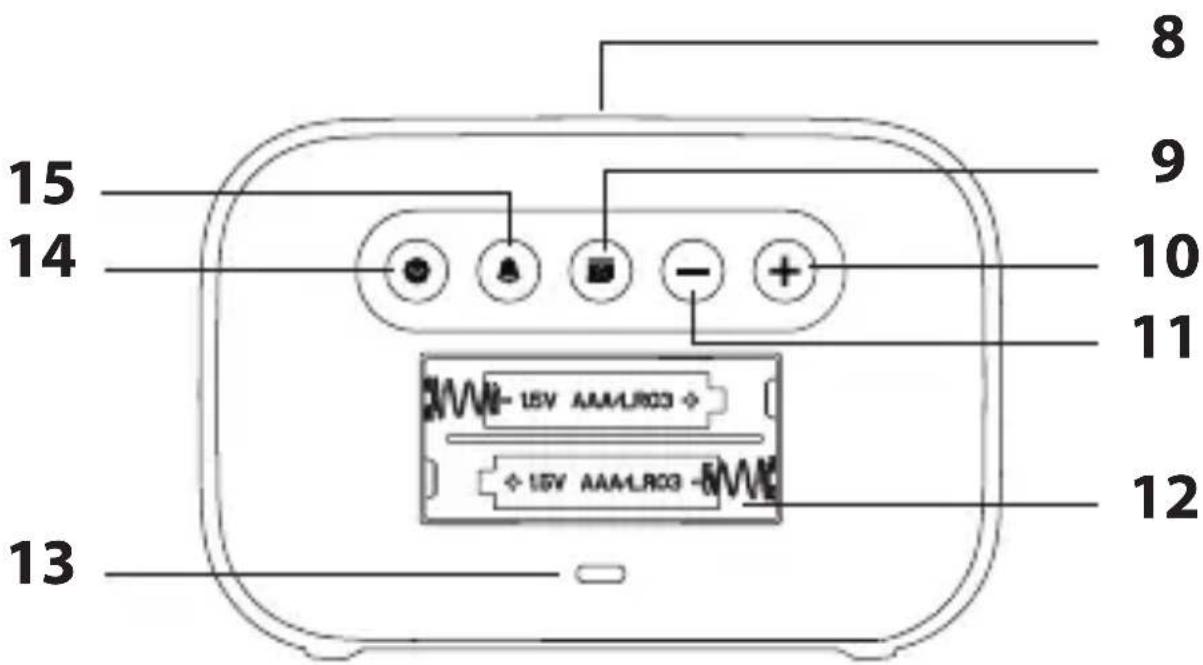
8 SNOOZE/LIGHT sensor field
9 Button: Set date
10 Button+: Increase value
11 Button -: Decrease value
12 Battery compartment for 2x LR03 (AAA)
13 Speaker
14 Button : Set time and time format
15 Button : Alarm function on/off
Scope of delivery
Alarm
- 2x LR03 (AAA) batteries, 1.5 V
- Operating manual
Start-up
For use, you will need two LR03 (AAA), 1.5V batteries.
- Remove the back cover.
- Insert the batteries as shown on the bottom of the battery compartment. Pay attention to the correct polarity (+/-) .
- Put the cover back on and press it down until it clicks into place.
When the batteries are inserted, all displays are shown for a brief moment, the display is illuminated and a beep is heard. Shortly thereafter, the room temperature reading will appear in the lower right corner of the display.
Notes on changing the battery:
- Only use the battery type specified in the "Technical Data".
Always replace all batteries.
- Dispose of old batteries in an environmentally friendly manner, see "Disposal".
Setting the time

Press and hold down -or t* speed up the progress of the displayed values in increasing or decreasing order.
- Press and hold down the button until the hour digit flashes on the display.
- Use the - or + buttons to set the current hour.
- Briefly press the key : The minute digit flashes on the display.
- Use the - or + buttons to set the current minute time, if necessary.
- Finally, press briefly. The time has been set.
Selecting the time format
-Briefly press the key If the display shows "AM" or "PM", the 12-hour format is set.
Set date
- Press and hold down the button until the year indicator flashes on the display.
- Use the - or + buttons to set the current calendar year.
- Briefly press the key:
The month digit flashes on the display.
- Use the - or + buttons to set the current month.
- Briefly press the key:
The day digit flashes on the display.
- Use the - or + buttons to set the current day.
- Finally, press briefly.
Alarm
Setting the alarm time
- Press and hold down the button until the wake-up hour digit flashes in the top right corner of the display.
- Use the - or + buttons to set the desired wake-up hour.
- Briefly press the key : The wake-up minute digit flashes on the display.
- Use the - or + buttons to set the desired wake-up minute.
- Briefly press the key A : "LO1" appears on the display and you can hear the alarm volume.
- Use the - or + buttons to set the desired alarm volume. "LO1" (loud) or "LO2" (quiet).
-
Press key.
-
The alarm time is set and the alarm function is active (pay attention to the display A ).
- Finally, use the - button to select the desired alarm setting:
"WEEKEND" is displayed: No alarm function on Saturday and Sunday, "WEEKEND" is not displayed: Alarm function is also active on weekends.
Waking up
At the set time, you will be woken by an alarm signal, which will become more intense as the waking time increases.
Interrupting the alarm for 24 hours
-Press any button (except SNOOZE/LIGHT) to interrupt the alarm. After 24 hours, the alarm will be triggered again.
Auto-stop function
If you do not press a button, the alarm switches off automatically after 3 minutes. After 24 hours, the alarm will be triggered again.
Repeat alarm (snoopze function)
- Press the SNOOZE/LIGHT button 1x when the alarm sounds.
The alarm time and flash on the display. After 9 minutes, the device switches on again and wakes you up again. This procedure can be repeated multiple times.
Switching the alarm function off and on again
-Briefly press the button in normal time mode. The alarm symbol goes off and "OFF" appears in the top right corner of the display.
-If you briefly press the button again, the set alarm time and symbol will appear on the display; the alarm function is enabled again.
Other functions
Illuminating the display
- Press the SNOOZE/LIGHT sensor field to turn on the display backlight for approx. 5 seconds.
Change temperature unit
-In normal time mode, press the button to display the temperature in degrees Celsius (^) or degrees Fahrenheit (^) .
Cleaning

Do not immerse the alarm clock in water or other liquids. Do not use rough, scratching or abrasive cleaning agents.
-If necessary, use a soft, dry cloth, or a slightly moistened one to wipe the alarm clock.
Fault and remedy
No function.
- Are the batteries empty or inserted the wrong way around?
Temperature indication appears too high. - Check whether the alarm clock is exposed to direct sunlight.
Technical data
Model: CK 2000 digital alarm clock
Battery:
2x LR03 (AAA), 1.5 V
Rated current: < 40 A
Measuring range: approx. -10 °C - 50 °C
(approx. 14^ F - 122^ F )
Dimensions: approx. 108 × 38 × 71 ~mm
Distributor (no service address):
Waagen-Schmitt GmbH
Neuer Höltigbaum 15
22143 Hamburg, Germany
Our products are constantly developed and
improved. For this reason, design and technical
modifications are possible at any time.
Declaration of conformity
Waagen-Schmitt GmbH hereby declares that the CK 2000 digital alarm clock complies with EU directives 2014/30/EU and 2011/65/EU.
This declaration loses its validity if any modification is made to the item that has not been agreed with us in advance.
Hamburg, March 2021
Waagen-Schmitt GmbH

Warranty
Waagen-Schmitt GmbH warrants for 2 years from the purchase date the cost-free rectification of defects in material and workmanship through repair or exchange.
In the event of a warranty claim, please return the product with the proof of purchase (specifying the reason for claim) to your dealer.
Disposing of the packaging

Dispose of the packaging with similar materials. Dispose of cardboard and carton as waste paper and of films to the collection point.
Disposing of the product
Dispose of the product in accordance with the regulations that apply in your country.

Devices must not be disposed of in normal household waste
At the end of its life, the product must be disposed of in an appropriate way.
In this way, valuable materials contained in the device will be recycled and the burden on the environment avoided. Bring the old device to a collection point for electronic waste or to a recycling depot. For more information, contact your local waste disposal firm or your local administrative body.

Standard and rechargeable batteries should not be disposed of along with household waste
All batteries and rechargeable batteries must be brought to a local or district collection point or to the retailer. Such batteries and rechargeable batteries can thus be disposed of in an environmentally friendly way.
2x LR03 (AAA), 1,5 V

HOMHaJIbHbI TOK: < 40 A
ДиапаЗОн
ca. -10^ C - 50^ C
n3mepen:
(ca. 14^ - 122^ )
Pa3mepbl: 108 x 38 x 71 mm
ДистрпбьюТОР:
Waagen-Schmitt GmbH
Neuer Höltigbaum 15
22143 Hamburg, Germany
Haça προύκυπην NOCTOΥHNO pa3BnBaetcγ
n COBepseHcTByeTc. Po 3Toi npuHne
KOHCTpyKTINBHbIe IN TexHnueCKne n3MeHeHnA
B03MOXHbI B IIO6Oe BpeMЯ.
Дeкларачnia O COOTBeTCTBnN
Waagen-Schmitt GmbH hactoIm 3aBnJeT, chTo cnfoBbIe yacbl CK 2000 cootBeTCTByOT dinpeKtNbam EC 2014/30/EUn 2011/65/EU.
3TO 3aBHeHne TepReT CBOU CNly, eCIn B TOBap BHOCaTc KaKHe-Im6o N3MeHeHn, KOTOpbIe He 6bln corglaCoBaHbI c HAMN 3apaHee.
Hamburg, map 2021
Waagen-Schmitt GmbH

TapaHTn
KoMaHnJa Waagen-Schmitt GmBrapaHTnpyeT
- General information
- About this operating manual
- Explanation of symbols
- Table of contents
- Intended use
- Safety
- DANGER for children
- RISK of fire/burning and/or explosion
- BEWARE of material damage
- Overview
- Scope of delivery
- Start-up
- Setting the time
- Selecting the time format
- Set date
- Alarm
- Setting the alarm time
- Waking up
- Interrupting the alarm for 24 hours
- Auto-stop function
- Repeat alarm (snoopze function)
- Switching the alarm function off and on again
- Other functions
- Illuminating the display
- Change temperature unit
- Cleaning
- Fault and remedy
- No function.
- Technical data
- Declaration of conformity
- Warranty
- Disposing of the packaging
- Disposing of the product
- Devices must not be disposed of in normal household waste
- Standard and rechargeable batteries should not be disposed of along with household waste
- Дeкларачnia O COOTBeTCTBnN
- TapaHTn
Brand : ADE
Model : CK 2000
Category : Alarm Clock