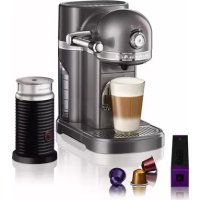
Nespresso & Aeroccino 5KES0504 - Coffee machine KITCHENAID - Free user manual and instructions
Find the device manual for free Nespresso & Aeroccino 5KES0504 KITCHENAID in PDF.



| Brand | KitchenAid |
| Model | Nespresso & Aeroccino 5KES0504 |
| Product type | Nespresso espresso coffee machine |
| Power supply | 220-240 V, 50/60 Hz |
| Pressure | 19 bar (approx.) |
| Water tank capacity | Approximately 1 L (approx.) |
| Capsule container capacity | Up to 14 used capsules |
| Brew volumes | 25 ml (ristretto), 40 ml (espresso), 60 ml, 90 ml, 110 ml (lungo), 130 ml |
| Automatic standby mode | 9 min (adjustable to 15, 20 or 30 min) |
| Special functions | Descaling, draining, factory reset |
| Capsule type | Exclusive Nespresso capsules |
| Maintenance and cleaning | Manual cleaning of water tank, grid, drip tray; monthly descaling recommended |
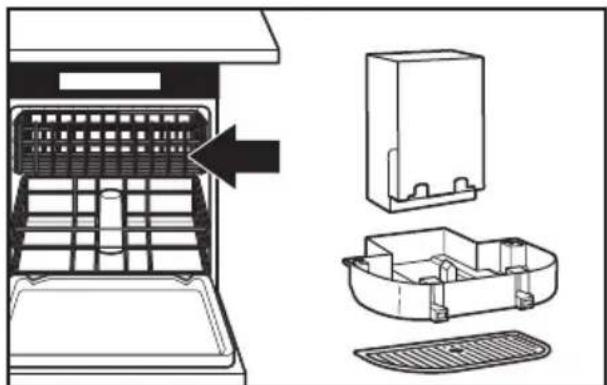
| Removable dishwasher-safe parts | Capsule container, grid, drip tray (top rack) |
| Warranty | 2 years |
| After-sales service | Nespresso Club (country-specific contacts) |
| Safety | Do not immerse, use on stable surface, unplug before maintenance |
| Included accessories | Water tank, drip tray, grid, Aeroccino (depending on model) |
Frequently Asked Questions - Nespresso & Aeroccino 5KES0504 KITCHENAID
User questions about Nespresso & Aeroccino 5KES0504 KITCHENAID
0 question about this device. Answer the ones you know or ask your own.
Ask a new question about this device
Download the instructions for your Coffee machine in PDF format for free! Find your manual Nespresso & Aeroccino 5KES0504 - KITCHENAID and take your electronic device back in hand. On this page are published all the documents necessary for the use of your device. Nespresso & Aeroccino 5KES0504 by KITCHENAID.
USER MANUAL Nespresso & Aeroccino 5KES0504 KITCHENAID
ESPRESSO MACHINE SAFETY
Important safeguards....6
Electrical requirements 12
Electrical equipment waste disposal....12
PARTS AND FEATURES
Parts and accessories....13
ASSEMBLING THE ESPRESSO MACHINE
Preparing the Espresso Machine for first use 14
OPERATING THE ESPRESSO MACHINE
Preheating....16
Brewing espresso 16
Automatic standby mode 18
CARE AND CLEANING
Cleaning the Espresso Machine....20
Emptying the Espresso Machine....21
Descaling 23
TROUBLESHOOTING 25
WARRANTY AND SERVICE....26
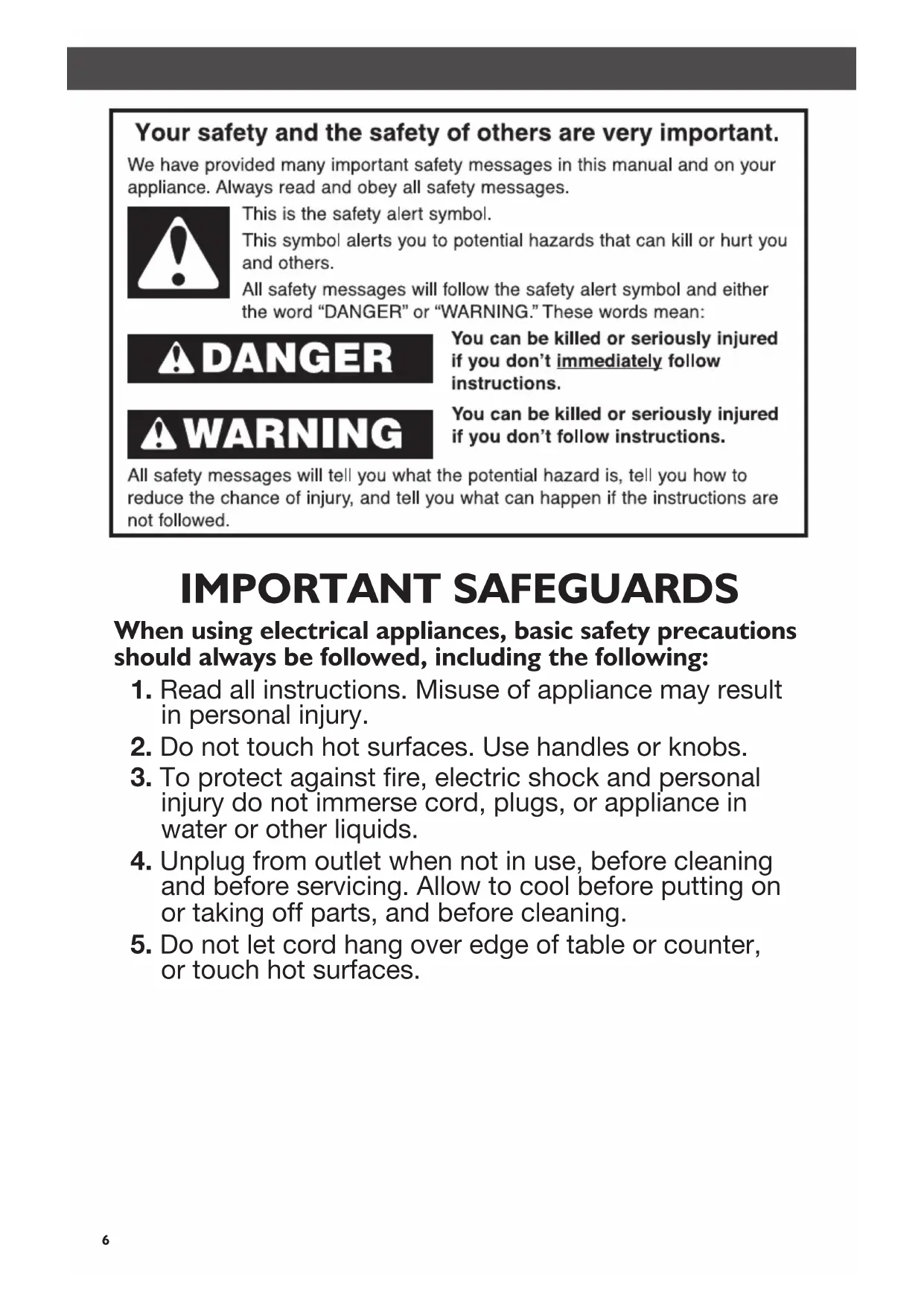
Your safety and the safety of others are very important.
We have provided many important safety messages in this manual and on your appliance. Always read and obey all safety messages.

This is the safety alert symbol.
This symbol alerts you to potential hazards that can kill or hurt you and others.
All safety messages will follow the safety alert symbol and either the word "DANGER" or "WARNING." These words mean:
! DANGER
You can be killed or seriously injured if you don't immediately follow instructions.
WARNING
You can be killed or seriously injured if you don't follow instructions.
All safety messages will tell you what the potential hazard is, tell you how to reduce the chance of injury, and tell you what can happen if the instructions are not followed.
IMPORTANT SAFEGUARDS
When using electrical appliances, basic safety precautions should always be followed, including the following:
- Read all instructions. Misuse of appliance may result in personal injury.
- Do not touch hot surfaces. Use handles or knobs.
- To protect against fire, electric shock and personal injury do not immerse cord, plugs, or appliance in water or other liquids.
- Unplug from outlet when not in use, before cleaning and before servicing. Allow to cool before putting on or taking off parts, and before cleaning.
-
Do not let cord hang over edge of table or counter, or touch hot surfaces.
-
Do not operate any appliance with a damaged cord or plug, or after appliance malfunctions or has been damaged in any manner. Return the appliance to the nearest authorized service center for examination, repair or adjustment.
- The use of accessory attachments not recommended by the appliance manufacturer may result in fire, electric shock, or personal injury.
- Do not use outdoors.
- Do not place on or near a radiator, hot gas or electric burner, in a heated oven, open flame, or similar.
- The safety precautions are part of the appliance. Read them carefully before using your new appliance for the first time. Keep them in a place where you can find and refer to them later on.
- The appliance is intended to prepare beverages according to these instructions.
- Do not use the appliance for any use other than the intended use.
- This appliance has been designed for indoor and non-extreme temperature conditions use only.
- Protect the appliance from direct sunlight effect, prolonged water splash and humidity.
- This appliance is designed for domestic use only. It is not intended to be used in the following environments and the guarantee will not apply for:
- Staff kitchen areas in shops, offices and other working environments,
- farmhouses,
- by clients in hotels, motels and other residential-type environments,
- bed and breakfast-type environments.
- This appliance may be used by children of at least 8 years of age, as long as they are supervised and have been given instructions about using the appliance safely and are fully aware of the dangers involved. Cleaning and user maintenance shall not be made by children unless they are older than 8 and they are supervised by an adult.
- Keep the appliance and its cord out of reach of children under 8 years of age.
- This appliance may be used by persons with reduced physical, sensory or mental capabilities, or whose experience or knowledge is not sufficient, provided they are supervised or have received instruction to use the device safely and understand the dangers.
- Children should not use the device as a toy.
- The manufacturer accepts no responsibility and the warranty will not apply for any commercial use, inappropriate handling or use of the appliance, any damage resulting from use for other purposes, faulty operation, non-professional repair or failure to comply with the instructions.
Avoid risk of fatal electric shock and fire
-
In case of an emergency: immediately remove the plug from the power socket.
-
Only plug the appliance into suitable, easily accessible, earthed mains connections. Make sure that the voltage of the power source is the same as that specified on the rating plate. The use of an incorrect connection voids the guarantee.
-
The appliance must only be connected after installation.
-
Do not pull the cord over sharp edges, clamp it or allow it to hang down.
- Keep the cord away from heat and damp.
- If the supply cord is damaged, it must be replaced by the manufacturer, its service agent or similarly qualified persons, in order to avoid all risks.
- If the cord is damaged, do not operate the appliance. Return the appliance to the Nespresso Club or to a Nespresso authorized representative.
- To avoid hazardous damage, never place the appliance on or beside hot surfaces such as radiators, stoves, ovens, gas burners, open flame, or similar.
- Always place it on a horizontal, stable and even surface. The surface must be resistant to heat and fluids, like water, coffee, descaler or similar.
- Disconnect the appliance from the mains when not in use for a long period. Disconnect by pulling out the plug and not by pulling the cord itself or the cord may become damaged.
- Before cleaning and servicing, remove the plug from the mains socket and let the appliance cool down.
- Never touch the cord with wet hands.
- Never immerse the appliance or part of it in water or other liquid.
- Never put the appliance or part of it in a dishwasher.
- Electricity and water together is dangerous and can lead to fatal electrical shocks.
- Do not open the appliance. Hazardous voltage inside!
-
Do not put anything into any openings. Doing so may cause fire or electrical shock!
-
Do not use an extension cord. If the power supply cord is too short, have a qualified electrician or serviceman install an outlet near the appliance.
Avoid possible harm when operating the appliance
-
Never leave the appliance unattended during operation.
-
Do not use the appliance if it is damaged or not operating perfectly. Immediately remove the plug from the power socket. Contact the Nespresso Club or Nespresso authorized representative for examination, repair or adjustment. A damaged appliance can cause electrical shocks, burns and fire.
-
Always completely close the lever and never lift it during operation. Scalding may occur.
-
Do not put fingers under coffee outlet, risk of scalding.
-
Do not put fingers into capsule compartment or the capsule shaft. Danger of injury!
-
Water could flow around a capsule when not perforated by the blades and damage the appliance.
-
Never use a damaged or deformed capsule. If a capsule is blocked in the capsule compartment, turn the machine off and unplug it before any operation. Call the Nespresso Club or Nespresso authorized representative.
-
Always fill the water tank with cold, fresh drinking water.
-
Empty water tank if the appliance will not be used for an extended time (holidays, etc.).
-
Replace water in water tank when the appliance is not operated for a weekend or a similar period of time.
-
Do not use the appliance without the drip tray and drip grid to avoid spilling any liquid on surrounding surfaces.
- Do not use any strong cleaning agent or solvent cleaner. Use a damp cloth and mild cleaning agent to clean the surface of the appliance.
- To clean machine, use only clean cleaning tools.
- When unpacking the machine, remove the plastic film and dispose.
- This appliance is designed for Nespresso coffee capsules available exclusively through the Nespresso Club or your Nespresso authorized representative.
- All KitchenAid appliances pass stringent controls. Reliability tests under practical conditions are randomly performed on selected units. Some units can therefore show traces of previous use.
- KitchenAid reserves the right to change instructions without prior notice.
Descaling
- Nespresso descaling agent, when used correctly, helps to ensure the proper functioning of your machine over its lifetime and that your coffee experience is as perfect as on the first day. For the safety instructions, correct amount and procedure to follow, consult the user manual included in the Nespresso descaling kit. For any additional questions you may have regarding descaling, please contact your Nespresso Club.
SAVE THESE INSTRUCTIONS
Pass them on to any subsequent user.
This Instruction Manual is also available as a PDF at nespresso.com and kitchenaid.eu.
Electrical Requirements
WARNING

Fire Hazard
Do not use an extension cord.
Doing so can result in death or fire.
Volts: 220-240 VAC
Hertz: 50-60 Hz
NOTE: If the plug does not fit in the outlet, contact a qualified electrician. Do not modify the plug in any way. Do not use an adapter.
Do not use an extension cord. If the power supply cord is too short, have a qualified electrician or serviceman install an outlet near the appliance.
Electrical equipment waste disposal
Disposal of packing material
The packing material is 100% recyclable and is marked with the recycle symbol. The various parts of the packing must therefore be disposed of responsibly and in full compliance with local authority regulations governing waste disposal.
Scrapping the product
- This appliance is marked in compliance with European Directive 2012/19/EU, Waste Electrical and Electronic Equipment (WEEE).
- By ensuring this product is disposed of correctly, you will help prevent potential
negative consequences for the environment and human health, which could otherwise be caused by inappropriate waste handling of this product.

- The symbol □ on the product or on the accompanying documentation indicates that it should not be treated as domestic waste but must be taken to an appropriate collection center for the recycling of electrical and electronic equipment.
For more detailed information about treatment, recovery and recycling of this product, please contact your local city office, your household waste disposal service or the shop where you purchased the product.
Parts and accessories
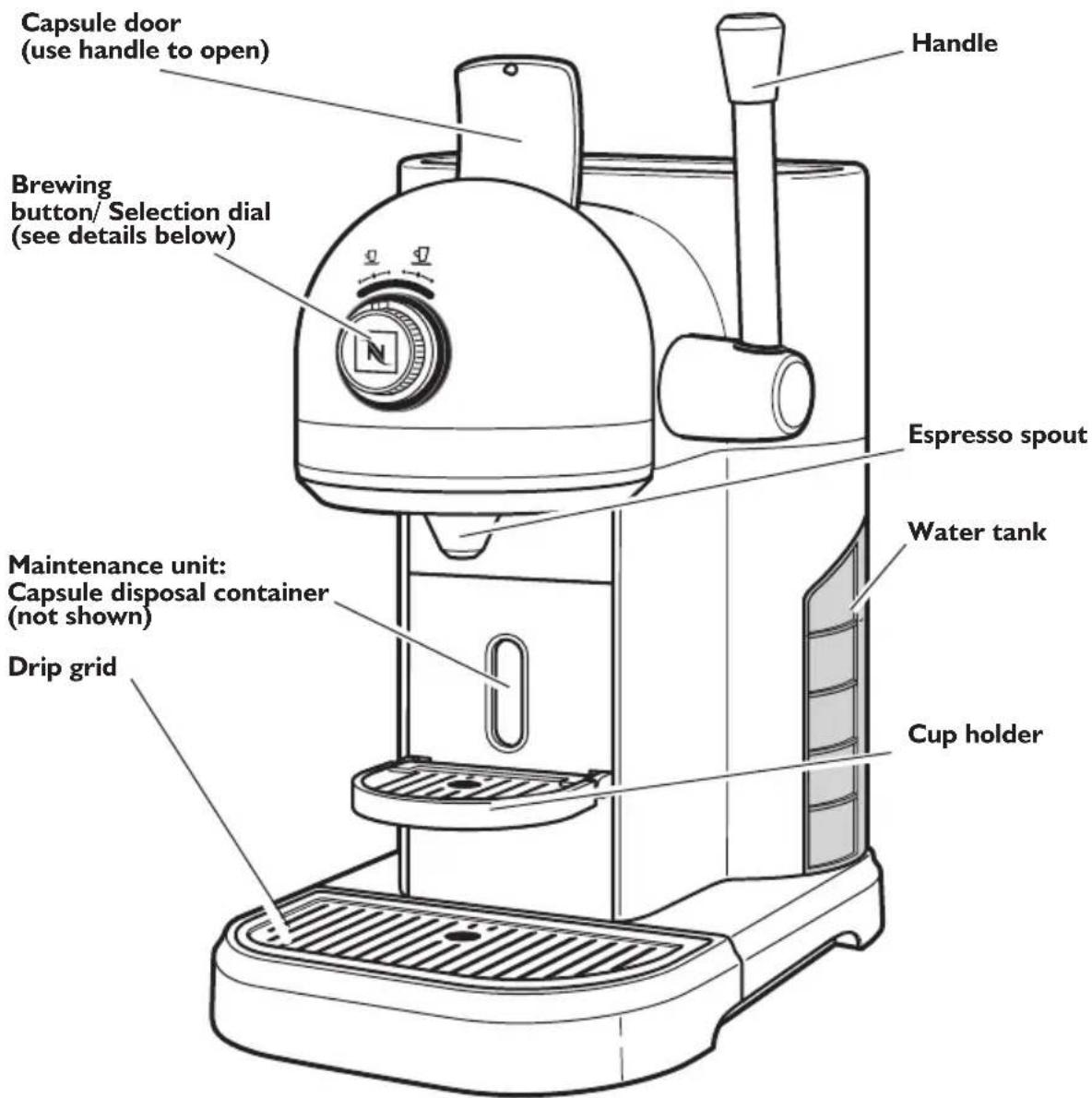
SELECTION DIAL Settings
NOTE: For coffee capsule and Aeroccino (5KES0504 only) questions, or for weekend calls, please contact Nespresso at nespresso.com
Preparing the Espresso Machine for first use
WARNING
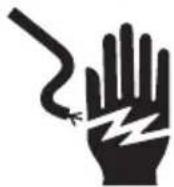
Electrical Shock Hazard
Plug into a grounded outlet.
Do not use with an adaptor or T.
Do not use with an extension cord.
Failure to follow these instructions could result in death, fire, or electric shock.
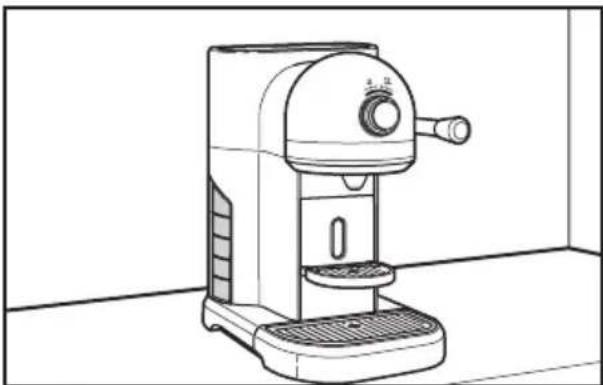
natural_image
Line drawing of a coffee maker with control knob and side panel (no text or symbols)I
Place the Espresso Machine on a clean, dry, level surface.
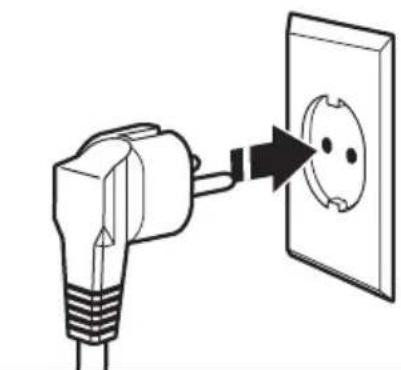
natural_image
Simple line drawing of an electrical outlet with a bulb and plug, showing a magnified view of the socket (no text or symbols)2
Plug the cord into a grounded outlet.
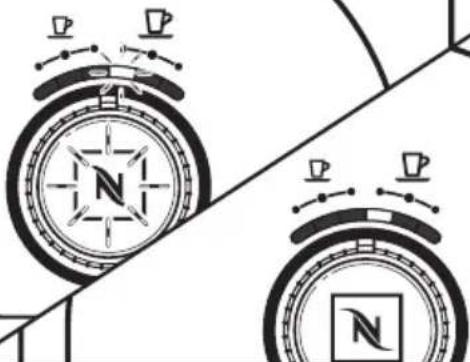
natural_image
Two compasses with directional arrows and a central compass face, no text or symbols present3
When the Espresso Machine is turned on, the LED will flash as it warms up. When the machine is ready, the LED will glow continuously.
ASSEMBLING THE ESPRESSO MACHINE
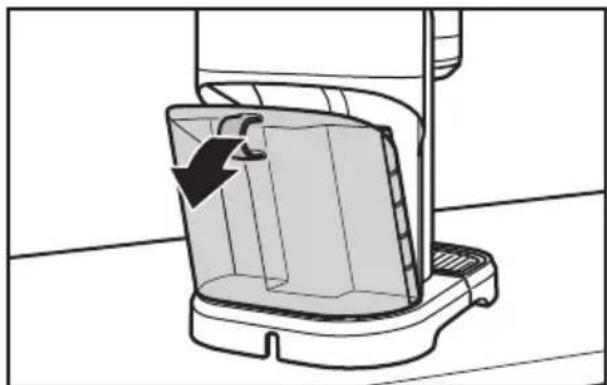
natural_image
Diagram of a kitchen sink with a downward arrow indicating a component (no text or symbols present)4 Tip the water tank slightly, then remove by pulling the water tank out from the Espresso Machine.

natural_image
Line drawing of a hand using a tool to clean or wash a rectangular object on a kitchen sink (no text or symbols)5 Wash the water tank in hot, soapy water and rinse with clean water. Dry with a soft cloth. The water tank cannot be washed in the dishwasher.
English
natural_image
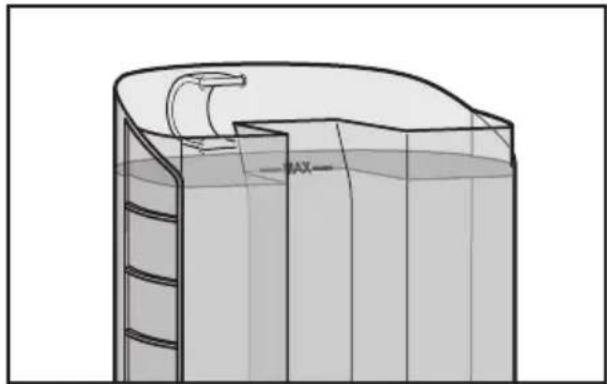
3D technical line drawing of a cylindrical container with internal structure and a curved top section (no text or symbols)6 Fill the water tank with fresh, cold, drinking water (the water level should be at or below the "max" fill line).
natural_image
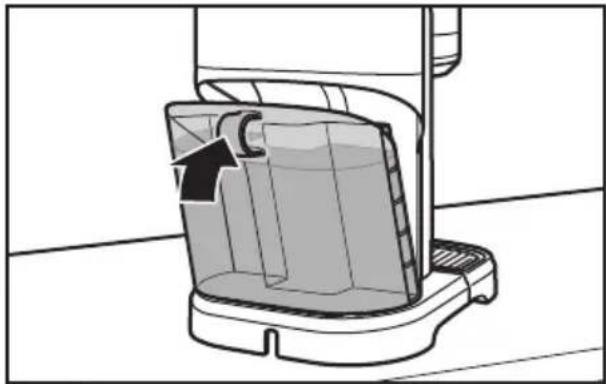
Diagram of a mechanical device with a curved arrow indicating direction, no text or symbols present7 Place the water tank back on the Espresso Machine.
NOTE: Press water tank in until it snaps completely into place to assure proper function.
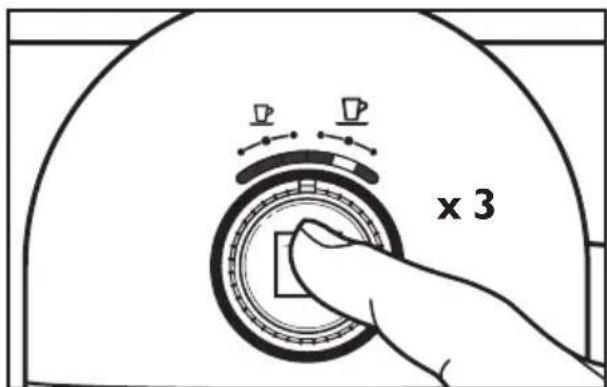
8 Before brewing espresso for the first time, make sure to run plain water through the Espresso Machine, on the "lungo" setting three times.
Preheating
natural_image
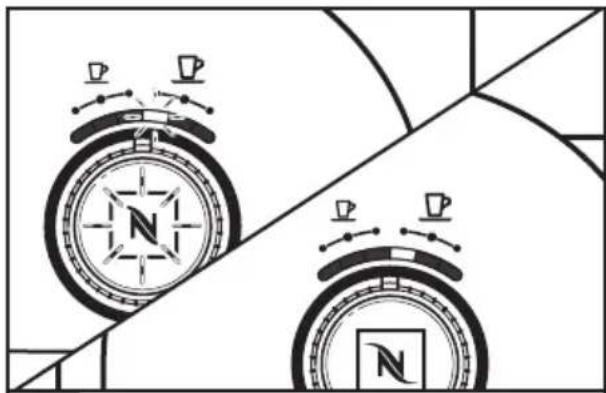
Two compasses with circular headsets and a central compass, set against geometric background (no text or symbols)When the Espresso Machine is turned on, the LED will flash as it warms up. When the machine is ready, the LED will glow continuously.
NOTE: You can change your desired volume selection while the Espresso Machine is heating up. When you do this, the LED bar will no longer flash, but remains lit over the selected portion size and the brew button continues to flash while the Espresso Machine heats up. Press the brew button. Once the correct temperature is reached, the brew cycle will start on its own.
Brewing espresso
natural_image
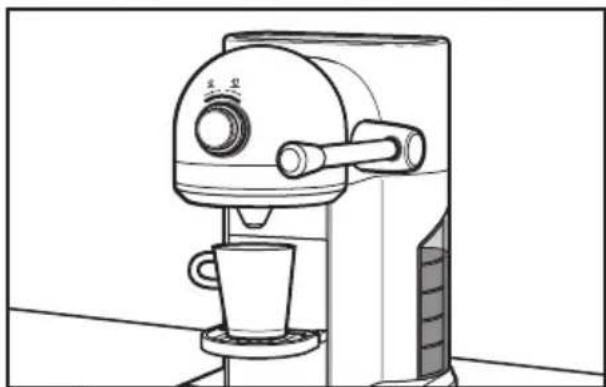
Line drawing of a coffee maker with a cup and side arm (no text or symbols)Place your cup on the cup holder.
natural_image
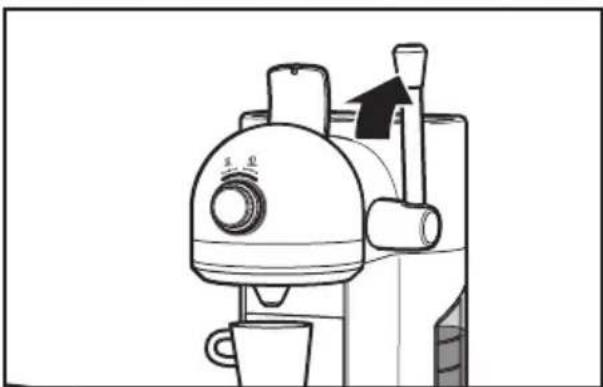
Line drawing of a coffee maker with a cup, mugs, and a brush (no text or symbols)2 Lift the handle to raise the lid on the capsule loading compartment to its fully upright position.
NOTE: To avoid damage and injury due to hot vapor when brewing, open the capsule door ONLY by the handle 3 seconds after the brewing cycle has completed. Never try to pull up the capsule door with your fingers.
natural_image
Diagram showing a hand holding a spray bottle with a black internal component, separated by a diagonal line (no text or symbols)3
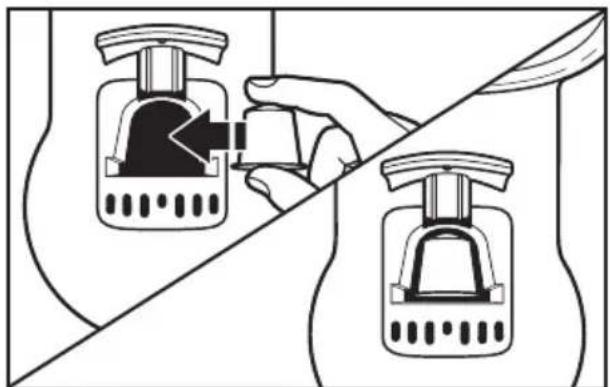
Select the capsule you want to use. Hold the capsule as shown, with the foil cap facing towards you, and drop into the capsule loading compartment on top of the machine.
natural_image
Line drawing of a coffee maker with a cup and handle, showing a downward arrow indicating compression (no text or symbols)4
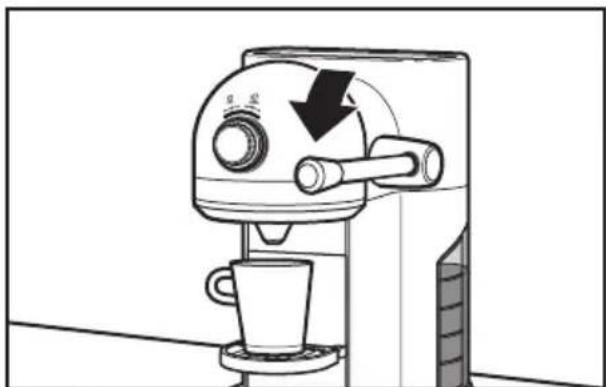
Lower the handle to close the capsule compartment. Make sure the handle is rotated to a horizontal position. The capsule loading compartment should be fully closed.
natural_image
Diagram of a circular device with directional arrows and a compass, no readable text or symbols present.5
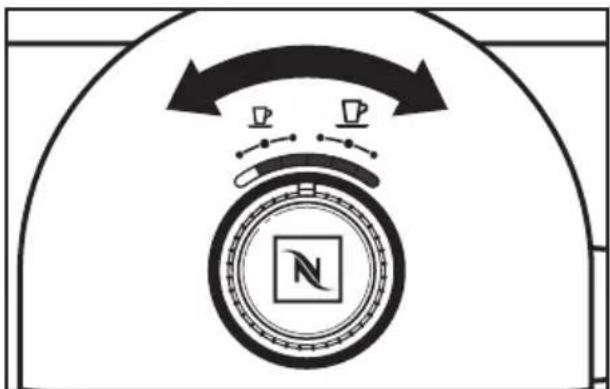
Turn the selection dial to your desired volume setting (from left to right): 1: 25 ml (ristretto), 2: 40 ml (espresso), 3: 60 ml, 4: 90 ml, 5: 110 ml (lungo), or 6: 130 ml.
natural_image
Diagram showing two compasses with directional arrows and a hand adjusting the square button (no text or symbols)6
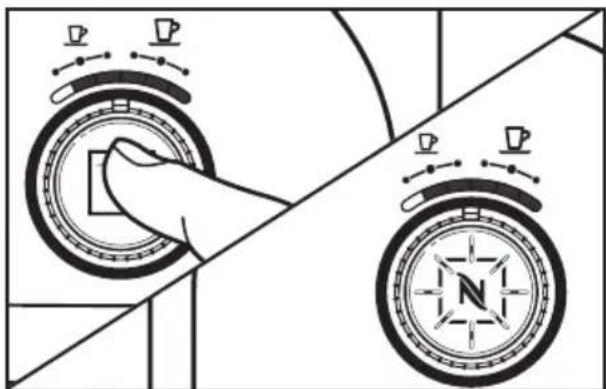
Press the brew button. The espresso will begin to brew. Press the brew button a second time if you want to top off the cup, or if you want to stop the brewing cycle early.
NOTE: When the Espresso Machine is turned on, it will automatically come on at the setting that was selected most in the last 11 uses.
OPERATING THE ESPRESSO MACHINE
flowchart
graph TD
    A["Start"] --> B{Decision}
    B -->|Yes| C["Process Step 1"]
    B -->|No| D["Process Step 2"]
    C --> E["End"]
    D --> E
    E --> F["End"]
7
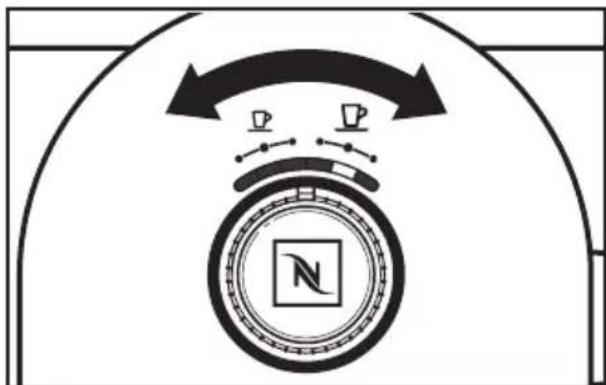
You can change your selection mid-brew by turning the selection dial to a new selection before brewing ends.
natural_image
Line drawing of a coffee maker with a cup and directional arrow (no text or symbols)8
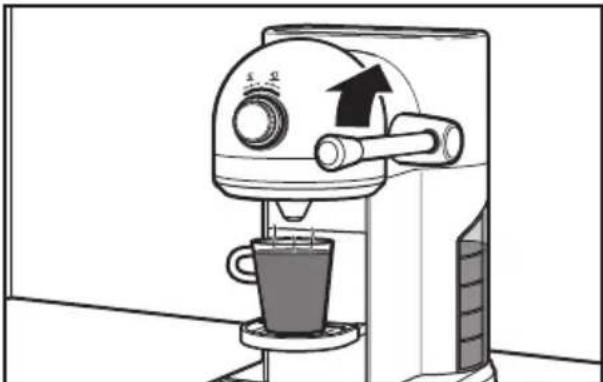
After your espresso is finished brewing, lift the handle to its fully upright position to drop the used capsule into the disposal container.
NOTE: Eject the capsule after each coffee or before turning off the machine. The capsule disposal container holds up to 14 used capsules. See the “Care and cleaning” section for more information.
Automatic standby mode
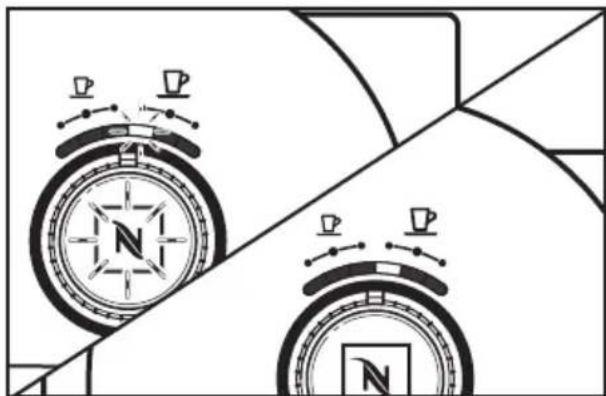
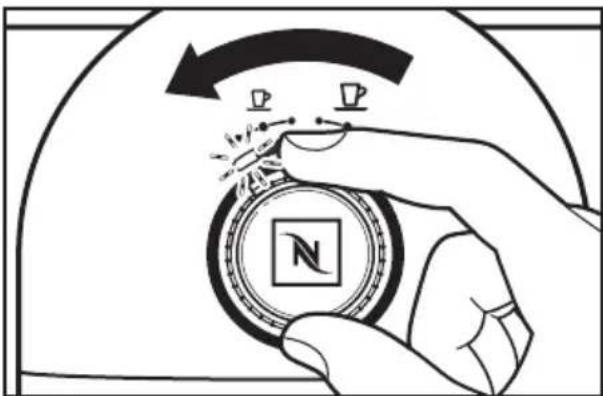
When the Espresso Machine is plugged in, it automatically goes into stand-by mode. You must either press the brew button or rotate the dial to wake up the Espresso Machine. After 9 minutes of non-use, it turns to a low-consumption mode, and the heater powers off. If you prefer to change this standby time, you can set it for 15 minutes, 20 minutes, or 30 minutes, using the following directions:
natural_image
Two compasses with directional arrows and a square base, no text or symbols present1
When the Espresso Machine is turned on, the LED will flash as it warms up. When the machine is ready, the LED will glow continuously.
natural_image
Illustration of a hand holding a circular object with a compass and a square symbol, no text or symbols present.2
Rotate the selection dial until the light is over the left most position and hold for 6 seconds. The light will hold steady before changing to 2 blinks per second. The Espresso Machine is now ready to reset the standby time.
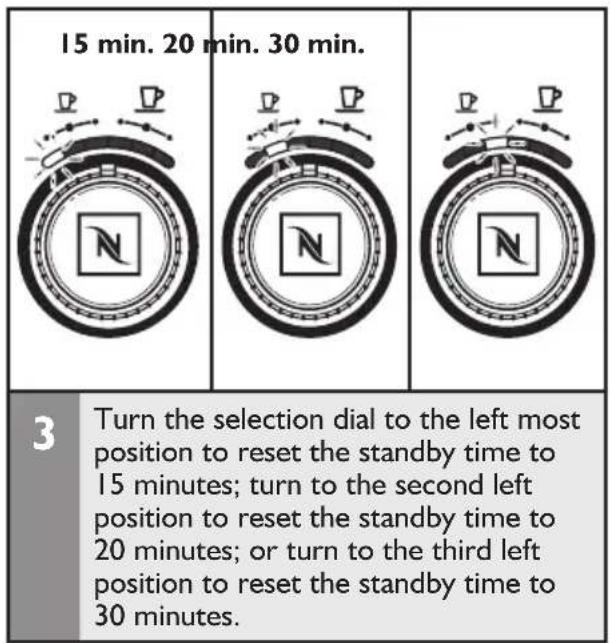
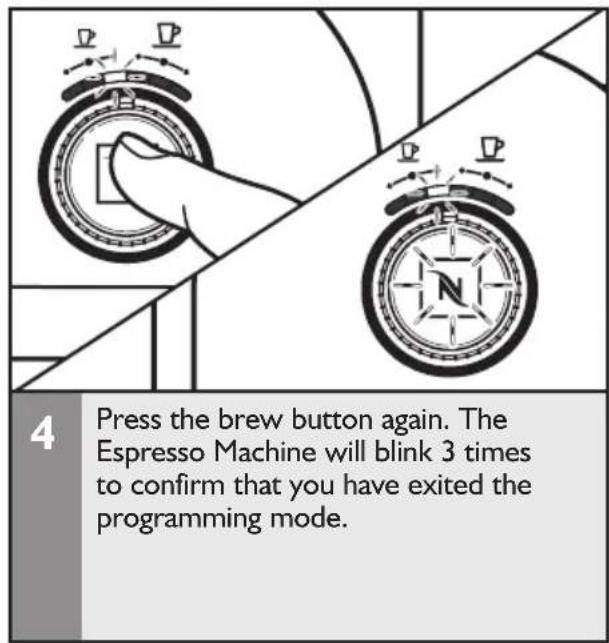

NOTE: To get back to the factory preset of 9 minutes if you have reset to another standby time, turn the selection dial to the first left position and hold for 6 seconds (the blinking LED will change to 2 blinks per second). Then, rotate the selection dial to the far right position and press the brew button. The Espresso Machine will return to factory settings and automatically go into ready mode.
Cleaning the Espresso Machine
Keeping the Espresso Machine clean is vital to brewing the best espresso possible. Stale coffee oils will ruin the flavour of even the most expertly prepared coffee.
NOTE: Do not clean Espresso Machine with abrasive cleaners, steel wool, or other abrasive materials.
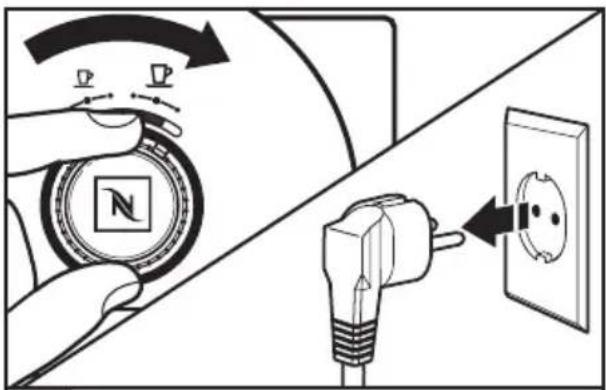
Turn off the Espresso Machine by turning the dial all the way to right and holding it for 6 seconds. Unplug from the wall outlet, or disconnect power. Let the Espresso Machine, and any attached parts or accessories, cool.
natural_image
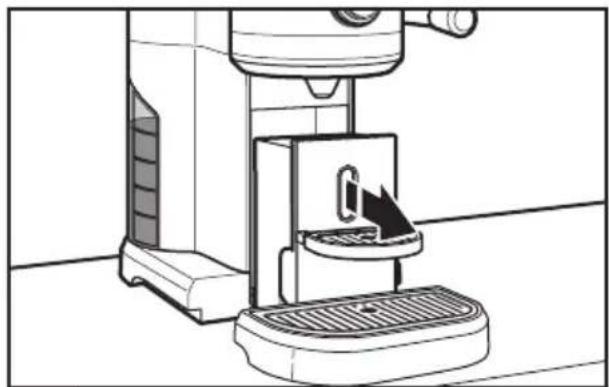
Line drawing of a coffee maker with a tray and handle, no text or symbols present2 Slide the maintenance unit out from the base by pulling it towards you.
natural_image
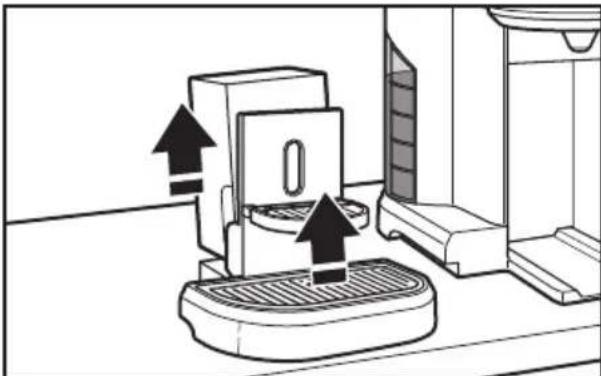
Diagram of a kitchen appliance with upward arrows indicating motion or movement (no text or symbols)3 Remove and empty the capsule disposal container. Then remove the drip grid from the drip tray.
natural_image
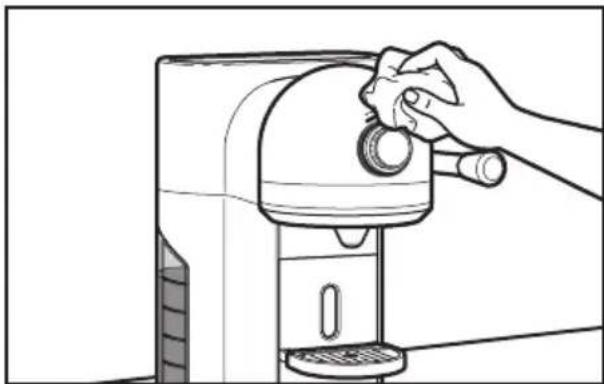
Line drawing of a hand using a blender to press or clean the cup (no text or symbols)4 Wipe the Espresso Machine housing with a clean damp cloth and dry with a soft cloth. Do not use abrasive cleansers or scouring pads when cleaning the housing, or any part or accessory.
natural_image
Diagram showing a device with internal components and a separate view of a plastic housing (no text or symbols)5 Wash the capsule disposal container, drip grid, and drip tray in the top rack of a dishwasher, or by hand in warm, soapy water. If washing by hand, be sure to rinse with clean water and dry with a soft cloth.
natural_image
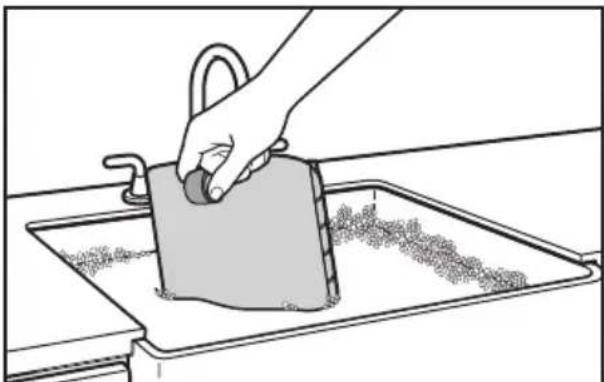
Line drawing of a hand using a tool to clean or wash a surface in a kitchen sink (no text or symbols)6 Wash the water tank in hot, soapy water and rinse with clean water. Dry with a soft cloth. The water tank cannot be washed in the dishwasher.
Emptying the Espresso Machine
natural_image
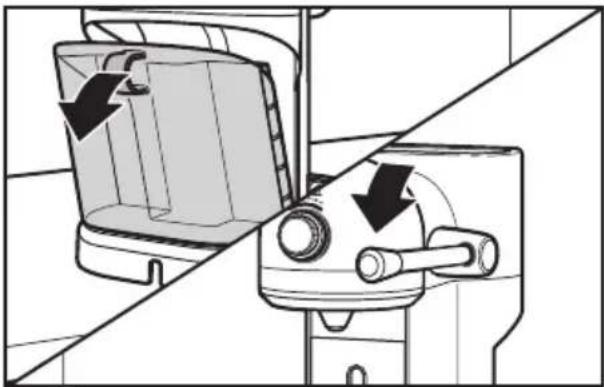
Diagram of a kitchen appliance with a side mirror and handle, showing directional arrows indicating movement (no text or symbols present)Tip the water tank slightly, then remove by pulling the water tank out from the Espresso Machine. Empty the water out of the tank and place it back on the Espresso Machine. Make sure the capsule compartment is fully closed by lowering the handle to a horizontal position.
natural_image
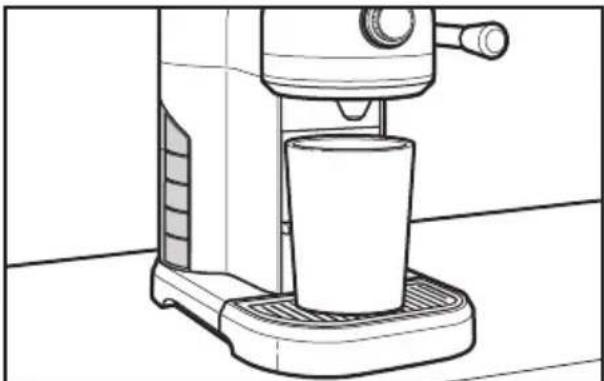
Line drawing of a coffee maker with a cup on a base (no text or symbols)2 Place an empty container under the coffee outlet.
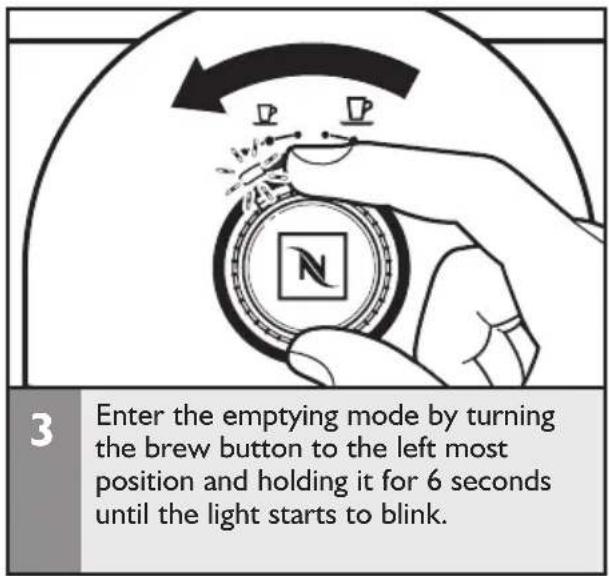
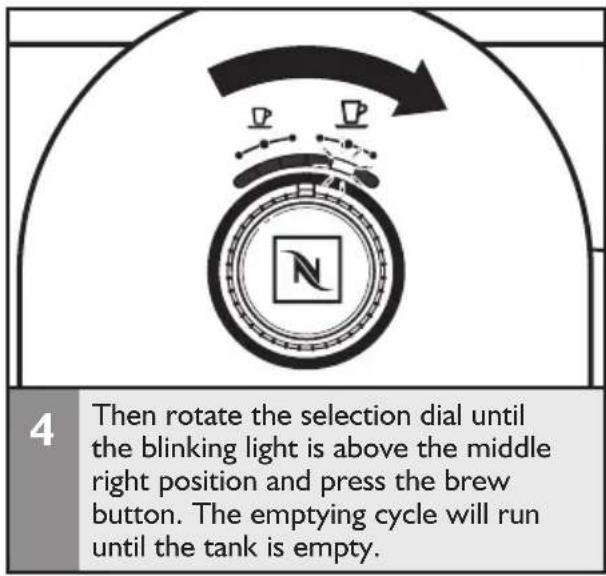
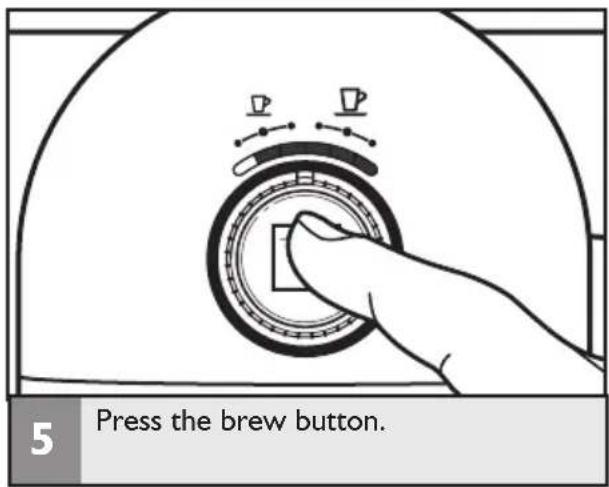
NOTE: Once Espresso Machine has emptied, allow it to cool down for 10 minutes before using.
Descaling
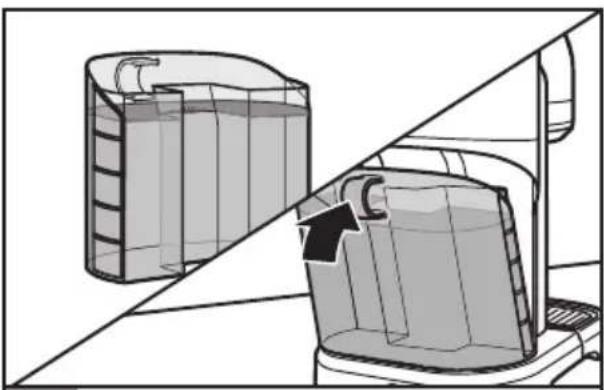
Calcium deposits (“scale”) from water will build up in the Espresso Machine over time and may impair espresso quality. Scale should be removed every month; local hard-water conditions may require more frequent descalings. Use the Nespresso brand packaged descaling agent available online to remove scale. Follow the directions on the package. KitchenAid does not recommend using home remedies or water and vinegar solutions to descale the Espresso Machine.
natural_image
Diagram showing two containers with different internal structures, one partially filled and the other partially open, separated by a diagonal line (no text or symbols)I
Add two descaling agent packets to the tank per package directions then fill the water tank with water to the "max" fill line. Replace tank on espresso machine.

natural_image
Line drawing of a coffee maker with a cup on a base (no text or symbols)2
Place an empty container (at least 1.5L) under the coffee outlet.
natural_image
Illustration of a hand holding a compass with arrows indicating rotation (no text or symbols)3
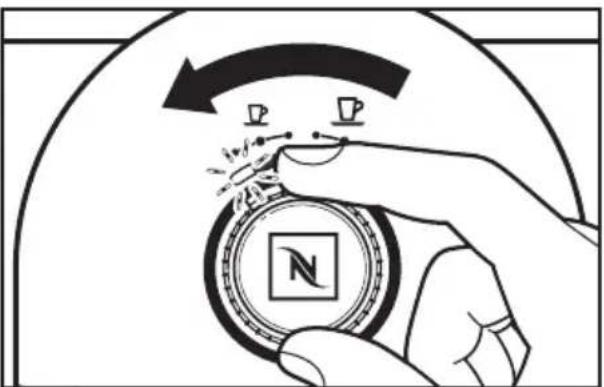
Enter descaling mode by turning the brew button to the left most position and holding it for 6 seconds until the light starts to blink.
natural_image
Diagram of a compass with directional arrows and a compass icon, no readable text or symbols present.4
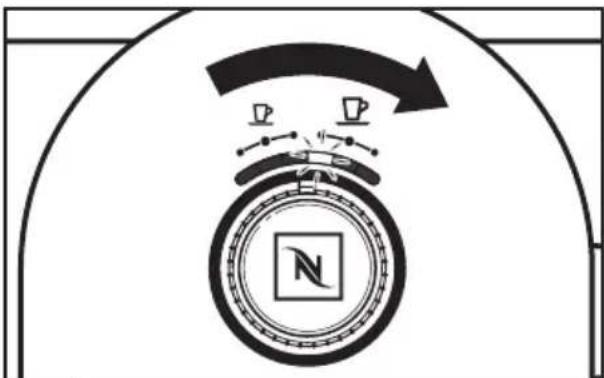
Then rotate the selection dial until the blinking light is above the first right position.
natural_image
Hand pressing a button on a circular device with two cups above it (no text or symbols visible)5
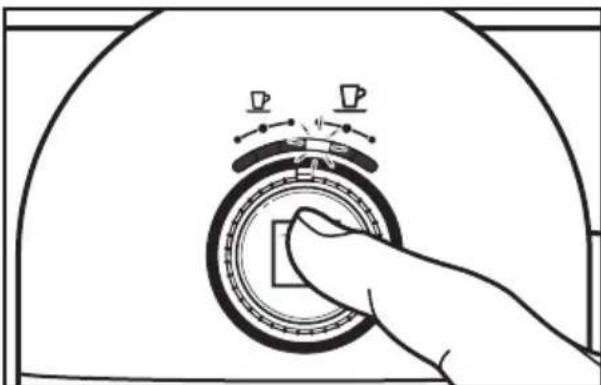
Press the brew button to start descaling and run until the water tank is empty.
natural_image
Cross-sectional diagram of a cylindrical tank with internal structure and piping (no text or symbols)6
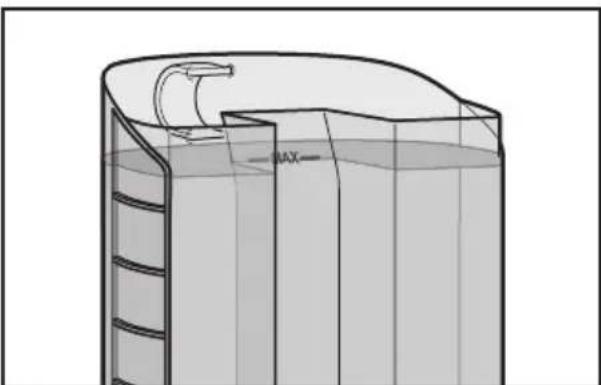
Fill the water tank with water to the "max" fill line a second time and repeat the cycle with water only to rinse. The Espresso Machine will automatically proceed to ready mode when finished.
I. If the power on indicator remains off and the Espresso Machine fails to heat when the Brewing button is pressed:
WARNING

Electrical Shock Hazard
Plug into a grounded outlet.
Do not use with an adaptor or T.
Do not use with an extension cord.
Failure to follow these instructions could result in death, fire, or electric shock.
- Check to see if the Espresso Machine is plugged into a grounded outlet; if it is, unplug, plug it back in, and press the Brewing button again. If the Espresso Machine still does not operate, check the fuse or circuit breaker on the electrical circuit the machine is connected to and make certain the circuit is closed.
- If coffee does not flow from the spout...
• Water tank may be empty.
- Espresso Machine may need to be descaled.
- Capsule container may need to be emptied:
- Check to see that there is not a capsule blocked inside the Espresso Machine.
- Check to see that the capsule was inserted in the correct orientation.
- Check to see that the handle is completely closed, see "Brewing espresso" section.
NOTE: If not cleared the brew water will flow into the capsule container to the maintenance unit. (Lift drip grid and check if unbrewed water is present).
- If coffee grounds found in cup:
The handle/capsule door was opened too soon. Wait 3 seconds after the brewing cycle has completed before opening the capsule door.
4. If the LEDs in position 1 and 6 blink alternately at 2 blinks per second:
- This indicates the “overheating” error code. The lights will continue to flash until the Espresso Machine is ready, or it enters standby mode.
- If the LEDs in position 1 and 6 blink 3 times alternately every 2 seconds at two blinks per second:
- This indicates the “electronic” error code. Allow the Espresso Machine to go into standby mode, then check to see if the error is still there after reactivating.
If the problem cannot be fixed with the steps above, see the "Warranty and service" section.*
KitchenAid Espresso Machine warranty
KITCHENAID warrants this product against defects in materials and workmanship for a period of two years from the date of purchase. During this period, KITCHENAID, at the NESPRESSO after sales centers, will either repair or replace, at its discretion, any defective product at no charge to the owner. Replacement products will be warranted for 2 years. Repaired units will be guaranteed for only the unexpired portion of the original warranty or six months, whichever is greater. This limited warranty does not apply to any defect resulting from accident, misuse, improper maintenance, or normal wear and tear. The benefits provided by this KITCHENAID warranty shall not preclude application of more favorable local statutory rights. If you believe your product is defective, contact the Nespresso Club or Nespresso authorized representative for examination, repair or adjustment.
Customer service
Contact the Nespresso Club
For any additional information, in case of problems or simply to seek advise, call the Nespresso Club.
| Country Nespresso Club Contact Number | |
| Belgium 0800 - 16264 | |
| France 0800 55 52 53 | |
| Germany 0800 18 18 444 | |
| Italy 800 39 20 29 | |
| Luxembourg 8002 26 33 | |
| Russia 8-800-200-0004 | Orders, New Members, Information8-800-200-00-39Technical Information/Questions |
| The Netherlands 0800 - 022 23 20 | |
| UK 0800 442 442 | |
INHALTSVERZEICHNIS
natural_image
Line drawing of a modern coffee maker with control panel and side grates (no text or symbols)natural_image
Simple line drawing of an electrical outlet with a bulb inserted into a wall socket (no text or symbols)natural_image
Two compasses with directional arrows and a central compass face, no text or symbols presentnatural_image
Diagram of a kitchen sink with a downward arrow indicating a component (no text or symbols present)natural_image
Line drawing of a hand cleaning a kitchen sink with a cloth (no text or symbols)natural_image
Cross-sectional diagram of a cylindrical container with internal structure and a curved top layer (no text or symbols)natural_image
Diagram of a kitchen appliance with a handle and internal compartments, showing no text or symbolsnatural_image
Two compasses with directional arrows and a central compass, no text or symbols presentnatural_image
Line drawing of a coffee maker with a cup and side arm (no text or symbols)natural_image
Line drawing of a coffee maker with a cup, mugs, and a brush (no text or symbols)natural_image
Diagram showing hand holding a spray bottle with a black arrow, alongside another device with a white handle (no text or symbols)3
natural_image
Line drawing of a coffee maker with a cup and handle, showing a downward arrow indicating compression (no text or symbols)4
natural_image
Diagram of a compass with directional arrows and a circular symbol, no readable text or labels5
natural_image
Diagram showing two compasses with directional arrows and a hand pressing a square button, no text or symbols present.6
natural_image
Line drawing of a coffee maker with a cup and directional arrow (no text or symbols)natural_image
Two compasses with directional arrows and a central compass design, no text or symbols presentnatural_image
Illustration of a hand holding a circular object with a compass and a square logo, emitting motion arrows (no text or symbols)natural_image
Line drawing of a coffee maker with a tray and handle, no text or symbols presentnatural_image
Diagram of a kitchen appliance with arrows indicating movement or assembly (no text or symbols)natural_image
Line drawing of a hand using a blender to press or clean the product (no text or symbols)natural_image
Diagram showing a refrigerator interior with internal compartments and a separate storage unit (no text or symbols)5
natural_image
Line drawing of a hand cleaning a kitchen sink with a bag filled with granular material (no text or symbols)6
natural_image
Technical diagram of a mechanical device with directional arrows indicating motion or force (no text or symbols present)1
natural_image
Line drawing of a coffee maker with a cup on a base (no text or symbols)2
natural_image
Hand pressing a button on a circular device with two cups above it (no text or symbols visible)5
natural_image
Diagram of a container with a side arm and a curved top, showing liquid levels and a pipe (no text or symbols)6
natural_image
Line drawing of a coffee maker with control knob and side grates (no text or symbols)|
natural_image
Simple line drawing of an electrical outlet with a bulb inserted into a wall socket (no text or symbols)2
natural_image
Black and white illustration of a compass with cardinal direction indicators (N, 300°), no text or symbols present.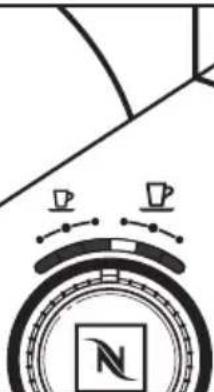
natural_image
Abstract diagram with circular elements and teacups, no readable text or symbols3
natural_image
Diagram of a kitchen sink with a downward arrow indicating a component (no text or symbols present)natural_image
Line drawing of a hand cleaning a kitchen sink with a bag, showing surface texture and a handle (no text or symbols)natural_image
Cross-sectional diagram of a container with internal structure and a curved arrow indicating flow or movement (no text or symbols)natural_image
Diagram of a kitchen appliance with a lid and handle, showing internal structure and a black arrow indicating direction (no text or symbols)natural_image
Two compasses with directional arrows and a central compass design, no text or symbols presentnatural_image
Line drawing of a coffee maker with a cup and side arm (no text or symbols)natural_image
Line drawing of a coffee maker with a teapot and cup, no text or symbols presentnatural_image
Diagram showing hand holding a spray bottle with a black arrow, alongside another device (no text or symbols present)3
natural_image
Line drawing of a coffee maker with a cup and handle, showing a downward arrow indicating compression (no text or symbols)4
natural_image
Diagram of a compass with directional arrows and a circular symbol, no readable text or labels5
natural_image
Diagram showing two compasses with directional arrows and a hand pressing a square button, no text or symbols present.6
natural_image
Diagram of a basketball court with directional arrows and a circular emblem featuring a 'N' symbol (no text or labels)natural_image
Line drawing of a coffee maker with a cup and directional arrow (no text or symbols)natural_image
Two compasses with directional arrows and a central compass, set against geometric background (no text or symbols)natural_image
Illustration of a hand holding a compass with a compass icon, no text or symbols presentnatural_image
Line drawing of a coffee maker with a griddle and baseplate (no text or symbols)natural_image
Diagram of a kitchen appliance with arrows indicating motion or movement, no text or symbols presentnatural_image
Line drawing of a hand using a blender to press or clean the cup (no text or symbols)natural_image
Diagram showing a refrigerator interior with internal compartments and a separate storage unit (no text or symbols)5
natural_image
Line drawing of a hand cleaning a kitchen sink with a cloth (no text or symbols)6
natural_image
Diagram of a kitchen appliance with a side panel and handle, showing mechanical components and directional arrows (no text or labels)|
natural_image
Line drawing of a coffee maker with a cup on a base (no text or symbols)2
natural_image
Illustration of a hand holding a compass with a circular base and a magnifying glass, no text or symbols present.3
natural_image
Hand pressing a button on a circular device with icons, no text or symbols present5
natural_image
Diagram showing two containers with different internal structures, one partially open and the other closed, separated by a diagonal line (no text or symbols)|
natural_image
Line drawing of a coffee maker with a cup and handle (no text or symbols)2
natural_image
Illustration of a hand holding a compass with a compass icon, no text or symbols present3
natural_image
Diagram of a basketball court with directional arrows and a compass, no readable text or symbols present.4
natural_image
Illustration of a hand pressing a button on a circular device with two cups above (no text or symbols)5
natural_image
Diagram of a container with a curved top and side ladder, showing liquid levels and a pipe outlet (no text or symbols)6
- bed and breakfast.
natural_image
Line drawing of a coffee maker with control knob and side panel (no text or symbols)natural_image
Simple line drawing of an electrical outlet with a bulb inserted into a socket (no text or symbols)2
natural_image
Two compasses with directional arrows and a central compass face, no text or symbols present3
natural_image
Diagram of a kitchen drawer with an arrow indicating a component, no text or symbols presentnatural_image
Line drawing of a hand cleaning a kitchen sink with a bag filled with granular material (no text or symbols)natural_image
Technical line drawing of a cylindrical container with internal channels and a curved top section (no text or symbols)natural_image
Diagram of a kitchen appliance with a handle and internal compartments, showing a directional arrow (no text or symbols)natural_image
Diagram showing hand holding a spray bottle with a black internal component, divided by a diagonal line (no text or symbols)3
natural_image
Line drawing of a coffee maker with a cup and handle, showing a downward arrow indicating compression (no text or symbols)4
natural_image
Diagram of a compass with directional arrows and a circular base, no text or symbols present5
natural_image
Diagram showing two compasses with directional arrows and a hand adjusting the square button (no text or symbols)6
natural_image
Diagram of a basketball court with directional arrows and a circular emblem featuring a 'N' logo (no text or symbols)natural_image
Line drawing of a coffee maker with a cup and directional arrow (no text or symbols)natural_image
Diagram showing two compasses with directional arrows and a square marker, no text or symbols presentnatural_image
Illustration of a hand holding a circular object with a compass and a square logo, no text or symbols present.natural_image
Line drawing of a coffee maker with a griddle and baseplate, showing no text or symbolsnatural_image
Diagram of a kitchen appliance with upward arrows indicating motion or movement (no text or symbols)natural_image
Line drawing of a hand using a blender to press or clean the cup (no text or symbols)natural_image
Diagram showing a device with internal components and a separate view of a plastic housing (no text or symbols)5
natural_image
Line drawing of a hand cleaning a kitchen sink with a bag, showing surface texture and a handle (no text or symbols)6
natural_image
Technical diagram showing a mechanical device with directional arrows indicating motion or force (no text or symbols present)1
natural_image
Line drawing of a coffee maker with a cup on a base (no text or symbols)2
natural_image
Diagram showing two containers with different internal structures, one partially open and the other closed, separated by a diagonal line (no text or symbols)natural_image
Line drawing of a coffee maker with a cup on top (no text or symbols)natural_image
Illustration of a hand holding a compass with a compass icon, no text or symbols presentnatural_image
Diagram of a compass with directional arrows and a circular emblem, no readable text or symbols present.natural_image
Illustration of a hand pressing a button on a circular device with two cups above (no text or symbols)5
natural_image
Diagram of a container with a curved top and side ladder, showing liquid levels and a pipe outlet (no text or symbols)6
PROBLEEMOPLOSSING....113
GARANTIE EN SERVICE....114
- in bed en breakfasts.
natural_image
Line drawing of a coffee maker with control panel and side grilles (no text or symbols)I
natural_image
Simple line drawing of an electrical outlet with a bulb inserted into a socket (no text or symbols)2
natural_image
Two compasses with directional arrows and a central compass face, no text or symbols present3
natural_image
Diagram of a kitchen appliance with a downward arrow indicating a component (no text or symbols present)4
natural_image
Line drawing of a hand using a tool to clean or wash a rectangular object on a kitchen sink (no text or symbols)5
natural_image
Cross-sectional diagram of a cylindrical container with internal structure and a curved top section (no text or symbols)6
natural_image
Diagram of a kitchen appliance with a container and arrow indicating direction (no text or symbols)7
natural_image
Two compasses with directional arrows and a central compass, no text or symbols present|
natural_image
Line drawing of a coffee maker with a cup and side arm (no text or symbols)|
natural_image
Line drawing of a coffee maker with a cup and side arm, no text or symbols present2
natural_image
Diagram showing hand holding a spray bottle with a black arrow, alongside another device with a white handle (no text or symbols)3
natural_image
Line drawing of a coffee maker with a cup and handle, showing a downward arrow indicating compression (no text or symbols)4
natural_image
Diagram of a compass with directional arrows and two cups, no text or symbols present5
natural_image
Diagram showing two compasses with directional arrows and a hand holding the square, no text or symbols present.6
flowchart
graph TD
    A["Start"] --> B{Bidirectional Arrow}
    B --> C["Arrow to Center"]
    C --> D["Arrow to Right"]
    D --> E["Arrow to Left"]
    E --> F["Arrow to Right"]
    F --> G["Arrow to Left"]
    G --> H["Arrow to Right"]
    H --> I["Arrow to Right"]
    I --> J["Arrow to Left"]
    J --> K["Arrow to Right"]
7
natural_image
Line drawing of a coffee maker with a cup and directional arrow (no text or symbols)8
natural_image
Two compasses with directional arrows and a central compass design, no text or symbols present|
natural_image
Illustration of a hand holding a circular object with a compass and square symbol, emitting motion arrows (no text or symbols)2
natural_image
Line drawing of a coffee maker with a gridded base and lever mechanism (no text or symbols)natural_image
Diagram of a kitchen appliance with arrows indicating movement or assembly (no text or symbols)natural_image
Line drawing of a hand using a blender to press or clean the cup (no text or symbols)natural_image
Diagram showing a kitchen appliance with internal compartments and a separate storage unit (no text or symbols)natural_image
Line drawing of a hand cleaning a kitchen sink with a cloth (no text or symbols)natural_image
Technical diagram of a mechanical device with directional arrows indicating motion or force (no text or symbols present)natural_image
Line drawing of a coffee maker with a cup on a base (no text or symbols)natural_image
Diagram showing two containers with a diagonal line and an arrow pointing to one (no text or symbols)natural_image
Line drawing of a coffee maker with a cup on a base (no text or symbols)natural_image
Illustration of a hand holding a compass with a circular base and directional arrow, no text or symbols present.natural_image
Diagram of a basketball court with directional arrows and a compass, no readable text or symbols present.natural_image
Illustration of a hand pressing a button on a circular device with two cups above (no text or symbols)5
natural_image
Diagram of a container with a side arm and a curved top, showing liquid levels and a pipe (no text or symbols)6
natural_image
Line drawing of a coffee maker with control panel and side grilles (no text or symbols)natural_image
Simple line drawing of an electrical outlet with a bulb and plug, showing a magnified view of the socket (no text or symbols)2
natural_image
Two compasses with directional arrows and a central compass design, no text or symbols present.3
natural_image
Diagram of a kitchen appliance with a downward arrow indicating a component (no text or symbols present)natural_image
Line drawing of a hand cleaning a kitchen sink with a cloth (no text or symbols)natural_image
Cross-sectional diagram of a cylindrical container with internal structure and a curved top layer (no text or symbols)natural_image
Diagram of a kitchen appliance with a lid and handle, showing internal components and a directional arrow (no text or symbols)natural_image
Two compasses with directional arrows and a central compass design, no text or symbols presentnatural_image
Line drawing of a coffee maker with a cup and side arm (no text or symbols)natural_image
Line drawing of a coffee maker with a teapot and stand, no text or symbols presentnatural_image
Diagram showing two hand-painted containers with internal components, one being cut and the other holding a tray (no text or symbols)3
natural_image
Line drawing of a coffee maker with a cup and handle, showing a downward arrow indicating compression (no text or symbols)4
natural_image
Diagram of a basketball court with directional arrows and a compass, no text or symbols present5
natural_image
Diagram showing two circular components with directional arrows and a hand holding a square button, separated by a diagonal line (no text or symbols)6
natural_image
Line drawing of a coffee maker with a cup and directional arrow (no text or symbols)natural_image
Two compasses with directional arrows and a square marker, no text or symbols presentnatural_image
Illustration of a hand holding a circular object with a compass and a square logo, emitting motion arrows (no text or symbols)1
natural_image
Line drawing of a coffee maker with a tray and handle, no text or symbols present2
natural_image
Diagram of a kitchen appliance with upward arrows indicating motion or movement (no text or symbols present)3
natural_image
Line drawing of a hand using a coffee maker to press or clean the cup (no text or symbols present)4
natural_image
Diagram showing a refrigerator interior with internal compartments and a separate storage unit (no text or symbols)5
natural_image
Line drawing of a hand cleaning a kitchen sink with a cloth (no text or symbols)6
natural_image
Technical diagram showing a device with directional arrows indicating motion or force, no text or symbols present1
natural_image
Line drawing of a coffee maker with a cup on a base (no text or symbols)2
natural_image
Diagram showing two containers with different internal structures, one partially filled and the other partially open, separated by a diagonal line (no text or symbols)1
natural_image
Line drawing of a coffee maker with a cup and handle (no text or symbols)2
natural_image
Illustration of a hand holding a compass with a compass icon, no text or symbols present3
natural_image
Diagram of a basketball court with directional arrows and a compass, no text or symbols present4
natural_image
Hand pressing a button on a circular device with icons for coffee cups and a square (no text or symbols)5
natural_image
Diagram of a container with a curved top and side structure, showing liquid levels and a pipe outlet (no text or symbols)6
natural_image
Line drawing of a coffee maker with control panel and side grilles (no text or symbols)natural_image
Simple line drawing of an electrical outlet with a bulb inserted into a socket (no text or symbols)natural_image
Two compasses with directional arrows and a central compass face, no text or symbols presentnatural_image
Diagram of a kitchen sink with a downward arrow indicating a component (no text or symbols present)natural_image
Line drawing of a hand washing a square dish on a kitchen sink (no text or symbols)natural_image
3D technical diagram of a cylindrical container with internal channels and a curved inlet (no text or symbols)natural_image
Diagram of a kitchen appliance with a container and handle, showing internal structure and airflow direction (no text or symbols)7 Су резервуарын эспрессо машинасына салыңыз.
natural_image
Two compasses with directional arrows and a central compass design, no text or symbols presentnatural_image
Line drawing of a coffee maker with a cup and side arm (no text or symbols)natural_image
Line drawing of a coffee maker with a hand gesture and control knob (no text or symbols)natural_image
Diagram showing hand holding a spray bottle with a black internal component, divided by a diagonal line (no text or symbols)natural_image
Line drawing of a coffee maker with a cup and handle, showing a downward arrow indicating compression (no text or symbols)natural_image
Diagram of a compass with directional arrows and a square marker, no text or symbols presentnatural_image
Diagram showing hand pressing a square button on a divided surface with compass and gear symbols (no text or labels)natural_image
Line drawing of a coffee maker with a cup and directional arrow (no text or symbols)natural_image
Two compasses with directional arrows and a central compass, no text or symbols presentnatural_image
Illustration of a hand pressing a circular object with a compass and a square logo, no text or symbols present.natural_image
Line drawing of a coffee maker with a griddle and baseplate (no text or symbols)natural_image
Diagram of a kitchen appliance with arrows indicating movement or assembly (no text or symbols)natural_image
Line drawing of a hand using a blender to press or clean the cup (no text or symbols)natural_image
Diagram showing a device with internal components and a separate view of a plastic housing (no text or symbols present)natural_image
Line drawing of a hand cleaning a kitchen sink with a bag, showing surface texture and a handle (no text or symbols)natural_image
Technical diagram showing a mechanical device with directional arrows indicating motion or force (no text or symbols present)natural_image
Line drawing of a coffee maker with a cup on a base (no text or symbols)natural_image
Diagram showing two containers with different internal structures, one divided into sections (no text or symbols)natural_image
Line drawing of a coffee maker with a cup and handle (no text or symbols)natural_image
Illustration of a hand holding a compass with a compass icon, no text or symbols presentnatural_image
Diagram of a basketball court with directional arrows and a compass, no readable text or symbols present.natural_image
Hand pressing a button on a circular device with two cups above (no text or symbols visible)5
natural_image
Cross-sectional diagram of a cylindrical container with internal structure and a piping outlet (no text or symbols)6
© 2014. All rights reserved.
KITCHENAID is a trademark of KitchenAid, U.S.A.
NESPRESSO and the N Design are trademarks of Societe Des Produits Nestle SA.
Used under license.

- ESPRESSO MACHINE SAFETY
- PARTS AND FEATURES
- ASSEMBLING THE ESPRESSO MACHINE
- OPERATING THE ESPRESSO MACHINE
- CARE AND CLEANING
- TROUBLESHOOTING 25
- WARRANTY AND SERVICE....26
- Your safety and the safety of others are very important.
- ! DANGER
- WARNING
- IMPORTANT SAFEGUARDS
- When using electrical appliances, basic safety precautions should always be followed, including the following:
- Avoid risk of fatal electric shock and fire
- Avoid possible harm when operating the appliance
- Descaling
- SAVE THESE INSTRUCTIONS
- Electrical Requirements
- Fire Hazard
- Electrical equipment waste disposal
- Disposal of packing material
- Scrapping the product
- SELECTION DIAL Settings
- Preparing the Espresso Machine for first use
- Preheating
- Brewing espresso
- 7
- 8
- Automatic standby mode
- 1
- 2
- Cleaning the Espresso Machine
- Emptying the Espresso Machine
- KitchenAid Espresso Machine warranty
- Customer service
- Contact the Nespresso Club
- INHALTSVERZEICHNIS
- 5
- 6
- |
- 3
- 4
Brand : KITCHENAID
Model : Nespresso & Aeroccino 5KES0504
Category : Coffee machine