5KES8558 - Coffee machine KITCHENAID - Free user manual and instructions
Find the device manual for free 5KES8558 KITCHENAID in PDF.


Pick your language and provide your email: we'll send you a specifically translated version.
| Brand | KitchenAid |
| Model | 5KES8558 |
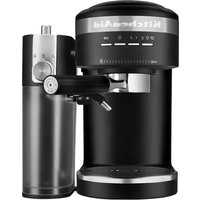
| Product type | Automatic coffee machine |
| Dimensions (H x L x P) | 35 x 25 x 30 cm |
| Weight | 8 kg |
| Power supply | 220-240 V, 50/60 Hz, 1450 W |
| Water tank capacity | 1.5 L |
| Bean hopper capacity | 200 g |
| Pump pressure | 15 bar |
| Main functions | Espresso, cappuccino, latte, ristretto, hot water |
| Milk frother | Integrated, pivoting steam nozzle |
| Heating system | Thermoblock |
| Display | LCD with icons |
| Maintenance and cleaning | Automatic descaling, removable parts dishwasher safe |
| Safety | Automatic shut-off, overheat protection |
| Spare parts and repairability | Solenoid valve, pump, seals available from after-sales service |
| General information | Color: black, brushed stainless steel |
Frequently Asked Questions - 5KES8558 KITCHENAID
How to descale my KitchenAid 5KES8558?
Use the automatic descaling program: fill the tank with a mixture of water and descaling agent (white vinegar or specific product), then start the cycle. Rinse with clean water afterwards.
What to do if the machine does not turn on?
Check that the power cord is properly plugged in and the outlet works. Make sure the water tank is correctly in place. If the problem persists, contact customer service.
How to use the steam nozzle to froth milk?
Fill a pitcher with cold milk, immerse the nozzle in the milk, then activate the steam. Make circular motions to obtain a creamy froth. Clean the nozzle after each use.
Why is my coffee too weak?
Check the grind: it should be fine for espresso. Increase the coffee dose or select a stronger program. Also make sure the bean hopper is not empty.
How to adjust water hardness?
Go to the machine settings, navigate to 'Water hardness' and select the level corresponding to your water (soft, medium, hard). Use the provided test strip.
The machine displays 'Fill tank' when it is full
Remove the tank, clean the contacts with a dry cloth and replace it correctly. If the message persists, a sensor may be defective: contact customer service.
Can I use ground coffee in this machine?
Yes, thanks to the ground coffee compartment located on top. Add a spoonful of ground coffee per cup, then select the corresponding program.
How to clean the brewing unit?
Remove the brewing unit (see manual), rinse it with clean water without detergent, brush the filters, then let it dry before putting it back.
What does the 'Descaling' indicator light mean?
The machine indicates that a descaling cycle is necessary. Follow the instructions in the manual to start the descaling program.
How to reset to factory settings?
Press and hold the 'Menu' button for 5 seconds until the screen displays 'Reset', then confirm. All settings will return to default values.
User questions about 5KES8558 KITCHENAID
0 question about this device. Answer the ones you know or ask your own.
Ask a new question about this device
No questions yet. Be the first to ask one.
Download the instructions for your Coffee machine in PDF format for free! Find your manual 5KES8558 - KITCHENAID and take your electronic device back in hand. On this page are published all the documents necessary for the use of your device. 5KES8558 by KITCHENAID.
USER MANUAL 5KES8558 KITCHENAID

Manual assistant
Powered by Anthropic
Waiting for your message
Product information
Brand : KITCHENAID
Model : 5KES8558
Category : Coffee machine