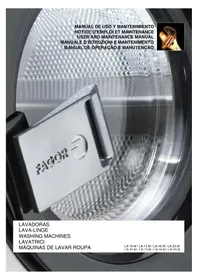
LA18 M - Washing machine FAGOR - Free user manual and instructions
Find the device manual for free LA18 M FAGOR in PDF.



| Brand | Fagor |
| Model | LA18 M |
| Product type | Front-loading washing machine |
| Load capacity | 7 kg (estimated) |
| Dimensions (H x W x D) | 85 x 60 x 60 cm (estimated) |
| Weight | 70 kg (estimated) |
| Power supply | 220-240 V, 50 Hz, 10 A (estimated) |
| Wash programs | 16 programs: White 90°C, White/Color 60°C, Synthetic, Delicate, Wool, Quick, Sanitary, etc. |
| Express function | Automatic reduction of program duration |
| Extra rinse | Addition of automatic rinse |
| Thermal stop | Timer activation after reaching temperature (configurable) |
| Advance button | Direct jump to next phase |
| Display | 4-digit 7-segment digital display |
| Control | Microprocessor with buttons START, INC (∧), DEC (∨), EXPRESS, Extra rinse |
| Water levels | 3 configurations: Low (factory), Medium, High |
| Spin speed | Variable (max estimated 800 rpm) |
| Safety | Door lock, imbalance detection, motor thermal protection, emergency stop |
| Maintenance | Daily cleaning of detergent drawer; monthly cleaning of water inlet filters; stainless steel lubrication if unused |
| Self-service version | Compatible with payment center, coin or card (optional kit) |
| Warranty | 12 months parts, 1 month labor |
| Required water pressure | 2 to 4 kg/cm² (28-56 psi) |
Frequently Asked Questions - LA18 M FAGOR
User questions about LA18 M FAGOR
0 question about this device. Answer the ones you know or ask your own.
Ask a new question about this device
Download the instructions for your Washing machine in PDF format for free! Find your manual LA18 M - FAGOR and take your electronic device back in hand. On this page are published all the documents necessary for the use of your device. LA18 M by FAGOR.
USER MANUAL LA18 M FAGOR
LA-10 M / LA-13 M / LA-18 M / LA-25 M
IR-10 M/IR-13 M/IR-18 M/IR-25 M
| MD | LA-10 | LA-13 | LA-18 | LA-25 | LR-10 | LR-13 | LR-18 | LR- 25 | LN-10 | LN-13 | LN-18 | LN-25 | |
| DC | litros | 100 | 130 | 180 | 250 | 100 | 130 | 180 | 250 | 100 | 130 | 180 | 250 |
| CM kg | 10 13 18 25 | 10 13 | 18 25 | 10 13 18 | 13 18 25 | ||||||||
| SP1 | r.p.m. | 50 | 50 | 47 | 45 | 50 | 50 | 47 | 45 | 50 | 50 | 47 | 45 |
| SP2 | rpm | 500 | 500 | 475 | 450 | 500 | 500 | 475 | 450 | 500 | 500 | 475 | 450 |
| SP3 | r.p.m. | 1000 | 1000 | 950 | 900 | 1000 | 1000 | 1000 | 1000 | 950 | 900 | ||
| SP4 | rpm | 800 | 800 | 750 | 700 | 800 | 800 | ||||||
| LV1 | mm | 70 | 75 | 85 | 95 | 70 | 75 | 85 | 95 | 70 | 75 | 85 | 95 |
| LV2 | mm | 90 | 105 | 115 | 125 | 90 | 105 | 115 | 125 | 90 | 105 | 115 | 125 |
| LV3 | mm | 110 | 135 | 145 | 155 | 110 | 135 | 145 | 155 | 110 | 135 | 145 | 155 |
| LV4 | mm | 130 | 165 | 175 | 185 | 130 | 165 | 175 | 185 | 130 | 165 | 175 | 185 |
| LV5 | mm | 180 | 225 | 240 | 260 | 180 | 225 | 240 | 260 | 180 | 225 | 240 | 260 |
| P1 | |||||||
| PH 1 2 | 3 | 4 | 5 | 6 | 7 | ||
| BL 1 | 2 | 3 | 3 | 4 | 5 | ||
| SP 1 1 | 1 | 2 | 1 | 3 | |||
| LV 1 | 1 | 3 | 3 | --- | 3 | ||
| °C | 40 | 90 | |||||
| °F | 104 | 194 | --- | --- | |||
| TM(min) | 6 | 12 | 3 | 3 | 2 | ||
| MT | 1 | 1 | 1 | --- | 1 | ||
| P5 | |||||||
| PH 1 2 3 | 4 5 6 7 | ||||||
| BL 13 | 15 | 19 | 19 | 4 | 20 | 21 | |
| SP 1 1 1 | 1 2 1 3 | ||||||
| LV 2 | 2 | 3 | 3 | --- | 3 | --- | |
| °C | 30 | 60 | |||||
| °F | 86 | 140 | --- | --- | |||
| TIME(min) | 6 | 15 | 8 | 8 | 2 | 8 | 4 |
| MOTION | 1 | 1 | 1 | 1 | --- | 1 | --- |
| P2 | |||||||
| PH 1 2 3 | 4 5 6 7 | ||||||
| BL 7 | 9 | 3 | 3 | 4 | 5 | 6 | |
| SP 1 1 1 | 1 2 1 3 | ||||||
| LV 1 | 1 | 3 | 3 | --- | 3 | --- | |
| °C | 30 | 60 | |||||
| °F | 86 | 140 | --- | --- | |||
| TIME(min) | 6 | 15 | 3 | 3 | 2 | 3 | 6 |
| MOTION | 1 | 1 | 1 | 1 | --- | 1 | --- |
| P6 | |||||||
| PH 1 2 3 | 4 5 6 7 | ||||||
| BL 14 | 18 | 19 | 19 | 4 | 20 | 21 | |
| SP 1 1 1 | 1 2 1 3 | ||||||
| LV 2 | 2 | 3 | 3 | --- | 3 | --- | |
| °C | |||||||
| °F | --- | --- | --- | --- | --- | --- | --- |
| TIME(min) | 6 | 12 | 8 | 8 | 2 | 8 | 4 |
| MOTION | 1 | 1 | 1 | 1 | --- | 1 | --- |
| P3 | |||||||
| PH 1 2 3 | 4 5 6 7 | ||||||
| BL 8 | 11 | 3 | 3 | 4 | 5 | 6 | |
| SP 1 1 1 | 1 2 1 3 | ||||||
| LV 1 | 1 | 3 | 3 | --- | 3 | --- | |
| °C | 30 | ||||||
| °F | --- | 86 | --- | --- | --- | ||
| TIME(min) | 6 | 12 | 8 | 8 | 2 | 8 | 6 |
| MOTION | 1 | 1 | 1 | 1 | --- | 1 | --- |
| P7 | |||||||
| PH 1 2 3 | 4 6 7 | ||||||
| BL 22 | 23 | 26 | 26 | 27 | 34 | ||
| SP 1 1 1 | 1 1 4 | ||||||
| LV 3 | 3 | 4 | 4 | 4 | --- | ||
| °C | 40 | ||||||
| °F | --- | 104 | --- | --- | |||
| TIME(min) | 6 | 12 | 3 | 3 | 3 | 4 | |
| MOTION | 2 | 2 | 2 | 2 | 2 | --- | |
| P4 | |||||||
| PH 1 2 3 | 4 5 6 7 | ||||||
| BL 8 | 12 | 3 | 3 | 4 | 5 | 6 | |
| SP 1 1 1 | 1 2 1 3 | ||||||
| LV 1 | 1 | 3 | 3 | --- | 3 | --- | |
| °C | |||||||
| °F | --- | --- | --- | --- | --- | --- | --- |
| TIME(min) | 6 | 12 | 8 | 8 | 2 | 8 | 6 |
| MOTION | 1 | 1 | 1 | 1 | --- | 1 | --- |
| P8 | |||||||
| PH 1 2 3 | 4 6 7 | ||||||
| BL 22 | 25 | 26 | 26 | 27 | 34 | ||
| SP 1 1 1 | 1 1 4 | ||||||
| LV 3 | 3 | 4 | 4 | 4 | --- | ||
| °C | |||||||
| °F | --- | --- | --- | --- | --- | --- | |
| TIME(min) | 6 | 12 | 3 | 3 | 3 | 4 | |
| MOTION | 2 | 2 | 2 | 2 | 2 | --- | |
| P9 | |||||||
| PH | 2 | 3 | 4 | 6 | 7 | ||
| BL | 29 | 30 | 30 | 31 | 32 | ||
| SP | 1 | 1 | 1 | 1 | 2 | ||
| LV | 3 | 4 | 4 | 4 | --- | ||
| °C | --- | --- | --- | --- | --- | ||
| °F | 12 | 3 | 3 | 3 | 3 | ||
| TIME(min) | 3 | 3 | 3 | 3 | --- | ||
| P13 | |||||||
| PH | 2 | 3 | 4 | 6 | 7 | ||
| BL | 17 | 24 | 24 | 5 | 6 | ||
| SP | 1 | 1 | 1 | 1 | 3 | ||
| LV | 1 | 3 | 3 | --- | 3 | --- | |
| °C | 60 | ||||||
| °F | 140 | --- | --- | ||||
| TIME(min) | 10 | 2 | 2 | 3 | 6 | ||
| MOTION | 1 | 1 | 1 | 1 | --- | ||
| P10 | |||||||||
| PH 0 1 2 | 3 5 4 | 5 6 7 | |||||||
| BL | 3 | 35 | 36 | 3 | 4 | 3 | 4 | 5 | 6 |
| SP 1 1 1 | 2 1 | 2 1 3 | |||||||
| LV | 3 | 1 | 3 | 3 | --- | 3 | --- | 3 | --- |
| °C | 65 | 71 | |||||||
| °F --- | 149 | 160 | --- | --- | --- | --- | --- | --- | |
| TIME(min) | 3 | 5 | 5 | 3 | 2 | 3 | 2 | 3 | 6 |
| MOTION | 1 | 1 | 1 | 1 | --- | 1 | --- | 1 | --- |
| P14 | |||||||
| PH | 2 | 3 | 4 | 6 | 7 | ||
| BL | 28 | 26 | 26 | 27 | 32 | ||
| SP | 1 | 1 | 1 | 1 | 2 | ||
| LV | 3 | 4 | 4 | --- | 4 | --- | |
| °C | --- | --- | --- | --- | --- | ||
| °F | |||||||
| TIME(min) | 8 | 3 | 3 | 3 | |||
| MOTION | 2 | 2 | 2 | 2 | --- | ||
| P11 | |||||||
| PH | 2 | 3 | 4 | 6 | 7 | ||
| BL | 10 | 24 | 24 | 5 | 6 | ||
| SP | 1 | 1 | 1 | 1 | 3 | ||
| LV | 1 | 3 | 3 | --- | 3 | --- | |
| °C | --- | --- | --- | --- | --- | ||
| °F | 3 | ||||||
| TIME(min) | 8 | 2 | 2 | ||||
| MOTION | 1 | 1 | 1 | 1 | --- | ||
| P15 | |||||||
| PH 6 | |||||||
| BL 6 | |||||||
| SP 3 | |||||||
| LV | --- | ||||||
| °C | --- | ||||||
| °F | --- | ||||||
| TIME(min) | 6 | ||||||
| MOTION -- | |||||||
| P12 | |||||||
| PH | 2 | 3 | 4 | 6 | 7 | ||
| BL | 16 | 24 | 24 | 5 | 6 | ||
| SP | 1 | 1 | 1 | 1 | 3 | ||
| LV | 1 | 3 | 3 | --- | 3 | --- | |
| °C | 40 | ||||||
| °F | 104 | --- | --- | ||||
| TIME(min) | 10 | 2 | 2 | 3 | 6 | ||
| MOTION | 1 | 1 | 1 | 1 | --- | ||
| P16 | |||||||
| PH | 4 | ||||||
| BL | 33 | ||||||
| SP | 2 | ||||||
| LV | --- | ||||||
| °C | --- | ||||||
| °F | --- | ||||||
| TIME(min) | 2 | ||||||
| MOTION | --- | ||||||
INTERPRETACION DE TABLAS: SIMBOLOS Y VALORES
| SIMBOLO | SIGNIFICADO VALORES | |
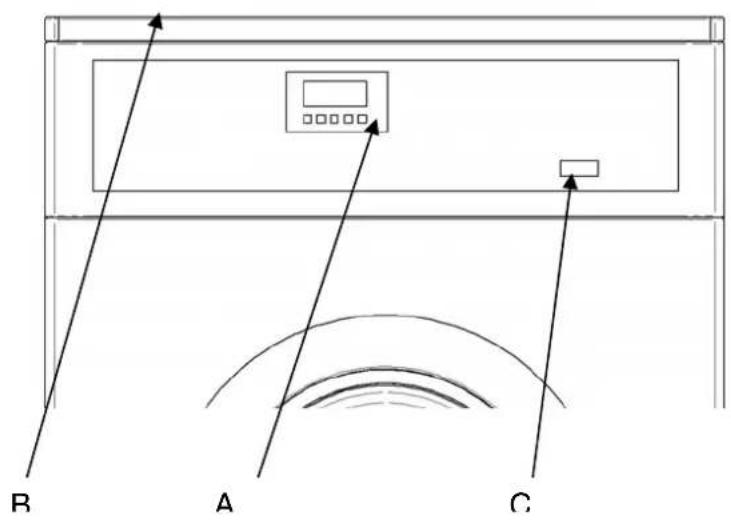
| A | CONTROLES | |
| B | CUBETERA | |
| C | INTERRUPTOR GENERAL | |
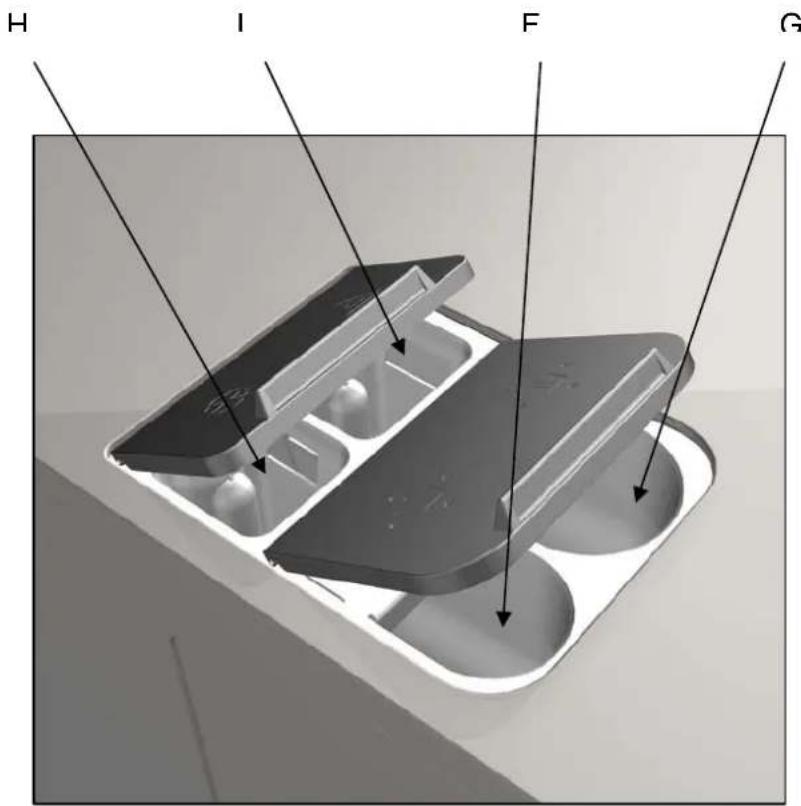
| F | PRELAVADO | |
| G | LAVADO | |
| H | SUAVIZANTE | |
| I | LEJIA | |
| PH | FASE | 0: Remojo 1: Prelavado 2: lavado 3:聲明 1 4:聲明 2 5: centrifugado corto 6: Aclarado final (suavizante) 7: centrifugado largo |
| BL | N° DE BLOQUE | |
| SP* | VELOCIDAD | SP1: LAVADO SP2: CENTRIFUGADO CORTO SP3: CENTRIFUGADO LARGO (MAX) SP4: CENTRIFUGADO DELICADO |
| LV* | NIVEL DE AGUA | LV1: MINIMO LV2: BAJO LV3: MEDIO LV4: ALTO LV5: MAXIMO |
| T | TEMPERATURA | |
| TM | TIEMPO | |
| MT | MOVIMIENTO TAMBOR | 1: ENERGICO 2: NORMAL 3: DELICADO |
| P* | PROGRAMAS | P1: BLANCA 90C/194F P2: BLANCA/COLOR 60°C/140F P3: BLANCA/COLOR 30°C/86F P4: BLANCA/COLOR FRIA P5: SINTETICA 60°/140 P6: SINTETICA FRIA P7: DELICADA 40°C/104F P8: DELICADA FRIA P9: LANA FRIA P10: SANITARIO P11: RAPIDO FRIO P12: RAPIDO 40°C/104 P13: RAPIDO 60°/140F P14: RAPIDO DELICADA P15: CENTRIFUGADO LARGO P16: CENTRIFUGADO CORTO |
ACLA Aclarado extra (On/Off)
Stop Parada t érmica (On/Off)
3.4 ACLA (Aclarado extra)
WARNING: To reduce the risk of electrical shocks or injury when using the appliance, the basic precautions should be observed, including the following:
1- READ all the instructions prior to using the appliance and KEEP THEM in an easily accessible place for reference in the event of doubt.
2- Do NOT wash clothes which have been previously treated, washed, soaked or stained with petrol, dry cleaning solvents, or other inflammable or explosive substances, as these give off vapours which may catch fire or explode.
3- Do NOT add petrol, dry cleaning solvents or other inflammable substances to the washing water. These substances give off vapours which could catch fire or explode.
4- In some conditions, hydrogen gas may be produced in a hot water system which has not been used for more than two weeks. Hydrogen gas is explosive. If the hot water system has not been used for a while, before using the washing machine turn on all the hot water taps and let the water run for a few minutes. This will release any accumulated hydrogen gas. As the gas is inflammable, do not smoke or use naked flames during this operation.
5- Do NOT allow children to play in or on the appliance. Children should be strictly supervised when in the vicinity of a machine which is operating.
6- Remove the door from the appliance before disposal or before leaving it out of service.
7- DO NOT TRY TO OPEN THE DOOR if the drum is moving.
8- Do NOT install or store the appliance in the open.
9- Do NOT try to force the controls.
10- Do not repair or replace parts of the appliance or carry out any servicing unless recommended to do so in the User Instruction Manual. Make sure that you fully understand the instructions and have the necessary skills to carry out the operations described.
11- Do NOT remove any safety device or modify any components in the washing machine. DO NOT INSTALL components not belonging to the machine in the appliance.
12-Failure to comply with any of the instructions given in the Instruction Manual may result in personal injury to the user. It is no possible to provide for all possible situations and contingencies with warnings about risk and hazards. Therefore, any person involved in the transportation, installation, use or maintenance of the machine should always employ common sense, caution and care.
13- Do NOT use the machine unless all the covers and guards are correctly fitted and secured.
14- The distributor (vendor) MUST correctly instruct the user during commissioning.
15- Pour the correct doses of detergent, fabric softener and lay into the dispenser drawer, as indicated by the manufacturer. Heed tips concerning the treatment of different materials given by the manufacturers.
16- Daily remove any traces of detergent or liquids from the dispenser drawer. Never use powdered or abrasive detergents for cleaning; use only water and soap.
17- Clean the water inlet filters and the external dispenser conducts once a month.
18- Never clean the exterior by water injection; functional parts of the machine could damage.
19- If the washing machine is to be idle for long periods, apply a coat of Vaseline oil to all its stainless steel surfaces.
20- An annual general revision is recommended.
CONTENTS
INTERPRETATION OF TABLES: SYMBOLS AND VALUES 3
IMPORTANT INSTRUCTIONS REGARDING SAFETY AND USE 4
1 INTRODUCTION 6
2 USE 7
2.1 Controls 7
2.2 Programmes 7
2.3 Operation 9
2.3.1 Programme execution 9
2.3.2 Programme end 9
3 CONFIGURATION (advanced) 10
3.1 Prg (programme selection) 10
3.2 AVAN(advance) 10
3.3 SPRES (Express) 10
3.4 ACLA (Extra rinse) 10
3.5 Stop (Thermal stop switch) 10
3.6 LEuL (Configuration of levels) 10
3.7 bLOC (Modify/delete blocks) 11
3.8 Timr (Remaining time) 11
3.9 Parameters (In run mode) 11
4 SELF- SERVICE 12
4.1 Operation 12
4.2 Pay centre/card 12
4.3 COIN 12
5 MAINTENANCE 14
5.1 Electrical and mechanical irregularities 14
5.2 Error messages 14
1 INTRODUCTION
Dear customer,
Thank you for the confidence you have placed in our product. We hope it meets your needs.
We offer a guarantee of 12 months from the date shown on the invoice for the purchase of spare parts and of 1 month for labour and displacement.
The guarantee does not cover damage to glass components, or consumables (seals, bulbs, etc.) nor damage to insulation material or damage due to the incorrect installation of the appliance, or to inappropriate use, inadequate maintenance or poor repair processes.
This appliance is subject to changes and modifications for its technical progress.
2 USE
2.1 Controls
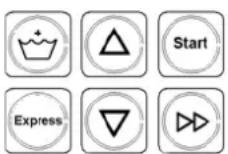
| Screen (2) | The screen has 4 displays with 7 segments each and gives information regarding the current operation. |
| Mains switch (4) On/Off | The switch has two positions. Press "I" to switch on the washing machine and "O" to switch it off. |
| START key | Press Start to start a programme, pause or continue the programme after the pause. In the menu navigation use the ENTER function to enter or go the next level in a menu. |
| ADVANCE (>>) key | Press advance to accelerate a programme. When this key is pressed the programmer goes directly to run the next phase of the programme; where the phase currently running is the last, the programme ends. Please note that if you press this key during a spin cycle, the machine will not move to the next phase until completion of the required safety time to permit the drum to come to a complete standstill. |
| INC (^) and DEC (✓) keys | The INC (^) and DEC (✓) keys have different functions depending on the screen and the programmer operating mode. Use these keys to select a wash programme or to scroll through different menus. |
| EXPRESS Key | Press Express to reduce the time each programme runs. The following table shows the effect of the "express" key on the different programmes. When the Express key is pressed, the letter S appears next to the programme, indicating that the express mode is on. When scrolling through the menus, use the Return function to exit or go to the higher level. |
| Extra Rinse Key | Press this key to add an additional rinse to the current washing programme. When it is pressed, the additional Extra Rinse LED lights up. |
| Phase indicators (LEDS) | The programmer has 7 amber LEDs that indicate the status of the washing machine and the washing programme progress in its different phases. The eighth LED is green and shows the door status. |
2.2 Programmes
(S) Express mode on
| Programme "Express" Effect | ||
| P1 (S) | Whites 90°C | The complete prewash cycle is cancelled and the wash cycle lasts 8 minutes instead of 12. |
| P2 (S) | Whites/coloureds 60 °C | The complete prewash cycle is cancelled and the wash cycle lasts 10 minutes instead of 15. |
| P3 (S) | Whites/coloureds 30 °C | The complete prewash cycle is cancelled and the thermal stop is deactivated in the wash cycle |
| P4 (S) | Whites/coloureds cold wash | The complete prewash cycle is cancelled. |
| P5 (S) | Synthetics 60°C | The complete prewash cycle is cancelled and the wash cycle lasts 10 minutes instead of 15. |
| P6 (S) | Synthetics cold wash The complete prewash cycle is cancelled. | |
| P7 (S) | Delicates 40°C | The complete prewash cycle is cancelled and the thermal stop is deactivated in the wash cycle |
| P8 (S) | Delicates cold wash | The complete prewash cycle is cancelled. |
| P9 (S) | Cold woollens | The complete prewash cycle is cancelled and the wash cycle lasts 8 minutes instead of 12. |
| P10 (S) | Sanitary There is no change. | |
| P11 (S) | Fast cold wash | There is no change. |
| P12 (S) | Fast wash 40°C | There is no change. |
| P13 (S) | Fast wash 60°C | There is no change. |
| P14 (S) | Fast delicates | There is no change. |
| P15 (S) | Long spin | There is no change. |
| P16 (S) | Short spin | There is no change. |
NOTE: When the thermal stop is deactivated, the programmed wash time starts to run immediately without waiting for the programmed water temperature to be reached
2.3 Operation
This machine has been designed to wash or treat most materials. Its use for other purposes than those given is considered as undue and dangerous.
The machine should be loaded with the nominal load, smaller or bigger loads should be avoided.
Clothes should not be washed in sacks or cloth bags. If this is absolutely necessary, make sure the machine is loaded to the nominal load to avoid possible unbalanced loads.
Canvas, waterproof items, mops, carpets or rugs should not be spun.
The machine is controlled using a microprocessor able to adapt to the needs of each user.
There are 16 programmes for which the times and temperatures can be changed. They are divided into four sections with different spin settings and treatments: Normal, Delicates, synthetics and fast. For further details, please see the sections Configuration (page 68) and Standardised Programmes (page 68).
The machine has an intelligent control to control the water temperature; if hot water is available, it should be connected. The machine adjusts the different water inputs to maintain the programmed temperature.
It has intelligent control for spin cycle management. The washing machine controls any unbalanced loads and manages the spin to ensure a good spin, reducing noise and extending the useful life of wearable components, thus significantly reducing fatigue in the mechanical components.
The machine offers the "Express" system. By pressing one key you automatically reduce the programme time, thus adapting to user requirements without needing to change the machine configuration.
Extra rinse option. Press one key to add another rinse to the programme, thus adapting to user requirements without needing to change the machine configuration.
2.3.1 Programme execution
In order to carry out a wash programme, the following steps should be followed:
1- Put dirty clothes in washing machine drum
2- Close washing machine door.
3- Add detergent
4- Select desired programme.
5- Press START key.
After starting a programme, the LEDs indicate its condition and evolution.
With the START key the programme stops, and pauses. If you want the programme to continue, press the Start key again. If the programme is in spin mode,
it is not possible to pause the machine, and therefore pressing the START key will have no effect.
2.3.2 Programme end
The programme can finish in several ways:
Normal end: the programme finishes when all cycles have been carried out.
- Pressing the EXPRESS key when the washing machine is in PAUSE mode.
- By pressing the ADVANCE key from any point in the programme, repeatedly, the end of the programme can be reached. If a spin is being carried out, the ADVANCE key will not respond until the braking safety time has finished (approx 1 min.).
When a programme ends, before allowing the door to be opened, the clothes are untangled during 30 seconds. An acoustic signal when the door can be opened after this process.
3 CONFIGURATION (advanced)
To go to the menu, while the machine is on and stopped, press the INC and DEC ( ,) keys together for 2 seconds. The two main menus of the machine are shown below.
CONF Configuration
MANT Maintenance
The maintenance menu is exclusively for use by the technical service, user options are included in the configuration menu. To go to configuration, press START and enter the code, 3489. The different options are displayed below:
3.1 Prg (programme selection)
Press start to access the programme selection; the programmes are displayed followed by y or n (yes/no) indicating which programmes are activated. Use the INC (A) and DEC (v) keys to change the yes/no, press >> (advance) to change the programme and Start to end. If no programme is selected, the defect programme, P1 is active. If, for example, programmes P1, P4, P5, P8 and P14 are selected, correlative numbers are displayed on the operation screen: P1, P2, P3, P4, P5.
3.2 AVAN(advance)
MOD. Model (technical service)
Grd Temperature unit (C or Fahrenheit)
Pay Self-service (Off/coin/CP) Only for
self-service models (see point 2.9)
The key >> can be deactivated, to prevent the advance of a cycle thus ensuring the wash programme is completed correctly. ON activated, OFF deactivated (activated by defect)
3.3 SPRES (Express)
Prg Programme selection
AVAN Advance (On/Off)
SPRES Express (On/Off)
ACLA Extra rinse (On/Off)
Stop Thermal stop switch (On/Off)
LEuL Configuration of water level
bLOC bLOC (Modify/delete blocks)
TimR → Remaining time
Div Currency (only self-service slot) (see point 2.9)
Pric Price (only self-service/coin) (see point 2.9)
The Express function may be switched off. This function slightly alters the wash cycles and times to give shorter cycles. ON activated, OFF deactivated (activated by defect)
3.4 ACLA (Extra rinse)
The extra rinse key can be switched off, eliminating the option to add an extra rinse. ON activated, OFF deactivated (activated by defect)
3.5 Stop (Thermal stop switch)
When the thermal stop switch is activated, the cycle time does not start until the programmed temperature has been reached in order to guarantee the wash cycle is correctly completed; this switch can be deactivated so that the time is counted from the moment the programmed level is reached. ON activated, OFF deactivated (activated by defect)
3.6 LEuL (Configuration of levels)
The water levels can be varied; there are three different settings:
1- Low (factory setting)
2- Intermediate
3- Height
If the configuration is modified, this will affect all the levels of water used. Press start and the current level is displayed (Leu1), use the INC and DEC ( ,) keys to change the level to suit your needs. Press Start again to confirm the level selected.
3.7 bLOC (Modify/delete blocks)
It is possible to modify the time and temperature of each phase and even delete phases.
First, refer to the table of Standardised Programmes to confirm which blocks are in the programme you wish to modify.
Next, enter this block and modify the parameters as follows:
1- When bLOC is displayed on the screen, press Start.
2-B 1 is displayed, press the INC and DEC ( ,) keys to go to the block you wish to modify. Press Start.
3- "tIME" is displayed on the screen, press the INC or DEC ( ,) keys to go to "tEMP" (temperature). To modify the time, press Start when "tIME" is displayed and the default time setting will be shown. Use the INC and DEC ( ,) keys to modify this value and press Start to confirm. Press Express to exit.
4- To modify the temperature, go to "tEmp", press Start and the default temperature setting is displayed, modify the value using the INC and DEC ( ,) keys and press Start to exit.
5- If the time is set to 0 seconds, the block is cancelled and will not run, i.e. the next phase will be run. It is not possible to cancel the last spin of each programme and therefore this is limited to a time of one minute.
6- Warning! Please note that some blocks are used in more than one programme at a time and, if these block are changed, all the programmes in which they are used will be changed.
3.8 Timr (Remaining time)
The timer can be activated to display the time remaining for each programme, provided that the thermal stop, Express and extra rinse functions are switched off. ON activated, OFF deactivated (deactivated by defect)
3.9 Parameters (In run mode)
To go to the menu and view the real data while the machine is running, press INC and DEC ( ,) together for 2 seconds.
PARA Parameters: Temperature, level of water and remaining time.
IN Inputs (technical service)
OUT Outputs (technical service)
4 SELF-SERVICE
4.1 Operation
The configuration of the machine is different for self-service models.
There is no mains switch on the control panel. To switch the machine on and off, use the switch (circuit breaker) at the rear of the machine.
Only those keys required to run a programme are displayed; the "Express", "extra rinse" and advance >> keys are switched off although they can be activated in the configuration menu (page 9).
Warning!
For safety reasons, access to configuration is not the same as in non-self-service machines. Please ask your distributor (vendor) for details on the corresponding method.



Remember that these keys are used in the configuration menus, therefore you should know exactly which function each key corresponds to.
The "Timr" (time
remaining) option is activated by default, it can be switched off in the configuration menu (see section 3.8).
By defect, only 4 programmes are activated:
| Self-service programmes | |
| P1 | Whites 90°C |
| P2 | Whites/coloureds 60 °C |
| P3 | Whites/coloureds 30 °C |
| P4 | Whites/coloureds cold wash |
| P5 | Synthetics 60°C |
| P6 | Synthetics cold wash |
| P7 | Delicates 40°C |
| P8 | Delicates cold wash |
| P9 | Cold woollens |
| P10 | Sanitary |
| P11 | Fast cold wash (P1) |
| P12 | Fast wash 40°C(P2) |
| P13 | Fast wash 60°C(P3) |
| P14 | Fast delicates (P4) |
| P15 | Long spin |
| P16 | Short spin |
The programme selection can be configured (See section 3.1)
Remember that the customer is only shown the active programmes, and these are always shown in correlative order beginning with P1.
Self-service machines can be operated using different devices:
1- Pay centre (standard configuration)
2- Coin slot.
3- Card
The self-service washing machine is delivered with Pay Centre configuration (CP). For the coin and card operated options, it is necessary to install the corresponding "kits" sold separately. Please ask your distributor for further information.
To change the washing machine configuration, go to CONF/PAY (see section 3) and select the required option. There are two operating modes:
The different functions in each case are shown below:
4.2 Pay centre/card
Use this option if the washing machine is a pay centre model or the card kit has been installed.
Programme execution
In order to carry out a wash programme, the following steps should be followed:
1- Place dirty washing in the machine.
2- Close the door
3- Add detergent
4- Insert card or coins in the pay centre
5- Select programme
6- Press Start
The price rate is the same for all the programmes. To change the price, please see the pay centre manual on the card reader if using card payments.
4.3 COIN
Use this option if the machine has been installed with the coin kit.
In order to carry out a wash programme, the following steps should be followed:
1- Place dirty washing in the machine.
2- Close the door
3- Add detergent
4- Select programme
5- Confirm price
6- Insert the coins
7- Press Start
The programme number and price are shown on the screen intermittently; use the INC and DEC ( ,) keys to change the programme and the price will be
updated. If there is no activity to the keys or in the coin slot after 30 seconds, the word "FREE" is displayed on the screen, indicating that the machine is available. Press any button to view the programmes.
With this type of coin-operated machine, a different price can be allocated to each programme. Two new submenus, DIV and Pric, are displayed in the configuration menu and can be used to allocate the corresponding currency and price.
Div: The coin slot has a different setting for each currency. Please refer to the coin kit manual and confirm that the installed coin kit accepts your currency. Allocate the currency to the washing machine programmer. The table below shows the available currencies:
| 0 | COIN |
| 1 | EURO-COUNTRYS |
| 2 | USA |
| 3 | UNITED KINGDOM |
| 4 | MEXICO |
| 5 | CANADA |
| 6 | AUSTRALIA |
NOTE: This list is continuously updated, if you cannot find your country in the list, please ask your distributor for the latest available update.
PRIC: Allocate the price to each programme. Press Start to go to the programmes, in this menu only the active programmes are displayed (but with their original numbering) (please see the table on page 11). Press Start to access the price. The price is conditioned by the currency selected; if the currency is changed, the prices will be reset, therefore it is IMPORTANT to select the currency first. If a programme is added to the list (section 3.1) the default price for this currency will be allocated to the programme, the price should be allocated after it has been activated.
5 MAINTENANCE
5.1 Electrical and mechanical irregularities
Before calling the Technical Service Centre, check the following:
That power is supplied to the machine.
The condition of the fuses.
That the voltage is correct for the machine.
If the washing machine fails to get the required level of water, check:
The water mains tap is open.
The water inlet filter is not blocked.
That the water pressure is between 2 and 4kg / cm 28 (28 and 56 psi).
If a power cut occurs, check:
The tub is drained and the door is blocked. If you want to take the clothes out of the washing machine, unlock the door by pulling down the belt located behind the front panel.
5.2 Error messages
On the washing machine screen, warning or fault messages may be displayed during or after the execution of a wash programme. Except in the event of a power cut, the washing machine will be paused (drain pipe valve off, motor off, etc.), awaiting user action.
If the washing machine vibrates excessively, check:
None of the panel screws is loose.
| Message | Possible causes | Action |
| PWR FAUL UAIT | This message appears on recovering the power after having been cut-off. If the power cut occurs during the spin cycle, the message "WAIT" is displayed. For safety reasons, wait approximately 1.5 minutes without pressing anything until "PWR FAULT" is displayed. | Press START: the programme continues to operate in the same phase as before the power cut. Press EXPRESS: the programme ends. |
| E2 | FAULT LOCK This message appears when it is detected that the door can not be unlocked at the end of the programme or that it has unlocked during the programme | Press ESC: the programme ends. |
| E3 | FAULT DRAIN PIPE This message is displayed when, in spite of deactivating the emptying valve output, the water level inside the drum has not decreased for a pre-established period of time. | Press START: the programme continues. Press EXPRESS: the programme ends. |
| E4 | FAULT WATER INLET This message appears when, in spite of activating the corresponding solenoid valves' outputs, the water level inside the tub has not increased during a certain pre-established period of time. | Press START: the programme continues. Press EXPRESS: the programme ends. |
| E5 | HEATING FAULT This message is shown when, in spite of activating the heating output, the water temperature has not increased for a certain pre-established period of time. | Press START: the programme continues. Press EXPRESS: the programme ends. |
| E6 | MAX. TEMP This message is displayed when the water temperature has exceeded 95 °C. | Press START: the programme continues. Press EXPRESS: the programme ends. |
| E7 | THERMOSTAT OPEN This message appears when the water exceeds 95 °C | Press START: the programme continues. Press EXPRESS: the programme ends. |
| E9 | MOTOR HEATING This message appears when the thermal protection of the washing machine's motor is detected to have not been activated. | Press START: the programme continues. Press EXPRESS: the programme ends. |
| E10 | UNBALANCE This message appears when the final spin activates the unbalance micro three times. | Press EXPRESS: the programme ends. |
| E11 | CLOTHES HOT This message is displayed when a programme execution finishes but the water temperature inside the tub exceeds 50 °C. | Press EXPRESS: the programme ends. |
| E12 | WATER IN TUB This message is displayed when a programme execution is finished but there is still water inside the tub. The door can not be opened until the water is drained from the tub. | Press EXPRESS: the programme ends. |
Pay Self-service (Off/coin/CP) esclud SPRES (Express)
ACLA Extra risciacquo (On/Off)
Stop Arresto termico (On/Off)
4.3 COIN (gettoniera)
AVAN Avanço (On/Off)
XPRES Express (On/Off)
3.4 ENXA (Enxaguamento extra)
ENXA Enxaguamento extra (On/Off)

- INTERPRETACION DE TABLAS: SIMBOLOS Y VALORES
- ACLA (Aclarado extra)
- CONTENTS
- INTRODUCTION
- USE
- Programmes
- Operation
- Programme execution
- Programme end
- CONFIGURATION (advanced)
- Prg (programme selection)
- AVAN(advance)
- SPRES (Express)
- ACLA (Extra rinse)
- Stop (Thermal stop switch)
- LEuL (Configuration of levels)
- bLOC (Modify/delete blocks)
- Timr (Remaining time)
- Parameters (In run mode)
- SELF-SERVICE
- Operation
- Warning!
- Pay centre/card
- Programme execution
- COIN
- MAINTENANCE
- Electrical and mechanical irregularities
- Error messages
- COIN (gettoniera)
- ENXA (Enxaguamento extra)
Brand : FAGOR
Model : LA18 M
Category : Washing machine