SBTH 4.0 A1 - Wireless Earbuds SILVERCREST - Free user manual and instructions
Find the device manual for free SBTH 4.0 A1 SILVERCREST in PDF.



| Product type | Wireless Bluetooth headset |
| Brand | SilverCrest |
| Model | SBTH 4.0 A1 |
| Power supply | Lithium-ion battery 3.7 V / 195 mAh |
| Charging voltage | 5 V (via USB) |
| Charging time | Approx. 2.5 hours |
| Audio playback time | Approx. 15 hours (at medium volume) |
| Standby time | Up to 1900 hours |
| Talk time | Approx. 15 hours |
| Bluetooth version | 4.0 + EDR |
| Supported Bluetooth profiles | A2DP, AVRCP, HSP, HFP |
| Bluetooth range | Up to 10 meters |
| Frequency response (headphone) | 20 Hz – 20 kHz |
| Frequency response (microphone) | 20 Hz – 16 kHz |
| Weight | Approx. 135 g |
| Dimensions (W x H x D) | 165 x 153 x 52 mm |
| Operating temperature | 0 °C to +45 °C |
| Storage temperature | -20 °C to +60 °C |
| Operating humidity | max. 85% RH (non-condensing) |
| Multipoint connection | Yes (up to 2 devices) |
| Main functions | Play/pause, next/previous track, volume, hands-free calls, voice command |
| Cleaning | Soft, dry cloth |
| Warranty | 3 years |
| Package contents | Headset, USB cable, user manual |
| Manufacturer | TARGA GmbH |
Frequently Asked Questions - SBTH 4.0 A1 SILVERCREST
User questions about SBTH 4.0 A1 SILVERCREST
0 question about this device. Answer the ones you know or ask your own.
Ask a new question about this device
Download the instructions for your Wireless Earbuds in PDF format for free! Find your manual SBTH 4.0 A1 - SILVERCREST and take your electronic device back in hand. On this page are published all the documents necessary for the use of your device. SBTH 4.0 A1 by SILVERCREST.
USER MANUAL SBTH 4.0 A1 SILVERCREST
User manual and service information
IAN 106951
IAN 106951
DE AT CH
Deutsch. 2
Francais 20
Italiano 38
English 56
Inhaltsverzeichnis
Warenzeichen 3
Einleitung. 3
Safety instructions 60
Copyright 64
Overview of the controls and button functions 65
Prior to use 66
Charging the battery 66
First use 66
Switching the headphones on/off 66
Connecting headphones 66
Connecting headphones to two Bluetooth® devices 67
Putting on the headphones. 68
Music playback. 68
Making calls 69
Deleting list of connections. 70
Troubleshooting 70
Environmental and disposal information 71
Conformity information 71
Warranty and servicing advice. 72
Trademarks
The Bluetooth® word mark and logos are registered trademarks of Bluetooth SIG, Inc. (Special Interest Group).
USB is a registered trademark.
Other names and products may be the trademarks or registered trademarks of their respective owners.
Introduction
Thank you for purchasing a SilverCrest product.
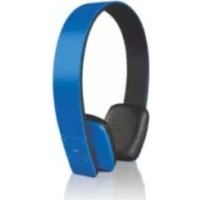
The SilverCrest SBTH 4.0 A1 Bluetooth® headphones, hereinafter referred to as headphones, allow you to listen to music from your smartphone or music playback device wirelessly. Their lightweight construction ensures they are comfortable to wear while providing a crystal-clear sound with disruptive background noise largely eliminated.
Intended use
These headphones are a consumer electronics device which is used to listen to music at a reasonable volume. The headphones can also be used as a hands-free kit. The headphones may only be used privately and not for industrial or commercial purposes. Furthermore, the headphones may not be used in tropical climates. The manufacturer does not accept any liability for any resulting damage or faults in the event of unauthorised modifications to the headphones. Only use accessories specified by the manufacturer. Please observe the regulations and laws in the country of use.
Supplied items
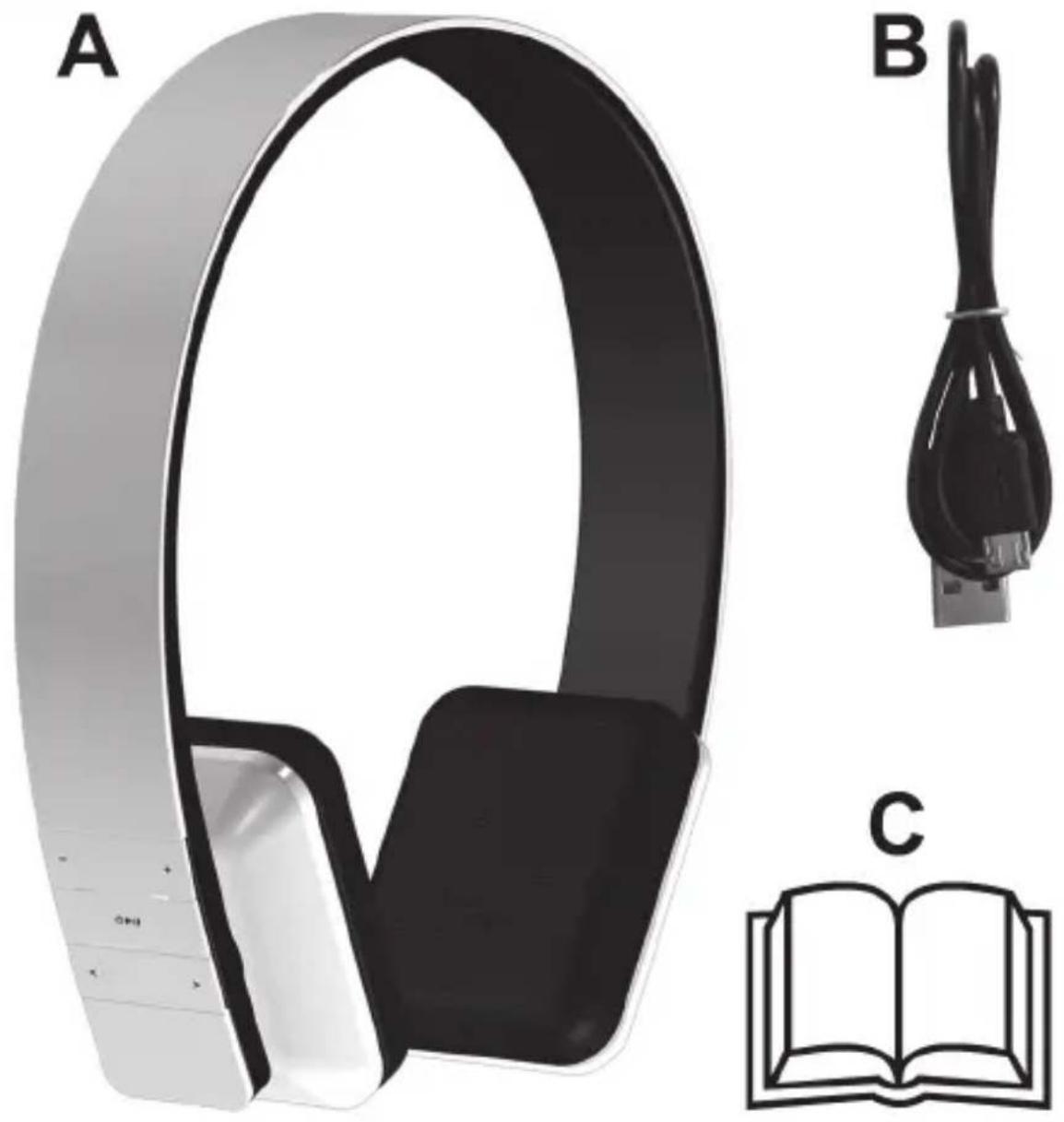
A SilverCrest SBTH 4.0 A1 Bluetooth ® headphones
B USB charging cable
C These instructions (symbolic representation)
Technical data
| Operating voltage 5V | ∞ |
| Battery Li-Ion, 3.7V | |
| Battery capacity 195mAh | |
| Bluetooth® specification v4.0 + EDR | |
| Profile support A2DP, AVRCP, HSP, HFP | |
| Frequency range of headphones 20Hz - 20kHz | |
| Frequency range of microphone 20Hz - 16kHz | |
| Range of Bluetooth® operation up to 10 metres | |
| Charging time approx. 2.5 hours | |
| Standby time up to 1900 hours | |
| Music playback approx. 15 hours* | |
| Talk time approx. 15 hours* | |
| Dimensions (W x H x D) approx. 165 x 153 x 52mm | |
| Weight approx. 135g | |
| Operating temperature | 0°C to +45°C |
| Storage temperature | -20°C to +60°C |
| Air humidity | max. 85% rel. humidity (non-condensing) |
- At medium volume
The technical data and design may be changed without notification.
Safety instructions
Before using these headphones for the first time, please read the following instructions carefully and take note of the safety warnings, even if you are familiar with the use of electronic devices. Store these instructions in a safe place for future reference. If you sell or pass on the headphones to someone else, be sure to always include these operating instructions as they are an integral part of the device.
Explanation of the hazard symbols used in these instructions

DANGER! This symbol in conjunction with the "danger" note indicates an imminent dangerous situation which, if not prevented, could result in serious injury or even death.

WARNING! This symbol in conjunction with the "warning" note indicates important information for safe operation of the device and the safety of the user.
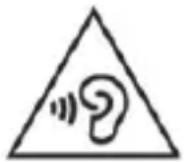
Take care when using headphones. Listening at high volume for prolonged periods of time can damage your hearing. Before using the headphones, set the volume to the lowest level.

This symbol indicates other important information on the topic.

DANGER! Radio interface
Switch off the headphones in aircraft, hospitals, operating rooms or in the vicinity of medical electronic systems. The transmitted radio waves can impair the functionality of sensitive devices. Keep the headphones at least 20cm away from any pacemakers or implantable cardioverter defibrillators because the proper functioning of the pacemaker or implantable cardioverter defibrillator can be impaired by radio waves. The transmitted radio waves can cause interference in hearing aids. Do not place the device in the vicinity of flammable gases or in a potentially explosive environment (e.g. paint shop) when the radio components are switched on because the transmitted radio waves can cause an explosion or a fire. The range of the radio waves is dependent on conditions in the surrounding environment. In the event of data traffic via a wireless connection, it is also possible for unauthorized third parties to receive data. Targa GmbH is not responsible for radio or television interference caused by unauthorized changes to this device. In addition, Targa assumes no responsibility for the replacement or exchange of connecting lines and devices not indicated by Targa GmbH. The user is solely responsible for the elimination of interference caused by such unauthorized changes and for the replacement or exchange of the devices.

DANGER! Risk of explosion!
The headphones must not be thrown into a fire because the built-in battery may explode.

DANGER! Children and persons with disabilities
These headphones can be used by children aged 8 and older and by persons with reduced physical, sensory or mental abilities or lack of experience and knowledge if they are supervised or have been instructed on the safe use of the headphones and understand the resulting risks. Children must not play with the headphones. Cleaning and user maintenance must not be carried out by children without supervision. Small parts can be fatal if swallowed.
Always keep plastic packaging away from children.

DANGER! It poses a suffocation risk!

WARNING! Ensure that
- no direct heat sources (e.g. heating) can affect the headphones
- the headphones are not exposed to bright artificial light
- any contact with splashed and dripping water and corrosive liquids is avoided and the headphones are not operated in the vicinity of water. In particular, the headphones should never be submerged in liquid; do not place any vessels filled with liquid, for example, vases or drinks, on or near the headphones
- the headphones are not used in the immediate vicinity of magnetic fields (e.g. speakers)
- no fire sources (e.g. burning candles) are placed on or near the headphones
- no foreign objects penetrate the device
- the headphones are never subjected to extreme temperature fluctuations as this could result in condensation and electrical short circuits. If the headphones were subjected to extreme temperature fluctuations, however,
wait (approx. 2 hours) until the headphones have reached ambient temperature before use
-
the headphones are never subjected to excessive shocks and vibrations
-
the headphones are never covered while they are charging as they can become heated
-
when using an optional USB power supply, its operating instructions are observed
-
connected cables are always laid in such a manner that nobody can step on them or trip over them. There is a risk of injury
-
no objects are placed on a connected cable and cables are not connected over sharp edges because they could be damaged otherwise.

WARNING! Maintenance / cleaning
It is necessary to repair the headphones if they have been damaged in any way, for example, if the housing is damaged, if liquid or object penetrated the device or if the product has been exposed to rain or moisture. Repair work is also required if the device is not working properly or has been dropped. If smoke is produced, or there are any unusual sounds or smells, turn the headphones off immediately. In such cases, the headphones should not be used until they have been inspected by authorised service personnel. Only have the device repaired by qualified personnel. Never open the housing of the headphones.
Only use a clean, dry cloth for cleaning the headphones and never use any corrosive liquids. Use a slightly damp cloth and a mild cleaning agent to remove stubborn dirt.
Never try to open the housing of the headphones. This would void your warranty.
Operating environment
The headphones are not designed for use in environments with a high temperature or humidity (e.g. bathrooms), and must be kept free from dust. Operating temperatures and operating air humidity: 0^ to 45^ , max. 85% rel. humidity.
Copyright
All information contained in these instructions is subject to copyright and is provided for information purposes only. It is only permitted to copy or duplicate data and information with the express and written consent of the author. This also includes commercial use of the content and data. The text and illustrations are based on the state of the art at the time of printing.
Overview of the controls and button functions
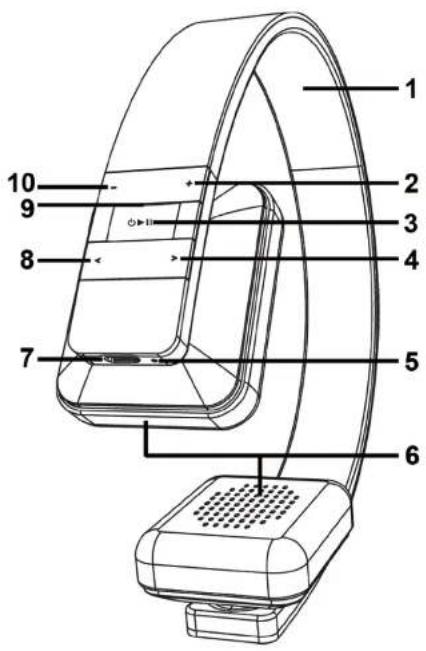
An illustration of the controls with the relevant reference numbers can be found on the fold-out inside cover of these instructions. You can leave this cover page folded out while reading further sections of these instructions. Thus you always keep a reference to the relevant control in sight.
1 Headband
2 + button
3 11 button
4 >button
5 Microphone
6 Earphone
7 Charging socket
8 < button
9 LED
10 - button
Prior to use
Take the headphones and the accessories out of the packaging and remove all packaging material completely.
Charging the battery
Before the first use or when the built-in battery is empty, you charge it as follows:
- Connect the supplied USB charging cable (B) to the charging socket (7) and a free USB socket of your computer when it is switched on or a USB power supply (not supplied).
- The LED (9) lights up orange while the battery is being charged. When the battery is fully charged, the LED (9) lights up blue.
The LED (9) flashes orange when the battery is low.
First use
Switching the headphones on/off
Switch on the headphones by pressing the button (3) for approximately 3 seconds. The LED (9) flashes orange and thus indicates standby mode. If the headphones were switched on for the first time and had never been connected to a device, pairing mode is started automatically. The LED (9) alternates between flashing blue and orange in pairing mode. Read the next section when connecting your device.
Press the button (3) for approximately 3 seconds to switch off the headphones.
Connecting headphones
Proceed as follows to connect the headphones to your device:
- Switch off the headphones.
-
Press the button (3) for approximately 6 seconds to start pairing mode.
-
The LED (9) alternates between flashing blue and orange. The headphones are now in search mode. In search mode, you can connect a compatible device to the headphones via the Bluetooth® function.
- Then connect your smartphone or audio / media player to the headphones via Bluetooth®. For further details, please read the instructions of your smartphone or media player. Select the device "SBTH 4.0 A1" from the list of devices which are found and establish the connection. If you are asked for a PIN, enter "0000".
When there is an established connection, the LED (9) flashes blue twice briefly about every 3 seconds. As soon as the device is switched off or is out of range, the headphones switch to standby mode (not connected) and the LED (9) flashes orange once briefly every 2 seconds.
If you want to connect a different device to the headphones, you must repeat the pairing as described previously.
As soon as the previously connected device comes within range of the headphones, the connection is established automatically. You may need to confirm the connection on your device.
Connecting headphones to two Bluetooth® devices
You can connect the headphones to two Bluetooth® devices at the same time. If you have already connected a device to the headphones, proceed as follows to connect another device:
Activate the multiple connection mode by pressing the button (3) briefly in pairing mode until four signal tones can be heard in an ascending tone sequence.
Establish the connection to your second device. Note the previous section "Connecting headphones" for further details.
Deactivate the multiple connection mode by pressing the button (3) twice in pairing mode until four signal tones can be heard in a descending tone sequence.
Putting on the headphones
Note the markings on the inside of the headband (1) directly above the earphone (6) to put on the headphones correctly: R = right , L = left . The controls and the LED (9) are located on the right side of the headphones.
You can adjust the size of the headband (1) by extending the earphone (6) slightly out of the headband (1) and sliding it back into the headband (1). This ensures that they fit as comfortably as possible.
Music playback

All of the following functions depend on the functionality of the mobile phone or media player which is used. It is possible that some functions may not be supported.
If you have connected the headphones to a smartphone or a music playback device, you can listen to music via the headphones. The following functions are available:
| Function | Action |
| Playback Press the ➔ll button (3) | briefly Ⓞ |
| Pause Press the ➔ll button (3) briefly | briefly Ⓞ |
| Next track Press the > button (4) | briefly |
| Previous track Press the < button | (8) briefly |
| Scan forward Keep the > button | (4) pressed |
| Scan back Keep the < button (8) | pressed |
| Increasing volume Press the + button (2) | (2) |
| Reducing volume Press the - button (10) | (10) |
Making calls
If you have connected the headphones to a mobile phone, you can make calls via the headphones. You can perform the following functions:
| Function | Action |
| Answering call Press the ➔ll button (3) briefly | (3) briefly |
| Ending call Press the ➔ll button (3) briefly | (3) briefly |
| Rejecting call Press the ➔ll button | (3) for approximately 2 seconds until a beep sounds |
| Redialling Press the ➔ll button (3) twice briefly | (3) twice briefly |
| Voice control Press the + button | (2) and - button (10) at the same time briefly |
| Increasing volume Press the + button (2) | (2) |
| Reducing volume Press the - button (10) | (2) |
| Transferring phone call from headphones to mobile phone | Press the ➔ll button (3) twice briefly |
| Taking phone call from mobile phone to headphones | Press the ➔ll button (3) twice briefly |
| Answering a new call and ending the current call * | Press the ➔ll button (3) briefly |
| Switching between two calls (toggling) * | Press the ➔ll button (3) for approximately 2 seconds until a beep sounds |
- This function must be supported by your network operator.
Deleting list of connections
The headphones note in a list of connections the last devices that were connected. You can delete this list of connections as follows:
- Start pairing mode as described in the section "Connecting headphones".
- Press the button (3) and the - button (10) at the same time for at least 5 seconds until the LED (9) briefly stops flashing.
- The list of connections is then deleted. If the headphones are switched on again, pairing mode is started automatically.
Troubleshooting
The headphones cannot be switched on.
- Charge the battery.
No audio signal for Bluetooth® connection
- Switch on the headphones.
- Try to connect the headphones to the device again.
The Bluetooth® connection is not established.
- Check whether the Bluetooth® function of your device is switched on.
- The distance between the headphones and the device is too large, reduce it.
Not all aforementioned functions are working
- All aforementioned functions depend on the functionality of the device which is used.
Environmental and disposal information
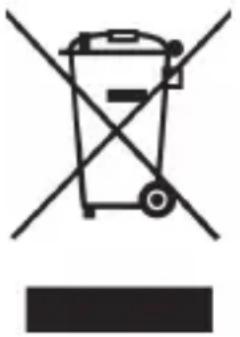
When this symbol appears on a product, this indicates that the product is subject to the European Directive 2012/19/EU. All old electrical and electronic devices must be separated from normal household waste and disposed of at designated state facilities. The correct disposal of old devices in this manner will prevent environmental pollution and human health hazards. For further information about proper disposal, contact your local authorities, waste disposal office or the shop where you bought the device.
The built-in battery cannot be removed for disposal.
Dispose of the packaging in an environmentally compatible manner. Cardboard can be put out for municipal paper collections or brought to public collection points for recycling. Films and plastic used for packaging the device are collected by your local disposal services and disposed of in an environmentally compatible manner.
Conformity information

This device meets the basic requirements and other relevant regulations of the EMC Directive 2004/108/EC, the Low Voltage Directive 2006/95/EC, the R&TTE Directive 1999/5/EC and the RoHS Directive 2011/65/EU. The Declaration of Conformity can be found at the end of these instructions.
Warranty and servicing advice
Warranty of TARGA GmbH
This device is sold with three years warranty from the date of purchase. Please keep the original receipt in a safe place as proof of purchase. Before using your product for the first time, please read the enclosed documentation. Should any problems arise which cannot be solved in this way, please call our hotline. Please have the article number and, if available, the serial number to hand for all enquiries. If it is not possible to solve the problem on the phone, our hotline support staff will initiate further servicing procedures depending on the fault. Within the warranty period the product will be repaired or replaced free of charge as we deem appropriate. No new warranty period commences if the product is repaired or replaced. Consumables such as batteries, rechargeable batteries and lamps are not covered by the warranty.
Your statutory rights towards the seller are not affected or restricted by this warranty.
Service

Phone: 0207-3650744
E-Mail: service.GB@targa-online.com

Phone: 01-2421583
E-Mail: service.IE@targa-online.com

Phone: 800-62175
E-Mail: service.MT@targa-online.com

Phone: 800-92496
E-Mail: service.CY@targa-online.com
IAN:106951

Manufacturer
TARGA GmbH
Coesterweg 45
59494 SOEST
GERMANY
C E
EU - Declaration of Conformity
Address: Targa GmbH Coesterweg 45 59494 Soest, Germany
Product: Bluetooth Headset
Model: SilverCrest SBTH 4.0 A1
Identification number: IAN 106951
The product complies with the requirements of the following European directives:
2004/108/EC Electromagnetic Compatibility
2006/95/EC Low Voltage
1999/5/EC R&TTE
2011/65/EU Restriction of the use of certain hazardous substances in electrical and electronic equipment
Compliance was proved by the application of the following standards:
EMC: EN301489-1V1.9.2 EN301489-17V2.2.1
Safety: EN 60950-1:2006 + A11:2009 + A1:2010 + A12:2011 EN 62479:2010
R&TTE EN300328V1.8.1
Rohs: EN 50581:2012
Year of CE marking: 2014
Soest, 5^th December 2014
Matthias Klauke, Managing Director

- Inhaltsverzeichnis
- Warenzeichen 3
- Einleitung. 3
- Safety instructions 60
- Copyright 64
- Overview of the controls and button functions 65
- Prior to use 66
- First use 66
- Troubleshooting 70
- Environmental and disposal information 71
- Conformity information 71
- Warranty and servicing advice. 72
- Trademarks
- Introduction
- Intended use
- Supplied items
- Safety instructions
- Explanation of the hazard symbols used in these instructions
- DANGER! Radio interface
- DANGER! Risk of explosion!
- DANGER! Children and persons with disabilities
- DANGER! It poses a suffocation risk!
- WARNING! Ensure that
- WARNING! Maintenance / cleaning
- Operating environment
- Copyright
- Overview of the controls and button functions
- Prior to use
- Charging the battery
- First use
- Switching the headphones on/off
- Connecting headphones
- Connecting headphones to two Bluetooth® devices
- Putting on the headphones
- Music playback
- Making calls
- Deleting list of connections
- Troubleshooting
- The headphones cannot be switched on.
- No audio signal for Bluetooth® connection
- The Bluetooth® connection is not established.
- Not all aforementioned functions are working
- Environmental and disposal information
- The built-in battery cannot be removed for disposal.
- Conformity information
- Warranty and servicing advice
- Warranty of TARGA GmbH
- Service
- Manufacturer
- C E
- EU - Declaration of Conformity
Brand : SILVERCREST
Model : SBTH 4.0 A1
Category : Wireless Earbuds