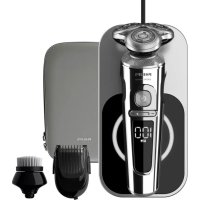
S9000 Prestige SP9863 - Shaver PHILIPS - Free user manual and instructions
Find the device manual for free S9000 Prestige SP9863 PHILIPS in PDF.


Frequently Asked Questions - S9000 Prestige SP9863 PHILIPS
User questions about S9000 Prestige SP9863 PHILIPS
0 question about this device. Answer the ones you know or ask your own.
Ask a new question about this device
Download the instructions for your Shaver in PDF format for free! Find your manual S9000 Prestige SP9863 - PHILIPS and take your electronic device back in hand. On this page are published all the documents necessary for the use of your device. S9000 Prestige SP9863 by PHILIPS.
USER MANUAL S9000 Prestige SP9863 PHILIPS
Congratulations on your purchase and welcome to Philips! To fully benefit from the support that Philips offers, register your product at
www.philips.com/welcome.
Please read this user manual, as it contains information about the features of this shaver as well as some tips to make shaving easier and more enjoyable.
General description (Fig. 1)
1 Protection cap for cleansing brush attachment
2 Click-on cleansing brush attachment
3 Attachment holder
4 Supply unit
5 USB plug
6 Wireless charger
7 Pouch
8 Replacement reminder
9 Notification symbol
10 Cleaning reminder
11 Travel lock symbol
12 Battery charge indicator
13 Battery charge percentage
14 Personal comfort settings bar
15 Personal comfort settings decrease button
16 Personal comfort settings increase button
17 On/off button
18 Shaving unit with hair chamber
19 Click-on precision trimmer attachment
20 Click-on beard styler attachment
21 Comb for beard styler attachment
The accessories supplied may vary for different products. The box shows the accessories that have been supplied with your appliance.
Important safety information
Read this important information carefully before you use the appliance and its accessories and save it for future reference. The accessories supplied may vary for different products.
Danger

- Keep the supply unit dry.
Warning

- The appliance is a Class III construction.
- To charge the battery, only use the detachable supply unit and charging pad (supply unit, type HQ87. Charging pad, type HQ8509 or HQ8510) provided with the appliance.
-
Do not use an USB extension cord.
-
This appliance can be used by children aged from 8 years and above and persons with reduced physical, sensory or mental capabilities or lack of experience and knowledge if they have been given supervision or instruction concerning use of the appliance in a safe way and understand the hazards involved. Children shall not play with the appliance. Cleaning and user maintenance shall not be made by children without supervision.
-
Always check the appliance and its attachments before you use it. Do not use the appliance or its attachments if it is damaged, as this may cause injury. Always replace a damaged part with one of the original type.
-
Do not open the appliance to replace the rechargeable battery.
-
The charging pad is not intended for use in a car. It may interfere with the automotive electronic systems.
Caution
- Never immerse the charging pad in water, nor rinse it under the tap.
- Always make sure the charging pad is completely dry before you connect it to the wall socket.
- Never use water hotter than 60^ C to rinse the shaver.
- Only use this appliance for its intended purpose as shown in the user manual.
- For safety reasons, do not use the shaver while you drive a car.
- For hygienic reasons, the appliance should only be used by one person.
- Never use compressed air, scouring pads, abrasive cleaning agents or aggressive liquids such as petrol or acetone to clean the appliance.
-
Do not put the appliance or any part in the dishwasher.
-
Water may trickle out of the shaver after you rinse it. This is normal and not dangerous because all electronics are enclosed in a sealed power unit inside the shaver.
- Do not use the supply unit in or near wall sockets that contain an electric air freshener to prevent irreparable damage to the supply unit.
- Do not use the appliance on chapped skin, open wounds, healing wounds, skin recovering from surgery or if you suffer from a skin disease or skin irritation, such as severe acne, sunburn, skin infection, skin cancer, inflammation, eczema, psoriasis, nylon allergy etc.
- Do not use the appliance if you are taking steroid-based medication.
-
If you wear piercings on your face, remove the piercings before you use the click-on attachments or make sure that you do not use the appliance on or near the piercing.
-
If you wear jewelry, contact lenses or glasses, remove them before you use the click-on attachments, or make sure that you do not use the appliance on or near jewelry or glasses.
Electromagnetic fields (EMF)
This Philips appliance complies with all applicable standards and regulations regarding exposure to electromagnetic fields.
General

- This shaver is waterproof. It is suitable for use in the bath or shower and for cleaning under the tap.
- The supply unit is suitable for mains voltages ranging from 100 to 240 volts.
- The supply unit transforms 100-240 volts to a safe low voltage of less than 24 volts.
The display
Note: Remove any sticker or protective foil from the display before using the product.
Charging
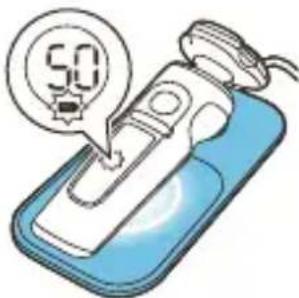
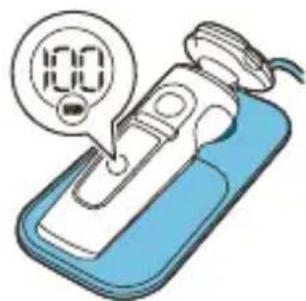
When the shaver is charging, the ring on the pad lights up and the battery charge indicator on the shaver flashes white.
The battery charge is indicated by the battery charge percentage flashing on the display, which is shown when the shaver is moved.
Quick charge: After approx. 18 minutes charging, the appliance contains enough energy for one shave.
Battery fully charged
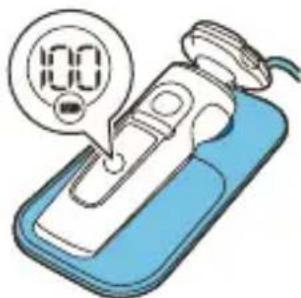
When the battery is fully charged, the battery charge indicator and the ring on the pad light up white continuously.
Note: Both lights switch off automatically after 15 minutes.
The battery charge percentage lights up white continuously, which is shown when the shaver is moved.
Battery low
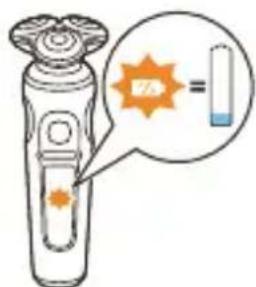
When the battery is almost empty, the battery charge indicator flashes orange and the shaver beeps. At this point there is enough energy left for one shave..
Remaining battery charge
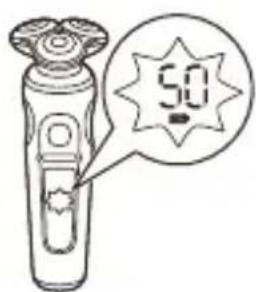
The remaining battery charge is indicated by the battery charge percentage shown on the display.
Personal comfort settings
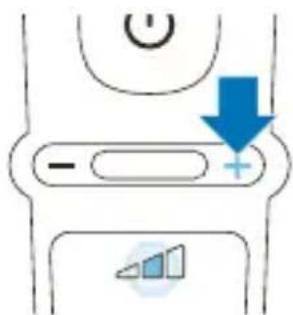
The shaver has a feature that allows you to personalize your settings. Depending on your personal shaving needs, choose between three settings, from low to high: comfort, dynamic or efficiency. When you press the button on the left or right of the display, the segment of the personal comfort settings bar lights up to indicate the selected setting. To select a lower or higher setting, press the button on the left or right of the display.
Cleaning reminder
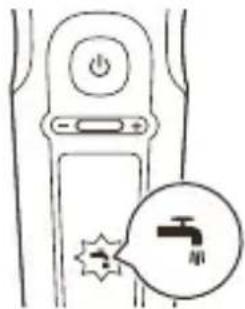
Clean the shaver after every use for optimal performance (see 'Cleaning and maintenance'). When you switch off the shaver, the cleaning reminder flashes to remind you to clean the shaver.
Travel lock
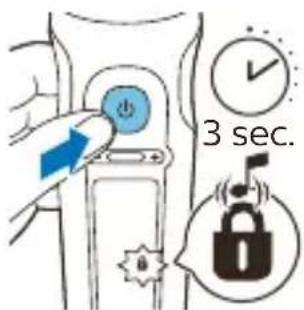
When you are going to travel, you can lock the shaver to prevent it from accidentally switching on (see 'Activating the travel lock').
Replacement reminder
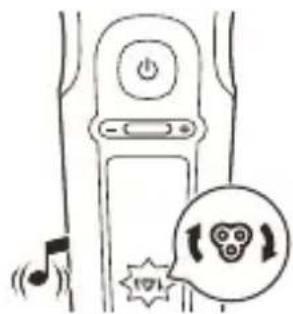
For maximum shaving performance, replace the shaving heads every two years. The shaver is equipped with a replacement reminder which reminds you to replace the shaving heads. The shaver beeps, the replacement reminder lights up and the arrows flash to indicate that you have to replace the shaving heads.
Note: After replacing the shaving heads, you can reset the replacement reminder by pressing the on/off button for 7 seconds. If you do not reset the replacement reminder, the shaver resets automatically after 9 shaves.
Notification symbol
Overheating
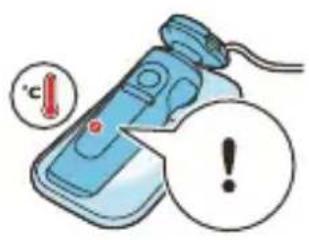
If the shaver overheats during charging, the notification symbol flashes. When this happens, the shaver stops charging automatically. Charging continues once the temperature of the shaver has decreased to the normal level after approx. 10 minutes.
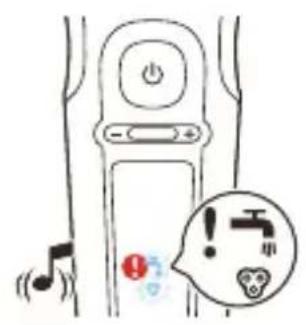
Blocked shaving heads
If the shaving heads are blocked, the notification symbol continuously lights up red. The replacement reminder and the cleaning reminder alternately flash white and the shaver beeps. In this case, the motor cannot run because the shaving heads are dirty or damaged. If the shaving heads are dirty, you have to clean them. If the shaving heads are damaged, you have to replace them.
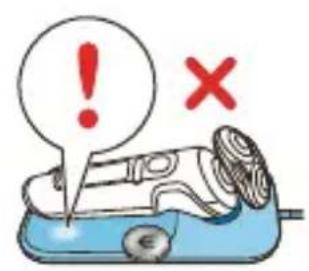
Foreign object on wireless charger
If there is a foreign (metal) object on the wireless charger during charging, the notification symbol on the wireless charger lights up. The wireless charger switches off automatically and restarts 5 minutes after the foreign object has been removed.
Do not place any foreign (metal) objects on the wireless charger. Only use the wireless charger to charge the shaver or another device (e.g. smartphone) compliant with Qi charging.
Charging
Charge the shaver before you use it for the first time and when the display indicates that the battery is almost empty.
Charging takes approx. 3 hours. A fully charged shaver has a shaving time of up to 60 minutes.
After approx. 18 minutes of charging the shaver contains enough power for one shave.
Note: You cannot use the shaver while it is charging.
Quick charge
After approx. 18 minutes of charging the shaver contains enough power for one shave.
Charging with the wireless charger

Note: The wireless charger is Qi compliant. Only charge the Qi compatible shaver or other Qi charging compliant appliances on the wireless charger provided.
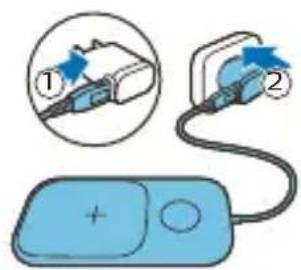
Note: Carefully shake off excess water before placing the shaver on the wireless charger.
1 Put the USB plug in the supply unit supplied.
2 Put the supply unit in the wall socket.
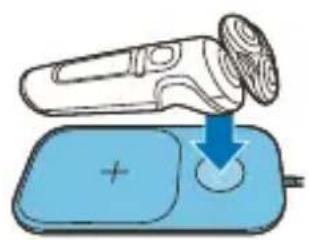
Place the shaver on the cross mark of the wireless charger. Make sure the shaver fits into the cavity of the wireless charger.
Only charge the shaver on the provided wireless charger.
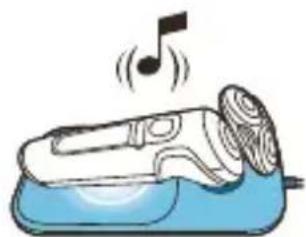
- The wireless charger beeps and the ring on the pad lights up when the shaver is correctly placed and connected for charging.
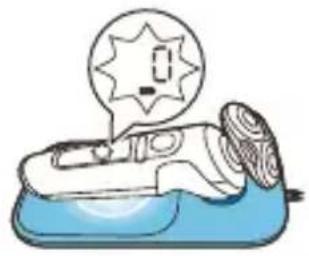
- When the shaver is charging, the ring on the pad lights up and the battery charge indicator on the shaver flashes white. The battery charge is indicated by the battery charge percentage flashing on the display, which is shown when the shaver is moved.
3 When the battery is fully charged, the battery charge indicator and the ring on the pad light up white continuously. Both lights switch off automatically after 15 minutes.
Using the shaver

Always check the shaver and all accessories before use. Do not use the shaver or any accessory if it is damaged, as this may cause injury. Always replace a damaged part with one of the original type.
This symbol indicates that the shaver can be used in the bath or shower.
- Use this shaver for its intended household use as described in this manual.
- For hygienic reasons, the shaver should only be used by one person.
- Trimming is easier when the skin and hair are dry.
Note: This shaver is waterproof. It is suitable for use in the bath or shower and for cleaning under the tap. For safety reasons, the shaver can only be used without cord.
Switching the shaver on and off
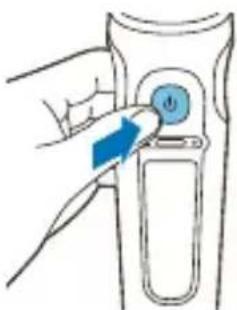
1 To switch on the shaver, press the on/off button once.
The battery charge percentage lights up for a few seconds.
2 To switch off the shaver, press the on/off button once.
The battery charge percentage lights up for a few seconds and shows the remaining battery charge.
Shaving
Skin adaptation period
Your first shaves may not bring you the result you expect and your skin may even become slightly irritated. This is normal. Your skin and beard need time to adapt to any new shaving system. To allow your skin to adapt to this new appliance, we advise you to shave regularly (at least 3 times a week) and exclusively with this appliance for a period of 3 weeks.
Shaving tips
- For the best results on skin comfort, pre-trim your beard if you have not shaved for 3 days or longer.
- Select your personal comfort setting (see 'Personal comfort settings').
Dry shaving
1 Switch on the shaver.
2 Move the shaving heads over your skin in circular movements to catch all hairs growing in different directions. Make sure each shaving head is fully in contact with the skin. Exert gentle pressure for a close, comfortable shave.
Note: Do not press too hard, as this can cause skin irritation.
3 Switch off and clean the shaver after each use (see 'Cleaning and maintenance').
The display lights up for a few seconds to show the remaining battery charge.
Wet shaving
For a more comfortable shave, you can also use this appliance on a wet face with shaving foam or shaving gel.
1 Apply some water to your skin.
2 Apply shaving foam or shaving gel to your skin.
3 Rinse the shaving unit under the tap to ensure that the shaving unit glides smoothly over your skin.
4 Switch on the shaver.
5 Move the shaving heads over your skin in circular movements to catch all hairs growing in different directions. Make sure each shaving head is fully in contact with the skin. Exert gentle pressure for a close, comfortable shave.
Note: Do not press too hard, as this can cause skin irritation.
Note: Rinse the shaving unit regularly to ensure that it continues to glide smoothly over your skin.
6 Dry your face.
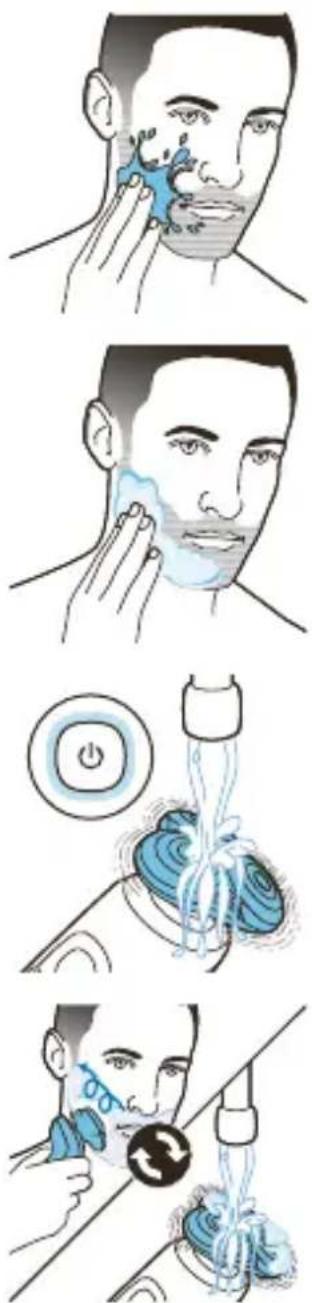
7 Switch off the shaver and clean it after each use.
Note: Make sure that you rinse all foam or shaving gel off the shaver.
Using click-on attachments
It is recommended not to use the click-on cleansing brush attachment directly after shaving to prevent skin irritation.
Removing or attaching click-on attachments
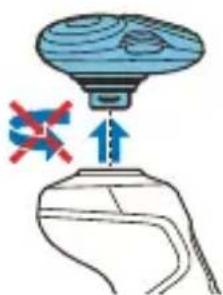
1 Make sure the shaver is switched off.
2 Pull the attachment straight off the shaver.
Note: Do not twist the attachment while you pull it off the shaver.
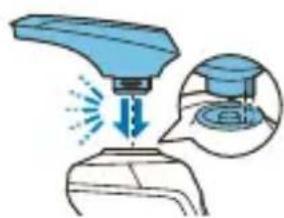
3 Insert the lug of the attachment into the slot in the top of the shaver. Then press down the attachment to attach it to the shaver ('click').
Attachment holder
Note: Attach the click-on cleansing brush attachment on the attachment holder first, before you place the attachment onto the appliance.
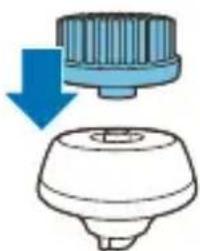
1 Place the click-on attachment onto the attachment holder until it locks into position with a click.
Using the precision trimmer attachment
You can use the precision trimmer attachment to touch up your beard, sideburns and moustache.
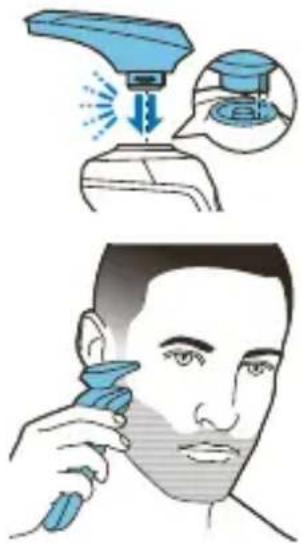
1 Attach the attachment to the appliance ('click').
2 Switch on the appliance.
3 Hold the precision trimmer perpendicular to the skin and move it downwards while exerting gentle pressure.
4 Switch off the appliance and clean the attachment after use (see 'Deactivating the travel lock').
Using the beard styler attachment with comb
You can use the beard styler with the comb attached to style your beard at one fixed setting, but also at different length settings. You can also use it to pre-trim any long hairs before shaving for a more comfortable shave.
Note: The beard styler is only intended for trimming facial hair. Do not use on areas below the neck.
The length settings on the beard styler attachment correspond to the remaining hair length after cutting and range from 1 to 5mm (3/64 - 3/16 in).
1 Attach the attachment to the appliance ('click').
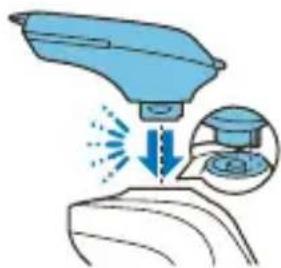
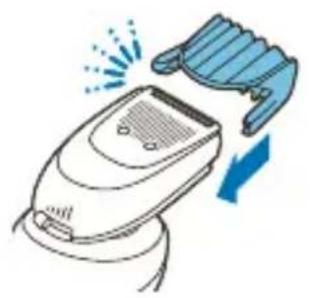
2 Slide the comb straight into the guiding grooves on both sides of the beard styler attachment ('click').
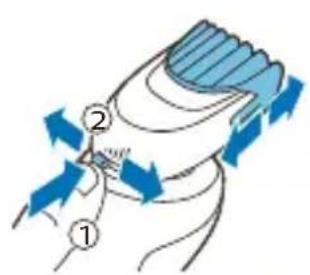
3 Press the length selector and then push it to the left or right to select the desired hair length setting.
4 Switch on the appliance.
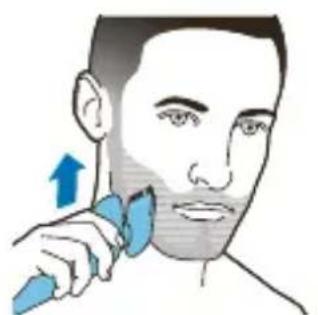
5 Move the appliance upwards while you exert gentle pressure. Make sure the front of the comb is in full contact with the skin.
6 Clean the attachment after use.
Using the beard styler attachment without comb
You can use the beard styler attachment without the comb to contour your beard, moustache, sideburns or neckline at a length of 0.5 mm (1/32 in).
Note: The beard styler is only intended for trimming facial hair. Do not use it on areas below the neck.
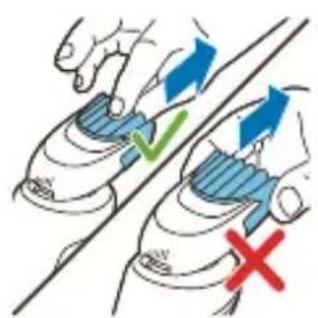
1 Pull the comb off the beard styler attachment. Note: Grab the comb in the center to pull it off the beard styler attachment. Do not pull at the sides of the comb.
2 Switch on the appliance.
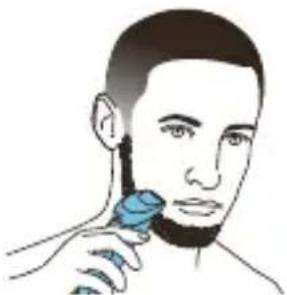
3 Hold the beard styler attachment perpendicular to the skin and move the appliance downwards while you exert gentle pressure.
4 Clean the attachment after use.
Using the cleansing brush attachment
Note: For better shaving results, use the click-on cleansing brush attachment before shaving.
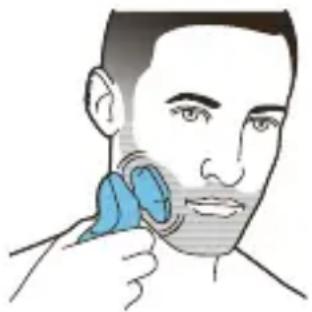
Use the rotating cleansing brush with your daily cleansing cream. The cleansing brush removes oil and dirt, contributing to a healthy and oil-free skin. We advise you to use it no more than twice a day. Start with the lowest personal comfort setting to familiarize yourself with the attachment.
Do not use the appliance on damaged or irritated skin or on wounds.
1 Place the attachment on the attachment holder.
2 Attach the attachment to the appliance ('click').
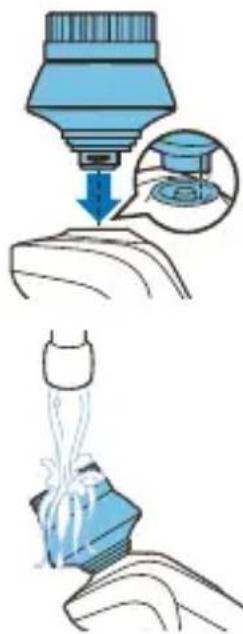
3 Moisten the attachment with water.
Note: Do not use the appliance with a dry cleansing brush attachment, as this can irritate the skin.
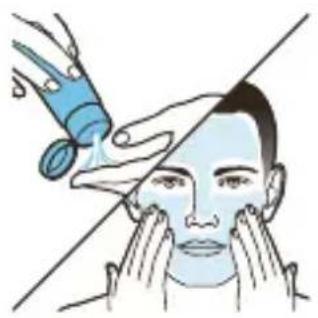
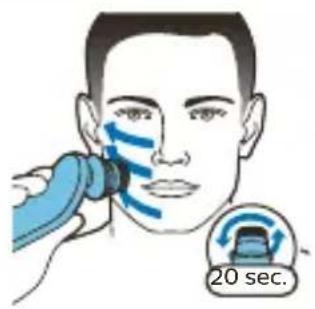
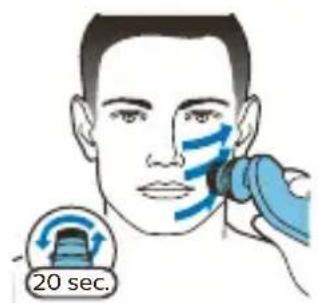
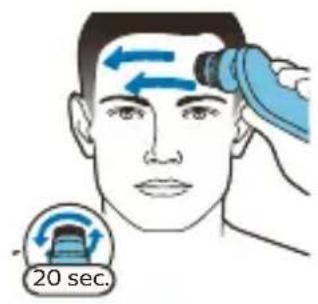

4 Moisten your face with water and apply a cleanser to your face.
5 Place the attachment on your cheek.
6 Switch on the appliance.
7 Gently move the brush across your skin from the nose towards the ear. Do not push the brush too hard onto the skin to make sure that the treatment remains comfortable.
Note: Do not cleanse the sensitive area around your eyes.
8 After approx. 20 seconds, move the appliance to your other cheek and start cleansing this part of your face.
9 After approx. 20 seconds, move the appliance to your forehead and start cleansing this part of your face. Gently move the brush head from left to right.
Note: We advise you to not overdo the cleansing and to not cleanse any zone longer than 20 seconds.
10 Switch off the appliance and clean the attachment after use.
11 After the treatment, rinse and dry your face. Your face is now ready for the next step of your daily skincare routine.
Travel lock
You can lock the shaver when you are going to travel to prevent it from switching on accidentally.
Activating the travel lock
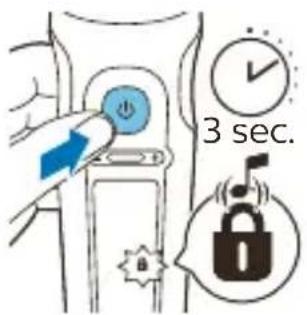
1 Press the on/off button for 3 seconds to use the travel lock mode.
While you activate the travel lock, the travel lock symbol lights up briefly and the shaver produces a short sound. When the travel lock is activated, the travel lock symbol flashes.
If you try to switch on the shaver while the travel lock is active, the travel lock symbol flashes.
Deactivating the travel lock
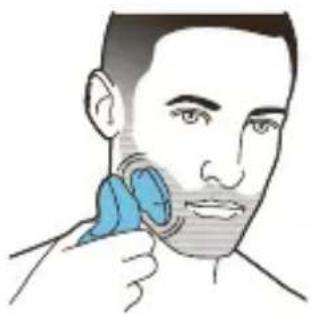
1 Press the on/off button for 3 seconds.
While you deactivate the travel lock, the travel lock symbol lights up briefly and the shaver produces a short sound. The shaver switches on and is now ready for use again.
Note: The shaver unlocks automatically when it is placed on the wireless charger.
Cleaning and maintenance
Regular cleaning guarantees better shaving results.
Never clean, remove or replace the shaving unit while the shaver is switched on.
Do not apply pressure to shaving head guards.
Do not touch shaving heads with hard objects as this may dent or damage the precision-made slotted guards.
Do not use compressed air, abrasives, scourers or aggressive liquids such as petrol or acetone to clean the shaver.
Cleaning the shaver under the tap
Clean the shaver after every shave for optimal performance.
Always check if the water is too hot, to prevent burning your hands.
Never dry the shaving unit with a towel or tissue, as this may damage the shaving heads.
While rinsing the shaving unit, water may drip out of the bottom of the shaver. This is a normal occurrence.
1 Switch on the shaver.
2 Rinse the shaving unit under a warm tap.
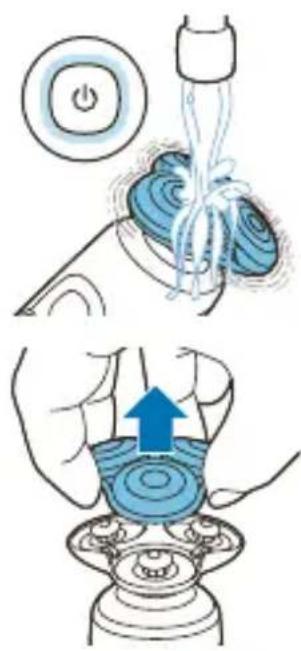
3 Switch off the shaver. Pull the shaving head holder off the bottom part of the shaving unit.
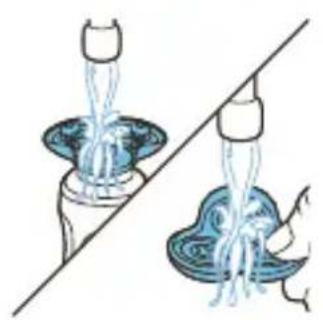
4 Rinse the hair chamber and shaving head holder under the tap.
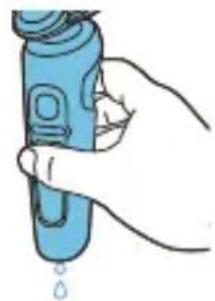
While rinsing the shaving unit, water may drip out of the bottom of the shaver. This is a normal occurrence.
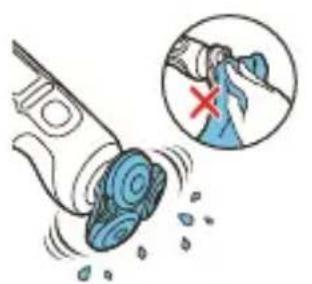
5 Carefully shake off excess water and let the shaving head holder air-dry completely.
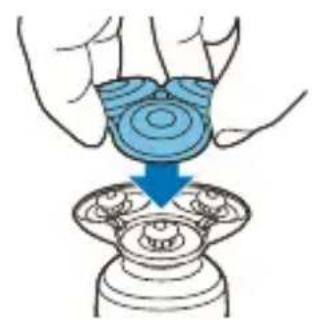
6 Attach the shaving head holder to the bottom part of the shaving unit ('click').
Thorough cleaning
We advise you to clean the shaving heads thoroughly once a month or when the shaver does not shave as well as it used to.
1 Switch off the shaver.
2 Pull the shaving head holder off the bottom part of the shaving unit.
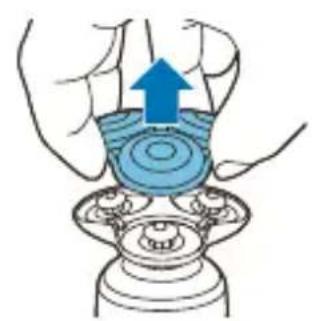
3 Rinse the hair chamber and shaving head holder under the tap.
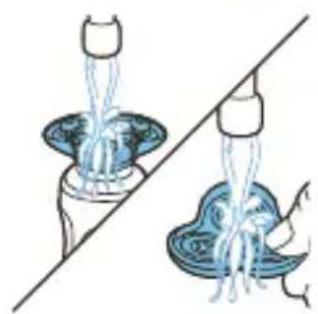
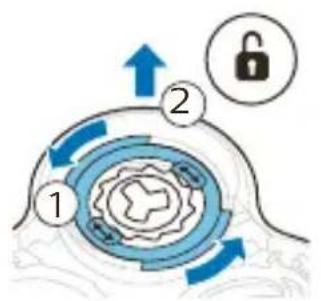
4 Turn the retaining ring anticlockwise and lift it off the shaving head.
Repeat this process for the other retaining rings. Place them aside in a safe place.
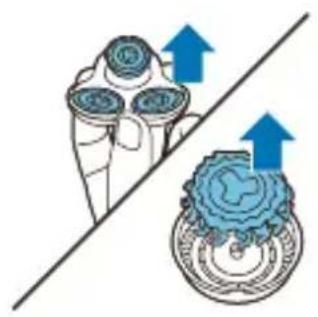
5 Remove the shaving heads from the shaving head holder. Each shaving head consists of a cutter and guard.
Note: Do not clean more than one cutter and guard at a time, since they are all matching sets. If you accidentally put a cutter in the wrong shaving guard, it may take several weeks before optimal shaving performance is restored.
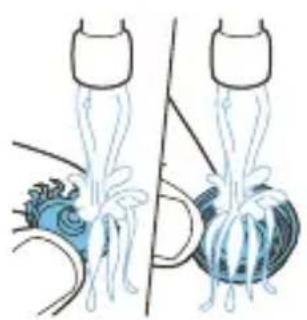
6 Clean the cutter and guard under the tap.
7 Shake off excess water.
8 Put the cutter back into the guard.
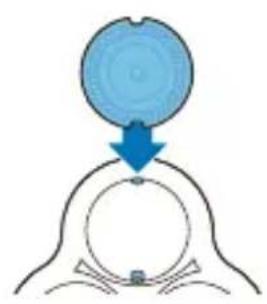
9 Place the shaving heads in the shaving head holder.
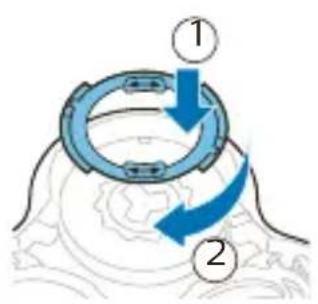
10 Place the retaining ring on the shaving head.
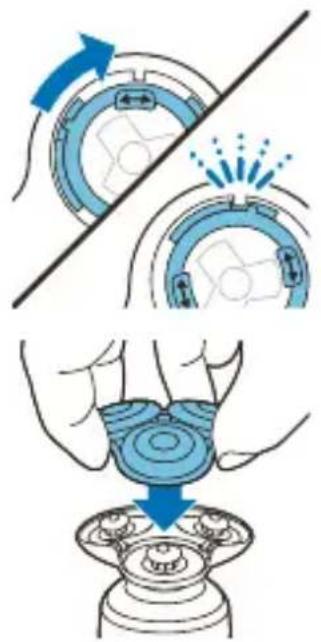
11 Align the arrows on the retaining ring with the projections in the shaving head holder. Turn the ring clockwise until it clicks to indicate that the ring is fixed.
12 Attach the shaving head holder to the bottom part of the shaving unit ('click').
Cleaning the trimmer attachment
Never dry the trimmer with a towel or tissue, as this may damage the trimming teeth.
Clean the trimmer attachment after each use.
1 Switch on the appliance with the precision trimmer attachment attached.
2 Rinse the attachment under a warm tap.
3 After cleaning, switch off the appliance.
4 Carefully shake off excess water and let the attachment air-dry completely.
Tip: For optimal performance, lubricate the teeth of the attachment with a drop of sewing machine oil regularly.
Cleaning the beard styler attachment
Clean the beard styler attachment after each use.
1 Pull the comb off the beard styler attachment.
Note: Grab the comb in the center to pull it off the beard styler attachment. Do not pull at the sides of the comb.
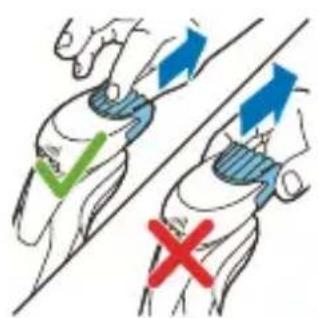
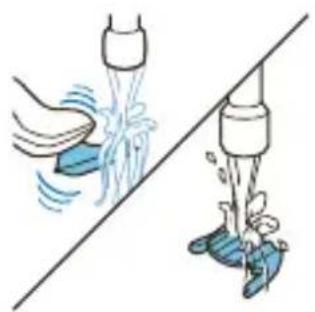
2 Rinse cut hairs off the cutting unit with lukewarm water.
3 Rinse cut hairs off the comb.
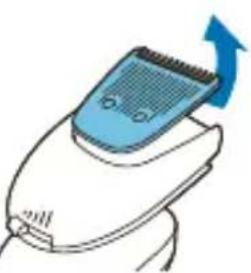
4 Remove the cutting unit from the beard styler attachment. By pushing the cutting unit off the beard styler attachment, you can remove any hairs that have accumulated inside the beard styler attachment. You can also rinse the bottom of the cutting unit.
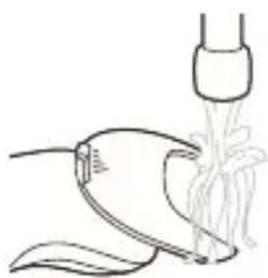
5 Rinse cut hairs out of the beard styler attachment.
6 Carefully shake off excess water and leave the comb, cutting unit and beard styler attachment to air-dry before you use them again.
7 When the cutting unit is dry, attach it to the beard styler attachment.
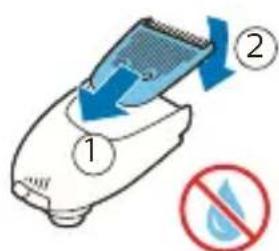
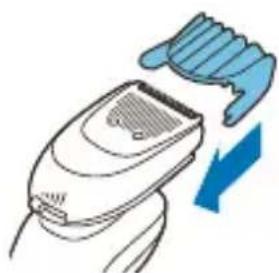
8 When the comb is dry, attach it to the beard styler attachment.
9 For optimal performance, lubricate the teeth of the attachment with a drop of sewing machine oil regularly.
Cleaning the cleansing brush
Clean the attachment after each use.
1 Switch off the appliance.
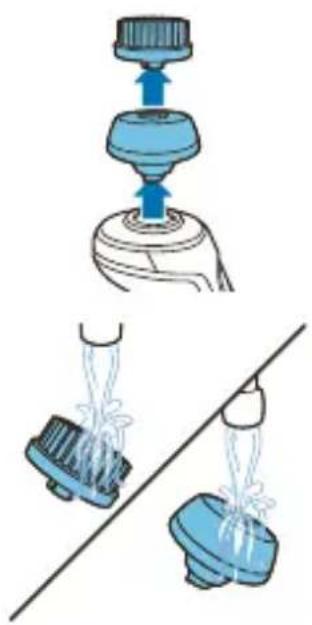
2 Remove the attachment from the attachment holder.
3 Clean the parts thoroughly with warm water.
4 Dry the attachment with a towel.
Replacement
Replacing the shaving heads
For maximum shaving performance, we advise you to replace the shaving heads every two years. Replace damaged shaving heads immediately.
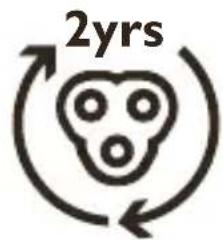
Always replace the shaving heads with original Philips shaving heads (see 'Ordering accessories').
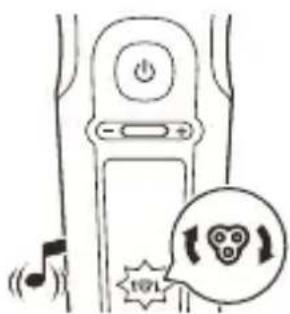
Replacement reminder
The replacement reminder indicates that the shaving heads need to be replaced. The shaving unit symbol lights up continuously, the arrows flash white and you hear a beep when you switch the shaver on or off.
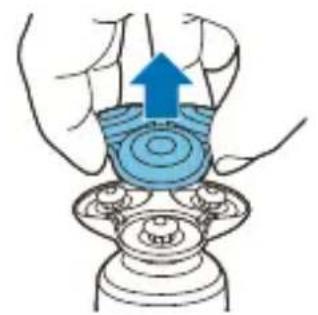
1 Switch off the shaver. Pull the shaving head holder off the bottom part of the shaving unit.
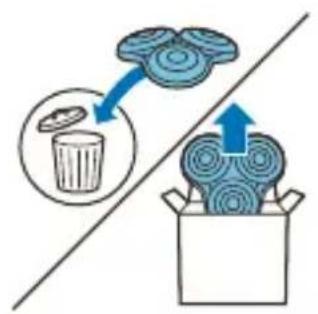
2 Discard the old shaving head holder and attach the new shaving head holder to the bottom part of the shaving unit ('click').
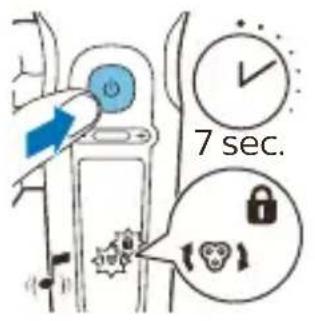
3 After replacing the shaving heads, you can reset the replacement reminder by pressing the on/off button for 7 seconds. Wait until your hear 3 beeps.
If you do not reset the replacement reminder, the shaver resets automatically after 9 shaves.
Replacing the cleansing brush attachment
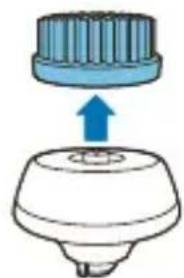
The cleansing brush attachment should be replaced every 3 months or earlier if the brush hairs are bent or damaged (see 'Ordering accessories').
Storage
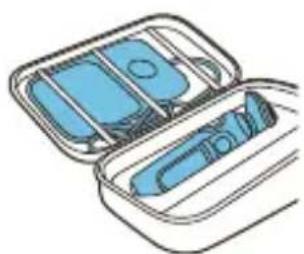
Store the shaver in the pouch.
Note: Always let the shaver dry completely before you store it in the pouch.
Ordering accessories
To buy accessories or spare parts, visit
www.philips.com/parts-and-accessories or go to your Philips dealer. You can also contact the
Philips Consumer Care Center in your country (see the international warranty leaflet for contact details).
The following accessories and spare parts are available:
- SH98 Philips shaving heads
- HQ110 Philips shaving head cleaning spray
- RQ111 Philips beard styler attachment
- RQ585 Philips cleansing brush attachment
- RQ560 Philips cleansing brush attachment
- RQ563 Philips cleansing brush attachment 3-pack
- HQ87 USB supply unit
- HQ8509, HQ8510 wireless charger
Note: The availability of the accessories may differ by country.
Recycling
- This symbol means that this product shall not be disposed of with normal household waste (2012/19/EU).
-
This symbol means that this product contains a built-in rechargeable battery which shall not be disposed of with normal household waste (2006/66/EC). Please take your product to an official collection point or a Philips service center to have a professional remove the rechargeable battery.
-
Follow your country's rules for the separate collection of electrical and electronic products and rechargeable batteries. Correct disposal helps prevent negative consequences for the environment and human health.
Removing the rechargeable shaver battery
Only remove the rechargeable battery when you discard the shaver. Before you remove the battery, make sure that the shaver is disconnected from the wall socket and that the battery is completely empty.
Take any necessary safety precautions when you handle tools to open the shaver and when you dispose of the rechargeable battery.
1 Remove the click-on attachment from the appliance.
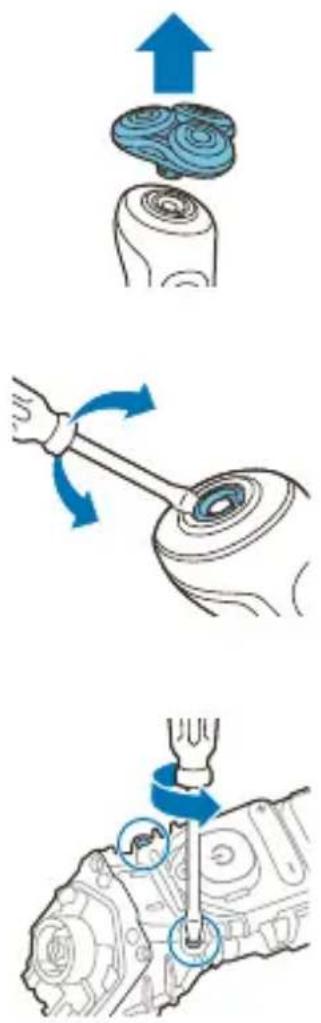
2 On top of the appliance insert a screwdriver between the black cylinder and silver ring. Force the silver ring up off the appliance and remove the top panel.
3 Unscrew the two screws and remove the frame.
4 Remove the two back black covers and slide the front housing off the appliance.
5 Unscrew the two screws at the top of the inner panel.
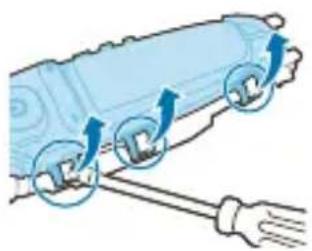
6 Place a screwdriver between the lips of the inner panel and bend them aside. Then remove the inner panel.
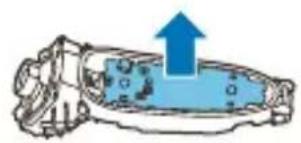
7 Lift out the printed circuit board with the rechargeable battery.
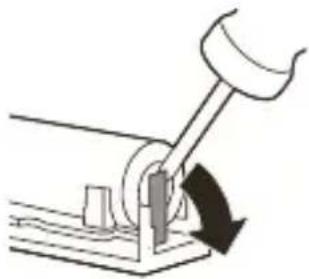
8 Bend the battery tags aside with a screwdriver.
9 Remove the rechargeable battery.
Warranty and support
If you need information or support, please visit www.philips.com/support or read the international warranty leaflet.
Warranty restrictions
The shaving heads (cutters and guards) are not covered by the terms of the international warranty because they are subject to wear.
Troubleshooting
This chapter summarizes the most common problems you could encounter with the appliance. If you are unable to solve the problem with the information below, visit www.philips.com/support for a list of frequently asked questions or contact the Consumer Care Center in your country.
Shaver
Problem Possible cause Solution
| The appliance does not work when I press the on/off button. | The appliance is still placed on the wireless charger. | Remove the appliance from the wireless charger and press the on/off button to switch on the appliance. |
| The rechargeable battery is empty. | Recharge the battery (see 'Charging'). | |
| The travel lock is activated. | Press the on/off button for 3 seconds to deactivate the travel lock. | |
| The shaving unit is soiled or damaged to such an extent that the motor cannot run. | Clean the shaving heads thoroughly or replace them. | |
| The appliance does not shave as well as it used to. | The shaving heads are damaged or worn. | Replace the shaving heads (see 'Replacement'). |
| Hairs or dirt obstruct the shaving heads. | Clean the shaving heads in the regular way or clean them thoroughly. | |
| I replaced the shaving heads, but the display still shows the replacement reminder. | You have not reset the appliance. | Reset the appliance by pressing the on/off button for approx. 7 seconds. |
| A shaving unit symbol has suddenly appeared on the display. | This symbol reminds you to replace the shaving heads. | Replace the shaving heads (see 'Replacement'). |
Problem Possible cause Solution
| The notification symbol flashes and the shaver beeps while the shaver is charging. | The appliance is overheated. | When this happens, the shaver stops charging automatically. Charging continues once the temperature of the shaver has decreased to the normal level after approx. 10 minutes. |
| The notification symbol flashes and the shaver beeps when I try to shave. | The shaving heads are soiled. | Clean the shaving heads (see 'Cleaning and maintenance'). |
| The notification symbol flashes and the shaver beeps after cleaning the shaving heads. | The shaving heads are damaged. | Replace the shaving heads (see 'Replacement'). |
| Water is leaking from the bottom of the appliance. | During cleaning, water may collect between the inner body and the outer shell of the appliance. | This is normal and not dangerous because all electronics are enclosed in a sealed power unit inside the appliance. |
Click-on attachments
Problem Possible cause Solution
| I do not know if the appliance is suitable for use on my skin. | Do not use the appliance on dry, chapped skin, open wounds, healing wounds, skin recovering from surgery or if you suffer from a skin disease or skin irritation, such as severe acne, sunburn, skin infection, skin cancer, inflammation, eczema, psoriasis etc. Do not use the appliance if you are taking steroid-based medication. |
| I don’t know which facial attachments I can use with the appliance. | All attachments provided with this appliance can be used with this appliance. To find out more about the range of attachments, consult our website www.shop.philips.com or the shop where you purchased your Philips appliance. If you have any difficulties obtaining information, please contact the Philips Consumer Care Center in your country. You find its contact details in the international warranty leaflet. You can also visit www.philips.com/support. |
| The cleansing brush attachment feels too harsh on my skin. | Start with the lowest personal comfort setting to familiarize yourself with the attachment. |
Problem Possible cause Solution
| I don’t know with which cleansing products I can use the cleansing brush attachment. | We advise you to cleanse your skin with your favorite cleanser. You can use cleansing gel, foam, oil, milk or lotions. Please do not use scrub cream or gel with particles. |
| The click-on attachment do not fit on the appliance. | Attach the cleansing brush attachment on the attachment holder, before placing it on the appliance. |
Einführung
Bateria completely cargada