RR 501 BT - Radio Trevi - Free user manual and instructions
Find the device manual for free RR 501 BT Trevi in PDF.



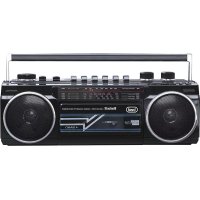
| Product type | Portable cassette radio with USB/SD player, Bluetooth and recorder |
| Brand | Trevi |
| Model | RR 501 BT |
| Power supply | 230 V~50 Hz (mains) or 4 D-type batteries (UM-1) not included |
| Radio reception bands | FM 87.5-108 MHz, MW 530-1600 kHz, SW1 3-10 MHz, SW2 10-23 MHz |
| Bluetooth | Version unspecified, typical range 10 m, transmission power ≤ 2.5 mW, frequency 2.4 GHz |
| USB/SD player | MP3 playback from USB key or SD card (not included) |
| Cassette player | Playback and recording on audio cassette (not included) |
| Built-in microphone | For voice recording |
| Headphone jack | 3.5 mm jack |
| Dimensions | 317 x 114 x 89 mm |
| Weight | Approximately 1.5 kg (estimated) |
| Main functions | FM/MW/SW radio, Bluetooth, USB/SD, cassette, recording, volume and bass control, telescopic antenna |
| Care and cleaning | Soft slightly damp cloth; do not use solvents or abrasives |
| Safety | Do not open (high voltage); avoid water, magnetic fields, heat, dust, vibrations; unplug if liquid penetrates; leave 5 cm space for ventilation |
| Repairability | Contact an authorized Trevi service center if problems occur |
| Spare parts | Batteries (not supplied), telescopic antenna; other parts available from after-sales service |
| General information | User manual available in PDF; WEEE compliance (Directive 2012/19/EU) |
Frequently Asked Questions - RR 501 BT Trevi
User questions about RR 501 BT Trevi
0 question about this device. Answer the ones you know or ask your own.
Ask a new question about this device
Download the instructions for your Radio in PDF format for free! Find your manual RR 501 BT - Trevi and take your electronic device back in hand. On this page are published all the documents necessary for the use of your device. RR 501 BT by Trevi.
USER MANUAL RR 501 BT Trevi
This symbol on the back of the unit and in this manual indicate the presence on them of important instructions for safe use. Please read them carefully before using the appliance.

DANGEROUS
VOLTAGE
This symbol on the back of the unit and in this manual indicates the presence in this equipment components operating at high voltage, do not open it to avoid the risk of electric shock.
NOTES OF USE
Do not listen at high volume for a long time may damage your hearing.
Avoid placing the player:
- Close to magnetic fields.
- Near heat sources such as heaters and stoves.
- In places with high humidity such as bathrooms, swimming pools, etc. ...
- In dusty places.
-In areas subject to strong vibration. - Place the set on its side so that there is always enough
space for the free movement of air (at least 5 cm).
- If any water gets inside the unit, immediately disconnect the power plug from the outlet and take it to the nearest authorized service center TREVI.
- Always check that the power cables are installed correctly.
CARE AND MAINTENANCE
For cleaning we recommend the use of a soft, slightly damp cloth. Avoid solvents or abrasives.
IMPORTANT
The good construction of this machine guarantees the perfect functioning for a long time. However, should any problem arise, you should consult your nearest authorized service center.
TREVI pursues a policy of continuous research and development. Therefore, the products may have different features from those described.
ENGLISH
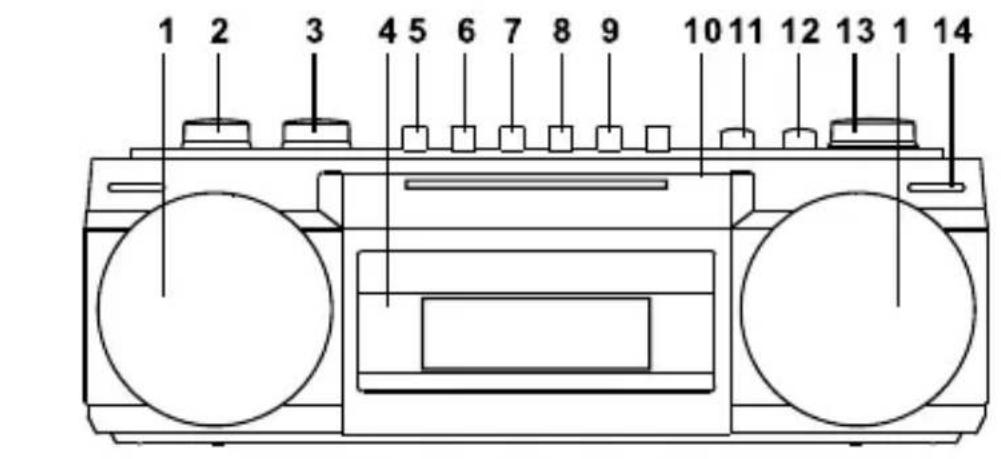
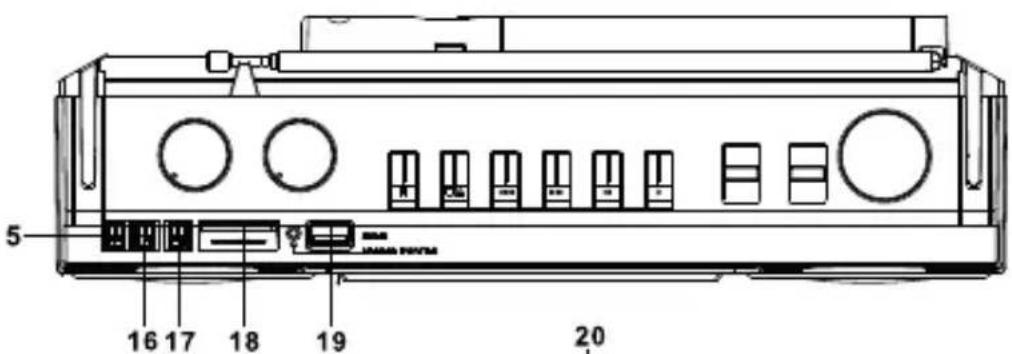
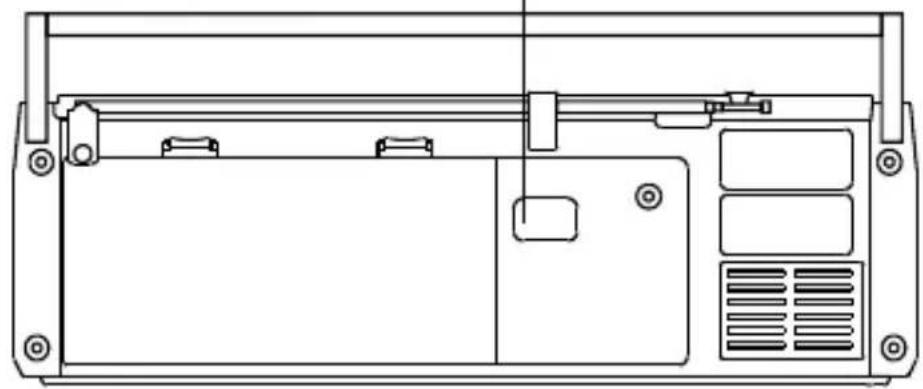
LOCATION OF CONTROLS
1 Speakers
2 VOLUME
3 BASS
4 Tape deck
5 PAUSE
6 STOP/EJECT
7 FFW
8 REW
9 PLAY
10 Band dial
11 FUNCTION
12 BAND
13 TUNING
14 Internal microphone
15 PREV
16 PAUSE/PLAY
17 NEXT
18 SD slot
19 USB port
20 ACIN
POWER SUPPLY
AC Power Operation
- Check the voltage rating of your unit against the AC main supply voltage.
- Put the AC supply lead into the ACSOCKET to connect the AC outlet.
Note: Once plugged in the AC outlet, the battery of the unit will be cut off.
Battery Power Operation
- Open the BATTERY COMPARTMENT door.
- Install four "UM-1" (Size D) or R20 batteries according to the indicated battery polarity. Note: Before using with batteries, disconnect the AC Cord from the AC SOCKET.
RADIO OPERATION
- Slide the FUNCTION SWITCH to RADIO position.
- Select the desired radio band with the BAND SWITCH.
- Tune in a desired station by turning the TUNING BUTTON.
- Adjust the VOLUME CONTROL to your desired listening level.
TELESCOPIC ANTENNA
- Extend the TELESCOPIC ANTENNA for optimum reception on FM.
- The unit is equipped with a built-in ferrite antenna for MW(AM) and SW. This built-in antenna is directional so reception from distant station may be improved by rotating the unit.
CASSETTE OPERATION
Installation of Cassette
Open the CASSETTE COMPARTMENT by pressing STOP/EJECT BUTTON. Insert the recorded cassette, bottom side up with tape facing you. Close the CASSETTE COMPARTMENT. Now the unit is ready for operation.
USB/SD/BT operation
- USB/SD / BT: Use the FUNCTION switch to select the BT/MUSIC function.
- BT: Press and hold PLAY/PAUSE (17) to activate BT pairing. Activate BT on your smartphone/tablet as well and pair withRR501BT. You can now stream audio from your smartphone/tablet over the RR501BT speakers.
- USB/BT: Insert USB or SD drives into the respective slots (19/20). The playback starts automatically. Use the buttons PREV, PLAY/PAUSE and NEXT (16/17/18) to operate the music playback.
Playback
- Set the FUNCTION SWITCH to Tape position.
- Press the PLAY BUTTON. The unit will begin to playback.
- Adjust the VOLUME CONTROL to the desired sound level.
Fast Forward and Rewind
To playback the desired portion in the middle of the tape or to skip over portions of the tape quickly. Press STOP/EJECT BUTTON first and then press FAST FORWARD BUTTON for winding or the REWIND BUTTON for rewinding, press STOP/EJECT BUTTON to stop the tape.
Pause Function
During playback or recording, the tape can be stopped temporarily by depressing the PAUSE BUTTON. Press again to release the pause action.
RECORDING
Recording from the Built-in Microphone
- Install a plain cassette.
- Slide the FUNCTION SWITCH to TAPE position.
- Depress RECORD BUTTON for recording.
Recording from the Built-in Radio
Turn on the radio as instruction "RADIO OPERATION". Slide the FUNCTION SWITCH to RADIO position. Depress RECORD BUTTON simultaneously.
EXTERNAL HEADPHONE JACK
For private listening, insert the plug of a headphone(not included) into HEADPHONE JACK and adjust VOLUME CONTROL accordingly. During the use of headphone, the built-in speaker is automatically disconnected.
MAINTENANCE
Cleaning of the Heads, Pinch Rollers and Capstans
To assure continued high performance from our Recorder periodically. Cleaning the heads, pinch rollers and capstans whenever an accumulation of dust and tape oxide deposits.
These particles may be cleaned with a cotton swab moistened with alcohol (methylated spirit) or special head-cleaning fluid.
Depress the STOP/EJECT BUTTON and remove the cassette.
Carefully rub the face of the heads and also the surface of the capstans and the pinch rollers.
WARNING:
To prevent fire or shock hazard, do not expose this appliance to rain or moisture. Do not remove cover (or back), no user serviceable parts inside. Refer servicing to qualified service personnel.
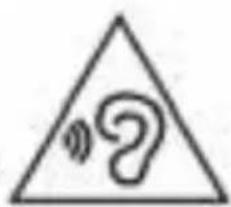
To avoid possible hearing damage, limit the time listening at high volumes
TECHNICAL SPECIFICATIONS
Power: 230V\~/50Hz-4 batteries D (UM-1)
not included
Frequency range: FM 87.5 - 108.0 MHz
MW530-1600KHz
SW1 3.0 - 13.0 MHz
SW2 13.0 - 23.0 MHz
Bluetooth transmission power: 2.5mW
Bluetooth transmission frequency: 2,4GHz
Size: 317 x 114 x 89 mm
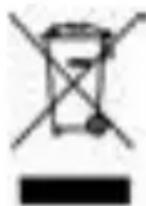

USERS INFORMATION pursuant to Legislative Decree No. 49 of March 14, 2014
"Implementation of Directive 2012/19 / EU on Waste Electrical and Electronic Equipment (WEEE)"
This wheeled bin symbol on the product indicates that at the end of its life must be collected separately from other waste. The user must, therefore, take the remote control integrates the essential components that got to its life to the appropriate differentiated collection centers for electronic and electro-technical waste, or return it to the dealer when purchasing a new appliance of equivalent type, in terms of one to one, or one to zero for equipment having longer side of less than 25~cm . Appropriate separate collection for the decommissioned equipment for recycling, processing and environmentally compatible disposal helps prevent negative impact on the environment and human health and promotes recycling of the materials making up the product. Illegal dumping of the product by the user entails the application of administrative sanctions stated in Legislative Decree n. Legislative Decree No. 49 of March 14, 2014.
SIMPLIFIED EU DECLARATION OF CONFORMITY
Hereby TREVI Spa declares that the radio equipment type RR 501BT is in compliance with directive 2014 / 53 / EU.
The full text of the EU declaration of conformity is available at the following internet address www.trevi.it


- DANGEROUS
- VOLTAGE
- NOTES OF USE
- CARE AND MAINTENANCE
- IMPORTANT
- LOCATION OF CONTROLS
- POWER SUPPLY
- AC Power Operation
- Battery Power Operation
- RADIO OPERATION
- TELESCOPIC ANTENNA
- CASSETTE OPERATION
- Installation of Cassette
- USB/SD/BT operation
- Playback
- Fast Forward and Rewind
- Pause Function
- RECORDING
- Recording from the Built-in Microphone
- Recording from the Built-in Radio
- EXTERNAL HEADPHONE JACK
- MAINTENANCE
- Cleaning of the Heads, Pinch Rollers and Capstans
- WARNING:
- USERS INFORMATION pursuant to Legislative Decree No. 49 of March 14, 2014
- "Implementation of Directive 2012/19 / EU on Waste Electrical and Electronic Equipment (WEEE)"
- SIMPLIFIED EU DECLARATION OF CONFORMITY
Brand : Trevi
Model : RR 501 BT
Category : Radio