Babymonitor 1800 - Radio STABO - Free user manual and instructions
Find the device manual for free Babymonitor 1800 STABO in PDF.


Frequently Asked Questions - Babymonitor 1800 STABO
User questions about Babymonitor 1800 STABO
0 question about this device. Answer the ones you know or ask your own.
Ask a new question about this device
Download the instructions for your Radio in PDF format for free! Find your manual Babymonitor 1800 - STABO and take your electronic device back in hand. On this page are published all the documents necessary for the use of your device. Babymonitor 1800 by STABO.
USER MANUAL Babymonitor 1800 STABO
Prior to using the device for the first time, carefully and completely read through all operating instructions. Keep these operating instructions in a safe place; it contains important hints for operating the device.
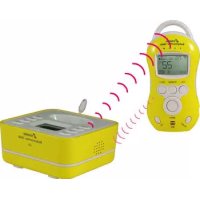
Thanks to radio transmission to the mobile parents' set, the stabo Babymonitor 1800 enables an acoustic monitoring of the children's room which is almost free from interferences. Furthermore, the integrated temperature sensor checks the room temperature.
In general, the usage of the Babymonitor permits to ease the supervision of a child or another dependent person; however, it can by no means substitute the personal supervision!
For this reason, any liability outside of the legal regulations of guarantee is excluded. This is particularly applicable to any medical application which is not intended.

Safety warnings
Designed for indoor use only! Do not expose the devices to the weather in the open. Protect your stabo Babymonitor 1800 from heat, humidity, dust and strong vibrations!
The devices must be kept out of the reach of children! Never place the baby set in the children's bed! Prevent children from playing with the devices or from having access to the devices and accessories.
Do not use the sets in a hospital or comparable facilities! The Babymonitor 1800 produces radio waves which might affect the proper functioning of medical electrical equipment.
Do not open the devices or make any modifications to them! Never open your stabo Babymonitor 1800 and make any modifications to the devices. Ensure that any repairs are carried out by qualified personnel only. Otherwise, no further guarantee claim can be accepted and/or the devices could lose their approval for use!
If the housing is damaged, disconnect the power plug! If the housing of one of the devices belonging to your Babymonitor 1800 is damaged, immediately disconnect it from the mains (in case of mains operation).
The immediate proximity of other radio transmitters is to be avoided! Other radio transmitters (DECT phones, wireless routers, mobile phones) on this transmission path might interfere with the connection between the parents' and the baby set.
Product features
DECT technology almost free from interferences (1.8 GHz)
Night light function
Lullaby function (5 different melodies)
Speech function
Adjustable transmitting power (high/low)
Adjustable microphone sensitivity (4 levels)
Room temperature indication
Temperature alarm at minimum/maximum value
Page function
Out-of-reach alert
Battery status indicator
Scope of delivery
1 baby unit
1 parents' unit
2 power supplies (5 V DC/500 mA)
1 NiMH battery pack for parents' set (2.4 V/800 mAh)
1 operating instructions
Please check the contents of the package for completeness.
Prior to using the sets examine them with respect to any external damage. In case of an external damage, do not put the product into operation, but contact your specialist dealer immediately.
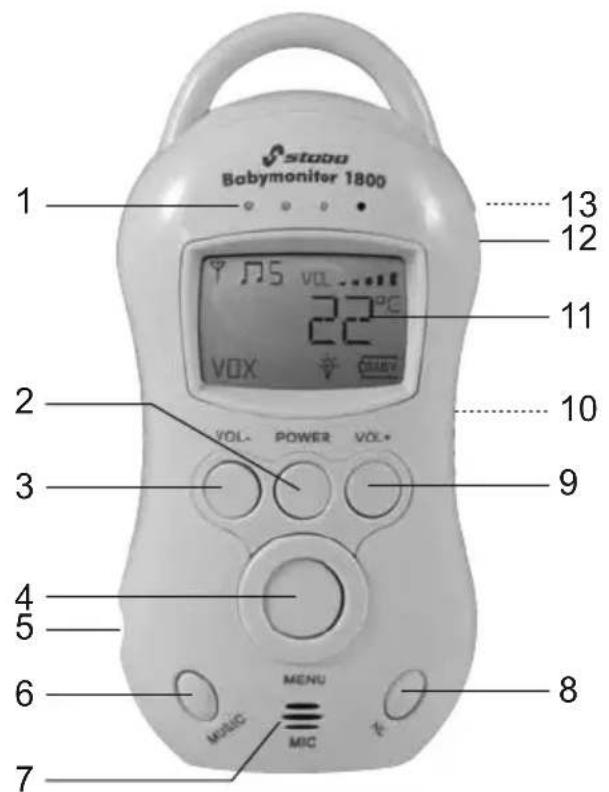
Control elements and connections of the parents' set
text_image
1 Babymonitor 1800 13 12 11 22°C VOX VOL- POWER VOL+ 9 4 5 6 MENU MUSIC MIC 7 8- 4 blue LEDs: Noise level indication
- POWER: Switches the radio set on/off (press and hold for 3 sec.) and is used as return key in the menu
- VOL-: Reduces the volume and is used for menu navigation
- MENU key: Activates the menu and confirms the settings in the menu
- 5 V DC IN socket: Power supply connector
- MUSIC: Switches the lullaby function on and off.
- MIC: Microphone
- NL: Night light function (night light is manually switched on/off or noise acitvated)
- VOL+: Increases the volume and is used for menu navigation
- Battery compartment for NiMH battery pack
- LC display
- Talk key: Push-to-talk key (press and hold to talk to the child)
- Loudspeaker
Indications in the LC display (baby/parents' set)

Antenna symbol (parents' set only)

Room temperature (°Celsius or °Fahrenheit)

Baby symbol (parents' set only)

Lullaby symbol

Night light symbol


Night light is noise activated

Battery indicator (3 bars)
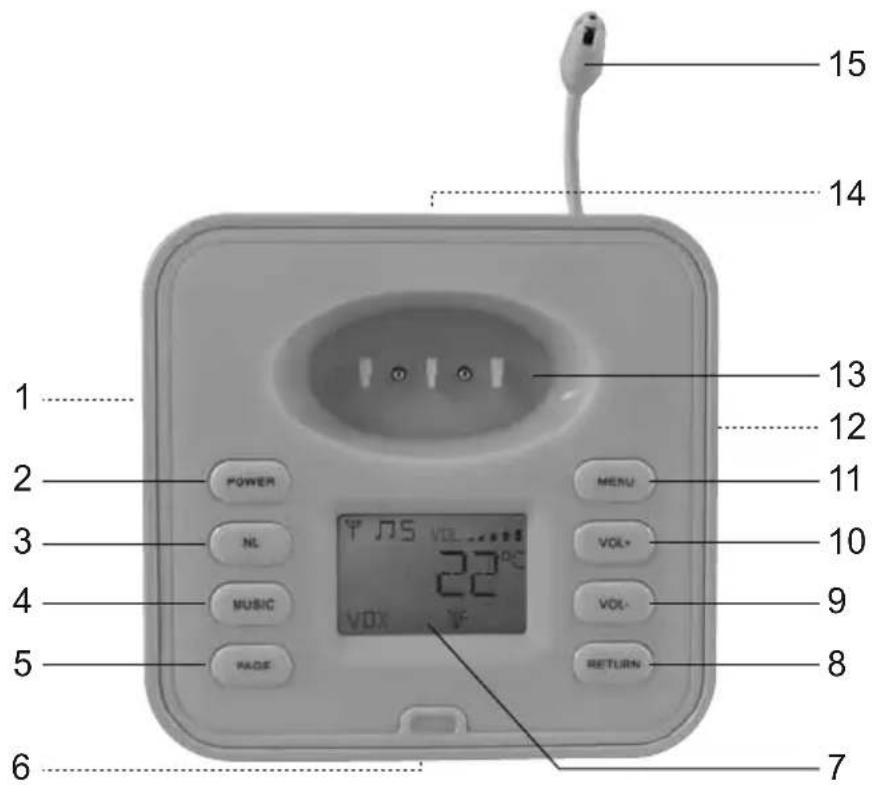
Control elements and connections of the baby set
text_image
1 2 3 4 5 6 POWER NL MUSIC PAGE MENU VOL* 22°C VOX 15 14 13 12 11 10 9 8 RETURN 7- Loudspeaker
- POWER: Switches the set on/off (press and hold for 3 sec.)
- NL: Night light function (night light is manually switched on/off or noise activated)
- MUSIC: Switches the lullaby function on and off
- PAGE key: Emits a call tone to the parents' set
- Microphone
- LC display
- RETURN key: Return key in the menu and exits the menu
- VOL-: Reduces the volume and is used for menu navigation
- VOL+: Increases the volume and is used for menu navigation
- MENU key: Activates the menu and confirms the settings in the menu
- Battery compartment
- Charging stand for parents' set
- 5 V DC IN socket: Power supply connector
- Temperature sensor
First start-up
Power supply of baby set
Plug the power supply unit into a socket (230 V/50 Hz) and connect the plug to the 5 V DC IN socket of the baby set.
Alternatively, the baby set can also be operated using commercially available alkaline batteries (type AAA). Be sure to observe the following notes for battery operation:

The set does not feature a charging function. Thus, do not use rechargeable battery cells! It is essential to ensure the indicated polarity when inserting the batteries into the battery compartment! In case of a battery change you always have to exchange all batteries. Do not mix used and new batteries. Remove the batteries, if you do not use your devices for a prolonged period! When operating the baby set with batteries, the baby symbol is shown on the display of the parents' set.
Power supply of parents' set
The power supply of the parents' set is provided through the NiMH battery pack (2.4 V/800 mAh) included in the scope of supply.

Note: The battery pack is not precharged. Thus, prior to using the set for the first time (and after a long period of non-use) charge the battery pack for at least 6 hours!
Inserting the battery pack
Open the battery compartment at the rear side of the device. Insert the battery pack and place the plug of the battery pack into the socket in the battery compartment – make sure not to squeeze the cable.
Close the battery compartment.
Charging the battery pack
Now, the battery pack in the device can directly be charged through the power supply unit or in the charging stand of the baby set.

Note: If you connect a power supply unit to the parents' set without having correctly inserted the battery pack in advance, an audio warning sounds and the display shows NO BA.
Plug the power supply unit into a 230 V socket and connect it to the 5 V DC IN socket of the parents' set or connect it to the baby set and place the parents' set in the charging stand.
During charging, the charging state indicator of the battery appears on the display of the parents' set. When the battery pack is completely charged, a "battery full" symbol is shown.
Establishing/checking the radio link
The radio link between the baby and the parents' set should automatically be established, since the mutual registration of the devices has already been performed ex works.
For checking the proper link, place both devices in the same room at first (minimum distance of 1 m in order to reduce feedback noise). Switch on the baby set by pressing the POWER key for 3 sec.: A double beep tone sounds and the temperature is indicated on the display (and the battery symbol 📄 for battery operation of the set in addition). Afterwards, switch on the parents' set by pressing the POWER key for 3 sec.: SRCH and the antenna symbol 🌼 are flashing on the display.
When the radio link is automatically established, the display shows the temperature, the battery symbol □ and the antenna symbol ▼. For battery operation of the baby set, the baby symbol □ is displayed in addition.
If the display of the parents' set shows UNREG instead, perform the device registration now (SETUP, refer to page 17).
Place the baby set at a distance of approx. 1 m to the children's bed and connect it to the mains using the power supply unit.
The range of the Babymonitor is a function of many factors. Thus, the environment in which the sets are used has a significant influence: Each obstacle (walls) on the transmission path reduces the range; some materials (e.g. reinforced concrete) give rise for considerable screening effects.
The parents' set is equipped with a range-checking function: If the parents' set is out of the range of the baby set (or if the baby set is switched off), the parents' set emits a signal tone and the antenna symbol and SRCH flash on the display.
Make sure that the reception quality is sufficient at the planned place of use.
If required, make individual setting through the menu (e.g. adjust the microphone sensitivity or change the lullaby, refer to MENU, page 16).
Features
Noise level indication
Depending on the noise level in the children's room, 1 to 4 blue LEDs at the parents' set are lit up.
Night light function
The night light can directly be switched on/off (the display shows 📋) or can be activated through the noise in the children's room:
For manually activating the night light, press NL once.
For activating the night light through noise (VOX), press NL twice (☀️ symbol and VOX are shown on the device display). At a certain noise level in the children's room, the night light is now automatically activated for approx. 20 sec.
For switching off the night light, press NL three times (the symbols disappear from the display).
Page function
By pressing the PAGE key at the baby set, a call tone sounds on the parents' set and PAGE flashes on the display.
The call tone on the parents' set automatically finishes after 60 sec. or can be switched off by pressing any key.
Speech function
Babymonitor 1800 enables you to talk to your child through the parents' set.
To do so, press and hold the Talk key (the display shows SPK): Now speak with normal voice level and a distance of approx. 5 - 10 cm into the microphone.
After you have finished speaking, release the Talk key again (SPK disappears from the display).
Range-checking function
If the parents' set is out of the range of the baby set (or if the baby set is switched off), the parents' set emits a signal tone and the antenna symbol and SRCH flash on the display.
Battery low indicator of the baby set
If the batteries are used up, the battery symbol flashes on the display. Every 10 sec., a double warning tone sounds in the parents' set and the baby symbol flashes on the display. Replace the batteries or connect the power supply unit.
Battery low indicator of the parents' set
If the capacity of the battery pack is low, the battery symbol flashes on the display and a double warning tone sounds every 10 sec. Charge the battery pack.
Menu
General hints on the menu
All individual settings (e.g. microphone sensitivity, selection of the lullaby, entry of the desired values for the temperature alarm) can either be performed on the parents' set or on the baby set. To do so, both devices must be switched on and the radio link must be established.
In these operating instructions, the selection of the menu options through the parents' set is described. The adjustment of the settings through the baby set is the same – apart from two items:
- The SETUP function (if the devices possibly need to be registered anew) can only be adjusted on the parents' set.
- The function of the return key in the menu mode is different for both sets: For the parents' set, the POWER key is used as return key (also for exiting the menu and returning to the operating mode), while the baby set is provided with a special RETURN key.
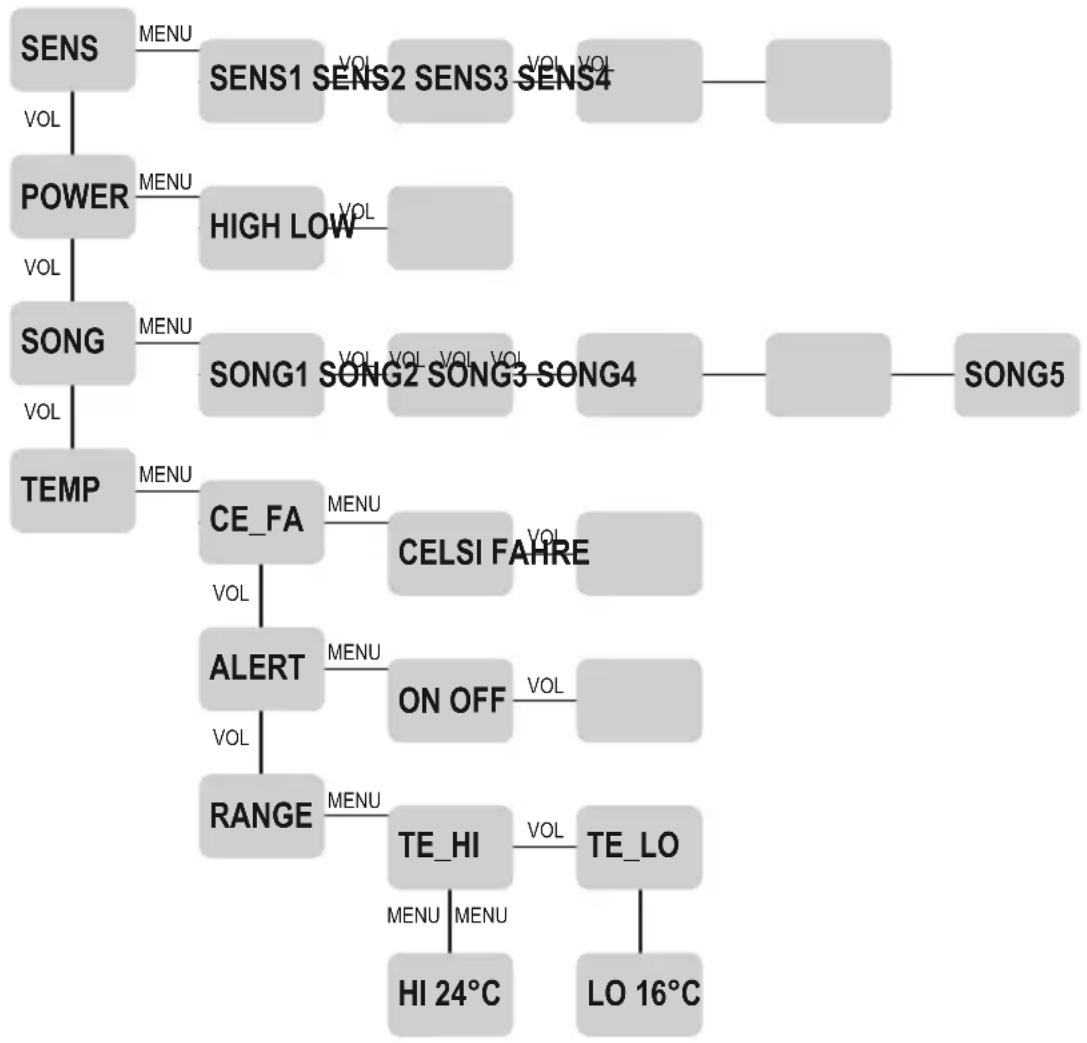
Menu navigation
Open the menu by pressing the MENU key (press twice on the parents' set, press once on the baby set).
The VOL keys are used to navigate the four items of the main menu (SENS, POWER, SONG, TEMP). By pressing the MENU key, you open the respective submenus. Use the VOL keys again to navigate the individual options within these submenus. Confirm your selection of a sub-item (e.g. lullaby melody) by pressing the MENU key and thus simultaneously return to the corresponding item of the main menu. On the parents' set, use the POWER key (baby set: RETURN key) to return to the next item of the main menu or exit the menu and switch again back to the operating mode.
flowchart
graph TD
    A["SENS"] --> B["MENU"]
    B --> C["SENS1"]
    C --> D["SENS2"]
    D --> E["SENS3"]
    E --> F["SENS4"]
    G["POWER"] --> H["MENU"]
    H --> I["HIGH LOW"]
    I --> J["SONG"]
    J --> K["MENU"]
    K --> L["SONG1"]
    L --> M["SONG2"]
    M --> N["SONG3"]
    N --> O["SONG4"]
    P["TEMP"] --> Q["MENU"]
    Q --> R["CE_FA"]
    R --> S["VOL"]
    R --> T["ALERT"]
    T --> U["VOL"]
    T --> V["RANGE"]
    V --> W["MENU"]
    W --> X["TE_HI"]
    X --> Y["HI 24°C"]
    X --> Z["TE_LO"]
    Z --> AA["LO 16°C"]
    AB["CE_LSI"] --> AC["VOL"]
    AD["FAHRE"] --> AE["VOL"]
    AF["ON OFF"] --> AG["VOL"]
SENS (microphone sensitivity, factory setting: level 4)
Four levels are provided to adjust the microphone sensitivity (level 1: minimum sensitivity, records loud noises only, level 4: maximum sensitivity, also records low noises).
POWER (transmitting power, factory setting: high)
If the distance and constructional conditions (observe the range-checking function!) permit, the energy consumption of the devices can be reduced by decreasing the transmitting power.
SONG (lullaby function, factory setting: song 5)
The lullaby function can be switched on/off on the parents' and on the baby set, 5 different melodies are available to be selected.
For activating the lullaby function, press the MUSIC key: The selected lullaby sounds and will be repeated continuously (the device display shows the and SONG). Use the VOL keys to modify the volume. For switching off the lullaby, press the MUSIC key (the and SONG disappear from the display).
TEMP (room temperature, factory setting: alarm off)
The Babymonitor 1800 is equipped with a temperature sensor and a temperature alarm function. If the room temperature in the children's room reaches the adjusted minimum/maximum value, the parents' set emits a triple alarm tone and ALERT flashes on the display.
Use the submenu ALARM to activate the temperature alarm and enter the corresponding temperature values in the submenu RANGE. Adjust the desired maximum temperature under the menu item TE_HI and the minimum temperature under the menu item TE_LO (using the VOL keys).
An initiated temperature alarm can be switched off manually by pressing a VOL key (for approx. 3 sec.). However, it is automatically switched off after approx. 5 min.
SETUP (device registration, menu item only available on the parents' set)
In rare cases (e.g. in case of interferences by other radio transmitters in immediate proximity) it may happen that the parents' and baby set loose their specific identification, the display shows UNREG. In this case, register the devices again:
Press and hold the PAGE key on the baby set for 7 sec.: A signal tone sounds and the night light flashes, the baby set is now in registering mode.
Activate the SETUP menu on the parents' set now by pressing the MENU key once.
Press one of the VOL keys, the display shows REG.
Confirm by pressing the MENU key: REG flashes on the display, the parents' set is now in registering mode, too.
If a triple beep tone sounds, the device registration is finished and the devices automatically return to their operating mode.
Care instructions
Clean the sets by means of a slightly damp, lint-free cloth. Do not use any aggressive detergents.
Remove the battery pack/batteries, if you do not use your devices for a prolonged period!

Disposal instruction
Electric/electronic devices and used up batteries are not to be thrown into the domestic waste.
Deliver devices that are out of order/used with a corresponding collecting point. Please contact your local authorities for corresponding information.
Dispose used up batteries (only if completely discharged) with the corresponding collecting points.
Technical specifications
Channel frequency: 1,880-1,900 GHz
Range: up to 300 m (depending on the environment)
Power supply baby unit: Power supply: DC 5 V/ 500 mA or
3 x alkaline batteries Typ AAA
Power supply parent unit: 2.4 V / 800 mAh NiMH battery pack
Dimensions
baby unit (WxHxD): 103 x 45 x 98 mm
Weight: 155 g
Dimensions
parent unit (WxHxD): 60 x 125 x 35 mm
Weight: 105 g
Indication importante
Appareil parents (HxLxP): 60 x 125 x 35 mm
Poids 105 g