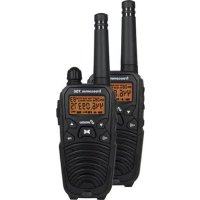
Freecomm 700 - Talkie Walkie STABO - Free user manual and instructions
Find the device manual for free Freecomm 700 STABO in PDF.


| Product type | PMR 446 two-way radio |
| Brand | Stabo |
| Model | Freecomm 700 |
| Frequency range | 446.00625 MHz - 446.09375 MHz |
| Number of channels | 8 |
| Number of sub-channels (CTCSS) | 38 |
| Number of DCS codes | 83 |
| Maximum range | 10 km (line of sight) |
| Output power | ≤ 500 mW |
| Operating voltage | 4.8 V |
| Power supply | 4 NiMH 600 mAh rechargeable batteries or 4 AAA LR03 batteries |
| Dimensions (L x H x D) | 175 x 58 x 35 mm (antenna included) |
| Weight | 160 g (batteries included) |
| Main functions | VOX, Dual Watch, FM Radio, LED SOS Lamp, Key Lock, Scan Search, Acoustic Monitoring |
| Display | LCD with backlight, channel, battery, TX/RX indicators, active functions |
| Maintenance and cleaning | Clean with a soft slightly damp cloth, without chemicals. Keep battery contacts clean. |
| Safety | Do not open the housing, avoid moisture, excessive heat and shocks. Follow instructions for pacemakers. |
| Spare parts and repairability | Replaceable batteries. Repairs by qualified personnel only. Accessories available (belt clip, charger). |
| General information | User manual available in PDF. Compliant with directive 2014/53/EU. |
Frequently Asked Questions - Freecomm 700 STABO
User questions about Freecomm 700 STABO
0 question about this device. Answer the ones you know or ask your own.
Ask a new question about this device
Download the instructions for your Talkie Walkie in PDF format for free! Find your manual Freecomm 700 - STABO and take your electronic device back in hand. On this page are published all the documents necessary for the use of your device. Freecomm 700 by STABO.
USER MANUAL Freecomm 700 STABO
Prior to using the device for the first time, carefully and completely read through all operating instructions. Keep these operating instructions in a safe place; it contains important hints for operating the device.
natural_image
Technical line drawing of two mechanical components with internal channels and directional arrows (no text or symbols)natural_image
Three technical line drawings of a handheld device with internal components and directional arrows indicating assembly (no text or symbols)natural_image
Technical line drawing of a walkie-talkie with a power outlet connected to it (no text or symbols present)Please read this manual carefully and completely to make yourself familiar with the various functions of your radio set. Make sure to observe the safety instructions to avoid any danger for you and other persons as well as damage to the radio set. Keep the operating instructions in a safe place. Be sure to hand over the instructions in case you lend out or sell the radio set.
The manufacturer disclaims any liability for damage and consequential damage caused by the nonobservance of these instructions!

Safety warnings
Persons with cardiac pacemakers are generally advised not to use radio sets! No transmission in immediate proximity to persons with cardiac pacemakers.
Do not touch the antenna during the transmission, do not hold it close to your body, especially not close to the face or the eyes. When using a headset be sure not to turn the volume of your radio set too high: otherwise the noise might damage your hearing.
Do not operate the radio sets neither in an aircraft nor in a hospital or in comparable facilities. Switch off the radio set, if you are in explosive-prone environment (e.g. petrol station). Make sure not to change the battery cells in those places.
When using the radio set in a vehicle be sure to comply with the national regulations! In some countries it is forbidden to use a radio set while driving a vehicle! In a vehicle equipped with an airbag you must not operate or store the radio set neither directly above the airbag nor in the inflation zone of the airbag.
Never open the housing of a radio set or its accessories and do not carry out any modification. Ensure that any repair is carried out exclusively by qualified personnel. Modifications of or interventions in the radio set automatically lead to an expiry of the type approval, moreover it voids all warranty claims.
Prevent children from playing with the radio set, accessories, batteries or the packing material!
If you state the odor emissions or the formation of smoke, immediately switch off the radio set and remove the battery cells. Do not operate
the radio set, if you detect any damage of the housing or the antenna. Contact a qualified workshop.
Protect your radio set and the accessories against moistness, heat, dust, and strong vibrations. Avoid operating temperatures below -20^ or above +50^ . Do not expose the radio set to direct sunlight for a prolonged period (e.g. shelf in the vehicle). Do not employ the radio set in the rain: However, if the radio set has become wet, switch it off immediately, take out the battery cells and dry it by means of a soft, lint-free cloth. Only employ the radio set, if it is completely dry.
Never throw the battery cells into the fire! Never short-out the contacts of the battery cells!
Important information/Intended use
stabo freecomm 700 is a PMR 446 handheld radio set for voice radio over short distances.
The radio standard PMR 446 is assigned in AT, BE, CH, DE, DK, ES, FI, FR, GB, GR, IE, NL, NO, PL, PT, SI (free of charge and without any registration). There is obligatory registration in IT: Italian residents have to pay a nonrecurring charge upon registration of the radio set! (Tourists may use their radio sets free of charge for the duration of their stay in Italy.)
For information on national regulations concerning the use of radio sets on travels abroad please contact the embassies/consulates of the corresponding countries or you may get the information from the corresponding telecoms and postal regulator.
PMR 446-radio sets transmit/receive on 8 specified channels (446 MHz). Within the radius of reach you can communicate via an optional number of radio sets, however, only one person can talk and the other/s listen. Uncoded voice radio links are not confidential!
The range is a function of many factors. Apart from the statutory transmitting power other factors are relevant: e.g. the position of the antenna (it should be installed at right angle and send freely), the energy supply (fully charged battery cells fully exploit the reach) and above all the environment where you transmit. Each “obstacle” (hills, buildings, trees) reduces the range, some materials (e.g. reinforced concrete, pieces of rock) give rise for considerable screening effects.
Under optimum conditions (e.g. during sailing or paragliding) PMR 446 radio sets have a maximum reach of 10 km. In housing areas a range of 1 - 2 km is realistic, in strongly screened environment (e.g. in the mountains or inside buildings made of reinforced concrete) the reach may drop to a few hundred meters or less.
Scope of delivery
2 PMR 446 hand voice radio sets
2 belt clips
1 double tabletop charger
1 power supply unit 230 V/50 Hz
8 NiMH battery cells (4.8 V/600 mAh)
1 operating instructions
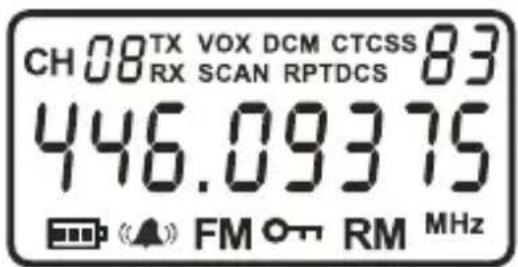
The display
| CH88 | Adjusted channel number |
| TX | Transmission indicator |
| RX | Reception indicator |
| VOX | VOX activated |
| DCM | Dual Watch activated |
| SCAN | Scanning activated |
| CTCSS88 | Adjusted CTCSS number |
| DCS88 | Adjusted DCS number |
| Battery status indicator (3 levels) | |
| Call tone activated | |
| Vibration activated | |
| Call tone and vibration activated | |
| Key lock activated | |
| FM | Radio activatedv |
| RM | Acoustical monitoring activated |
Control elements and connections
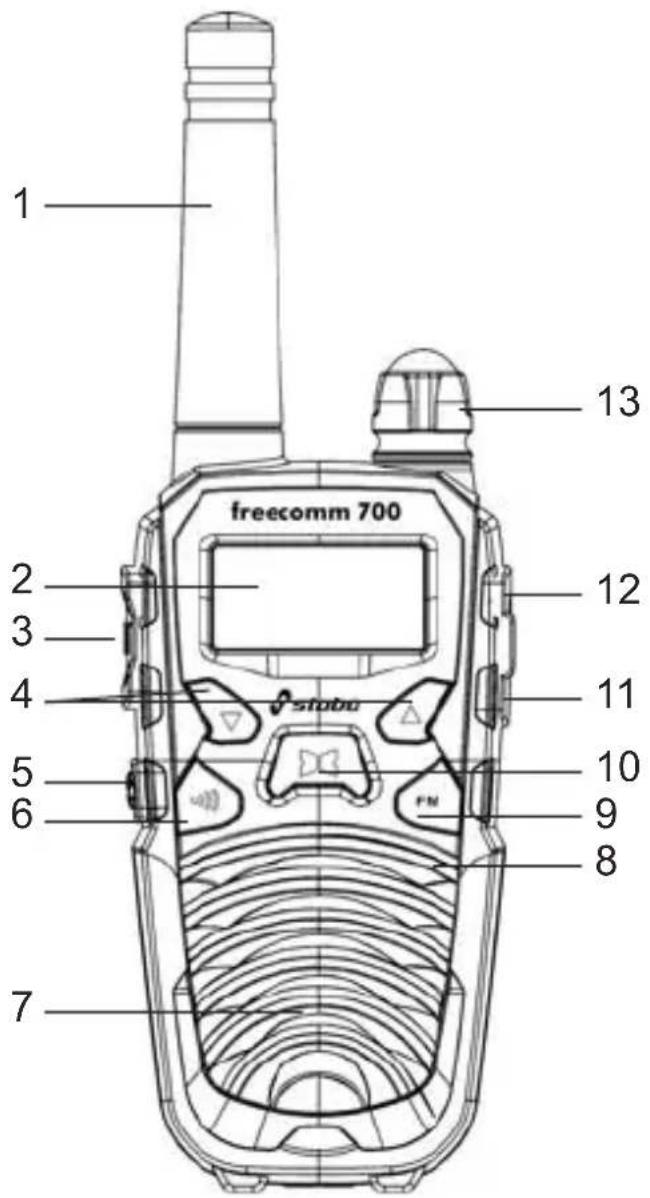
- Antenna (The antenna is fixed to the housing, do not try to unscrew it!)
- LC display
- PTT: Transmission key
- UP/DOWN keys: For stepping forward through the individual settings in the Set menu
- LED spotlight key (with SOS function)
- Call key: Sending out a call tone
- Loudspeaker
- Microphone
- FM key: For switching the FM radio on/off
- Menu key: Switching over to the Set menu
- MIC/SPK socket
- Charging socket
- Control: ON/OFF switch and volume control
Important provisions for the operation
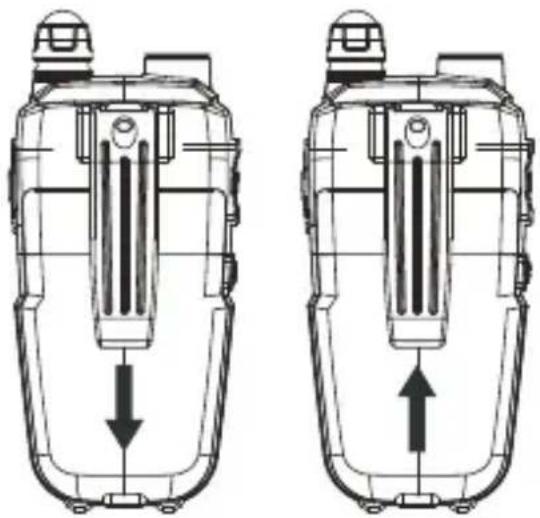
Belt Clip
Attaching/taking-off belt clip
Place the grooves of the belt clip on the guide rails on the upper part of the housing and slide the belt clip downwards until the safety catch snaps in.
For removing push the safety catch on top of the belt clip away from the housing and slide the belt clip upwards.
natural_image
Technical line drawing of two identical mechanical components with internal channels and directional arrows (no text or symbols)Charging the battery cells
The NiMH battery cells are not precharged: Thus, before commissioning the radio sets, the battery cells have to be completely charged (charging time approx. 12 hours). To do so, insert the battery cells into both radio sets:
Inserting the battery cells
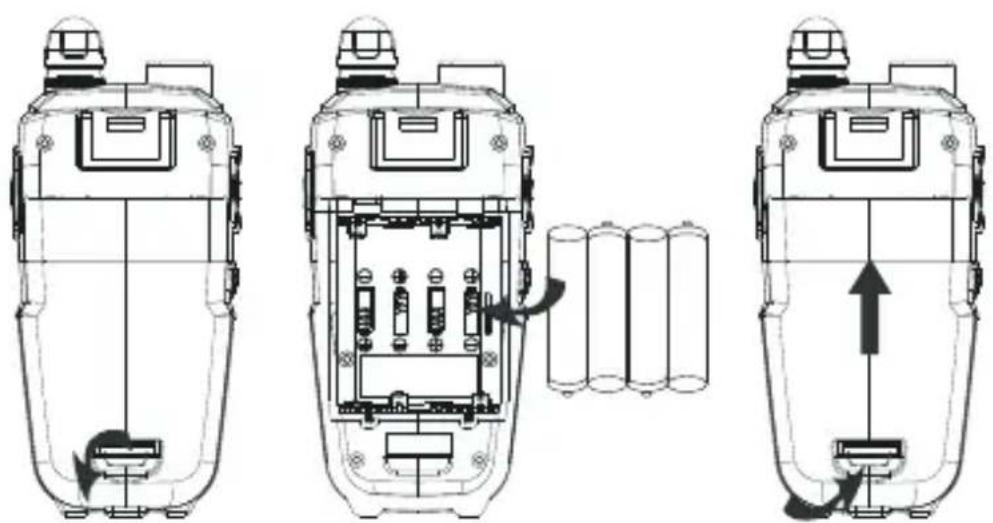
Open the battery compartment at the rear side of the device and insert the 4 NiMH battery cells by observing the +/- marking. Slide the cover on the housing and let the safety catch click into place.
natural_image
Technical line drawing of three views of a portable device with internal components and directional arrows indicating movement (no text or symbols)Charging the battery cells in the charger
Ensure that both radio sets are switched off!
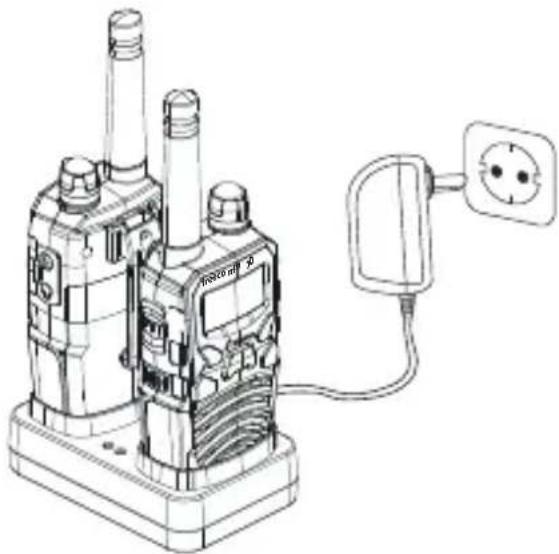
Plug the power supply unit into a socket (230 V) and connect it to the charger.
Place the radio sets into the two charging shafts.
Both control lamps on the charger emit red light, the battery cells are now being charged.
For this charger, the charging current is set to approx. 75 mA or 150 mA.
natural_image
Line drawing of a walkie-talkie device with a power outlet connected to it (no text or symbols present)The maximum charging time amounts
to 12 hours, afterwards charging is stopped. If the radio sets are not removed from the charger, charge conversation automatically starts after one hour. Both control lamps on the charger start flashing alternately.
Maximum charging times
The charging time depends on the state of charge and the capacity of the battery cells.
With completely discharged battery cells with a capacity of 600 mAh the battery cells are fully charged after 12 hours.
If you want to recharge two half-full battery cells, the charging time is only 6 hours. Be sure to terminate the charging in time in order to avoid overcharging of the battery cells!

Please note the following: Recharging of partly discharged battery cells is basically possible, however, it reduces their lifetime!
Charging via the lateral charging socket
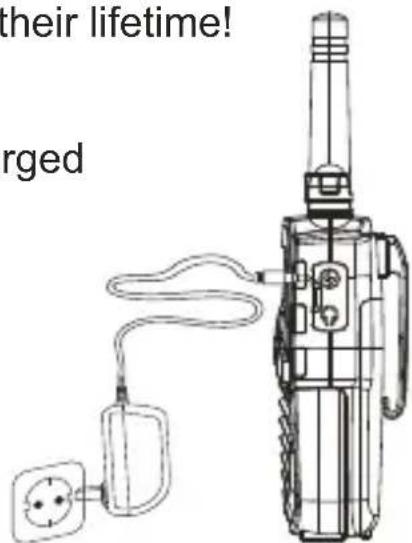
The battery cells of a radio set can also be charged directly using the lateral charging socket:
Switch the radio set off!
Plug the power supply unit of the charger into a socket (230 V) and connect it to lateral charging socket of the radio set.

Safety instructions for the charger
The double tabletop charger must only be used for the charging of the NiMH battery cells that are included in the scope of delivery!
Never place radio sets that are equipped with non rechargeable batteries into the charger! There is explosion hazard!
The charger must only be operated with the delivered power supply unit. Do not abuse it as DC voltage source for other applications.
Prevent small metal parts from penetrating into the charger.
Do not disassemble neither the power supply unit nor the charger.
Disconnect the device from the mains if you do not use it.
Never short-out the contacts of the battery cells!
Make sure that the radio sets are switched off during charging.
Only use the charger in closed rooms. Protect it from humidity, dust, heat and strong vibrations.
Operation with batteries
Your radio sets can also be operated with four micro-batteries each (type: AAA, LR03). It is essential to ensure the indicated polarity when inserting them into the battery case! In case of a battery change you always have to exchange all batteries.
Do not mix different battery types, batteries with different capacities or batteries and rechargeable battery cells!
Do not try to charge a radio set that is equipped with batteries in the charger! There is explosion hazard!
Remove the batteries, if you do not use your devices for a prolonged period!
Information on disposal of battery cells/batteries
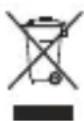
Used up battery cells and batteries are not to be thrown into the domestic waste. Be sure to observe the national disposal regulations and dispose used up battery cells/batteries (only if completely discharged) with the corresponding collecting points.
Energy management
The power consumption of this radio set is very small. If no signal is received, the electronic battery stand-by mode is activated. If the capacity of the battery cells is low or if the batteries are almost empty, the radio set will emit an audio warning that is repeated every 10 sec. Now you have to charge the battery cells or replace the batteries.
Battery status indicator

Full capacity

Half of capacity

Low capacity: The audio warning for weak batteries sounds every 10 sec. You have to charge the battery cells now.

No capacity: The battery symbol flashes, a double warning tone sounds and the radio set is switched off.
Functions

Note: If a setting is not activated within 10 seconds the radio set will automatically adopt the last setting.
Switching on/off the radio set
Turn the knob clockwise for switching the radio set on and counterclockwise for switching it off. Switching on is accompanied by a beep sound.
Adjusting the volume
Use the knob to adjust the volume (volume up: by turning clockwise, volume down: by turning counterclockwise).
Selecting the channel
First select one of the eight available channels.

Note: Always adjust both radio sets to the same channel!
Press the MENU key once: The channel number flashes.
Use the UP/DOWN keys to select a free channel.
Confirm by pressing the PTT key.
Transmitting/receiving
Hold the PTT key pressed and speak with normal voice level and a distance of approx. 5 cm into the microphone, the TX symbol is displayed. If your message is finished, release the PTT key, the TX symbol is no longer displayed.
When the radio set is switched on, it is ready-to-receive (unless the set is transmitting). If the radio set receives a signal, the RX symbol is displayed.
Automatic squelch
Your radio set is equipped with an automatic squelch that prevents that an annoying noise can be heard on free radio channels. However, under certain conditions – and depending on the distance - computers, electric or electronic devices might interfere with this squelch, so that you hear noises. Due to the supersensitive receiver of the radio set, such interferences in immediate proximity are normal and unavoidable. In case of such interferences you should change the distance to the source of interference and hold the radio set in such a manner that the antenna can send freely.
Monitor function
The automatic squelch can bypassed such that you can also hear weak signals.
Activating/deactivating the monitor function
Press and hold the FM key until the RX symbol is displayed and the beep sounds.
For deactivating the function, press and hold the FM key until the RX symbol disappears and the beep sounds.
Pilot tone process CTCSS
Your radio set is equipped with a pilot tone process, that permits to address specific individual partner stations or groups or to receive only calls from the latter.

Note: 38 different tones are available. Make sure that you and your partner use the same channel and the same pilot tone.
Activating/deactivating the pilot tone process CTCSS
Press the MENU key twice: CTCSS OF flashes.
Use the UP/DOWN keys to select a pilot tone number.
Confirm by pressing the PTT key.
For deactivating press again the MENU key twice: The pilot tone number flashes.
Use the UP/DOWN keys to select 00.
Confirm by pressing the PTT key.
Digital code system
Apart from the pilot tone process CTCSS, your radio set is also equipped with the DCS process, that permits to address specific individual partner stations or groups or to receive only calls from the latter.

Note: 83 different codes are available. Make sure that you and your partner use the same channel and the same digital code.
Activating/deactivating the digital code System
Press the MENU key thrice: DCS OF flashes.
Use the UP/DOWN keys to select a digital code.
Confirm by pressing the PTT key.
For deactivating press again the MENU key thrice: The digital code flashes.
Use the UP/DOWN keys to select 00.
Confirm by pressing the PTT key.
VOX function (phonetic transmission)
This function permits to send without activating the transmit key:
Voices/noises that hit the microphone thus switch on the transmitter of the radio set.
Adjust the sensitivity according to the environmental noises, so that the set switches from reception to transmission if your voice volume is appropriate. You can select between 3 sensitivity levels (1 low, 2 medium, 3 high sensitivity).
Activating/deactivating VOX
Press the MENU key four times: VOX OFF flashes.
Use the UP/DOWN keys to select the requested sensitivity level.
Confirm by pressing the PTT key, VOX is displayed.
For deactivating press again the MENU four times: The adjusted sensitivity level flashes.
Use the UP/DOWN keys to select OFF.
Confirm by pressing the PTT key, VOX is no longer displayed.
Automatic scan
The automatic scan permits to find active channels quickly. It scans independently all of the 8 channels and stops as soon as a signal exceeds the squelch threshold. It will start anew, if no signal is available. You can also restart scanning by pressing the UP/DOWN keys.
Apart from the channel scan the radio set has two more scan functions: Scanning for CTCSS pilot tones and scanning for digital codes.
Activating/deactivating the channel scan
Press the MENU key 5 x: SCAN flashes.
Use the UP/DOWN keys for starting the scan.
To deactivate scanning, press the PTT key, SCAN is no longer displayed.
Activating/deactivating the CTCSS scan
Press the MENU key 6 x: SCAN and CTCSS 00 start flashing.
Use the UP/DOWN keys for starting the scan.
To deactivate scanning, press the PTT key: SCAN and CTCSS are no longer displayed.
Activating/deactivating the digital code scan
Press the MENU key 7 x: SCAN and DCS 00 start flashing.
Use the UP/DOWN keys for starting the scan.
To deactivate scanning, press the PTT key: SCAN and DCS are no longer displayed.
Call tone
Push the call key to emit a tone call that is received by the partner station. The TX symbol is displayed.
You can select among 15 different call tone melodies.
Selecting the call tone melody
Press the MENU key 8 x: C01 is displayed.
Use the UP/DOWN keys to select a call tone melody.
Confirm by pressing the PTT key.
Incoming call signaling
Three different incoming call signaling types are available.

Call tone

Call tone plus vibration

Vibration
Selecting the incoming call signaling
Press the MENU key 9 x: 1 and ▲ start flashing.
Use the UP/DOWN keys to select the requested incoming call signaling.
Press the PTT key: The symbol of the selected incoming call signaling is displayed.
Roger beep
When releasing the PTT key after transmission, a signal tone is automatically transmitted. This tone signals to your contact partner that your message is finished and your partner can talk (this is useful for instance for disturbed radio communications).
Activating/deactivating the roger beep
Press the MENU key 10 x: rO OFF flashes.
Use the UP/DOWN keys to select rO ON.
Confirm by pressing the PTT key.
For deactivating press the MENU key again 10 x: rO ON flashes.
Use the UP/DOWN keys to select rO OFF.
Confirm by pressing the PTT key.
Activating/deactivating the key beep
Press the MENU key 11 x: tO OFF flashes.
Use the UP/DOWN keys to select tO ON.
Confirm by pressing the PTT key.
For deactivating press the MENU key again 11 x: tO ON flashes.
Use the UP/DOWN keys to select tO OFF.
Confirm by pressing the PTT key.
Dual watch function
If you wish to be ready-to-receive on both channels instead of only one channel, you require the dual watch function. With this function
the radio set automatically switches over every 0.5 sec. from the actual channel to the preferred channel.
A CTCSS tone or digital code can also be set for the preferred channel.
Activating/deactivating Dual Watch
Press the MENU key 12 x: DCM OFF flashes.
Use the UP/DOWN keys to select the requested preferred channel.
Use the MENU key to adjust a CTCSS tone or digital code in addition: Adjusting the CTCSS tone = press MENU key once, adjusting the digital code = press MENU key twice. Afterwards use the UP/DOWN keys to select the requested CTCSS tone and/or digital code.
Confirm by pressing the PTT key.
For deactivating press the MENU key again 12 x: DCM flashes.
Use the UP/DOWN keys to select DCM OFF.
Confirm by pressing the PTT key.
Acoustical monitoring
This function can be used to acoustically monitor a (potential) source of noise by placing a radio set in immediate proximity to this source of noise (at a max. distance of 40 cm). Dependant on the noise level, the transmitting unit will now transmit signals automatically to the receiving unit.
First activate the VOX function of the radio set positioned for monitoring purposes and adjust sensitivity level 3.
Afterwards, activate the function Acoustical monitoring:
Activating/deactivating acoustical monitoring
Press the MENU key 13 x: RM OFF flashes.
Use the UP/DOWN keys to select RM ON.
Confirm by pressing the PTT key.
For deactivating press the MENU key again 13 x: RM ON flashes.
Use the UP/DOWN keys to select RM ONFF.
Confirm by pressing the PTT key.
Additional functions
Key lock
As a protection against faulty operation you can lock the keyboard (with the exception of the PTT and call tone key).
Activating/deactivating the key lock
Press the MENU key for 3 sec., the symbol is displayed.
For deactivating press the MENU key again for 3 sec., the symbol is no longer displayed.
Display lighting
By briefly pressing the MENU or an UP/DOWN key, the display lighting is switched on for approx. 5 sec.
FM radio
The stabo freecomm 700 is equipped with a FM radio function (frequency range 87.5 – 108 MHz).
By briefly pressing the FM key, the radio set switched over to radio mode. The FM symbol and the receive frequency set last (e.g. 87.5000 MHz) are displayed.
For activating the channel scan, press one of the UP/DOWN keys for 2 sec. Scanning stops as soon as a station is being received. For starting channel scan again, press the UP/DOWN key once again for 2 sec.
For deactivating the radio mode, briefly press the FM key.

Note: Radio operation takes priority over FM radio mode. If a signal is received on the PMR channel adjusted last, the radio set automatically switches over from FM radio mode to radio operation. Radio operation remains activated as long as the signal is received. If no signal is received anymore, the radio set switches back to FM radio mode.
LED spotlight with SOS function
By briefly pressing the LED spotlight key, the LED is switched on and off.
A long keystroke activates the SOS function, the LED starts flashing with the SOS Morse code.

For deactivating the SOS function, briefly press the LED spotlight key.
Note: This function is also available if the radio set is switched off.
Care instructions
Protect your radio sets and the accessories against humidity/moistness, dust/contamination, strong vibrations and extreme temperatures.
Do not dip the radio sets and the accessories into water or other liquids. Clean the housings of the radio sets by means of a slightly damp, lint-free cloth, do not at all use detergents or solvents. Keep the battery contacts clean by means of a dry cloth.
Remove the battery cells/batteries, if you do not use your devices for a prolonged period.
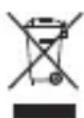
Disposal instructions
Electric and electronic devices are not to be thrown into the domestic waste. Deliver devices that are out of order/used with a corresponding collecting point. Please contact your local authorities for corresponding information.
Used up batteries or defective battery cells are not to be thrown into the domestic waste: Dispose them with the corresponding collecting points!
Troubleshooting
Fault/Remedy
Your radio set cannot be switched on.
Charge the battery cells or renew the batteries.
You can neither speak nor hear your radio partner.
Check whether the same channel and (if activated) the same CTCSS tone are adjusted.
If you are out of reach, reduce the distance to your radio partner.
No key function.
The key lock is switched on. Deactivate the key lock.
The channel is permanently busy.
Check the VOX setting. If required, reduce the VOX sensitivity of the second device as well.
Technical data
Frequency range: 446.00625 MHz /446.09375 MHz
Number of channels: 8
Number of subchannels (CTCSS): 38
(DCS): 83
Range: max. 10 km
(with unobstructed view)
Output power: ≤ 500 mW
Operating voltage: 4.8 V/600 mAh NiMH battery cells
or 4 x micro-batteries, type AAA,
LR03
Dimensions (H x W x D): 175 x 58 x 35 mm (incl. antenna)
Weight: 160 g (incl. battery cells)
Channel frequency table
Channel no. Frequency (MHz)
1 446.00625
2 446.01875
3 446.03125
4 446.04375
5 446.05625
6 446.06875
7 446.08125
8 446.09375
CTCSS (in Hz) CDCSS subcodes
Code Freq. Code Freq. Code Code Code Code Code Code
01 67,0 20 131,8 D023N D122N D244N D351N D466N D712N
02 71,9 21 136,5 D025N D125N D245N D356N D503N D723N
03 74,4 22 141,3 D026N D131N D246N D364N D506N D731N
04 77,0 23 146,2 D031N D132N D251N D365N D516N D732N
05 79,7 24 151,4 D032N D134N D252N D371N D523N D734N
06 82,5 25 156,7 D036N D143N D255N D411N D526N D743N
07 85,4 26 162,2 D043N D145N D261N D412N D532N D754N
08 88,5 27 167,9 D047N D152N D263N D413N D546N
09 91,5 28 173,8 D051N D155N D265N D423N D565N
10 94,8 29 179,9 D053N D162N D271N D431N D606N
11 97,4 30 186,2 D054N D165N D274N D432N D612N
12 100,0 31 192,8 D065N D172N D306N D445N D624N
13 103,5 32 203,5 D071N D174N D311N D446N D627N
14 107,2 33 210,7 D072N D205N D315N D452N D631N
15 110,9 34 218,7 D073N D212N D325N D454N D632N
16 114,8 35 225,7 D074N D223N D331N D455N D654N
17 118,8 36 233,6 D114N D225N D332N D462N D662N
18 123,0 37 241,8 D115N D226N D343N D464N D664N
19 127,3 38 250,3 D116N D243N D346N D465N D703N
Notizen/Notes
SIMPLIFIED EU DECLARATION OF CONFORMITY
Hereby, stabo Elektronik GmbH declares that the radio equipment type stabo freecomm 700
is in compliance with Directive 2014/53/EU.
The full text of the EU declaration of conformity is available at the following internet address:
http://stabo.de/fileadmin/DoC/DoC_stabo_freecomm_700.pdf
Herstellergarantie
natural_image
Technical line drawing of two mechanical components with internal channels and directional arrows (no text or symbols)natural_image
Three technical line drawings of a portable electronic device with internal components and battery pack (no text or symbols)natural_image
Line drawing of a walkie-talkie device with a power outlet connected to it (no text or symbols present)1 446.00625
2 446.01875
3 446.03125
4 446.04375
5 446.05625
6 446.06875
7 446.08125
8 446.09375