Sani System Check - Steam cleaner POLTI - Free user manual and instructions
Find the device manual for free Sani System Check POLTI in PDF.



| Product type | Professional steam cleaner |
| Brand | Polti |
| Model | Sani System Check |
| Use | Disinfection and sanitization of surfaces and fabrics (reduction of bacterial, fungal and viral load) |
| Technology | Superheated dry saturated steam |
| Compatible detergent | Polti HPMed (disinfectant co-adjuvant) |
| Display | Digital with programming |
| User identification | By badge (LOGIN/LOGOUT) |
| Printer | Integrated summary tickets (thermal paper 57x50 mm) |
| Number of programs | 10 presets + 1 free |
| Program duration | From 3 minutes to 35 minutes (presets) + additional time of 120 seconds |
| Free program | From 3 to 3600 seconds |
| Water tank | Tap water or 50% demineralized water mixture |
| Power supply | Mains with earth connection |
| Safety | Steam lock on gun, child safety |
| Included accessories | Straight and curved flow concentrators, brushes |
| Maintenance | Regular cleaning of gun and nozzle, paper roll replacement |
| Warranty | 1 year (professional) / 2 years (consumer) |
| Country of manufacture | Italy |
| Standards | CE, Directive 2011/65/EU, 2012/19/EU |
Frequently Asked Questions - Sani System Check POLTI
User questions about Sani System Check POLTI
0 question about this device. Answer the ones you know or ask your own.
Ask a new question about this device
Download the instructions for your Steam cleaner in PDF format for free! Find your manual Sani System Check - POLTI and take your electronic device back in hand. On this page are published all the documents necessary for the use of your device. Sani System Check by POLTI.
USER MANUAL Sani System Check POLTI
MANUEL D'INSTRUCTIONS
BEDIENUNGSANLEITUNG
MANUAL DE INSTRUÇÉS
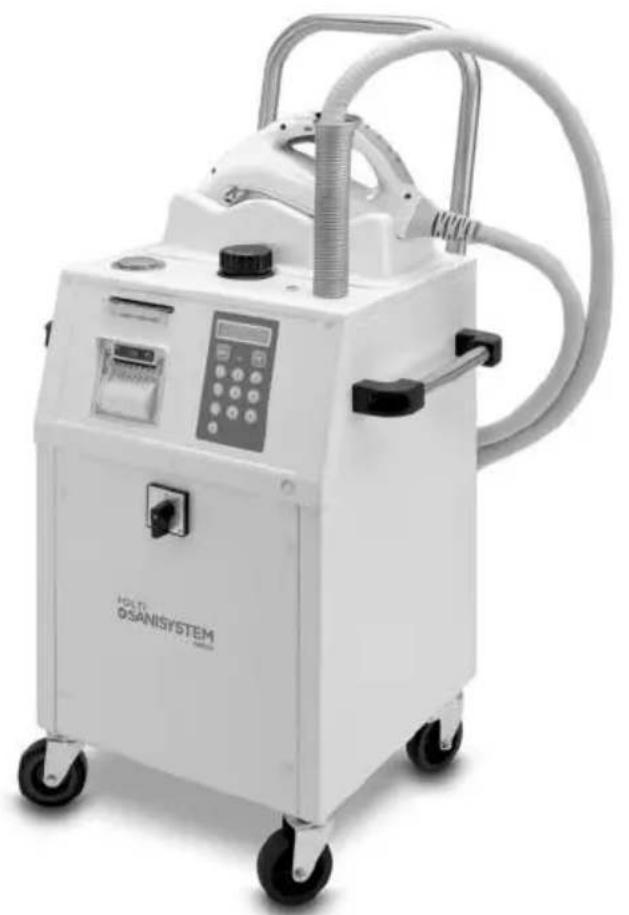
POLTI SANI SYSTEM CHECK
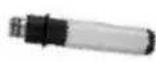
CONCENTRATORE DI FLUSSO DRITTO
STRAIGHT FLOW CONCENTRATOR
CONCENTRATEUR DE FLUX DROIT
POLTI HPMED DETERGENT
DETERRGENT POLTI HPMED
DETERGENTE POLTI HPMED
REINIGUNGSMITTEL POLTI HPMED
DETERGENTE POLTI HPMED
24x
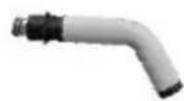
CURVED FLOW CONCENTRATOR
CONCENTRATEUR DE FLUX COURBE
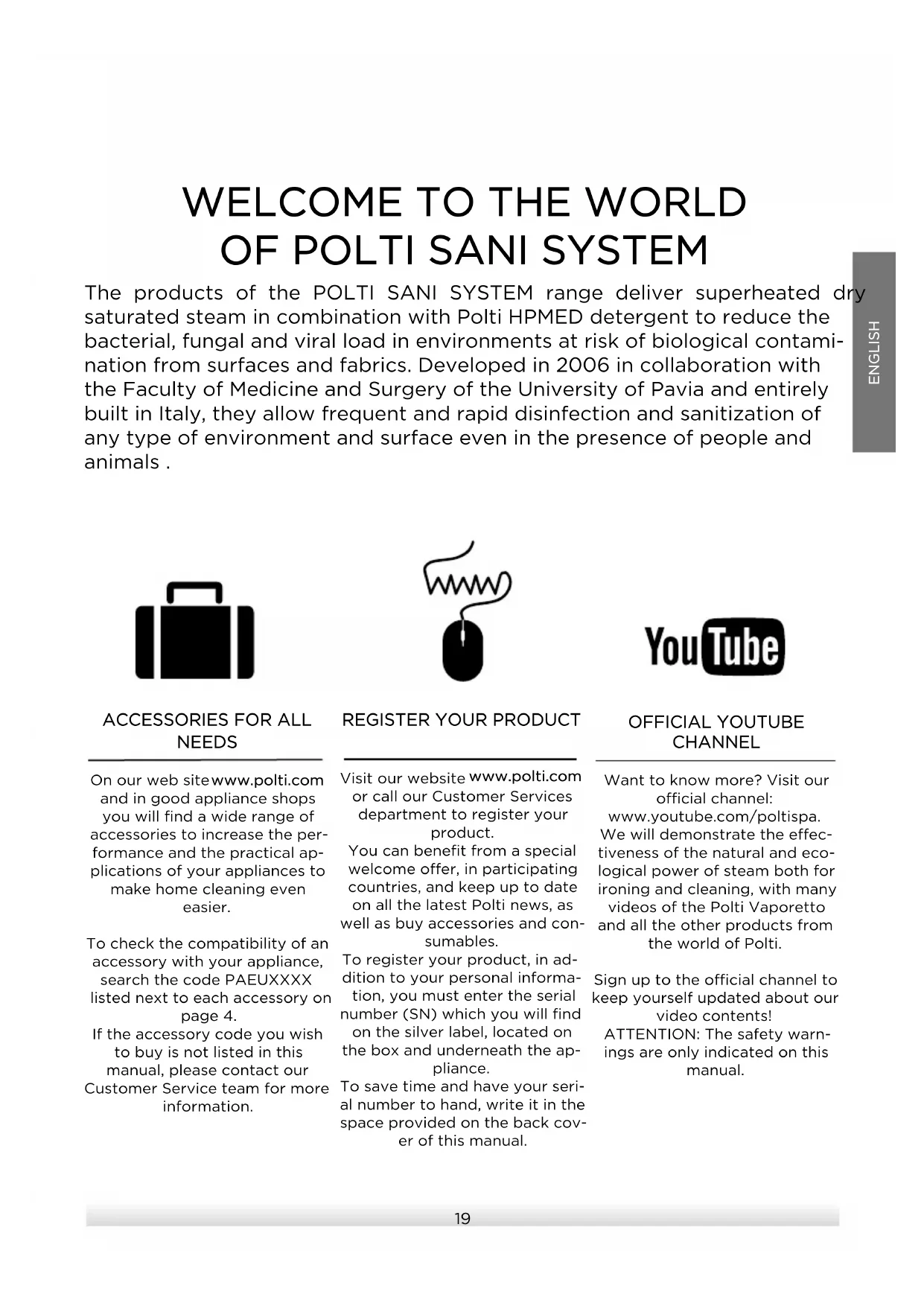
The products of the POLTI SANI SYSTEM range deliver superheated dry saturated steam in combination with Polti HPMED detergent to reduce the bacterial, fungal and viral load in environments at risk of biological contamination from surfaces and fabrics. Developed in 2006 in collaboration with the Faculty of Medicine and Surgery of the University of Pavia and entirely built in Italy, they allow frequent and rapid disinfection and sanitization of any type of environment and surface even in the presence of people and animals.

ACCESSIONS FOR ALL NEEDS
On our web site www.polti.com and in good appliance shops you will find a wide range of accessories to increase the performance and the practical applications of your appliances to make home cleaning even easier.
To check the compatibility of an accessory with your appliance, search the code PAEUXXXXX listed next to each accessory on page 4.
If the accessory code you wish to buy is not listed in this manual, please contact our
Customer Service team for more information.

REGISTER YOUR PRODUCT
Visit our website www.polti.com or call our Customer Services department to register your product.
You can benefit from a special welcome offer, in participating countries, and keep up to date on all the latest Polti news, as well as buy accessories and consumables.
To register your product, in addition to your personal information, you must enter the serial number (SN) which you will find on the silver label, located on the box and underneath the appliance.
To save time and have your serial number to hand, write it in the space provided on the back cover of this manual.
Want to know more? Visit our official channel:
www.youtube.com/poltispa. We will demonstrate the effectiveness of the natural and ecological power of steam both for ironing and cleaning, with many videos of the Polti Vaporetto and all the other products from the world of Polti.
Sign up to the official channel to keep yourself updated about our video contents!
ATTENTION: The safety warnings are only indicated on this manual.
SAFETYWARNINGS
IMPORTANT PRECAUTIONS FOR USE

WARNING! BEFORE USING THE APPLIANCE, CAREFULLY READ ALL THE INSTRUCTIONS AND WARNINGS IN THIS MANUAL, AND ON THE APPLIANCE ITSELF.
Polti S.p.A. declines all liability for any accident deriving from any improper use of this appliance.
Correct use of the product is only as detailed in this instruction manual.
Any use which does not comply with these instructions will invalidate the warranty.
SAFETY SYMBOLS:

WARNING: High temperature. Risk of scalding! If shown on the product, do not touch as parts may be very hot.

WARNING: Steam. Risk of scalding!
This appliance reaches very high temperatures. Incorrect use of the device can cause scalding.
- Never disassemble or carry out maintenance on the appliance apart from that indicated in this manual. In the event of a fault or malfunction, do not try to repair the appliance yourself. Incorrect use or a lack of respect for the instructions herein may lead to serious accidents. Always contact Authorised Service Centres.
- This appliance must not be used if it has been dropped, if there are visible signs of damage or if it leaks.
- The plug must be removed from the socket before the tank/boiler is filled with water.
- To carry out any maintenance or cleaning requiring access to the boiler, ensure that the appliance is switched off at the
power switch and disconnected from the mains for at least two hours.
- Always unplug the appliance if it is not in use.
- This appliance can be used by persons with reduced physical, sensory or mental capabilities or lack of experience and knowledge if they have been given supervision or instruction concerning use of the appliance in a safe way and understand the hazards involved. Children must be supervised to ensure they do not play with the appliance.
- Keep the appliance out of reach of children when it is plugged in or cooling down.
- Keep all the parts of the packaging out of the reach of children; they are not toys. Keep the plastic bag out of the reach of children: danger of suffocation.
- The appliance must not be left unattended if plugged in to the mains.
- Steam must not be directed towards equipment containing electrical components, such as the interior of ovens.
- This appliance is intended for indoor and similar domestic use only.
- During use, keep the base in a horizontal position on stable surfaces.
- Use the product on flat surfaces. When moving on uneven surfaces, lift the appliance by the side handles or use an additional trolley.
In order to reduce the risk of accidents, including: fires, electrocution, personal injury and scalding, both during use and during preparation, maintenance and storage, always take the basic precautions listed in this manual.
RISKS CONNECTED TO THE POWER SUPPLY - ELECTROCUTION
- The earthing system and highly sensitive residual-current circuit breaker, complete with magnetothermic cut-out for your system, guarantee safe use of electrical appliances.
Therefore, for your own safety, check that the electrical system to which the appliance is connected complies with current laws.
- Do not connect the appliance to the mains if the voltage does not correspond with that of the electrical circuit in use.
- Do not overload sockets with adaptors and/or transformers. Only connect the product to a single socket with current that is compatible with the plug supplied.
- Electrical extension leads that are unsuitable for the power rating or which are not compliant with law may overheat and possibly lead to short circuiting, fire, power outage or damage to the equipment. Only use extension leads which are certified, suitable for the power rating, supporting 16A and earthed.
- Always turn the appliance off before unplugging it.
- To remove the plug from the socket, do not pull the power cable, but hold the plug itself to avoid damage to the plug and the cable.
- Fully unwind the cable from the cable winder before connecting the appliance to the mains and before use. Always use the product with the cable completely unwound.
- Do not pull or jerk the cable or expose it to tensions (twisting, crushing or stretching). Keep the cable away from hot and/or sharp surfaces and elements. Avoid crushing the cables in doors and windows. Do not pull the cable tight around corners. Avoid treading on the cable. Do not wind the power cable around the appliance, especially if the appliance is hot. Do not place the appliance on top of the power cable, this can be dangerous.
- Do not substitute the plug on the power cable.
- If the power cable is damaged, it must be replaced by the manufacturer, its service agent or similarly qualified persons in order to avoid all possible hazards. Do not use the product if the power cable is damaged.
- Do not touch or use the appliance barefoot and/or with wet body or feet.
- Do not use in swimming pools containing water. Do not use the appliance near containers full of water, e.g. sinks, baths and swimming pools.
- Never immerse the cleaner in water or other fluid.
RISKS DURING USE OF THE PRODUCT - INJURIES/SCALDING
- The product should not be used in areas where there is a danger of explosions or in the presence of toxic substances.
- Do not pour toxic substances, acids, solvents, detergents, corrosive substances and/or explosives or perfumes into the boiler.
- Only pour water or the water mix indicated in the section "Which water to use in the boiler" into the boiler.
- Do not direct the steam jet onto toxic substances, acids, solvents, detergents or corrosive substances.
- Do not direct the steam jet onto explosive powders or liquids, hydrocarbons, open flames and or extremely hot objects.
- The handling and removal of dangerous substances must be carried out according to the indications of the manufacturers of these substances.
- Do not position the product near sources of heat such as fireplaces, stoves and ovens.
- Do not position the product near electromagnetic fields such as induction plates.
- Re-wind the cable when the appliance is not in use.
- Use the special carry handle for transport. Do not pull the power cable. Do not use the power cable as a handle. Do not lift the appliance using the power cable or the steam hoses/vacuum tubes.
- Do not obstruct the openings and grills on the product.
- Do not direct the steam jet on any part of the body of people or animals.
- Do not direct the steam jet onto clothes while they are being worn.
- Cloths and rags and fabrics which have been subjected to a deep steam reach very high temperatures, above 100^ . Wait a few minutes and check that they have cooled before handling them. Therefore, avoid contact with the skin if they have just been steamed.
The steam lock on the handle guarantees greater safety, as it prevents the accidental activation of steam delivery by children or people who are unaware of the function of the appliance. When steam is not being used, engage the steam
lock.
To continue steam delivery, return the switch to its original position.
WARNING: Do not use any chemical products other than those recommended by the manufacturer.
Polti S.p.a. guarantees correct operation of the system only if it is used with Polti HPMed. If products other than Polti HPMed are used, Polti will accept no liability and the guarantee will be invalidated.
CORRECT USE OF THE PRODUCT
This appliance is intended for home and similar professional use, according to the descriptions and instructions given in this manual. Please read these instructions carefully and keep them. If this manual is lost, it can be consulted and/or downloaded from the website www.polti.com.
POLTI S.p.A. reserves the right to make the aesthetic, technical and construction changes it deems necessary, without prior notice. Before leaving our factory all our products are rigorously tested. This is the reason why your Polti Sani System may contain some residual water in the boiler. The intended use of the product is only as indicated in this instruction booklet and in the protocol for use. Any other use may damage the appliance and invalidate the warranty.
Polti S.p.A. declines all responsibility for accidents resulting from the use of this appliance in a manner that does not comply with these instructions for use.
INFORMATION FOR USERS
Pursuant to European Directive 2012/19/EU, regarding electric and electronic appliances, this appliance must not be disposed of with domestic waste, but sent to an official collection facility. This appliance complies with EU Directive 2011/65/EU.
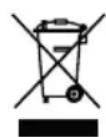
The crossed-out bin symbol on the appliance indicates that, at the end of its useful lifespan, the product must be disposed of separately from
other waste. Therefore, at the end of its life,
the user must hand over the appliance to an appropriate collection centre for electric and electronic waste or, according to the legislation in force in the country, leave the used appliance with the distributor when buying a new product to replace it. Proper separate waste collection to facilitate the subsequent recycling, treatment and environmentally compatible disposal of the appliance helps to prevent negative effects on the environment and human health, and promotes recycling of the materials the product is made of. Unlawful disposal by the owner involves the application of the administrative sanctions envisaged by current legislation.
WHICH WATER TO USE IN THE BOILER
This appliance has been designed to function with normal medium tap water between 8^ and 20^ If the tap water contains a lot of limescale use a mix composed of 50% tap water and 50% demineralised water which is widely available to purchase. Do not use pure demineralised water.
Warning: check the hardness of the water at the technical office at your local council or the local water supplier.
Never use distilled water, rain water or water containing additives (e.g. starch, perfumes), or water produced by other domestic appliances, by water softeners or filter jugs.
Do not add chemical, natural, detergent, or limescale removing substances, etc.
POLTIHPMED
Polti HPMed is an adjuvant detergent for the sanitising action of steam.
- Respectful of the environment
- Can be used in the presence of people and animals.
- Eliminates odours.
- Can be used on surfaces and fabrics without damaging them.
WARNING: When the level of Polti HPMe contained in the disposable bottle falls below the minimum level indicated on the label, replace it with a new bottle. Once the disposable bottle is opened and inserted in the dispenser, use it within the following 7 days and replace it with a new one. Do not refill the disposable bottle.
Polti HPMed is on sale in appliance stores, at authorized Polti Technical Assistance Centers and on the website www.polti.com.
1. PREPARED FOR USE
1.1 Insert the carrier grip, securing it as illustrated and tightening the two screws on the rear of the grip itself (1).
1.2 Unscrew the tank cap (2) and pour in normal tap water. This operation must always be carried out when the boiler has cooled and with the power cable disconnected from the mains.
1.3 Unscrew the cap of the Polti HPMed detergent (3).
1.4 Insert the wick into the bottle (4) until it rests on the base of the bottle, ensuring that it stays as straight as possible (5).
1.5 Screw the bottle into the dispensing gun fitting taking care to ensure that the stopper enters the hole inside the fitting perfectly, without bending (6).
WARNING: Do not screw the Polti HPMed bottle to the gun without the stopper. If no consumption of Polti HPMed is seen during use of the product, this means that the stopper has not been inserted correctly, or has folded within the bottle. Unscrew the bottle and repeat the insertion procedure, taking care to position it correctly.
1.6 Plug the power cable into the panel-type socket on the rear of the device. Plug the connector on the other end of the power cord into a suitable socket with an earth connection (7).
2. BEGINNING OPERATIONS / LOGIN
2.1 Turn the main switch to the "l" position (8).
2.2 The date and time will appear on the display. Press "OK" on the numerical keypad to confirm. If the date and time are not displayed automatically, it will be necessary to enter them by hand using the numerical keypad and then pressing "OK" to confirm.
2.3 The prompt "PRINT last logout?" will appear on the display. If you wish to proceed with printing a summary of the operations carried out during the last work session, press "OK", otherwise press "CANC" on the numerical keypad.
2.4 The device will start up and the word LOGIN will appear on the display.
2.5 Insert a card into the appropriate slot (9).
WARNING: Do not remove the CARD from the slot during use.
2.6 The following information will appear: "HEATING" will flash to indicate that the device is in the heating stage, while IDXX represents the number of the card inserted.
Once the correct pressure has been achieved, the word "READY" will appear, indicating that the device is ready for use.
3.PROGRAMMING
After completing LOGIN, the following prompts will appear on the display:
- "Prog:_: use the keypad to type the 2-digit number for the programme you wish to use, and press OK.
There are ten programmes with pre-set times: 01, 02, 03, 04, 05, 06, 07, 08, 09, 10, while programme 00 is free.
To choose which programme to use, refer to section 3.1 - 3.2.
- "Area": it is possible to assign a number from 01 to 99 to every area to be treated, in order to ensure the traceability of the operations carried out. If entered, the Area number will be recorded on the receipt. If you do not wish to use a code for the work area, type 00.
In both cases, confirm by pressing OK.
Once these parameters have been entered, the following information will appear on the display:
Prog: Indicates the programme that has been selected.
TIME: indicates the remaining steam dispensing time in seconds, based on the programme selected.
To delete something typed in error, press the CANC button. This button also enables you to
return to the previous menu for selecting the programme.
3.1 FREE PROGRAMME 00
Programme 00 is a free programme, the user can use it to dispense steam from a minimum of 3 seconds to a maximum of 3,600 seconds (1 hour).
3.2 PRE-SET PROGRAMMES
01/02/03 04/05/06/07/08/09/10
These ten programmes vary on the basis of the pre-set steam dispensing time:
01 - 180" (3 min.) + 120" (extra time)
02 - 300" (5 min.) + 120" (extra time)
03 - 480" (8 min.) + 120" (extra time)
04 - 600" (10 min.) + 120" (extra time)
05 - 780" (13 min.) + 120" (extra time)
06 - 900" (15 min.) + 120" (extra time)
07 - 1200" (20 min.) + 120" (extra time)
08 - 1500" (25 min.) + 120" (extra time)
09 - 1800" (30 min.) + 120" (extra time)
10 - 2100" (35 min.) + 120" (extra time)
4. TREATMENT
The spacer stand can be used in the open (A) or closed (B) position depending on the treatment to be carried out. You can also use the spacer stand in the middle position to rest the gun (C).
The safety button on the gun prevents accidental activation of the steam supply. When the steam is not used, move the safety button to the stop position (11). To resume dispensing, return the button to its initial position (12).
To dispense steam, press the trigger on the gun.
WARNING: Dispense "non-usable" steam for about 30 seconds downwards to reach the optimum operating temperature and pressure. At the first use after switching on the appliance, some drops of water may be mixed with the steam due to imperfect thermal stabilization
WARNING: For additional safety, test steam delivery on a hidden part, leave the steamed part to dry to ensure that no changes in colour or deformations have occurred.
Treatment: dispense "non-usable" steam for 2 seconds and, without interrupting the flow, position the jet perpendicular to the surface or fabric. Refer to the Protocol for Use for the treatment of surfaces and fabrics.
Wait for rapid and spontaneous drying. Drying times depend on the environmental conditions (temperature and humidity), on cor
rect use and on the nature and temperature of the surfaces. Complete drying with a disposable cloth only if strictly necessary.
5. ACCESSORIES
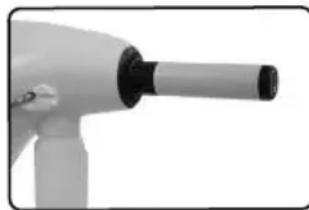
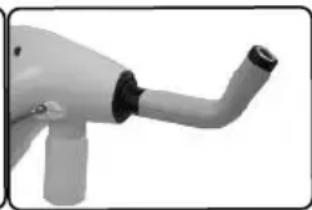
Flow concentrators are used to treat hard-to-reach places or where a concentrated steam jet is needed.
- Straight flow concentrator: for a concentrated jet, often used to treat drain pipes and grates.
- Curved flow concentrator: to reach difficult and / or inaccessible points, e.g. toilets.
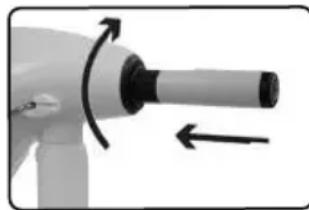
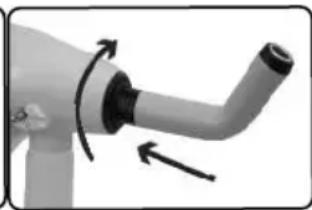
To connect the concentrator, match the accessory to the dispenser and rotate it until it locks.
WARNING: When using the concentrator accessory it is necessary to detach the Polti HPMed disposable bottle and connect the empty bottle supplied.
6. PRINTING THE RECEIPT
Once the prompt "PRINT?" appears on the display and the indicator light (10) comes on, two operations are possible:
- If you press OK, the receipt will be printed with the message "PROG: OK" if the cycle was completed correctly. If the cycle was interrupted by the user performing LOGOUT or in the event of the device malfunctioning, the receipt will not be printed.
- If you press CANC, the receipt will not be printed but the information will be retained in the memory. Then, when LOGOUT is performed, all the information on the work carried out will be summarised and printed on a single receipt.
For programmes 01-10, the receipt can be printed either at the end of the pre-set time (depending on the programme selected) or during or at the end of the extra time.
7. END OF OPERATIONS / LOGOUT
Once operations have been completed, perform LOGOUT by keeping the CANC button held down for 4 seconds. At this point, the receipt summarising all the operations carried out between LOGIN and LOGOUT will be printed.
The device will then return to its initial configuration and require a LOGIN.
The summarising receipt will contain the messages "PROG OK" for programmes performed correctly, and "PROG: NOT VALID" for programmes interrupted early or because of a malfunction.
To LOGIN again, it is necessary to remove the card inserted in the slot before inserting a card again.
To end operations, switch the machine off using the main switch.
8. LACKOF WATER
When the water inside the tank is used up, the wording "WATER EMPTY" will appear intermittently on the display and an acoustic signal will sound. To resume use, fill the tank again as described on the section "Preparation for use".
9. CARD
9.1 ACCIDENTAL REMOVAL OF THE CARD
If the card is removed during use, the machine will become locked and the message "LOCKED INSERT CARD IDXX" will appear on the display. In order to unlock the machine and resume work, the same card with which the LOGIN was previously carried out will need to be inserted. The work data will be retained in the memory. If the card is no longer available, refer to section 9.2. The cards provided with the device are already configured and only work with that machine. If new cards are purchased, they must be initialized as described in section 9.3.
9.2 LOST OR DAMAGED CARDS
In the event that the card which was used for LOGIN is lost or damaged, the machine can be unlocked using the "SUPER USER" (S.U.) card supplied with it.
When this card is inserted into the slot, OGOUT will occur automatically and the receipt summarising the last work session will be printed.
9.3 INITIALISING NEW CARDS
If you purchase any new cards over and
above those supplied with the machine, they will have to be initialized.
With the machine switched off, press keys 1 and 2 on the numerical keypad, both at the same time. Use the switch (A) to turn on the machine, then release keys 1 and 2.
The message "INITIALIZE CARD XX" will appear on the display (XX corresponds to the number indicated on the display when the card is inserted which must be initialized, which is sequential and unrepeatable).
Insert the new card in the slot. Do not remove the card until the information "CARD XX INITIALIZED" appears on the display.
Remove the card from the slot.
Once the card has been removed, the system will prompt you to initialize another card. To do this, follow the instructions as above. To exit, turn of the machine using the switch (8). A card that has already been initialised cannot be overwritten.
10. CHANGING THE ROLL IN THE PRINTER
To change the paper roll, proceed as follows:
- Open the lid of the printer (13).
- Place the paper roll inside the compartment (14).
- Pull the end of the paper so that it leads out of the compartment, then close the lid.
- Tear off the excess paper against the serrated edge (15).
It is possible to move the paper forward by pressing the button (16).
Use rolls of thermal paper of 57 × 50 mm (max).
Store the paper in a dry place and away from direct sunlight in order to ensure a longer life both of the paper and of the data printed on it.
11. TRASPORT
Polti Sani System Check can be moved easily by means of the transport grip on the rear of the device or using the two side handles. If required, the transport grip can be removed by unscrewing the two wing screws on the rear of the handle.
WARNING: Never drag the device by the nozzle. Move it only by means of the grip or the two side handles.
WARNING: Use the product on flat surfaces. When moving on uneven surfaces, lift the appliance by the side handles or use an additional trolley.
12. STORING THE DEVICE
When you have finished using the device, put it away in a clean and dry place after disconnecting it from the power mains. Keep it away from sources of heat and protect from the weather. Do not expose the device to extreme temperatures.
13. GENERAL MAINTENANCE
To clean the outside of the appliance, only use a damp cloth and tap water.
Clean the steam gun after every 10 uses or if visibly dirty.
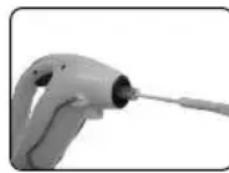
Clean the dispensing nozzle using the brush included, sliding it inside the gun so as to remove any limescale residue in it.
WARNING: Perform these operations when the appliance is turned off, cold and disconnected from the mains.
Do not use detergents of any type.
14. TROUBLESHOOTING
| PROBLEM CAUSE SOLUTION | ||
| The appliance does not turn on. | No power. Check that the product has been connected to the mains, as indicated in Section 1. | |
| The “steam ready” indicator light and the steam dispenser light come on and go off during use. | This indicates that the electrical resistor has started to work to keep the pressure and temperature constant. | It is a normal phenomenon, no action is necessary. |
| Does not dispense steam. | Out of water. The boiler is not yet pressurised. Child safety inserted. | Add water to the boiler as described in Section 1. Wait until the steam indicator light comes on. Deactivate the safety switch. |
| During use the appliance does not consume Polti HPMed. | The stopper inside the bottle has not been inserted correctly. | Insert the stopper correctly, following the instructions in Section 1. |
| The message “WATER MISS-ING” starts flashing on the display. | Boiler empty / pump taking too long to charge | Switch the device off, wait a few seconds, then switch it on again using the main switch. If the problem persists, contact an authorised service centre. |
| The message “WATER MISS-ING” appears on the display and the device emits a continuous acoustic signal. | Shortage of water in the boiler. | Switch the device off, wait a few seconds, then switch it on again using the main switch. If the problem persists, contact an authorised service centre. |
| The message “BOILER PRESURE” starts flashing on the display and the device emits an intermittent acoustic signal. | Incorrect boiler pressure. | Switch the device off, wait a few seconds, then switch it on again using the main switch. If the problem persists, contact an authorised service centre. |
| One of the following two messages appears on the display:“WRONG TEMP. B”“WRONG TEMP. L” | Incorrect operating temperature | Switch the device off, wait a few seconds, then switch it on again using the main switch. If the problem persists, contact an authorised service centre. |
| The message “CARD NOT VALID” appears on the display | The device does not grant access to the user. | Make sure that the card is correctly inserted. If you are using a new card, proceed to initialize the card as described in the manual |
| The message “LOCKED INSERT CARD” appears on the display. | The machine becomes locked and no longer dispenses steam. | The card has been removed from the slot. To resume oper-ating, re-insert the card used for LOGIN or the “SUPER USER” card to perform LOGOUT. The insertion of other cards will not unlock the machine. |
| The message “CHECK PRINTER PAPER OR COVER” appears on the display. | The paper has run out, or the lid of the printer is not closed. | Insert the paper roll in the printer correctly. Close the lid of the printer. |
| During use, the programme was interrupted early. | The device became disconnected from the mains. In programmes 01-10, the CANC button was pressed before the end of the pre-set time. | Check and reconnect the device to the mains. Input the programme again and repeat the operation from the beginning. |
| Power cut | The device retains all the completed operations in its memory, but not the programme in progress if it has been interrupted. | Resume operations once the power supply has been restored. |
| If problems persist or are not listed above, please contact a Polti Authorised Service Centre (www.politisanisystem.com for the updated list) or contact Customer Services. | ||
WARRANTY
This appliance is guaranteed for one year from the date of purchase if purchased by a professional/commercial business with an invoice (VAT number). If the purchase is made by a consumer with a tax receipt, the warranty period is two years, as required by the Consumer Code. The date of purchase and the duration of the guarantee must be proven by the tax document issued by the seller:
- Invoice: one year warranty
Tax receipt: two-year warranty
For repairs, the appliance must be accompanied by proof of purchase.
This warranty does not affect the consumer rights deriving from European Directive 99/44/EC as regards some aspects of sale and warranty of consumer goods, rights which the consumer should uphold with respect to the seller.
This warranty is valid in the countries which adhere to European Directive 99/44/EC. For other countries, local regulations on warranties apply.
WHAT THE WARRANTY COVERS
During the warranty, Polti guarantees free repair of a product with a manufacturing or factory defect and, therefore, the client is not liable to pay for any work or materials.
In case of irreparable defects, Polti may replace the product free of charge.
To avail of the warranty, the customer should visit one of the Polti Authorised Service Centres with proof of purchase from the seller valid for tax purposes and bearing the date of purchase of the product. Without proof of purchase and the relative date of purchase, the work will be charged for. Store the proof of purchase document safely for the whole duration of the warranty.
WHAT THE WARRANTY DOES NOT COVER
- Any fault or damage not deriving from a manufacturing defect.
- Any fault due to improper use or use other than that indicated in the instruction booklet, an integral part of the product sales contract.
- Any defect resulting from force majeure (fires, short circuits) or caused by third parties (tampering).
- Damage caused by the use of non-original Polti parts, and repairs or modifications performed by staff or service centres not authorised by Polti.
- Damage caused by the customer.
- Parts (filter, brush, hose, battery, etc.) damaged by use (consumable goods) or normal wear and tear.
- Any damage caused by limescale.
- Defects resulting from lack of maintenance/cleaning according to the manufacturer's instructions.
Assembly of non-original Polti accessories or those that have been modified or which are not suitable for the appliance.
Inappropriate use and/or use not compliant with the instructions for use and any other warnings or indications contained in this manual invalidates the warranty.
Polti takes no responsibility for any direct or indirect damage to people, objects or animals caused by non-compliance with the instructions indicated in this instruction booklet, regarding warnings for use and product maintenance.
To see the up-to-date list of the Polti Authorised Service Centres, visit the website www.politisanisystem.com.
BIENVENUE DANS LE MONDE DE POLTI SANI SYSTEM
UTILISATION CORRECTE DU PRODUIT
USO CORRECTO DEL PRODUCTO
USO CORRETO DO PRODUCTO
7. FIM DAS OPERACões / LOGOUT
22070 Bulgarograsso (CO) - Italy
www.poltisanisystem.com
www.polti.com
Follow us:



- POLTI SANI SYSTEM CHECK
- SAFETYWARNINGS
- IMPORTANT PRECAUTIONS FOR USE
- RISKS CONNECTED TO THE POWER SUPPLY - ELECTROCUTION
- RISKS DURING USE OF THE PRODUCT - INJURIES/SCALDING
- CORRECT USE OF THE PRODUCT
- INFORMATION FOR USERS
- WHICH WATER TO USE IN THE BOILER
- POLTIHPMED
- PREPARED FOR USE
- BEGINNING OPERATIONS / LOGIN
- 3.PROGRAMMING
- FREE PROGRAMME 00
- PRE-SET PROGRAMMES
- TREATMENT
- ACCESSORIES
- PRINTING THE RECEIPT
- END OF OPERATIONS / LOGOUT
- LACKOF WATER
- CARD
- ACCIDENTAL REMOVAL OF THE CARD
- LOST OR DAMAGED CARDS
- INITIALISING NEW CARDS
- CHANGING THE ROLL IN THE PRINTER
- TRASPORT
- STORING THE DEVICE
- GENERAL MAINTENANCE
- TROUBLESHOOTING
- WARRANTY
- WHAT THE WARRANTY COVERS
- WHAT THE WARRANTY DOES NOT COVER
- BIENVENUE DANS LE MONDE DE POLTI SANI SYSTEM
- UTILISATION CORRECTE DU PRODUIT
- USO CORRECTO DEL PRODUCTO
- USO CORRETO DO PRODUCTO
- FIM DAS OPERACões / LOGOUT
Brand : POLTI
Model : Sani System Check
Category : Steam cleaner