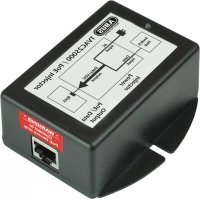
TVAC25000 - Network card / adapter ABUS - Free user manual and instructions
Find the device manual for free TVAC25000 ABUS in PDF.


| Product Type | PoE Injector |
| Brand | ABUS |
| Model | TVAC25000 |
| Category | Network card / adapter |
| Dimensions (L x H x D) | 86 mm x 36 mm x 76 mm |
| Weight | 150 g |
| Power Supply | 100 - 260 VAC, 47 - 63 Hz |
| Input Current | 0.4 A @ 110 VAC / 0.2 A @ 220 VAC |
| Output Voltage | 48 VDC |
| Min. Output Power | 15.4 W |
| Data Rate | 10/100 MB/s |
| Connectors | 2 x shielded RJ-45 (EIA 568A and EIA 568B) |
| Max. Transmission Distance | 100 m |
| Compatibility | IEEE 802.3af |
| Main Functions | Data and power transmission over network cable, Plug & Play, short-circuit protection, overload protection, high voltage protection |
| Intended Use | Powering ABUS PoE IP cameras; with TVAC25010 splitter for non-PoE IP cameras |
| Operating Temperature | 0°C to 50°C |
| Max. Humidity | 90%, non-condensing |
| Maintenance | Clean with a dry cloth; do not use chemicals |
| Safety | Do not open housing; disconnect before cleaning; use only with specified power supply |
| Disposal | Do not dispose of with household waste; follow local regulations |
Frequently Asked Questions - TVAC25000 ABUS
User questions about TVAC25000 ABUS
0 question about this device. Answer the ones you know or ask your own.
Ask a new question about this device
Download the instructions for your Network card / adapter in PDF format for free! Find your manual TVAC25000 - ABUS and take your electronic device back in hand. On this page are published all the documents necessary for the use of your device. TVAC25000 by ABUS.
USER MANUAL TVAC25000 ABUS
These user manual contains important information for installation and operation. This should be also noted when this product is passed on to a third party. Therefore look after these operating instructions for future reference!
A list of contents with the corresponding page number can be found in the index on page 14.
Français
Thank you for purchasing this product.
This product meets the requirements of the applicable European and national guidelines. The corresponding declarations and documents can be obtained from the manufacturer (www.abus-sc.com).
To maintain this condition and to ensure risk-free operation, you as the user must observe these operation instructions!
Before initial start-up, read through the complete operating instructions observing operating and safety instructions.
All company and product names mentioned in this document are registered trademarks. All rights reserved.
If you have any questions, please contact your installer or your local dealer!

Disclaimer
This user manual was prepared with greatest care. If you should notice omissions or inaccuracies, please inform us about these on the back of this manual given address.
The ABUS Security-Center GmbH assumes no liability for technical and typographical faults and reserves the right to make at any time modifications to the product or user manual without a previous announcement.
The company is not liable or responsible for direct and indirect subsequent damages which are caused in connection with the equipment, the performance and the use of this product.
No guarantee for the content of this document is taken.
Icon explanation

A flash in the triangle is used if there is danger for the health, e.g. by an electric shock.

An exclamation mark in the triangle points to an important note in this user manual which must be minded.

This symbol can be found when you are to be given tips and information on operation.
Important safety advice

The warranty will expire for damage due to non-compliance with these operating instructions. ABUS will not be liable for any consequential loss!

ABUS will not accept liability for damage to property or personal injury caused by incorrect handling or non-compliance with the safety-instructions. In such cases the warranty will expire.
The device has been manufactured in compliance with international safety standards. Please read these safety advices carefully.
Safety advice
- Mains supply
100-260VAC,47-63Hz
Operate this product only from the type of power supply indicated on the marking label. If you are not sure of the type of power supplied to your home, consult your local power company. Disconnect the product from the mains before you start any maintenance or installation procedures.
- Overloading
Do not overload a wall outlet, extension cord or adapter as this may result in electric fire or shock.
- Liquids
Protect the device from any kind of liquids entering.
- Cleaning
Disconnect the product from the wall outlet before cleaning. Use a light damp cloth (no solvents) to dust the product.
- Accessories
Do not use any unsupported accessories as these may be hazardous or cause damage the product.
-
Location
-
Setup the device only in dry and dust-protected rooms.
- Do not place the device near a radiator or heat register.
- Setup the device only in areas with the advised operating temperatures of 0^ 50^ .
Warnings
Follow all safety and operating advises before starting-up the device!
-
Follow these directions in order to avoid damage of the power cord or plug:
-
Do not modify or process the power cord or plug arbitrarily.
- Make sure to disconnect the power cord holding the plug.
-
Keep heating appliances as far as possible from the power cord in order to prevent the cover vinyl from melting.
-
Follow these directions. Failure to follow any of them may cause electrical shock:
-
Do not open the main body or the power supply.
- Do not insert metal or inflammable objects inside the product.
-
In order to avoid any damage during lighting use a surge protection.
-
Do not use the product when it is out of order. If you continue to use the product when defective, serious damage can be caused to it. Make sure to contact your local product distributor if the product is out of order.

During the installation into an existing video surveillance system make sure that all devices are disconnected from the low and supply voltage circuit.

If in doubt allow a professional electrician to mount, install and wire-up your device. Improper electrical connection to the mains does not only represent at threat to you but also to other persons.
Wire-up the entire system making sure that the mains and low voltage circuit remain separated and cannot come into contact with each other in normal use or due to any malfunctioning.
Unpacking
While you are unpacking the device please handle it with utmost care.

If you notice any damage of the original packaging, please check at first the device. If the device shows damages, please contact your local dealer.
Table of contents
- Intended use 15
- Scope of delivery 15
- Features and functions 15
- Physical descriptions 16
- Description of possible connections 16
5.1 Usage with PoE compliant terminals 16
5.2 Usage with non PoE compliant devices 17
- Maintenance and cleaning 17
6.1 Maintenance 17
6.2 Cleaning 18
- Disposal 18
- Pin-Assignment 18
- Technical data. 19
1. Intended use
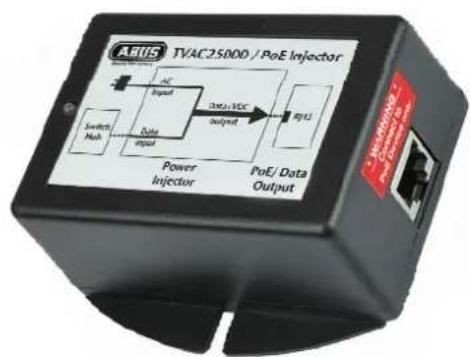
This PoE Injector is used for the transmission of data and power over a standard network cable. The current is transmitted with 48 VDC by using unused twisted pair of a category 5 network cables. The injector can be used together with PoE compliant ABUS IP cameras. Together witht the PoE splitter (TVAC25010) this Injector can be used for combined power and data transmission to a non PoE compliant ABUS IP camera.
A detailed description of all functions can be found in chapter „3 Features and functions".
2. Scope of delivery
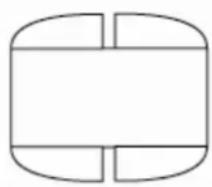
PoE Injector
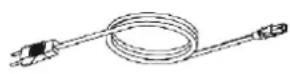
Power cord
User manual
3. Features and functions
For Transmission of power and data over a network cable to all PoE compliant ABUS IP cameras
Transmission range of up to 100m
Compliant with IEEE 802.3af standard
Usage in connection with PoE splitter (TVAC25010) for combined power and data transmission to ABUS IP cameras without PoE
- Plug & Play
- Short-circuit protected
Overload protected
- Protected against high voltage
- An output voltage over 52 VDC will lead to an automatic reset.
4. Physical descriptions
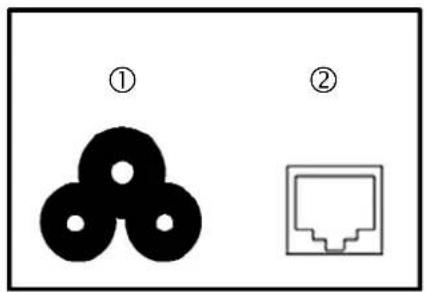
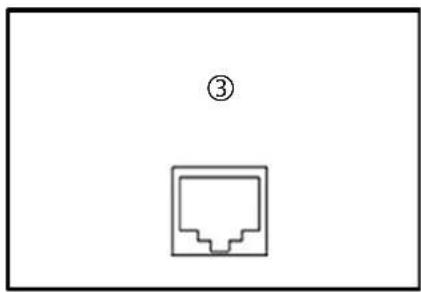
| ① | Power supply 100 – 260 VAC, power cord |
| ② | RJ-45 Input Shielded RJ-45 jack for e.g. router, access point etc. |
| ③ | RJ-45 Output Shielded RJ-45 jack for PoE transmission |
5. Description of possible connections
5.1 Usage with PoE compliant terminals

Warning:
Before installation please make sure that the terminal is PoE compliant.
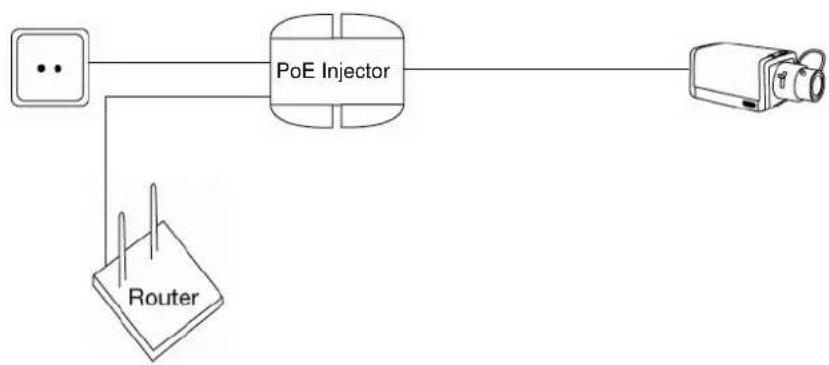
- Connect the 3 pin power cord to the power plug of the injector. The LED will now shine red.
- Now connect the RJ-45 port, which is on the same side as the power port, with your router, access point etc.
- Now connect the injector with the PoE compliant device. Use for this connection a network cable of the category 5e (e.g. TVAC40800 - TVAC40850).
- As soon as the injector recognizes a PoE compliant device, the LED will shine green.
5.2 Usage with non PoE compliant devices

Warning:
Before installation please make sure that the connected device needs a power supply of 12 VDC.
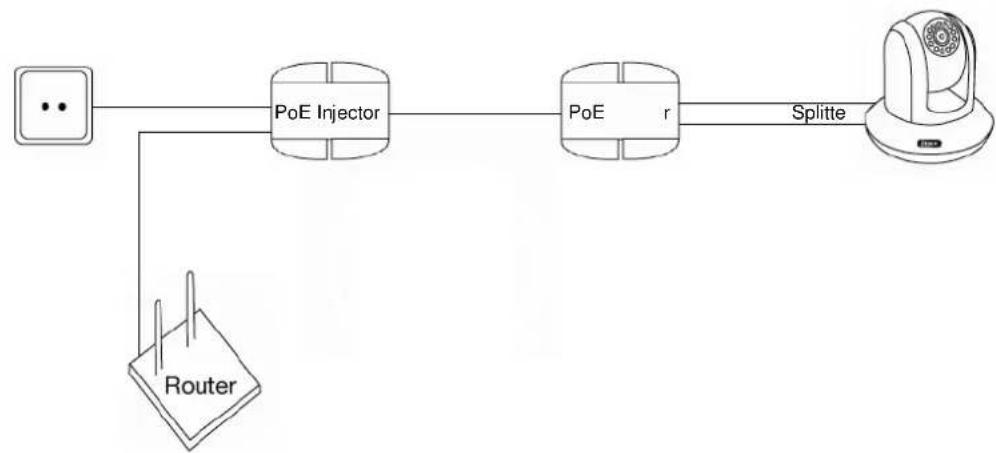
- Take the injector into operation, the LED will shine red.
- Now connect the injector with the PoE Splitter (TVAC25010), please use therefore a network cable of the category 5e (e.g. TVAC40800 - TVAC40850).
- Now connect the splitter with the LAN port and the power plug of the camera, the LED of the Splitter will shine green.
- As soon as the injector recognizes the splitter, the LED will shine green.
6. Maintenance and cleaning
6.1 Maintenance
Regularly check the product's physical state, e.g. check for damage of the housing.
If you suspect that safe operation cannot be guaranteed anymore, disconnect the product and ensure that it cannot be used by mistake.
You can assume that safe operation is not possible anymore when
- the device shows visible damage,
- the device does not function anymore

Please note:
The product is maintenance free for you. Inside the product are no parts that can be checked or repaired, so do not ever open it.
6.2 Cleaning
Wipe the product with a clean, dry cloth. If the device is very dirty, you can moisten the cloth with lukewarm water.

Make sure that no liquids can enter the equipment as the device can be destroyed. Never use chemical detergents as they could attack the surface of the device
7. Disposal
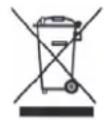
Devices with this marking should not be put in the household garbage. Dispos of the product at the end of its lifetime according to the applicable regulations.
8. Pin-Assignment
| RJ45 Input (only data) | RJ45 Output (data and power) | |||
| PIN | Symbol | Description | Symbol | Description |
| 1 | Rx+ Data receive Rx+ Data receive | |||
| 2 | Rx- Data receive Rx- Data receive | |||
| 3 | TX+ Data transmission | TX+ Data | ||
| 4 | NC | Not connected | -VDC | Power injection (+) |
| 5 | NC | Not connected | -VDC | Power injection (+) |
| 6 | TX- | Data transmission | TX- | Data transmission |
| 7 | NC | Not connected | -VDC | Power injection (-) |
| 8 | NC | Not connected | -VDC | Power injection (-) |
| Warning: Pin 7 and 8 should not be shorted to Ground. | ||||
transmission
9. Technical data
| Type number TVAC25000 | |
| Inputs 1x RJ-45 (Data), 1x AC-IN (3-pin power cord) | |
| Input power 100 – 260 VAC (47 – 63 Hz) | |
| Input current 0,4 A @ 110VAC | 0,2 A @ 220 VAC |
| Outputs 1x RJ-45 (PoE, data & power) | |
| Output voltage -48 VDC | |
| Output power min. 15,4 W | |
| Data rate 10/100 MB/s | |
| Connection plugs 2 x shielded RJ-45 (EIA 568A and EIA 568B) | |
| Operation temperature 0° - 60°C | |
| Operation Humidity max. 90%, RH | |
| Dimensions (WxHxD) 86 mm x 36 mm x 76 mm | |
| Weight | 150 |
TVAC25000
Manuel utiliseur
Version 05/2010
C E
Chere cliente, cher client,
These operating instructions are published by ABUS Security-Center GmbH & Co.KG, Linker Kreuthweg 5, 86444 Affing, Germany. No reproduction (including translation) is permitted in whole or part e.g. photocopy, microfilming or storage in electronic data processing equipment, without the express written consent of the publisher. The operating instructions reflect the current technical specifications at the time of print. We reserve the right to change the technical or physical specifications.