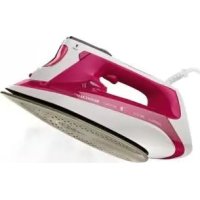
SDB 2400 B2 - Iron SILVERCREST - Free user manual and instructions
Find the device manual for free SDB 2400 B2 SILVERCREST in PDF.

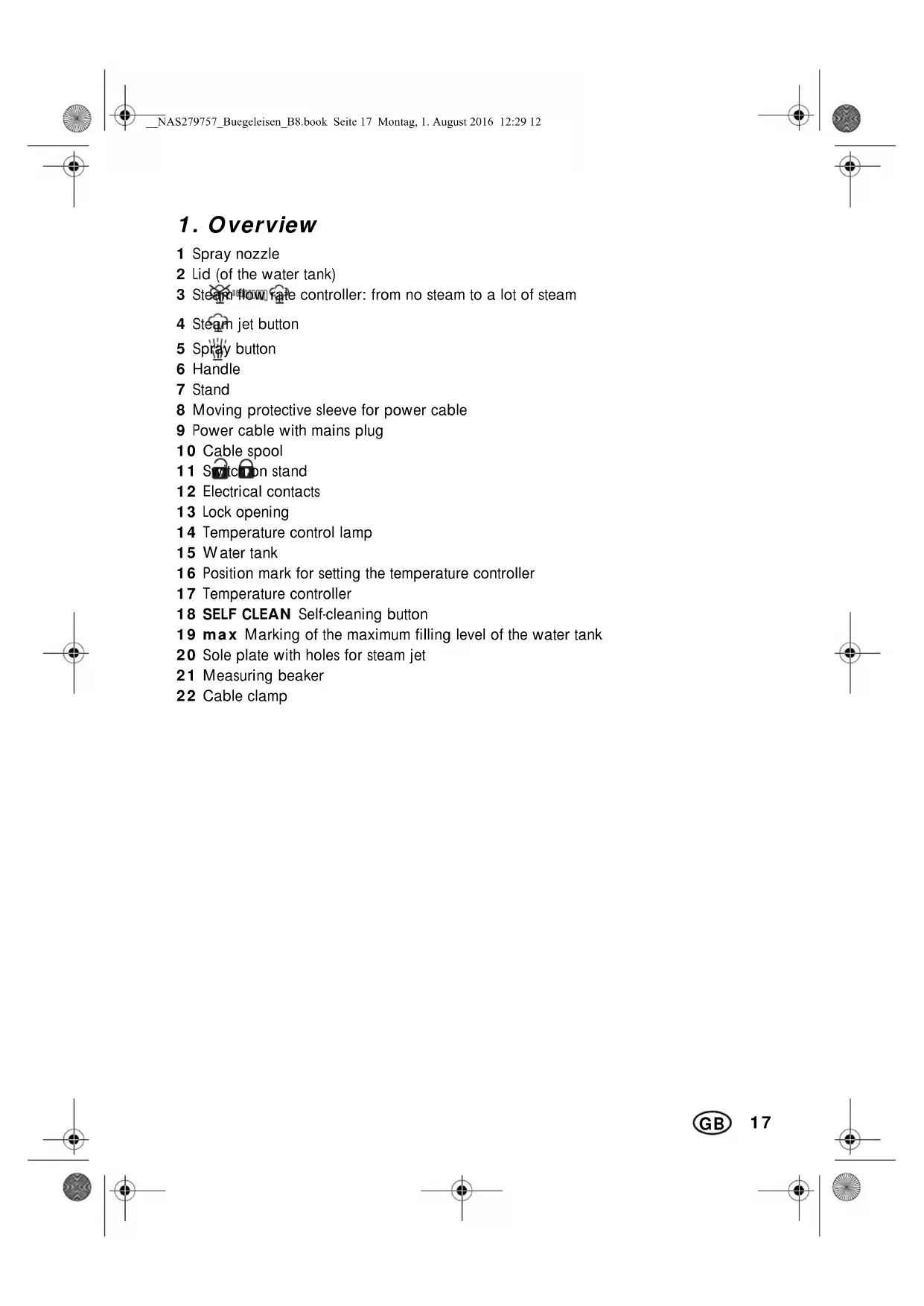


| Product Type | Cordless Steam Iron |
| Brand | SilverCrest |
| Model | SDB 2400 B2 |
| Power Supply | 220-240 V ~ 50/60 Hz |
| Power | 2000 - 2400 W |
| Protection Class | I |
| Water Tank Capacity | Approx. 300 ml (max marking) |
| Maximum Temperature | Approx. 210 °C (MAX position) |
| Steam Functions | Continuous steam, steam jet, spray, vertical steam |
| Anti-Drip System | Yes (DRIP STOP) |
| Self-Cleaning | Yes (SELF CLEAN button) |
| Cordless Ironing | Yes, with heating base |
| Soleplate Type | Not specified (probably ceramic or stainless steel) |
| Cable Length | Approx. 2 m (integrated cord rewinder) |
| Package Contents | Iron, base, measuring cup, instruction manual |
| Warranty | 3 years (HOYER Handel GmbH) |
| Country of Manufacture | Not specified (probably China) |
Frequently Asked Questions - SDB 2400 B2 SILVERCREST
User questions about SDB 2400 B2 SILVERCREST
0 question about this device. Answer the ones you know or ask your own.
Ask a new question about this device
Download the instructions for your Iron in PDF format for free! Find your manual SDB 2400 B2 - SILVERCREST and take your electronic device back in hand. On this page are published all the documents necessary for the use of your device. SDB 2400 B2 by SILVERCREST.
USER MANUAL SDB 2400 B2 SILVERCREST
Operating instructions
NL BE
STOOMSTRIJKIJZER
Gebruiksaanwijzig
ES
PLANCHA DE VAPOR
Instruetiones de service
IAN 279757

Deutsch 2
English 16
Francais. 28
Nederlands 42
Cesky 56
Espanol 68
Portugues 82
15
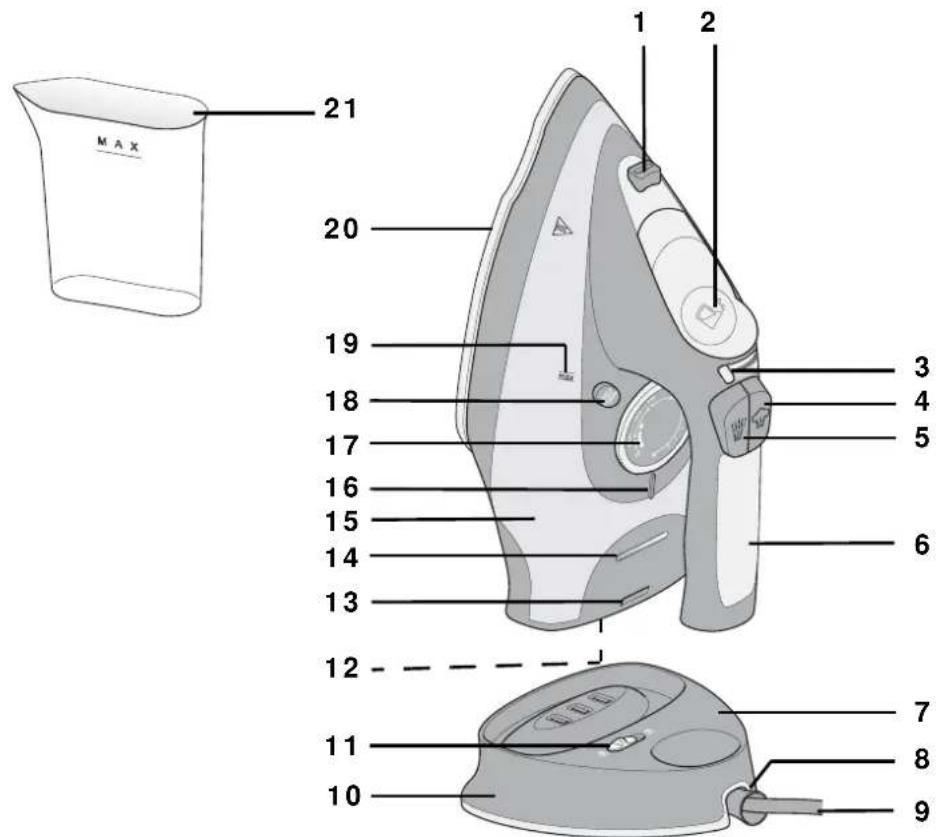
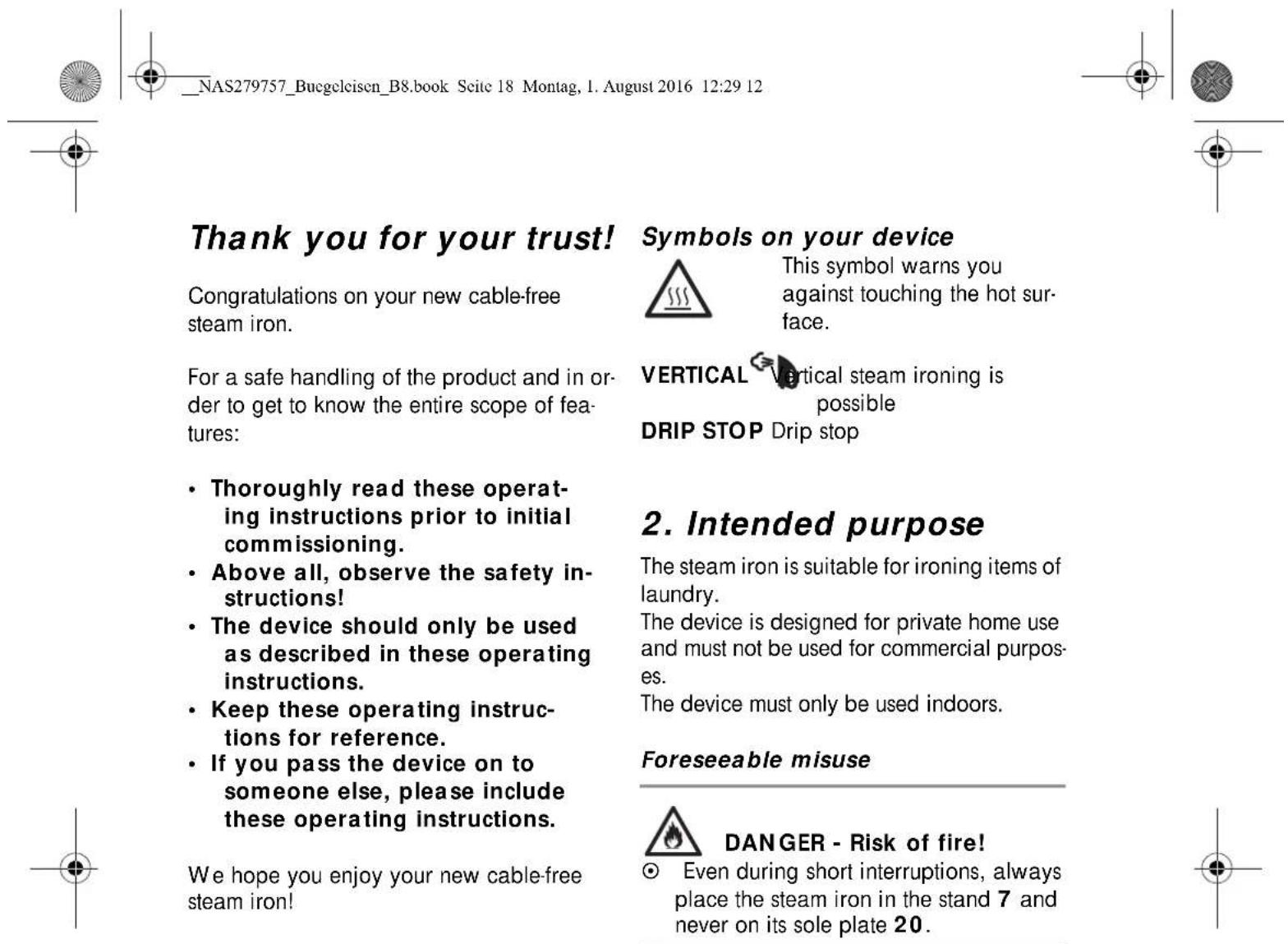
Übersicht / Overview / Aperçu de l'appareil / Overzicht / Přehled / Vista general / Vista geral
Inhalt
- Overview 17
- Intended purpose 18
- Safety information 18
- Items supplied 21
- Normal or cable-free ironing 21
6.Before using for the first time 21 - Operation 22
7.1 Filling the water tank 22
7.2 Set iron temperature 22
7.3 Spray function 23
7.4 Ironing without steam 23
7.5 Ironing with steam 23
7.6 Steam jet function 24
- Cleaning 24
9.Storage 25
-
Disposal 25
-
Trouble-shooting 25
- Technical specifications 26
13.Warranty of the HOYER Handel GmbH 26
3. Safety information
Warnings
If necessary, the following warnings will be used in these operating instructions:

DANGER! High risk: failure to observe this warning may result in injury to life and limb.
WARNING! Moderate risk: failure to observe this warning may result in injury or serious material damage.
CAUTION: Low risk: failure to observe this warning may result in minor injury or material damage.
NOTE: Circumstances and specifics that must be observed when handling the device.
Instructions for safe operation
- This device can be used by children from the age of 8 and people with restricted physical, sensory or intellectual abilities or people without adequate experience and/ or understanding, if they are supervised or instructed on how to use this device safely and if they are aware of the resulting risks. Children must not play with the device. Cleaning and maintenance by the user must not be performed by children without supervision.
- While switched on or cooling down, the iron and its power cable must be kept out of the reach of children younger than 8 years.
The iron must not be left unattended when it is connected to the power mains. - The plug must be pulled out of the socket before the water container is filled with water.
The filling opening must not be opened during operation.
The iron must be used on a flat surface. - The iron must only be used together with the corresponding stand.
Ensure that the stand is always placed on a level, stable surface.
The iron must not be used if it has been dropped, if visible damage can be seen, or if it leaks. - If the power cable of this device should become damaged, it must be replaced by the manufacturer, the manufacturer's customer service department or a similarly qualified specialist, in order to avoid any hazards.

DANGER for children
- Packing materials are not children's toys. Children should not be allowed to play with the plastic bags: there is a risk of suffocation.

DANGER to and from pets and livestock
- Electrical devices can represent a hazard to pets and livestock. In addition, animals can also cause damage to the device. For this reason you should keep
animals away from electrical devices at all times.

DANGER! Risk of electric shock due to moisture
- Never place the device anywhere that it could fall into water while plugged in.
Protect the device from moisture, water drops and water spray.
The device, the cable and the mains plug must not be immersed in water or any other liquids.
- If liquid gets into the device (except in the water tank), pull out the mains plug immediately. Have the device checked before reusing.
- If the device (steam iron or stand) never falls into water, pull out the power plug immediately and only then remove the device from the water. Do not use the device again, and have it checked by a specialist.
The water tank must not be filled with water above the max marking, otherwise it may overflow. - Never touch the device with wet hands.

DANGER! Risk of electric shock
Lay the power cable such that no one can step on it, get caught on it, or trip over it.
- Only connect the mains plug to a properly installed and easily accessible wall socket whose voltage corresponds to the specifications on the rating plate. The wall socket must continue to be easily accessible after the device is plugged in.
- Ensure that the power cable cannot be damaged by sharp edges or hot points. Do not wrap the power cable around the device (risk of cable damage!).
Ensure that the power cable cannot be trapped or crushed.
To pull the mains plug out of the wall socket, always pull on the mains plug, and never on the power cable.
- Disconnect the mains plug from the wall socket...
- ... after every use
- ... if there is a fault,
- ... when you are not using the device,
- ... before you clean the device, and
- ... during thunderstorms.
- If the power cable or the device is damaged, immediately pull the mains plug out of the wall socket.

DANGER! Fire hazard!
Use the device on a stable, level and heat-resistant surface.
Even during short interruptions, always place the steam iron in the stand and never on its sole plate. It must be placed on a stable and heat-resistant surface. Pull out the mains plug during longer interruptions or if you leave the room.

DANGER! Risk of injury through burning!
Do not touch the hot surfaces of the device.
- Allow the device to cool down completely before you clean it or put it away.
- Danger due to sudden evaporation. Allow the device to cool down completely before you refill it with fresh water.
Warning: risk of burns from steam and sprayed hot water when using the steam burst button. When using the steam burst, always point the sole plate towards the item of laundry or ironing board.
The sole plate becomes very hot during operation. Only touch the handle and control elements of the steam iron during operation. Never iron items of clothing on a person's body.
WARNING! Risk of material damage
- Only use the original accessories.
Do not use any astringent or abrasive cleaning agents.
Do not iron over e.g. zippers, metal buttons or applications that could damage the sole plate.
Do not put vinegar, limescale remover or any other additives into the water tank. Additives can damage the device.
4. Items supplied
1 steam iron
1 stand 7
1 measuring beaker 21
1 set of operating instructions
5. Normal or cable-free ironing
The steam iron can be operated cable-free. This makes the steam iron a little lighter, and the cable is no longer in the way during ironing.
As soon as the steam iron is replaced on the stand 7, the sole plate is heated up again. The temperature control lamp 14 lights up until the set temperature is reached.
Settings on the stand
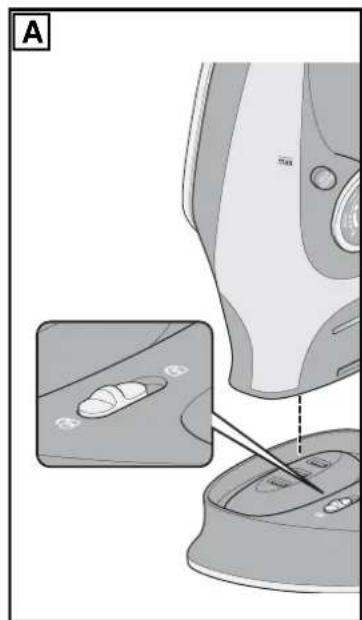
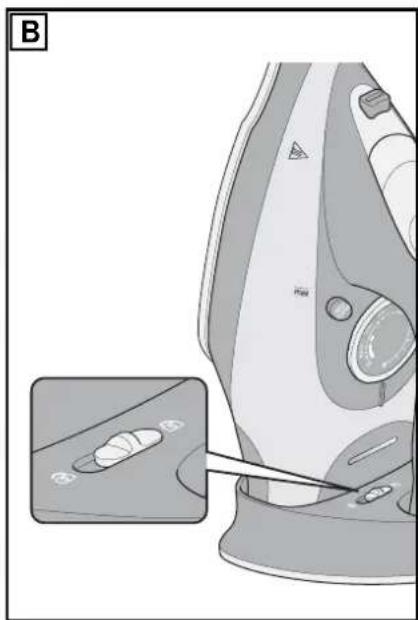
The switch 11 on the stand 7 allows you to choose between 2 options:
= cable-free ironing
^ = ironing with cable and Storage
Cable-free ironing
Figure A: lift the steam iron out upwards.
The stand 7 will remain standing without the steam iron.
Ironing with cable
Figure B: raise the steam iron. The stand 7 will stay on the steam iron.
NOTE:
If you want to work with a great many bursts of steam in quick succession, ironing with the cable is recommended. This is better because the sole plate 20 may fall below the set temperature faster than normal as a result of the many steam bursts.
Storage
Figure B: the steam iron is locked in place on the stand 7.
6. Before using for the first time
- Ensure that you have pulled out the mains plug.
- The switch 11 is in the position . Remove the steam iron from the stand 7.
- Open the lid 2 (of the water tank).
- Pour water into the measuring beaker 21 and half-fill the water tank 15.
- Place the steam iron in the stand 7.
- To lock the iron, set the switch 11 to the position ±b0
- Insert the mains plug into a wall socket corresponding to the technical data.
- Set the temperature controller 17 to MAX.
The temperature control lamp 14 lights up.
- When the device has reached the desired temperature (temperature control lamp 14 goes out), iron an old cotton cloth in steam mode until the water tank 15 is empty.
7. Operation

DANGER!
The sole plate 20 becomes very hot during operation. During operation touch only the handle 6 and the control elements of the steam iron.
Even during short interruptions, always place the steam iron in the stand 7 and never on its sole plate 20. There is a fire hazard!
NOTE:
- You may notice an odour when using for the first time. This is a result of the manufacturing process and is not a defect with the device. Ensure adequate ventilation.
The sole plate 20 cools down slightly during ironing. In order to reach the set temperature again, the device heats the sole plate 20 up again, during which the temperature control lamp 14 is lit. The temperature control lamp 14 goes out again when the set temperature is reached. This process repeats itself during ironing.
Ironing with cable: simply continue ironing during the heating phase.
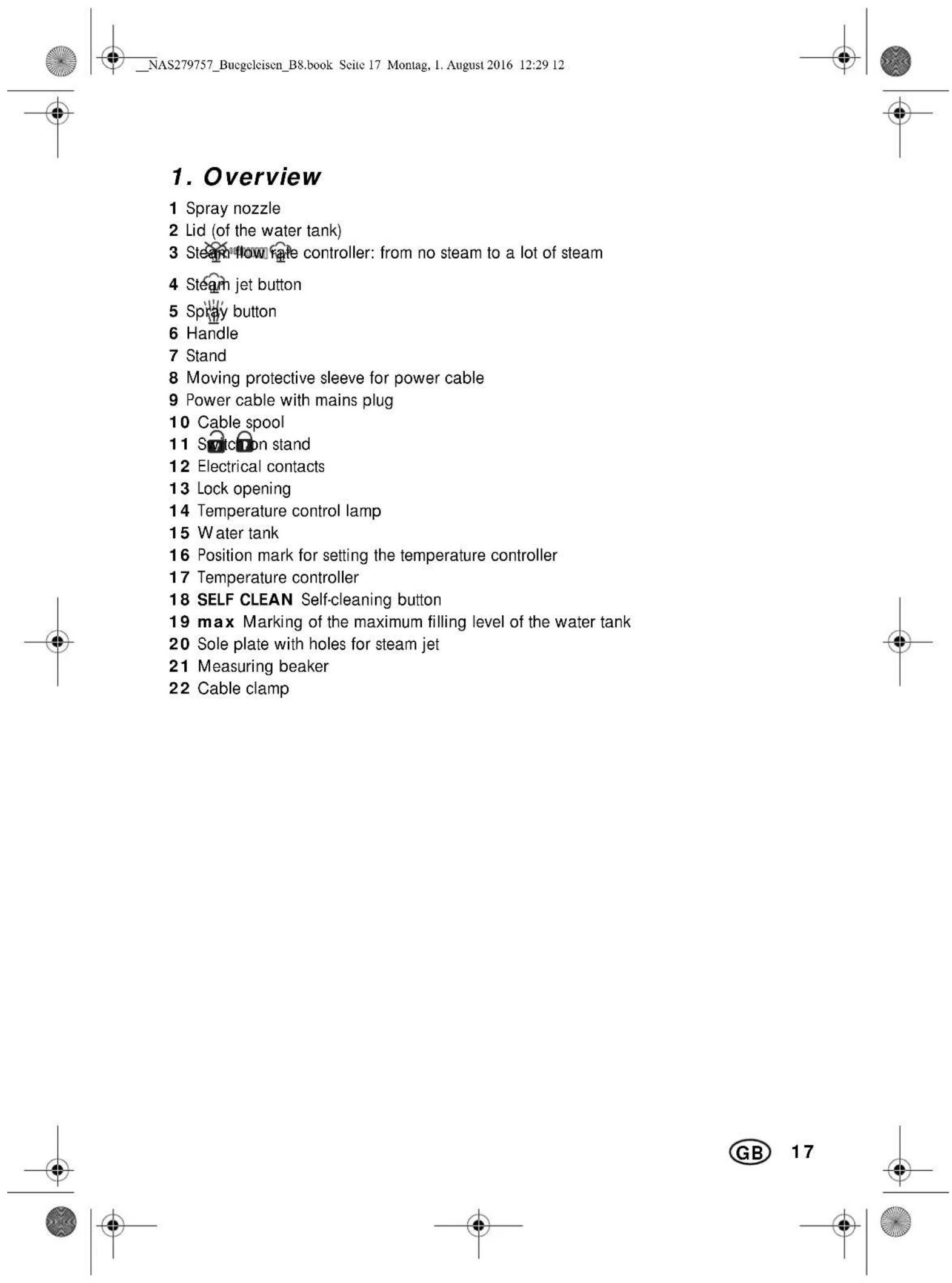
If you wish to shorten the power cable somewhat, press it into the cable clamp 22 at the desired point.
Cable-free ironing: the steam iron stands on the stand 7.
Wait until the temperature control lamp 14 goes out. For purposes of heating up, regularly place the steam iron on the stand 7.
7.1 Filling the water tank

DANGER!
Pull the mains plug out of the socket before you fill up the water tank 15.
-
Use clean tap water without any additives (e.g. vinegar, limescale remover, starch, perfume, softener).
The integrated anti-limescale protection reduces limescale deposits for average water hardness, and thus extends the service life of the device. If your tap water is hard, use distilled water. Where the water is moderately hard, mix distilled water and tap water at a ratio of 1:1. -
Disconnect the mains plug from the wall socket.
- Set the steam flow rate controller 3 to
- The switch 11 is in the position . Remove the steam iron from the stand 7.
- Open the lid 2 (of the water tank) and tilt the iron forwards slightly to fill it.
- Use the measuring beaker 21 to pour in water up to the mark 19 max, but at least up to one quarter. Hold the steam iron upright to check.
- Close the lid 2 (of the water tank).
- Place the steam iron on the stand 7 and set the steam flow rate controller 3 to the desired position.
7.2 Set iron temperature
NOTE:
-
The steam iron must be connected to the stand 7 in order to heat up.
-
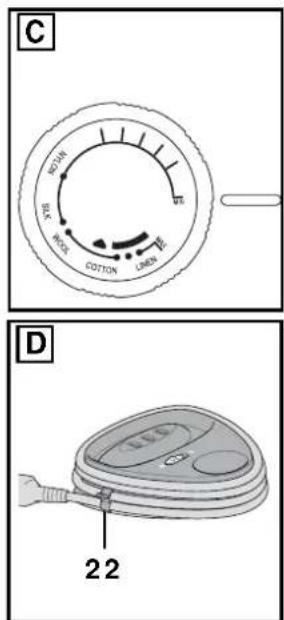
Figure C: Set the desired temperature using the temperature controller 17: MIN the device is not getting hot
- temperature: up to approx. 110^ (synthetic materials)
- temperature: up to approx. 150^ C (Silk, wool)
temperature: up to approx. 210^ (linen, cotton) -
MAX maximum temperature
-
The temperature control lamp 14 is lit for as long as the steam iron is heating. It goes out when the set temperature has been reached. You can then begin ironing.
7.3 Spray function
Use the spray function in order to dampen dry items of laundry. This option is available irrespective of the set temperature. For this purpose, the water tank 15 must be at least one quarter full.
- Repeatedly press the spray button 5. While doing so, hold the steam iron horizontally with the tip over the item of laundry. Ensure that no water sprays onto the ground.
7.4 Ironing without steam
Sensitive fabrics are ironed at lower temperatures and without steam. In order to dampen them, the spray function is available.
- Set the steam flow rate control 3 to and set the temperature controller 17 to MIN.
- Fill the water tank 15 if you wish to use the spray function.
- Place the steam iron in the stand 7.
- Connect the mains plug with the wall socket.
-
Set the desired temperature using the temperature controller 17. The temperature control lamp 14 lights up.
-
Start ironing as soon as the ironing temperature has been reached and the temperature control lamp 14 goes out.
- Finish ironing, set the temperature controller 17 to MIN and pull out the mains plug.
- Allow the steam iron to cool down, and pour off any remaining water from the water tank 15 through the filling opening in the water tank (under the lid 2).
7.5 Ironing with steam
Steam ironing requires a high temperature, at least the temperature setting for in order to additionally dampen items of clothing, the spray function is also available.
- Set the steam flow rate control 3 to and set the temperature controller 17 to MIN.
- Fill the water tank 15.
- Place the steam iron in the stand 7.
- Connect the mains plug with the wall socket.
- Set the temperature controller 17 to the desired temperature (at least) The temperature control lamp 14 lights up.
- As soon as the ironing temperature has been reached and the temperature control lamp 14 goes out, adjust the steam flow rate controller 3 to the desired steam flow rate and start ironing.
The steam will ...
... start to come out as soon as you hold the steam iron horizontal, and
... stop as soon as:
- you hold the steam iron vertically,
- you place the steam iron into the stand 7,
- the temperature is too low,
- the water tank 15 is empty or
you set the steam flow rate controller 3 to
- Finish ironing, set the temperature controller 17 to MIN, set the steam flow rate controller 3 to 品 and pull out the mains plug.
- Allow the steam iron to cool down, and pour off any remaining water from the water tank 15 through the filling opening in the water tank (under the lid 2).
7.6 Steam jet function
The steam jet function requires a high temperature. Select a temperature setting between and MAX. For this purpose, the water tank 15 must be at least one quarter full. The steam flow rate controller 3 is located to the left on the symbol
Press the steam jet button while the steam iron glides over the item of laundry 4.
- Wait a few seconds before you press the steam jet button 4 again.
NOTE:
- For smoothing items of clothing that are hanging up, you can use the steam jet Button in a vertical position.
8. Cleaning

DANGER!
Pull the mains plug out of the wall socket before you clean the steam iron.
- Allow the device to cool down before cleaning.
CAUTION:
Do not use any astringent or abrasive cleaning agents.
Cleaning the device
- For cleaning the device, use a soft, moistened cloth.
- Dirt can be removed from the sole plate 20 using commercially available cleaning agents for chrome, silver or stainless steel.
- Residues that have melted on can be removed by heating the steam iron up to the MAX setting and then ironing an old cotton cloth.
Self-cleaning
CAUTION:
- Do not put vinegar, limescale remover or any other additives into the water tank 15. Additives can damage the device.
If you use tap water, you should run the self-cleaning cycle after every use. Otherwise use the self-cleaning cycle at least twice per month.
- Fill the water tank 15.
- Place the steam iron in the stand 7.
- Connect the mains plug with the wall socket.
- Set the steam flow rate controller 3 to and set the temperature controller 17 to MAX.
- Wait until the temperature control lamp 14 goes out.
- The switch 11 is in the position . Pick up the steam iron together with the stand 7.
- While doing so, hold the device horizontally over a heat-resistant household dish.
- Press the 18 SELF CLEAN button and hold it down. Limescale residues will now be ejected with steam and hot water from the steam outlet holes in the sole plate 20. Hold the button down until no more steam or water emerges.
- Repeat steps 1 to 8 until no more residues are coming out.
10.Pull out the mains plug, allow the device to cool down, and pour off any remaining water.
9. Storage

DANGER!
Store the steam iron out of the reach of children.
- Set the temperature controller 17 to MIN.
- Place the steam iron on the stand 7.
- Allow the device to cool down.
- Set the steam flow rate controller 3 to
- Set the switch 11 to the position if appropriate.
- Remove the iron from the stand 7 and pour off any remaining water through the filling opening of the water tank (under the lid 2).
- Place the iron on the stand 7 and set the switch 11 to the position
- FIGURE D: wind the power cable 9 around the cable spool 10 and fix it in place using the cable clamp 22.
- Store the iron and the stand 7 in an upright position.
10. Disposal
This product is subject to the provisions of European Directive 2012/19/EC. The symbol showing a wheelie bin crossed through indicates that the product requires separate refuse collection in the ion. This applies to the produce accessories marked with this
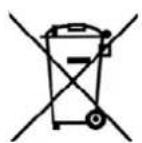
ucts identified with this symbol may not be discarded with normal household waste, but must be taken to a collection point for recycling electric and electronic appliances. Recycling helps to reduce the consumption of raw materials and protect the environment.
Packaging
When disposing of the packaging, make sure you comply with the environmental regulations applicable in your country.
11. Trouble-shooting
If your device fails to function as required, please try this checklist first. Perhaps there is only a minor problem, and you can solve it yourself.

DANGER! Risk of electric shock!
Do not attempt to repair the device yourself under any circumstances.
| Fault | Possible causes/ Action |
| No function | ·Connect the device to the mains power supply. ·Use the temperature control-ler 17 to turn up the temper-ature. |
| Little or no steam | ·Fill the water tank 15 to at least one quarter full. ·Switch on the steam flow rate controller 3 (▲▲▲). ·Run the self-cleaning cycle. |
| Steam burst is not work-ing. | ·Fill the water tank 15 to at least one quarter full. ·Set the right temperature. ·Leave a pause of a few seconds between steam bursts. |
| Spray burst is not working. | Fill the water tank 15 to at least one quarter full.For the first spray burst, you need to pump several times. |
12. Technical specifications
| Model: SDBK 2400 E4 |
| Mains voltage: 20-240 V ~50/60 Hz |
| Protection class: I |
| Power rating: 2,000 - 2,400 W |

Subject to technical modification
13. Warranty of the HOYER Handel GmbH
Dear Customer, your device is provided with a 3 year warranty starting with the purchase date. In the event of product defects, you are entitled to statutory rights against the vendor. These statutory rights are not restricted by our warranty presented in the following.
Warranty conditions
The warranty period starts with the purchase date. Please keep the original purchase receipt in a safe place. This document is required to verify the purchase.
If within three years from the purchase date of this product a material or factory defect occurs, the product will be repaired or replaced by us - at our discretion - free of charge to you. This warranty implies that within the period of three years the defective device and the purchase receipt are presented, including a brief written description of the defect and the time it occurred. If the defect is covered by our warranty, the repaired or a new product will be returned to you. No new warranty period starts with a repair or replacement of the product.
Warranty period and statutory claims for defects
The warranty period is not extended when the warranty has been claimed. This also applies to replaced and repaired parts. Any damages and defects already existing at the time of purchase must be reported immediately upon unpacking. Repairs arising after the expiration of the warranty period are subject to a charge.
Warranty coverage
The device was produced carefully according to strict quality guidelines and tested diligently prior to delivery.
The warranty applies to material or factory defects.
Excluded from the warranty are wear parts subject to normal wear and damages to fragile parts, e.g. switches, batteries, lamps or other parts manufactured from glass.
This warranty expires if the product is damaged, not used as intended or not serviced. For the proper operation of the product, all instructions listed in the operating instructions must be observed carefully. Any form of use and handling that is advised against in the operating instructions or warned against must always be avoided.
The product is only intended for private and not for commercial use. In the case of incorrect and improper treatment, use of force and interventions not performed by our authorised Service Centre, the warranty shall cease.
Handling in case of a warranty claim
In order to ensure prompt processing of your matter, please observe the following notes:
Please keep the article number IAN:279757 and the purchase receipt as a purchase verification for all inquiries.
- The article number can be found on the rating plate, an engraving, the title page of your instructions (in the bottom left), or as a label on the rear or underside of the device.
- If faulty operation or other defects occur, first contact the Service Centre listed in the following by telephone or email.
- Then, you are able to send a product reported as defective free of charge to the service address specified to you, including the purchase receipt and the information on the defect and when it occurred.

Please visit www.lidl-service.com to download this and many other manuals, product videos and software.

Service Centre
GB Service Great Britain Tel.:08715000720 (20.10/Min.) E-Mail: hoyer@lidl.co.uk
IE Service Ireland
Tel.: 1890 930 034
(0,08 EUR/ Min., (peak))
(0,06 EUR/ Min., (off peak))
E-Mail: hoyer@lidl.ie
MT Service Malta Tel.:80062230 E-Mail: hoyer@lidl.com
CY Service Cyprus Tel.:80094409 E-Mail: hoyer@lidl.com.cy
IAN:279757

Supplier
Please note that the following address is no service address. First contact the aforementioned Service Centre.

- STOOMSTRIJKIJZER
- PLANCHA DE VAPOR
- Inhalt
- Safety information
- Warnings
- Instructions for safe operation
- DANGER for children
- DANGER to and from pets and livestock
- DANGER! Risk of electric shock due to moisture
- DANGER! Risk of electric shock
- DANGER! Fire hazard!
- DANGER! Risk of injury through burning!
- WARNING! Risk of material damage
- Items supplied
- Normal or cable-free ironing
- Settings on the stand
- Cable-free ironing
- Ironing with cable
- NOTE:
- Storage
- Before using for the first time
- Operation
- DANGER!
- Filling the water tank
- Set iron temperature
- Spray function
- Ironing without steam
- Ironing with steam
- Steam jet function
- Cleaning
- CAUTION:
- Cleaning the device
- Self-cleaning
- Storage
- Disposal
- Packaging
- Trouble-shooting
- DANGER! Risk of electric shock!
- Technical specifications
- Warranty of the HOYER Handel GmbH
- Warranty conditions
- Warranty period and statutory claims for defects
- Warranty coverage
- Handling in case of a warranty claim
- Service Centre
- Supplier
Brand : SILVERCREST
Model : SDB 2400 B2
Category : Iron