Evolution 5.2 - Speaker ELTAX - Free user manual and instructions
Find the device manual for free Evolution 5.2 ELTAX in PDF.


Frequently Asked Questions - Evolution 5.2 ELTAX
User questions about Evolution 5.2 ELTAX
0 question about this device. Answer the ones you know or ask your own.
Ask a new question about this device
Download the instructions for your Speaker in PDF format for free! Find your manual Evolution 5.2 - ELTAX and take your electronic device back in hand. On this page are published all the documents necessary for the use of your device. Evolution 5.2 by ELTAX.
USER MANUAL Evolution 5.2 ELTAX
natural_image
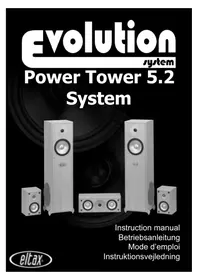
Black-and-white photo of a multi-tiered audio amplifier with speakers and a speaker block, no visible text or labels.Instruction manual
Betriebsanleitung
Mode d'emploi
Thank you for purchasing Eltax Evolution 5.2 Power Tower surround loudspeakers, a no-compromise yet cost-effective integrated solution to eliminate the need for independent subwoofers for both music and movie reproduction.
Eltax Power Tower integrated subwoofers have clear advantages for the discerning listener, their perfectly mated drive units convey a seamless presentation of the entire audible spectrum, free from detrimental time-alignment and phase errors. Two custom manufactured 200mm long-throw polypropylene low frequency drivers in a mirror-image configuration greatly reduces the possibility of uneven in-room response. Although Eltax loudspeakers are designed to handle high power loadings, you must remember that any loudspeaker that is abused with excessive use of volume, tone controls and graphic equalisers is likely to cause damage to the drive-units. If you hear a distorted signal through the loudspeakers you must reduce the power level.
Package Contents:
2 × Evolution Power Towers (left/right pair)
2 x Evolution surround speakers (left/right pair)
1 x Evolution centre speaker
1 × Low-level Power Tower interconnect Y-splitter
2 × Low-level Power Tower subwoofer interconnect cables
2 × Power Tower high-level adapter cable
5 x Speaker cable
Connection Methods:
The Eltax Evolution Power Tower loudspeakers forming part of the Evolution 5.2 Power Tower Pack afford a unique level of connectivity flexibility; they can be used with existing Dolby Surround or Dolby Pro Logic receivers, or as part of a contemporary Dolby Digital, DTS or MPEG-Audio multi-channel home theatre.
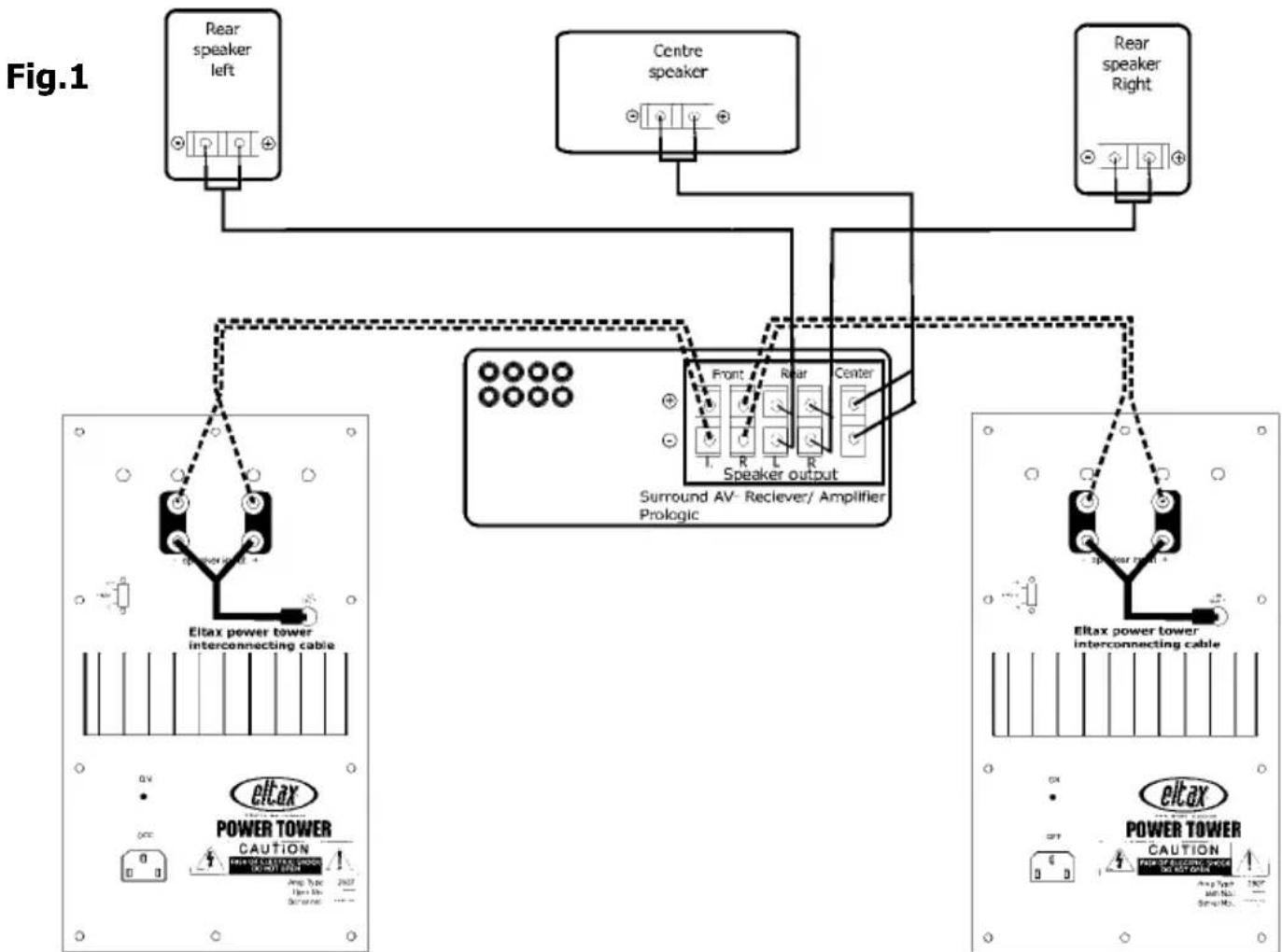
Option A (see fig.1)
Option A is recommended if you have an older Dolby Surround or Dolby Pro Logic amplifier, receiver or processor without a dedicated low-level (line-level) subwoofer output.
One pair of binding posts on each Power Tower is connected via high-level (loudspeaker) cable to the amplifier or receiver, and the second pair of binding posts connected to the low-level input of the bass module using the supplied Power Tower high-level adapter cable.
Important note: The Power Tower high-level adapter cable has been specifically designed for this purpose, please do not use an unsupported substitute.
Connect the centre channel loudspeaker to the centre channel loudspeaker output, and the surround loudspeakers to the surround loudspeaker outputs of your amplifier or receiver.
flowchart
graph TD
    A["Rear speaker left"] --> B["Speaker output"]
    C["Centre speaker"] --> B
    D["Rear speaker Right"] --> B
    B --> E["Eitax power tower interconnecting cable"]
    B --> F["Power Tower CAUTION"]
    B --> G["Power Tower"]
    style B fill:#f9f,stroke:#333,stroke-width:2px
    note right of B
        Surround AV- Reciever/ Amplifier Prologic
    end

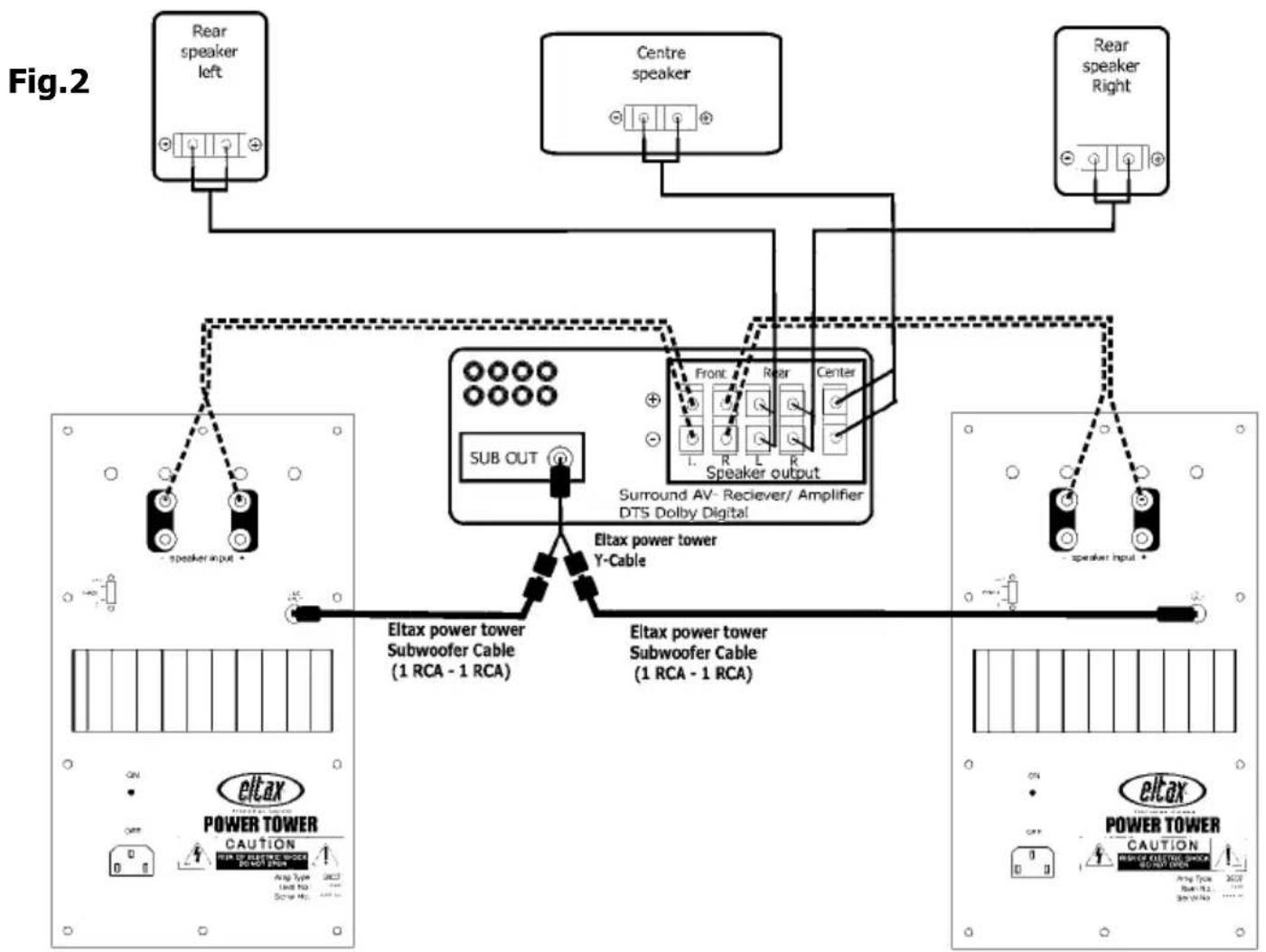
Option B (see fig.2)
Option B is recommended for multi-channel amplifiers, receivers or processors equipped with one low-level subwoofer (or LFE) output.

One pair of binding posts on each Power Tower is connected via high-level (loudspeaker) cable to the amplifier or receiver, whilst the low-level subwoofer output is passed to each of the Power Tower's active low frequency element via the supplied Y-splitter and low-level interconnect cable.
Connect the centre channel loudspeaker to the centre channel loudspeaker output, and the surround loudspeakers to the surround loudspeaker outputs of your amplifier or receiver.
Important Note: If your surround amplifier, receiver or processor has integral bass management circuitry, ensure that your front left/right, centre and surround channels are set to 'Small' and that the subwoofer output is enabled for both two-channel and multi-channel listening. Suggested crossover options are 80Hz and 100Hz. Please refer to the documentation supplied with your amplifier, processor or receiver.
flowchart
graph TD
    A["Rear speaker left"] --> B["Speaker input"]
    C["Centre speaker"] --> D["Speaker output"]
    E["Rear speaker Right"] --> F["Speaker input"]
    B --> G["Sub OUT"]
    D --> H["Front"]
    F --> I["Front"]
    G --> J["Eitax power tower Y-Cable"]
    H --> K["Eitax power tower Subwoofer Cable (1 RCA - 1 RCA)"]
    I --> L["Eitax power tower Subwoofer Cable (1 RCA - 1 RCA)"]
    J --> M["Power Tower"]
    K --> N["Power Tower"]
    L --> O["Power Tower"]
Option C (see fig.3)
For use with multi-channel amplifiers, receivers or processors equipped with two low-level subwoofer (or LFE) outputs.
The connectivity method is the same as Option B, but a Y-splitter is not required. Connect the low-level left subwoofer output to the left Power Tower and the low-level right subwoofer output to the right Power Tower using the supplied cable.
Connect the centre channel loudspeaker to the centre channel loudspeaker output, and the surround loudspeakers to the surround loudspeaker outputs of your amplifier or receiver.
Important Note: If your surround amplifier, receiver or processor has integral bass management circuitry, ensure that your front left/right, centre and surround channels are set to 'Small' and that the subwoofer outputs are enabled for both two-channel and multi-channel listening. Suggested crossover options are 80Hz and 100Hz. Select the 'Stereo' subwoofer output option if one is available. Please refer to the documentation supplied with your amplifier, processor or receiver.
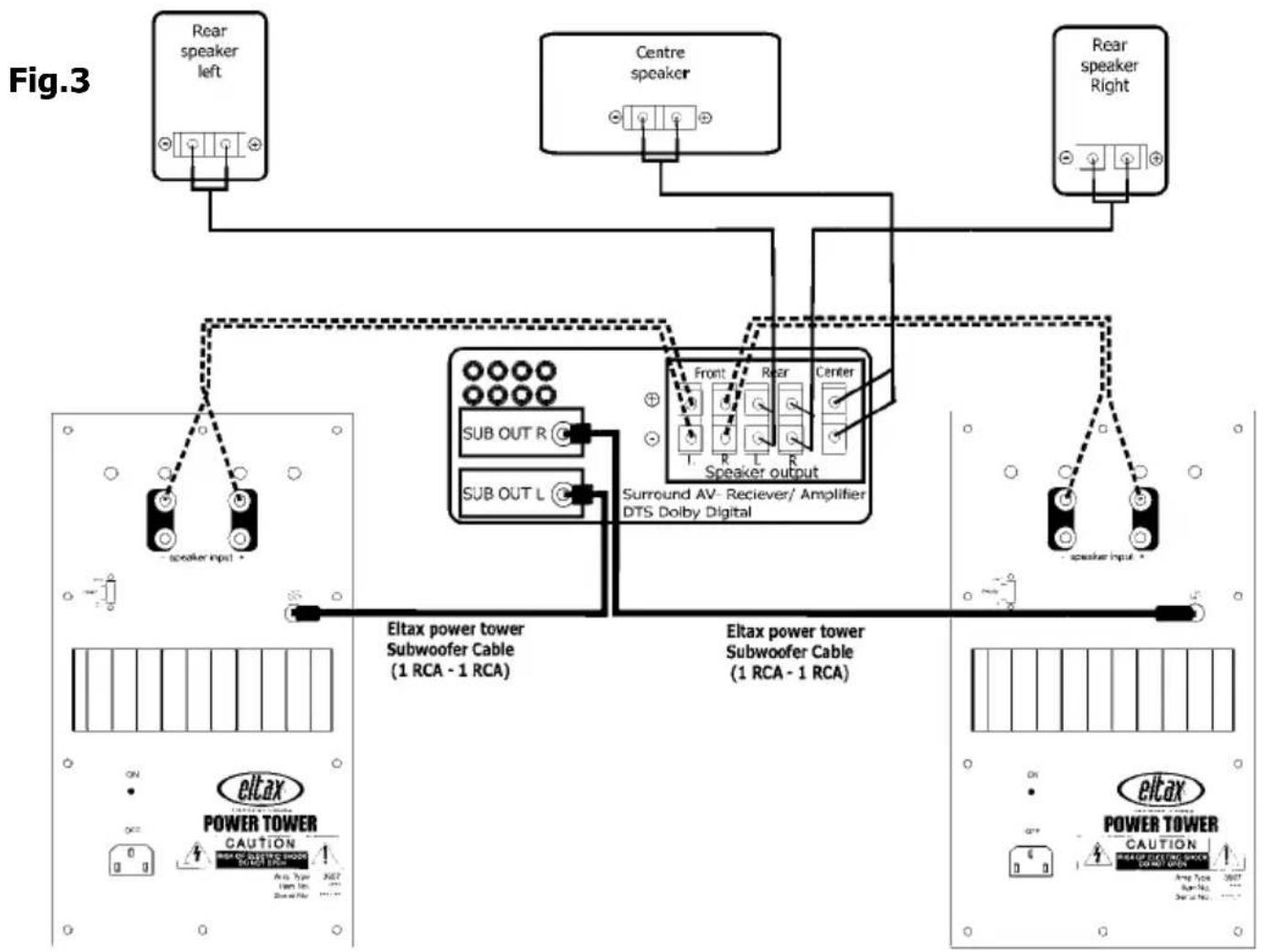
flowchart
graph TD
    A["Rear speaker left"] --> B["Speaker output"]
    C["Centre speaker"] --> B
    D["Rear speaker Right"] --> B
    B --> E["Subwoofer Cable (1 RCA - 1 RCA)"]
    B --> F["SubOUT R"]
    B --> G["SubOUT L"]
    E --> H["Eltax power tower Subwoofer Cable (1 RCA - 1 RCA)"]
    F --> I["Eltax power tower Subwoofer Cable (1 RCA - 1 RCA)"]
    G --> J["Eltax power tower Subwoofer Cable (1 RCA - 1 RCA)"]
    style A fill:#f9f,stroke:#333
    style C fill:#f9f,stroke:#333
    style D fill:#f9f,stroke:#333
    style B fill:#ccf,stroke:#333
    style E fill:#cfc,stroke:#333
    style F fill:#cfc,stroke:#333
    style G fill:#cfc,stroke:#333

Placement of loudspeakers for your home cinema:
A surround sound system, as a minimum, requires 5 loudspeakers. It is important to position them carefully. Thus we recommend that you work with the arrangement of the speakers in your system, perhaps our idea of placing the system initially may not suit the way in which your furniture is arranged.

The Power Tower frontspeakers can be placed on each side of your TV. We recommend that they are placed at a suitable distance from your TV, resulting in optimum sound exposure. Please note that some frontspeakers are not magnetically shielded and can cause damage to the TV picture, if positioned too close to your TV set.
Your active subwoofer is designed to re-produce music information in very low frequencies. The human ear is not able to localize sound for these low frequencies, this is why the placement of the Power Tower is not critical.
However you can use the nature of the acoustic laws in the following ways:
To get the most amplification of the room itself, place the Power Tower Front, with the sidewoofers pointing away from eathother, close to a corner at a distance of about 30 cm from the walls. If you get to much bass please move the Power Tower Front out from the corner.
By experimenting with the placement of the Power Tower Front you can optimize the sound quality.
The center speaker is placed either under or above your TV. The center speaker is magnetically shielded and can't damage the TV picture
The rear speakers are placed behind or next to your listening position.
Controls:
Each Evolution Power Tower includes:
- A phase switch, used to improve integration between each loudspeaker and to counter uneven room response. Set the switch to achieve the loudest bass response at your listening position.
- A volume control, used to adjust the relative output of the subwoofer element. If you are using an amplifier, receiver or processor with integral subwoofer calibration noise, adjust this control to obtain the desired output level (usually 75dB, C-weighted, slow response mode).
An adjustable low-pass filter, used to control the frequencies reproduced by the internal subwoofer. If you using an amplifier, receiver or processor with integral bass management, set this control to its highest point (250Hz).
Eltax recommends that each Power Tower subwoofer remains on at all times; each Power Tower includes an automated on/off circuit. The circuit will activate the subwoofer in the presence of a signal and enter a power-saving mode after a period of approximately 15 minutes of inactivity.
Subwoofer Status:
The multi-colour front-panel LED shows the current status of the active subwoofer element of the Power Towers. Each Power Tower is a self-contained, fully independent unit, so please refer to the displays on each.
Green LED: Active subwoofer element 'On'
Red LED: Active subwoofer element 'Standby'
Extinguished LED: Active subwoofer element 'Off'.
Safety:
Please allow adequate ventilation around each Power Tower subwoofer element, do not place anything directly on or above the rear panel heat sink.
Troubleshooting:
Problem Solution
No sound from front
L/R loudspeakers. Ensure all loudspeaker connections have been made securely.
Check the correct source component is selected and playing.
Ensure that the amplifier, receiver or processor's volume is correctly set.
No sound from centre
loudspeaker. Ensure all loudspeaker connections have been made securely.
Enable the centre loudspeaker in your amplifier, receiver or processor set-up.
Ensure that a processing mode that uses the centre channel is engaged (Dolby Pro Logic or Dolby Digital for example).
Check the correct source component is selected and playing.
Check that the software has centre channel content.
Ensure that the amplifier, receiver or processor's volume is correctly set and that the centre channel output level has been adjusted accordingly.
No sound from
surround loudspeakers. Ensure all loudspeaker connections have been made securely.
Enable the surround loudspeakers in your amplifier, receiver or processor set-up.
Ensure that a processing mode that uses the surround channels is engaged (Dolby Pro Logic or Dolby Digital for example).
Check the correct source component is selected and playing.
Check that the software has surround channel content.
Ensure that the amplifier, receiver or processor's volume control is correctly set and that the surround channel/s output levels have been adjusted accordingly.
No sound from active
subwoofer elements. Ensure that the power cable is attached and mains power turned on - indicated by a green front panel LED.
Ensure that all connections have been correctly made and that they are secure.
If you have selected connection Option A, make sure that the Power Tower high-level adapter cable is in place.
If your amplifier, receiver or processor has integral bass management, ensure that the subwoofer is enabled (set to 'Yes') and that the remaining channels are set to 'Small'.
Check the correct source component is selected and playing.
Ensure that the amplifier, receiver or processor's volume is correctly set and that the subwoofer output level has been adjusted accordingly.
Subwoofer turns off
during music or
movie material. The auto-on/off circuit threshold is set too low; increase
the subwoofer's volume control. Note: you may have
to decrease the amplifier, receiver or processor's subwoofer (LFE) level to maintain the correct output SPL.

flowchart
graph TD
    A["Rear speaker left"] --> B["Speaker output"]
    C["Centre speaker"] --> B
    D["Rear speaker Right"] --> B
    B --> E["Surround AV- Reciever/ Amplifier Prologic"]
    F["Eltax power tower interconnecting cable"] --> G["Power Tower Caution"]
    G --> H["Capacable DC Power"]
    I["Altax Power Tower Interconnecting Cable"] --> J["Power Tower Caution"]
    J --> K["Capacable DC Power"]
Dolby®Digital:
3. Surround receiver ohne Subwoofer pre-out
Power Tower Frontbox