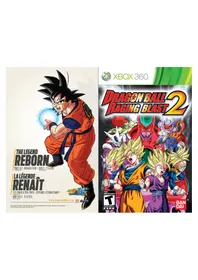
Dragon Ball Z Raging Blast 2 (Xbox 360) - Game MICROSOFT - Free user manual and instructions
Find the device manual for free Dragon Ball Z Raging Blast 2 (Xbox 360) MICROSOFT in PDF.


Frequently Asked Questions - Dragon Ball Z Raging Blast 2 (Xbox 360) MICROSOFT
User questions about Dragon Ball Z Raging Blast 2 (Xbox 360) MICROSOFT
0 question about this device. Answer the ones you know or ask your own.
Ask a new question about this device
Download the instructions for your Game in PDF format for free! Find your manual Dragon Ball Z Raging Blast 2 (Xbox 360) - MICROSOFT and take your electronic device back in hand. On this page are published all the documents necessary for the use of your device. Dragon Ball Z Raging Blast 2 (Xbox 360) by MICROSOFT.
USER MANUAL Dragon Ball Z Raging Blast 2 (Xbox 360) MICROSOFT
WARNING Before playing this game, read the Xbox 360^ console and accessory manuals for important safety and health information. Keep all manuals for future reference. For replacement console and accessory manuals, go to www.xbox.com/support.
Important Health Warning About Playing Video Games
Photosensitive seizures
A very small percentage of people may experience a seizure when exposed to certain visual images, including flashing lights or patterns that may appear in video games. Even people who have no history of seizures or epilepsy may have an undiagnosed condition that can cause these "photosensitive epileptic seizures" while watching video games.
These seizures may have a variety of symptoms, including lightheadedness, altered vision, eye or face twitching, jerking or shaking of arms or legs, disorientation, confusion, or momentary loss of awareness. Seizures may also cause loss of consciousness or convulsions that can lead to injury from falling down or striking nearby objects.
Immediately stop playing and consult a doctor if you experience any of these symptoms. Parents should watch for or ask their children about the above symptoms—children and teenagers are more likely than adults to experience these seizures. The risk of photosensitive epileptic seizures may be reduced by taking the following precautions: Sit farther from the screen; use a smaller screen; play in a well-lit room; do not play when you are drowsy or fatigued.
If you or any of your relatives have a history of seizures or epilepsy, consult a doctor before playing.
ESRB Game Ratings
The Entertainment Software Rating Board (ESRB) ratings are designed to provide consumers, especially parents, with concise, impartial guidance about the age-appropriateness and content of computer and video games. This information can help consumers make informed purchase decisions about which games they deem suitable for their children and families.
ESRB ratings have two equal parts:
Rating Symbols suggest age appropriateness for the game. These symbols appear on the front of virtually every game box available for retail sale or rental in the United States and Canada.
Content Descriptors indicate elements in a game that may have triggered a particular rating and/or may be of interest or concern. The descriptors appear on the back of the box next to the rating symbol.

For more information, visit www.ESRB.org.
TABLE OF CONTENTS
Xbox LIVE 1
GAME CONTROLS 2
MAIN MENU 3
BATTLE SCREEN 4
BASIC PAUSE MENU 5
NOTES 6
CUSTOMER SUPPORT & WARRANTY 7
FRANCAIS 9
Xbox LIVE
Xbox LIVE® is your connection to more games, more entertainment, more fun. Go to www.xbox.com/live to learn more.
Connecting
Before you can use Xbox LIVE, connect your Xbox 360 console to a high-speed Internet connection and sign up to become an Xbox LIVE member.
For more information about connecting, and to determine whether Xbox LIVE is available in your region, go to www.xbox.com/live/countries.
Family Settings
These easy and fl exible tools enable parents and caregivers to decide which games young game players can access based on the content rating. Parents can restrict access to mature-rated content. Approve who and how your family interacts with others online with the Xbox LIVE service, and set time limits on how long they can play. For more information, go to www.xbox.com/familysettings.
GAMECONTROLS
MAIN MENU

GAME CONTROLS MAIN MENU
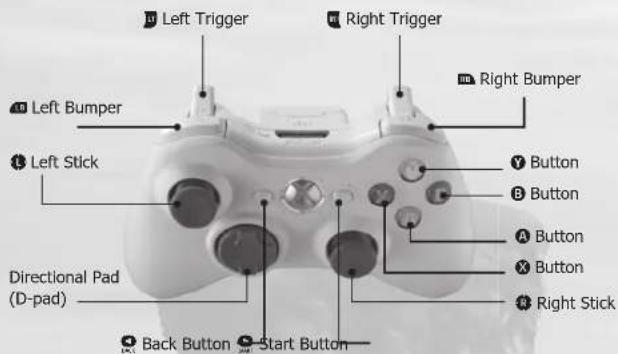
Controls for the Xbox 360TM Controller
MENUCONTRROLS
Highlight option Left Stick
Select option
Go back to previous menu
GAME CONTROLS
Control character Left Stick
Melee Attack
Ki Blask / Smash Attack
Signature Skill 8
Super Attack Right Stick
Ultimate Attack Click Right Stick
Ki Charging ....hold D-pad
Dash + Left Stick
Homing Dash hold 4
Block
Sway +X
Toggle windows
Skip cinema
Vanishing 8 +
Counter
Crash 8 + 8
Ascend 10
Quick ascend 0+
Descend
Quick descend +
Transform/Fusion/Switch
Recover from faint A+X+
+repeatedly
Change camera view D-pad
left/right
SINGLE PLAY
This mode allows you to play on your own in several different game types. In Galaxy Mode you can play the original missions created for each character. In Battle Zone you must defeat the warriors that defend each Battle Zone one by one. This mode also includes a Tutorial that teaches basic battle controls, and a Training mode where you can refi ne your fi ghting style.
BATTL
This competitive fighting mode lets you choose characters and stages for battle. Each option allows you to fight in either a local match with a friend or compete against the computer. Use Single Battle to fight one on one, Team Battle to clash two teams of up to five characters against each other, or Power Battle to engage in a team battle where the combined power level of each team's members cannot exceed the total power level set for the match.
Xbox LIVE
In this mode, you connect to Xbox LIVE and fight against other players anywhere in the world. This menu also allows you to view a variety of battle-related rankings. Battle types include: Standard, where players can compete using normal characters; Freestyle, where players can battle with enhanced characters and equip items; World Tournament, where players engage in multi-round tournament style play; and Friend match, where you can compete with other players on your friends list. Here you can also view your game Ranking and overall Battle Record.
Note: For more information on Internet functionality, please refer to your Xbox 360TM instruction manual.
WORLD TOURNAMENT
Relieve the excitement of the World Tournament or the Cell Games with up to 16 combatants.
ULTIMATE CUSTOMIZE
Here you can customize any character's Super Attacks and equipped items.
MUSEUM
View the Character Encyclopedia, access unlocked BGM, view unlocked Pictures, and watch saved replay data and Movies.
OPTIONS
Adjust various game options dealing with Screen, Sound, and Controller settings.
BATTLESCREEN
BASICPAUSE MENU

Displays a character's health, which decreases when the player is attacked. Above the gauge are several icons called Health Stocks, which decrease by one every time the Health Gauge falls to zero.

HEALTH SHOCK
Displays the remaining number of Health Stocks. If the number of stocks falls to zero and the final Health Gauge is fully depleted, the character will be knocked out and lose the battle.
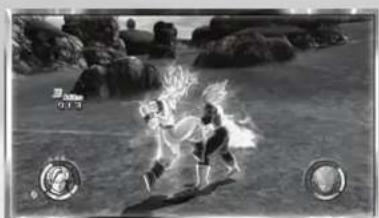

KI GAUGE
Displays the character's Ki. Ki is depleted every time the character uses Ki Blasts, Dashes, and Super Attacks. The character's Ki can be recovered by charging or by successfully landing attacks.
Note: If enough time passes then Ki can recover on its own, but only up to a certain point.

CHARACTER ICON
Displays current character. The Character Icon flashes red if a character's health is depleted to one gauge.

ENHANCEMENT ICON
Displays any active enhancement. Characters can achieve enhancements through equipped items or creating Super Attacks.

TIMER
Displays the amount of time remaining in the battle. The timer only appears once the remaining time begins to run low. When the time runs out, the battle ends, and the character with the greater amount of health remaining is declared the winner.

COMBO COUNTER
Displays the number of hits in the current combo.

DAMAGE COUNTER
Displays the amount of damage taken during current attack or combo.

Return to the battle in progress.

SKILL LIST
View the command list for the currently selected character.

RESTART
Restart current battle.

SELECT CHARACTER
Return to Character Selection screen.

RETURN TO BATTLE MENU / END BATTLE
Exit out to Mode Selection Screen.

RETURN TO MAIN MENU
Exit out to Main Menu.
BIRD STUDIO/SHUEISHA, TOEI ANIMATION. License coordinated by FUnlimation® Productions, Ltd. All rights reserved. Dragon Ball, Dragon Ball Z, Dragon Ball GT, and all logos, character names and distinctive likenesses thereof are trademarks of Shueisha Inc.
2010 NAMCO BANDAI Games Inc. All rights reserved.
The typefaces included herein are solely developed by DynaComware.
LIMITED WARRANTY
Ever get stuck and just need that extra edge to beat the level?
Having problems getting your game to work properly?
Now you can get one-on-one help from NAMCO BANDAI Games America Inc.
using your web browser!
Simply go to livehelp.namco.com for more details.
Live Counselors available from 9am-5pm Monday-Friday Pacific Time.
NAMCO BANDAI Games America Inc.
ATTN: Customer Service
4555 Great America Parkway, Suite 201
Santa Clara, CA 95054
Before returning any defective materials to us, please contact us for a Return Merchandise Authorization (RMA) number. You can reach us at the address above, via e-mail at support@namcobandaigames.com or contact us at (408) 236-2222. Please note that any materials sent to us without an RMA number will be refused and returned. We highly recommend that you use a traceable and / or insured method of shipping the materials to us.
Namco Bandai Games America Inc. Online:
www.namcobandaigames.com
Visit our Website to get information about our new titles.
LIMITED WARRANTY
NAMCO BANDAI Games America Inc. warrants to the original purchaser that this NAMCO BANDAI Games America Inc. game pack shall be free from defects in material and workmanship for a period of ninety (90) days from the date of purchase. If a defect covered by this limited warranty occurs during this 90-day limited warranty period, NAMCO BANDAI Games America Inc. will repair or replace the defective game pack or component part, at its option, free of charge.
This limited warranty does not apply if the defects have been caused by negligence, accident, unreasonable use, modifi cation, tampering, or any other cause not related to defective material or workmanship.
LIMITATIONS ON WARRANTY
Any applicable implied warranties of merchantability and fi tness for a particular purpose, are hereby limited to ninety (90) days from the date of purchase and are subject to the conditions set forth herein. In no event shall NAMCO BANDAI Games America Inc. be liable for consequential or incidental damages resulting from the possession or use of this product.
The provisions of the limited warranty are valid in the United States only. Some states do not allow limitations on how long an implied warranty lasts, or exclusion of consequential or incidental damages, so the above limitation or exclusion may not apply to you. This limited warranty provides you with specific legal rights. You may have other rights which vary from state to state.

Transformation/Fusion/
Transmutation
BIRD STUDIO/SHUEISHA, TOEI ANIMATION. License coordinated by FUNimation® Productions, Ltd. All rights reserved. Dragon Ball, Dragon Ball Z, Dragon Ball GT, and all logos, character names and distinctive likenesses thereof are trademarks of Shueisha Inc.
2010 NAMCO BANDAI Games Inc. All rights reserved.
The typefaces included herein are solely developed by DynaComware.
| NOTES | NOTES |
| 14 15 | 16 |
GARANTIE LIMITEE
DES CONSEILS MAINTENANT OFFERTS EN LIGNE!
4555 Great America Parkway, Suite 201
Santa Clara, CA 95054