Soul Calibur IV (Xbox 360) - Game MICROSOFT - Free user manual and instructions
Find the device manual for free Soul Calibur IV (Xbox 360) MICROSOFT in PDF.


| Product Type | Video Game |
| Platform | Xbox 360 |
| Genre | Fighting (Beat 'em up) |
| Number of Players | 1 to 2 players (local and online) |
| Game Modes | Story, Arcade, Tower of Lost Souls, Training, Duel (Standard and Special), Xbox LIVE (Standard and Special Duel), Character Creation, Museum |
| Game Content | Original characters, Star Wars characters, customizable weapons and armor, 3D battles |
| ESRB Rating | M (Mature 17+) for violence and suggestive content |
| User Manual | 20 pages, French language |
| Main Functions | 8-way run, guard, throw, special attacks, Critical Finish, equipment destruction, soul gauge |
| Character Creation | Full customization: gender, fighting style, equipment, skills, alignment |
| Xbox LIVE | Online multiplayer, leaderboards, voice and video messaging, content download |
| Parental Controls | Rating filter, time limit, online communication restriction |
| Power | Works with Xbox 360 console (requires power adapter) |
| Box Dimensions | Approximately 13.5 x 19 x 1.5 cm (standard Xbox 360 case) |
| Weight | Approximately 120 g (case and manual) |
| Care and Cleaning | Clean disc with a soft, dry cloth; avoid scratches and dust |
| Safety | Warning about photosensitive epilepsy; use in a well-lit environment; take regular breaks |
Frequently Asked Questions - Soul Calibur IV (Xbox 360) MICROSOFT
User questions about Soul Calibur IV (Xbox 360) MICROSOFT
0 question about this device. Answer the ones you know or ask your own.
Ask a new question about this device
Download the instructions for your Game in PDF format for free! Find your manual Soul Calibur IV (Xbox 360) - MICROSOFT and take your electronic device back in hand. On this page are published all the documents necessary for the use of your device. Soul Calibur IV (Xbox 360) by MICROSOFT.
USER MANUAL Soul Calibur IV (Xbox 360) MICROSOFT
WARNING Before playing this game, read the Xbox 360® Instruction Manual and any peripheral manuals for important safety and health information. Keep all manuals for future reference. For replacement manuals, see www.xbox.com/support or call Xbox Customer Support.
Important Health Warning About Playing Video Games
Photosensitive seizures
A very small percentage of people may experience a seizure when exposed to certain visual images, including flashing lights or patterns that may appear in video games. Even people who have no history of seizures or epilepsy may have an undiagnosed condition that can cause these "photosensitive epileptic seizures" while watching video games.
These seizures may have a variety of symptoms, including lightheadedness, altered vision, eye or face twitching, jerking or shaking of arms or legs, disorientation, confusion, or momentary loss of awareness. Seizures may also cause loss of consciousness or convulsions that can lead to injury from falling down or striking nearby objects.
Immediately stop playing and consult a doctor if you experience any of these symptoms. Parents should watch for or ask their children about the above symptoms—children and teenagers are more likely than adults to experience these seizures. The risk of photosensitive epileptic seizures may be reduced by taking the following precautions: Sit farther from the screen; use a smaller screen; play in a well-lit room; do not play when you are drowsy or fatigued.
If you or any of your relatives have a history of seizures or epilepsy, consult a doctor before playing.
ESRB Game Ratings
The Entertainment Software Rating Board (ESRB) ratings are designed to provide consumers, especially parents, with concise, impartial guidance about the age-appropriateness and content of computer and video games. This information can help consumers make informed purchase decisions about which games they deem suitable for their children and families.
ESRB ratings have two equal parts:
Rating Symbols suggest age appropriateness for the game. These symbols appear on the front of virtually every game box available for retail sale or rental in the United States and Canada.
- Content Descriptors indicate elements in a game that may have triggered a particular rating and/or may be of interest or concern. The descriptors appear on the back of the box next to the rating symbol.

For more information, visit www.ESRB.org

TABLE OF CONTENTS
Play anyone and everyone, anytime, anywhere on Xbox LIVE. Build your profile (your gamer card). Chat with your friends. Download content (TV shows, trailers, HD movies, game demos, exclusive game content, and Arcade games) at Xbox LIVE Marketplace. Send and receive voice and video messages. Use LIVE with both Xbox 360 and Windows. Play, chat, and download on both your PC and your Xbox 360. LIVE gives you ultimate access to the things you want and the people you know. On both your PC and your TV. Get connected and join the revolution!
CONNECTING
Before you can use Xbox LIVE, connect your Xbox 360 console to a high-speed Internet connection and sign up to become an Xbox LIVE member. For more information about connecting, and to determine whether Xbox LIVE is available in your region, go to www.xbox.com/live/countries.
FAMILY SETTINGS
These easy and flexible tools enable parents and caregivers to decide which games young game players can access based on the content rating. Parents can restrict access to mature-rated content. Approve who and how your family interacts with others online with the Xbox LIVE service. And set time limits on how long they can play. For more information, go to www.xbox.com/familysettings.
LANGUAGES THAT AREN'T SUPPORTED IN THE XBOX 360® DASHBOARD
If your game is available in a language that isn't supported in the Xbox 360™ Dashboard, you must select a corresponding locale (region) in Console Settings to enable that language in the game. For more information, go to www.xbox.com.
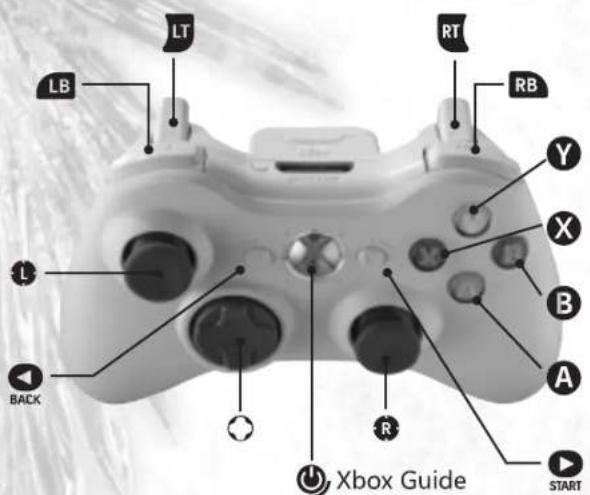
GAME CONTROLS
STARTING THE GAME
DEFAULT CONTROLS
MENUCONTRS
Select Menu Options Left Stick/D-pad
Confirm selection. A button
Cancel menus and other selections...B button
GAME CONTROLS
Move Character Left Stick/D-pad
Horizontal Strike (A). X button
Vertical Strike (B). Y button
Kick (K) B button
Guard (G) A button
Press A+B+K+G simultaneously. Left Bumper
Press B+G simultaneously. Left Trigger
SWT .Right Bumper
Press A+B+K simultaneously... Right Trigger
Pause game / open pause menu START button
Push the START button to go to the Mode Select Screen.
MODE SELECT SCREEN
SINGLE PLAYER MODES
The single player modes include Story, Tower of Lost Souls, Arcade, and Training.
VERSUS MODES
The modes in this section allow you to play against another player locally in either Special Versus or Standard Versus.
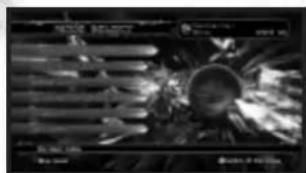
XBOX LIVE
The modes in this section allow you to play online against other players on Xbox LIVE in Special Versus or Standard Versus. Leaderboards can be checked in this section.
CHARACTER CREATION
This mode allows you to create a new character for you to play as in SOULCALIBUR IV. You can also edit standard characters here.
MUSEUM
View acquired illustrations and unlocked events. Here you can access Chain of Souls, Art Gallery, Event Theater, and Battle Records.
OPTIONS
Change settings for Versus mode, controller, display, sound and stage music.
SOUND
This game is presented in Dolby Digital 5.1 surround sound. Connect your Microsoft Xbox® 360 to a sound system with Dolby Digital technology using a digital optical cable. Connect the digital optical cable to the base of an Xbox 360 Component HD AV Cable, Xbox 360 VGA HD AV Cable, or Xbox 360 S Video AV Cable. From the "system" blade of the Xbox 360 dashboard, choose "console settings", then select "audio options", then "digital output" and finally select "Dolby Digital 5.1" to experience the excitement of surround sound.
SCREEN GUIDES AND RULES
BASIC TECHNIQUES
These are the basic rules and viewing methods for in battle screens. The rules and screens vary according to the mode. For details on this, please refer to the pages explaining each game mode.
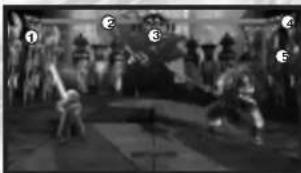
BASIC SCREEN GUIDE
1-CHARACTER NAMES: Displays the character's name.
2-HEALTH GUAGE: The green bar indicates how much health remains for the player's character. When the health gauge reaches zero, the player loses.
3-TIME: When the clock reaches zero, time is up for the match. The player with more health wins.
4-SDUL GAUGE: Shows how much Soul Charge you have stored. When it's full you can perform a Critical Finish after a SOUL CRUSH.
5-EQUIPMENT DESTRUCTION GAUGE: Shows the equipment that has been destroyed.
PAUSE MENU
When the START button is pushed during battle in each mode, a Pause Menu will be displayed. Select a submenu with the D-pad or the left stick, and confirm your selection by pushing the A button. Note: In some portions of the game, there is no pause menu available (Character Creation and Options).
HOW TO WIN
Attain any one of the following conditions to win a single battle. Winning a match requires winning a varying number of battles. Adjust the number of battles required to win a match in Battle Count under the Options Menu in the Main Menu. The Battle Count can only be changed for Versus modes.
KNOCK OUT: Opponent's health is reduced to zero.
RING OUT: Opponent is knocked out of the ring.
TIME'S UP: The character with more health when time runs out wins.
DRAW: When a double knock out or a double ring out occurs, a draw results. Both sides receive a point for the battle at this time.
GAME OVER: This occurs when a match is lost. In Story mode, when Game Over is reached, a Continue Screen appears. Push the START button before the countdown reaches zero to continue playing.
This section provides an overview of basic moves in SOULCAIBUR③IV. All move commands and controls assume that the character is facing right (standing on the IP side).
BASIC CONTROL NOTATION
COMMAND SYMBOL CONTROLLER BUTTON MEANING
→ D pad or left stick . Press direction quickly
D-pad or left stick Hold direction
A. X button Horizontal Strike
B. Vertical Strike
K. B button . Kick
G. A button . Guard
The arrows correspond to the up, down, left, and right directions of the D-pad or left stick.
The controller buttons are based on the default setup.
ATTACKATTRIBUTE NOTATION
SYMBOL MEANING
H.. High-level Attack
M. Mid-level Attack
Low-level Attack
U Unblockable Attack
SM .Special Mid-level Attack
SI. Special Low-level Attack
T. Trow
AI... Attack Throw
SP .Special Movement
GB. Guard Break
IMP. Guard Impacts the opponent's attack
ST. Batalte Stance
BASIC TECHNIQUES
BASIC TECHNIQUES
8-WAY RUN
The 8-Way Run is a system that lets the player run in all directions, allowing for a wider array of movement. To do an 8-Way Run in the forward direction, enter and the character will run while still facing the opponent. This can be used to dodge the opponent's attacks or to put the player in an advantageous position for combat. There are also moves that can only be executed during an 8-Way Run. Keep in mind, the left stick can be used to enter the same D-pad controls.
In order to use the D-pad buttons to move diagonally, push two D-pad buttons at the same time, for instance, for the direction, simultaneously press the and D-pad buttons.
JUMP AND GUARD
In order to jump, hold G and 忍 or 忍 . To guard and retreat or advance, hold G and or . To guard and crouch, hold G and , , or . The left stick can be used to enter the same D-pad controls.
STEP IN/BACK AND SIDE STEP
Players can Step In, Step Back. Left Side Step, and Right Side Step.
Step In.
Step Back
Left Side Step
Right Side Step
Note: When the character is facing right (standing on the IP side.)
THROW
Enter A+G or B+G while standing close to an opponent, to throw them. In order to escape an opponent's throw, press A against an A+G throw, or B against a B+G throw just as the opponent starts the move.
ATTACK ATTRIBUTES AND GUARD
HIGH-LEVEL ATTACK
Useful against standing opponents or opponents jumping towards the player. Use a Standing Guard to defend or Crouch to evade.
MID-LEVEL ATTACK
Useful against both standing and crouching opponents. Use a Standing Guard to defend, but not a Crouching Guard.
LOW-LEVEL ATTACK
Useful against both standing and crouching opponents. Use a Standing or Crouching Guard to defend.
Get up in place. Press G.
Rolling forward or backward to get up...Press (forward) or .. (backward) while on the ground
Rolling sideways to get up.. Press (towards the back) or (towards the front) while on the ground
Attacking while getting up.. Press an attack button (A, B, K) while on the ground
STAGGER RECOVERY
Certain attacks can stun characters, causing them to lose their balance and temporarily be unable to move. In this situation, pushing the D-pad buttons, the left stick, or any of the A, B, K, G repeatedly speeds up recovery.
BASIC TECHNIQUES
BASIC TECHNIQUES
UKEMI
Certain powerful attacks can throw a character down onto the ground. Press G while going down to quickly recov er and return to a ready position.
Forward Ukemi Enter + + while going down.
Backward Ukemi....Enter < + G while going down.
Side Roll Ukeni....Enter ① + G or ② + G while going down.
GUARD IMPACT
Use one of the following commands at the right moment to repel or parry an opponent's attack. This is called Guard Impact. When successful, both parties are momentarily stunned. The player who successfully used Guard Impact is able to move first. and will therefore have an advantage in the fight. Guard Impact is effective against almost every technique, but there are a few exceptions.
To repel High and Mid attacks.. Press · +· +G
To repel Mid and Low attacks.. Press 出 + 6
To parr an opponent's High and Mid attacks.. Press 一 + 6
To parry Mid and Low attacks.. Press + G
REVERSE GUARD IMPACT
When an attack is repelled or parried by a Guard Impact, the player is in the disadvantageous position of being unable to attack or guard. However, if attacked while still immobile, the player can use Guard Impact against the opponent.
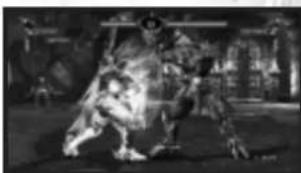
JUST IMPACT
When entering Guard Impact +6 or +6 , if your timing perfectly matches that of your opponent's attack, it will become Just Impact. If you land a hit with an attack after Just Impact, it will be treated as a counter hit. Depending on the move, you can see a large damage increase.
THE RELATIONSHIP BETWEEN STRIKES AND 8-WAY RUN
In addition to the various attacks, defensive techniques, and special moves in SUICALIBURGEIV, there is the triparlite relationship between the basic attacks (vertical strike, horizontal strike) and B-Way Run.
8-WAY RUN
Use the 8-Way Run to dodge vertical strikes. Run behind opponents and follow up with a powerful attack.
HORIZONTAL STRIKE
Stop an opponent's 8-Way Run with a horizontal strike. Since the opponent is running, the likelihood of a Run Counter is high.
VERTICAL STRIKE
Vertical strikes have the ability to crush horizontal strikes. Match an opponent's horizontal strike with a strong vertical strike to gain the upper hand.
ADVANCED GAMEPLAY
GAME MODES
SOUL GAUGE
The Soul Gauge is located next to the HP Gauge. As the player blocks attacks it will gradually change from green to red and ultimately start flashing red. The Soul Gauge will restore to the initial green state and eventually the fully charged blue state, as a player's attacks hit the opponent.
SOUL CRUSH
When their Soul Gauge is flashing red, any further blocks against strong attacks or a Guard Impact by the opponent will put the player in a vulnerable defenseless state.
EQUIPMENT DESTRUCTION
Head. Upper Body, or Lower Body equipment will be destroyed depending on the type of attacks that put the character in a state of SOUL CRUSH. Continuous attack on one area will also result in an eventual destruction of equipment. Damage rate to that specific area will increase once the equipment is destroyed. Equipment condition is displayed on the Armor Indicator below the Soul Gauge.
CRITICAL FINISH
A Critical finish can be executed by pressing the G + A + B + K buttons simultaneously when the opponent is in a state of SOUL CRUSH. Successful execution will end the battle in one fatal attack.

FORCE GAUGE
This gauge is a special addition used only for the guest Star Wars ^c characters in SUULCALIBUR IV. The gauge is full at the beginning of the match and shows the amount of force power available during the fight. The Force Gauge is drained as Force powers are used in gameplay and slowly replenishes over time and upon landing successful hits.
When the Force Gauge is overused and drained to zero, the character will become overcome by the Force and enter a state of dizziness, becoming temporarily uncontrollable.
SINGLE PLAYER MODES
STORY Discover the legend of Soulcalibur as you progress through story mode. Standard characters may be used to unlock unique storylines through text and cutscenes. While playing Story mode, players may earn money and equipment depending on the enemy they fight. Money may be used to buy upgrades such as armor and weapons.
TOWER OF LOST SOULS
A sixty-floor tower of opponents where the player can either Ascend or Descend. Choose to Ascend and you can capture the tower by defeating the boss. Choose to Descend and see just how many enemies you can defeat. Each battle presents a unique obstacle, as certain conditions and characteristics are manipulated to challenge the player to adapt and evaluate each fight carefully. If the player overcomes these challenges they will be rewarded greatly with new unlockables. Progress in the Tower of Lost Souls is saved after each set of floors and play may be resumed from any previous mission.
ARCADE
Arcade mode consists of eight consecutive stages. Players earn points based on how well they play and scores are ranked online.
TRAINING
Training mode is free form and allows the player to hone their fighting skills without the worry of a competitive match.
VERSUS MODES
SPECIAL VERSUS
An offline match mode where players may use their fighters with customized armor, weapons, and skills.
STANDARD VERSUS
An offline match mode where players may use customized fighters but their customized skills will not affect their attributes.
XBOX LIVE
NOTE: Playing SOULCALIBUR IV online is subject to your acceptance of the terms and conditions under the User Agreement. A full copy is available online at www.namcbandaigames.com/terms.
SPECIAL VERSUS
An online match mode where players may use their fighters with customized armor, weapons, and skills. Players may battle in both Ranked and Player Match modes.
STANDARD VERSUS
An online match mode where players may not use customized fighters. Players may battle in both Ranked and Player Match modes.
CHARACTER CREATION
CHARACTER CREATION
Create your own original characters and edit the look of standard character parts such as hair and costume. Use your own created character to play in other modes such as Versus modes, Single Player modes and Arcade mode.
CHARACTER SELECT
After selecting Character Creation from the Mode Select Menu you'll be taken to the Character Select screen. Here you can choose either to modify a current SOULCALIBUR IV character or make a completely new character. To perform the latter, select the icon with two unknown characters.
CREATING ANew CHARACTER
After selecting the new character icon from Character Select, pick a data slot to place your creation in. Unused slots are marked with a golden color. Next choose your characters gender and fighting style. The fighting style is based on the combat style of twenty five different SOULCALIBUR IV standard characters.
TRAITS MENU
After selecting a fighting style, you'll be taken to a menu where you shape the personal and combat traits of your character. Decide if they'll have a particular combat trait under the Battle Trait selection, if they'll have an armor preference under Equipment Trait, and if they are evil, good, or normal under Alignment.
CREATING A NEW CHARACTER (CONTINUED)
EDIT MENU
The Edit Menu is where you dive in and really customize your character. You have six main categories in your edit menu on the left. These are:
1-EQUIPMENT: Here you can change your character's attire. There are twelve options to choose from.
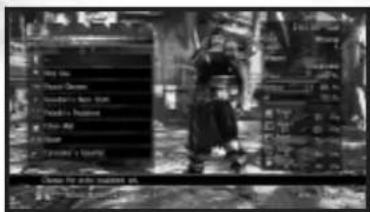
2-EQUIPMENT COLOR: Change the color of all clothing and accessories here. You can choose to change colors of items individually or all at once using the whole body icon at the top.
3-MODEL INFORMATION: This section allows you to change the physical aspects of your character. There are nine total options, which include body physique, voice, hair and face.
4-STYLE/WEAPON: Edit your character's selected fighting style and weapons.
5-SKILL SETTINGS: Customize your attacks and increase your combat statistics.
6-SYSTEM: Here you can finalize your edits, including character name, background selection and pose selection. You can also test your character in a mock battle.
STATISTICS MENU
On the right side of the screen is the Statistics Menu, which displays your characters combat and attack statistics. These stats are affected by some of the options you select in the Edit Menu.
CAMERA CONTROLS
It is possible to adjust the camera or zoom in and out with the left trigger, the right trigger, and the right stick.
Coup vertical (B) Touche Y
Coup de pied (K) Touche B
Garde (G) Touche A
Appuyer simultanement sur A + B + K + G . . . . . . . . . . . . . . . . . . . . . . . . . . . . . . . . . . . . . . . . . . . . . . . . . . . . . . . . . . . . . .
Appuyer simultanement sur B + G . . . . . . . . . . . . . . . . . . . . . . . . . . . . . . . . . . . . . . . . . . . . . . . . . . . . . . . . . . . . . . . . . . . . .
SWT. Gachette Haute Droite
B Touche Y Coup vertical
K Touche B Coup de pied
G Touche A Garde
LEAD VISUAL PROGRAMMER
Yoshihito Iwanaga
VISUAL PROGRAMMER
Sei Nakatani
GAME SYSTEM PROGRAMMERS
ARCADE AND VS MODEP PROGRAMMER
Makoto Watanabe
GAME SYSTEM. TRAINING MODE AND AI
PROGRAMMER
Kenichi Nakaguchi
RELEASE SYSTEM AND
NETWORK PROGRAMMER
Takashi Koshigoe
SAVE LOAD AND GRAPHIC
CONVERSION PROGRAMMER
Hyoichi Kaku
NETWORK PROGRAMMERS
Akira Kitahara
Hidenori Iwakiri
Takeki Takahashi
Shui Takahashi
Tsyoshi Takahashi
Lakeshi Doo
CREATION MODE PROGRAMMER
Takashi Kumakura
EFFECT PROGRAMMERS
Tadashi Obamo
Souta Kageyama
SOUND PROGRAMMERS
Takayuki Kakinuma
Junji Hata
GAME EFFECTS PROGRAMMERS
PHYSICS PROGRAMMER
Ken Shimoda
STAGE EFFECTS AND OPTIONS
PROGRAMMER
Kotaro Mor
MUSEUM AND TEXT SYSTEM
PROGRAMMER
Tomoaki Kumasaka
THE TOWER OF LOST SOULS PROGRAMMER
Takeki Takahashi
STORY MODE PROGRAMMER
Tomohiro Chouji
MODE SELECT AND RANKING MODE
PROGRAMMER
Kohlaka Satoh
SYSTEM SUPPORT
Hyunosuke Okazaki
NETWORK SUPPORT
Kazushige Wolanabe
Shuji Takahashi
Hanuki Suzuki
ART DIRECTION
Masashi Kubo
CHARACTER ILLUSTRATION
LEAD CHARACTER ILLUSTRATOR
Takuji Kawano
CHARACTER ILLUSTRATOR
Satoko Nakayama
CG CHARACTER ART
LEAD CG CHARACTER ART DESIGNER
Kazumasa Habu
CG CHARACTER ART DESIGNER
Tomoyuki Itozaki
BOUNUS CHARACTER ILLUSTRATION
Angol Fear) Mine Yoshizaki
(Kamikirinusu) Hisayuki Hirokazu
(Syura) Hiroya Oku
(Ashlotte) Oh! Great.
(Scheherazade)Yulaka Izubuchi
CHARACTER & WEAPON DESIGN
LEA CHARACTER & WEPOON DESIGNER
Hideo Yoshie
CHARACTER & WEAPON DESIGNERS
Akira Nakajima
Daisuke Fu Jin
Hiruaki Kado
Kenji Kimura
Masaya Fukasawa
Shinichiro Ozawa
Tohru Hashimoto
Tomoko Imura
Yasuto Morioka
CHARACTER CREATION DESIGN
LEAD CHARACTER CREATION DESIGNERS
Seidou Ozawa
Shinichi Ikeda
CHARACTER CREATION DESIGNERS
Taichi Higashino
Koushi Watanabe
Shohhei Senda
Shinya Murat
Yuuko Hirano
Ava Takemuro
Kouhei Magome
BACKGROUND ART
LEAD BACKGRDND ARTIST
Yasuyuki Kobori
BACKGROUND ARTISTS
10101010
Chiaki Kudo
Chino Kasa
Daisuke Kalaoka
Hiroko Nagao
Jun Mimato
Kelichi Hiro
Natsuyu Nakayama
Hena Takahashi
Ryo Saita
Tama Veng
Tomoko Horiji
VISUAL EFFECTS
LEAD VISUAL EFFECTS DESIGNER
Seidou Ozawa
VISUAL EFFECTS DESIGNER
Tomoaki Honma
20 GRAPHIC DESIGN
Hirotaka Kawakami
Urara Yakushijin
Katsuhisa Imaoka
CUTSCENES
CUTSCENE DIRECTOR
Jaehyung An
CUTSCENE ANIMATORS
Tatsuya Ishiyama
Kazuyo Yoshida
Kobuko Nimura
Katsuya Honda
CUTSGENE VISUAL DESIGNERS
Shinichi Katahira
Masatsugu Furusawa
Kei Holaka
APPLICATIONS ENGINEERS
LEAD APPLICATIONS ENGINEER
Ryo Takahashi
APPLICATIONS ENGINEERS
Nautaka Kameda
Kazuki Takahashi
GRAPHIC DESIGNER
Takaharu Suzuki
ANNATION
LEAD ANIMATOR
Yusuke Shibata
SENIOR ANIMATORS
Hiroki Minami
Isamu Sawada
ANIMALS
Tomoe Hirata
Yui Matsumoto
Kaori Sato
Manabu Morimoto
Keiko Saito
Yoshiyuki Nemoto
Hidekazu Shira
Keiichiro Yoshitake
Yoshiliro Kaneko
Mika Kamatak
Yoshitaka Morimune
Kosuke Sasaki
Byuij Ikeda
Koi Motouma
Masao Hanai
FACIAL ANIMATOR
Saori Dgiya
MOTION CAPTURE TECHNICAL STAFF
Tushio Murata
Tetsuya X
Sumio Ito
Tetsuya Kanakubo
Kaoru Suzuki
Kuniko Naemura
Nakaki Ishid
Yasunobu Samata
Mio Sato
Naoko Yoshiyama
Jun Osone
MUSIC AND SOUND EFFECTS
SOUND DIRECTOR G MUSIC COMPOSER
Junichi Nakatsuru
LEAL SOUND DESIGNER
Yoshihito Yano
SOUND DESIGNERS
Tomumitsu Kaneko
Shouchi
DIALOGUE EDITER
Yukiko Yamamoto
MUSIC COMPOSERS
Keiki Kobayashi
Hiroyuki Fujita
NUSOUND(COMMUN LIBRARY)
Tetsukazu Kakanishi
Yoshinuro Kurohata
Shogo Nakamura
Kazue Yamada
Tsu-yoshi Fukulomi
Hiroyuki Hiraishi
All Nulib Staff
QUALITY ASSURANCE
DALEAD
Shinichi Tsuruya
Ryo Sakamoto
Furukawa Manabi
Takemto Shino
Ikeno Kazuya
Kamata Masaki
Kaneko Yu ki
Takahashi Tomomi
Yoshinari Nurihiro
and All QA staff
CREDITS
CREDITS
CONSUMER SOFTWARE COMPANY INTERNATIONAL BUSINESS DIPT
GENERAL MANAGER Takedumi Hyudo
CS PRODUCTION General Manager Ryuichi Usada
PRODUCERS
Yeshitaoka Goto
Hidsumi Inagaki
Michinori Ozawa
Daiosuke Ichiyuki
CS PROMOTION
CS PROMOTION GENERAL MANAGER Hirotaka Watanabe
CS PROMOTION MANAGER
Ko Kurosawa
PROMOTION SUPPORT
Satoshi Ikeda
Shin Dae
Kohei Dishi
Maiko Neishu
CONTENTS LICENSE DEPARTMENT
Naoki Kudo
Choya Ishida
Kei Omeki
Seita Ooshima
Natsuko Kaneko
PATENT DEPARTMENT
Kenichira Minematsu
LEGAL SERVICES DEPARTMENT
Rice Tanaka
Tokahiro Anzai
CS SALES
SALES GENERAL MANAGER
Fernike Nishiyama
SALES TEAM
Kazuhiro Takabayashi
Hirashii Saiki
Nikkei Kuroda
Daisuke Takahashi
Yeoshiba Mori
Aya Morinka
Tatsuaki Fujii
Kenji Tsuchiya
Hiroshi Onodera
Shoya Yamazaki
Hiroshi Matsuda
Kenichi Toida
Emolao Youhei
Yoshiha Suojich Sakata Keisuke
Kitayama Mequmi
Saroru Nishibaba
Harumi Naguchi
Ariya Yumi
Masataka Yani
Hidevuki Yamaraki
Makiko Tamura
Masaki Iwahii
Maumu Naozawa
Wakata Hanaoka
Wukko Taimo
Umingi Tomoko
HITOKI TUMORO 2017-03-04
Asai Waki
Itou Dario
Kikuchi Youhei
SPECIAL THANKS TO Hiroaki Kavagane
Kento Kojima
Kinchi Tsuyoshi
Masaka Ishikawa
Motoko Takahie
Shinlareu Hotta
Yashibisa Yanuchi
Yutaka Kuroda
Yusufu Kusumu
Yasunori Miyahima
Yoshibin Mizuno
Department of Mathematics
TAFUKO AGHADA
HIroyuki Kobota
Shigeto Murata
Shigeya Muto
Tetsuya Ohtanuro
BystarO Disafine
Masanori Yamada
Lakushi Sunja
Xei Kudun
10.1.10
Kouichiro Vaidanabe 106-107
Takashi Imagire
National University of Tokyo
Shigeru Kitsutaka
Koichiro Tsutsumi
Kenlaro Yamauchi
Masao Kasamatsu
Jun Imamiya
Morikazu Orikasa
Keith Kirn
Kunichi Sefamotye
Cannum Cukumoto
NAMCO BANDAI GAMES AMERICA INC.
PRESIDENT G CEO
Genichi Ito
EXECUTIVEVP&COO
Makoto Iwai
SENIORVP6CHI
Shui Nakata
EVECTIVEVPDESALES&MARKETING
Andrew Letchuk
PRODUCT MARKETING MANAGER
Wayne Shi
ASSOCIATE PRODUCT
MARKETING MANAGE
Kristeen Kennody
MARKETING TRANSLATION
Chiemi Kurryanan
SENIOR PUBLIC RELATIONS MANAGER
Arne Cual-Pedrosa
PUBLIC RELATIONS COORDINATOR
Nick O'Leary
STRATEGIC BUSINESS MANAGER 6
GUEST CHARACTER CONCPT
Brian Scherr
DIRECTOR OF SALES
Chris Loo
NATIONAL SALES MANAGER
Terry Carlson
SENIOR BUSINESS DEVELOPMENT DIRECTOR
Zack Karlsson
LEGAL COUNSOI
Janna Smith
SENIOR OPERATIONS MANAGER
Jennifer Terslont
SEIONDA MANAGER
Tad Hirabayashi
DA SUPERVISOR
Mike Peterson
PRODUCT COORDINATOR
Jesse Meija
DA LCAO
Kenrick Mah
DA ASSISTANT LEADER
Dlamon Bernal
Nikolas Carey
CUG TESTS
Gren Anderson
Luis Castillo
Ruan Dailey
Billy Dai Porto
DA TESTERS
Darren Auellon
Josh Dujan
Taylor Benson
Stephen Chin
Mays Lohang
Miko Dornpanin
Lalita Jueanur
Brian R. Harpin
1
Autumn Valence
Abdul Waifat
Aedina Vilejas
Alam Wicca
Alex Wugli
Cameo Wininger
Shawn Woo
Gary Yamashita
Jhune Dela Cruz
Tyler Knoot
Mike Jackson
Adam De Anta
Wes Moots
VERY SPECIAL THANKS
LucasArts
Adu Duan
Peter Hirschmann
Atsunaka Matsuguma
Darraph D'Farrell
Jenny Macarthy
Joey MacMillan Kim Peacock
Kunming Jiang
Hae duacknail
Brett Hector
Kevin Kurtz
Margaret Grohne
Adam Kahn
Douglas Reilly
Anne Marie Hawkins
Kim Morgan
LUCAS LICENSING
Howard Roffman
Stacy Cherenotis
Leland Chee
Ashley Matheson
Arenpunished
TICASFILM
Bill Gannon
Pablo Hidalgo
EXECUTIVE PRODUCERS
Shukun Ishikaya
Shin Unozawa
Takashi Shpii
Nakalani Hajiim
Yui Tsunuki
SPECIAL THANKS.
Fontworks Japan Inc.
1955-2018NAMCDBANON Games Inc.
LucasFis. The LucasFis logo and the STAN WHiS chie
acters, names and all related indlcs are trademarks at
Lucasfilm Ltd. 2008 Lucasfilm Entertainment
Company Ltd. or Lucasin Ltd. & or TM as indicated
All rights reserved. Used with permission.
THIS SOFTWARE USES FONTS BY FONTWORKS, JAPAN.
INC.FONTUNORKS.DAPAN.FONTUNORKS AND THE FONT
NAMES ARE TRADEMARKS OF FONTAOKS JAPAN, INC.
SOLUCAUBURIV uses Haxk:10 Copyright 999 2008.
Book.com Inc. (or its license), All rights reserved.
See www.havok.com for details.
Baby and the double O symbol are trademarks of
Dolly Laboratories.
DOLBY
DIGITAL
havok
(三)CASA及TS
SOME BATTLES ARE FOUGHT WITH THE SOUL.

MIMANE 3008A Guinea America Inc. 455Gest Acstus Pathways, Suite 361, Santa Clara, CA 95854
© © 1986-2008 NAMC/1988A Guinea Inc. Microsoft, China, Xiao, 2013, Oss/CIV and the Islamic laws are trademarks of the Microsoft group of companies and no actual license from Microsoft. The rating icon is a regulated trademark of the Entertainment Software Association. All other trademarks and trade names are the property of their respective owners.
Jump in.
XBOX360M
Ever get stuck and just need that extra edge to beat the level? Having problems getting your game to work properly? Now you can get one-on-one help from NAMCO BANDAI Game Americas Inc., using your web browser! Simply go to livehelp.namco.com for more details. Live Counselors available from 8am-5pm Monday-Friday Pacific Time.
MAMCO BARDAI Games America Inc. ATTIC Customer Service 4555 Great America Parkway, Suite 201 Santa Clara, CA 95054
Before returning any defective materials to us, please contact us for a Return Merchandise Authorization (RMA) number. You can reach us at the address above, via e-mail at support@namcobandalgames.com or contact us at (408) 235-2222. Please note that any materials sent to us without an RMA number will be refused and returned. We highly recommend that you use a traceable and /or is issued method of shipping the materials to us.
NAMCO BANDAI Games America Inc. Online: www.namcobandaigames.com Visit our Website to get information about our new titles. LIMITED WARRANTY: NAMCO BANDAI Games America Inc. warrants to the original purchaser that this NAMCO BANDAI Games America Inc. game pack shall be free from defects in material and warranty for a period of ninety (90) days from the date of purchase. If a defect is caused by this limited warranty occurs during this 90-day limited warranty period, NAMCO BANDAI Games America Inc. will repair or replace the defective game pack or component part, at its option, free of charge. This limited warranty does not apply if the defects have been caused by negligence, accident, unreasonable use, modification, tampering, or any other cause not related to defective material or warranty.
LIMITATIONS ON WARRANTY: Any applicable implied warranties of merchantability and fitness for a particular purpose, are hereby limited to anyony (80) days from the date of purchase and are subject to the conditions set forth herein. In no event shall NAMICO BAIDAI Games America Inc. be liable for consequential or incidental damages resulting from the possession or use of this product. The provisions of the limited warranty are valid in the United States only. Some states do not allow limitations on how long an implied warranty lasts, or exclusion of consequential or incidental damages, so the above limitation or exclusion may not apply to you. This limited warranty provides you with specific legal rights. You may have other rights which vary from state to state.
DES CONSEILS MAINTENANT OFFERTS EN LIGNE!
Microsoft, Xbox, Xbox 360, and the Xbox logos are trademarks of the Microsoft group of companies and are used under license from Microsoft.
To register product online go to www.NAMCOREG.COM

- Important Health Warning About Playing Video Games
- Photosensitive seizures
- ESRB Game Ratings
- CONNECTING
- FAMILY SETTINGS
- LANGUAGES THAT AREN'T SUPPORTED IN THE XBOX 360® DASHBOARD
- GAME CONTROLS
- STARTING THE GAME
- DEFAULT CONTROLS
- MENUCONTRS
- MODE SELECT SCREEN
- SINGLE PLAYER MODES
- VERSUS MODES
- XBOX LIVE
- CHARACTER CREATION
- MUSEUM
- OPTIONS
- SOUND
- SCREEN GUIDES AND RULES
- BASIC TECHNIQUES
- BASIC SCREEN GUIDE
- PAUSE MENU
- HOW TO WIN
- BASIC CONTROL NOTATION
- COMMAND SYMBOL CONTROLLER BUTTON MEANING
- ATTACKATTRIBUTE NOTATION
- SYMBOL MEANING
- 8-WAY RUN
- JUMP AND GUARD
- STEP IN/BACK AND SIDE STEP
- THROW
- ATTACK ATTRIBUTES AND GUARD
- HIGH-LEVEL ATTACK
- MID-LEVEL ATTACK
- LOW-LEVEL ATTACK
- STAGGER RECOVERY
- UKEMI
- GUARD IMPACT
- REVERSE GUARD IMPACT
- JUST IMPACT
- THE RELATIONSHIP BETWEEN STRIKES AND 8-WAY RUN
- HORIZONTAL STRIKE
- VERTICAL STRIKE
- ADVANCED GAMEPLAY
- GAME MODES
- SOUL GAUGE
- SOUL CRUSH
- EQUIPMENT DESTRUCTION
- CRITICAL FINISH
- FORCE GAUGE
- TOWER OF LOST SOULS
- ARCADE
- TRAINING
- SPECIAL VERSUS
- STANDARD VERSUS
- CHARACTER SELECT
- CREATING ANew CHARACTER
- TRAITS MENU
- CREATING A NEW CHARACTER (CONTINUED)
- EDIT MENU
- STATISTICS MENU
- CAMERA CONTROLS
- CREDITS
- SOME BATTLES ARE FOUGHT WITH THE SOUL.
- DES CONSEILS MAINTENANT OFFERTS EN LIGNE!
Brand : MICROSOFT
Model : Soul Calibur IV (Xbox 360)
Category : Game