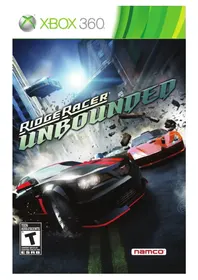
Ridge Racer Unbounded (Xbox 360) - Game MICROSOFT - Free user manual and instructions
Find the device manual for free Ridge Racer Unbounded (Xbox 360) MICROSOFT in PDF.


| Product Type | Video Game |
| Brand | Microsoft |
| Model | Ridge Racer Unbounded (Xbox 360) |
| Platform | Xbox 360 |
| Format | DVD-ROM |
| Box Dimensions (approx.) | 13.5 x 19 x 1.5 cm |
| Weight (approx.) | 100 g |
| Power Supply | None (uses console power supply) |
| Available Languages | French, English |
| ESRB Rating | E10+ (Everyone 10+) |
| Number of Players | 1 player, online multiplayer (Xbox LIVE) |
| Main Features | Arcade racing, drifting, destruction, city and track creation, Domination, Multiplayer, Challenges modes |
| Game Modes | Domination, Multiplayer, Create My Cities, Progress, Options |
| Essential Controls | Left stick to turn, A for power, B to drift, RT accelerate, LT brake, START pause |
| Care and Cleaning | Wipe the disc with a soft cloth from the center outward. Avoid scratches. |
| Safety | Read warnings about photosensitive epilepsy. Play in a well-lit room, at a distance from the screen. |
| Spare Parts and Repairability | Not applicable (software product). In case of defect, contact customer service. |
| General Information | Game published by Microsoft, developed by Namco Bandai. Limited 90-day warranty. |
Frequently Asked Questions - Ridge Racer Unbounded (Xbox 360) MICROSOFT
User questions about Ridge Racer Unbounded (Xbox 360) MICROSOFT
0 question about this device. Answer the ones you know or ask your own.
Ask a new question about this device
Download the instructions for your Game in PDF format for free! Find your manual Ridge Racer Unbounded (Xbox 360) - MICROSOFT and take your electronic device back in hand. On this page are published all the documents necessary for the use of your device. Ridge Racer Unbounded (Xbox 360) by MICROSOFT.
USER MANUAL Ridge Racer Unbounded (Xbox 360) MICROSOFT
WARNING Before playing this game, read the Xbox 360 ^® console and accessory manuals for important safety and health information. Keep all manuals for future reference. For replacement console and accessory manuals, go to www.xbox.com/support.
Important Health Warning About Playing Video Games
Photosensitive seizures
A very small percentage of people may experience a seizure when exposed to certain visual images, including fl ashing lights or patterns that may appear in video games. Even people who have no history of seizures or epilepsy may have an undiagnosed condition that can cause these “photosensitive epileptic seizures” while watching video games.
These seizures may have a variety of symptoms, including lightheadedness, altered vision, eye or face twitching, jerking or shaking of arms or legs, disorientation, confusion, or momentary loss of awareness. Seizures may also cause loss of consciousness or convulsions that can lead to injury from falling down or striking nearby objects.
Immediately stop playing and consult a doctor if you experience any of these symptoms. Parents should watch for or ask their children about the above symptoms—children and teenagers are more likely than adults to experience these seizures. The risk of photosensitive epileptic seizures may be reduced by taking the following precautions: Sit farther from the screen; use a smaller screen; play in a well-lit room; do not play when you are drowsy or fatigued.
If you or any of your relatives have a history of seizures or epilepsy, consult a doctor before playing.
ESRB Game Ratings
The Entertainment Software Rating Board (ESRB) ratings are designed to provide consumers, especially parents, with concise, impartial guidance about the age-appropriateness and content of computer and video games. This information can help consumers make informed purchase decisions about which games they deem suitable for their children and families.
ESRB ratings have two equal parts:
- Rating Symbols suggest age appropriateness for the game. These symbols appear on the front of virtually every game box available for retail sale or rental in the United States and Canada.
- Content Descriptors indicate elements in a game that may have triggered a particular rating and/or may be of interest or concern. The descriptors appear on the back of the box next to the rating symbol.

flowchart
graph LR
    A["Start: ECE"] --> B["ON FRONT"]
    B --> C["VIDEO GAME"]
    C --> D["ON BACK"]

    subgraph Stage1
        E["ECE"] --> F["EVERYONE 10+ TM"]
        G["ECE"] --> H["EVERYONE 10+"]
        I["ECE"] --> J["EVERYONE 10+"]
        K["TEN"] --> L["EVERYONE 10+"]
        M["MATURE 57+"] --> N["EVERYONE 10+"]
        O["MA"] --> P["EVERYONE 10+"]
        Q["NOTES OUT 18+"] --> R["EVERYONE 10+"]
    end

    subgraph Stage2
        S["ECE"] --> T["EVERYONE 10+ TM"]
        U["ECE"] --> V["Cartoon Violence Mild Lyrics"]
        W["ECE"] --> X["EVERYONE 10+ TM"]
        Y["ECE"] --> Z["EVERYONE 10+ TM"]
        AA["ECE"] --> AB["EVERYONE 10+ TM"]
        AC["ECE"] --> AD["EVERYONE 10+ TM"]
        AE["ECE"] --> AF["EVERYONE 10+ TM"]
        AG["ECE"] --> AH["EVERYONE 10+ TM"]
        AI["ECE"] --> AJ["EVERYONE 10+ TM"]
        AK["ECE"] --> AL["EVERYONE 10+ TM"]
        AM["ECE"] --> AN["EVERYONE 10+ TM"]
        AO["ECE"] --> AP["EVERYONE 10+ TM"]
        AQ["ECE"] --> AR["EVERYONE 10+ TM"]
        AS["ECE"] --> AT["EVERYONE 10+ TM"]
        AU["ECE"] --> AV["EVERYONE 10+ TM"]
        AW["ECE"] --> AX["EVERYONE 10+ TM"]
        AY["ECE"] --> AZ["EVERYONE 10+ TM"]
        BA["ECE"] --> BB["EVERYONE 10+ TM"]
        BC["ECE"] --> BD["EVERYONE 10+ TM"]
        BE["ECE"] --> BF["EVERYONE 10+ TM"]
        BG["ECE"] --> BH["EVERYONE 10+ TM"]
        BI["ECE"] --> BJ["EVERYONE 10+ TM"]
        BK["ECE"] --> BL["EVERYONE 10+ TM"]
        BM["ECE"] --> BN["EVERYONE 10+ TM"]
        BO["ECE"] --> BP["EVERYONE 10+ TM"]
        BQ["ECE"] --> BR["EVERYONE 10+ TM"]
        BS["ECE"] --> BT["EVERYONE 10+ TM"]
        BU["ECE"] --> BV["EVERYONE 10+ TM"]
        BW["ECE"] --> BX["EVERYONE 10+ TM"]
        BY["ECE"] --> BZ["EVERYONE 10+ TM"]
        CA["ECE"] --> CB["EVERYONE 10+ TM"]
        CC["ECE"] --> CD["EVERYONE 10+ TM"]
        CE["ECE"] --> CF["EVERYONE 10+ TM"]
        CG["ECE"] --> CH["EVERYONE 10+ TM"]
        CI["ECE"] --> CJ["EVERYONE 10+ TM"]
        CK["ECE"] --> CL["EVERYONE 10+ TM"]
        CM["ECE"] --> CN["EVERYONE 10+ TM"]
        CO["ECE"] --> CP["EVERYONE 10+ TM"]
        CEB["ECE"] --> CE["OVERYONE 10+ TM"]
        CFB["ECE"] --> CF["OVERYONE 10+ TM"]
        GD["BV"] --> GD["OVERYONE 10+ TM"]
    end
For more information, visit www.ESRB.org.
RIDGERACER UNBOUNDED
CONTENTS
Xbox LIVE....01
Game Controls....02
Main Menu....05
Game Screens 06
Customer Service Support and Warranty ....10
Xbox LIVE
Xbox LIVE® is your connection to more games, more entertainment, more fun. Go to www.xbox.com/live to learn more.
Connecting
Before you can use Xbox LIVE, connect your Xbox 360 console to a highspeed Internet connection and sign up to become an Xbox LIVE member. For more information about connecting, and to determine whether Xbox LIVE is available in your region, go to www.xbox.com/live/countries.
Family Settings
These easy and flexible tools enable parents and caregivers to decide which games young game players can access based on the content rating. Parents can restrict access to mature-rated content. Approve who and how your family interacts with others online with the Xbox LIVE service, and set time limits on how long they can play. For more information, go to www.xbox.com/familysettings.
GAME CONTROLS
The layout of the controller and basic game controls, such as on menus.
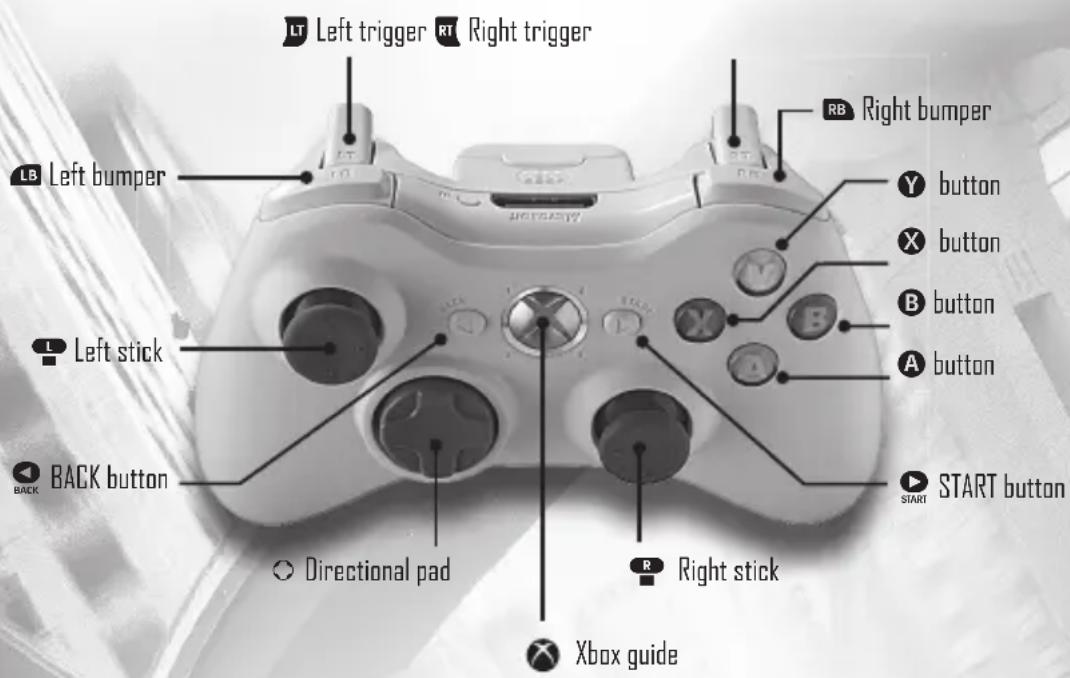
MENU CONTROLS
○ directional pad / left stick Navigate menus
A button Select
B button Back
RACE CONTROLS
left stick Steering
B button Drift
A button Power
RT Right trigger Accelerate
Left trigger Brake
Right stick Look Back
START button Pause game
○ DPAD Up Random song
○ DPAD Left Previous song
○ DPAD Right Next song
Y button Change Camera
CREATE CITIES CONTROLS
✗ button Delete City, Delete Event
Y button Publish City
START START Button Change City Name, Change Event Name
○ directional pad/ left stick Move along grid, Browse through the blocks
× button Rotate block
Y button Remove block
A button Open block browser, Select block, Place block, Copy block
B button Back
START START Button Options
BACK Button Switch view
ADVANCED EDITOR CONTROLS
| Controller Button | Cursor Mode(no objects selected) | Browser | Placer Mode(objects selected) |
| A | Selectproceed to object browser | Select Place | |
| B | - | Cancelreturn to cursor mode | Cancelreturn to cursor mode |
| X | --- | ||
| Y | Remove -- | ||
| ←,→,↑and↓ | Move camera | Browseitems/categorie | Move item |
| ←,→,↑and↓ | Rotate camera | Rotate camera (around obj.) | Rotate camera (around obj.) |
| ←,→,↑and↓ | - Scroll through Objects | Rotate/ Raise/Lower object | |
| LT | - Camera zoom out Camera zoom out | ||
| RT | - Camera zoom in Camera zoom in | ||
| LB | --- | ||
| RB | --- | ||
| L | -- Snap to ground | ||
| R | --- | ||
| START | Pause Menu Pause Menu Pause Menu | ||
| BACK | Toggle free drive -- |
MAIN MENU
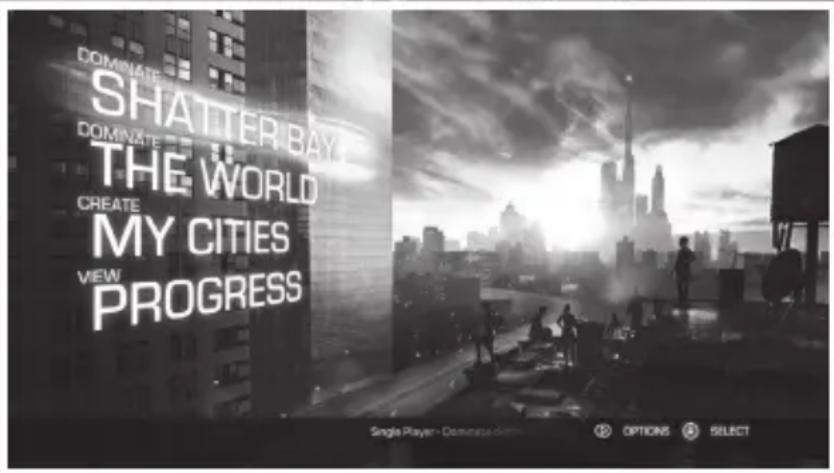
DOMINATE
Join the Unbounded and dominate in various game modes. Take part in events within the city of Shatter Bay or play cities created by other players. Choose Multiplayer to play against other players or the City Browser to search for cities to play. There are also challenges that you can take part in and compete for true domination. Earn Domination Score from any game mode to raise your rank and become the ultimate dominator!
CREATE MY CITIES
Create your own cities and events and upload them online. Once you've made a city, you can customise it by placing custom objects, change the event options (game mode, weather, amount of laps, etc.) and then try it out to make sure the track works.
VIEW PROGRESS
Keep track of your statistics.
OPTIONS
Adjust different game settings such as Display, Audio.
GAME SCREENS
IN-GAME
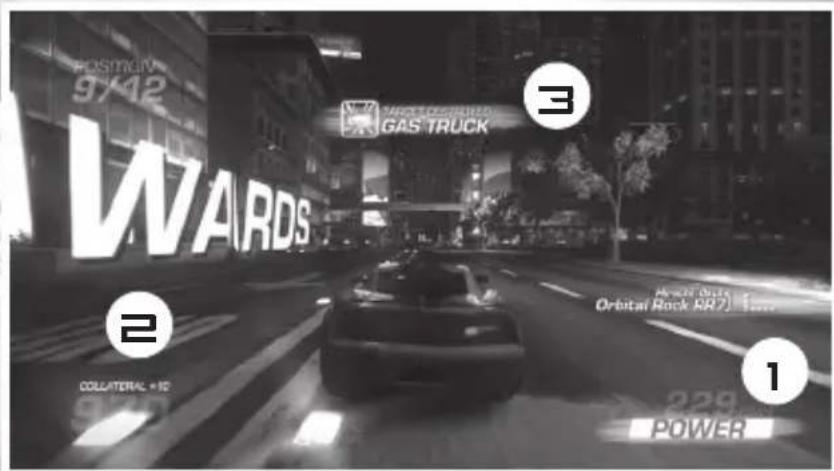
1 Power Gauge: When the Power gauge lights up, press Ⓐ button to destroy targets or opponent cars by crashing into them.
Domination Score: Gather score according to each game mode's requirements.
Awards: Earn awards by performing amazing maneuvers for example drifting for an extended time or destroying many opponents.
CREATE
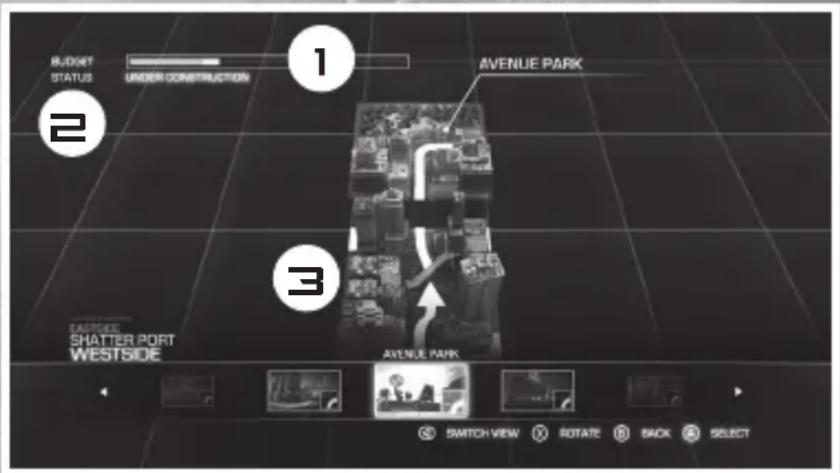
1 Budget: Each time you add new blocks a part of the budget is used. You cannot go over your budget so keep an eye on it. If you are running out of budget and wish to add new blocks, delete some of the old ones!
Status: Gives information or warnings about the status of your track creation (like Start Block Missing, Road cut-off', etc.).
3 Browser: Press the Ⓐ button to browse different types of blocks and districts to choose the ones you want for your track.
NOTES:
NOTES:
LIMITED WARRANTY
Ever get stuck and just need that extra edge to beat the level?
Having problems getting your game to work properly?
Now you can get one-on-one help from NAMCO BANDAI Games America Inc.
using your web browser!
Simply go to livehelp.namco.com for more details.
Live Counselors available from 9am-5pm Monday-Friday Pacific Time.
NAMCO BANDAI Games America Inc.
ATTN: Customer Service
1740 Technology Drive, Suite 600
San Jose, CA 95110
Before returning any defective materials to us, please contact us for a Return Merchandise Authorization (RMA) number. You can reach us at the address above, via e-mail at support@namcobandaigames.com or contact us at (408) 235-2222. Please note that any materials sent to us without an RMA number will be refused and returned. We highly recommend that you use a traceable and / or insured method of shipping the materials to us.
Namco Bandai Games America Inc. Online:
www.namcobandaigames.com
Visit our Website to get information about our new titles.
LIMITED WARRANTY
NAMCO BANDAI Games America Inc. warrants to the original purchaser that this NAMCO BANDAI Games America Inc. game pack shall be free from defects in material and workmanship for a period of ninety (90) days from the date of purchase. If a defect covered by this limited warranty occurs during this 90-day limited warranty period, NAMCO BANDAI Games America Inc. will repair or replace the defective game pack or component part, at its option, free of charge. This limited warranty does not apply if the defects have been caused by negligence, accident, unreasonable use, modification, tampering, or any other cause not related to defective material or workmanship.
LIMITATIONS ON WARRANTY
Any applicable implied warranties of merchantability and fitness for a particular purpose, are hereby limited to ninety (90) days from the date of purchase and are subject to the conditions set forth herein. In no event shall NAMCO BANDAI Games America Inc. be liable for consequential or incidental damages resulting from the possession or use of this product. The provisions of the limited warranty are valid in the United States only. Some states do not allow limitations on how long an implied warranty lasts, or exclusion of consequential or incidental damages, so the above limitation or exclusion may not apply to you. This limited warranty provides you with specific legal rights. You may have other rights which vary from state to state.
RIDGE RACER® Unbounded™ 2012 ©NAMCO BANDAI Games Inc.
▶ touche START Options
1740 Technology Drive, Suite 600
San Jose, CA 95110
RIDGE RACER® Unbounded™ 2012 ©NAMCO BANDAI Games Inc.
natural_image
Illustration of a dynamic action scene with glowing elements and motion lines against a blue sky (no text or symbols)
natural_image
Illustration of two characters in dynamic action poses, one in red and one in white, with no visible text or symbols.
natural_image
Action scene with two characters in dynamic combat poses under purple lighting (no visible text or symbols)SOULCALIBUR-V AVAILABLE NOW
SOULCALIBUR V MAINTENANT DISPONIBLE
www.SOULCALIBUR.com
TEEN
ADOLESCENTS

Mild Language
Suggestive Themes
Violence
Langage Grossier
Thèmes Suggestifs
Violence
ESRB CONTENT RATING
CLASSIFIÉ PAR L'ESRB
www.esrb.org

XBOX 360.
XBOX LIVE.
namco®
SOULCALIBUR®V & © 2012 NAMCO BANDAI Games Inc. Assassin's Creed™ & © 2012 Ubisoft Entertainment. All Rights Reserved. Assassin's Creed, Ubisoft and the Ubisoft logo are trademarks of Ubisoft. Entertainment in the U.S. and/or other countries. KINECT, Xbox, Xbox360, Xbox LIVE, and the Xbox logos are trademarks of the Microsoft group of companies and are used under license from Microsoft. The ratings icon is a trademark of the Entertainment Software Association.

- Important Health Warning About Playing Video Games
- Photosensitive seizures
- ESRB Game Ratings
- RIDGERACER UNBOUNDED
- CONTENTS
- Xbox LIVE
- Connecting
- Family Settings
- GAME CONTROLS
- MENU CONTROLS
- RACE CONTROLS
- CREATE CITIES CONTROLS
- MAIN MENU
- DOMINATE
- CREATE MY CITIES
- VIEW PROGRESS
- OPTIONS
- GAME SCREENS
- IN-GAME
- CREATE
- NOTES:
- LIMITED WARRANTY
- NAMCO BANDAI Games America Inc.
- LIMITATIONS ON WARRANTY
- SOULCALIBUR-V AVAILABLE NOW
- SOULCALIBUR V MAINTENANT DISPONIBLE
Brand : MICROSOFT
Model : Ridge Racer Unbounded (Xbox 360)
Category : Game