GA100 - Mechanical chipper BLACK & DECKER - Free user manual and instructions
Find the device manual for free GA100 BLACK & DECKER in PDF.



| Product type | Mechanical chipper (garden shredder) |
| Brand | Black & Decker |
| Model | GA100 |
| Power supply | Electric, mains 230 V ~ 50 Hz |
| Max. shredding capacity | Branches up to 25 mm diameter |
| Shreddable materials | Garden waste, branches, hedges, paper, cardboard |
| Cutting system | Grinding disc with reversible blades |
| Main funnel | For small branches (up to 6 mm) and light waste |
| Side tube | For branches 6 to 25 mm |
| Double insulation | Yes, earthing not required |
| Safety switch | Prevents starting if tube is removed |
| Thermal circuit breaker | Protects motor in case of overload |
| Sound pressure level | 96 dB(A) |
| Sound power level | 109 dB(A) |
| Hand-arm vibration | 11.2 m/s² |
| Recommended fuse | 13 amperes |
| Maintenance | Cleaning after each use, checking blades |
| Blade replacement | Reversible blades, replacement possible with hex key |
| Belt replacement | Possible, detailed procedure in the manual |
| After-sales service | Black & Decker France, Le Paisy, 69570 Dardilly |
| Warranty | According to provided warranty card |
Frequently Asked Questions - GA100 BLACK & DECKER
User questions about GA100 BLACK & DECKER
0 question about this device. Answer the ones you know or ask your own.
Ask a new question about this device
Download the instructions for your Mechanical chipper in PDF format for free! Find your manual GA100 - BLACK & DECKER and take your electronic device back in hand. On this page are published all the documents necessary for the use of your device. GA100 by BLACK & DECKER.
USER MANUAL GA100 BLACK & DECKER
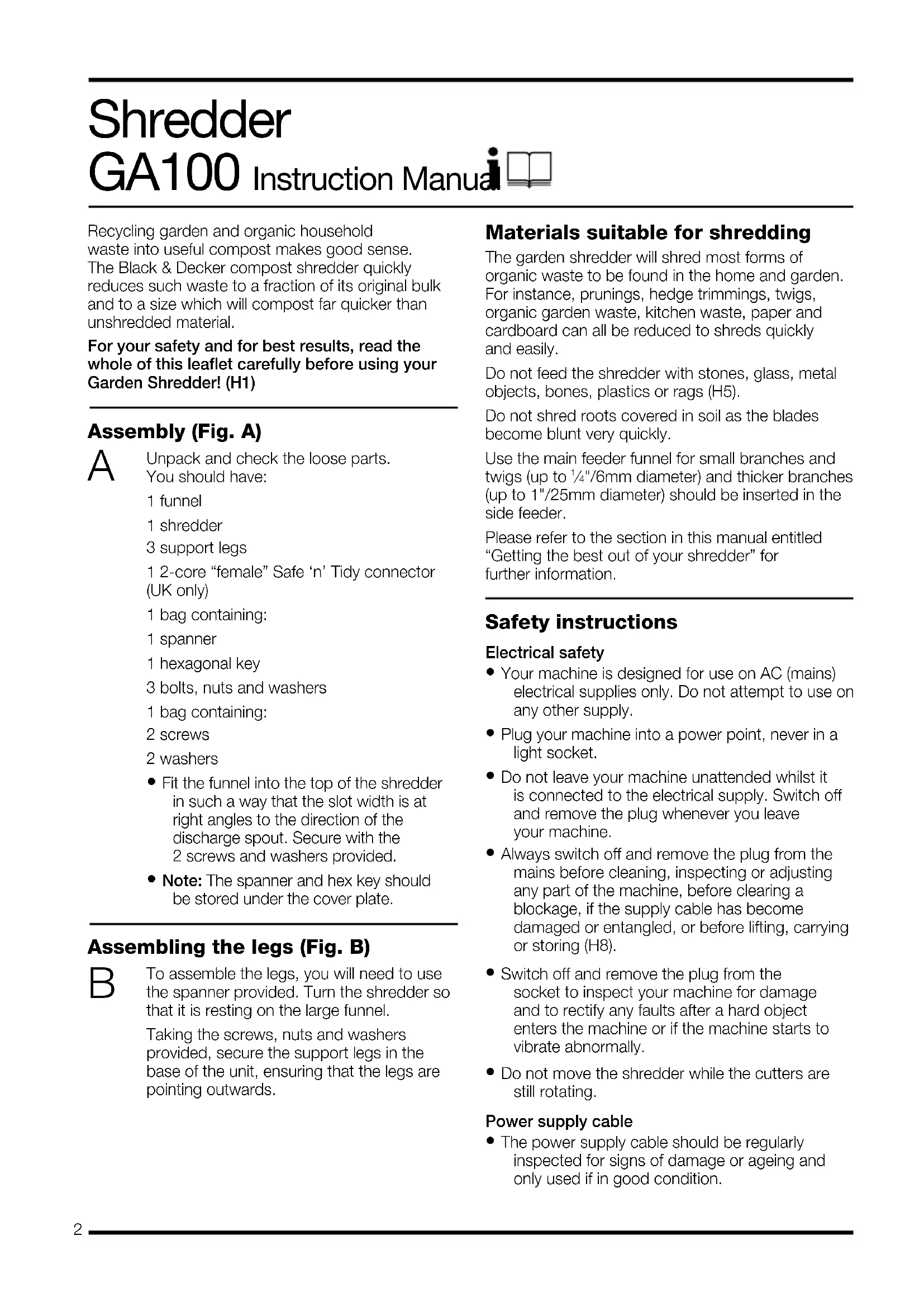
Recycling garden and organic household waste into useful compost makes good sense. The Black & Decker compost shredder quickly reduces such waste to a fraction of its original bulk and to a size which will compost far quicker than unshredded material.
For your safety and for best results, read the whole of this leaflet carefully before using your Garden Shredder! (H1)
Assembly (Fig. A)
A
Unpack and check the loose parts. You should have:
1 funnel
1 shredder
3 support legs
1 2-core "female" Safe 'n' Tidy connector (UK only)
1 bag containing:
1 spanner
1 hexagonal key
3 bolts, nuts and washers
1 bag containing:
2 screws
2 washers
- Fit the funnel into the top of the shredder in such a way that the slot width is at right angles to the direction of the discharge spout. Secure with the 2 screws and washers provided.
- Note: The spanner and hex key should be stored under the cover plate.
Assembling the legs (Fig. B)
B
To assemble the legs, you will need to use the spanner provided. Turn the shredder so that it is resting on the large funnel.
Taking the screws, nuts and washers provided, secure the support legs in the base of the unit, ensuring that the legs are pointing outwards.
Materials suitable for shredding
The garden shredder will shred most forms of organic waste to be found in the home and garden. For instance, prunings, hedge trimmings, twigs, organic garden waste, kitchen waste, paper and cardboard can all be reduced to shreds quickly and easily.
Do not feed the shredder with stones, glass, metal objects, bones, plastics or rags (H5).
Do not shred roots covered in soil as the blades become blunt very quickly.
Use the main feeder funnel for small branches and twigs (up to 14 "/6mm diameter) and thicker branches (up to 1"/25mm diameter) should be inserted in the side feeder.
Please refer to the section in this manual entitled "Getting the best out of your shredder" for further information.
Safety instructions
Electrical safety
- Your machine is designed for use on AC (mains) electrical supplies only. Do not attempt to use on any other supply.
- Plug your machine into a power point, never in a light socket.
- Do not leave your machine unattended whilst it is connected to the electrical supply. Switch off and remove the plug whenever you leave your machine.
- Always switch off and remove the plug from the mains before cleaning, inspecting or adjusting any part of the machine, before clearing a blockage, if the supply cable has become damaged or entangled, or before lifting, carrying or storing (H8).
- Switch off and remove the plug from the socket to inspect your machine for damage and to rectify any faults after a hard object enters the machine or if the machine starts to vibrate abnormally.
- Do not move the shredder while the cutters are still rotating.
Power supply cable
- The power supply cable should be regularly inspected for signs of damage or ageing and only used if in good condition.
ENGLISH
- Always keep the power supply cable away from the machine - be aware of its position at all times.
- Never carry your machine by the cable or jerk the cable to separate the connectors. Keep the cable away from heat sources, oils or sharp edges. Check the condition of your cable before use and do not use if damaged.
- You can use an extension cable up to 40m (130ft). This must be 2 core only, not lighter than PVC sheathed flexible cord, code designation H05VV-F, with 1.0mm ^2 copper cross section.
For Australia/New Zealand use extension cords complying to all regulations.
Clothing
- Always wear gloves when operating the shredder (H4).
- We recommend the wearing of protective eye glasses when operating the shredder (H2).
- To protect your feet, always wear stout shoes or boots.
- Wearing shoes with rubber or man-made soles will enhance your safety.
- Do not use the shredder barefoot or in open sandals.
- Where long trousers to protect your legs.
- Always use ear protection if the sound level (H3) seems uncomfortable when using your machine.
- Do not wear loose jewellery.
- Protect long hair from contact with the shredder.
Safety of others
- Do not allow children or any person who has not read this instruction leaflet or who is not familiar with the shredder to operate it.
- Do not allow children, animals or other persons near your machine when in use - always keep them at least 6m (20ft) away from the shredder.
- Remember that the operator/user is responsible for accidents or hazards occurring to other people or their property.
Working conditions
- Ensure that the shredder is standing on firm ground when in use.
- Do not use your shredder in the rain or in wet conditions (H7).
- Use only in daylight or good artificial light.
Using your machine
- Always be sure your machine is in a safe operating condition.
-
Before using your machine, disconnect it from the electrical supply and check that the blade, blade bolts and cutter assembly are not worn or damaged. Damaged blades and worn bolts are major hazards and must be replaced.
-
Under no circumstances should you attempt to turn your machine over on to its side whilst running, or attempt to stop the blade - always allow it to stop on its own. Do not put hands or feet near or under rotating parts.
- Never operate the shredder with defective guards or shields (H6).
- Replace worn or damaged parts for safety.
- Do not look directly into the funnel or shredder outlet while operating the shredder, as loose debris may be ejected. We recommend the wearing of protective eye glasses when operating the shredder.
- Under no circumstances put your hands in the cutting area whilst the cutters are still rotating. The blades will continue to rotate for a short while after the machine is switched off.
- Never start the shredder without the body and large feeder funnel being securely attached.
- Do not switch the motor off until the shredder is completely empty, as it may clog and be difficult to restart.
- Ensure that no hard objects, e.g. metal, stones or glass, come into contact with the blades.
Care of your machine
- Store your machine in a dry place when not in use, out of the reach of children.
- Do not use solvents or cleaning fluids to clean your machine - use a blunt scraper to remove grass and dirt. Always disconnect from the electrical supply before cleaning.
- Do not operate your machine if any parts are defective; discard all defective parts and fit new parts before use.
- Use only Black & Decker recommended replacement parts and accessories.
- Keep all nuts, bolts and screws tight to be sure your machine is in a safe working condition.
Double insulation

Your machine is double insulated. This means that all external metal parts are electrically isolated from the power supply. This is achieved by placing an extra insulation barrier between the electrical and mechanical parts. Double insulation means greater electrical safety and obviates the necessity of having the machine earthed.
Black & Decker policy is one of continuous improvement to their product and as such they reserve the right to change product specification without prior notice.
Electrical safety
Your machine should always be switched off at the mains before disconnecting any plug and socket connector or extension cables. The recommended fuse for use with your machine is 13 amps (UK only).
Note: Fuses do not give protection against electric shock.
New cable connection system (UK only)
Black & Decker continually make every effort to achieve the highest standards in performance, quality and reliability and recommend the use of a new outdoor cable connection system.
The new system gives additional protection against the possibility of water or moisture entering into the cable connector during normal use.
Note: The new connection system does not release the operator of the machine from the safety precautions and safe working practices given in the instruction leaflet. Particular attention is drawn to the coupler system as being “weather resistant” and not suitable for immersion, submersion or being subjected to water jets. Care should be taken to prevent the cable from lying or trailing through pools of water or from splashing with hose pipes.
The new cable system is available in various lengths through most major DIY retail outlets:
A6615 20m heavy duty cable, new socket, 13 amp plug
A6616 20m heavy duty cable, new socket, 13 amp plug and cable tidy system
A6617 30m heavy duty cable, new socket, 13 amp plug and cable tidy system
A6613 40m heavy duty cable, new socket, 13 amp plug and cable tidy reel
Existing cable systems (UK only)
If you already own an outdoor cable system, we recommend that you replace the existing "female" cable connector with the new 'female' connector (see below) which is supplied loose in the carton. (Please read the section entitled "fitting the 'female' connector".)
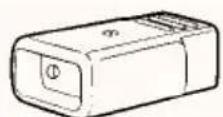
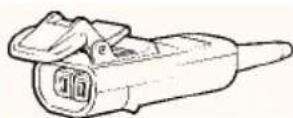
old 'female' connector new 'female' connector
Should you wish to convert more than one cable system, the new female connector is available as an accessory from most major DIY retail outlets and from Black & Decker service centres (cat. no. A6624S).
Existing powered garden tools (UK only)
To connect existing Black & Decker garden power tools to the new system you will require an adaptor (see below). This is available as an accessory from most major DIY retail outlets (cat. no. A6623S).
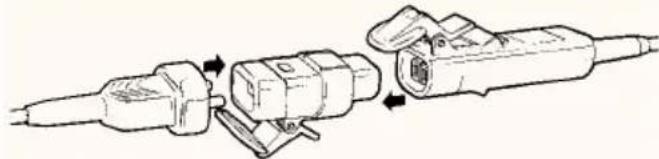
natural_image
Technical line drawing of a mechanical assembly with two connected components (no text or symbols)Warning! This adaptor is only suitable for products rated up to 500W. It is NOT recommended for use with the following: Hover mowers, rotary mowers with grass collection, chainsaws, shredders and blower vacs. Please contact your local service centre should you require further advice.
Fitting your own extension cable (UK only)
- When fitting your own extension cable fit a 13 amp plug (see “fitting the mains plug”) to one end of the cable and a ‘female’ connector (supplied loose in the carton) to the other end (see below). For wiring instructions see the following sections.
- A ‘male’ connector is already attached to the electrical supply cable on your machine and is designed to be non-rewireable. This should not be removed (see below). Should the cable and plug become damaged or need replacing, please return the machine to your Black & Decker service centre.
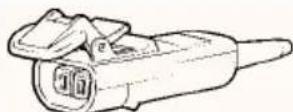
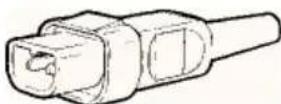
'female' connector 'male' connector
- Note: The recommended fuse for use with this machine is 13 amps.
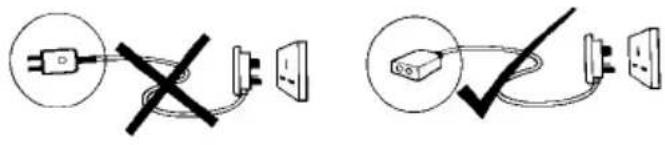
- Warning! Never wire an extension cable with anything other than the 'female' connector supplied and a 13 amp BS1363A approved plug with the recommended fuse. Never wire a 'male' connector to your extension cable and never wire an extension cable with a plug of any kind at each end of the cable. This is extremely dangerous and results in the pins being live which may cause a fatal electric shock.
text_image
Diagram showing two electrical circuit setups with symbols and connection points, including a plug, switch, and power outlet.Fitting the 'female' connector (UK only)
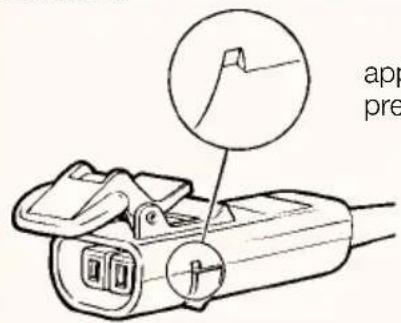
To remove the cover, unscrew the fixing screw until it is free of the nut which is located in the hexagonal recess on the underside of the connector.
Take care not to lose the nut if it falls out.
There is no need to completely remove the fixing screw as it is intended to remain captive in the cover. The cover can now be removed by applying pressure as follows.
text_image
app preapply pressure here
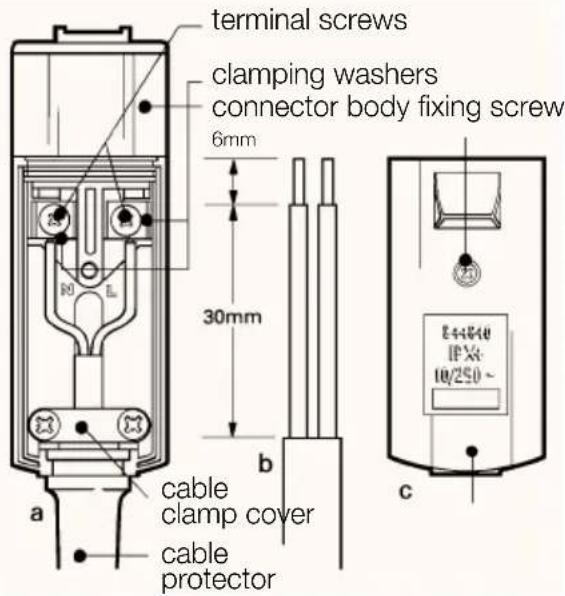
The extension cable contains two wires which are colour coded for easy recognition; brown is for 'Live' (L) and blue is for 'Neutral' (N). The female connector is marked 'L' for live and 'N' for neutral. These markings are located inside the body near the terminal screws (see opposite, figure a). With the connector cover removed, lift out the cable protector and proceed as follows:
• Pass the cable through from the narrow end of the cable protector (see opposite, figure a).
- Prepare the cable ends to the specified strip lengths (see opposite, figure b).
- Remove cable clamp (see opposite, figure a). Take care of loose parts.
- To connect the extension cable to the connector terminals, unscrew the terminal screws until the clamp washers have lifted just enough to enter the conductor between the raised washer and the terminal (see below). Connect the brown lead to 'L' and the blue lead to 'N'. N.B. There is no need to remove the terminal screws. Connections are not to be made under the screw heads.
terminal screw
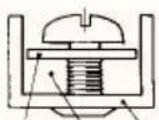
clamp terminal
washer conductor position
to left of screw
ENGLISH
- Locate the cable and cable protector into the body correctly (see opposite, figure a). Then fit the cable clamp over the outer sheath of the cable and screw down until the screws are fully home. Failure to do this may result in the cover not fitting correctly to the connector body.
- Before replacing the cover of the ‘female’ connector make sure that the cable clamp is holding the outer sheath of the cable firmly with screws fully home and that the two leads are correctly fixed at the terminal screws and are not taut (see opposite, figure a).
- Place the cover onto the body assembly ensuring that it seats flat, then retighten the fixing screw into the nut until the cover is securely held (see opposite, figure c).
- Finally check that the cable protector is secure and that there are no gaps between the cover and the connector body.
text_image
terminal screws clamping washers connector body fixing screw 6mm 30mm b cable clamp cover cable protector a c 14+44+0 IFX: 10/250~ cFitting a new mains plug (UK only)
text_image
Fit a BS1363A approved plug Connect blue to N (neutral) E L N Fit the recommended fuse Connect brown to L (live)Make sure that the outer sheath of the cable is held firmly by the clamp
240 volts AC only.
Never use a light
socket
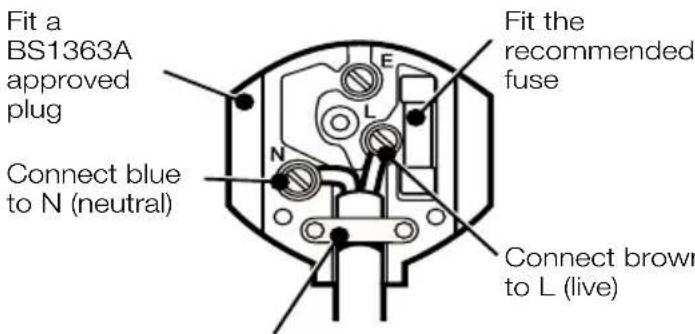
- The cable wire colours, or a letter, will be marked at the connection points of most good quality plugs. Attach the wires to their respective points in the plug (see above). Brown is for ‘Live’ (L) and blue is for ‘Neutral’ (N).
- The recommended fuse to use with this product is 13 amps. Please ensure that the plug being fitted is equipped with a fuse of the correct rating. Note: Fuses do not give personal protection against electric shock.
- Before replacing the top cover of the mains plug ensure that the cable restraint is holding the outer sheath on the cable firmly and that the two leads are correctly fixed at the terminal screws.
- Do not wire an extension cable directly into your machine yourself. Instead, take your machine to your nearest Black & Decker service centre.
- Warning! Never connect live or neutral wires to the earth pin marked 'E' or 12 .
Additional electrical safety
Increased safety can be obtained by having a qualified electrician install a high sensitivity circuit breaker in the house wiring. If you do not have such a circuit breaker installed, or you do not wish to have one installed, then we strongly recommend that the electrical power to the machine be supplied through a high sensitivity residual current device (RCD) with a tripping current of not more than 30mA. The RCD is designed to provide a high degree of personal protection against harmful electric current should fault conditions occur.
Warning! The use of an RCD or other circuit breaker unit does not release the operator of the machine from the safety instructions and safe working practices given in this manual.
Operating the shredder (Figs. C & D)
C
- To switch the unit on, press the white switch located on the side of the shredder motor.
- To switch the unit off, press the red switch located above the white 'on' switch.
In normal use, do not switch the shredder off until all shredded material has been cleared from the cutter assembly. If the unit is switched off too quickly, remaining bits of material may clog and stall the motor when it is switched on again. If this does occur, follow the procedure outlined below.
- The shredder is equipped with an integral safety switch to protect the motor from damage if it is overloaded. If this occurs, the shredder will automatically be
switched off. It will automatically reset after a delay of about 1 or 2 minutes which allows the motor to cool.
D
If the motor refuses to start after this period, the following procedure should be followed:
- Ensure the shredder is switched off.
- Disconnect the shredder from the power supply.
- Disconnect the motor plug connection.
- The shredder has been fitted with a safety-interlock device.
- The device ensures that the power is disconnected from the shredder if the funnel has been removed. The unit cannot be operated with the cutting blades exposed.
- To remove the funnel, it is necessary to pull the interlock device away from the motor housing as shown in Fig. D. The reverse of this procedure must be followed after the funnel has been reconnected.
- Loosen the thumbscrew and remove the feeder body.
- Clean out all material left in the shredder.
- Replace feeder body, tighten the screw and reconnect the motor plug
- Reconnect the power supply.
Why shred?
The material should be shredded to assist in quicker decomposition.
The relatively short duration of this decomposition process is made possible by the numerous ruptures resulting from the shredding process which provide excellent points of attack for the micro-organisms. In a short time the natural decomposition process of the shredded material will produce a rich healthy humus.
For the growth of leaves, flowers, fruits and roots, plants need important nutritive elements, which they draw chiefly from the soil. This extraction of food is reduced to a minimum by the return of organic humus naturally to the soil.
Organic fertilisers are decomposed in the soil by bacteria and are transformed into the important nutrients absorbed by the plants.
Humus regulates the water balance in the fertile topsoil, allows for sufficient aeration of the soil and facilitates growth of radicles.
Well fertilised soil produces better growth and a richer harvest. When used in conjunction with good, systematic rotation, humus will enrich poor soil.
ENGLISH
best c
- Read the instructions before using your shredder, particularly the safety instructions.
- Allow the unit to work at its own pace; do not overload it.
- Ensure that the cutters are kept sharp: dull cutters reduce the efficiency and can cause overloading.
- Dry material will help moist material clear the ejection chute.
- Save some dry sticks until last to help clean the unit out.
- Do not allow material to pile up and “compost” prior to shredding as it will become too damp.
- There are two clips on the front of the shredder to which a plastic bag or bin liner can be attached to collect the shreddings. However, to avoid the bag becoming detached, ensure that the bag is touching the ground when attaching.
See overleaf for a table illustrating how to achieve optimum performance from your shredder.
Maintenance
- Disconnect the unit from the mains before cleaning.
- After use, disconnect from the power supply, remove the funnel and clean and dry the casing and cutter disc area.
- Store in a dry place out of reach of children.
- Check that the cutter blades are kept sharp. New blades are available from any Black & Decker service centre.
Changing the cutters (Fig. E)
- Switch the shredder off and disconnect from the power supply.
- Disconnect the motor plug connection.
- Loosen the thumbscrew on the front of the shredder and remove the feeder body.
- In order to change the blades it is necessary to lock the cutter disc, by putting the spanner into the slot in the casing and cutting disc, so that the blades cannot rotate.
- Cutting blades can be used on both sides. When the first side has become blunt, release the two screws with the hexagonal key and turn the blades over, refit the screws and tighten securely. New blades are available from any Black & Decker service centre.
E
- After changing the blades, replace the feeder body and secure. Reconnect the motor plug.
- Reconnect the power supply.
- Pre-cutter blades are designed to last the life of the unit. If damaged, they must only be changed by Black & Decker service centre staff.
Renewing the drive belt (Fig. F)
F
If the shredder motor is running without driving the cutter disc, it indicates the drive belt has worn out and will need replacing. New drive belts are available from any Black & Decker service centre.
- Disconnect the shredder from the power supply.
- Place the shredder upside down so that it is resting on the large funnel.
- Remove the back support leg with the spanner.
- Remove the black cover plate by releasing the two screws.
- Remove the belt tension screw located at the front of the shredder.
- Disconnect the motor plug connection. Remove the motor by releasing the four hexagonal screws with the allen key provided.
- Remove the old drive belt and replace the new one over the belt pulley. Fit the motor, making sure that the drive spindle on the motor engages with the drive belt.
- Replace the four hexagonal screws and washers but do not secure.
- Replace the tension screw and tighten fully.
- Turn the belt pulley to check that the drive belt is still engaged with the motor drive spindle.
- The four hexagonal screws can now be tightened, and the motor plug reconnected.
- Replace and secure the cover plate and back support leg.
Black & Decker lawn and garden guarantee
Australia/New Zealand refer to your guarantee card or carton for details.
UK only - This guarantee provides 36 months parts cover and 12 months labour. Proof of purchase will be required.
If your Black & Decker product becomes defective, within the guarantee period, due to faulty materials and workmanship, we guarantee to either replace all defective parts, or at our discretion, replace the unit free of charge, provided that:
- The product is returned to us or our authorised repairers with evidence of purchase.
- The product has been used within the parameters of its consumer classification.
- The product has not been used for hire purposes.
- Repairs have not been attempted by anyone other than our own service staff or authorised repairers.
- The failure has not occurred through normal wear and tear.
This guarantee is offered as an extra benefit and is additional to our statutory rights.
What to do if your Black & Decker product needs repair
If your Black & Decker product should need repair the quickest and simplest way is to take or send it to a Black & Decker service centre, providing proof of purchase if a guarantee repair is required.
UK only - If you have difficulty, please contact our service and information centre (tel: 01753 511234) who will give you every assistance.
Other countries should refer to the guarantee card or Yellow pages for list of service centres.
The guarantee policy
Failures due to the following are not covered:
- Replacing worn or damaged blades, nylon line and chains, or cables damaged during storage or use. These are regarded as replacement items which wear during normal usage.
- Failures as a result of sudden impact or obvious abuse.
- Failures due to usage not in accordance with instructions and recommendations contained in the instruction manual.
The use of other than genuine Black & Decker accessories and parts may damage or reduce the performance of you Black & Decker product and may render the guarantee void.
Black & Decker after sales service
Black & Decker offers a nationwide after sales service through company operated service centres. It is our aim to offer excellent service, fast repairs, extensive parts availability and full accessory support.
If you need any help or advice please contact your local Black & Decker service centre manager. Full details of our unique after sales service can be obtained from any of our service centres (a full UK directory is printed on the reverse of the parts drawing included with your product).
EC Declaration of Conformity
We declare that unit:
GA100
conforms to DIN VDE 0730, DIN 11004 89/392/EEC, 89/336/EEC, 73/23/EEC, EN60335, EN55104, EN55014
A weighted sound pressure 96dB (A)
A weighted sound power 109dB (A)
Hand/arm weighted vibration 11.2m/s ^4
Brian Cooke
Director of Engineering
Spennymoor, County Durham DL16 6JG
United Kingdom
A guide to optimum performance from your shredder
| Material that should be shredded prior to composting | Material condition at time of shredding | Material feed point on shredder | Advice on shredding particular materials |
| Twigs and prunings up to 6mm diameter | As cut Top Feed into the top at a rate which the shredder will accept without overloading | ||
| Branches 6-25mm diameter | As cut Side Clip off side growth with secateurs and feed into the top. Feed the main stem into the side chute | ||
| Bedding plants, weeds, shrubby growth | As cut, fairly dry | Top Knock soil and stones off the roots to avoid damage to the blades. Avoid weeds that have seeded; the seeds may not decompose and may germinate later | |
| Freshly cut foliage, hedge prunings, kitchen waste (i.e. cabbage leaves, vegetable peelings) | As cut, no surface moisture | Top With any material having a high internal moisture content it is advisable to feed in some dry sticks at regular intervals to help push the material through the shredder and prevent it clogging. Experience will tell you the frequency and amount to put through | |
| Paper and cardboard Loose rolled Top Side Material must be very dry to avoid clogging. Sharpness of the cutters is important to give best results. Avoid following moist material as shreddings may stick to moist shredder interior | |||
| Fibrous foliage, pampas grass stems | Very dry Top Material must be dried out to avoid it wrapping around the "V" cutter. Cut into short lengths before feeding into the unit | ||
| Material suitable for composting without shredding | |||
| Grass clippings | |||
| Soft vegetation, particularly if it has become wet or natural decomposition has commenced | |||
| Damp paper or cardboard | |||
Trituratore
GA100
Manuale Istruzioni

Director of Engineering
Spennymoor, County Durham DL16 6JG
United Kingdom
ITALIANO
Director of Engineering
Spennymoor, County Durham DL16 6JG
United Kingdom
Spennymoor, County Durham DL16 6JG United Kingdom
Director of Engineering
Spennymoor, County Durham DL16 6JG United Kingdom
NEDERLANDS
Australia Black & Decker (A'asia) Pty Ltd Tel: 03 213 8200 286-288 Maroondah Highway Fax: 03 726 7150 North Croydon, Victoria 3136
Belgique/België Black & Decker Belgium NV Tel: 02 719 07 11 Weihoek 1, Nossegem Fax: 02 721 40 45 1930-Zaventem-Zuid
Danmark Black & Decker AB Tlf: 70-20 15 10 Hejrevang 26 B, 3450 Allerød Fax: 48-14 13 99
New Zealand Black & Decker 483 Great South Road, Penrose, Auckland Tel: 09 579 7600 Fax: 09 579 8200