F6DW24 FI1 - Dishwasher Fulgor Milano - Free user manual and instructions
Find the device manual for free F6DW24 FI1 Fulgor Milano in PDF.



Frequently Asked Questions - F6DW24 FI1 Fulgor Milano
User questions about F6DW24 FI1 Fulgor Milano
0 question about this device. Answer the ones you know or ask your own.
Ask a new question about this device
Download the instructions for your Dishwasher in PDF format for free! Find your manual F6DW24 FI1 - Fulgor Milano and take your electronic device back in hand. On this page are published all the documents necessary for the use of your device. F6DW24 FI1 by Fulgor Milano.
USER MANUAL F6DW24 FI1 Fulgor Milano
2.1 Upper panel 5
2.2 Setting the washing program and switching on and off 6
2.2.1 Switching on 9
2.2.2 Selecting and starting the program 10
2.2.3 End of program 10
2.2.4 Interrupting a program 10
2.2.5 Changing the current program 10
2.2.6 Canceling the current program 11
2.2.7 Options 11
2.2.8 Switching off 12
2.2.9 Removing the dishes 12
2.3 Additional functions 13
2.3.1 Adjusting the water softener 13
3 ENERGY SAVING AND ENVIRONMENTAL CONSIDERATIONS 15
4 TROUBLESHOOTING 16
5 OPERATING INSTRUCTIONS 18
5.1 Using the water softening system (on some models only) 18
5.2 Using the rinse-aid and detergent dispenser 20
5.2.1 Adding the rinse-aid 21
5.2.2 Adjusting the rinse-aid dispenser setting 21
5.2.3 Adding the detergent 22
5.3 General warnings and recommendations 24
5.4 Using the racks 26
5.4.1 Lower rack 27
5.4.2 Cutlery basket 29
5.4.3 Upper rack 30
6 CLEANING AND USER MAINTENANCE 33
6.1 General warnings and recommendations 33
6.2 Cleaning the water intake filter 34
6.3 Cleaning the spray arms 34
6.4 Cleaning the filter unit 36
6.5 General warnings and recommendations for correct maintenance ..... 37
6.6 Troubleshooting minor problems 38
7 IMPORTANT SAFETY AND INSTRUCTIONS 40
8 INSTALLATION AND HOOK-UP 46
9 TECHNICAL DATA 48
EN
1 INTRODUCTION
Thank you for choosing Fulgor Milano. To use this dishwasher correctly and safely, please read this manual carefully. The manual is divided into sections giving you a step-by-step guide all your appliance's functions. The enclosed information is complete with detailed illustrations. Following the cleaning instructions provided here will keep dishwasher performance at peak levels in the long term. This user friendly manual aims to provide answers to all your questions about using and caring for you dishwasher.
This manual comprises the following sections:
INTRODUCTION: general information about the manual.
USER INSTRUCTIONS: advice on selecting the washing programs and information about the dishwasher functions.
Useful advice is provided for the use of racks, spray arms, containers and filters.
WARNINGS: a list of warnings concerning safety and use of the dishwasher.
INSTALLATION INSTRUCTIONS: for the qualified technician who must carry out the installation, hook-up and testing of the appliance.
Symbols used in this manual
 | DANGER. This symbol highlights information and warnings which, if not observed, may compromise personal safety or damage the appliance. |
 | DANGER OF ELECTROCUTION. This symbol highlights information and warnings of an electrical nature which, if not observed, may compromise personal safety or damage the appliance. |
 | This symbol highlights general information and warnings. |
2 DESCRIPTION OF THE CONTROLS
2.1 Upper panel
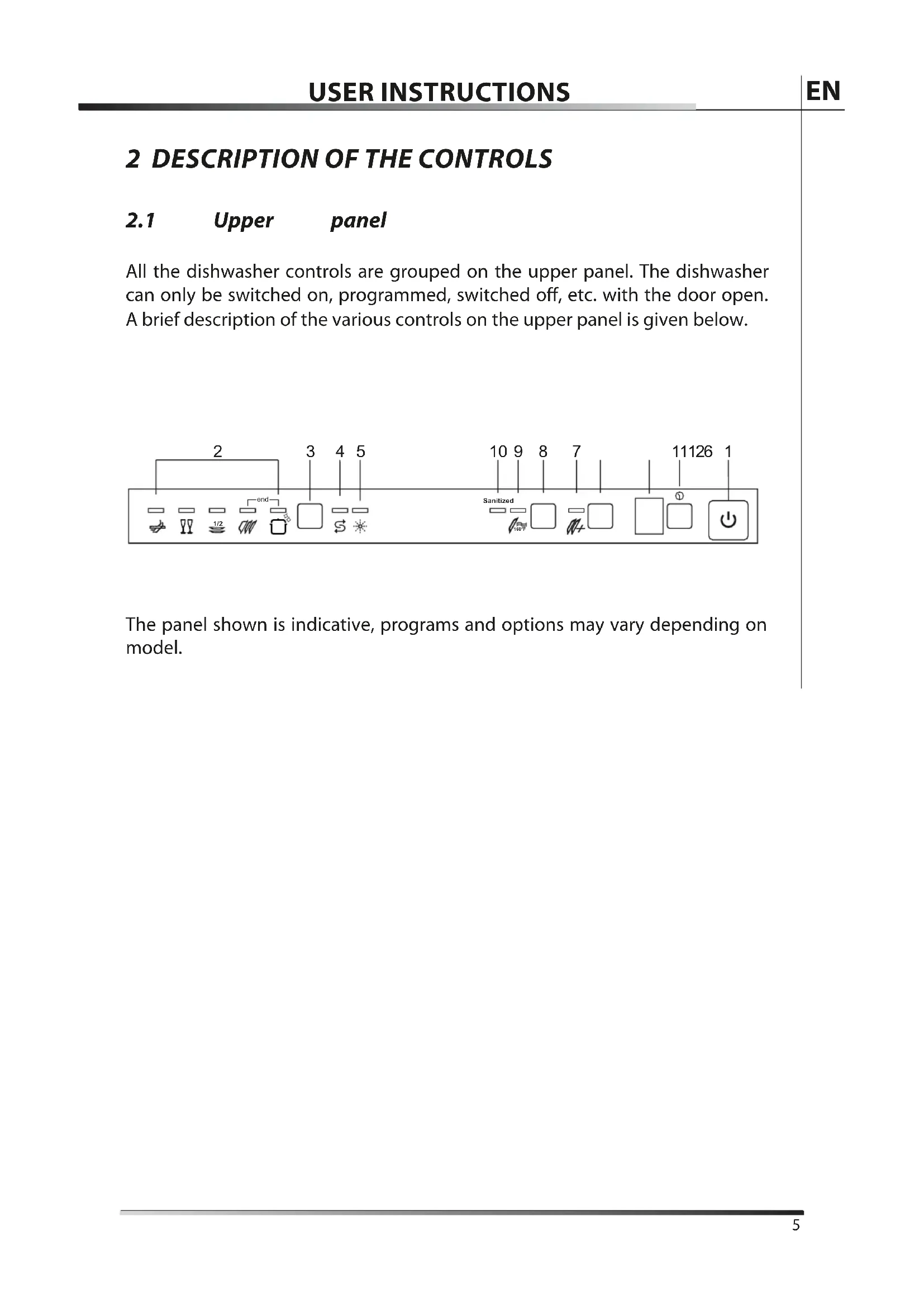
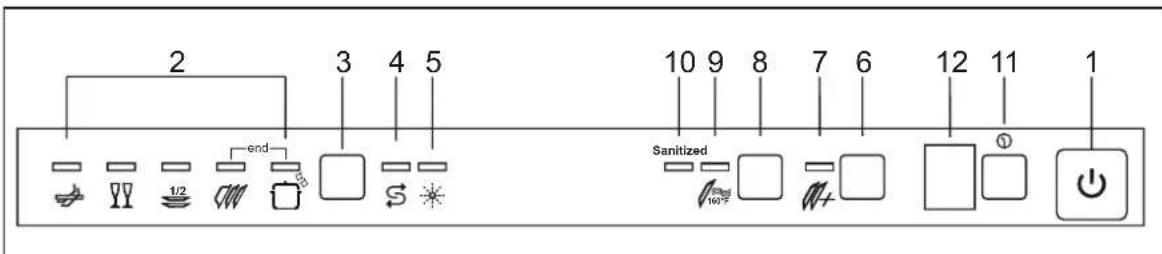
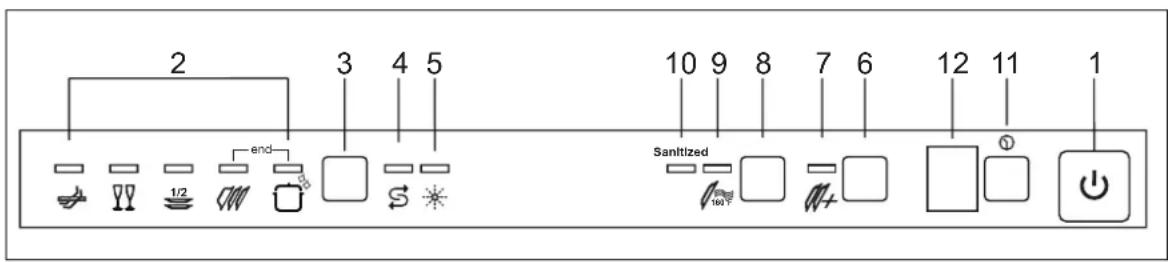
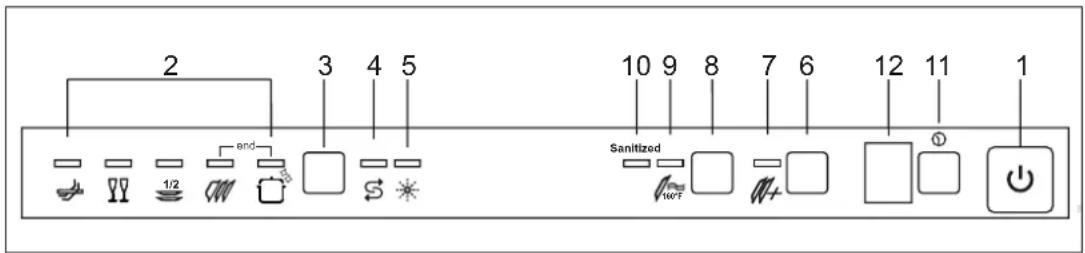
All the dishwasher controls are grouped on the upper panel. The dishwasher can only be switched on, programmed, switched off, etc. with the door open. A brief description of the various controls on the upper panel is given below.

text_image
2 3 4 5 10 9 8 7 11126 1 end Sanitized 190°FThe panel shown is indicative, programs and options may vary depending on model.
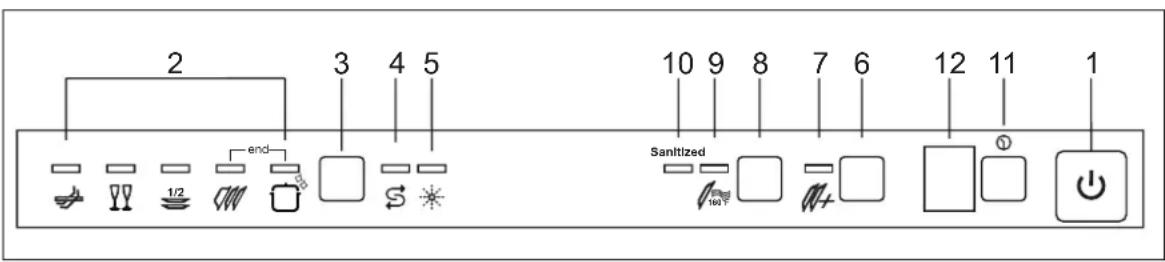
| 1 | On/off buttonPress to power the appliance. |
| 2 | Program indicator lightsThese show which program is selected and whether there are any faults (Troubleshooting). |
| 3 | Program indicator lightsThese show which program is selected and whether there are any faults (Troubleshooting). |
| 4 | Add salt indicator lightShows the appliance is low on salt. |
| 5 | Add rinse aid indicator light(only fitted on some models)Shows the appliance has run out of rinse aid. |
| 6 | Quick time option buttonPress this button to start one of the quick time programs (see pag. 8). |
| 7 | Quick time programs indicator lightShows that one of the quick time programs will be run |
| 8 | Extra drying option buttonPress to select the extra drying option |
| 9 | Extra drying option indicator lightShows the function is active |
| 10 | Sanitation indicator lightShows that sanitation has been completed (see notes in the programs table) |
| 11 | Programme delay buttonPress to delay the start of the program up to 9 hours. |
| 12 | Information display |
2.2 Setting the washing program and switching on and off
The dishwasher is equipped with a control panel which is used to program the appliance and switch it on and off.

text_image
2 3 4 5 10 9 8 7 Sanitized 11126 1 1/2 end 1027The manual contains the programs table for several models.
To select the most suitable program for the dishes to wash consult the following table which specifies the most appropriate type of washing sequence depending on the kind of dishes and how dirty they are.
| PROGRAM, NUMBER & SYMBOL | LOAD DESCRIPTION | PROGRAM CYCLES | DURATION | CONSUMPTION | |||
| MINUTES (1) | WATER | ENERGY KWH (1) | |||||
| 1 | 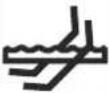 | RAPID 27' | Dishes with light soil, washed immediately after use. | Wash at 38°C (100.4°F) Rinse at 50°C (112°F) | 27 | 6.5 l 1.72 gal. | 0.4 |
| 2 |  | CRYSTAL | Glass china and mixed dishes with light soil. | Wash at 45°C (113°F) Cold rinse Rinse at 70°C (158°F) Dry | 65 | 12 l 3.17 gal. | 0.5 |
| 3 | 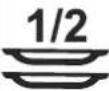 | DAILY HALF LOAD | Half load dishes with normal soil, washed immediately after use. | Wash at 65°C (149°F) Rinse at 70°C (158°F) Dry | 90 | 13 l 3.45 gal. | 1.00 |
| 4 |  | NORMAL (2) | Dishes with normal soil, including dried-on residues. | Wash at 45°C (113°F) Cold rinse Rinse at 65°C (149°F) Dry | 100 | 12 l 3.45 gal. | 0.7 |
| 5 |  | EXTREME WASH ETL SANIT- TION LISTED | Very dirty pans and dishes, including dried-on residues. | Hot prewash Wash at 70°C (158°F) 2 cold rinses Rinse at 70°C (158°F) Dry | 122 | 18.3 l 4.83 gal. | 1.12 |
| 6 |  + + | SOAK | Pans and dishes awaiting completion of the load. | Cold prewash | 16 | 3.9 l1.03 gal. | 0.4 |
| 7 |  + + | LIGHT | Delicate dishes with light soil. | Cold prewash Wash at 45°C (113°F)Cold rinse Rinse at 70°C (158°F) | 50 | 12 l3.17 gal. | 0.5 |
| 8 | 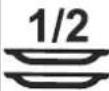 + + | NORMAL FAST | Dishes with normal soil, washed immediately after use. | Cold prewash Wash at 65°C (149°F)Cold rinse Rinse at 70°C (158°F) | 90 | 13 l3.45 gal. | 1.00 |
| 9 |  + + | ECO | Dishes with normal soil, including dried-on residues | Cold prewash Wash at 55°C (131°F)Cold rinse Rinse at 70°C (158°F) | 85 | 12 l3.17 gal. | 0.7 |
| 10 | 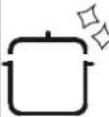 + + | STRONG AND FAST | Very dirty pans and dishes, including dried-on residues. | Wash at 65°C (149°F)Cold rinses Rinse at 70°C (158°F) | 55 | 9.5 l2.51 gal. | 1.12 |
(1) The cycle times and electrical energy listed are based on normal soil loads and 120^ F ( 49^ C) incoming water and will vary based on your actual conditions.
(2) Program for energy star.
- Only "EXTREME WASH" program conforms to NSF std 184 and is certified by INTERTEK with the ETL SANITATION LISTED.
- When the "Sanitized" light shine it means that the dishwasher and its contents have been sanitized according to the requirements of the National Sanitation Foundation (NSF).
Only run the soak program with half loads.
To run programs 6, 7, 8, 9, 10, select the required standard program and then press the quick time option button (ref. 6).
After using the above tables to choose the most suitable washing cycle, program the appliance.

Before starting a washing program, make sure that:
• The water supply valve is open.
- The correct amount of detergent has been added to the dispenser (to add detergent, see sec. 5.2.3).
- The spray arms are able to rotate freely and without obstruction.
• The racks have been correctly loaded (see sec 5.4).
• The dishwasher door is securely closed.
2.2.1 Switching on
Press the on/off button (ref. 1) to start the dishwasher. Then wait for one of the program indicator lights to turn on (ref. 2).

text_image
2 3 4 5 10 9 8 7 11126 1 Sanitized 1027 1/2 end S 11126 ① ② ③ ④ ⑤2.2.2 Selecting and starting the program
- Press the program selection button (ref. 3) several times until the indicator light corresponding to the required program turns on (ref. 2)
- If required, press the relative buttons to select any complementary functions (e.g.: “extra drying”, “program delay”; see para 2.2.7 “options”);
- Close the door; the program will start after about 2 seconds and the relevant indicator light will flash throughout the cycle (program running signal).

If the door of the dishwasher has not been closed or has been incorrectly closed, the washing cycle will not begin.
FAST CYCLES OPTION
- Select this option together with any washing program (except the soak program) to SHORTEN the cycle by a minimum of 10% to a maximum of 55%, depending on the cycle selected. To activate this option, press the FAST CYCLES button 🎨 (light comes on) after selecting the program required. The option is automatically deactivated at the end of the program.
2.2.3 End of program
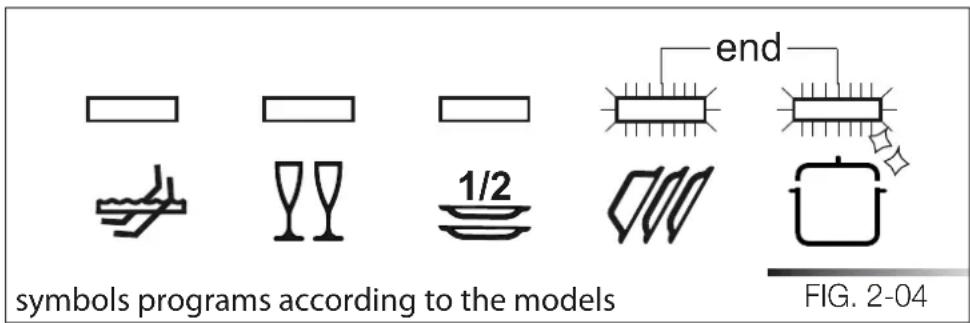
The end of the program is signaled by a short beep. Additionally the indicator light of the normal and strong programs (marked “end”) flash.
2.2.4 Interrupting a program
To interrupt the current program simply open the door of the dishwasher; to restart the program, simply close the door again. The program restarts from where it was interrupted.
2.2.5 Changing the current program
To change the current program, simply open the door of the dishwasher and select the new program. Close the door to run the new program automatically.
text_image
2 3 4 5 end 10 9 8 7 6 12 11 1 Sanitized 100 ° ①2.2.6 Canceling the current program
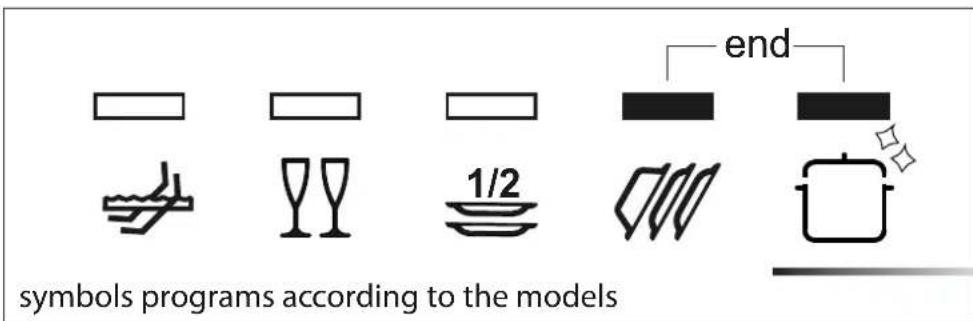
- To cancel the current program, open the door and press and hold down the program selection button (ref. 3) for a few seconds until the indicator lights of the fourth and fifth programs turn on (ref. pr. 4, pr. 5 fig. below).
- Close the door again.
- After about 1 minute, the dishwasher terminates the cycle and the indicator lights of the fourth and fifth programs (ref. pr. 4, pr. 5 fig. below) start flashing.
text_image
symbolis programs according to the models 1/2 end2.2.7 Extra Drying Option (ref. 8)
This function is designed for loads with hard to dry items such as saucepans, non-stick pans and plastic containers. This function increases the hot rinse temperature and can be used in programs featuring a final drying phase (see programs table).
PROGRAM DELAY
(available for all programs except soak)
The “program delay” function delays the beginning of the washing program up to 9 hours from the moment in which programming takes place. This makes it possible to use the dishwasher at a certain time of day.
Before programming a delay, open the door of the dishwasher, select the required washing program (see sec. 2.2. "Setting the washing program and switching on and off"). Select the amount of delay by pressing the Program delay button (ref. 11); each time you press the button, the display increases the delay before the appliance starts by 1 hour.
text_image
2 3 4 5 end 10 9 8 7 6 12 11 1 Sanitized 10/72.2.8 Switching off
At the end of the program, the dishwasher emits a short beep and the indicator lights of the fourth and fifth program (ref. pr. 4, pr. 5) flash below. Turn off the appliance by opening the door and pressing the on/off button (ref.1)
text_image
symbols programs according to the models 1/2 END FIG. 2-04
If it is necessary to open the door during the washing cycle, the program will be interrupted, the relative indicator light will continue to flash and a beep will indicate that the cycle has not terminated. Wait for about 1 minute before closing the door and continuing with the program. When the door closes, the program will start from where it was interrupted. This operation should be performed only if necessary as it could cause irregular program performance.
4.2.9 REMOVING THE DISHES

At the end of the washing program, wait at least 20 minute before removing the dishes in order to allow them to cool. To prevent any water droplets on the upper rack from falling onto the dishes in the lower rack, empty the lower rack first and then the upper one.
text_image
2 3 4 5 10 9 8 7 6 12 11 1 Sanitized 100 ° 100 ° 12.3 A additional functions
2.3.1 Adjusting the water softener

N.B.: a different washing program from soak must be used to make the following adjustment
Press and hold down the program delay button (11) until the preset value appears followed by a dot (normally 3.). Release the button and then press it again until the required value is displayed, as indicated in the table (see tab. 2-03).
The 6 possible adjustment levels will appear in this sequence:
3., 4., 5., 0., 1., 2..
When the required value appears on the display, release the button; after 5 seconds the appliance automatically reverts to the program delay and the adjustment is set to the chosen value.

N.B.: the display indicates the water hardness adjustment and the program delay. A dot (.) after the number means that the water hardness adjustment is being displayed. If no dot (.) appears, the program delay is being displayed.
text_image
2 3 4 5 10 9 8 7 6 12 11 1 Sanitized 1wF| WATER HARDNESS | SETTING | ||
| German degrees (°D) | French degrees (°F) | American degrees grains/galls | |
| 0 - 4 | 0 - 7 | 0 - 4.5 | 0. |
| 5 - 15 | 8 - 25 | 4.6 - 14.5 | 1. |
| 16 - 23 | 26 - 40 | 14.6 - 23.5 | 2. |
| 24 - 31 | 41 - 60 | 23.6 - 35 | 3. |
| 32 - 47 | 61 - 80 | 35.1 - 46.5 | 4. |
| 48 - 58 | 81 - 100 | 46.6 - 58.5 | 5. |
Contact your local water board for information on the hardness of your water supply.
3 ENERGY SAVING AND ENVIRONMENTAL CONSIDERATIONS
• Always try to run the dishwasher fully loaded.
- Do not pre-rinse the dishes under a running tap.
• Use the most suitable washing program for each type of load.
- If available, connect the dishwasher to a hot water system with a temperature of up to 60°C (140°F).
- When possible, skip the drying cycle by opening the door after washing: the air and the residual heat will dry the dishes naturally.
3.1 Reducing the consumption of detergent
The phosphates contained in many popular dishwasher detergents are harmful to the environment. To avoid using excessive amounts of detergent and to save on electricity:
- Separate the more delicate items from those that are more resistant to aggressive detergents and high temperatures;
- Do not pour the detergent directly onto the dishes.
GNITOOHSELBUORT 4
The dishwasher can signal a number of malfunctions by turning on various indicator lights, as described below
| FAULT | DESCRIPTION | |
| E1 | 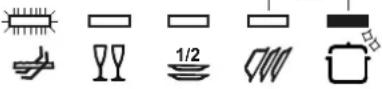 | Acquastop failureThe anti-flooding system has tripped (only for models fitted with this feature). Activates in case of water leaks. Contact the technical assistance service. |
| E2 | 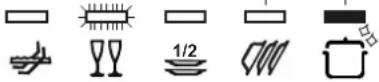 | Safety levelThe system limiting the water level in the dishwasher has tripped. Interrupt the current program. Switch off the dishwasher, switch it back on again, program a new cycle and press start. If the problem persists, contact the technical assistance service. |
| E3 | 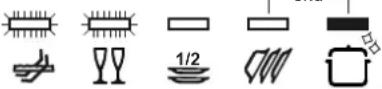 | Water heating malfunctionThe water is not heated or is incorrectly heated. Repeat the washing program; if the problem persists, contact the technical assistance service. |
| E4 | 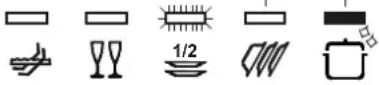 | Water temperature monitoring malfunctionInterrupt the current program. Switch off the dishwasher, switch it back on again, program a new cycle and press start. If the problem persists, contact the technical assistance service. |
| E5 | 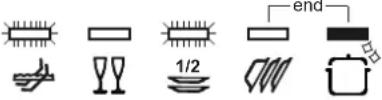 | Water intake malfunctionThe appliance does not take in water or does so incorrectly. Make sure the water connections are correct, that the water supply tap is open and that the filter is not clogged. If the problem persists, contact the technical assistance service. |

Light off

Light on

Light flashing
| FAULT DESCRIPTION | ||
| E6 | Water pump-out malfunctionThe appliance does not pump out the water or does so incorrectly. Make sure the drain hose is not kinked or crushed and that the siphon and filters are not clogged. If the problem persists, contact the technical assistance service. | |
| E7 | Turbine flow-regulator malfunction(only for models fitted with this feature)The appliance is unable to precisely measure the quantity of incoming water. Interrupt the current program and switch off the dishwasher. Switch it back on again, program a new cycle and press start. If the problem persists, contact the technical assistance service. | |
| E8 | Alternate washing system malfunctionInterrupt the current program and switch off the dishwasher. Switch it back on again, program a new cycle and press start. If the problem persists, contact the technical assistance service. | |
| E9 | Water intake system malfunctionContact the technical assistance service. | |

Light off

Light on

Light fl ashing
If an alarm situation occurs, the dishwasher interrupts the current program and signals the fault.
- Alarms E1, E2, E3, E4, E8, E9 immediately terminate the current program.
- Alarms E5, E6 interrupt the current program and, after the problem has been eliminated, resume the cycle.
- Alarm E7 is displayed at the end of the cycle which, however, is completed given that it does not jeopardize the operation of the dishwasher.
To "reset" an alarm:
- open or close the door, or switch the appliance on and back off again. At this point, the dishwasher can be programmed again.

If the fault persists, contact the Authorized Technical Assistance Service.
5
OPERATING
INSTRUCTIONS

BEFORE STARTING TO USE THE APPLIANCE, MAKE SURE YOU HAVE READ AND UNDERSTOOD ALL THE WARNINGS CONTAINED IN CHAPTER 7 "IMPORTANT SAFETY INSTRUCTIONS".
Once the dishwasher has been correctly installed, prepare for use as follows:
- adjust the water softening system;
• add the regenerating salt;
• add the rinse-aid and detergent.
5.1 Using the water softening system
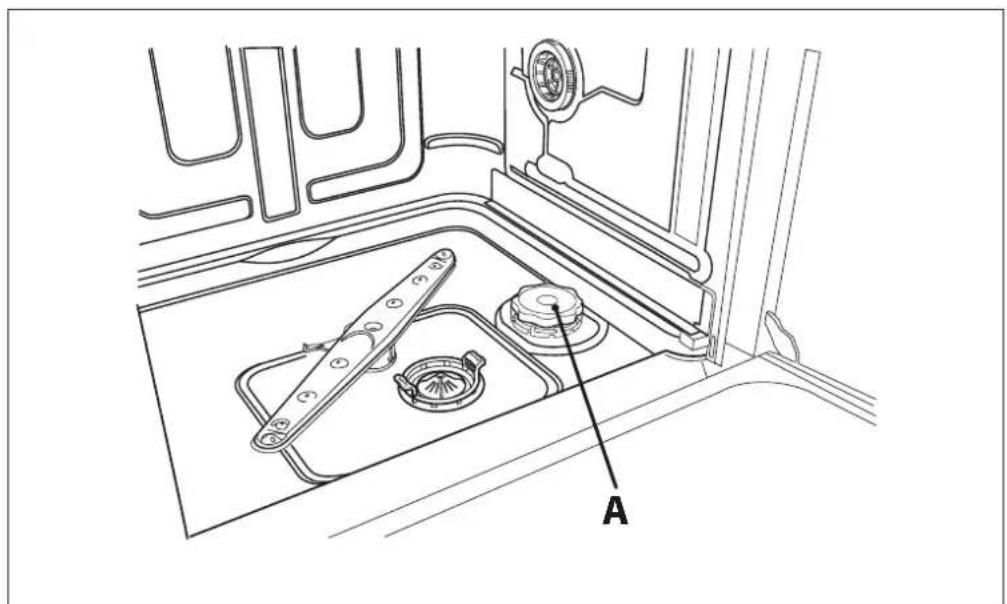
The amount of scale contained in the water (water hardness index) can cause whitish haze on the dry dishes, which tend to become dull over time. The dishwasher is equipped with an automatic softening system which uses a special regenerating salt to reduce the hardness of the water. The dishwasher is factory set for water hardness level 3 (average hardness 41-60°dF - 24-31°dH / 23.6-35 gpg). When using water of medium hardness, the regenerating salt container should be refilled after approximately 20 washing cycles. The salt container can hold approximately 1.7 Kg (3.75 lb) of salt in grains. Some models are equipped with an optical no-salt indicator. In these models, the cap of the salt container contains a green float which descends as the salt concentration in the water drops. When the green float can no longer be seen, the container must be topped up with regenerating salt. The container is situated at the bottom of the dishwasher. After removing the lower rack, unscrew the salt container cap (ref. A fig. below) by turning it anticlockwise and pour in the salt using the funnel (following figure) supplied with the dishwasher. Before replacing the cap (ref. A fig. below), remove any salt residues from around the opening.
text_image
A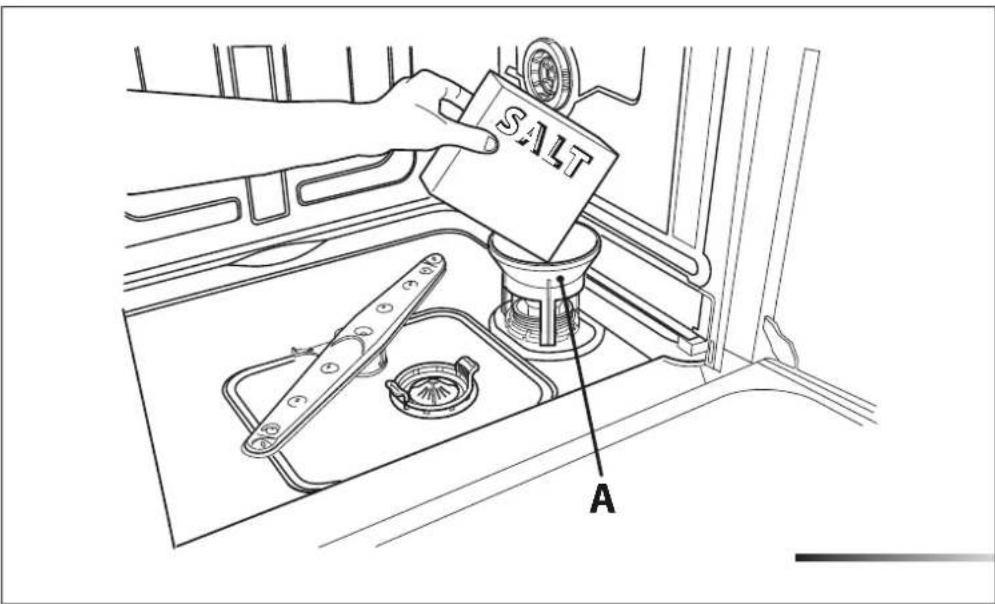
text_image
SALT A- When using the dishwasher for the first time, in addition to the salt it is also necessary to add one liter of water to the container.
• Each time the salt container is refilled, make sure that the cap (ref. A fig. above) is securely closed. The mixture of water and detergent must never penetrate the salt container, as this would compromise the operation of the regeneration system and cause complications requiring repair which would not be covered by warranty.
- Only use regenerating salt specially formulated for domestic dishwashers. If using salt tablets, do not fill the container completely.
- Do not use table salt as it contains insoluble substances which, over time, may damage the water softening system.
- When necessary, refill the regenerating salt container before starting the washing program. In this way, the excess saline solution will be immediately removed by the water; the prolonged presence of salt water inside the tank may lead to corrosion.

BE CAREFUL NOT TO CONFUSE THE SALT AND DETERGENT PACKAGES; ADDING DETERGENT TO THE SALT CONTAINER WILL DAMAGE THE WATER SOFTENING SYSTEM.
5.2 Using the rinse-aid and detergent dispensers
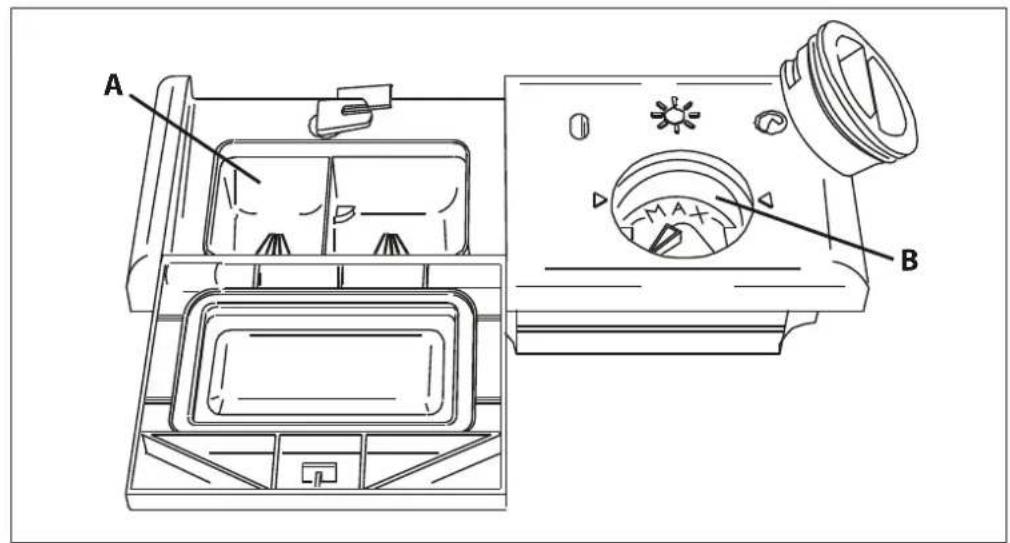
The detergent and rinse aid dispensers are situated on the inner part of the door: the detergent dispenser (ref. A fig. below) is on the left, and the rinse-aid dispenser (ref. B fig. below) is on the right.
text_image
A B
WITH THE EXCEPTION OF THE SOAK PROGRAM, BEFORE EVERY WASHING CYCLE IT IS NECESSARY TO ADD THE REQUIRED AMOUNT OF DETERGENT TO THE DETERGENT DISPENSER. THE RINSE AID, ON THE OTHER HAND, SHOULD ONLY BE ADDED AS REQUIRED.
5. .1 Adding the rinse-aid
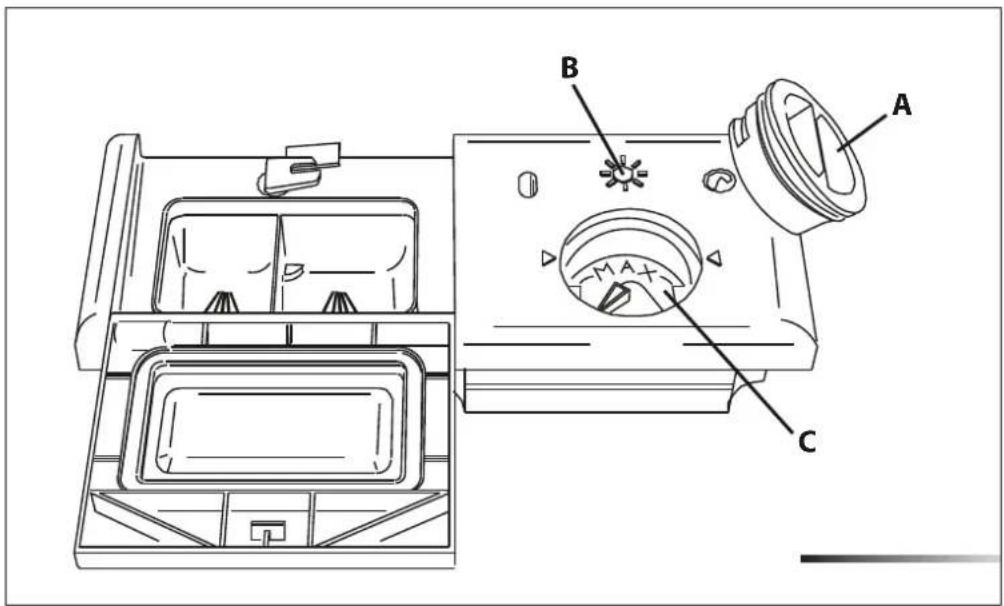
The rinse aid helps the dishes dry faster and prevents the formation of scale deposits and staining; it is automatically added to the water during the final rinse cycle, from the container situated on the inner side of the door.
text_image
Technical diagram of a refrigerator interior with labeled parts A, B, and CTo add rinse aid:
- Open the door.
- Rotate the container cover (ref. A fig. above) anticlockwise by 14 of a turn and remove it.
- Add the rinse aid until the container is full (approximately 140 ml). The optical level indicator (ref. B fig. above), on the side of the cap should be completely ob-scured. Refill the rinse aid when the optical level indicator becomes clear again, or when the rinse aid warning light illuminates (see "Description of controls" manual).
- Replace the cover (ref. A fig. above) by turning it in a clockwise direction until it is fully closed.
- Use a cloth to remove any spillage of rinse aid which might lead to the formation of excess foam.
5. .2 Adjusting the rinse-aid dispenser setting
The rinse-aid dispenser can be set to one of 6 different levels. The dishwasher is factory set for medium water hardness (selector set to "3"). To change the setting, turn the dispenser selector (ref. c fig. above) to the desired position: the amount of rinse-aid dispensed is proportional to the position of this selector. Make that the minimum amount of rinse-aid (selector turned to "1") is approximately 1 ml and the maximum amount (selector turned to "6") is approximately 6 ml.
- To adjust the rinse aid setting, rotate the dispenser cover (ref. A previous figure) through a quarter turn in an anticlockwise direction and remove it.
- Then use a screwdriver to rotate the rinse aid selector to the desired position.
- Replace the cover (ref. A previous figure) by turning it in a clockwise direction until it is fully closed.
- The amount of rinse aid must be increased if the washed dishes appear dull or feature circular stains.
- If, on the other hand, the dishes are sticky or have white streaks, it is necessary to reduce the rinse aid setting.
5.2.3 Adding the detergent

DO NOT INHALE OR SWALLOW DETERGENT AS THIS MAY CAUSE BURNS AND/OR PERMANENT DAMAGE TO THE NOSE, MOUTH AND THROAT, AND EVEN LEADING TO SUFFOCATION; KEEP DETERGENT AWAY FROM YOUR EYES. IF ONE OF THE ABOVE SITUATIONS OCCURS, SEEK MEDICAL ASSISTANCE IMMEDIATELY.
PREVENT CHILDREN FROM COMING INTO CONTACT WITH DETERGENT;
KEEP THEM AWAY FROM THE DISHWASHER WHEN THE DOOR IS OPEN AS IT MAY CONTAIN DETERGENT RESIDUES. FILL THE DISHWASHER JUST BEFORE STARTING THE WASHING CYCLE AND THEN KEEP THE DETERGENT OUT OF THE REACH OF CHILDREN.
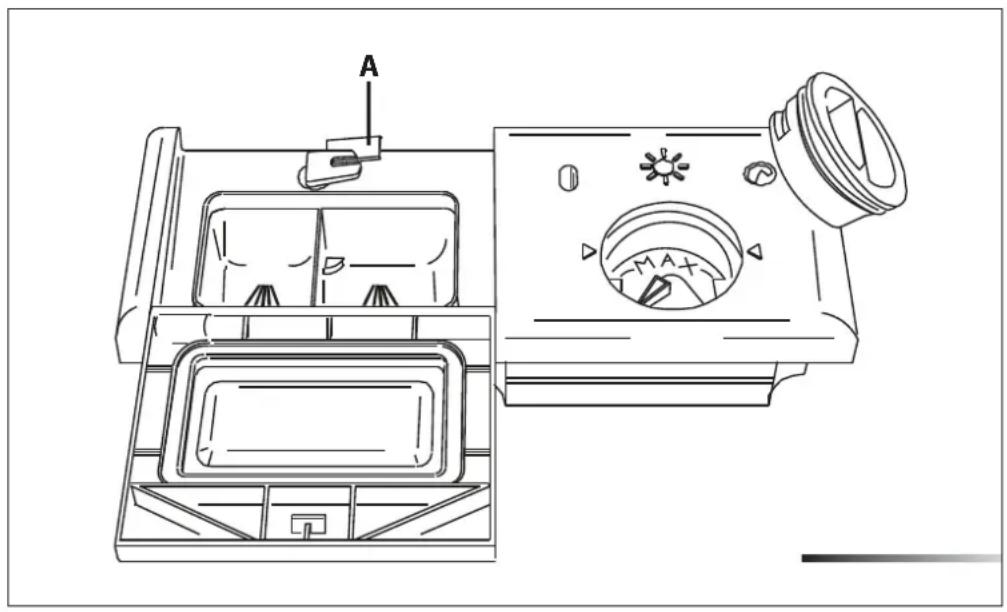
To open the detergent dispenser cover, lightly press the release button (ref. A fig. below). Add the detergent and close the cover carefully. During the washing cycle, the dispenser will be opened automatically.
natural_image
Technical line drawing of a washing machine with labeled components (no text or symbols beyond 'A' and 'MAX')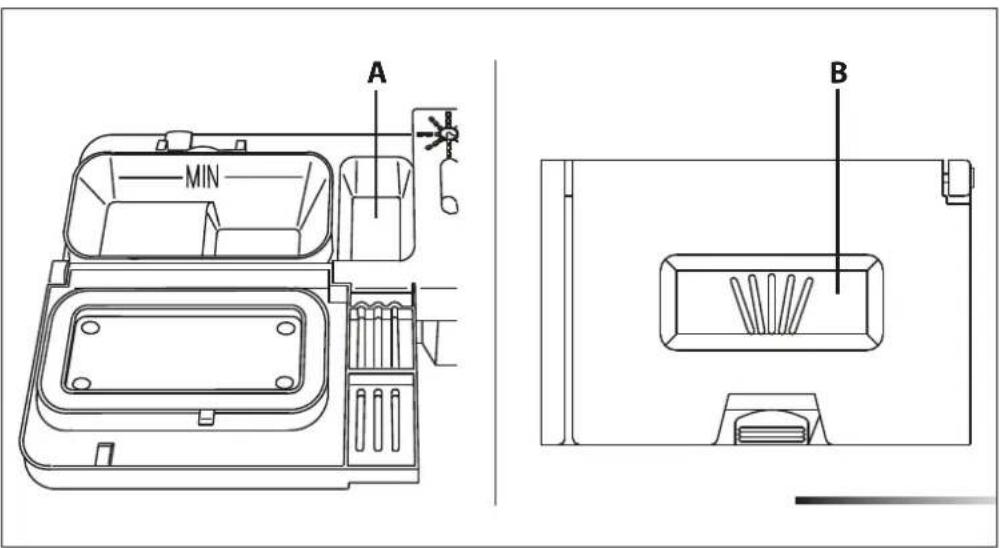
text_image
A MIN B- When a program with hot prewash is selected (see program table in the "Description of Controls" manual), extra detergent must be placed in the cavity (ref. A or B fig. above, depending on models).
- Only use dishwasher-specific detergents. For optimal washing results it is important to use a good quality detergent.
- The detergent packs must be sealed and stored in a dry place to prevent the formation of lumps which may negatively affect washing results. Once opened the detergent packs should not be kept for too long, otherwise the detergent loses its effectiveness.
- Do not use detergents formulated for washing dishes by hand, because produce a great deal of foam and may negatively affect the operation of the dishwasher.
- Add the correct amount of detergent. An insufficient amount of detergent will result in a partial removal of soil from the dishes, whereas an excessive amount is wasteful and does not improve the washing results.
- The market offers liquid and powder detergents with differing chemical compositions, which may contain phosphates, or be phosphate-free but contain natural enzymes.
- Detergents containing phosphates are more effective against grease and starch at temperatures above 60°C (140°F).
- Enzyme detergents, on the other hand, are also effective at lower temperatures (from 40 to 55^ / from 104 to 131^ ) and are more easily biodegradable. With enzyme detergents it is possible to obtain at low temperatures comparable results to those which can only be achieved at 65^ ( 149^ ) using traditional detergents. For the safeguarding of the environment we recommend the use of phosphate- and chlorine-free detergents.
- When using detergent tabs, place them in the cutlery basket. The dispenser has been designed for powder or liquid detergent. As the cover does not open completely during the washing cycle, tabs are not fully released (dissolved). This could generate the following problems:
- insufficient detergent released during the cycle and poor washing results;
- the detergent is compacted in the dispenser and is released during the final rinse cycle.

THE INTRODUCTION OF DETERGENT INTO THE RINSE AID DISPENSER, EVEN IN LIQUID FORM, WILL DAMAGE THE DISHWASHER AND VOID WARRANTY COVERAGE FOR ANY RELATED REPAIRS.
5.3 General warnings and recommendations
Before using the dishwasher for the first time, it is advisable to read the following recommendations concerning dish types to be washed and their loading. There are generally no constraints on the washing of domestic dishes, but in certain cases it is necessary to take their characteristics into account. Before loading the dishes into the racks it is necessary to:
- remove coarse food remains: e.g. bones, fish-bones, etc. which may clog the filter or damage the wash pump;
- soak any pots or pans with burnt-on food remains on the bottom to facilitate removal, then load them into the LOWER RACK.
Use the 12 load wash" option (if available) for washing small amounts of dishes; it saves water and electricity. When using this function, only load the rack selected for the 12 load wash; the other rack must remain empty. There is no need to pre-wash the dishes under running water before loading them into the racks since this only wastes water. Correct loading of the dishes helps ensure optimal washing results.
WARNING!
- make sure that the dishes are securely in place so that they cannot tip over or obstruct the rotation of the spray arms during the washing cycle;
- do not place very small objects in the racks as these could fall and obstruct the spray arms or the wash pump;
- containers such as cups, bowls, glasses and pots should always be loaded with the opening facing downwards and with any cavities at an angle, to allow the water to drain out;
• do not stack dishes or place them in such a way that they cover one other; - do not place glasses too close together because they may knock against each other and break, or there might be staining at the point where they touch.
MAKE SURE that the items being washed are dishwasher-safe.
Items which are not dishwasher-safe:
- Wooden dishes, pots or pans: these may be damaged by the high washing temperatures.
- Handcrafted items: these are rarely suitable for washing in a dishwasher. The relatively high water temperatures and the detergents used may damage them.
- Lightweight objects: place lightweight objects in the upper rack where the water pressure is lower.
• Dishes and objects in copper, tin, zinc or brass: these tend to stain.
- Aluminum dishes: items made from anodized aluminum may lose their color.
• Silverware: silver items may stain.
- Glass and crystal: in general, glass and crystal objects can be washed in the dishwasher. However, certain types of glass and crystal may become dull and lose their clearness after many washings. Therefore, for these items we recommend using the least aggressive program available (see sec 2.2.).
- Decorated items: the decorated objects available on the market are generally able to withstand washing in the dishwasher, although the colors may fade after a great many washes. If in doubt as to the stay-fastness of the colors, it is advisable to wash just a few items at a time for approximately one month as a test sample.
5.4 skcar eht gnisU
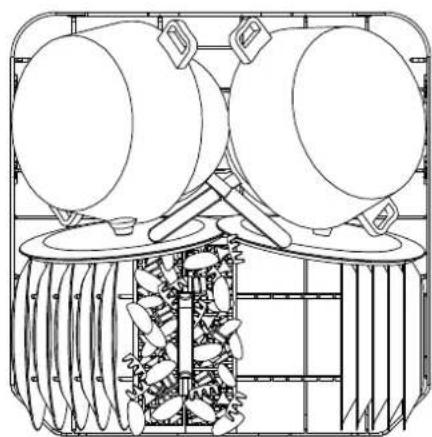
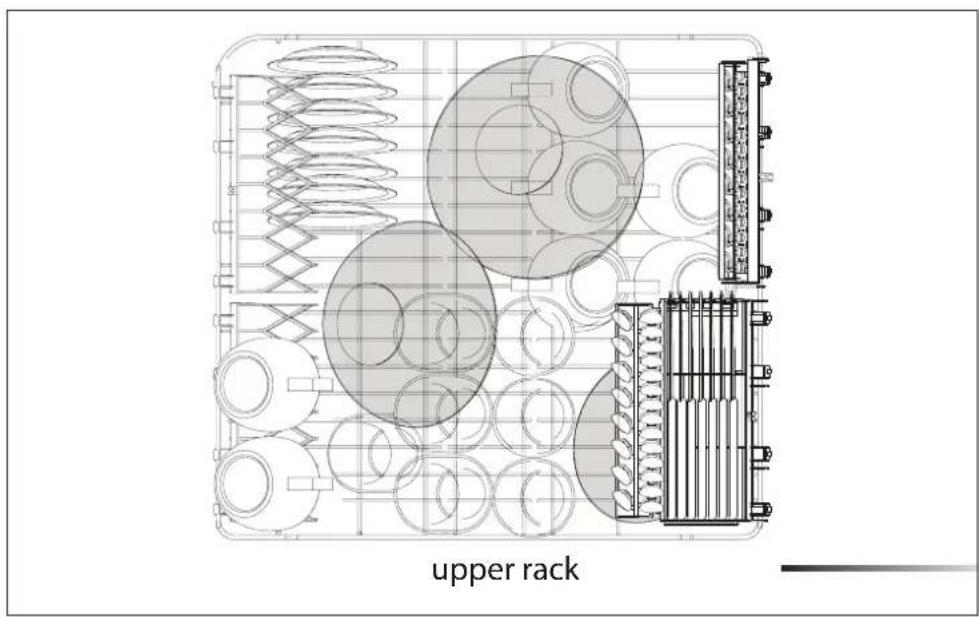
The dishwasher has a capacity of 13 place-settings, including serving dishes. Examples of loading 13 place-settings in the upper rack and in the lower rack are shown below.
text_image
upper rack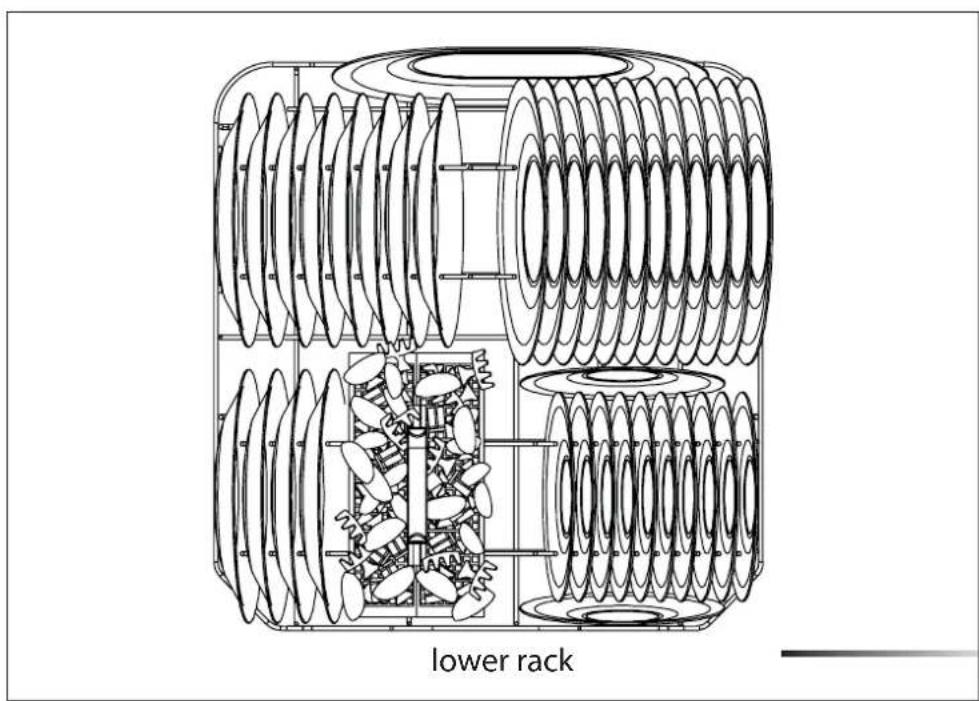
natural_image
Technical line drawing of a mechanical assembly with coiled springs and internal components, labeled 'lower rack' (no text or symbols on the diagram itself)5.4.1 kcar rewoL
The lower rack receives the full force of the lower spray arm, and should therefore be used for the "toughest" items with a heavier degree of soiling.
All types and combinations of loads are permitted, provided that the dishes, pots and pans are arranged with all the soiled surfaces exposed to the water jets coming from the bottom.
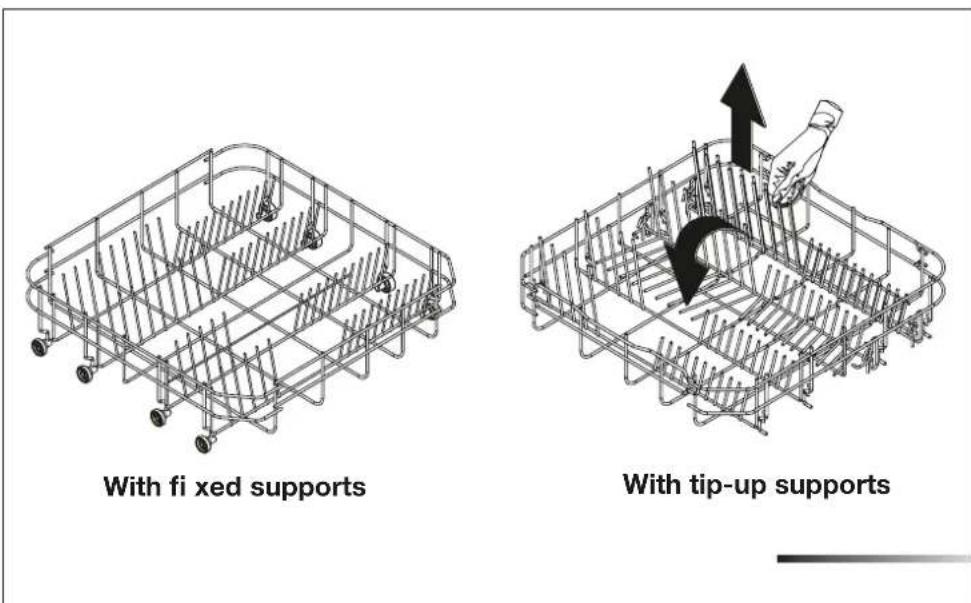
To make the most of the space inside the rack when loading large items, certain models are equipped with tip-up supports for plates in 2 or 4 sections (see fig. below).
Loading the lower rack
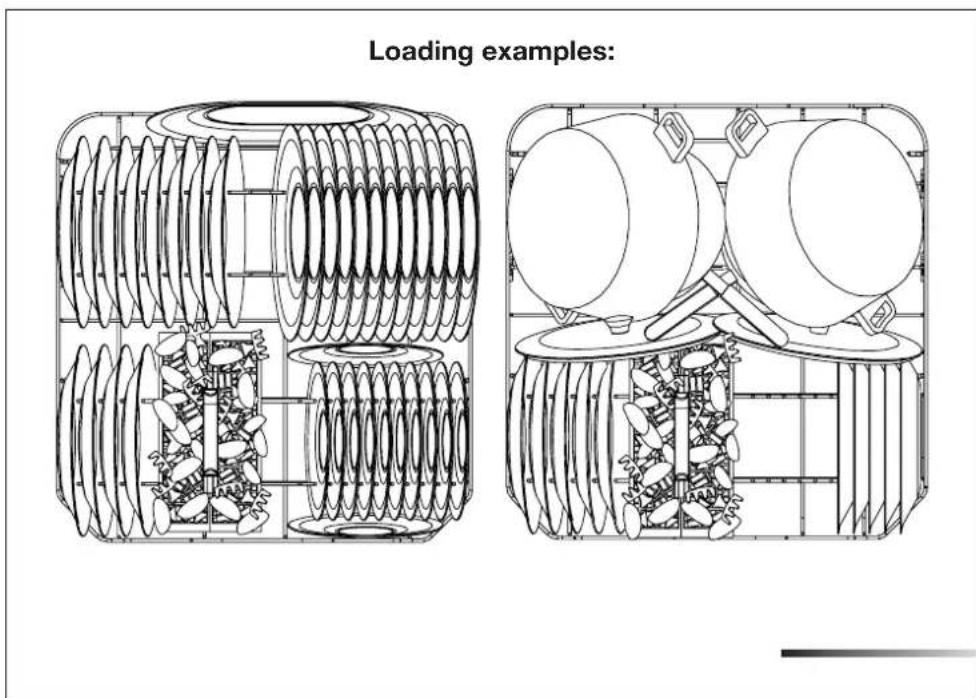
Carefully load flat plates, soup plates, dessert and serving dishes, positioning them vertically. Pots, pans and their covers must be loaded upside down. When loading soup plates and dessert bowls, be sure to leave a gap between them.
text_image
Loading examples:5.4.2
teksab yreltuC
The basket has removable top grids into which items of cutlery should be inserted to keep them properly spaced and allow water to pass between them effectively. The top grids and central lid are in the bag of accessories. The central lid functions as a lid only.
The top grids can be detached and used separately.
The cutlery should be arranged in an orderly manner inside the basket, with the handles pointing downwards. Take care during loading to avoid injury from the knife blades. The basket is suitable for all types of cutlery, except those long enough to interfere with the upper spray arm. Ladles, wooden spoons and co-oking knives can be placed in the upper basket, making sure that the knife blades do not protrude from the basket.
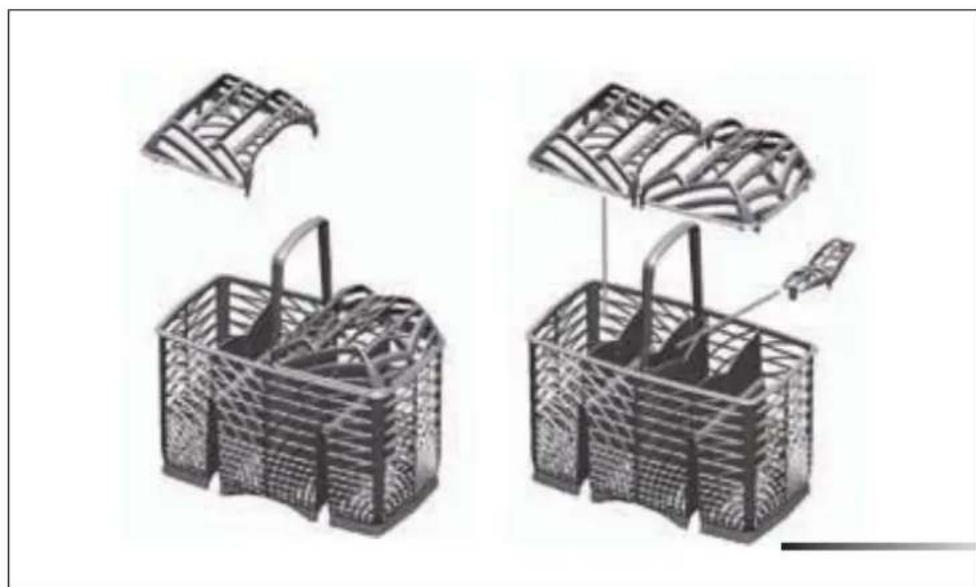
natural_image
Illustration of two woven baskets with internal compartments and a lid, showing structural details (no text or symbols)The cutlery basket slides across the dishwasher and can be placed in any position to allow optimal use of the space in the bottom basket.
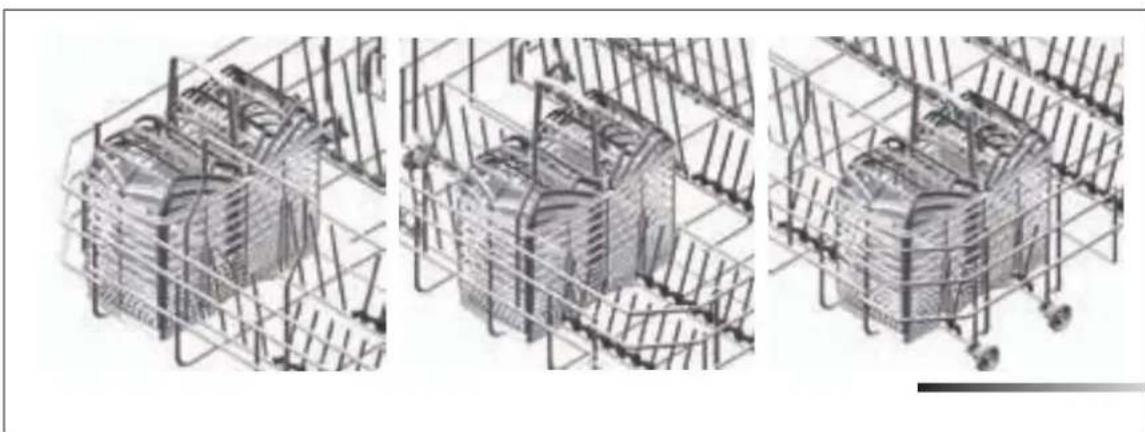
natural_image
Three technical line drawings of a mechanical assembly enclosed in wireframe grids, showing internal components without any text or symbols.5.4.3
kcar reppU
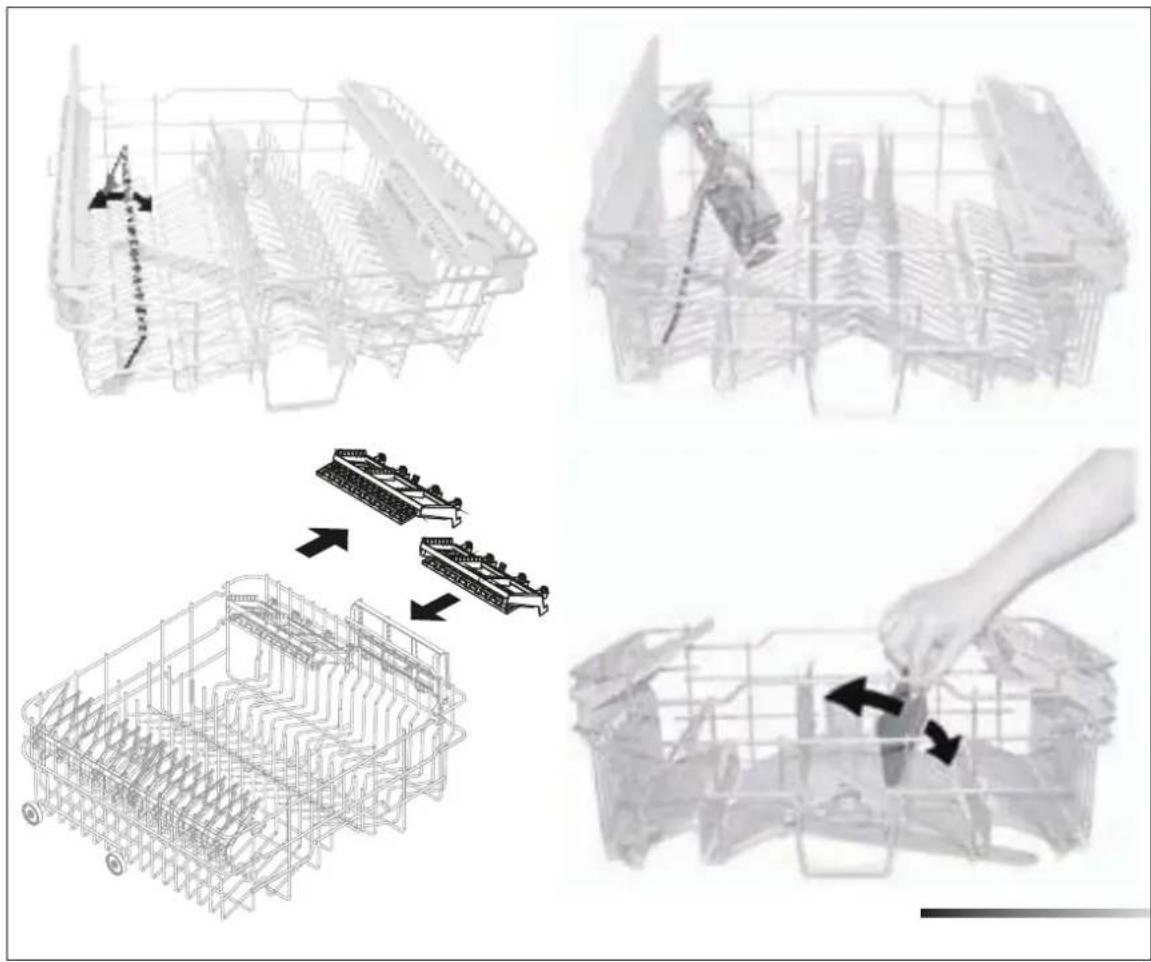
Depending on the models, the basket may be equipped with some or all of the following accessories:
- Supports for cups or long objects (ladles, spoons...), on the left; can be tipped to the vertical position when not in use.
- Long-stemmed glass holder, on the left; to use, simply lift and fix onto the hooks provided.
- Cutlery racks, on the right, designed for knives and teaspoons; for teaspoons, pull out t he s liding support. T he r acks can b e tipped to t he vertical position when not in use.
- Fixed or movable racks in the middle. The movable supports can be fixed vertical, resting on the bottom of the basket when not in use, or set in the intermediate position, as required.
flowchart
graph TD
    A["Initial Vehicle Structure"] --> B{Assembly Point}
    B --> C["Assembly Step 1"]
    B --> D["Assembly Step 2"]
    C --> E["Final Assembly"]
    D --> F["Final Assembly"]
Loading the upper rack
Load plates facing forward; cups, bowls etc. must always be facing downwards. The left-hand side of the rack can be loaded with two layers of cups and glasses. The centre can be filled with plates and side-plates, fitted upright into the supports provided.
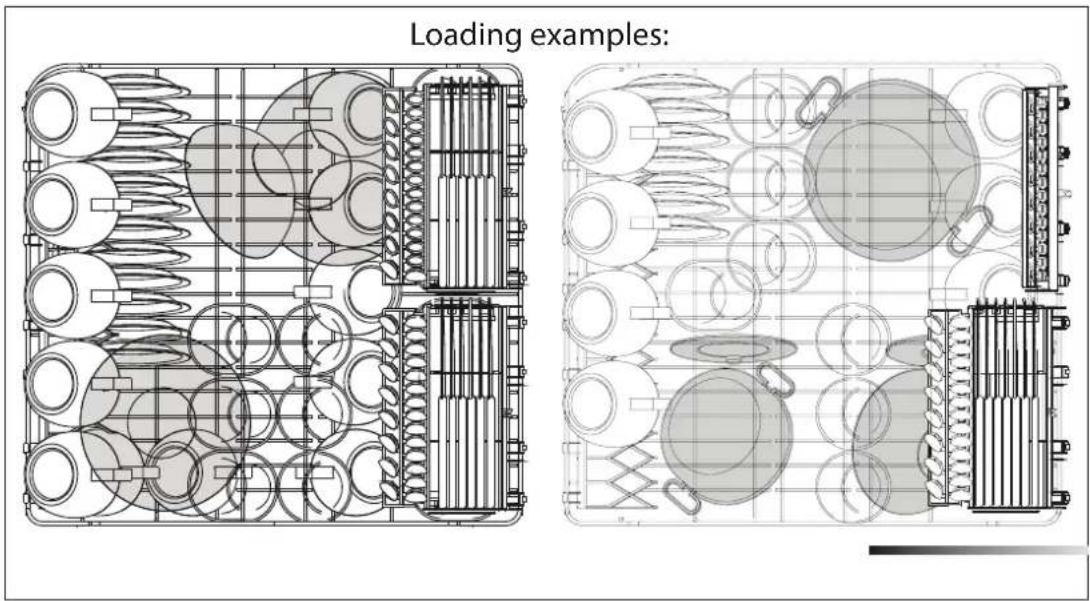
text_image
Loading examples:Adjusting the upper rack
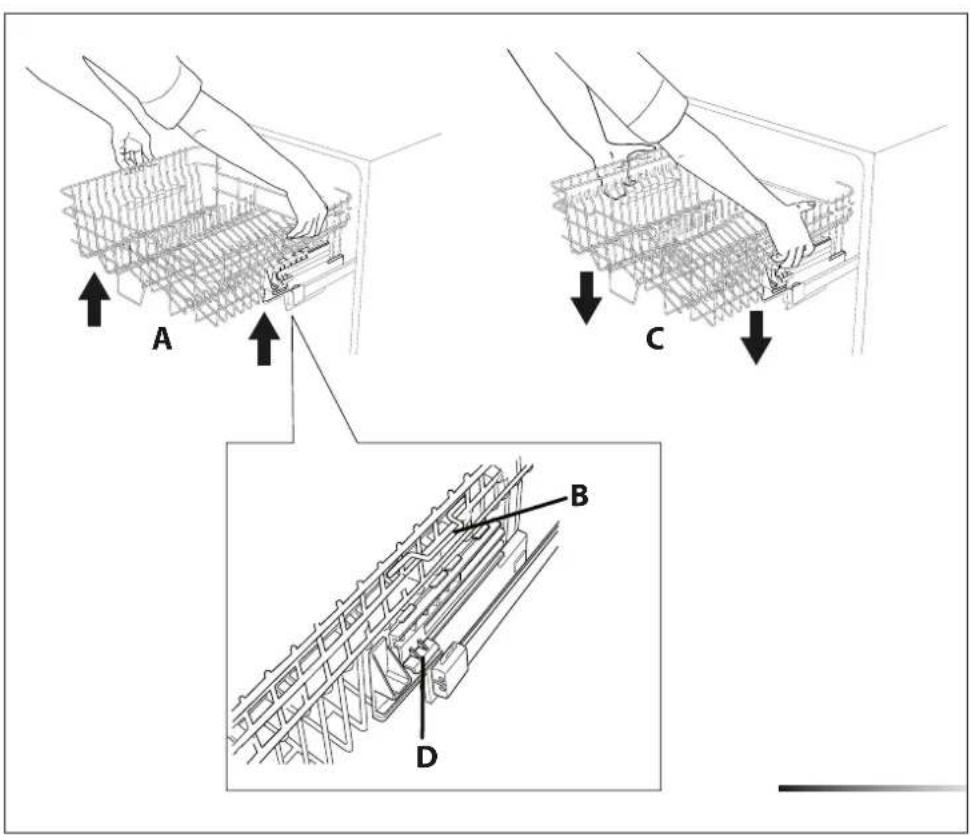
The upper rack can be set in three different positions on both sides. The rack must be level on both sides.
To raise the rack (ref. A fig. below), lift it with the two handles (e.g.: ref. B fig. below) to the first or second catch depending on the height required. To lower it (ref. c fig. below) be up the two release levers (e.g.: ref. D fig.). This is also possible with the rack loaded, but in this case when lowering the rack it should be held steady with one hand to avoid knocking the dishes.
text_image
A C B D6 CLEANING AND USER-MAINTENANCE

BEFORE CARRYING OUT ANY WORK, ALWAYS DISCONNECT THE APPLIANCE FROM THE ELECTRICAL POWER SUPPLY.
6.1 General warnings and recommendations

NEVER USE ABRASIVE AND/OR CORROSIVE DETERGENTS TO CLEAN THE APPLIANCE.
Clean the outer surfaces and door-lining of the dishwasher regularly using a soft cloth moistened with a neutral detergent (not abrasive and/or corrosive) suitable for painted surfaces. Clean the door gaskets with a damp sponge. Periodically (once or twice a year) it is advisable to clean the tank and gaskets, using a soft cloth and water to remove any deposits.
Do not clean the controls with too much water as this may leak onto the electronic components and damage them.
After cleaning, dry the appliance with a soft, lint-free cloth.
If stainless steel surfaces are preset, clean them with a non-abrasive product specific for stainless steel. To prevent stains, a vaporize may also be used, though sparingly and at a moderate pressure.
6.2 Cleaning the water intake filter
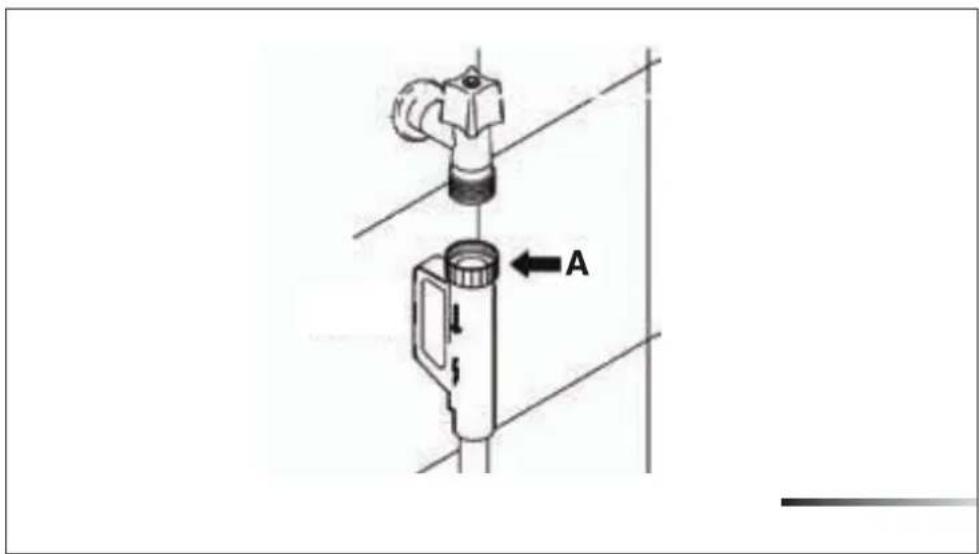
Clean the water inlet filter at regular intervals. After closing the supply valve, unscrew the ring nut (ref. A fig. below) on the water inlet pipe (using a pair of pliers, if necessary) and delicately clean the filter, removing deposits or impurities. Then firmly fix the pipe by tightening the ring nut (ref. A fig.below) (use a pair of pliers, if necessary).
Do not over - tighten - only snug to the point that the dishwasher seals the connection. Over tightening can damage the washer and cause leaking.
text_image
A6.3 Cleaning the spray arms
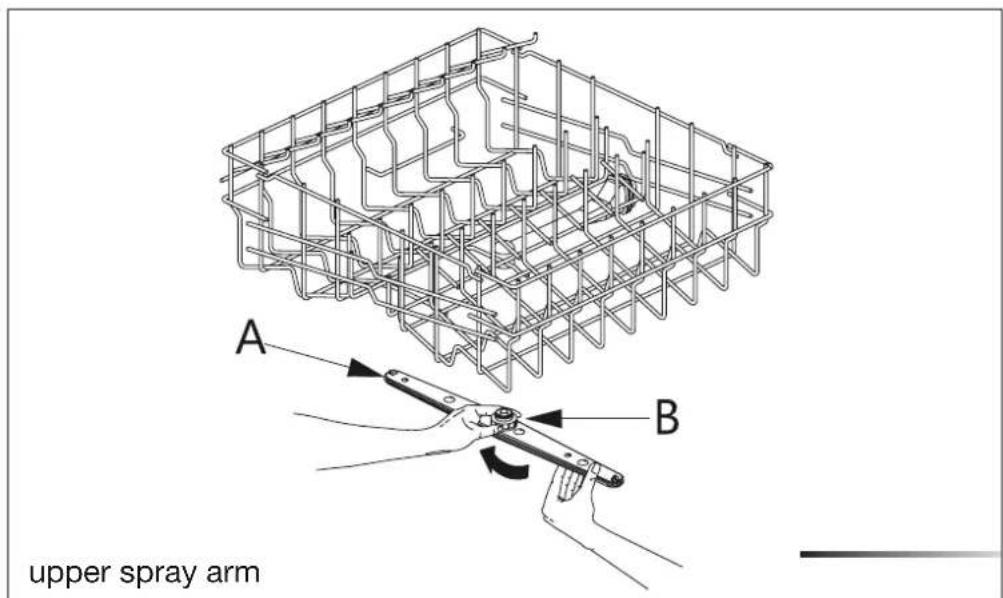
The spray arms can be easily removed for periodic cleaning of the nozzles, to prevent possible clogging. Wash them under running water (at room temperature) and carefully replace them in their seats, checking that their rotary movement is in no way impeded; if this is not the case, make sure they have been mounted properly.
Removing the spray arms
- To remove the upper gsweloyarm (ref. A fi . ), unscrew the locking ring (ref. B fig.below ) by turning it clockwise. After cleaning, remount the spray arm in its seat and tighten the locking ring by turning it counter-clockwise.
- To remove the lower spray arm (ref.C biglow ), simply lift it up, pulling by the central part (see fig.below). Then remount the lower spray arm into its seat and push it down slightly until it below clicks below place (see fig. ).
text_image
A B upper spray arm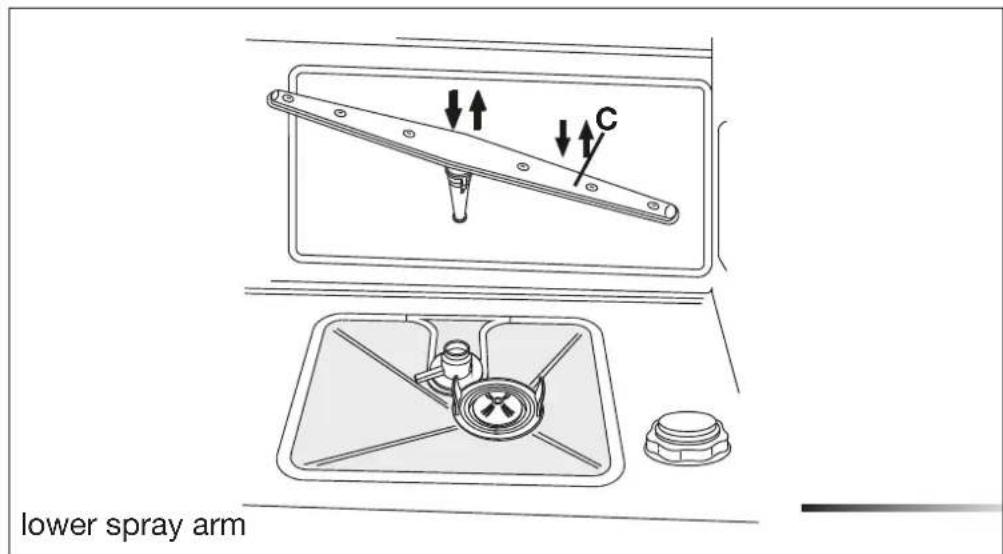
text_image
lower spray arm6.4 Cleaning the filter unit
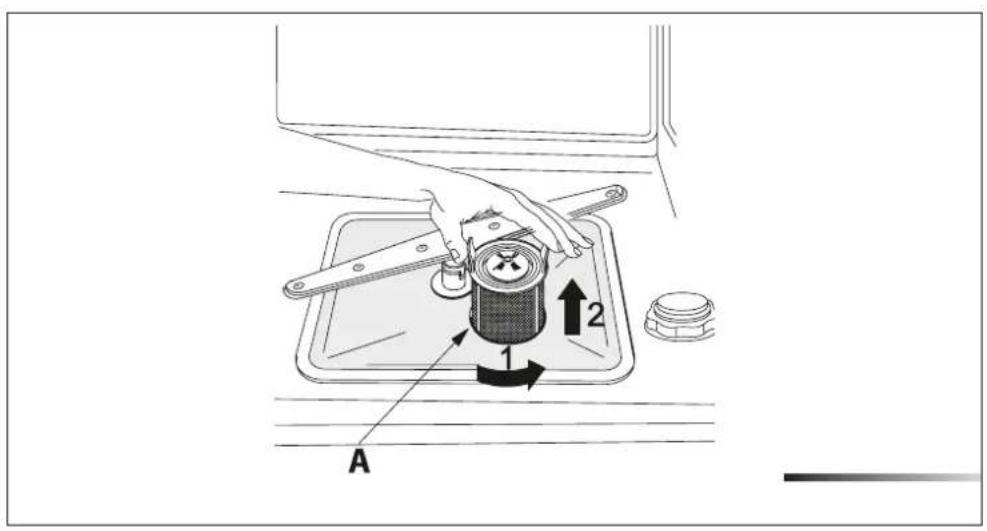
- Periodically inspect the filter unit (ref. A fig. below) and, if necessary, clean it under running water (at room temperature), using a stiff brush. To remove the filter, grip the tabs, turn counter-clockwise and lift upwards;
- push the center filter (ref. B below ) from the underside to remove it from the micro-filter;
- separate the two parts which make up the plastic center filter by pressing the body of the filter in the zone shown by the arrows (ref. C figlow);
- remove the center filter by lifting it upwards.
- after cleaning, remount the filter unit, joining the two parts comprising the center filter by pushing slightly until they click into place; insert the center filter into the micro-filter (see fig. below below position the filter unit (ref. A fig. into its seat, turning it clockwise until it locks.
text_image
A 1 2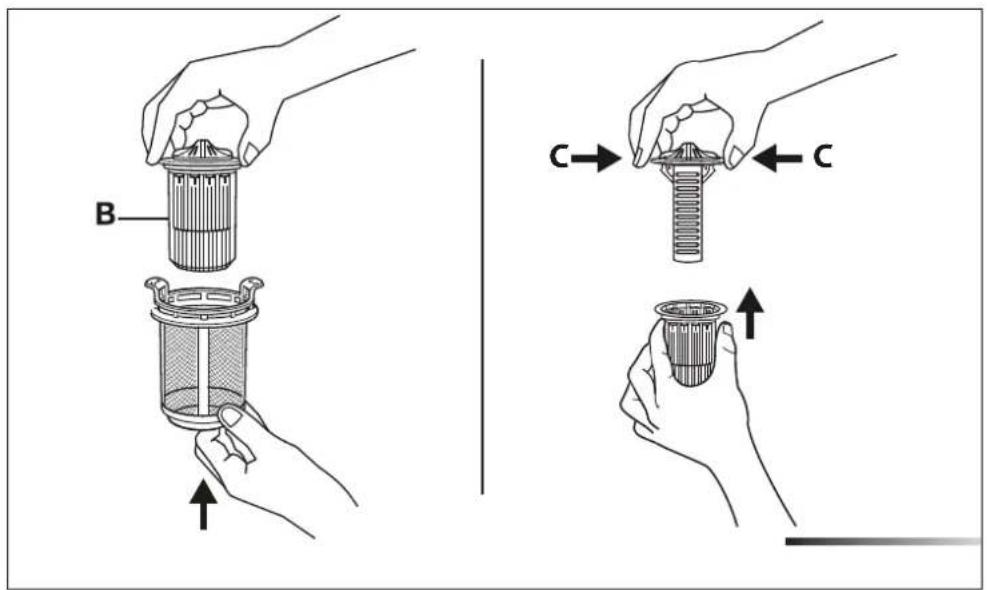
text_image
B C C6.5 General warnings and recommendations for correct maintenance
• Clean the filters under running water (at room temperature) using a stiff brush.
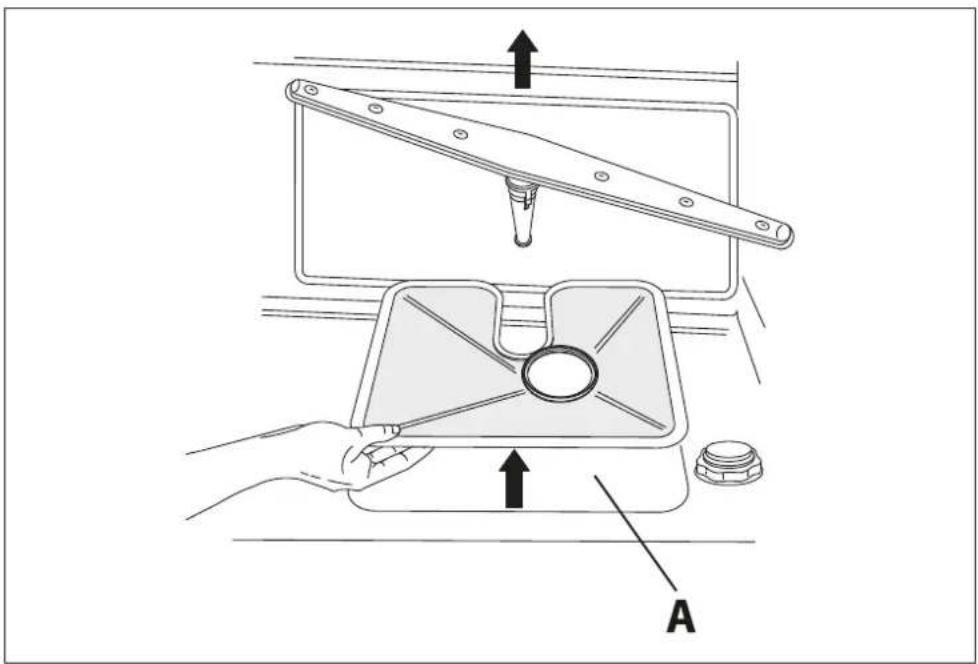
- When removing the filter, take care that there are no food residues on it. If any residues fall into the washing pit (ref. A fig. below), they might block hydraulic components or clog the spray arm nozzles.
- It is essential to thoroughly clean the filters according to the above instructions: the dishwasher cannot function if the filters are clogged.
- Carefully replace the filters in their seats, to avoid damaging the wash pump.
text_image
Technical diagram showing a hand operating a mechanical device with labeled parts and directional arrowsProlonged disuse
- Run the soak program twice in succession.
- Unplug the power cord fro the socket.
- Leave the door slightly open in order to prevent the formation of unpleasant odors inside the washing tank.
- Fill the rinse-aid dispenser.
- Shut off the water supply tap.
Before starting the dishwasher after prolonged disuse
- Check that there are no deposits of sludge or rust inside the water pipe: if there are, allow the water to run from the water supply tap for a few minutes.
- Plug the power cord back into the socket.
- Reconnect the water intake hose and open the tap again.
6.6 Troubleshooting minor problems
In some cases it is possible to remedy minor problems by referring to the following instructions:
If the program fails to start, check that:
• the dishwasher is connected to the electrical power supply;
• there is no power failure;
• the water tap is open;
• the dishwasher door is properly closed.
If water remains inside the dishwasher, check that:
• the drain hose is not kinked
• the drain siphon is not obstructed;
• the dishwasher filters are not clogged.
If the dishes do not come out clean, check that:
• the correct amount of detergent has been added;
• there is regenerating salt inside the special container;
• the dishes are being loaded correctly;
• the selected program is suitable for the dish types and their degree of soiling;
• all the filters are clean and positioned correctly;
• the spray arm nozzles are not clogged;
• there is no object obstructing the rotation of the spray arms.
If the dishes fail to dry or remain dull, check that:
• there is rinse aid inside the reservoir;
• the rinse-aid dispenser setting is correct;
- the detergent used is of good quality and has not lost its effectiveness (for example, through incorrect storage, with the box left open).
If the dishes show signs of streaking, staining, etc., check that:
• the rinse aid dispenser setting is not too high.
If there are visible traces of rust inside the tank:
- the tank is made of steel, and therefore any rust marks are due to external elements (fragments of rust from the water pipes, pots, cutlery, etc.). Special products are commercially available to remove such marks.
- check that the amount of detergent being used is correct. Certain detergents can be more corrosive than others.
- check that the cap of the salt container is securely closed, and that the water softening setting is correct.

IF AFTER PERFORMING THE ABOVE TROUBLESHOOTING INSTRUCTIONS THE PROBLEM PERSISTS, CALL THE TECHNICAL ASSISTANCE CENTER.
WARNING: ANY OPERATIONS PERFORMED ON THE APPLIANCE BY UNAUTHORIZED PERSONS ARE NOT COVERED BY THE WARRANTY AND SHALL BE PAID FOR BY THE USER.
7 IMPORTANT SAFETY INSTRUCTIONS (Save these instructions)

THIS MANUAL FORMS AN INTEGRAL PART OF THE APPLIANCE: IT MUST ALWAYS BE KEPT INTACT TOGETHER WITH THE DISHWASHER. BEFORE USING THE APPLIANCE, CAREFULLY READ ALL THE INSTRUCTIONS CONTAINED IN THIS MANUAL.
INSTALLATION MUST BE PERFORMED BY A QUALIFIED TECHNICIAN, IN COMPLIANCE WITH THE REGULATIONS IN FORCE. THIS APPLIANCE IS INTENDED FOR DOMESTIC USE AND SIMILAR APPLICATIONS SUCH AS THE STAFF KITCHENS OF SHOPS, OFFICES AND OTHER WORK-PLACES, INSTITUTIONS, AND FOR THE USE OF GUESTS AT HOTELS, HOSTELS, BED AND BREAKFAST ESTABLISHMENTS AND OTHER RESIDENTIAL FACILITIES AND COMPLIES WITH DIRECTIVES 2006/95/EC AND 2004/108/EC CURRENTLY IN FORCE, INCLUDING THE PREVENTION AND ELIMINATION OF RADIO FREQUENCY INTERFERENCE.
THE APPLIANCE IS DESIGNED FOR THE FOLLOWING PURPOSE: WASHING AND DRYING OF DISHES; ANY OTHER USE SHALL BE CONSIDERED IMPROPER. THE MANUFACTURER DECLINES ALL RESPONSIBILITY FOR USES OTHER THAN THOSE DESCRIBED ABOVE.

THE NAME PLATE FEATURING THE TECHNICAL DATA, SERIAL NUMBER AND MARKINGS IS VISIBLY POSITIONED ON THE INNER EDGE OF THE DOOR. THE NAME PLATE MUST NEVER BE REMOVED.

THIS APPLIANCE IS NOT SUITABLE FOR USE ON BOATS, CARAVANS OR THE LIKE.
DISHWASHERS CERTIFIED FOR DOMESTIC USE ARE NOT SUITABLE FOR COMMERCIAL USE SUCH AS IN RESTAURANTS.

CHECK THAT THE VOLTAGE, FREQUENCY AND PROTECTION OF THE DOMESTIC MAINS POWER SUPPLY MATCH THE RATINGS ON THE NAME PLATE OF THE APPLIANCE.

DO NOT LEAVE DISCARDED PACKAGING MATERIALS UNSUPERVISED WITHIN THE HOME. SEPARATE THE VARIOUS PACKAGING MATERIALS AND TAKE THEM TO THE NEAREST SORTED WASTE COLLECTION CENTER. KEEP CHILDREN, PHYSICALLY AND/OR MENTALLY IMPAIRED ADULTS, AND ANIMALS AWAY FROM PACKAGING WASTE; DANGER OF SUFFOCATION.

BEFORE PROCEEDING WITH INSTALLATION, DISCONNECT THE MAINS POWER SUPPLY FROM THE WORK AREA.

DO NOT USE EXTENSION CORDS, ADAPTORS OR SHUNT CONNECTIONS IN ORDER TO AVOID THE POSSIBILITY OF OVERHEATING OR BURNING WITH CONSEQUENT FIRE HAZARD.

DURING INSTALLATION, TAKE CARE NOT TO INJURE YOURSELF ON THE SHARP EDGES OF THE APPLIANCE; WEAR SAFETY GLOVES.

THE APPLIANCE MUST BE PROVIDED WITH A GROUNDED CONNECTION IN ACCORDANCE WITH THE ELECTRICAL SAFETY REGULATIONS IN FORCE.
IF IN DOUBT, HAVE THE SYSTEM CHECKED BY A QUALIFIED ELECTRICIAN (SEE ALSO THE WARNINGS INDICATED IN CHAPTER 3).
THE MANUFACTURER DECLINES ALL RESPONSIBILITY FOR DAMAGE TO PERSONS OR PROPERTY RESULTING FROM THE FAILURE TO GROUND THE APPLIANCE OR FROM A DEFECTIVE GROUND CONNECTION.

ALWAYS SWITCH OFF THE DISHWASHER AFTER EACH USE TO AVOID WASTING ELECTRICITY.

IN THE EVENT OF A FAULT, DISCONNECT THE DISHWASHER FROM THE ELECTRICAL POWER SUPPLY AND SHUT OFF THE WATER SUPPLY VALVE.

DO NOT USE APPLIANCES WHICH HAVE BEEN DAMAGED DURING TRANSIT! IF IN DOUBT, CONSULT YOUR DEALER. THE APPLIANCE MUST BE INSTALLED AND CONNECTED IN ACCORDANCE WITH THE INSTRUCTIONS PROVIDED BY THE MANUFACTURER.

ONLY USE DETERGENTS SPECIALLY FORMULATED FOR DISH-WASHERS.
DO NOT USE DETERGENTS FORMULATED FOR WASHING DISHES BY HAND.
ONLY USE RINSE-AID SPECIALLY FORMULATED FOR DOMESTIC DISHWASHERS.

DO NOT INHALE OR SWALLOW DETERGENT AS THIS MAY CAUSE BURNS AND/OR PERMANENT DAMAGE TO THE NOSE, MOUTH AND THROAT, AND EVEN LEADING TO SUFFOCATION; KEEP DETERGENT AWAY FROM YOUR EYES. IF ONE OF THE ABOVE SITUATIONS OCCURS, SEEK MEDICAL ASSISTANCE IMMEDIATELY.
TO PREVENT CHILDREN FROM COMING INTO CONTACT WITH DETERGENT, FILL THE DISHWASHER JUST BEFORE SETTING THE PROGRAM AND THEN KEEP THE DETERGENT OUT OF THE REACH OF CHILDREN.

THIS DISHWASHER MUST BE USED BY ADULTS. USE BY PERSONS WITH REDUCED MENTAL AND/OR PHYSICAL CAPABILITIES IS ONLY PERMITTED UNDER THE SUPERVISION OF A PERSON RESPONSIBLE FOR THEIR SAFETY.
DO NOT ALLOW CHILDREN TO APPROACH AND/OR PLAY IN OR ON THE DISHWASHER. THE APPLIANCE MAY CONTAIN RESIDUES OF DETERGENT WHICH CAN CAUSE PERMANENT DAMAGE TO THE EYES, MOUTH AND THROAT, AS WELL AS POSSIBLE DEATH BY SUFFOCATION; IF THE ABOVE OCCURS, SEEK MEDICAL ASSISTANCE IMMEDIATELY.
BEWARE; IT IS POSSIBLE FOR CHILDREN TO GET TRAPPED INSIDE THE DISHWASHER!

DO NOT INTRODUCE SOLVENTS SUCH AS ALCOHOL OR TURPENTINE WHICH MAY CAUSE AN EXPLOSION.

DO NOT POUR POWDER AND/OR LIQUID DETERGENT INTO THE RINSE-AID CONTAINER AS THIS WILL DAMAGE THE CONTAINER. DO NOT POUR POWDER AND/OR LIQUID DETERGENT INTO THE WASTER SOFTENER TANK AS THIS WILL DAMAGE THE TANK.
DO NOT USE INDUSTRIAL DETERGENTS AS THIS MAY DAMA THE APPLIANCE AND/OR TRIGGER VIOLENT CHEMICAL REAC-TIONS (E.G. EXPLOSIVE GAS).

DO NOT LOAD DISHES THAT ARE SOILED WITOR ASH, WAX PAINTS.

DO NOT INTRODUCE ITEMS IN HEAT-SENSITIVE PLASTIC, SUCH AS DISPOSABLE CUTLERY OR PLATES, AS THESE MAY BECOME DE FORMED. DO NOT WASH OBJECTS IN PLASTIC UNLESS THEY ARE MARKED "DISHWASHER PROOF" OR THE LIKE. FOR UNMARKED OBJECTS, FOLLOW THE INSTRUCTIONS OF THE MANUFACTURER; IF NO INFORMATION IS AVAILABLE, DO NOT WASH THESE JECTS IN THE DISHWASHER.

DO NOT INTRODUCE ANIMALS INTO THE DISHWASHER.

WHEN OPENING THE DISHWASHER DOOR DURING A CYCLE THERE IS A RISK OF SCALDING DUE TO THE HEAT CONTAINED INSIDE; DO NOT GET IN THE WAY OF THE STEAM LEAVING THE APPLIANCE AND DO NOT TOUCH THE COMPONENTS INSIDE.
WAIT 20 MINUTES AFTER THE END OF THE WASHING CYCLE OR AFTER INTERRUPTING IT BEFORE REMOVING THE DISHES IN ORDER TO ALLOW THEM TO DRY AND COOL TO THE TOUCH.

IN CERTAIN SITUATIONS, HYDROGEN MAY BE GENERATED INSIDE A HOT WATER SYSTEM THAT HAS NOT BEEN USED FOR OVER TWO WEEKS.
HYDROGEN IS AN EXPLOSIVE GAS. IF THE HOT WATER SYSTEM HAS NOT BEEN USED FOR TWO WEEKS OR MORE, OPEN ALL THE HOT WATER TAPS AND ALLOW THE WATER TO RUN FOR A FEW MINUTES BEFORE USING THE DISHWASHER. THIS WILL DISCHARGE ANY HYDROGEN BUILDUPS. AS THIS GAS IS FLAMMABLE, DO NOT SMOKE OR USE OPEN FLAMES WHILE PERFORMING THIS OPERATION.

LEANING OR SITTING ON THE DISHWASHER DOOR WHEN OPEN MAY CAUSE THE APPLIANCE TO OVERTURN, PUTTING PEOPLE AT RISK. NEVER LEAVE THE DISHWASHER DOOR OPEN; PEOPLE MIGHT TRIP OVER IT.
DO NOT LEAN AGAINST OR STAND ON THE DISHWASHER RACKS.

DO NOT DRINK THE WATER RESIDUES WHICH MAY BE PRESENT INSIDE THE DISHES OR DISHWASHER.

KNIVES OR OTHER SHARP-ENDED COOKING UTENSILS MUST BE PLACED IN THE CUTLERY BASKET BLADE-DOWN, OR LAID HORIZON-TAL IN THE UPPER RACK. TAKE CARE NOT TO CUT YOURSELF AND EN-SURE THAT THEY DO NOT PROJECT FROM THE RACK.
POSITION SHARP/POINTED OBJECTS SO AS TO PREVENT THEM FROM DAMAGING THE DOOR GASKETS.

DO NOT OPERATE THE DISHWASHER UNLESS ALL THE OUTER PANELS HAVE BEEN POSITIONED CORRECTLY.

DO NOT TAMPER WITH THE DISHWASHER CONTROLS.

AQUASTOP MODELS; THE AQUASTOP DEVICE PREVENTS FLOODING IN THE EVENT OF A WATER LEAK. WHEN THE AQUASTOP DEVICE IS TRIPPED (THE ERROR IS INDICATED ON THE DISPLAY), CALL IN A QUALIFIED TECHNICIAN TO IDENTIFY AND REPAIR THE FAUIT. IN MODELS EQUIPPED WITH THE AQUASTOP DEVICE, THERE IS A SOLENOID VALVE INSIDE THE WATER INTAKE HOSE. DO NOT CUT THE HOSE AND DO NOT ALLOW THE SOLENOID VALVE TO DROP INTO WATER. IN THE EVENT OF DAMAGE TO THE WATER INTAKE HOSE, DISCONNECT THE APPLIANCE FROM THE ELECTRICAL POWER SUPPLY AND FROM THE WATER SUPPLY.
IMMEDIATELY AFTER INSTALLING THE DISHWASHER, PERFORM A QUICK TEST OF THE APPLIANCE (SEE "INSTALLATION" MANUAL). IF THE DISHWASHER FAILS TO OPERATE CORRECTLY, DISCONNECT IT FROM THE ELECTRICAL POWER SUPPLY AND CALL THE NEAREST TECHNICAL SERVICE CENTRE. DO NOT ATTEMPT TO REPAIR THE APPLIANCE YOURSELF.

THE DISHWASHER MEETS ALL THE REQUIREMENTS SET OUT BY THE REGULATIONS IN FORCE CONCERNING SAFETY AND ELECTRICAL EQUIPMENT. ANY TECHNICAL CHECKS SHOULD BE CONDUCTED EXCLUSIVELY BY A TRAINED AND AUTHORIZED TECHNICIAN: REPAIRS CARRIED OUT BY UNAUTHORIZED PERSONS WILL VOID THE WARRANTY, AS WELL AS POSING A POTENTIAL HAZARD TO THE USER.

BEFORE CLEANING OR SERVICING THE APPLIANCE, REMOVE THE PLUG OR TURN OFF THE CIRCUIT BREAKER SWITCH.

REMOVE THE WASHING COMPARTMENT DOOR AND DISCONNECT THE MAINS POWER SUPPLY WHEN REMOVING THE OF DISHWASHER FOR MAINTENANCE OR DISPOSAL.

THE SYMBOL ON THE PRODUCT, OR ON THE DOCUMENTS ACCOMPANYING THE PRODUCT, INDICATES THAT THIS APPLIANCE MAY NOT BE TREATED AS HOUSEHOLD WASTE. INSTEAD IT SHALL BE HANDED OVER TO THE APPLICABLE COLLECTION POINT FOR THE RECYCLING OF ELECTRICAL AND ELECTRONIC EQUIPMENT. DISPOSAL MUST BE CARRIED OUT IN ACCORDANCE WITH LO-CAL ENVIRONMENTAL REGULATIONS FOR WASTE DISPOSAL. FOR MORE DETAILED INFORMATION ABOUT TREATMENT, RECOVERY AND RECYCLING OF THIS PRODUCT, PLEASE CONTACT YOUR LO-CAL CITY OFFICE, YOUR HOUSEHOLD WASTE DISPOSAL SERVICE OR THE SHOP WHERE YOU PURCHASED THE PRODUCT.

BY ENSURING THIS PRODUCT IS DISPOSED OF CORRECTLY, YOU WILL HELP PREVENT POTENTIAL NEGATIVE CONSEQUENCES FOR THE ENVIRONMENT AND HUMAN HEALTH.

THE MANUFACTURER DECLINES ALL RESPONSIBILITY FOR DAMAGE TO PERSONS, ANIMALS OR PROPERTY RESULTING FROM FAILURE TO OBSERVE THE ABOVE PRECAUTIONS, FROM TAMPERING WITH EVEN A SINGLE COMPONENT OF THE APPLIANCE, OR FROM THE USE OF UNORIGINAL SPARE PARTS. IF IN DOUBT ABOUT THE CONTENTS OF THIS MANUAL, CONTACT THE TECHNICAL ASSISTANCE SERVICE.

DO NOT USE PRESSURE WASHER TO CLEAN THE DISHWASHER.

WARNING: SOME DISHWASHER DETERGENTS ARE STRONGLY ALKALINE. THEY CAN BE EXTREMELY DANGEROUS IF SWALLOWED. AVOID CONTACT WITH THE SKIN AND EYES AND KEEP CHILDREN AWAY FROM THE DISHWASHER WHEN THE DOOR IS OPEN. CHECK THAT THE DETERGENT RECEPTACLE IS EMPTY AFTER COMPLETION OF THE WASH CYCLE.
8 INSTALLATION AND HOOK-UP
To install and hook up this appliance, consult the attached installation manual. Bear in mind the following warnings when installing and hooking up the dishwasher.

DURING INSTALLATION, TAKE CARE NOT TO INJURE YOURSELF ON THE SHARP EDGES OF THE APPLIANCE; WEAR SAFETY GLOVES.

INSTALLATION, REPAIRS AND SERVICING MUST BE PERFORMED BY QUALIFIED AND AUTHORIZED TECHNICIANS. AS WELL AS INVALIDATING THE WARRANTY, WORK CARRIED OUT BY UNAUTHORIZED PERSONS MAY GENERATE HAZARDS. INSTALLATION MUST BE PERFORMED IN COMPLIANCE WITH ALL THE DIRECTIVES IN FORCE IN THE COUNTRY OF INSTALLATION AND, IF THESE DO NOT EXIST: IN THE UNITED STATES THE NATIONAL ELECTRIC CODE; IN CANADA THE CANADIAN ELECTRIC CODE C22.1 - LATEST EDITION/PROVINCIAL AND MUNICIPAL CODES AND/OR LOCAL CODES.

BUILDING-IN A DISHWASHER UNDERNEATH A CERAMIC COOKTOP IS ABSOLUTELY FORBIDDEN. A DISHWASHER CAN BE BUILT-IN UNDER-NEATH A CONVENTIONAL HOB PROVIDED THERE IS NO BREAK IN THE KITCHEN WORKTOP, AND THE DISHWASHER AND COOKTOP ARE INSTALLED AND SECURED CORRECTLY, SO THAT NO HAZARDS ARE GENERATED.

PREVENTING THE RISK OF CLOGGING OR DAMAGE: IF THE WATER PIPE IS NEW OR HAS NOT BEEN USED FOR A LONG TIME, BEFORE CONNECTING TO THE WATER SUPPLY CHECK THAT THE WATER IS CLEAR AND FREE OF IMPURITIES, TO PREVENT DAMAGE TO THE APPLIANCE. THE DISHWASHER MUST ALWAYS BE CONNECTED TO THE WATER SYSTEM WITH NEW HOSES; OLD OR USED HOSES MUST NEVER BE REUSED.

CHECK THAT THE VOLTAGE AND THE FREQUENCY OF THE ELECTRICAL SUPPLY MATCH THE RATINGS ON THE NAME PLATE OF THE APPLIANCE POSITIONED ON THE INNER EDGE OF THE DOOR.

IN THE EVENT OF DAMAGE TO THE POWER CORD, HAVE IT REPLACED BY THE MANUFACTURER OR AN AUTHORIZED TECHNICAL SERVICE CENTER.

BEFORE MAKING ELECTRICAL CONNECTIONS, DISCONNECT THE MAINS POWER SUPPLY FROM THE WORK AREA.

CHECK THAT THE MAINS SUPPLY IN THE PLACE OF INSTALLATION COMPLIES WITH THE REGULATIONS IN FORCE IN THE COUNTRY OF USE, AND THAT IT IS CORRECTLY GROUNDED.

THIS APPLIANCE MUST BE GROUNDED. IN CASE OF A AN ELECTRICAL SHORT, THE GROUND REDUCES THE RISK OF ELECTROCUTION BY PROVIDING THE ELECTRICAL CURRENT WITH SAFE ALTERNATIVE, LESS RESISTANT PATH. THIS APPLIANCE IS FITTED WITH A SUPPLY CORD CONTAINING A GROUND WIRE AND PLUG. FIT THE PLUG INTO A SUITABLE SOCKET, INSTALLED AND GROUNDED IN COMPLIANCE WITH THE LAWS IN FORCE IN THE COUNTRY OF INSTALLATION.

AN INCORRECTLY CONNECTED GROUND WIRE MAY GENERATE THE RISK OF ELECTROCUTION. IF IN DOUBT AS TO THE CORRECT GROUNDING OF THE APPLIANCE, CALL IN A QUALIFIED ELECRTICIAN OR THE TECHNICAL ASSISTANCE SERVICE. DO NOT CHANGE THE PLUG ATTACHED TO THE APPLIANCE. IF THE PLUG IS NOT SUITABLE FOR THE SOCKET, CALL IN A QUALIFIED ELECTRICIAN TO FIT A SUITABLE PLUG. DO NOT REMOVE THE GROUNDING PRONG FROM THE PLUG OR USE A TWO-PRONG ADAPTER TO CONNECT THE APPLIANCE.

IN THE EVENT OF DAMAGE TO THE SUPPLY CORD, HAVE IT REPLACED BY THE MANUFACTURER OR AN AUTHORIZED TECHNICAL SERVICE CENTRE IN ORDER TO AVOID ANY RISK.

DO NOT USE EXTENSION CORDS, ADAPTORS OR SHUNT CONNECTIONS IN ORDER TO AVOID THE POSSIBILITY OF OVERHEATING OR BURNING, WITH CONSEQUENT FIRE HAZARD.
9 TECHNICAL DATA
| Width | 59.7 cm - 59.9 cm (23-1/2" - 23-5/8") |
| Depth measured flush with the outer edge of the control panel | 55 cm (21-5/8") - FD6W24FI157 cm (22-4/8") - FD6W24SS1 |
| Height | from 86 cm to 93 cm (from 33-14/16" to 36-10/16") |
| Capacity | 13 standard place-settings |
| Water supply pressure | min.7 - max. 130 PSI (min. 0.5-max. 9 bar) |
| Electrical characteristics See | rating plate |
Sommaire
1 INTRODUCTION.... 3
2 DESCRIPTION ET UTILISATION DES COMMANDES.... 5
text_image
2 3 4 5 10 9 8 7 Sanitized 11126 1 1/2 end S 100°Ftext_image
2 3 4 5 10 9 8 7 6 12 11 1 Sanitized 10/2 12 ① ①têrrA 8.2.2
text_image
2 3 4 5 10 9 8 7 Sanitized 11126 1 100°F
text_image
2 3 4 5 10 9 8 7 6 12 11 1 Sanitized 100°Ftext_image
Technical diagram of a washing machine with labeled components A, B, and Cnatural_image
Technical line drawing of a washing machine with labeled components (no text or symbols beyond 'A' and 'MAX')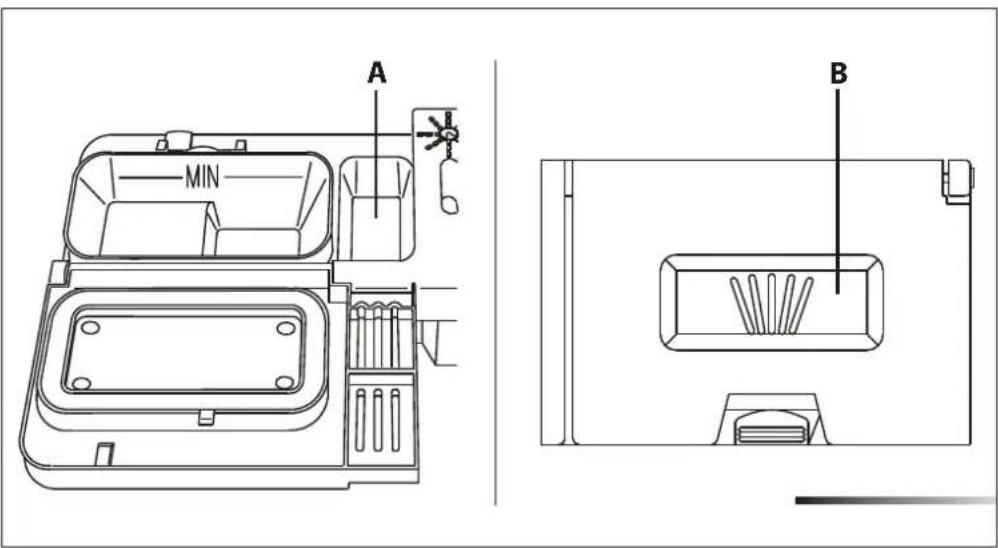
text_image
A MIN Bnatural_image
Technical line drawing of a mechanical assembly with coiled spring components (no text or symbols)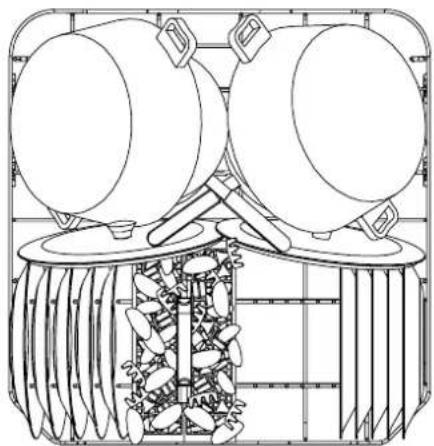
natural_image
Technical line drawing of a mechanical device with two circular components and a central spring-like structure (no text or symbols)natural_image
Illustration of two woven baskets with internal compartments and a lid, showing structural details (no text or symbols)natural_image
Three technical line drawings of a mechanical assembly with grid framework, showing internal components and mounting brackets (no text or symbols)natural_image
Technical line drawing of a mechanical assembly with multiple circular components and internal channels (no text or symbols)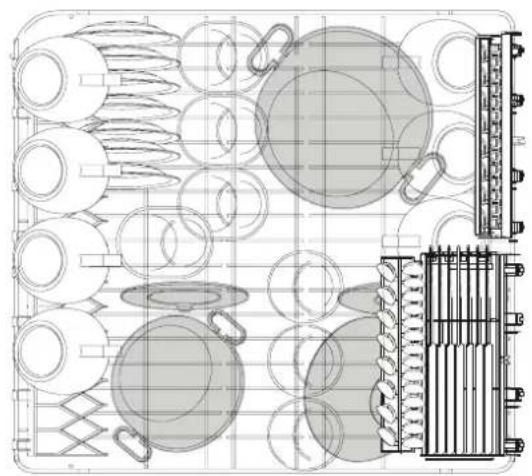
natural_image
Technical line drawing of mechanical components and assembly (no text or symbols)text_image
Technical diagram showing a mechanical assembly with labeled parts A and an upward arrow indicating motion or force.text_image
2 3 4 5 end 10 9 8 7 6 12 11 1 Sanitized 10/7text_image
Diagram showing various electrical component symbols including rectangular blocks, liquid bottles, a 1/2 plate, and circuit components with labels 'end' and '1'.
text_image
2 3 4 5 end 10 9 8 7 Sanitized 11126 1 1/2 S + - 10/7 10/7 1
text_image
2 3 4 5 1/2 end Sanitized 10 9 8 7 6 12 11 1 Power5.1 Using the water softening system
text_image
Technical diagram of a refrigerator interior with labeled parts A, B, and Cnatural_image
Technical line drawing of a washing machine interior with labeled components (no text or symbols)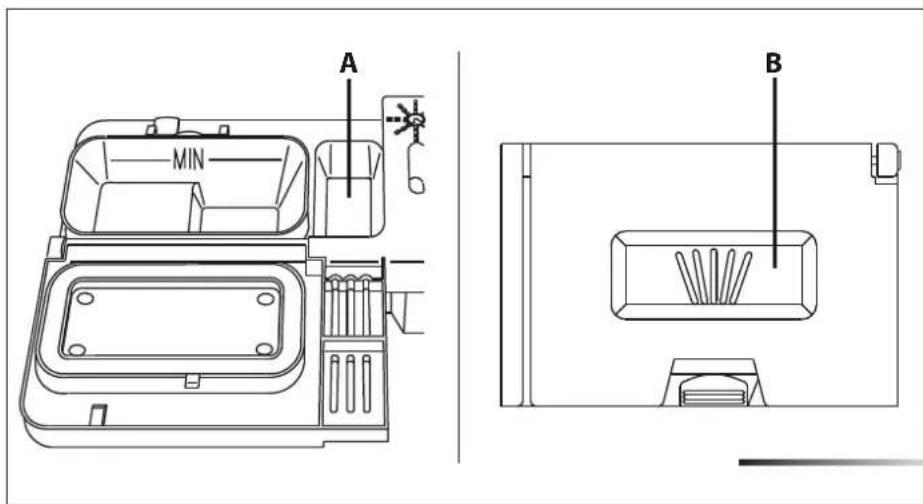
text_image
A MIN Bnatural_image
Technical line drawing of a mechanical assembly with coiled spring components (no text or symbols)