Novomatic 553 - Garage door Novoferm - Free user manual and instructions
Find the device manual for free Novomatic 553 Novoferm in PDF.



Frequently Asked Questions - Novomatic 553 Novoferm
User questions about Novomatic 553 Novoferm
0 question about this device. Answer the ones you know or ask your own.
Ask a new question about this device
Download the instructions for your Garage door in PDF format for free! Find your manual Novomatic 553 - Novoferm and take your electronic device back in hand. On this page are published all the documents necessary for the use of your device. Novomatic 553 by Novoferm.
USER MANUAL Novomatic 553 Novoferm
Installation, operating, maintenance instructions and works guarantee for garage door operators Novomatic 403 / 553
F
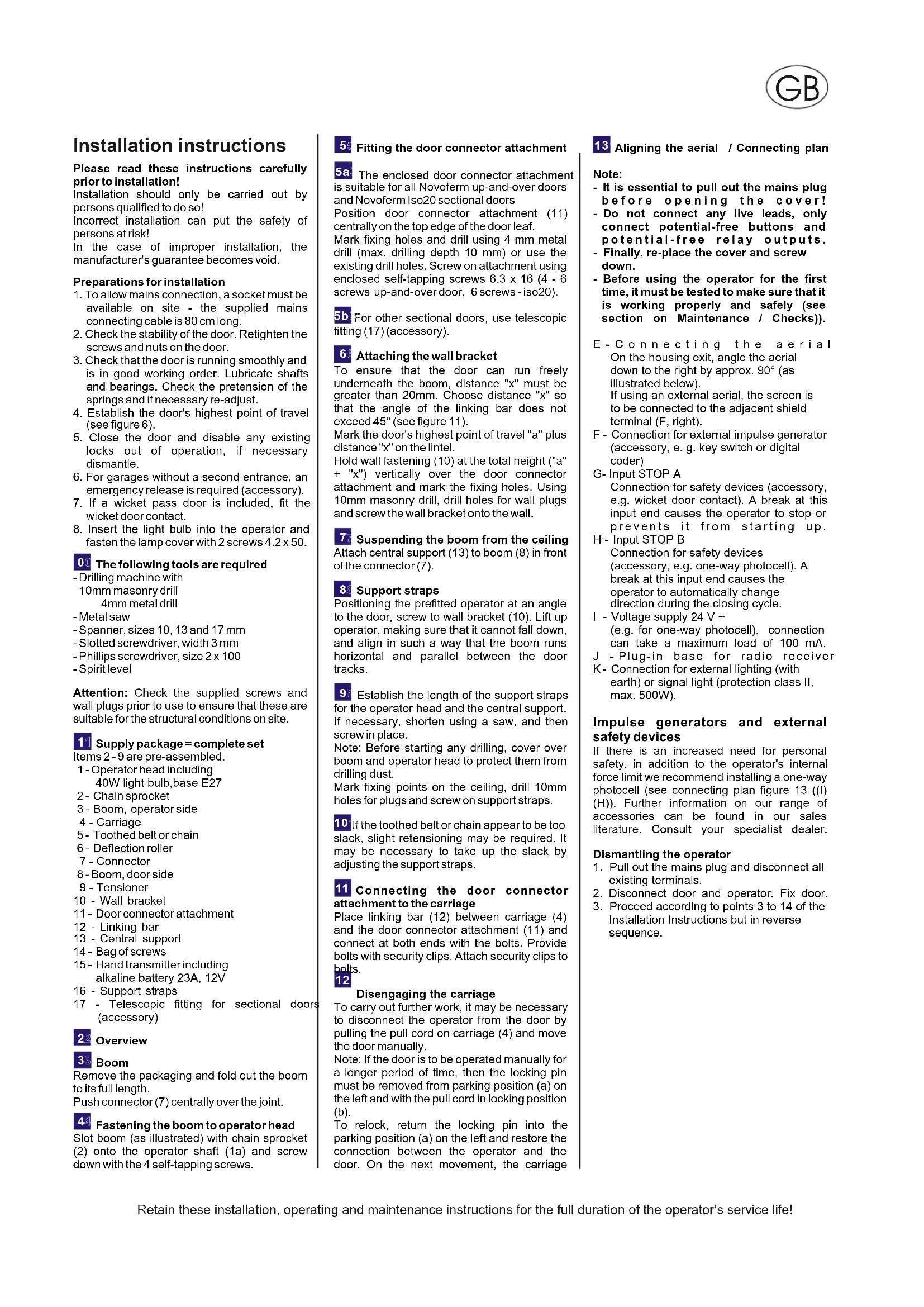
Installation instructions
Please read these instructions carefully prior to installation!
Installation should only be carried out by persons qualified to do so! Incorrect installation can put the safety of persons at risk!
In the case of improper installation, the manufacturer's guarantee becomes void.
Preparations for installation
- To allow mains connection, a socket must be available on site - the supplied mains connecting cable is 80 cm long.
- Check the stability of the door. Retighten the screws and nuts on the door.
- Check that the door is running smoothly and is in good working order. Lubricate shafts and bearings. Check the pretension of the springs and if necessary re-adjust.
- Establish the door's highest point of travel (see figure 6).
- Close the door and disable any existing locks out of operation, if necessary dismantle.
- For garages without a second entrance, an emergency release is required (accessory).
- If a wicket pass door is included, fit the wicket door contact.
- Insert the light bulb into the operator and fasten the lamp cover with 2 screws 4.2 × 50 .
0 The following tools are required
-Drilling machine with
10mm masonry drill
4mm metal drill
-Metalsaw
- Spanner, sizes 10, 13 and 17 mm
- Slotted screwdriver, width 3 mm
- Phillips screwdriver, size 2 x 100
- Spirit level
Attention: Check the supplied screws and wall plugs prior to use to ensure that these are suitable for the structural conditions on site.
Supply package = complete set
Items 2 - 9 are pre-assembled.
1-Operator head including 40W light bulb,base E27
2-Chain sprocket
3-Boom, operator side
4 - Carriage
5 - Toothed belt or chain
6 - Deflection roller
7 - Connector
8-Boom, door side
9-Tensioner
10 - Wall bracket
11- Door connector attachment
12 - Linking bar
13 - Central support
14 - Bag of screws
15- Hand transmitter including alkaline battery 23A, 12V
16 - Support straps
17 - Telescopic fitting for sectional doors (accessory)
2 Overview
3 Boom
Remove the packaging and fold out the boom to its full length.
Push connector (7) centrally over the joint.
4 Fastening the boom to operator head
Slot boom (as illustrated) with chain sprocket (2) onto the operator shaft (1a) and screw down with the 4 self-tapping screws.
Fitting the door connector attachment
5a The enclosed door connector attachment is suitable for all Novoferm up-and-over doors and Novoferm Iso20 sectional doors Position door connector attachment (11) centrally on the top edge of the door leaf. Mark fixing holes and drill using 4mm metal drill (max. drilling depth 10mm ) or use the existing drill holes. Screw on attachment using enclosed self-tapping screws 6.3× 16 (4 - 6 screws up-and-over door, 6 screws - iso20).
b For other sectional doors, use telescopic fitting (17) (accessory).
6 Attaching the wall bracket
To ensure that the door can run freely underneath the boom, distance "x" must be greater than 20mm . Choose distance "x" so that the angle of the linking bar does not exceed 45^ (see figure 11).
Mark the door's highest point of travel "a" plus distance "x" on the lintel.
Hold wall fastening (10) at the total height ("a" + "x") vertically over the door connector attachment and mark the fixing holes. Using 10mm masonry drill, drill holes for wall plugs and screw the wall bracket onto the wall.
7 Suspending the boom from the ceiling Attach central support (13) to boom (8) in front of the connector (7).
8 Support straps
Positioning the prefitted operator at an angle to the door, screw to wall bracket (10). Lift up operator, making sure that it cannot fall down, and align in such a way that the boom runs horizontal and parallel between the door tracks.
9 Establish the length of the support straps for the operator head and the central support. If necessary, shorten using a saw, and then screw in place.
Note: Before starting any drilling, cover over boom and operator head to protect them from drilling dust.
Mark fixing points on the ceiling, drill 10mm holes for plugs and screw on support straps.
10 If the toothed belt or chain appear to be too slack, slight retensioning may be required. It may be necessary to take up the slack by adjusting the support straps.
11 Connecting the door connector attachment to the carriage
Place linking bar (12) between carriage (4) and the door connector attachment (11) and connect at both ends with the bolts. Provide bolts with security clips. Attach security clips to
half 12
Disengaging the carriage
To carry out further work, it may be necessary to disconnect the operator from the door by pulling the pull cord on carriage (4) and move the door manually.
Note: If the door is to be operated manually for a longer period of time, then the locking pin must be removed from parking position (a) on the left and with the pull cord in locking position (b).
To relock, return the locking pin into the parking position (a) on the left and restore the connection between the operator and the door. On the next movement, the carriage
13 Aligning the aerial / Connecting plan
Note:
- It is essential to pull out the mains plug before opening the cover!
- Do not connect any live leads, only connect potential-free buttons and potential-free relay outputs.
- Finally, re-place the cover and screw down.
Before using the operator for the first time, it must be tested to make sure that it is working properly and safely (see section on Maintenance / Checks)).
E-Connecting the aerial On the housing exit, angle the aerial down to the right by approx. 90^ (as illustrated below). If using an external aerial, the screen is to be connected to the adjacent shield terminal (F, right).
F - Connection for external impulse generator (accessory, e. g. key switch or digital coder)
G-Input STOP A Connection for safety devices (accessory, e.g.wicket door contact).A break at this input end causes the operator to stop or prevents it from starting up.
H - Input STOP B Connection for safety devices (accessory, e.g. one-way photocell). A break at this input end causes the operator to automatically change direction during the closing cycle.
I - Voltage supply 24V (e.g. for one-way photocell), connection can take a maximum load of 100mA .
J - Plug-in base for radio receiver
K - Connection for external lighting (with earth) or signal light (protection class II, max. 500W).
Impulse generators and external safety devices
If there is an increased need for personal safety, in addition to the operator's internal force limit we recommend installing a one-way photocell (see connecting plan figure 13 ([I) (H)). Further information on our range of accessories can be found in our sales literature. Consult your specialist dealer.
Dismantling the operator
- Pull out the mains plug and disconnect all existing terminals.
- Disconnect door and operator. Fix door.
- Proceed according to points 3 to 14 of the Installation Instructions but in reverse sequence.
Programming the Operator
14 Control elements
The controls for programming the door operator are protected by a transparent cover. The transparent cover can be opened with a screwdriver. After the operator has been programmed, the transparent cover must be closed again.
A - Numerical display shows the menu stage as well as the selected value.
a - Point display, lights up to indicate "ready for operation" and flashes on the hand transmitter code learning completion.
B - Button during the setting/adjustment phase serves as an "up" button and outside the menu as a start button.
C - Button during the setting/adjustment phase serves as a "down" button.
D - Button is used to call up the setting/adjustment menu, to change the menu stages and to store the settings.
Programming the control unit is menu-driven. Pressing button calls up the menu guide. The numbers displayed indicate the menu stage. After approx. 2 seconds the display flashes and the setting can be altered via buttons and .
The selected setting is stored with button And the programme jumps automatically to the next menu stage. By repeatedly pressing button menu stages can be skipped. To quit the menu, press button until "0" is shown again. Outside the menu, button can be used to generate a start impulse.
Before programming
- Allow door to engage into the carriage.
- Pull out the mains plug. Point display (a) lights up.
- Make sure that the aerial is correctly positioned (see figure 13).
- Observe the hand transmitter instructions.
15 Menu stage 1: Programming the start function for the hand transmitter
Briefly press button
"1" is displayed.
As soon as the display flashes, press and keep pressed for approx. 1 second the button of the hand transmitter, with which you later wish to start the operator.
As soon as the code has been read, the red point display (a) flashes five times before quitting.
Further hand transmitters (up to a maximum of 10) can be programmed.
16 Menu stage 2: Programming the light function for the hand transmitter
Press button
"2" appears in the display.
Note: If no 4-minute light is to be programmed, repress button . The display shows "0" - programming is completed.
Press the second button on the hand transmitter, with which the 4-minute light is to be switched on.
As soon as the code has been read, the red point display (a) flashes five times before quitting.
After the code has been learned, briefly press button
"0" appears indicating that you have come to the end of the menu.
Deleting all the hand transmitters programmed for the operator: Plug in the operator's mains plug and whilst button pressed.
17Menu stage 3: Setting/adjusting the top end of-travel position
Keep button pressed for 3 seconds.
Number 3 appears in the display.
Wait a short while until the 3 starts flashing.
Press button. The operator causes the door to travel in the OPEN direction as long as the button is pressed. The position can be altered to the CLOSE direction via button
Once the desired OPEN end-of-travel position has been reached, press button. The operator stores the OPEN end-of-travel position and "4" appears in the display.
18 Menu stage 4: Setting/adjusting the bottom end-of-travel position
Wait a short while until "4" starts flashing. Press button. The operator causes the door to travel in the CLOSE direction as long as the button is pressed. The position can be altered to the OPEN direction via button
Once the desired CLOSE end-of-travel position has been reached, press button. The operator stores the CLOSE end-of-travel position and "5" appears in the display. Press button twice until "0" appears.
18a Force-learning cycle
Attention: During this opening and closing cycle the operator learns the force required to open and close the door. A force limit does not apply! The cycles must not be interrupted. During these cycles "0" appears in the display.
- Press button . The operator causes the door to open until the top end-of-travel position has been reached.
- Now press button again. The operator causes the door to close until the bottom end-of-travel position has been reached.
- After approx. 2 seconds "0" goes out.
19 Menu stage 5: The opening force limit
If you have previously quit the setting menu, press button for 3 seconds until "3" appears. Then press button twice until "5" appears.
After approx. 2 seconds the display flashes showing the set value of the opening force limit.
The force limit setting can be increased or decreased via buttons and
After setting the value, press button. The display shows "6".
20Menu stage 6: The closing force limit
After approx. 2 seconds the display starts flashing and the set value for the closing force limit is displayed.
The force limit setting can be increased or decreased via buttons and
After setting the value, press button "0" appears in the display.
Finally, check the force settings and, if necessary, repeat the setting procedure.
The maximum force at the main closing edge must not exceed 150N!
Caution! If the force setting is too high, persons may be placed at risk of injury.
The factory setting is 4!
21 Checking the force limit facility
- Place an obstruction (e.g. operator's cardboard box) underneath the door's costing edge.
- Starting from the OPEN end-of-travel position, actuate the door to close.
- The door travels towards the obstruction, stops and travels back to the top end-of-travel position.
- The point display (a) must switch off for approx. 1 second. Then the operator functions as normal again.
If the door springs have been changed or altered, then the force learning cycle must be repeated:
Proceed to menu stage 5 and keep button Pressed for 3 seconds. "0" appears in the display. Then complete the force learning cycle as explained under point 18a.
Special settings
Menu stage 7: Light phases
Press button for 3 seconds.
"3" appears in the display.
Press button several times until menu stage 6 is shown.
Keep button pressed again for 3 seconds until "7" appears in the display.
| Menu value | Light phase | Warning phase |
| 0 | 60 s | - |
| 1 | 90 s | - |
| 2 | 120 s | - |
| 3 | 240 s | - |
| 4 | 0 s | 3 s |
| 5 | 90 s | 3 s |
| 6 | 240 s | 3 s |
| 7 | 0 s | 10 s |
| 8 | 90 s | 10 s |
| 9 | 240 s | 10 s |
If the warning phase is set, the light flashes before the door starts to move and during the actual travel cycle. The factory setting is 1.
Menu stage 8: "Soft" start and "soft" stop ("soft" runs)
Press button. "8" appears in the display.
| Menu Value | Start Open | Stop Open | Start Close | Stop Close |
| 0 | 0 | 0 | 0 | 0 |
| 1 | 15 | 0 | 15 | 0 |
| 2 | 0 | 15 | 0 | 60 |
| 3 | 15 | 15 | 15 | 35 |
| 4 | 25 | 45 | 25 | 45 |
| 5 | 15 | 15 | 15 | 60 |
| 6 | 15 | 15 | 15 | 15 |
| 7 | 35 | 35 | 35 | 50 |
| 8 | 60 | 15 | 15 | 85 |
| 9 | soft run only | |||
These values correspond to the "soft" runs measured in cm at the carriage.
Important note:
The factory setting of 4 must be adhered to. The "soft" runs may only be altered on the express permission of the door manufacturer. Press button . "0" appears in the display.
Operating Instructions
Before carrying out any work to the operator, always pull out the mains plug! All persons using the door system must be shown how to operate it properly and safely:
When the operator is being used, the opening and closing cycles must be monitored.
Keep hand transmitters out of the reach of children.
It must be ensured that neither persons nor objects are located within the door's range of travel.
Functional sequence
The garage door operator can be actuated via impulse generators such as hand transmitters, key switches etc. It is only necessary to give a short, sharp impulse.
Initial impulse:
The operator starts up and causes the door to travel to the set OPEN or CLOSE end-of-travel positions.
Impulse generated whilst the door is moving: the door stops
A new impulse:
the door continues to move but in the opposite direction.
Internal safety device
If the closing door encounters an obstruction, the operator stops and causes the door to open to its top end-of-travel position in order to clear the obstruction.
During the last 2 seconds of the closing cycle, the door only opens slightly, this being sufficient to clear the obstruction but otherwise barring anyone from taking a look into the garage.
If the opening door encounters an obstruction, the operator stops immediately. The door can be closed again by generating a new impulse.
External safety devices
Connecting plan figure 13
An open wicket door stops the operator immediately or stops it from starting up.
Photocell (STOP B)
If the photocell is interrupted whilst the door is closing, the door stops and reverses direction. An interruption whilst the door is opening has not effect.
Quick release
During adjustments, in the event of a power failure or malfunctions the door can be disengaged from the operator by actuating the pull cord on the carriage and then operated manually.
If the door is to be operated manually over a longer period of time, then the existing locking pin must be inserted (see figure 12). The door latches, put out of service for power operation, must be refitted, otherwise the door is not latched in the closed position.
To restore power operation, return the locking pin to the parking position (a) and put the latches put out of service.
After an impulse has been generated, the door automatically latches with the door operator.
Lighting
The lighting switches on automatically whenever a start impulse is generated and switches off again after the set time phase (factory setting approx. 90 seconds).
A second button on the hand transmitter can be programmed for 4-minutes light (figure 16). When the button on the hand transmitter is pressed, the light switches on independent of the motor and switches off again after approx. 4 minutes.
Changing the light bulb:
Pull out the mains plug and open the lamp cover using a Phillips screwdriver size 2x100. Replace the light bulb (230 V, 40 W, base E27) and screw the lamp cover back on.
Signal light
If a signal light for signalling the opening and closing phases is installed, this flashes together with the lamp in the operator as soon as a start impulse is generated. The operator starts with a time-delay in accordance with the set warning phase (see menu stage 7).
Hand transmitter
Programming further hand transmitters: See menu stages 1 and 2 (figure 15 and 16). Changing the battery: Slide back the battery compartment cover on the hand transmitter. Take out the battery. Insert a new battery (alkaline 23A, 12V) and be sure polarity correctly! Slide the cover back on.
Empty batteries must be disposed of separately (toxic waste)!
Maintenance/Checks
For your own safety we recommend that the door system be checked by a specialist after initial installation and then regularly at intervals of 1 year minimum.
Monitoring the force limit
The operator control unit features a 2-processor safety system to monitor the force limit. The integral force cut-out is automatically tested at each end-of-travel position.
The door system must be checked before being put into service and at least once a year thereafter, during the course of which, a check of the force limit facility (figure 21) must also be carried out!
Caution! If the closing force is set too high, persons can be placed at risk of injury.
The opening force can be re-adjusted in menu stage 5, the closing force in menu stage 6.
Terms of the Guarantee
Dear customer,
During production the garage door operator you have purchased has undergone various checks by the manufacturer to ensure that it is of impeccable quality. Should this operator or parts of it prove to be of no use or limited use as a result of proven material or manufacturing defects, we shall rectify this, at our discretion, through free-of-charge repair or replacement.
We shall not accept any liability for damage as a result of unsatisfactory fitting and installation, improper putting into service, incorrect operation and maintenance, excessive use and overloading as well as
Any alterations or modifications carried out to the operator and accessory parts by the customer. The same shall also apply for damage incurred during transit or as a result of force majeure, external influences or natural wear as well as special atmospheric stresses. We cannot accept any liability following alterations or modifications of functional parts carried out by the customer. We must be notified of any defects immediately in writing; on request the parts in question are to be made available to us.
We shall not bear the costs for dismantling and installation, freight and carriage. If a complaint is proven to be unjustified, the customer must bear our costs.
This guarantee is only valid in conjunction with the signed invoice and commences on the day of delivery. The manufacturer guarantees that the product is free of defects. The warranty is granted for a period of 24 months, in as far as the verification overleaf has been properly filled out. Otherwise the warranty shall expire 27 months after the date of manufacture.
Trouble-shooting
Important note: When working on the operator, always pull out the mains plug beforehand!!
| Fault/Malfunction Possible cause | Remedy | |
| Door does not fully close/open | Door mechanics have changed Set closing/opening force too weak. End-of-travel positions incorrectly set | Have door checked. Change force setting (menu stages 5 and 6) Reset end-of-travel positions (menu stages 3 and 4) |
| Door presses into the end-of-travel positions | Optimum setting of end-of-travel positions has not been achieved | Reset end-of-travel positions (menu stages 3 and 4) |
| After closing, door opens again to produce a slight gap | Door blocks just before CLOSE position | Remove obstruction or reset CLOSE end-of-travel position (menu stage 4) |
| Door does not respond to impulse from hand transmitter but does respond to push-button or other impulse generators | Flat battery in hand transmitter Aerial not plugged in/aligned No hand transmitter programmed | Replace battery in hand transmitter Plug in/align aerial Programme hand transmitter (menu stage 1) |
| Door does not respond to impulse from hand transmitter or ot other impulse generators | See diagnostic display | See diagnostic display |
| Insufficient range of hand transmitter | Flat battery in the hand transmitter Aerial not plugged in/aligned On-site screening of receiving signal | Replace battery in hand transmitter Plug in/align aerial Connect external aerial (accessory) |
Diagnostic display
During operation, the display provides diagnostic information on any possible faults / malfunctions
| Number | State | Diagnosis / Remedy |
| 0 | Operator starts up and “0” goes out. | Operator receives a start impulse at the START input or via a receiver, normal operation. |
| 1 | Door neither opens nor closes. | STOP A connection is interrupted. External safety device has been activated (e.g. wicket door). |
| 2 | Door no longer closes | STOP B connection is interrupted. External safety device has been activated (e.g. Photocell). |
| 3 | Motor has come to a standstill | Motor does not rotate. Call in a specialist company. |
| 4 | Permanent impulse signal at the start input | Door no longer accepts a start impulse. External impulse generator emits a permanent impulse signal (e.g. Button is jammed) |
| 5 | An error has occurred in setting the operator. | Travel path too long. Repeat setting procedure (menu stages 3 and 4) |
| 0 | “0” displayed during the next opening and closing cycle and then goes out. “0” continues to be displayed. | Operator is carrying out a learning cycle for the force limit. Caution: During these travel cycles the force is not monitored! Check door mechanics. Door is too sluggish. |
Subject to changes
Guarantee Document
Type designation:
Production number:
(See type plate)
Date of purchase:
Date when first put into service:
Address/Stamp of company carrying out the installation:
EC Declaration of Conformity In accordance with Article 8 of the "Machine Directive" (EC Directive 98/37/EC)
Company stamp :
Hereby declares that
Novoferm K Garage Up-and-Over Doors (door leaf weight up to 70kg)
Novoferm M Garage Up-and-Over Doors (door leaf weight up to 210kg)
Novoferm E Sectional Doors (door leaf weight up to 196kg)
together with the Novomatic 403, 553 or 803 Door Operators
comply with the relevant requirements of the EC Machine Directive (EC 98/37/EC)
comply with the relevant requirements of the following further EC directives:
- Low Voltage Directive (73/23/EEC)
- Electromagnetic Compatibility Directive (Directive (89/336/EEC)
the following harmonised standards (or parts thereof) were applied
- EN 12453 Doors
- Safety in Use of Power-Driven Doors
- Requirements and Classification
- EN 12445 Doors - Safety in Use of Power-Driven Doors - Test Methods
- EN 12604 Doors
- Mechanical Aspects
- Requirements
- EN 12605 Doors - Mechanical Aspects - Test Methods
the following national or international standards (or parts / clauses thereof) and specifications were applied
- Directive for Power-Driven Windows, Doors and Gates ZH 1/494 April 1989
- Safety of electrical equipment for domestic use and similar purposes:
DIN EN 60335 - 1 / VDE 0700 Part 1
A model of the machine was inspected by the examining body
TUV Nord (Technical Northern Division)
TÜV-CERT certifying body for machines, hoisting and conveying engineering at TÜV 1
30519 Hannover (Germany)
This body has issued the verification mark no. 08/205/GS/PT00710.
We declare that the machine is in conformity with the tested model.
Place, date: Signature:
Illustration of type plate
| This manually operated door was retro-equipped with a door operator by the installer named below. Details of the operator can be found on the operator's type plate. The installer confirms that his declaration of conformity in accordance with the Machines Directive has been issued for the customer. For your own safety, the door system, in as far as not governed by national regulations, should be inspected at least once a year by a qualified door installer. | |
| Serial number of the door system: | |
| Operator type: power-driven | |
| Manufacturer of the door system (company installing the door system): | |
| Installer: | |
| Date: | |
| Signature: |
Notice de pose
Lieu, date: Signature:
5-Tandriem of ketting.
6-Keerrol
7-Koppeling
8- Looprail, deurzijde
9 - Spaninrichting
10-Murbevestiging
11-Deurconsole
12 - Duwstang
13 - Middenstuk