
Intuition 01 - Receiver Wadia - Free user manual and instructions
Find the device manual for free Intuition 01 Wadia in PDF.




| Product Type | Digital Integrated Amplifier |
| Dimensions | 38 × 38 × 6 cm |
| Weight | 6 kg |
| Power Supply | AC, mains voltage (according to supplied cord) |
| Power Consumption | Not specified |
| Output Power | 350 W per channel into 4 ohms (1% THD); 190 W per channel into 8 ohms (EIAJ 1 kHz, 1% THD) |
| Digital Inputs | 1 USB, 1 Toslink optical, 2 D-Link (LVDS I2S), 1 AES/EBU, 2 coaxial S/PDIF (RCA) |
| Analog Inputs | 2 analog inputs (RCA) |
| USB Sampling Rate | Up to 32-bit / 384 kHz and DSD 64/128 |
| Oversampling | 24-bit / 1,536 MHz with Delta-SigMaster algorithm |
| D/A Converter | ESS 9018 |
| Speaker Outputs | Binding posts with banana connectors |
| Remote Control | Aluminum, with CR1216 battery |
| Remote Control Functions | Input selection, volume, mute |
| Display | Front screen with volume and input indicator |
| Maintenance and Cleaning | Dry lint-free cloth; do not use liquid products |
| Safety | Do not expose to water; unplug during storms; do not open the housing |
| Spare Parts | Fuse (same type), CR1216 battery |
| Repairability | Contact an authorized technician; do not modify the device |
| Warranty | 3 years, non-transferable, covers material and labor defects (excluding battery) |
| Operating Temperature | 35°C max in the room |
Frequently Asked Questions - Intuition 01 Wadia
User questions about Intuition 01 Wadia
0 question about this device. Answer the ones you know or ask your own.
Ask a new question about this device
Download the instructions for your Receiver in PDF format for free! Find your manual Intuition 01 - Wadia and take your electronic device back in hand. On this page are published all the documents necessary for the use of your device. Intuition 01 by Wadia.
USER MANUAL Intuition 01 Wadia
All of us at Wadia Digital would like to say thank
you, and congratulations for purchasing the Wadia
Intuition 01 Digital Integrated Amplifier.
We sincerely believe that your Wadia Intuition
01 is an intelligent investment that will bring you
many years of musical enjoyment and satisfaction.
We understand how eager you are to begin
listening and we want you to become familiar with
the full capabilities of the Wadia Intuition 01.
However, before powering on the device, we
encourage you to look through this guide and
carefully read its content.
Thank You.
Contents
Safety instruction 6
Wadia Digital - a Brief History 7
Installation
Getting Started 8
Features
8
Unpacking 8
Accessories 8
Connecting to AC Power 8
Removing the battery protection in the remote Control 8
Back panel
Connecting the inputs 9
Digital inputs 9
Note on the USB input 10
Connecting the speakers 10
Installing the USB driver on PC 10
Front panel
Power on 11
Selecting the desired input 11
Volume regulation
11
Remote control 12
Replacing the battery 12
Replacing the line fuse 12
Appendices
Troubleshooting 13
Warranty 14
Specifications 14
Declaration of conformity 15
Environmental information 15
- Read these instructions.
- Keep these instructions.
- Heed all warnings
- Follow all instructions.
- Do not use this apparatus near water.
- Clean only with a dry cloth
- Do not block any ventilation openings. Install in accordance with the manufacturer's instructions.
B. Do not install near any heat sources such as radiators, heat registers, stoves, or other apparatus (including amplifiers) that produce heat. - Do not defeat the safety purpose of the polarized or grounding-type plug. A polarized plug has two blades with one wider than the other. A grounding type plug has two blades and a third grounding prong. The wide blade or the third prong are provided for your safety. If the provided plug does not fit into your outlet, consult an electrician for replacement of the obsolete outlet.
- The apparatus must be connected to a mains socket that is connected to the earthing system.
- Protect the power cord from being walked on or pinched particularly at plugs, convenience receptacles, and the point where they exit from the apparatus.
- Only use attachments/accessories specified by the manufacturer.
- Use only with the cart, stand, tripod, bracket, or table specified by the manufacturer, or sold with the apparatus. When a cart is used, use caution when moving the cart/ apparatus combination to avoid injury from tip-over.
- Unplug this apparatus during lightning storms or when unused for long periods of time.
- Refer all servicing to qualified service personnel. Servicing is required when the apparatus has been damaged in any way, such as power-supply cord or plug is damaged, liquid has been spilled or objects have fallen into the apparatus, the apparatus has been exposed to rain or moisture, does not operate normally, or has been dropped.
- Do not expose this apparatus to dripping or splashing and ensure that no objects filled with liquids, such as vases, are placed on the apparatus.
- To completely disconnect this apparatus from the AC Mains, disconnect the power supply cord plug from the AC receptacle.
- The mains plug of the power supply cord shall remain readily operable
- Do not expose batteries to excessive heat such as sunshine, fire or the like.
Important notice
All of us at Wadia Digital take care our products have been officially approved with for the European Community (CE) mark and USA/Canada by Nemko. This means that your Wadia product was subjected to the most rigorous manufacturing and safety tests in the world. The CE mark certifies that your purchase meets all European Community requirements for consumer safety.

The lightning flash with arrowhead symbol within an equilateral triangle is intended to alert the user to the presence of uninsulated "dangerous voltage" within the product's enclosure that may be of sufficient magnitude to constitute a risk of electric shock to persons.

The exclamation point within an equilateral triangle is intended to alert the user to the presence of important operating and maintenance (servicing) instructions in the literature accompanying the product.
WARNING: TO REDUCE THE RISK OF FIRE OR ELECTRIC SHOCK, DO NOT EXPOSE THIS APPLIANCE TO RAIN OR MOISTURE.

CAUTION RISK OF ELECTRIC SI DO NOT OPEN

CAUTION: TO REDUCE THE RISK OF ELECTRICAL SHOCK, DO NOT REMOVE COVER. NO USER SERVICEABLE PARTS INSIDE. REFER SERVICING TO QUALIFIED PERSONNEL.
Wadia Digital
a brief history
Wadia Digital, founded in 1988, is one of the original companies dedicated to high performance digital audio reproduction.
Wadia was formed by a team of engineers from the Minneapolis based 3M Corporation (Minnesota Mining and Manufacturing) who shared many years of experience in advanced digital telecommunications research and development.
In the early 1980's, these engineers became intrigued by the emerging compact disc technology.
Disappointed with the sound quality of early CD players, they examined the workings and designs of these early components and found them to be unsophisticated when compared with the technology available in other areas of digital design.
In response, they founded Wadia Digital - a company based on the philosophy of applying advanced technology to improve the performance of digital audio components. Wadia's first product, the Wadia 2000 Decoding Computer, was an absolute breakthrough in digital audio.
For many discerning listeners, it proved that Digital Audio was a musically responsive, evolving, and engaging format.
Building on a tradition of excellence, Wadia continues to develop innovative technology; refining, listening, engineering, and improving along the way.
Since the Wadia 2000, new generations of industry-leading designs have been introduced and embraced by listeners around the world. Each step of the way, Wadia
has consistently raised the standard for performance of Digital Audio playback.
Here is a brief list of the technological innovations the Wadia engineers have pioneered over the past 25 years:
DigiMasterTM patented algorithm (filter optimized for reproducing music)
- ClockLink™ proprietary jitter reduction technology
- SwiftCurrent™ current to voltage conversion technology
- First outboard Digital-to-Analog converter
- First to apply glass fiber-optics to home audio
- First to recognize jitter as a source of audible distortion
- First to perfect digital volume control
- First high-end CD player competitive with expensive separates
- First company to provide bit perfect digital audio output from the iPod
While Wadia's expertise and track record exceed those of most digital audio companies, technology alone does not guarantee an immersive and captivating musical performance.
Wadia's intuitive designs are born of a delicate balance of technology shaped by a passion for music.
Wadia continues to re-define the limits of digital music playback.
We are proud to introduce the Wadia Intuition 01 - a breakthrough in sonic performance and a strong statement of our dedication to music.
Installation
Getting Started
The Wadia Intuition 01 is an integrated amplifier with 7 digital inputs with upsampling to 1.536MHz . Despite its slim design, the Wadia Intuition 01 is loaded with technology to bring you the best sound possible.
Features
- 24-bit/1.536MHZ upsampling using Delta-SigMaster algorithm
- Accepts up to a 32-bit/384kHz input data rate with DSD 64/128 playback
- 350 Watt/channel 4 Ohm, 190 Watt/channel 8 Ohm (EIAJ test 1khz, 1% THD)
- 7 Digital Inputs: 1xUSB, 1xTOSLINK Optical, 2xWadialink, 1xAES/EBU, 2x Coaxial S/PDIF (RCA)
- 2x Analog input.
- Aluminum Remote Control
Unpacking
Use care in unpacking your Wadia Intuition 01.
Inspect it for any shipping damage and call your dealer immediately if any is found. Do not plug your Wadia Intuition 01 into an AC outlet if you find shipping damage.
We advise saving all packing materials so that the unit can be easily and safely shipped if the need arises.

Note: Safely store all the packing materials in a secure place in case the unit need to be shipped out for service.
Accessories
Provided with the Wadia Intuition 01 are the following accessories:
- AC power cord
Remote Control
Wadia USB thumb drive - 2 red and 2 black male banana plugs for connecting the loudspeakers
- Screwdriver (to open the remote control when necessary to replace the battery)
- Cleaner + soft cloth
Connecting to AC Power
Check to make sure that the power cord shipped with your Wadia Intuition 01 has been manufactured for operation at your AC line voltage.
Damage caused by improper operation is not covered by Wadia warranty. If the included cable and wall termination is different from your AC outlet, contact your Wadia dealer.
Removing the battery protection on the Remote Control
The Wadia Intuition 01 remote control requires one CR1216 battery, which is already installed.
To activate, remove the plastic protection slip as shown in the following drawing

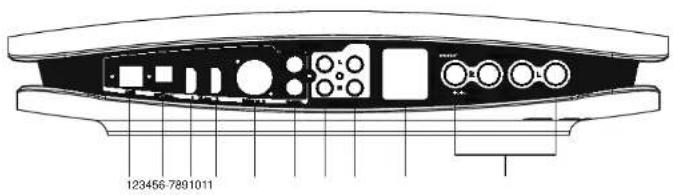
Back Panel
1 USB input
2 Toslink digital input
3D-link1-(I2S-LVDS)
4D-link2-12S-LVDS
5 AES/EBU digital input
6 S/PDIF input 1
7 S/PDIF input 2
8 Analog input 1
9 Analog input 2
10 Power inlet
11 Speaker output
Connection to the inputs
Do not apply electrostatic discharges accidentally to the apparatus inputs or outputs. To prevent this from occurring, touch any earthed surface, even the Wadia Intuition 01 casing, before connecting or removing a cable. It is unlikely that a static shock will damage the unit, but it may cause some input circuits to "lock-up". The inputs and outputs can be connected safely to the apparatus only when it is switched off.
Digital inputs
The Wadia Intuition 01 has 7 digital inputs on the back panel.
- 1 USB Input: Use a USB cable from a desktop or laptop computer.
- This input accepts a sample rate up to 32-bit/384kHz and DSD 64/128 files.
- 1 TOSLINK Optical Input: Use a TOSLINK optical cable from a digital source. DVD player or Laptop computer with optical output.
- 2 D-Link inputs : These are digital I2S LVDS inputs where you can connet sources with the same format.
This is also a preferred Wadia to Wadia connection protocol.

The I2S LVDS format is not a confirmed standard but a protocol that is in continual development, therefore its compatibility or correct operation with sources that have this data format is not guaranteed. These inputs are to be preferred for connecting Wadia apparatuses with D-Link outputs.
- 1 AES/EBU Digital Coax Inputs: This is the professional digital interface input. We recommend using this input to connect a source that features an AES/EBU output.
Note on the USB input
To play audio files using a USB connection from your computer to the Wadia Intu-tion 01, a driver may need to be installed into your computer.
Apple computers featuring OS 10.6.4 and higher do not require a driver.
The set-up program and driver is on the Wadia thumb drive included with your Intuition 01 (see accessories).
The set-up program with driver for the different versions of Windows is also available from the Wadia Web site on the page dedicated to Intuition 01.
The Wadia Intuition 01 USB input has the capacity to handle music files up to 384kHz and 32bits of resolution and DSD 64/128 files.
Loudspeaker outputs
Connect the left loudspeaker to the left loudspeaker terminals and the right loudspeaker to the right loudspeaker terminals.
Make sure to connect the positive terminal (red) with the positive loudspeaker terminal and the negative terminal (black) with the negative loudspeaker terminal.
To connect the loudspeakers use the banana plugs supplied with the standard accessories.
Installing the USB driver on PC
To play files using a USB connection from your computer to the Wadia Intuition 01, a specific driver must be installed in your Window computer. This driver is not required for Apple computers (OS 10.6.4 and higher).
The set-up program and driver is on the Wadia thumb drive included within the accessories in the Intuition 01 package. The set-up program and driver is also available for download on the Wadia web site at the Intuition 01 dedicated page.
Please read all of the instructions and the information on the Wadia Intuition 01 driver installation web page before installing drivers that match your specific computer operating system.
The Wadia Intuition 01 USB input has the capacity to handle music files up to 384kHz and 32 bits of resolution and DSD / DXD 64/128 files.
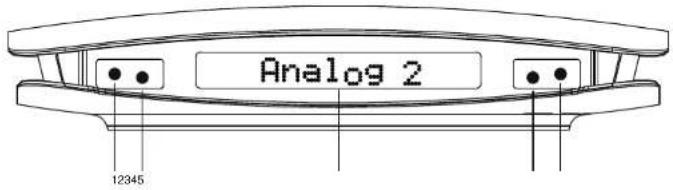
Front Panel
1 Select the previous input
2 Select the next input
3 Display
4 Volume down
5 Volume up

Note: The 1,2,4,5 buttons are placed under the fabric that covers the display and are located by 4 small white lighting spots.
Power
The power switch is located on the back panel of the Wadia Intuition 01 right above the AC inlet.
When the apparatus is switched on, a sequence of tests indicating the name Wadia and after this the product name and the currently selected input appear on the screen. After this sequence, four lit points that form a square are shown in the centre of the display, indicating that the apparatus is ready for use.
Selecting the required input
Press keys 1 or 2 to scroll left and right among the various inputs and select the one that is required.
If, for example, the USB input is currently active, pressing key 1 activates the Toslink optical input.
The same logic is also valid for the remote control, using the keys on its vertical axis.

Note : The input selector has a memory, therefore the apparatus remembers the name of the last input used by the user before switching off, and re-proposes it when the device is switched on the next time.
Adjusting the volume
The volume level is controlled by keys 4 and 5 on the front panel, or by the remote control using the 2 keys on its horizontal axis.
The keys must be kept pressed to increase or decrease the volume until the required level is obtained; the volume scale is divided into 100 steps that are well represented on the apparatus display and which can be read even from a distance.

Remote control
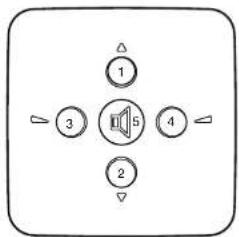
1 - Input selector: Selects the input coming after the current one
2 - Input selector: Selects the input coming before the current one
3 -Volume:Volume down
4 - Volume: Volume up
5 - Mute: Instantly lowers the volume to zero.
Pressing this key a second time returns the volume to the previous volume setting.
Replacing the battery in the remote control
To relace the battery you need to unscrew the 4 screws on the bottom of the remote control using the provided screwdriver.
Please do this operation carefully in order to keep the integrity of both the screw and the thread.
Once you have opened the bottom cover, you can remove the CR1216 battery by gently pushing aside the small spade that crosses the top edge of the battery.

Note: Danger of explosion if the battery is not replaced correctly. Only replace with the same or equivalent type.
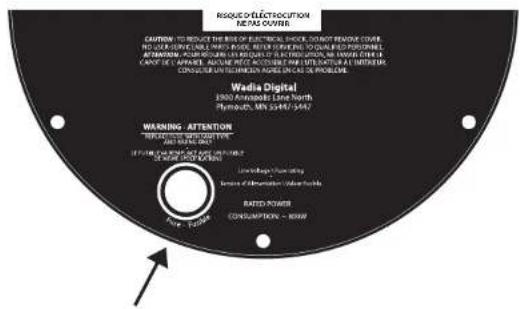
Replacing the fuse
Only replace the fuse with one of the same type and having the same capacity. To replace, turn the apparatus over and locate the fuse, as indicated by the arrow in the following image.
Troubleshooting
| Problem Cause Remedy | ||
| No power when POWER is switched on | 1. Mains plug not inserted correctly2. The fuse is broken | Plug in securelyReplace the fuse with a new one of the same type |
| The location of music is not correct | L and R input or output are reversed or positive and negative of speaker terminal is reversed | Reconnect correctly |
| No sound | 1. Volume control is set to minimum2. Source Selector set to wrong source3. Speakers not connected | Turn up the volumeCheck SelectorCheck speaker cables |
| Huming noise on speaker | 1. Signal cables not correctly connected2. The signal cable or power supply cord are placed too closely | Replace the signal cable with anoder onePut the connections in good order. Keep the signal cable away from the others |
| Remote control doesn't work | 1. The battery protection plastic slip has not been removed2. The battery is empty | Remove the plastic slipReplace the battery |
Warranty
This Warranty covers the Wadia Wadia Intuition 01.
Wadia Digital warrants that this product shall be free from defects in materials and workmanship for 3 years for all parts of the product (excluding batteries and external cables). The warranty period begins at the date of sale and is subject to the following requirements and understandings:
- This is a non-transferable warranty.
- The product must not have been modified in any manner whatsoever, or the warranty is immediately voided.
- The product must not have been stored in a humid, damp environment; nor subjected to weather, water, or salt spray.
- During the warranty period Wadia will repair or replace at our choice, a defective Wadia Intuition 01 with a similar available product, at no cost to the owner for labor or materials from Wadia.
- Wadia shall not, under any circumstances, be liable for any incidental or consequential damages arising from the loss of property or other damage or losses due to the failure of a Wadia Intuition 01. Wadia will not pay for loss of use or inconvenience caused by the failure of a Wadia Intuition 01. Wadia will not pay for damage caused to other audio components caused by the failure of the Wadia Intuition 01 within the limits allowed by State Law.
- The customer is responsible for the shipping charges for all repairs, warranty or non-warranty, shipped to Wadia. Wadia will pay return shipping to the customer or dealer (within the United States) for all warranty replacements. Special shipping methods or services will not be covered by Wadia.
- This product is only warranted in the country of original sale by Wadia.
Specifications
Decoding Software : Delta-SigMaster
Resampling Rate : 1.536 MHz
Digital Inputs: AES/EBU (XLR), 2 x Coaxial (RCA), Toslink Optical, USB, 2 x WadiaLink Input Data Rates: 44.1kHz, 48kHz, 88.2kHz, 96kHz, 176.4kHz, 192kHz, 352.8kHz, 384kHz, DSD 64, DSD 128.
Output Power : 350w/ch 4 ohm; 190w/ch 8 ohm ( EIAJ test - 1khz 1% THD )
Power Requirements: As reported on the bottom side of the product.
Dimensions and weight: WxDxH cm 38x38x6 - 6kg
Working temperature: maximum 35^ (room temperature)

DECLARATION OF CONFORMITY
Wadia Digital with headquarter in 3900 Annapolis, Lane North Plymouth, MN 55447-5447 USA, under its sole responsibility that the integrated digital amplifier INTUITION01 you have purchased which this declaration relates is in conformity to:
Directive:
2004/108/EC (EMC) Electromagnetic compatibility.
2006/95/EC (LVD) Low Voltage.
2011/65/EU (RoHS) Restriction of the use of certain hazardous substances.
2012/19/EU (WEEE) Waste electrical and electronic equipment.
Standards:
EN60065:2002+A1:2006+A11:2008(IEC60065:2001+A1:2005+A2:2010)
Audio, video and similar electronic apparatus - Safety requirements.
EN 55013:2001 + A1:2003 + A2:2006 (CISPR 13:2001 + A1:2003 + A2:2006)
Radio disturbance characteristics.
EN 55020:2007 (CISPR 20:2006)
Immunity characteristics
EN 61000-6-1:2007 (IEC 61000-6-1:2005)
Immunity for residential, commercial and light-industrial environments.
EN 61000-6-3:2007+A1:2012 (IEC 61000-6-3)
Emission standard for residential, commercial and light-industrial environments.

ENVIRONMENTAL INFORMATION
Waste of electrical and electronic equipment Directive WEEE 2002/96/EC - RoHS 2011/65/EU (for residents in EU Countries only)
This logo set on the product means that the recycling of this apparatus comes within the framework of the directive 2002/96/EC concerning the Waste on electrical and electronic equipment (WEEE).
The presence of dangerous substances in the electrical and electronic equipments can have potential con sequences on the environment and human health in the cycle of reprocessing this product.
Therefore, at the end of its lifetime, this product shall not be disposed with other non non-recycled waste.
As the end user, your role is of prime importance in the cycles of re-using, recycling, and other forms of valorisation of this electrical and electronic equipment.
Local authorities and resellers have set special procedures for the purpose of collecting and recycling this product.
You have the obligation to use the selective waste collection systems put in place by your local authorities.

Manuale d'uso
INTUITION
Wadia
FINE SOUNDS
2006/95/CE (LVD) Bassa tension.
Resampling Rate: 1.536 MHz
Digitaleingänge: AES/EBU (XLR), Koaxial (RCA), Toslink Optisch, USB
Datumübertragungsrate am Eingang: 44,1 kHz, 48 kHz, 88,2 kHz, 96 kHz, 176,4 kHz, 192 kHz, 384 kHz, DSD 64, DSD 128
D/A-Wandler: Industriestandard ESS 9018
Wadia is a brand of the
FINE SOUNDS
GROUP
©2013 Wadia Digital. All rights reserved. Specifications subject to change without notice.


- Thank You.
- Contents
- Important notice
- Wadia Digital
- Installation
- Getting Started
- Features
- Unpacking
- Accessories
- Connecting to AC Power
- Removing the battery protection on the Remote Control
- Back Panel
- Connection to the inputs
- Digital inputs
- Note on the USB input
- Loudspeaker outputs
- Installing the USB driver on PC
- Front Panel
- Power
- Selecting the required input
- Adjusting the volume
- Remote control
- Replacing the battery in the remote control
- Replacing the fuse
- Warranty
- Specifications
- DECLARATION OF CONFORMITY
- Directive:
- Standards:
- ENVIRONMENTAL INFORMATION
- FINE SOUNDS
Brand : Wadia
Model : Intuition 01
Category : Receiver