
151PowerDAC mini - Receiver Wadia - Free user manual and instructions
Find the device manual for free 151PowerDAC mini Wadia in PDF.


| Product Type | Digital Integrated Amplifier / Receiver |
| Brand | Wadia |
| Model | 151PowerDAC mini |
| Dimensions (H x W x D) | 2.7 x 8 x 8 in (6.86 x 20.32 x 20.32 cm) |
| Weight | 6 lb (2.72 kg) |
| Power Requirements | AC 100 - 240 VAC, 50/60 Hz |
| Power Output | 25 W/ch @ 8 Ohm, 50 W/ch @ 4 Ohm |
| Dynamic Power Rating | 100 W/ch @ 4 Ohm (1 kHz) |
| Digital Inputs | 2 Coaxial S/PDIF (RCA), 1 TOSLINK Optical, 1 USB B |
| Supported Sample Rates | Up to 24-bit/192 kHz (coaxial/optical), up to 24-bit/96 kHz (USB) |
| Upsampling | 24-bit/384 kHz |
| Speaker Outputs | 5-way insulated Gold Binding Posts |
| Frequency Response | 20 Hz to 20 kHz ±0.7 dB |
| Signal-to-Noise Ratio | -103 dB (signal on), -105 dB (signal off) |
| Distortion (THD+N) | 0.03-0.09% @ 1 kHz, 1 W; 0.11% @ 1 kHz, 45 W |
| Accessories Included | Aluminum remote control, 2 AAA batteries, heavy duty power cord |
| Remote Control Functions | Input selection, volume, mute, phase, display on/off, transport control, balance |
| Front Panel Controls | Input selector, phase, mute, volume up/down, LCD display |
| Warranty | 1 year parts and labor (non-transferable) |
| Safety Features | Three-prong grounded power cord; do not open; avoid heat/moisture |
Frequently Asked Questions - 151PowerDAC mini Wadia
User questions about 151PowerDAC mini Wadia
0 question about this device. Answer the ones you know or ask your own.
Ask a new question about this device
Download the instructions for your Receiver in PDF format for free! Find your manual 151PowerDAC mini - Wadia and take your electronic device back in hand. On this page are published all the documents necessary for the use of your device. 151PowerDAC mini by Wadia.
USER MANUAL 151PowerDAC mini Wadia
All of us at Wadia Digital would like to say thank you, and congratulations for purchasing the Wadia 151PowerDAC mini Digital Integrated Amplifier. We sincerely believe that your Wadia 151PowerDAC mini is an intelligent investment that will bring you many years of musical enjoyment and satisfaction.
We understand how eager you are to begin listening and we want you to become familiar with the full capabilities of the Wadia 151PowerDAC mini. However, before powering on the device, we encourage you to look through the manual and pay special attention to the sections highlighted with an ◆.
Table of Contents Wadia Digital – a Brief History 4
Optimizing Performance 6
Installation Getting Started 8
Features 8
Unpacking 9
Accessories 9
Installing Battery in Remote Control 10
◆Connecting to AC Power 10
◆Using Line Conditioners 11
◆Using Surge Protectors 11
Connections Back Panel 12
◆Speaker Outputs 13
◆ Connecting the Digital Inputs 13
Operation Front Panel 14
Using the Remote Control 16
Appendices Warranty 18
Specifications 20
Wadia Digital – a Brief History
Wadia Digital, founded in 1988, is one of the original companies dedicated to high performance digital audio reproduction. Wadia was formed by a team of engineers from the Minneapolis based 3M Corporation (Minnesota Mining and Manufacturing) who shared many years of experience in advanced digital telecommunications research and development. In the early 1980's, these engine became intrigued by the emerging compact disc technology. Disappointed with the sound quality of early CD players, they examined the workings and designs these early components and found them to be unsophisticated when compared with the technology available in other areas of digital design. In response, they founded Wadia Digital – a company based on the philosophy of applying advanced technology to improve the performance of digital audio components. Wadia's first product, the Wadia 2000 Decoding Computer, was an absolute breakthrough in digital audio. For many discerning listeners, it proved that Digital Audio was musically responsive, evolving, and engaging format.
Building on a tradition of excellence, Wadia continues to develop innovative technology; refining, listening, engineering, and improving along the way. Since Wadia 2000, new generations of industry-leading designs have been introduced and embraced by listeners around the world. Each step of the way, Wadia has consistently raised the standard for performance of Digital Audio playback.
Here is a brief list of the technological innovations the Wadia engineers have pioneered over the past 20 years:
- DigiMaster™ patented algorithm (filter optimized for reproducing music)
- ClockLink™ proprietary jitter reduction technology
- SwiftCurrent™ current to voltage conversion technology
- First outboard Digital-to-Analog converter
- First to apply glass fiber-optics to home audio
- First to recognize jitter as a source of audible distortion
- First to perfect digital volume control
- First high-end CD player competitive with expensive separates
- First company to provide bit perfect digital audio output from the il
While Wadia's expertise and track record exceed those of most digital audio companies, technology alone does not guarantee an immersive and captivating musical performance. Wadia's intuitive designs are born of a delicate balance of technology shaped by a passion for music.
Wadia continues to re-define the limits of digital music playback. We are prou introduce the Wadia 151PowerDAC mini – a breakthrough in sonic performance and a strong statement of our dedication to music.
Optimizing Preformance
To get the best performance from your 151PowerDAC mini, and for your own safety, please read and follow these important safety instructions.
- Before operating the 151PowerDAC mini please read all operating and safety instructions.
- Never place the 151PowerDAC mini near heat sources such as radiators, fireplaces, stove, or other appliances that produce heat. Avoid placing the 151PowerDAC mini where it will be subject to direct sunlight or low temperatures.
-
This product is equipped with a three prong AC power cord which includes an earth ground connection. To prevent shock hazard, all three connectors must always be used. If your electrical outlets will not accept this type of plug, an adapter may be purchased. If an adapter is necessary to be sure it is an approved type and that it is used properly, supplying a earth ground. If you are not sure of the integrity of your home's electric system, contact a licensed electrician for assistance.
-
AC extension cords are not recommended for use with this product. If an extension cord must be used, be sure it is an approved type and has sufficient current carrying capacity to power this product.
- Before cleaning the 151PowerDAC mini, always disconnect the power supply cord. Use a soft cloth and, if necessary, dampen with plain water. Never apply water, or any other cleaner, directly to the chassis.
- If you smell smoke, or an abnormal smell, immediately unplug the 151PowerDAC mini from the power supply and contact your Wadia deal
- Unplug unit if it becomes wet.
- THERE ARE NO USER SERVICEABLE PARTS INSIDE THE 151PowerDAC m Do not attempt to repair or modify your 151PowerDAC mini.
All service should be performed by qualified service personnel.
Do not open the unit while it is attached to the AC outlet.
Installation
Getting Started
The Wadia 151PowerDAC mini is an integrated amplifier with 4 digital inputs with upsampling to 24-bit/384kHz. Despite its small size the 151PowerDAC mini bursting with technology to bring you the best sound possible.
Features
• 24-bit/384kHz upsampling
- Accepts up to a 24-bit/192kHz input data rate
- Wadia's DirectConnect with Digital Volume Control technology
• 25 Watt/channel 8 Ohm, 50 Watt/channel 4 Ohm
• 4 Digital Inputs: 2 Coaxial S/PDIF (RCA), 1 TOSLINK Optical, 1 USB
- 5-way insulated Gold Binding Posts
• High quality Gold Plated Input Jacks
• Aluminum full function Remote Control
• Heavy Duty Power Cord
Unpacking
Use care in unpacking your Wadia 151PowerDAC mini. Inspect it for any ship damage and call your dealer immediately if any is found.
Do not plug your Wadia 151PowerDAC mini into an AC outlet if you find shipping damage.
We advise saving all packing materials so that the unit can be easily and safely shipped if the need arises.
Accessories
Provided with the Wadia 151PowerDAC mini are the following accessories:
- AC power cord
- Remote Control
- Two AAA batteries
Installing Battery in Remote Control
The Wadia 151PowerDAC mini remote control requires two AAA batteries, which you will find in the accessories kit. To install the batteries, remove the battery cover on the back of the remote. Insert the batteries as indicated on t battery holders, and replace the cover.
◆Connecting to AC Power
Check to make sure that the power cord shipped with your Wadia 151PowerDA mini has been manufactured for operation at your AC line voltage. Damage caused by improper operation is not covered by Wadia warranty. If the included cable and wall termination is different from your AC outlet, contact your Wadia deal
◆Using AC Line Conditioners
The Wadia 151PowerDAC mini employs extensive power-line filtering and noise suppression technology so fine performance is available with the Wadia 151PowerDAC mini plugged directly into a wall outlet using the AC power cord provided. However many users report gains in sound quality when using power conditioners or after-market power cords. If you wish to experiment with any of these devices we recommend working with your dealer and trusting your own ears for what sounds best.
◆Using a "Surge Protector"
Although the Wadia 151PowerDAC mini resists most significant voltage spikes it can still be damaged by extreme voltage overload such as a lightning strike. This type of damage is not covered under warranty. In certain circumstances, a "surge protector" can prevent this type of damage. If needed, we recommend a high quality conditioner/surge protection device to avoid the degradation in sound typical with inexpensive "strip" devices.
Connections
Avoid static discharge to the inputs or outputs. To prevent static shocks, touch any grounded surface, such as the chassis of any component that uses a grounded 3-prong plug, before connecting or removing a cable.

Back Panel
1 Right speaker terminals
2 Left speaker terminals
3 Coax 1 S/PDIF (RCA)
4 Coax 2 S/PDIF (RCA)
5 TOSLINK Optical
6 USB B
7 Power Switch
8 Power cord terminal
◆Speaker Outputs
The speaker outputs are on the back of the Wadia 151PowerDAC mini. Connect the left speaker to the left speaker terminals and the right speaker to the right speaker terminals. Make sure you keep the Wadia 151PowerDAC mini positive terminal (red) with the positive terminal on the speaker and the negative (black) on the Wadia 151PowerDAC mini with the negative (black) on the speaker.
◆Connecting the Digital Inputs
The Wadia 151PowerDAC mini has 4 digital inputs on the back.
• 2 Digital Coax Inputs:
Use a digital cable coax with RCA connectors. A digital source would be the Wadia 170iTransport.
• 1 TOSLINK Optical Input:
Use a TOSLINK optical cable from a digital source. DVD player or Laptop computer with optical output.
• 1 USB Input:
Use a USB cable from a desktop or laptop computer. The USB input accepts sample rate up to 24-bit/96kHz.
Operation

Front Panel
1 LCD display
2 Input Selector
3 Phase Button
4 Mute Button
5 Volume Up
6 Volume Down
The power switch is located on the back panel of the Wadia 151PowerDAC mini. Depress the power switch (circle) to turn the power "off". Please make sure the Wadia 151PowerDAC mini is turned off when making all digital and speaker connections.
Input
The Input button will cycle to the next input with each push of the button. (Coax 1, Coax 2, TOSLINK, and USB)
Phase
The Phase button will invert to the phase if the recording is out of phase.
Mute
The Mute button will mute the volume to zero, hit the button again and the \ will revert to its previous setting.
Volume
Volume on the Wadia 151PowerDAC mini is controlled with the volume '+' and '-' buttons on the front panel. The buttons may be continuously held for quicker volume setting. To increase the volume press '+', '-' to decrease the volume.
Using the Remote Control
Mode
Not active
Input
The Input button will cycle to the next with each push of the button (Coax 1, Coax 2, TOSLINK, and USB)
Display on/off
The display button will turn the LCD display on or off
Enter
The Enter button displays current sample rate of digital signal
Phase
The phase button inverts the polarity of the signal
Volume Down
The Volume Down decreases the volume
Volume Up
The Volume Up increases the volume
Track Back
The Track Back button skips to the previous track on a Wadia transport
Track Forward
The Track Forward button skips to the next track on a Wadia transport
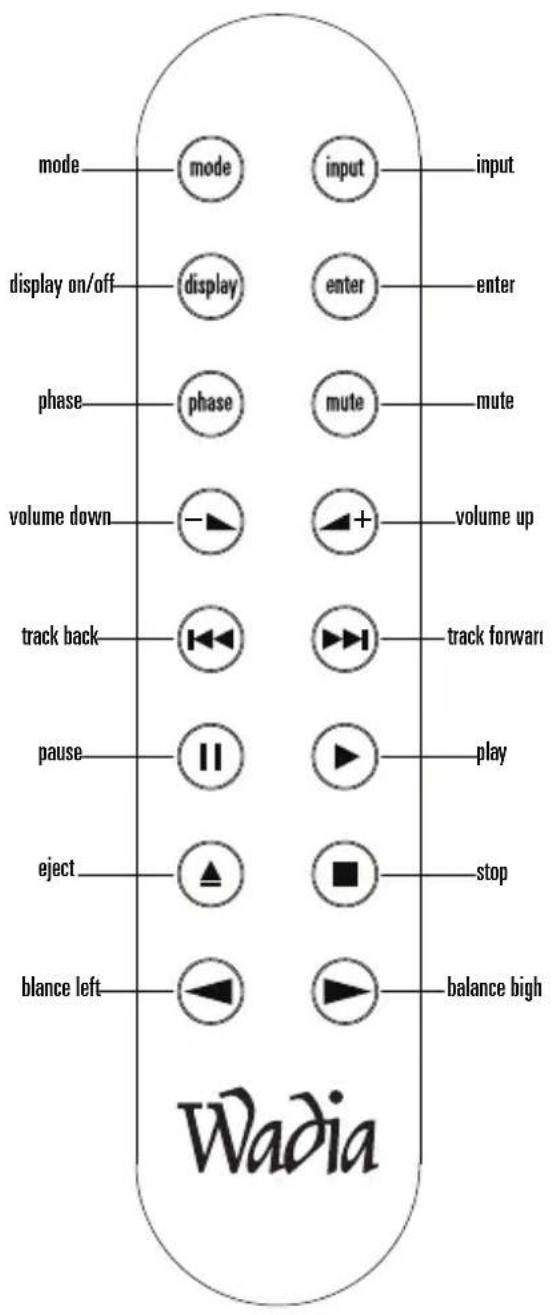
Pause
The Pause button pause the playback on a Wadia transport
Play
The Play button starts the playback on Wadia transport
Eject
The Eject button cause a Wadia transport to eject the disc inside the drive
Stop
The Stop button stops the play back of a Wadia transport
Balance Left
The Balance Left button causes the sound to the left speaker to be more dominant
Balance Right
The Balance Right button causes the sound to the right speaker to be more dominant
Warranty
This Warranty covers the Wadia 151PowerDAC mini.
Wadia Digital warrants that this product shall be free from defects in materials and workmanship for:
1 year for all parts of the product (excluding batteries).
The warranty period begins at the date of sale and is subject to the following requirements and understandings:
1 This is a non transferable warranty.
2 The product must not have been modified in any manner whatsoever, or the warranty is immediately voided.
3 The product must not have been stored in a humid, damp environment; nor subjected to weather, water, or salt spray.
4 During the warranty period Wadia will replace a defective Wadia 151PowerDAC mini with a similar available product, at no cost to the owner for labor, materials, and shipping charges from Wadia.
5 Wadia shall not, under any circumstances, be liable for any incidental or consequential damages arising from the loss of property or other damage or losses due to the failure of a Wadia 151PowerDAC mini. Wadia will not pay for loss of use or inconvenience caused by the failure of a Wadia 151PowerDAC mini. Wadia will not pay for damage caused to other audio components caused by the failure of the Wadia 151PowerDAC mini within the limits allowed by State Law.
6 The customer is responsible for the shipping charges for all repairs, warranty or non-warranty, shipped to Wadia. Wadia will pay return shipping to the customer or dealer (within the United States) for all warranty replacements. Special shipping methods or services will not be covered by Wadia.
7 This product is only warranted in the country of original sale by Wadia.
Specifications
Digital Inputs:
2 Coaxial S/PDIF (RCA), 1 TOSLINK Optical, 1 USB B
Power:
50 Watt/channel 4 Ohm, 25 Watt/channel 8 Ohm
Dynamic Power Rating @1kHz:
100 Watt/channel 4 Ohm
Distortion (THS + N):
1kHz@1 Watt: 0.03-0.09%, 1kHz@45 W: 0.11%
Signal-to-Noise Ratio:
-103dB (signal on), -105dB (signal off)
Frequency Response:
20Hz to 20kHz ±0.7dB
Power Requirements:
AC 100 - 240VAC, 50/60Hz
Dimensions (HWD):
2.7 x 8 x 8 in., 6.86 x 20.32 x 20.32 cm
Weight:
6 lbs, 2.72kg
Accessories Included:
Aluminum Remote (2 AAA batteries)
Heavy Duty Power Cord


- Table of Contents Wadia Digital – a Brief History 4
- Optimizing Performance 6
- Installation Getting Started 8
- Connections Back Panel 12
- Operation Front Panel 14
- Appendices Warranty 18
- Wadia Digital – a Brief History
- Optimizing Preformance
- Installation
- Getting Started
- Features
- Unpacking
- Accessories
- Installing Battery in Remote Control
- ◆Connecting to AC Power
- ◆Using AC Line Conditioners
- ◆Using a "Surge Protector"
- Connections
- Back Panel
- ◆Speaker Outputs
- ◆Connecting the Digital Inputs
- Front Panel
- Input
- Phase
- Mute
- Volume
- Using the Remote Control
- Mode
- Display on/off
- Enter
- Volume Down
- Volume Up
- Track Back
- Track Forward
- Pause
- Play
- Eject
- Stop
- Balance Left
- Balance Right
- Warranty
- Specifications
Brand : Wadia
Model : 151PowerDAC mini
Category : Receiver