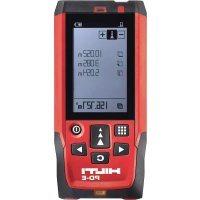
PDE - Rangefinder HILTI - Free user manual and instructions
Find the device manual for free PDE HILTI in PDF.


| Product type | Laser range finder |
| Brand | Hilti |
| Model | PDE |
| Weight (with batteries) | 165 g (5.8 oz) |
| Power supply | 2 AAA batteries (3 V), nominal current 400 mA |
| Laser class | Class 2 according to EN 60825-1:2007 |
| Laser power | < 1 mW |
| Laser wavelength | 639 nm |
| Distance measurement accuracy | ±1.0 mm (2σ) |
| Tilt measurement accuracy | ±0.2° (2σ) |
| Measuring range | Up to 200 m (depending on conditions) |
| Operating temperature | -10 °C to 50 °C |
| Storage temperature | -30 °C to 70 °C |
| Protection rating | IP 65 |
| Display | Backlit graphic display |
| Main functions | Individual measurement, continuous, areas, volumes, Pythagoras, trapezoid, staking, Delta Min/Max, data memory (30 values) |
| Maintenance and cleaning | Clean the lens with a soft cloth, pure alcohol or water; do not touch the lens with fingers |
| Safety | Do not look into the laser beam; use according to instructions; turn off laser when not in use |
| Spare parts and repairability | Standard AAA batteries; repair only by Hilti service; accessories: measuring tip, target plate, extension PDA 72 |
| Warranty | Manufacturer's warranty: contact local Hilti partner |
Frequently Asked Questions - PDE HILTI
User questions about PDE HILTI
0 question about this device. Answer the ones you know or ask your own.
Ask a new question about this device
Download the instructions for your Rangefinder in PDF format for free! Find your manual PDE - HILTI and take your electronic device back in hand. On this page are published all the documents necessary for the use of your device. PDE by HILTI.
USER MANUAL PDE HILTI
1 Information about the operating instructions
1.1 About these operating instructions
- Read these operating instructions before the product is used or operated for the first time. This is a prerequisite for safe, trouble-free handling and use of the product.
- Observe the safety instructions and warnings in these operating instructions and on the product.
- Always keep the operating instructions with the product and make sure that the product is accompanied by these operating instructions only, when the product is given to other persons.
1.2 Explanation of symbols
1.2.1 Warnings
Warnings alert persons to hazards that occur when handling or using the product. The following signal words are used:
DANGER
DANGER
Draws attention to imminent danger that will lead to serious personal injury or fatality.
WARNING
WARNING
Draws attention to a potential threat of danger that can lead to serious injury or fatality.
CAUTION
CAUTION!
Draws attention to a potentially dangerous situation that could lead to personal injury or damage to the equipment or other property.
1.2.2 Symbols in the operating instructions
The following symbols are used in these operating instructions:

Comply with the operating instructions

Instructions for use and other useful information
Dealing with recyclable materials
Do not dispose of electric equipment and batteries as household waste



1.2.3 Symbols in Illustrations
The following symbols are used in illustrations:
| 2 | These numbers refer to the illustrations at the beginning of these operating instructions. |
| 3 | The numbers in illustrations refer to important work steps or to components important for the work steps. In the text, the corresponding numbers draw attention to these work steps or components, e.g. (3). |
| 11 | Item reference numbers are used in the overview illustration and refer to the numbers used in the key in the product overview section. |
| 6! | This symbol is intended to draw your special attention to certain points for handling the product. |
1.3 Product-dependent symbols
1.3.1 General symbols
Symbols used in relation to the product.
| If applied on the product, the product has been certified by this cert-ification body for the US and Canadian markets according to the applicable standards. | |
| KCC-REM-HLT-PD-E | |
| On/off button | |
| Measure button | |
| Menu button | |
| Delete (clear) button | |
| Right arrow button | |
| Left arrow button |
1.4 Product information
products are designed for professional users and only trained, authorized personnel are permitted to operate, service and maintain the products. This personnel must be specifically informed about the possible hazards. The product and its ancillary equipment can present hazards if used incorrectly by untrained personnel or if used not in accordance with the intended use. The type designation and serial number are printed on the rating plate.
HILTA
- Write down the serial number in the table below. You will be required to state the product details when contacting Hitti Service or your local Hitti organization to inquire about the product.
Product information
| Laser range meter | PD-E |
| Generation 01 | |
| Serial no. |
1.5 Laser Information on the product
Laser information → page 3
Laser information
| CAUTION Laser Material: Steel CEREMORATION: Steel CLASS 1:2007 standard in compliance with CFR 21 § 1040 (Laser Notice 50). | |
| 2 | Laser Class 2: Do not stare into the beam. Do not direct the beam toward other persons or toward areas in which other persons, who are not involved in the work with lasers, may be present. |
| Recycle waste material. | |
2 Safety
2.1 Safety instructions
2.1.1 Basic information concerning safety
In addition to the safety rules listed in the individual sections of these operating instructions, the following rules must be strictly observed at
all times. The product and its ancillary equipment may present hazards when used incorrectly by untrained personnel or when used not as directed.
- Keep all safety instructions and information for future reference.
- Stay alert, watch what you are doing and use common sense when working with the product. Do not use the product while you are tired or under the influence of drugs, alcohol or medication. A moment of inattention while operating the product may result in serious personal injury.
- Do not render safety devices ineffective and do not remove information and warning notices.
If the product is opened improperly, laser radiation in excess of Class 2 may be emitted. Have the product repaired only by Hitti Service.
Tampering with or modification of the product is not permitted. - Check that the product functions correctly each time before use.

HILTI
Measurements taken through panes of glass or other objects may be inaccurate.
- The measurement may be incorrect if the conditions under which the measurement is taken change rapidly, e.g. due to people walking through the path of the laser beam.
Do not point the product toward the sun or other powerful light sources.
Take the influences of the surrounding area into account. Do not use the tool where there is a risk of fire or explosion.
Observe the information printed in the operating instructions concerning operation, care and maintenance.
2.1.2 General safety rules
- Check the product for damage before use. Have the damage repaired by Hilti Service.
- Check the accuracy of the product after it has been dropped or subjected to other mechanical stresses.
- Although the product is designed for the tough conditions of jobsite use, as with other measuring instruments it should be treated with o
- Products which are not in use must be stored in a dry, high place or locked away out of reach of children.
The product is not intended for use by children. - Observe the national health and safety requirements.
2.1.3 Proper preparation of the working area
- Avoid unfavorable body positions when working from ladders. Make sure you have a safe stance and that you stay in balance at all times.
- Secure the site at which you are taking measurements and take care to avoid directing the laser beam toward other persons or toward yourself.
- When the product is brought into a warm environment from very cold conditions, or vice-versa, allow it to become acclimatized before use.
Use the product only within its specified limits. - Keep the laser exit window clean in order to avoid measurement errors.
Observe the accident prevention regulations applicable in your country.
2.1.4 Working safely with laser tools
- Laser Class 2/Class II tools may be operated only by appropriately trained persons.
- Laser beams should not be projected at eye height.
Precautions must be taken to ensure that the laser beam does not unintentionally strike highly reflective surfaces.
Precautions must be taken to ensure that persons do not stare directly into the beam. - The laser beam must not be allowed to project beyond the controlled area.
- Switch the laser tool off when it is not in use.
HILTA
- Store laser tools, when not in use, in places to which unauthorized persons have no access.
2.1.5 Electromagnetic compatibility
Although the device complies with the strict requirements of the applicable directives, Hilti cannot entirely rule out the possibility of interference to the device caused by powerful electromagnetic radiation, possibly leading to incorrect operation. Check the accuracy of the device by taking measurements by other means when working under such conditions or if you are unsure. Likewise, Hilti cannot rule out the possibility of interference with other devices (e.g. aircraft navigation equipment). The tool complies with the requirements of class A; The possibility of interference occurring in a domestic environment cannot be excluded.
Only for Korea: This laser range meter is suitable for commercial and industrial use and for the electromagnetic radiation encountered in this field (Class A). Users must pay attention to this point and make sure that this laser range meter is not used in occupied living areas.
3 Description
3.1 Overview of the product
① Rear contact surface
② Reference indicator LED for rear contact
③ Left arrow button
① Menu button
⑤ "Measure" button
6 Graphic display
⑦ Reference indicator LED for front contact
Side "Measure" button
⑨ On/off button
10 Right arrow button
Hand strap attachment point
12 Delete (clear) button
1/4 inch thread
Folding spike
15 Laser emitting and receiving
lens
Optical sight
1/4 inch thread
3.2 Intended use
The product described is a laser range meter. It is designed for taking individual measurements as well as the continuous measurement of distances. Distances can be measured from all stationary targets without a highly reflective surface, i.e. concrete, stone, wood, plastic, paper, etc. The use of prisms or other highly reflective targets is not permissible and, if attempted, may falsify the results.
The product is approved for use with batteries of the type AAA.


3.3 Explanation of the display
Main menu
| Select angle unit |
| Determine painter's area |
| Single Pythagoras |
| Measure areas and volumes |
| Select special functions |
| Select trapezoid function |
| Select Pythagoras function At least one right angle is required for horizontal and diagonal tances. |
| Select settings |
| Measure indirectly No specific angle is required for measurements on non-moving jects such as walls. |
Generally applicable symbols
| Battery charge state |
| Measuring spike not folded out |
| Measuring spike folded out |
| Measure |
| Add distances |
| Subtract distances |
| Select |
| Do not select |
| Select measuring time |
| Select calculator |
Angle units submenu
| Inclination in percent |
| Metric units |
| Imperial units |
| Inclination in angular degrees |

HILTA
Area and volume measurement submenu
| □ | Measure rectangular areas |
| △ | Measure triangular areas |
| ◎ | Measure volumes |
| ◎ | Measure cylinder volume |
Special functions submenu
| Select outdoor mode |
| Select automatic brightness sensor |
| Determine area to be painted |
| Select layout function |
| Select min/max delta function |
| Select timer |
| Select offset function |
| Select data storage media |
Trapezoid function submenu
| Δ | Measure 3 distances |
| Δ | Measure 2 distances, 1 angle |
Pythagoras function submenu
| Single Pythagoras |
| Double Pythagoras |
| Combined Pythagoras |
Settings submenu
| Unit of measurement. Select unit of measurer: meter centimeter millimeter |
| Measuring references. Select measuring referen: front edge: par of thread: underside of thread |
| Angle unit. Select angle: inclination in percent metric units imperial units: inclination in angular degrees |
| Select expert mode |
| Edit favorites list |
HILSO
| 1.x | Activate scale |
| Switch signal tone on / off | |
| Select laser on constantly | |
| Select automatic brightness sensor | |
| Calibrate inclination sensor | |
| Display information about the tool | |
| Reset to default settings |
Indirect measurement submenu
| Δ | Indirect horizontal distance measurement |
| Δ | Indirect vertical distance measurement |
| √ | Take measurements on ceilings |
| √ | Indirect vertical distance measurement II |
3.4 Items supplied
Laser range meter, two batteries, operating instructions, manufacturer's certificate.
Other system products approved for use with this product can be found at your local Hitti Store or at: www.hitti.group
4 Technical data
| Rated voltage | 3 V |
| Rated current | 400 mA |
| Maximum site elevation above datum | 2,000 m (6,561 ft - 10 in) |
| Maximum relative humidity | 80 % |
| Operating temperature | -10 °C ... 50 °C (14 °F ... 122 °F) |
| Distance measurement accuracy (2σ, standard deviation) | ±1.0 mm |
| Inclination measurement accuracy (2σ, standard deviation) | ±0.2° |
| Output power, laser | < 1 mW |
| Wavelength, laser | 639 nm (0.0000252 in) |
HILTA
| Pulse duration | < 3.6 ns |
| Pulse period | 8.3 ns ... 243 ns |
| Weight (including batteries) | 165 g (5.8 oz) |
| Storage temperature | -30 °C ... 70 °C (-22 °F ... 158 °F) |
| Laser class in accordance with EN 60823 | laser class 2 |
| Protection class in accordance with IEC | 60529 |
5 Operation
5.1 Basic functions
Navigate to the desired function with the aid of the left or right arrow buttons.
Always press the "Measure" button to select a function.
Take care to ensure correct battery polarity. Change the batteries only in pairs. Do not use damaged batteries.
- Open the battery compartment and insert the batteries.
5.3 Switching the laser range meter on and off
- If the tool is switched off, press the on/off button or the "Measure" button to switch it on.
- If the tool is switched on, press the on/off button to switch it off.
5.4 Measuring using the spike
- Fold out the spike through 90° . The spike can then be used as the contact point.
Here, the spike helps to align the device while a stable position is established. This is the case primarily for indirect, trapezoid and Pythagoras measurements since these results are based on estimated values. Use the measuring extension PDA 72 for inaccessible places. The device automatically detects the measuring extension. A confirmation window may appear in the display. - Fold out the spike through 180° . The measuring reference point is then set automatically.

HILTO
5.5 Measuring using a target plate
- Use the target plate to measure distance under the following unfavorable conditions:
The wall is not sufficiently reflective due to the type of surface.
The target point is not on a surface.
The distance to be measured is very long.
The light conditions are unfavorable (bright sunshine).
- A distance of 1.2mm should be added to the measured distance when using a target plate.
5.6 Measurement mode
5.6.1 Single measurements
-
Press the "Measure" button briefly to activate the laser beam.
-
Keep the laser beam on the target point.
-
Press the "Measure" button briefly to take the measurement.
The measured distance is shown in the lower line of the display.
The distance measured in the previous measurement is shown in the upper line of the display.
- To take another measurement, keep the laser beam on the target point and press the "Measure" button again.
5.6.2 Continuous measurement
During continuous measurement, 6-10 measurements are taken and displayed every second. The laser range meter can be moved relative to the target until the desired distance is reached.
- Press the "Measure" button for 2 seconds.
If the signal tone is active, a signal tone will be emitted. - Move the laser range meter toward or away from the target until the desired distance is reached.
- Press the "Measure" button briefly.
The measured distance is shown in the lower line of the display.
The distance measured in the previous measurement is shown in the upper line of the display.
5.7 Selecting the angle unit
- Select the angle unit symbol from the menu.
- Navigate to the desired angle unit with the aid of the left or right arrow buttons.
- Select the desired angle unit by pressing the "Measure" button.
HILTA
5.8 Measuring areas and volumes
5.8.1 Measuring rectangular areas
- Aim the tool at the target point for the room width and press the "Measure" button.
- Aim the tool at the target point for the room length and press the "Measure" button.
5.8.2 Measuring triangular areas
- Aim the tool at the target point and press the "Measure" button.
- Aim the tool at the target point and press the "Measure" button.
- Aim the tool at the third target point and press the "Measure" button.
5.8.3 Measuring volumes
- Aim the tool at the target point and press the "Measure" button.
- Aim the tool at the next target point and press the "Measure" button.
- Aim the tool at the next target point and press the "Measure" button.
5.8.4 Measuring cylindrical volume
- Aim the tool at the corresponding target to measure the height of the cylinder and press the "Measure" button.
- Aim the tool at the next target point to measure the diameter of the cylinder and press the "Measure" button.
5.9 Special functions
5.9.1 Automatic brightness sensor
- Select the symbol for the automatic brightness sensor from the special functions menu.
The automatic brightness sensor automatically dims the lighting on the display in dark surroundings. This saves battery power.
5.9.2 Painter's area
- Aim the tool at the target point for the first room length and press the "Measure" button.
The result is saved as an intermediate result. - Aim the tool at the target for the next room length and press the "Measure" button to take the measurement.
The second result is shown in the intermediate results table. The intermediate result shown in bold is the sum of the measured room lengths.
- Repeat this procedure until all room lengths have been measured.
- Press the right arrow button to switch to room height and confirm by pressing the "Measure" button.

2068470 English 11
HILTI
- Position and aim the tool for room height measurement and then take the measurement.
The room height is measured and displayed in the intermediate result line. The painter's area is calculated immediately and shown in the result line.
5.9.3 Layout function
- Enter the distance manually. Do this by using the left or right arrow buttons to select the keyboard symbol and confirm by pressing the "Measure" button.
- Select the applicable numbers and confirm by pressing the "Measure" button.
- To confirm the value, select the check mark symbol (tick) at the bottom right corner.
- Select the flag symbol.
The distance you have entered will then be shown between the two flags.
- Press the "Measure" button to begin measuring.
- The arrows on the screen indicate in which direction you must move the tool. When the target distance is reached, black arrows appear above and below the distance shown in the display.
- To repeat this distance measurement several times, move the tool further. The number of times you have measured out this distance is shown on the right of the screen.
- Press the "Measure" button to stop measuring.
When the distance to be set out is reached, the currently used measuring reference is shown in the display.
As an alternative to entering the distance manually, the distance to be set out may also be measured with the tool. To do this, select the symbol for single measurement and confirm your choice by pressing the "Measure" button.
5.9.4 Min/max delta function
- Select the symbol for the min/max delta function from the special functions menu.
- Aim the tool at the target point and press the "Measure" button.
- Press the "Measure" button to stop measuring.
The last distances measured are shown in the results line.
HILTA
5.9.5 Data storage
- Select the data storage symbol from the special functions menu.
The tool can save up to 30 screens, including the graphical symbols. If 30 screens have already been saved, the oldest one will be deleted automatically when a new screen is saved.
2. To delete data storage memory, press and hold the C-button for 2 seconds while the data storage screen is displayed.
5.10 Trapezoid
5.10.1 Trapezoid function (3 distances)
- Select the symbol for the trapezoid function for 3 distances from the trapezoid functions menu.
- Aim the tool at the target point and press the "Measure" button. After measuring the first distance, the graphical display automatically prompts you to take the next measurement.
- Aim the tool at the next target point and press the "Measure" button.
- Aim the tool at the third target point and press the "Measure" button.
5.10.2 Trapezoid with inclination (2 distances, 1 angle)
- Select the symbol for the trapezoid function with inclination from the trapezoid functions menu.
- Aim the tool at the target point and press the "Measure" button.
- Aim the tool at the next target point and press the "Measure" button.
5.11 Pythagoras
5.11.1 Single Pythagoras
- Aim the tool at the target point and press the "Measure" button.
- Aim the tool at the next target point and press the "Measure" button.
In order to achieve accurate results, the second distance must be measured at right angles to the target distance.
5.11.2 Double Pythagoras
- Aim the tool at the target point and press the "Measure" button.
- Aim the tool at the next target point and press the "Measure" button.
In order to achieve accurate results, the second distance must be measured at right angles to the target distance.
3. Aim the tool at the third target point and press the "Measure" button.
5.11.3 Combined Pythagoras
- Aim the tool at the target point and press the "Measure" button.
- Aim the tool at the next target point and press the "Measure" button.
- Aim the tool at the next target point and press the "Measure" button.

2068470 English 13

5.12 Settings
5.12.1 Editing the favorites list
- Navigate to the function that you wish to edit and confirm by pressing the "Measure" button.
- Navigate to the desired function and confirm by pressing the "Measure" button.
5.12.2 Activating the scale
- Set the applicable number and confirm the value by pressing the "Measure" button.
- Select the check mark symbol (tick) to confirm the value.
5.12.3 Calibrate Inclination sensor
- Place the tool on a horizontal surface and press the "Measure" button.
- Rotate the tool through 180° and press the "Measure" button.
The inclination sensor is now calibrated.
5.13 Indirect measurements
5.13.1 Indirect horizontal distance measurement
- Aim the tool at the target point and press the "Measure" button.
The distance and angle of inclination are measured and shown in the intermediate result line.
The target distance is calculated immediately and shown in the result line.
5.13.2 Indirect vertical distance (2 angles, 2 distances)
- Aim the tool at the target point and press the "Measure" button.
The first distance and angle are measured and shown in the intermediate result line.
The graphical display automatically prompts you to measure the second distance.
- Aim the tool at the next target point and press the "Measure" button.
The target distance is calculated immediately and shown in the result
line.
5.13.3 Taking measurements on ceilings
- Aim the tool at the target point and press the "Measure" button.
The first distance and angle are measured and shown in the intermediate result line.
The graphical display automatically prompts you to measure the second distance.
- Aim the tool at the next target point and press the "Measure" button.
The target distance is calculated immediately and shown in the result line.
14 English 2068470

HILTA
5.13.4 Indirect vertical distance II (2 angles, 1 distance)
- Aim the tool at the target point and press the "Measure" button.
The first distance and angle are measured and shown in the intermediate result line.
The graphical display automatically prompts you to measure the second distance.
- Aim the tool at the next target point and press the "Measure" button.
The target distance is calculated immediately and shown in the result line.
6 Care, transport and storage
6.1 Cleaning
Do not touch the lens with the fingers.
Clean the lens by blowing the dust off or by wiping with a clean, dry cloth.
- Do not use liquids other than pure alcohol or water.
6.2 Transport
The batteries must be insulated or removed from the product before it is shipped or sent by mail.
Use the Hilti packaging or packaging of equivalent quality for transporting or shipping your equipment.
6.3 Storage and drying
- Do not put the product into storage when wet. Allow it to dry before putting it away.
- Observe the temperature limits given in the Technical Data section which are applicable to storage or transport of the equipment.
- Check the accuracy of the equipment before it is used after a long period of storage or transportation.
7 Disposal
WARNING
Risk of injury. Hazards presented by improper disposal.
- Improper disposal of the equipment may have the following consequences: The burning of plastic components generates toxic fumes which may present a health hazard. Batteries may explode if damaged or exposed to very high temperatures, causing poisoning, burns, acid burns or environmental pollution. Careless disposal may permit unauthorized and improper use of the equipment. This may result in serious personal injury, injury to third parties and pollution of the environment.

2068470 English 15
HILTI
Most of the materials from which Hitti products are manufactured can be recycled. The materials must be correctly separated before they can be recycled. In many countries, your old tools, machines or appliances can be returned to Hitti for recycling. Ask Hitti Service or your Hitti representative for further information.
In accordance with the European Directive on waste electrical and electronic equipment and its implementation in conformance with national law, electric tools or appliances that have reached the end of their life must be collected separately and returned to an environmentally compatible recycling facility.
Disposal of electric tools or appliances together with household waste is not permissible.
8 FCC statement / IC statement
CAUTION This product has been tested and found to comply with the limits for a class B digital device, pursuant to part 15 of the FCC Rules. These limits are designed to provide reasonable protection against harmful interference in a residential installation. These products generate, use and can radiate radio frequency energy and, if not installed and used in accordance with the instructions, may cause interference to radio communications.
There is no guarantee that interference will not occur in a particular installation. If this product does cause harmful interference to radio or television reception, which can be determined by turning the product off and on, the user is encouraged to try to correct the interference by taking the following measures:
Re-orient or move the receiving antenna.
- Increase the distance between the product and receiver.
- Connect the product to a power outlet on a circuit different from that to which the receiver is connected.
Consult your dealer or an experienced TV/radio technician for assistance.
Changes or modifications not expressly approved by Hitti may restrict the user's right to operate the product.
This product complies with the requirements in Paragraph 15 of the FCC Rules and RSS 210 of IC.
Operation of the product is subject to the following conditions:
This product should cause no harmful interference.
This product must accept any interference received, including interference that may cause undesired operation.
9 Manufacturer's warranty
- Please contact your local Hilti representative if you have questions about the warranty conditions.
HILTI
Français
| Δ | Mesurer 3 distances |
| Δ | Mesurer 2 distances, 1 angle |
4 Caracteristicas techniques
- 1 INFORMATION ABOUT THE OPERATING INSTRUCTIONS
- 1.1 ABOUT THESE OPERATING INSTRUCTIONS
- 1.2 EXPLANATION OF SYMBOLS
- 1.2.1 WARNINGS
- DANGER
- WARNING
- CAUTION
- CAUTION!
- 1.2.2 SYMBOLS IN THE OPERATING INSTRUCTIONS
- 1.2.3 SYMBOLS IN ILLUSTRATIONS
- 1.3 PRODUCT-DEPENDENT SYMBOLS
- 1.3.1 GENERAL SYMBOLS
- 1.4 PRODUCT INFORMATION
- HILTA
- 1.5 LASER INFORMATION ON THE PRODUCT
- LASER INFORMATION
- 2 SAFETY
- 2.1 SAFETY INSTRUCTIONS
- 2.1.1 BASIC INFORMATION CONCERNING SAFETY
- HILTI
- 2.1.2 GENERAL SAFETY RULES
- 2.1.3 PROPER PREPARATION OF THE WORKING AREA
- 2.1.4 WORKING SAFELY WITH LASER TOOLS
- 2.1.5 ELECTROMAGNETIC COMPATIBILITY
- 3 DESCRIPTION
- 3.1 OVERVIEW OF THE PRODUCT
- 3.2 INTENDED USE
- 3.3 EXPLANATION OF THE DISPLAY
- MAIN MENU
- GENERALLY APPLICABLE SYMBOLS
- ANGLE UNITS SUBMENU
- AREA AND VOLUME MEASUREMENT SUBMENU
- SPECIAL FUNCTIONS SUBMENU
- TRAPEZOID FUNCTION SUBMENU
- PYTHAGORAS FUNCTION SUBMENU
- SETTINGS SUBMENU
- HILSO
- INDIRECT MEASUREMENT SUBMENU
- 3.4 ITEMS SUPPLIED
- 4 TECHNICAL DATA
- 5 OPERATION
- 5.1 BASIC FUNCTIONS
- 5.3 SWITCHING THE LASER RANGE METER ON AND OFF
- 5.4 MEASURING USING THE SPIKE
- HILTO
- 5.5 MEASURING USING A TARGET PLATE
- 5.6 MEASUREMENT MODE
- 5.6.1 SINGLE MEASUREMENTS
- 5.6.2 CONTINUOUS MEASUREMENT
- 5.7 SELECTING THE ANGLE UNIT
- 5.8 MEASURING AREAS AND VOLUMES
- 5.8.1 MEASURING RECTANGULAR AREAS
- 5.8.2 MEASURING TRIANGULAR AREAS
- 5.8.3 MEASURING VOLUMES
- 5.8.4 MEASURING CYLINDRICAL VOLUME
- 5.9 SPECIAL FUNCTIONS
- 5.9.1 AUTOMATIC BRIGHTNESS SENSOR
- 5.9.2 PAINTER'S AREA
- 5.9.3 LAYOUT FUNCTION
- 5.9.4 MIN/MAX DELTA FUNCTION
- 5.9.5 DATA STORAGE
- 5.10 TRAPEZOID
- 5.10.1 TRAPEZOID FUNCTION (3 DISTANCES)
- 5.10.2 TRAPEZOID WITH INCLINATION (2 DISTANCES, 1 ANGLE)
- 5.11 PYTHAGORAS
- 5.11.1 SINGLE PYTHAGORAS
- 5.11.2 DOUBLE PYTHAGORAS
- 5.11.3 COMBINED PYTHAGORAS
- 5.12 SETTINGS
- 5.12.1 EDITING THE FAVORITES LIST
- 5.12.2 ACTIVATING THE SCALE
- 5.12.3 CALIBRATE INCLINATION SENSOR
- 5.13 INDIRECT MEASUREMENTS
- 5.13.1 INDIRECT HORIZONTAL DISTANCE MEASUREMENT
- 5.13.2 INDIRECT VERTICAL DISTANCE (2 ANGLES, 2 DISTANCES)
- 5.13.3 TAKING MEASUREMENTS ON CEILINGS
- 5.13.4 INDIRECT VERTICAL DISTANCE II (2 ANGLES, 1 DISTANCE)
- 6 CARE, TRANSPORT AND STORAGE
- 6.1 CLEANING
- 6.2 TRANSPORT
- 6.3 STORAGE AND DRYING
- 7 DISPOSAL
- 8 FCC STATEMENT / IC STATEMENT
- 9 MANUFACTURER'S WARRANTY
- FRANÇAIS
Brand : HILTI
Model : PDE
Category : Rangefinder