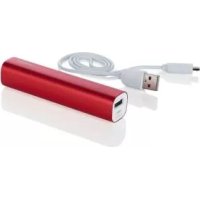
SPB 2.6 A1 - USB Charger SILVERCREST - Free user manual and instructions
Find the device manual for free SPB 2.6 A1 SILVERCREST in PDF.


| Product type | USB charger (external battery) |
| Brand | SilverCrest |
| Model | SPB 2.6 A1 |
| Integrated battery | 3.6 V / 2600 mAh (Li-ion) |
| Input (charging) | 5 V, 0.5 A (micro-USB) |
| Output (charging devices) | 5 V, 1 A (USB port) |
| Dimensions (L x H x D) | Approx. 2.3 x 2.3 x 10.3 cm |
| Weight | Approx. 75 g |
| Operating temperature | 5 °C to 45 °C |
| Operating humidity | 85% RH max (without condensation) |
| LED indicators | 4 LEDs for charge level (0-100%) |
| Main functions | Emergency charging for mobile devices (smartphones, tablets, etc.) |
| Package contents | Universal charger, USB cable, instruction manual |
| Care and cleaning | Clean with a dry, clean cloth; do not use aggressive liquids |
| Safety | Do not expose to heat, excessive humidity, do not open the casing |
| Repairability | Repair only by qualified technical personnel; do not open |
| Warranty | 3 years from date of purchase |
| Manufacturer | TARGA GmbH, Coesterweg 45, 59494 SOEST, Germany |
| Customer service (France) | Phone: 01 - 712 302 83, Email: service.FR@targa-o |
| Intended use | Private use, charging of devices with USB port |
Frequently Asked Questions - SPB 2.6 A1 SILVERCREST
User questions about SPB 2.6 A1 SILVERCREST
0 question about this device. Answer the ones you know or ask your own.
Ask a new question about this device
Download the instructions for your USB Charger in PDF format for free! Find your manual SPB 2.6 A1 - SILVERCREST and take your electronic device back in hand. On this page are published all the documents necessary for the use of your device. SPB 2.6 A1 by SILVERCREST.
USER MANUAL SPB 2.6 A1 SILVERCREST
GB User manual and service information
IAN 101433
IAN 101433
DE AT CH
Deutsch 2
Français....17
Italiano 33
English......47
Inhaltsverzeichnis
Einleitung 3
natural_image
Illustration of a Silver Crest battery, USB cable, and open book (no text or symbols on components)Technische Daten
natural_image
Symbol of a trash bin crossed with two crossed lines, no text or numbers presentnatural_image
Illustration of a Silver Crest battery with labeled components (A, B, C) and an open book icon (no text or symbols on main objects)natural_image
Symbol of a trash bin crossed with two crossed lines, no text or numbers presentnatural_image
Illustration of a Silver Crest battery with labeled components (A, B, C) and an open book icon (no text or symbols on main objects)Specifiche tecniche
Batterie incorporate 3,6V / 2600mAh
Ingresso 5 V, 0,5 A

Uscita 5 V, 1 A

Dimensioni (L x H x P) circa 2,3 x 2,3 x 10,3 cm
Peso circa 75 g
Temperatura operativa da 5 a 45°C
Umidità operativa
natural_image
Symbol of a trash bin crossed with two crossed lines, no text or numbers presentTechnical specifications 49
Safety instructions.... 50
Overview of the operating controls .... 54
Before you start 55
Getting started.... 55
Charging the power bank 55
Checking the state of charge 56
Charging external devices 57
Troubleshooting 58
Environmental regulations and disposal information.... 58
Conformity notes 59
Warranty and Service Information 60
Introduction
Thank you for choosing a SilverCrest product. The SilverCrest Power Bank SPB 2.6 A1 allows you to recharge battery of e.g. a mobile phone while on the move, even if there is no power socket available.
Intended use
The SilverCrest Power Bank SPB 2.6 A1 is an information technology product. It allows you to recharge mobile devices that have a USB charging socket. The SilverCrest Power Bank has not been designed for corporate or commercial applications. Use the power bank for private use only. Any use other than that mentioned above does not correspond to the intended use. The power bank fulfils all relevant norms and standards concerning CE conformity. Any modifications to the power bank other than recommended changes by the manufacturer may result in these standards no longer being met. The manufacturer shall not be liable for any damage or malfunctions resulting therefrom. Observe the regulations and laws in the country of use.
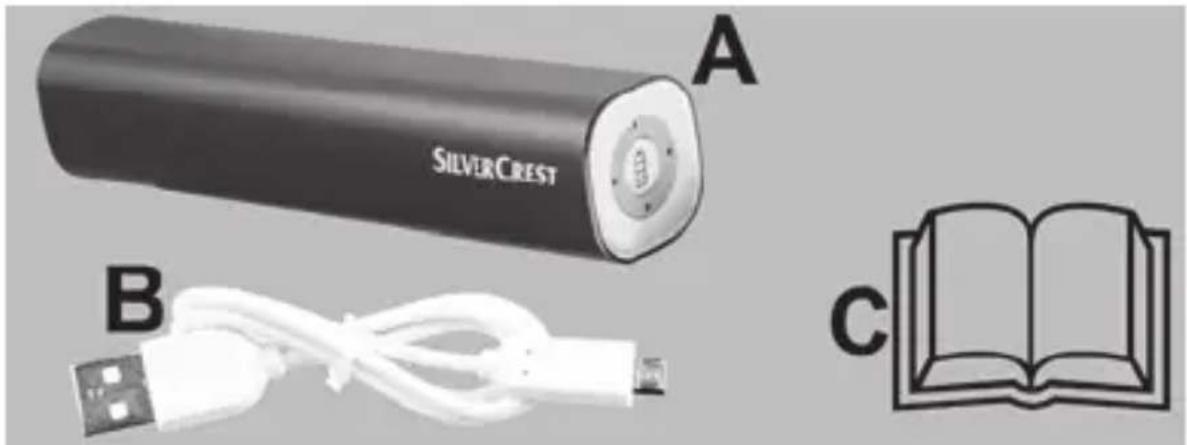
Package contents
A Power Bank SPB 2.6 A1
B USB charger cable
C These operating instructions (line-art illustration)
natural_image
Illustration of a Silver Crest battery with labeled components (A, B, C) and an open book icon (no text or symbols on main objects)Technical specifications
Built-in battery pack 3,6V / 2600mAh
Input 5 V, 0.5 A

Output 5 V, 1 A

Dimensions (W x H x D) approx. 2.3 x 2.3 x 10.3 cm
Weight approx. 75 g
Operating temperature 5 °C to 45 °C
Operating humidity
max. 85 % rel. humidity (non-condensing)
Permissible storage conditions
-5 °C to +50 °C, max. 85 % rel. humidity (non-condensing)
The technical specifications and design can be changed without prior notice.
Safety instructions
Before you use the power bank for the first time, please carefully read the following instructions even if you are familiar with handling electronic devices. Keep these operating instructions in a safe place for future reference. If you s power bank or pass it on, it is essential that you also hand over this manual, as it is part of the product.

CAUTION! This icon alerts you about a potential dangerous situation. Ignoring it can lead to severe injury or even death.

WARNING! This symbol denotes important information for the safe operation of the product and user safety.

This symbol denotes further information on the topic.
Copyright
All the contents of this user manual are protected by copyright and provided to the reader for information only. Copying data and information without the prior explicit written consent of the author is strictly forbidden. This also applies to any commercial use of the contents and information. All texts and diagrams are up-to-date as of the date of printing.
Operating environment
The device is not designed for use in environments with high humidity (e.g. bathrooms) or excessive levels of dust. Operating temperature and operating humidity: +5 to +45 °C, max. 85 % relative humidity. Please note that when using the product in a car, especially behind the windscreen, the temperature can significantly increase above +45 °C.

Always make sure that
- the device is not exposed to direct heat sources (e.g. radiators)
- the device is not exposed to strong artificial light
- contact with water spray and drops and aggressive fluids is avoided and the device is never operated near water, the device is never submerged (do not place any items containing liquids, such as drinks, vases, etc. on or near the device).
- the device is never placed near magnetic fields (e.g. speakers)
- no naked flames (e.g. burning candles) are placed on or near the device
- no foreign bodies can penetrate into the device
- the device is not subjected to any major temperature fluctuations as this can cause condensation and short-circuiting. If the device has been exposed to strong
temperature fluctuations, wait for it to reach the ambient temperature before switching it on (about 2 hours).
- the device should not be subjected to excessive shocks and vibrations
- the device or the optional USB power adapter is not used during thunderstorms and unplug the optional USB power adapter from the mains
- when using a USB power adapter the power socket used must be easily accessible at all times and cables are laid so they do not present a trip hazard
- the device is not covered. Heat can accumulate when the device is covered, therefore there is a risk of fire.
Failure to heed the warnings above may result in dam the device or injury.

Caution – danger of explosion
Never throw the device into a fire and do not deform the device or the built-in battery, as this could cause the battery to explode.
Please note the usage restrictions and regulations relating to battery-powered devices in dangerous places, such as petrol stations, aircraft, hospitals, etc.

Children and persons with disabilities
Electrical devices are not suitable for children. People with disabilities should only use electrical devices in appropriate circumstances. Do not allow children or persons with disabilities to use electrical devices unsupervised. They may not comprehend the potential risks. Batteries and small parts represent potential choking hazards.
Keep the packaging away from children and persons with disabilities.

There is a risk of suffocation.

Cables
Always hold cables by the plug and never pull on the cable itself. Never place heavy objects or furniture on the cables and take care that the cord does not become trapped, especially at the plug and sockets. Never tie knots in a cable and do not tie them to other cables. All cables must be laid so that nobody can trip over them or be obstructed by them.

Maintenance / cleaning
Repairs are required if this device has been damaged in any way, for example if the device housing is damaged, if liquids or
objects have penetrated the device or if the product has been exposed to rain or moisture. Repairs are also necessary if the product is not working properly or has been dropped. If you notice any smoke, unusual noises or strange smells, unplug all cables immediately and disconnect the optional USB power adapter from the power supply. If this occurs, do not continue to use the device and have it checked out by an expert. All repairs must be carried out by qualified service personnel. Never open the housing of the device. Only use a clean, dry cloth for cleaning. Never use aggressive liquids. Do not attempt to open the housing of the device, this will void your warranty.
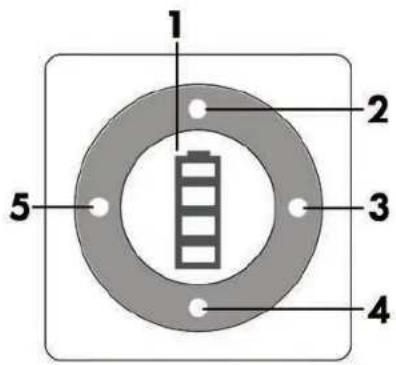
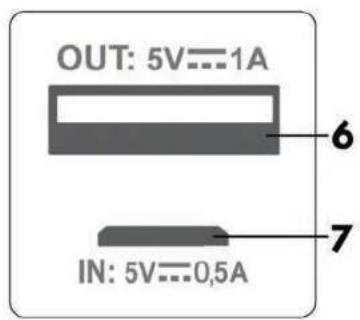
Overview of the operating controls
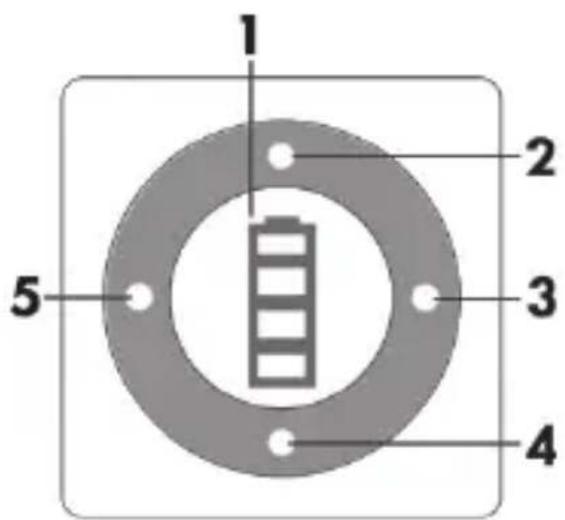
An illustration of the operating controls and their corresponding numbers can be found on the inside page of the fold-out cover of this user manual.
1 State of charge / START pushbutton
2 LED
3 LED
4 LED
5 LED
54 - English
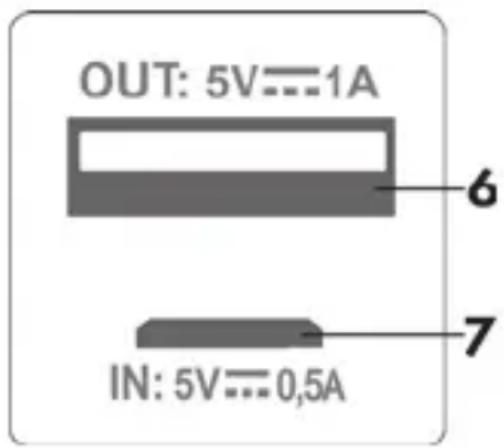
6 USB socket (output): Here you connect the device to be charged.
7 Micro USB port: Charging socket (input)
Before you start
Remove the power bank and its accessories from the package and remove the plastic films.
Getting started

The power bank must never be charged and be used to recharge an external device at the same time.
Charging the power bank
To charge the built-in battery of your power bank, use the supplied USB charging cable (B) to connect the power bank to a free USB port of your powered-on computer. To do so, insert the Micro USB plug of the USB charging cable (B) into the power bank Micro USB socket (7) and then connect the USB plug into a free USB port of your co
charging process, the LEDs (2, 3, 4, 5) inform you about the current state of charge of the power bank.
| LED indicator State of charge | |
| LED 2 flashes, 0 - 25 % | |
| LED 2 lit, LED 5 flashes 25 - 50 % | |
| LEDs 2 and 5 lit, LED 4 flashes 50 - 75 % | |
| LEDs 2, 5 and 4 lit, LED 3 flashes 75 | - 100 % |
| LEDs 2, 5, 4, 3 lit 100 % |

Alternatively, you can use an external USB power adapter (not included) to charge the battery of your power bank.
Checking the state of charge
You can also check the state of charge of your power bank when it is not being charged or discharged. To do this, press the State of charge / START pushbutton (1) briefly. The LEDs (2, 3, 4, 5) will indicate the state of charge of the power bank for approx. 5 seconds.
| LED indicator State of charge | |
| LEDs 2, 5, 4, 3 lit 75 - 100 % | |
| LEDs 2, 5, 4 lit 50 - 75 % | |
| LEDs 2, 5 lit 25 - 50 % | |
| LED 2 lit 0 - 25 % | |
| All LEDs off 0 % |
Charging external devices
- To charge an external device with your power bank, use the supplied USB charging cable (B) to connect the power bank to the external device. To do so, insert the Micro USB plug of the USB charging cable (B) into the Micro USB socket of your external device and then connect the USB plug into the USB port (6) of your power bank. If the charging process doesn't start automatically, press the State of charge / START pushbutton (1) briefly to start the charging process. Alternatively you can also use the charging cable of the external device manufacturer (USB connection).
During the charging process, the LEDs (2, 3, 4, 5) inform about the current state of charge of the power bank.
| LED indicator State of charge | |
| LEDs 2, 5, 4, 3 lit 75 - 100 % | |
| LEDs 2, 5, 4 lit 50 - 75 % | |
| LEDs 2, 5 lit 25 - 50 % | |
| LED 2 lit 0 - 25 % | |
| All LEDs off 0 % |
- You can stop the charging process at any time by unplugging the USB charging cable (B) or by keeping pressed (for approx. 3 seconds) the State of charge / START pushbutton (1).
Troubleshooting
The power bank is not charging
- Faulty connection, double-check the connection.
- Some computers do not supply USB power while they are turned off. If the battery of your power bank does not charge, make sure your computer is powered on.
A connected device is not charging.
- The battery of your power bank is empty; recharge it.
- No connection to the external device, double-check the connection.
- Press the State of charge / START pushbutton (1) briefly to start the charging process.
Environmental regulations and disposal information
natural_image
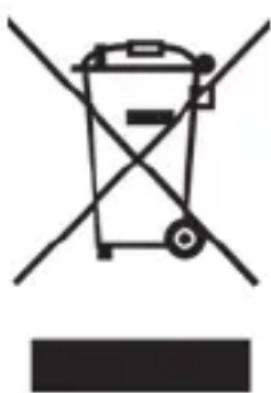
Symbol of a trash bin crossed with two crossed lines, no text or numbers presentDevices marked with this symbol are subject to the European Directive 2012/19/EU. All electrical and electronic devices must be disposed of separately from household waste at official disposal centres. Proper disposal of old devices prevents damage to the environment or your health. For further information about
proper disposal, contact your local council, recycling centre or the shop where you bought the device.
The built-in rechargeable battery cannot be removed for disposal.
Dispose of all packaging in an environmentally friendly manner. Cardboard packaging can be taken to paper recycling centres or public collection points for recycling. Any film or plastic contained in the packaging should be taken to your public collection points for disposal.
Conformity notes
CE This device complies with the basic and other relevant requirements of EMC Directive 2004/108/EC and the RoHs Directive 2011/65/EU. The Declaration of Conformity can also be found at the end of this Manual.
Warranty and Service Information
Warranty of TARGA GmbH
This device is sold with three years warranty from the date of purchase. Please keep the original receipt in a safe place as proof of purchase. Before using your product for the first time, please read the enclosed documentation. Should any problems arise which cannot be solved in this way, please call our hotline. Please have the article number and, if available, the serial number to hand for all enquiries. If it is not possible to solve the problem on the phone, our hotline support staff will initiate further servicing procedures depending on the fault. Within the warranty period the product will be repaired or replaced free of charge as we deem appropriate. No new warranty period commences if the product is repaired or replaced. Consumables such as batteries, rechargeable batteries and lamps are not covered by the warranty.
Your statutory rights towards the seller are not affected or restricted by this warranty.
Service

Phone: 0207 - 36 50 744
E-Mail: service.GB@targa-online.com

Phone: 01 - 242 15 83
E-Mail: service.IE@targa-online.com

Phone: 800 - 62 175
E-Mail: service.MT@targa-online.com
Phone: 800 - 92 496
E-Mail: service.CY@targa-online.com
IAN: 101433

Manufacturer
TARGA GmbH
Coesterweg 45
59494 SOEST
GERMANY
CE
EC-Declaration of Conformity
Address:
Targa GmbH
Coesterweg 45
59494 Soest, Germany
Product:
Power Bank SPB 2.6 A1
Model:
Identification number: IAN 101433
The product complies with the requirements of the following European directives:
2004/108/EC
Electromagnetic Compatibility
2011/65/EU
Restriction of the use of certain hazardous substances in electrical and electronic equipment
Compliance was proved by the application of the following standards:
EMC: EN 55022 : 2010 limit class B EN 55024 : 2010
Rohs: EN 50581:2012
Year of CE marking: 2014

natural_image
Simple line drawing of a stylized bird or dragonfly (no text or symbols)Soest, 07 ^th July 2014
Matthias Klauke, Managing Director