55802 V200 III Heavy Diesel Hydraulic - Model making Märklin - Free user manual and instructions
Find the device manual for free 55802 V200 III Heavy Diesel Hydraulic Märklin in PDF.


Frequently Asked Questions - 55802 V200 III Heavy Diesel Hydraulic Märklin
User questions about 55802 V200 III Heavy Diesel Hydraulic Märklin
0 question about this device. Answer the ones you know or ask your own.
Ask a new question about this device
Download the instructions for your Model making in PDF format for free! Find your manual 55802 V200 III Heavy Diesel Hydraulic - Märklin and take your electronic device back in hand. On this page are published all the documents necessary for the use of your device. 55802 V200 III Heavy Diesel Hydraulic by Märklin.
USER MANUAL 55802 V200 III Heavy Diesel Hydraulic Märklin
Information about the prototype
A short time after the founding of the German Federal Railroad the path was chosen for future development. In the past steam locomotives had been the center of locomotive planning; now electric and diesel motive power would be given preference.
The first prototype of the new V 200, a locomotive for heavy main line service, was presented to the public as early as 1953. Regular production versions were delivered starting in 1956. Together with the TEE railcar train, this locomotive was one of the DB's pieces of motive power that showed the way of the future at that time.
The V 200 proved itself in service on the point of freight trains as well as with long distance and regular express trains.
The class V 200 had 2 motors that could be switched on individually or together, depending on the power requirements.
Information about the model
This model is equipped with a sound effects circuit that reproduces the sound of one or two diesel motors, when the locomotive is operated with Marklin Digital. With this sound effects circuit digitally recorded, processed and stored sound images are reproduced according to the operating status of the locomotive.
This locomotive has a built-in digital electronic circuit and offers the following features:
- Optional conventional operation (AC power with 32 VA transformer or DC power [max. +/− 18 volts DC]), operation with Märklin Delta (only with the 6607 Delta Station), Märklin Digital (Control Unit) or Märklin Systems (Mobile Station or Central Station). This locomotive is not designed for operation with locomotive controllers for other systems (example: pulse width control, operation with the Central Control 1 (6030) or similar systems).
Automatic recognition of conventional operation and multi-train operation. The choice between AC or DC power in conventional operation is set manually on the circuit board.
80 Märklin Systems / Digital (4 Delta) addresses can be set with coding switches. Address set at the factory: 20.
- Adjustable maximum speed.
- Adjustable acceleration/braking delay. The electronic circuit for the locomotive is designed in such a way that the braking delay will not work in conventional operation.
-
Headlights change over with the direction of travel in operation with the Control Unit, the Mobile Station, or the Central Station and can be turned on/off. During conventional operation the brightness of the headlights depends on the speed of the loco-motive. The headlights are on constantly when the locomotive is operated with the Delta Station.
Built-in sound effects circuit, on which the locomotive's operating sounds or the separate sound of a horn can be turned on only in operation with the Control Unit, the Mobile Station, or the Central Station. -
Fitted driver's cab lighting system in both drivers' cabs.
Minimum radius for operation: 1.020 mm / 40-3/16". - This model has been developed for operation on the Märklin 1 Gauge track system. You incur your own risk operating it on other track systems.
2
Operation
2.2 Setting the Mode of Operation
- Removing the body (= > page 41).
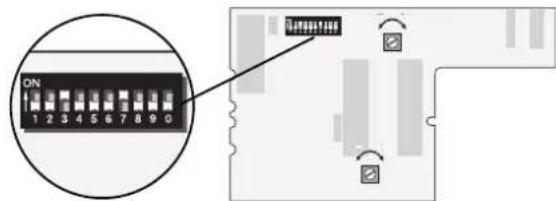
- Setting the coding switches.
Switch 10 (0) at off:
Operation with AC power
Switch 10 (0) at on:
Operation with DC power
The Digital / Delta mode of operation is always recognized automatically.
2.3 Setting the Digital Address
- Removing the body (= > page 41).
- Set the desired address with switches 1 to 8.
Example: 20 is the desired address.
Switches 3 and 7 at on.
Switches 1, 2, 4, 5, 6 and 8 at off.
Important:
Switch 9 must always be set at off.
2.4 Setting the Running Characteristics
- Removing the body (= > page 41).
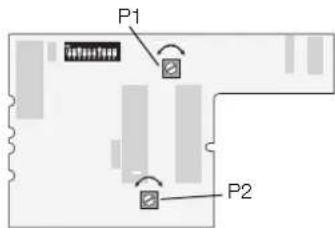
- The respective running characteristics can be changed by changing the setting on the potentiometers. These potentiometers have a stop at the end positions. When you encounter resistance when turning the "pots", do not try to turn them further with force.
P1: Acceleration / braking delay (together)
Left stop: minimum delay
Right stop: maximum delay
P2: Maximum speed
Left stop:
lowest maximum speed
Right stop:
highest maximum speed


Conventional AC power (off) or DC power (on), depending on the setting.
| Digital | ON | ||||||||
| 1 | 2 | 3 | 4 | 5 | 6 | 7 | 8 | 9 | |
| 01- | 2 | 3 | - | 5 | - | 7 | - | - | * |
| 02- | - | 3 | - | 5 | - | 7 | - | - | * |
| 031- | - | - | 4 | 5 | - | 7 | - | - | * |
| 04- | 2 | - | 4 | 5 | - | 7 | - | - | * |
| 05- | - | - | 4 | 5 | - | 7 | - | - | * |
| 061- | - | - | - | 5 | - | 7 | - | - | * |
| 07- | 2 | - | - | 5 | - | 7 | - | - | * |
| 08- | - | - | - | 5 | - | 7 | - | - | * |
| 091- | - | 3 | - | - | 6 | 7 | - | - | * |
| 10- | 2 | 3 | - | - | 6 | 7 | - | - | * |
| 11- | - | 3 | - | - | 6 | 7 | - | - | * |
| 121- | - | - | 4 | - | 6 | 7 | - | - | * |
| 13- | 2 | - | 4 | - | 6 | 7 | - | - | * |
| 14- | - | - | 4 | - | 6 | 7 | - | - | * |
| 151- | - | - | - | - | 6 | 7 | - | - | * |
| 16- | 2 | - | - | - | 6 | 7 | - | - | * |
| 17- | - | - | - | - | 6 | 7 | - | - | * |
| 181- | - | 3 | - | - | - | 7 | - | - | * |
| 19- | 2 | 3 | - | - | - | 7 | - | - | * |
| 20- | - | 3 | - | - | - | 7 | - | - | * |
| 211- | - | 4 | - | - | - | 7 | - | - | * |
| 22- | 2 | 4 | - | - | - | 7 | - | - | * |
| 23- | - | 4 | - | - | - | 7 | - | - | * |
| 241- | - | - | - | - | - | 7 | - | - | * |
| 25- | 2 | - | - | - | - | 7 | - | - | * |
| 26- | - | - | - | - | - | 7 | - | - | * |
| 271- | - | 3 | - | 5 | - | - | 8 | - | * |
| Digital | ON | ||||||||
| 1 | 2 | 3 | 4 | 5 | 6 | 7 | 8 | 9 | |
| 28 | - | 3 | - | 5 | - | - | 8 | - | * |
| 29 | - | - | 3 | - | 5 | - | 8 | - | * |
| 30 | 1 | - | - | 4 | 5 | - | 8 | - | * |
| 31 | - | 2 | - | 4 | 5 | - | 8 | - | * |
| 32 | - | - | - | 4 | 5 | - | 8 | - | * |
| 33 | 1 | - | - | 5 | - | - | 8 | - | * |
| 34 | - | 2 | - | - | 5 | - | 8 | - | * |
| 35 | - | - | - | - | 5 | - | 8 | - | * |
| 36 | 1 | - | 3 | - | - | 6 | - | 8 | - |
| 37 | - | 2 | 3 | - | - | 6 | - | 8 | - |
| 38 | - | - | 3 | - | - | 6 | - | 8 | - |
| 39 | 1 | - | - | 4 | - | 6 | - | 8 | - |
| 40 | - | 2 | - | 4 | - | 6 | - | 8 | - |
| 41 | - | - | - | 4 | - | 6 | - | 8 | - |
| 42 | 1 | - | - | - | - | 6 | - | 8 | - |
| 43 | - | 2 | - | - | - | 6 | - | 8 | - |
| 44 | - | - | - | - | - | 6 | - | 8 | - |
| 45 | 1 | - | 3 | - | - | - | - | 8 | - |
| 46 | - | 2 | 3 | - | - | - | 8 | - | * |
| 47 | - | - | 3 | - | - | - | 8 | - | * |
| 48 | 1 | - | - | 4 | - | - | 8 | - | * |
| 49 | - | 2 | - | 4 | - | - | 8 | - | * |
| 50 | - | - | - | 4 | - | - | 8 | - | * |
| 51 | 1 | - | - | - | - | - | 8 | - | * |
| 52 | - | 2 | - | - | - | - | 8 | - | * |
| 53 | - | - | - | - | - | - | 8 | - | * |
| 54 | 1 | - | 3 | - | 5 | - | - | - | * |
| Digital | ON | |||||||||
| 1 | 2 | 3 | 4 | 5 | 6 | 7 | 8 | 9 | 0 | |
| 55- | 2 | 3 | - | 5 | - | - | - | - | - | * |
| 56- | - | 3 | - | 5 | - | - | - | - | - | * |
| 57 1 | - | - | 4 | 5 | - | - | - | - | - | * |
| 58- | 2 | - | 4 | 5 | - | - | - | - | - | * |
| 59- | - | - | 4 | 5 | - | - | - | - | - | * |
| 60 1 | - | - | - | 5 | - | - | - | - | - | * |
| 61- | 2 | - | - | 5 | - | - | - | - | - | * |
| 62- | - | - | - | 5 | - | - | - | - | - | * |
| 63 1 | - | 3 | - | - | 6 | - | - | - | - | * |
| 64- | 2 | 3 | - | - | 6 | - | - | - | - | * |
| 65- | - | 3 | - | - | 6 | - | - | - | - | * |
| 66 1 | - | - | 4 | - | 6 | - | - | - | - | * |
| 67- | 2 | - | 4 | - | 6 | - | - | - | - | * |
| 68- | - | - | 4 | - | 6 | - | - | - | - | * |
| 69 1 | - | - | - | - | 6 | - | - | - | - | * |
| 70- | 2 | - | - | - | 6 | - | - | - | - | * |
| 71- | - | - | - | - | 6 | - | - | - | - | * |
| 72 1 | - | 3 | - | - | - | - | - | - | - | * |
| 73- | 2 | 3 | - | - | - | - | - | - | - | * |
| 74- | - | 3 | - | - | - | - | - | - | - | * |
| 75 1 | - | - | 4 | - | - | - | - | - | - | * |
| 76- | 2 | - | 4 | - | - | - | - | - | - | * |
| 77- | - | - | 4 | - | - | - | - | - | - | * |
| 78 1 | - | - | - | - | - | - | - | - | - | * |
| 79- | 2 | - | - | - | - | - | - | - | - | * |
| 80 1 | - | 3 | - | 5 | - | 7 | - | - | - | * |
2.5 Operations with Individual Power Systems
The model is designed for optional operation with Märklin Systems (Mobile Station or Central Station), Märklin Digital (only with the Control Unit as a Central Unit), Märklin Delta, AC power (only with the Märklin Transformer 32 VA), or DC power (power pack with a maximum voltage of +/-18 volts DC). Damages caused by operating the locomotive with another operating system will be viewed as taking place in a non-authorized operating status and therefore are not covered by the manufacturer's warranty. The consumer assumes all responsibility for damages resulting from this situation.
2.5.1 Operation with the Mobile Station / Central Station
Please read the instructions for the Mobile Station or Central Station to enter this locomotive into the locomotive list. Please use the item number for the locomotive found on its packaging to call it up from the database. The following auxiliary functions are available on this locomotive:
- Turning headlights on/off that change over with the direction of travel.
The lighting for the engineer's cabs on/off. - Turning locomotive operating sounds (motor 1) on/off.
- Turning the sound of a horn on/off.
- Turning locomotive operating sounds (motor 2) on/off.
2.5.2 Operation with Digital
Important:
All of the Marklin central units with the Motorola transmission format can be used to run this locomotive. The full range of functions is only available with the 6021 Control Unit 6021. Functions f1 through f4 cannot be activated if you are using the earlier Central Unit 6020 or a similar version. The indicator for direction of travel is also not present on these units.
The coding switches on the back of the Control Unit 6021 must be set as follows for trouble free operation:
| Switch: 1 | 2 3 4 | |||
| Setting: off on off | ||||
Operating the locomotive with the Control Unit 6021:
Entering the locomotive address. Turning the speed control knob to the right to the stop increases the locomotive's speed. Turning the speed control knob to the left to the "0" setting decreases the locomotive's speed.
Important:
There will be a delay in the locomotive's reaction to each change in speed, depending on how you have set the acceleration/ braking delay.
Turning the speed control knob to the left past the "0" setting: Reverses the locomotive's direction of travel.
Important:
On the Control Unit 6021 two arrows to the right of the address display indicate the direction of travel for the locomotive.
Arrow pointing up:
Locomotive runs forward.
Arrow pointing down:
Locomotive runs in reverse.
Pressing the "function" button:
Turns the headlights on.
Pressing the "off" button:
Turns the headlights off.
Pressing button "f1":
Turns the lighting for the engineer's cabs on.
Pressing button "f1" again turns the lighting for the engineer's cabs off.
Pressing button "f2":
Turning locomotiv operating sounds (motor 1) on.
Pressing button "f2" again turns the sound effects off.
Pressing button "f3"
Turns the sound of a horn on. Now quickly turn this function off by pressing button "f3" again! Otherwise, it can lead to malfunctions.
Pressing button "f4":
Turning locomotiv operating sounds (motor 2) on.
Pressing button "f4" again turns the sound effects off.
2.5.3 Operating the locomotive with Delta
To operate the locomotive with
Marklin Delta you use the Delta-Mobil
to select the address that has been set on the former. The locomotive will run forward when you turn the speed control knob to the right of the center position. Turning the speed control knob to the left of the center position will cause the locomotive to run in reverse. The headlights change direction with the direction of travel and are on all of the time. The maximum power output of the Delta-Station is sufficient to operate 2 to a maximum of 3 single motor locomotives at the same time.
Of the functions f1 to f4, the function f1 is on continuously when operating the locomotive with the Delta Station. The other functions remain off. For that reason this locomotive will always operate with the engineer's cab lighting turned on without diesel motor sound effects in Delta operation.
2.5.3 Operating the locomotive on alternating current
With "AC power" the locomotive can be controlled with a 6606 Marklin locomotive controller in conjunction with a 6001/6002 transformer, for example. Locomotive speed is increased by turning the control knob to the right and is decreased by turning the knob to the left. The direction of travel is changed by turning the control knob to the left past the "0" setting. The command to reverse should be given only to a standing locomotive, never to one in motion.
In operation with alternating current the headlights change direction with the direction of travel and are on all of the time. The intensity of the headlights depends on the speed of the locomotive.
Of the functions f1 to f4, the function f1 is on continuously when operating the locomotive with conventional AC power. The other functions remain off. For that reason this locomotive will always operate with the engineer's cab lighting turned on without diesel motor sound effects in AC power operation.
2.5.5 Operating the locomotive on direct current
Märklin does not offer DC power packs for 1 Gauge models. Suitable DC power packs are those with a maximum current of ± 18 volts. Direction reversing is done by reversing polarity. The manufacturer's instructions for a particular make of power pack will give directions on how to use it to operate a locomotive.
Tip: H0 DC power packs supply a maximum voltage of ± 12 volts. This locomotive reaches its full potential at ± 16 volts. H0 DC power packs can therefore be used only with limitations.
In operation with direct current the headlights change direction with the direction of travel and are on all of the time. The intensity of the headlights depends on the speed of the locomotive.
Of the functions f1 to f4, the function f1 is on continuously when operating the locomotive with conventional DC power. The other functions remain off. For that reason this locomotive will always operate with the engineer's cab lighting turned on without diesel motor sound effects in DC power operation.
2.6 The built-in diesel sound effects circuit
This sound effects circuit was tuned at the factory for this locomotive. The following settings can be changed by you:
Total volume.
- Volume relationship between the diesel sound effects and the locomotive's horn.
- Relationship of the sound effects circuit to the maximum speed set on the digital decoder.
When changing the maximum speed on the locomotive decoder () Setting the Running Characteristics) the sound effects circuit must also be adjusted to the new conditions. No adjustments in the sound effects circuit are required when changes are made in the acceleration and braking delay.
The adjustments to the sound effects circuit should be checked by operating the locomotive. The Control Unit / Mobile Station / Central Station must be used to control the locomotive. We recommend setting up a small test track (circle or oval with a minimum radius of 1,020mm or 40-5/32") or a test stand with a Control Unit / Mobile Station / Central Station connected to it. We recommend setting the acceleration and braking delay at the minimum value during the adjustment work.
Important: You can carry out adjustments to the sound effects circuit your-self. Damage to the potentiometers on the circuit board caused by too much force applied to them are not covered by the warranty.
Important: Check the setting of the jumper (bridge plug) on the circuit board. The jumper must be plugged in the "EIN" ("ON") position.
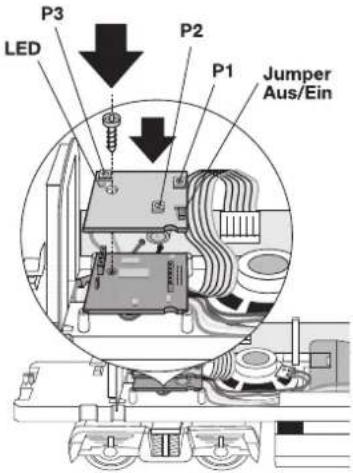
The following steps are performed for complete adjustment of the sound effects circuit.
-
Remove the locomotive body (page 41).
-
Set the locomotive frame on the test track. Select the locomotive with your locomotive controller. All functions are turned off. The speed control knob is at "0". The LED on the sound effects circuit is now lit up in this state (operating current present). If the LED does not light up, then check the power supply for the test track and the operating status of the Control Unit / Mobile Station / Central Station.
-
The volume can be changed with the P1 potentiometer. Please bear in mind that the sound level will be considerably higher with the body on the locomotive.
-
The volume relationship between the motor noise and the locomotive's horn can be changed with the P2 potentiometer. Turning the potentiometer to the left produces a louder additional sound. Turning the potentiometer to the right produces a softer additional sound. At the end settings for the potentiometer you will hear either only the motor sound or only the locomotive horn.
-
When the sound effects circuit is correctly adjusted, the LED on the sound effects circuit should go out after the locomotive starts to move. Just before the end setting for the speed controller (controller setting at bout "200") the LED should go on again.
If the operations LED does not light up at maximum speed for the locomotive, then the P3 potentiometer must be turned to the right.
If the operations LED lights up earlier, then the P3 potentiometer must be turned to the left. - Put the locomotive body back on the frame and test once more the setting you have chosen.
2
Operation
Please note the following points when operating the sound effects circuit.
-
The sound effects circuit a minimum power supply of 12 volts. If the power supply falls below this level, the sound effects circuit may produce distorted sound, become softer in volume or turn itself off completely. This condition will not change by manipulating the function buttons. This status is not ended until after an emergency stop has been carried out (voltage in the track is turned off for a few seconds). If this condition occurs on a particular stretch of track, then you must check to make sure that sufficient voltage is present in that area of track.
-
The power requirement for the sound effects circuit is about 12 VA. This will limit the maximum number of locomotives that can be operated in a power consumption area.
- We recommend putting the jumper in the "AUS" ("OFF") setting on the sound effects circuit board when operating the locomotive for long periods of time with conventional DC or AC power.
2.1 Fonctionnement
3.1 Connections between the track layout and the transformer
Rail joiners must fit well on the rails of the track to which they are joined to avoid voltage drop on the layout. We recommend that you install feeder wires every 3 to 5 meters (10 to 16 feet) using the 5654 feeder clips.
3.2 Operating the locomotive on grades
In contrast to the prototype a locomotive on a model railroad can operate up steeper grades. As a general rule a grade should be no steeper than 3% . In extreme situations a maximum grade of 5% is permissible, keeping in mind that the locomotive's tractive effort will be less. The beginning and the end of the grade must always work
gradually up to maximum grade for the route. The maximum allowable difference in grade between two track sections, each with a minimum length of 300 mm (11-3/4") is 1 to 1.5 percent.
3.3 Operating the locomotive on curved track
This locomotive can be operated on curves with a minimum radius op 1,020 mm (40-5/32). The detail parts included with the locomotive (2 ladders, brake lines, reproduction prototype couplers) cannot be used if the locomotive is to be operated on curves with a radius of 1,020 mm (40-5/32") or 1,176 mm (46-1/4").
4.1 Removing the body
To protect the projecting parts on the roof of the locomotive from damage, the locomotive is to be laid in the upper part of its packaging with the roof upside down.
- Remove the couplers both front and rear.
- Remove the four mounting screws on the underside of the model.
4.2 Lubrication after 40 hours of operation
Only the universal joint is to be oiled at the places indicated after approximately 40 hours of operation. Use only Märklin lubrication oil (no. 7149)! The remaining mechanism parts are maintenance-free.
4.4 Changing pick-up shoes
The pickup shoes are also soldered in place on the locomotive.
4.5 Changing couplers
If the locomotive is to be on static display, then automatic couplers can be replaced by the reproduction prototype coupler included with the unit.
4.5 Remplacer I'attelage
This locomotive can also be used outdoors. We do not recommend running the locomotive in bad weather (snow or rain). The mechanism and the electronic circuit are protected against spraying water. The locomotive cannot be run through water.
We recommend that you check the locomotive over after running in outdoors and that you dry it with a cloth or clean in with a brush if necessary. Never clean the locomotive with running water.
Important: Cleaning fluids can attack the finish and lettering for the locomotive and damage them.
This device complies with Part 15 of the FCC Rules.
Operation is subject to the following two conditions:
(1) This device may not cause harmful interference, and
(2) this device must accept any interference received, including interference that may cause undesired operation.