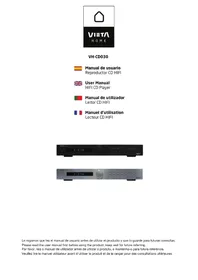
VHCD030 - Cd player/recorder VIETA - Free user manual and instructions
Find the device manual for free VHCD030 VIETA in PDF.



| Product type | CD player/recorder (CD player only) |
| Brand | Vieta |
| Model | VHCD030 |
| Power supply | 220-240 V AC, 50 Hz |
| Dimensions (H x W x D) | 50 x 430 x 285 mm |
| Supported disc formats | CD, CD-R |
| USB playback | Yes, MP3 files |
| Signal-to-noise ratio | > 90 dB |
| Harmonic distortion | < 0.1% (20 Hz - 20 kHz) |
| Stereo separation | > 70 dB at 1 kHz |
| Frequency response | 20 Hz - 20 kHz (±1 dB) |
| Output level | 2 Vrms |
| Remote control | Yes, supplied with batteries |
| Included accessories | User manual, RCA cable, remote control |
| Safety | Double insulation (Class II), surge protection |
| Maintenance | Clean with a soft, dry cloth. Do not use liquid or abrasive cleaners. |
| Warranty | 24 months |
Frequently Asked Questions - VHCD030 VIETA
User questions about VHCD030 VIETA
0 question about this device. Answer the ones you know or ask your own.
Ask a new question about this device
Download the instructions for your Cd player/recorder in PDF format for free! Find your manual VHCD030 - VIETA and take your electronic device back in hand. On this page are published all the documents necessary for the use of your device. VHCD030 by VIETA.
USER MANUAL VHCD030 VIETA
Please read the user manual first before using the product, keep well for future referring.
Por favor, leia o manual de'utilizar antes de utiliser o produits, e mantenha-o para futura referencia.
Stop,Skip,Search,Random 13
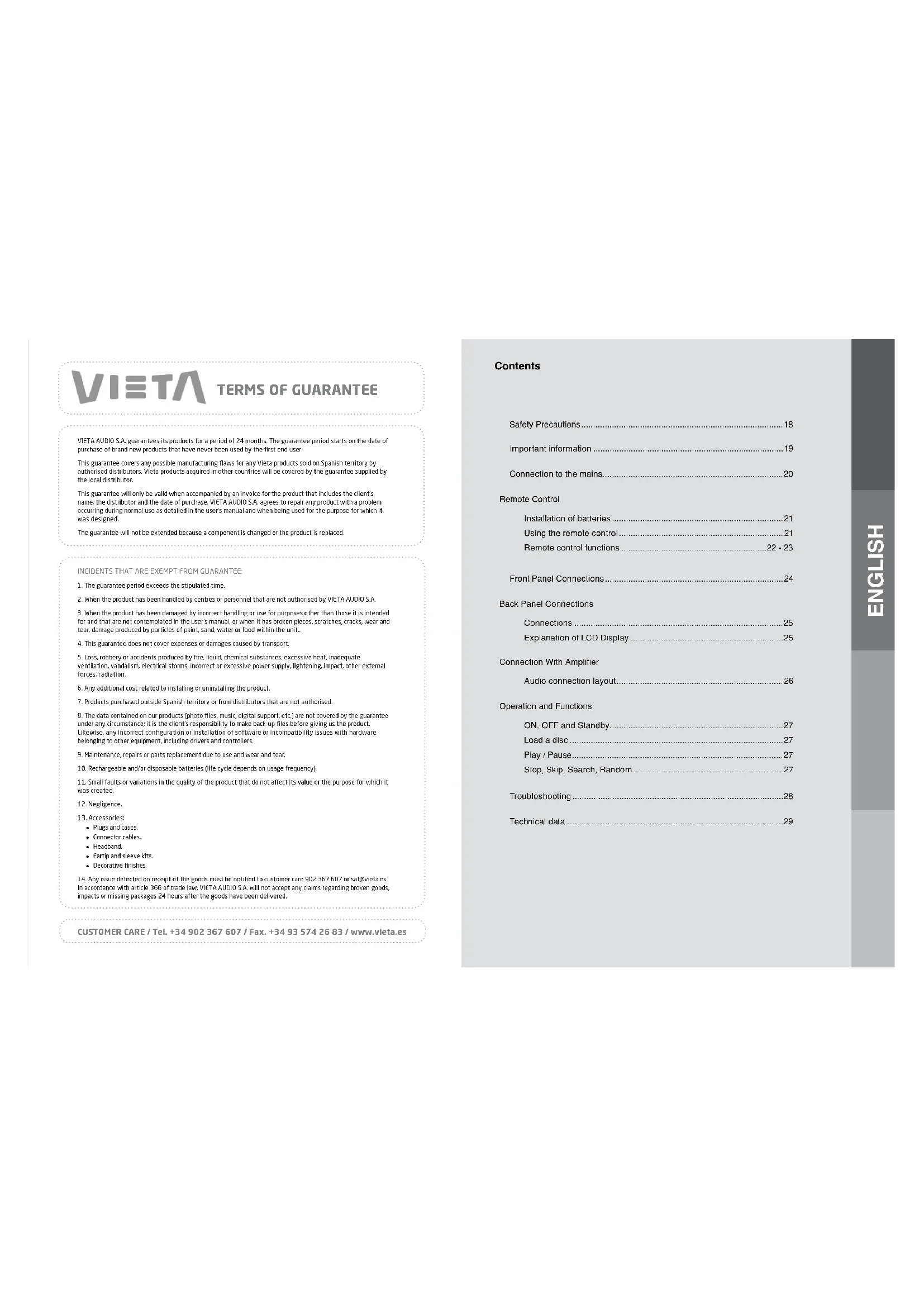
ViEIA AUDIO S.A. guarantees its products for a period of 24 months. The guarantee period starts on the date of purchase of brand new products that have never been used by the first end user.
This guarantee covers any possible manufacturing flaws for any Vieta products sold on Spanish territory by authorised distributors. Vieta products acquired in other countries will be covered by the guarantee supplied by the local distributor.
This guarantee will only be valid when accompanied by an invoice for the product that includes the client's name, the distributor and the date of purchase, VIETA AudIO S.A. agrees to repair any product with a problem occurring during normal use as detailed in the user's manual and when being used for the purpose for which it was designed.
The guarantee will not be extended because a component is changed or the product is replaced.
INCIDENTS THAT ARE EXEMPT FROM GUARANTEE:
-
The guarantee period exceeds the stipulated time.
-
When the product has been handled by centres or personnel that are not authorised by VIETA AUDIO SA,
-
When the product has been damaged by incorrect handling or use for purposes other than those it is intended for and that are not contemplated in the user's manual, or when it has broken pieces, scratches, cracks, wear and tear, damage produced by particles of paint, sand, water or food within the unit.
-
This guarantee does not cover expenses or damages caused by transport.
-
Loss, robbery or accidents produced by fire, liquid, chemical substances, excessive heat, inadequate ventilation, vandalism, electrical storms, incorrect or excessive power supply, lightening, impact, other external forces, radiation.
-
Any additional cost related to installing or uninstalling the product.
-
Products purchased outside Spanish territory or from distributors that are not authorised.
-
The data contained on our products (photo files, music, digital support, etc.) are not covered by the guarantee under any circumstance: it is the client's responsibility to make back up files before giving us the product. Likewise, any incorrect configuration or installation of software or Incompatibility Issues with hardware belonging to other equipment, including drivers and controllers.
-
Maintenance, repairs or parts replacement due to use and wear and tear.
-
Rechargeable and/or disposable batteries life cycle depends on usage frequency).
-
Small faults or variations in the quality of the product that do not affect its value or the purpose for which it was created.
-
Negligence.
-
Accessories:
Plugs and cases
- Connector tables
Headband.
-
tarp and sleeve kits.
-
Decorative finishes.
-
Any issue detected on receipt of the goods must be notified to customer care 902,367,607 or satsewetes. In accordance with article 366 of trade law, VIETA AUDIO S.A. will not accept any claims regarding broken goods, impacts or missing packages 24 hours after the goods have been delivered.
CUSTOMER CARE / Tel. +34 902 367 607 / Fax. +34 93 574 26 83 / www.vieta.es
Contents
Safety Precautions 18
Important information 19
Connection to the mains. 20
Remote Control
Installation of batteries 21
Using the remote control 21
Remote control functions 22-23
Front Panel Connections 24
Back Panel Connections
Connections 25
Explanation of LCD Display 25
Connection With Amplifier
Audio connection layout 26
Operation and Functions
ON, OFF and Standby 27
Load a disc 27
Play/Pause 27
Stop, Skip, Search, Random 27
Troubleshooting 28
Technical data 29
Safety Precautions Important Information

A triangle with a lightning symbol draws the user's attention to "dangerous voltage" without insulation in the cabinet which may be high enough to entail a risk of electric shock.

A triangle with an exclamation mark draws the user's attention to important instructions for use and maintenance in the accompanying manual, which should be studied.

A symbol for CLASS II (double insulation)
WARNING: TO MINIMISE THE RISK OF FIRE OR ELECTRICAL SHOCK, DO NOT EXPOSE THE UNIT TO RAIN OR MOISTURE. DO NOT OPEN THE CABINET AS IT CONTAINS DANGEROUS VOLTAGE. ONLY QUALIFIED TECHNICIANS ARE ALLOWED TO CARRY OUT REPAIR AND SERVICE.
CAUTION: if the plug of the power cord needs to be replaced, it is important that the replacement is identical to the plug to be replaced, or that the new plug has been recommended by the manufacturer
TO AVOID ELECTRICAL SHOCK, IT IS IMPORTANT TO INSERT THE PLUG CORRECTLY INTO THE SOCKET.
Handling Instructions
- The top and back panel of the unit may become warm after prolonged use. This is not due to a defect.
- Turn off the power when the unit is not used.
Protect the power cord
Follow the instructions below to prevent abnormal operation, electrical shock, fire or personal injury:
- Hold the plug firmly when inserting it into the socket.
- Avoid heat-producing devices.
- Do not place objects on the power cord
- Do not carry out service work on or change the power cord.
Positioning
Do not place the unit in any of the fol. places: In sunlight, close to heat-producing devices an enclosed rack.
- In places with high temperatures (40C or more) or high relative humidity (90% or more).
- In dirty places as some internal parts may be damaged.
Do not put your fingers or any other objects into the unit
- Touching the internal parts is dangerous and may cause injury or damage. Do not open the cabinet.
- Do not place any foreign matter in the unit.
Interference
Placing the unit near a television set, radio or video player may cause poor picture and sound quality. In that case, move the unit further away from the television set, radio or video player.
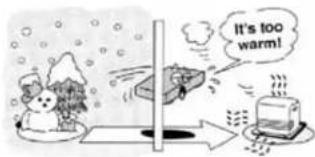
Condensation
Condensation may occur in the following cases:
- When the unit is moved directly from a cold to a warm place.
- When the unit is used in a room where the radiator has just been switched on or a place where the cold air from the air-conditioning system is directed at the unit.
If the unit is used in the summer in a warm and humid room just after it has been moved from an air-conditioned room. - If there is steam or a high level of humidity in the room.
In case of condensation, the unit will not work properly. Turn off the unit. Unplug the unit and leave it for 2-3 hours. The unit will then have adapted to the environment and any condensation will have disappeared.
Connection to the Mains
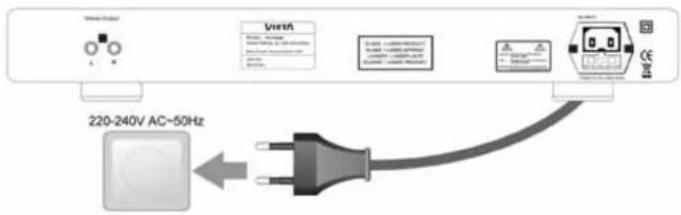

Do not turn on the power before all connections have been made correctly.
Check that all connections have been made correctly before turning on the
power.
Check that the mains voltage is 220-240V AC50Hz before turning on the power.
Connection to the Mains
Check that all other connections have been made correctly before inserting the mains plug into the wall socket.
Then insert the plug into a suitable socket.
If the unit is to be used abroad, you may need an adapter.
Remote Control
Installation of batteries
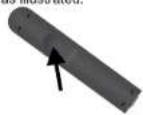
1 Remove the cover as illustrated.
3 Replace the cover.
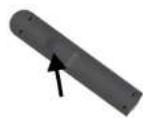
2 Position two batteries of the type AAA/R03/UM4 in the battery compartment. Make sure that the orientation of the batteries is correct (see drawing at bottom).
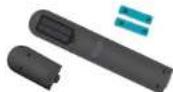
- Do not mix new and old batteries and do not use different types of batteries.
- If the remote control is not used for prolonged periods, remove the batteries from the remote control to avoid corrosion.
Using the remote control
Direct the remote control at the sensor on the front panel of the unit. When the remote control signal is received, the unit reacts accordingly. The remote control works within a range of 6 metres.
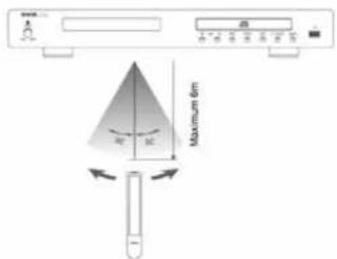
- Sometimes the remote control does not work well in strong light. You may have to move the unit if it is a problem.
- Malfunction may occur if other remote controls are used near the unit.
- Do not place any objects on the remote control, as the batteries may become flat if a key is depressed constantly.
- Make sure that there are no obstacles between remote control and unit.
- Do not position the unit behind tinted glass as it may reduce the maximum range of the remote control.
Full function remote control for Vieta
VH-CD030, VH-CD060, VH-HT010, VH-HR065, VH-HA050/075/100
| 11-Power-For at the unite into standby and ON. | √ | √ | √ | √ | √ | ||
| 2 Eject Open and close the disc tray | √ | √ | × | × | × | ||
| 3 | Number (0,1 - 10,1 + 10) | a. Number buttons (0,1 - 10,1) selects b. Number buttons (0,1 - 10,1) | tracks on VH-CD030, VH-CD080. Save preset on VH-HT010 and VH-HP065. | ||||
| Note: +10 key could be pressed by 0 button; eg 15, press +10钮 and and then 5 to select CD track or lunar pressat 15, eg 25, by 2 times pressing | √ | √ | √ | √ | × | ||
| 4 | > | Fast forwards in CD playback; Manual tuning | forward in lunr. | √ | √ | √ | × |
| 5 | > | Play/Pause: Stans and pause playback. | √ | √ | × | √ | × |
| 6 | >1 | Skip (←)/ Next: Selects the next track | in CD, and the next preset in turn. | √ | √ | √ | × |
| 7 | < | Skip (<)/ Previous: Selects the last track | in CD, and the last preset in turn. | √ | √ | √ | × |
| 8 | REPEAT | Repeat a single or all tracks in CD disc or | USB stick | √ | √ | × | √ |
| 9 | PROD. | PRO (Program) in CD060 only; ROM (Random) in CD030 only; | Programming tracks on a CD in a particular order. All tracks are played in random order. | √ | √ | × | × |
| 10 | < | Fast Rowits in playback CD disc; Manual | luning backward in Lunr. | √ | √ | √ | × |
| 11 | TIME | Press the key by time, shows (in CD disc)- current track: elapsed time;- total tracks: elapsed time of full disk;- current track: remaining time;- total tracks: remaining time of full disc | √ | × | × | × | |
| 12 | STOP | To stop playback in CD player. | √ | √ | × | √ | × |
| 13 | CD/USB | To select CD/USB source in amplifier Note: Press another time in CD030 to | or receiver; change CD or USB source. | √ | × | √ | |
| 14 | DVD | To select DVD source in amplifier or | receiver. | × | × | × | √ |
| 15 | TUNER | To select Tuna source in amplifier or | receiver. | × | × | √ | √ |
| 16 | AUX | To select AUX source in amplifier or | receiver. | × | × | × | √ |
| 17 | PHONO | To select PHONO source in amplifier or | receiver. | × | × | × | √ |
| 18 | LINE IN | To select line in source (3.5mm Jack in front panel or back panel) | × | × | × | √ | √ |
| in amplifier or receiver. | |||||||
| 19 | SPKRS A | Speaker selector, to choose par-A | speakers to listen. | × | × | × | √ |
| 20 | SPKRS B | Speaker selector, to choose par-B | speakers to listen. | × | × | × | √ |
| 21 | MUTE | To mute the sound in the amplifier or | receiver. | × | × | × | √ |
| 22 | VOLUME | To turn down the volume. | × | × | × | √ | √ |
| 23 | VOLUME+ | To turn up the volume. | × | × | × | √ | √ |
| 24 | RMAM | For tuner To switch FM mode or AM mode. | × | × | √ | × | × |
| 25 | ST/MONO | For tuner To switch Sono mode or Mono | mode in lunr. | × | × | √ | × |
| 26 | AUTO | For tuner: Auto scan the station(s) probably | exits in lunr. | × | × | √ | × |
| 27 | MEMORY | For tuner To store the favorite station (as number buttons instruction). | × | × | √ | √ | × |
| 28 | PDS | Fortuner To activate the PDS information | In the stations which available exists. | × | × | √ | × |
Front Panel
Connections
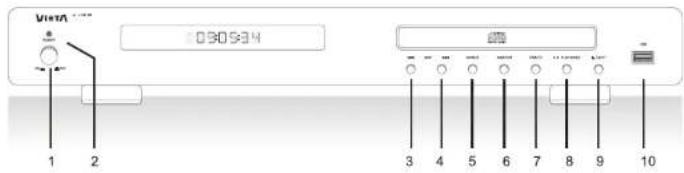
- Mains switch: Used to turn ON/OFF the power.
- LED: Lights off when VH-CD030 turns on, lights blue when in standby mode
- Skip backward (Previous): Selects the previous track.
- Skip forward (Next) : Selects the next track.
- Repeat: Repeats a single track or all tracks on a CD.
- Random: Makes it possible to play the tracks of a CD in random order.
- USB/CD selector: Switch the CD playback to USB playback; oppositely switch.
- Play/Pause: Starts playback at first press and stops playback at second press.
9 Eject: Open and close the disc tray on VH-CD030. - USB port: Inserts USB for directly playback.
Back Panel
Connections
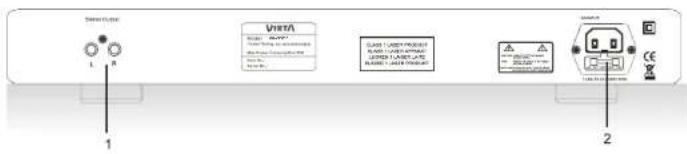
- Stereo Output: Analogue stereo output. For connection to stereo amplifier or receiver with analogue input.
- AC input: For connection of mains voltage. Make sure that the plug has been correctly inserted, and that the voltage corresponds to the text printed on the back panel of the cabinet.
Explanation of VFD display
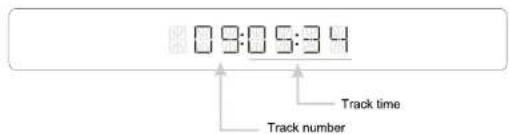
This unit does not feature any OSD (On Screen Display). Instead it features a more descriptive VFD display that displays all the information required. Below you can see a picture of the display and an explanation of the various symbols.
Connection with Amplifier
Audio connection layout
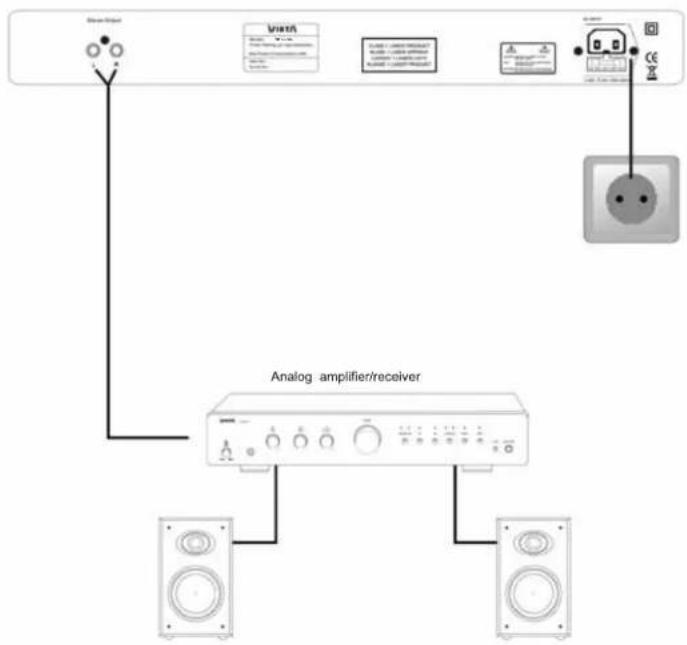
This page only contains suggestions for connection of your VH-CD030. Note: that the accessories in the pictures on this page are not included in the supply.
Operation and Functions
On, Off and Standby
-
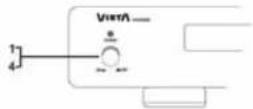
Turn on and off the unit by pressing the mains switch.
-
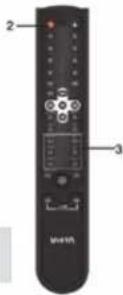
Press the standby button or the remote control to switch into standby mode and power on again.
-
If you wish to turn off the unit to avoid any power consumption, you must press the mains switch.
-
Protect the environment and turn off the unit after use.
Load a disc
If you want to play a disc, you must load it. You do that by pressing the eject button on the remote control or on the front panel of the CD player.
When the disc has been read, this display will show the number of tracks on the disc and the total playback time.
If there is not disc in the tray, this message "NO DISC" will be displayed. If the unit has trouble reading a disc, you must check if the disc is clean and free from dirt.
If the disc can still not be played, you must contact your dealer.
0905-34
NO DISC
Press the PLAY/PAUSE button once more to stop playback; the counter in the display will start to blink. To continue playback, press the PLAY/PAUSE button again.
Stop
To stop playback completely, press the STOP button once.
The display will display all the number of tracks on the disc and the total playback time.
Skip: Previous/Next
When a CD track is being played it is possible to switch to the previous track or to the next track.
If you want to continue to the next track, you must press the button on the ramola control or on the front panel once. If you want to move on several tracks,
If you wish to go back to one of the previous tracks, you must use the same procedure but not the same button. Use the button instead:
Search: Forward and rewind
If you wish to search forward, depress the >> button on the remote until you get to that part of the track that you wish to hear, and then press play. You will see that the time counter in the display counts up very quickly.
If you wish to search backwards, use the same procedure as when you search forward, but use the << button instead.
Random
It is possible to select a random play by pressing the RANDOM button on the remote control or the front.
panel . The CD tracks will be played in random order .The dark balance has four and seven levels from
the left starts to flash when the function has been activated.
It is possible to activate random play both in stop mode and during playback.
Press this RANDOM button again if you wish to deactivate random play.
Note: When you press SKIP bullfries (Icc or Igg) during random play, it will not be possible to select the next track but any other track.
Play / Pause
Press the PLAY/PAUSE button on the remote control or on the front panel once to start playback, the counter on the left side of the display will start to count upward.
Troubleshooting
| PROBLEM | SOLUTION |
| No power when unit is turned on. | - Switch on the electric current at the socket. - Check that the plug has been correctly inserted into the socket. - The internal fuse has blown and must be replaced by a qualified service technician. - The power cord has been damaged and must be replaced. |
| No sound. | - The unit has not been turned on. - Incorrect connection to the amplifier. - No loudspeakers have been connected to the amplifier. - No CD in the unit; or no MP3 files in the USB. |
| The unit will not read the disc. | - Check if the disc has been turned upside down. - Check if the disc is clean and undamaged. - Check if it is a CD or a CD-R. |
| The unit skips some parts during playback. | - Check if the disc is clean and undamaged. - The unit is positioned on an unstable surface. |
| A buzzing can be heard. | - The RCA cables between VH-CD030 and the amplifier/receiver have been damaged. - The RCA cables between the VH-CD030 and the amplifier/receiver have been wound around the power cord. |
Technical data
| TECHNICAL DATA | |
| Disc playback: | CD, CD-R |
| USB playback | MP3 |
| Frequency: | 16-Bit,96KHz |
| Output Level(TCD784): | 2Vrms |
| Distortion @ 20Hz-20Khz: | < 0.1% |
| Separation @ 1KHz: | >70dB |
| Frequency range -1dB@1KHz: | 20Hz-20KHz |
| S/N Ratio @ 8Ω/1KHz: | >90dB |
| Nose Output: | < 2mV |
| Mains Voltage: | AC 220-240V 50Hz |
| Dimensions (WxDxH) | 430 x 285 x 50 mm |
| Net Weight: | 4.1 kg |
Supplied Accessories
1.1pos User manual
3.100% Power cord
2.103 Power cord. 3.1.103 Remote control
4.Loss 2.BGA cable
We reserve the right to change the technical data and the design of the product without notice as a result of further development.
ViE7A
CONDIÇOÉS DE GARANTIA
A VICTA AUDIO S.A. attribui a garantia osvos produitspelorado 24mecos.0 periodo degaranto comeao na data de comparao de produits neveusutilizadospeuutilidoroal.
CONDITIONS DE GARANTIE
Stop, Skip, Search, Random 55
Instructions d/usage

- INCIDENTS THAT ARE EXEMPT FROM GUARANTEE:
- Contents
- Remote Control
- Back Panel Connections
- Connection With Amplifier
- Operation and Functions
- Safety Precautions Important Information
- Handling Instructions
- Protect the power cord
- Positioning
- Do not put your fingers or any other objects into the unit
- Interference
- Condensation
- Connection to the Mains
- Installation of batteries
- Using the remote control
- Front Panel
- Connections
- Back Panel
- Explanation of VFD display
- Audio connection layout
- On, Off and Standby
- Load a disc
- Stop
- Skip: Previous/Next
- Search: Forward and rewind
- Random
- Play / Pause
- Supplied Accessories
- ViE7A
- CONDIÇOÉS DE GARANTIA
- CONDITIONS DE GARANTIE
- Instructions d/usage
Brand : VIETA
Model : VHCD030
Category : Cd player/recorder