CoolTec CT6cc - Shaver BRAUN - Free user manual and instructions
Find the device manual for free CoolTec CT6cc BRAUN in PDF.


Frequently Asked Questions - CoolTec CT6cc BRAUN
User questions about CoolTec CT6cc BRAUN
0 question about this device. Answer the ones you know or ask your own.
Ask a new question about this device
Download the instructions for your Shaver in PDF format for free! Find your manual CoolTec CT6cc - BRAUN and take your electronic device back in hand. On this page are published all the documents necessary for the use of your device. CoolTec CT6cc by BRAUN.
USER MANUAL CoolTec CT6cc BRAUN
(Sharecall charged at local rates)
www.service.braun.com
natural_image
Illustration of a closed device with a blue internal component and a labeled part '11b' (no text or symbols on the device itself)CT5cc
CT4cc
CT4s

text_image
11cnatural_image
Black plastic electronic device with dome and control knob (no visible text or symbols)text_image
C CoolTec CoolTec CoolTec CoolTec CoolTecD
text_image
D CoolTec CoolTecE
text_image
2 1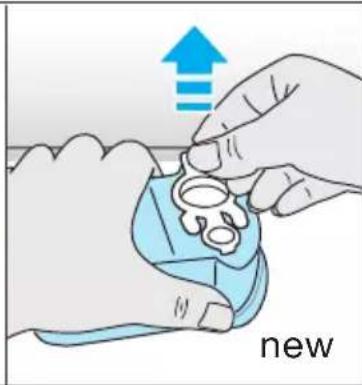
natural_image
Illustration of hands assembling a blue plastic component with an upward arrow and the word 'new' (no text or symbols on the diagram itself)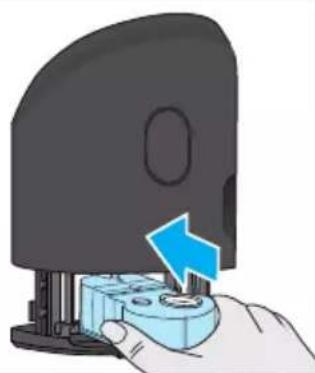
natural_image
Hand inserting a blue arrow into a black device component (no text or symbols visible)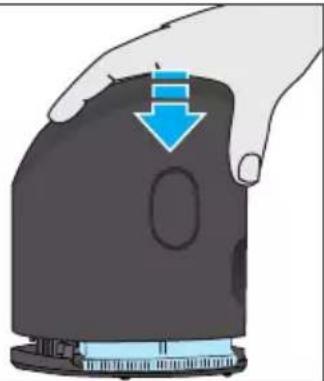
natural_image
Hand holding a black device with a blue downward arrow indicating compression or disassembly (no text or symbols)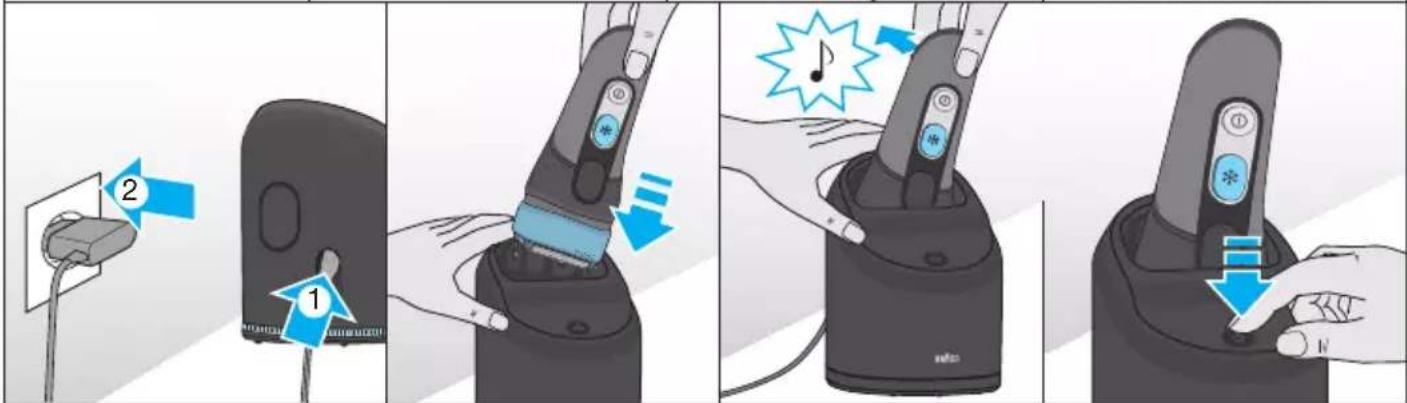
text_image
Illustration showing four steps of a remote control device with labeled buttons and directional arrows indicating action.F
natural_image
Three-panel illustration showing a hand pressing down a device into a base, with blue arrows indicating motion (no text or symbols)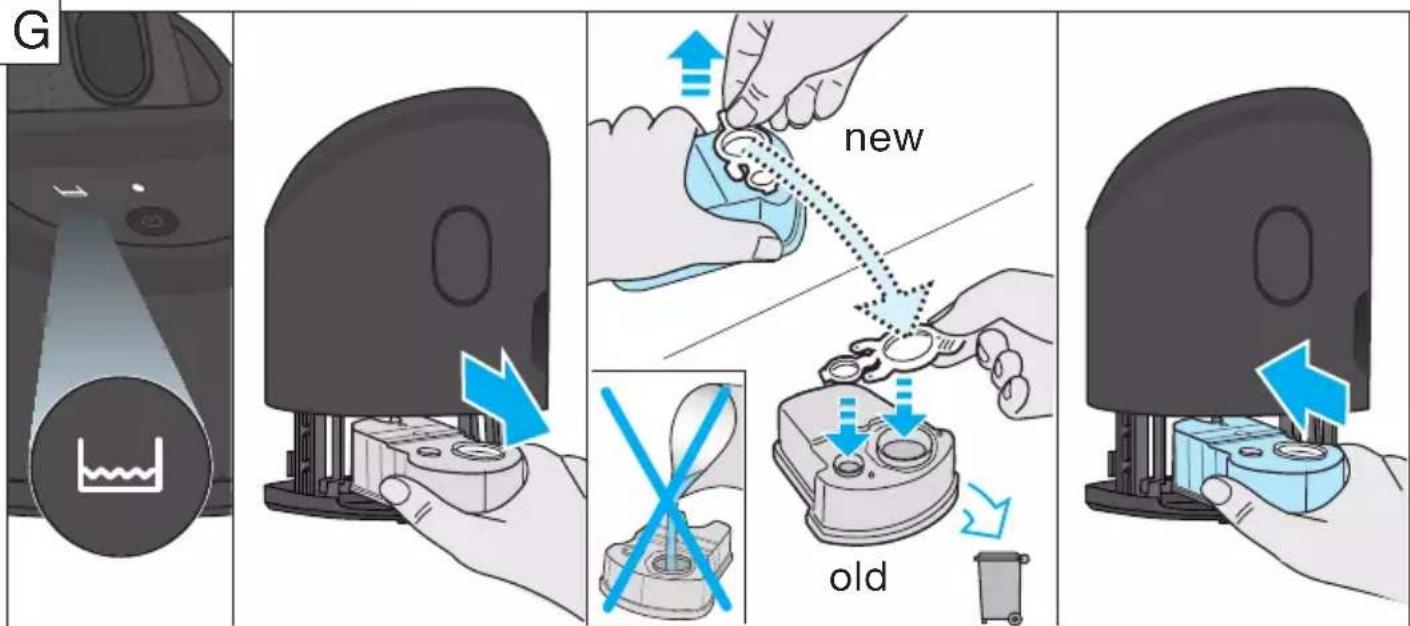
text_image
G new oldEnglish
Our products are designed to meet the highest standards of quality, functionality and design. We hope you enjoy your new Braun Shaver.
This shaver cools the skin to give you a cooling sensation for a pleasant shave.
Read these instructions completely, they contain safety information. Keep them for future reference.
Warning
Your appliance is provided with a special cord set, which has an integrated Safety Extra Low Voltage power supply. Do not exchange or tamper with any part of it, otherwise there is risk of an electric shock. Only use the special cord set provided with your appliance.
If the appliance is marked 492, you can use it with any Braun power supply coded 492-XXXX.
This appliance is suitable for use in a bathtub or shower. For safety reasons the appliance can only be operated cordless.
We recommend not to use the shaver with any foam or gel to ensure that you
– experience the optimal cooling effect.
- get the optimal cleaning performance from the Clean&Charge station (for cc models).
- avoid potential damage to the device.
Do not shave with a damaged foil or cord.
This appliance can be used by children aged from 8 years and above and persons with reduced physical, sensory or mental capabilities or lack of experience and knowledge if they have been given supervision or instruction concerning the safe use of the appliance and understand the hazards involved.
Children shall not play with the appliance. Cleaning and user maintenance shall not be made by children unless they are older than 8 years and supervised.
Oil bottle (not with all models)
Keep out of reach of children. Do not swallow. Do not apply to eyes. Dispose of properly when empty.
Clean&Charge Station (models CT6cc/CT5cc/CT4cc/CT3cc/CT2cc only)
To prevent the cleaning fluid from leaking, ensure that the Clean&Charge station is placed on a flat surface. When a cleaning cartridge is installed, do not tip, move suddenly or transport the station in any way as cleaning fluid might spill out of the cartridge. Do not place the station inside a mirror cabinet, nor place it on a polished or lacquered surface.
The cleaning cartridge contains a highly flammable liquid so keep it away from sources of ignition. Do not expose to direct sunlight and cigarette smoking nor store it over a radiator. Keep away from children.
Do not refill the cartridge and use only original Braun refill cartridges.
Shaver description
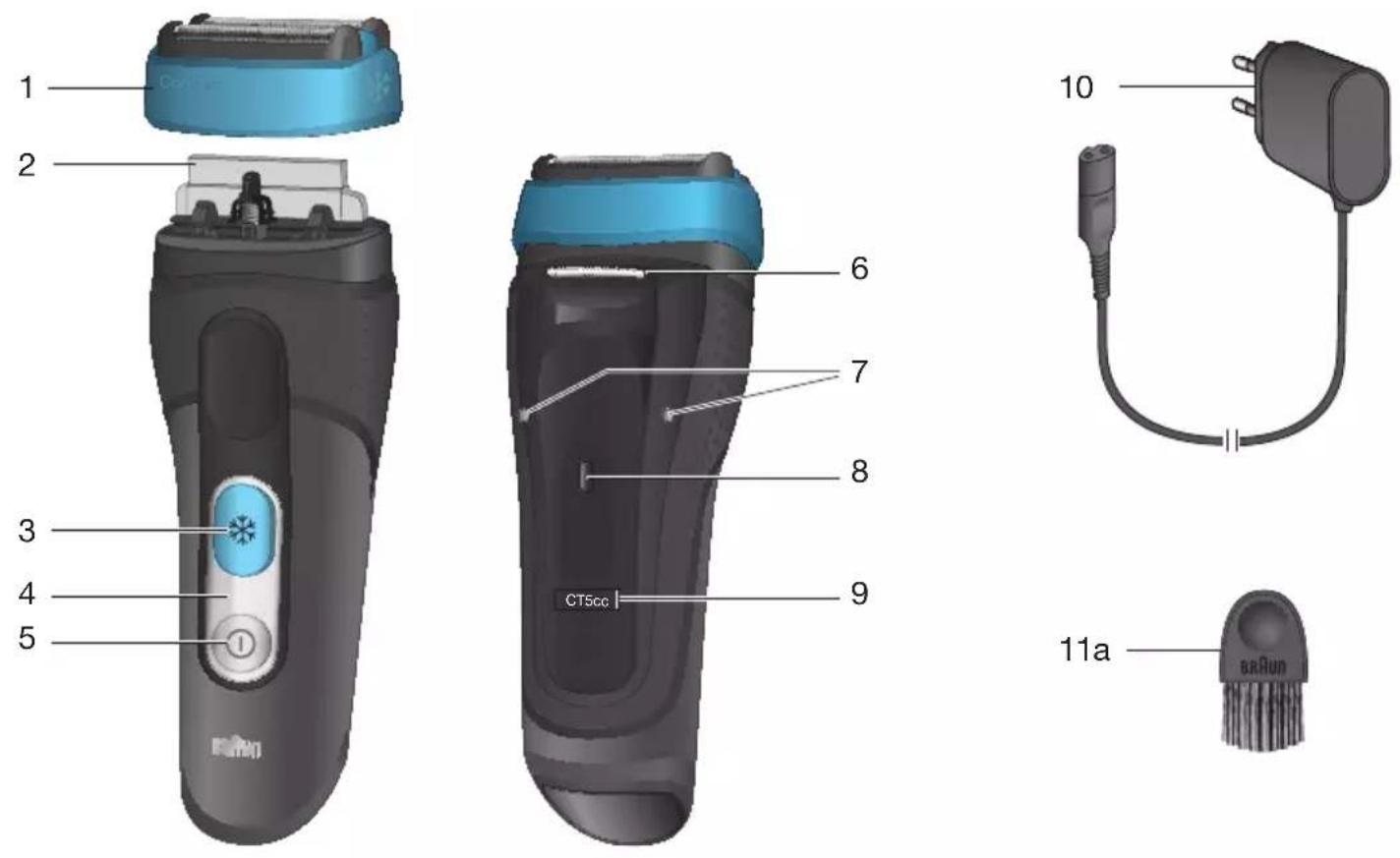
1 Foil & Cutter cassette
2 Cooling element
3 Cooling on/off switch
4 Shaver display
5 On/off switch
6 Long hair trimmer
7 Shaver-to-shell/station contacts
8 Release button for long hair trimmer
9 Model number
10 Special cord set (design can differ)
11a Brush
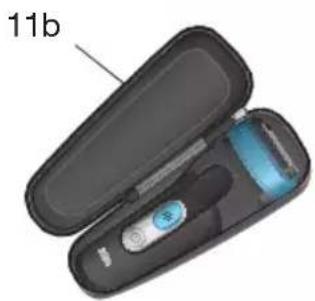
11b Pouch*
11c Protection cap*
12a Charging shell
12b Shell power socket
12c Stand for charging shell*
12d Shell-to-shaver contacts
*not with all models
First use and Charging
Prior to first use connect the shaver to an electrical outlet using the charging shell as described below or for models CT6cc/CT5cc/CT4cc/CT3cc/CT2cc the Clean&Charge station (see Chapter «Clean&Charge station»).
Note: The shaver can only be charged via the charging shell or the Clean&Charge station. Models CT4s/CT2s must not be used with the Clean&Charge station.
Charging shell (see fig. B)
- Click the charging shell (12a) onto the stand (12c - models CT4s/CT2s only). Using the special cord set (10), connect the shell power socket (12b) to an electrical outlet.
- Place the shaver into the charging shell. The contacts (7) on the back of the shaver need to align with the contacts (12d) in the charging shell. A beep sound confirms that the shaver sits properly in the station.
- The shaver will be automatically charged.
Charging and basic operating information
- A full charge provides the following operating times according to your beard growth and environmental temperatures:
- about 45 minutes without activated cooling function
- about 15 minutes with activated cooling function; afterwards 20 minutes operating time without cooling function.
- Recommended ambient temperature for charging is 5 °C to 35 °C. The battery may not charge properly or at all under extreme low or high temperatures. Recommended ambient temperature for shaving is 15 °C to 35 °C.
- Do not expose the appliance to temperatures higher than 50 °C for extended periods of time.
- When the shaver is connected to an electrical outlet, it may take some minutes until the display illuminates.
Shaver display
Charge status
During charging the symbol in the on/off switch (5) blinks green. When fully charged, it will light up for a few seconds, provided the shaver is connected to an electrical outlet.
Low charge
The symbol in the on/off switch (5) shines red when the battery is running low. You should be able to finish your shave. When switching off the shaver a beep sound reminds you of the low charge status.
Cooling Status
The symbol ✦ shines blue with activated cooling function. When the battery is running low it starts blinking.
Cleaning Status (only models CT6cc/CT5cc/CT4cc/CT3cc/CT2cc)
The cleaning indicator ◆ lights up, when the shaver needs to be cleaned in the Clean&Charge station.
Travel lock
The lock symbol lights up when the shaver has been locked to avoid unintended starting of the motor (e.g. for storing it in a suitcase).
Using the shaver (see fig. A)
Press the on/off switch (5) to operate the shaver.
Tips for a perfect dry shave
For best results, Braun recommends you to follow 3 simple steps:
- Always shave before washing your face.
- At all times, hold the shaver at right angles (90°) to your skin.
- Stretch your skin and shave against the direction of your beard growth.
Cooling
Note: The cooling sensation experienced may differ from person to person. It is influenced by personal and environmental factors (e.g. skin, environmental temperature).
Activation: To activate the cooling function, press the cooling switch (3) during shaving. The symbol * in the cooling switch shines blue. For best cooling performance, we recommend to wait a few seconds after the cooling function has been activated. Then continue shaving as usual.
Low battery: The symbol ✦ in the cooling switch (3) starts blinking when the battery is running low and there is not enough energy left for the cooling function. You should be able to finish your shave with activated cooling function. We recommend to charge the appliance afterwards to have the cooling function available for the next shave.
You can deactivate the cooling function by pressing the cooling switch again.
Long hair trimmer
To trim sideburns, moustache or beard, press the
release button (8) and slide the long hair trimmer (6) upwards.
Travel lock
- Activation: By pressing the on/off switch (5) for 3 seconds the shaver is locked. This is confirmed by a beep sound and the lock symbol 🔒 in the display. Afterwards the display turns off.
- Deactivation: By pressing the on/off switch for 3 seconds the shaver is unlocked again.
Manual cleaning of the shaver
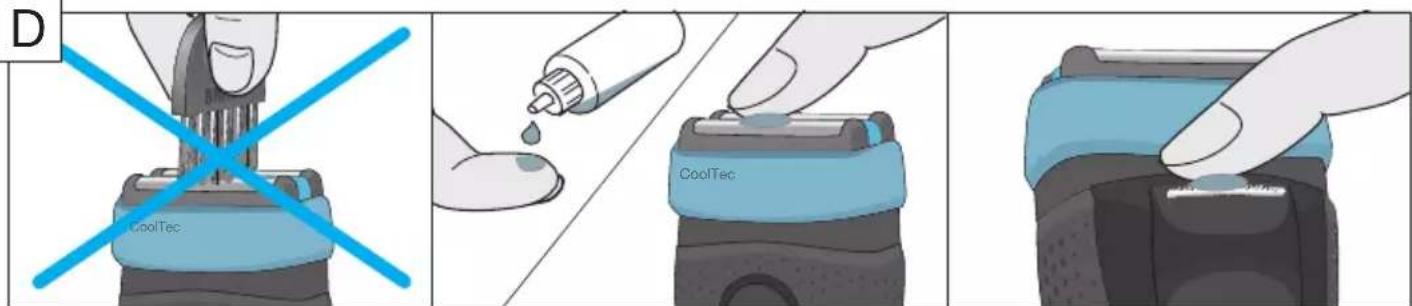
(see fig. C/D)
Cleaning under running water:
- Switch the shaver on (cordless) and rinse the shaver head under hot running water until all residues have been removed. You may use liquid soap without abrasive substances. Rinse off all foam and let the shaver run for a few more seconds.
- Next, switch off the shaver, remove the Foil & Cutter cassette and let it dry.
- If you regularly clean the shaver under water, then once a week apply a drop of light machine oil on top of the Foil & Cutter cassette.
Cleaning with a brush:
- Switch off the shaver. Remove the Foil & Cutter cassette (1) and tap it out on a flat surface. Using a brush, clean the inner area of the pivoting head. Do not clean the cassette with the brush as this may damage it!
Clean&Charge station
(models CT6cc/CT5cc/CT4cc/CT3cc/CT2cc)
The Clean&Charge station has been developed for cleaning, charging, lubricating, disinfecting and storing your Braun shaver.
13 Station power socket
14 Lift button for cartridge exchange
15 Station-to-shaver contacts
16a Level indicator
16b Status light
17 Start button
18 Cleaning cartridge
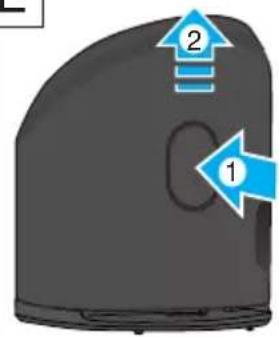
Installing the Clean&Charge station (see fig. E)
- Remove the protection foil from the Clean&Charge station display.
- Press the lift button (14) at the rear side of the Clean&Charge station to lift up the housing.
- Hold the cleaning cartridge (18) down on a flat, stable surface (e.g. table).
- Carefully remove the lid from the cartridge.
- Slide the cartridge from the rear side into the base of the station until it snaps into place.
- Slowly close the housing by pushing it down until it locks.
- Using the special cord set (10), connect the station power socket (13) to an electrical outlet.
Charging the shaver in the Clean&Charge station
Insert the shaver head down into the Clean&Charge station.
Important: The shaver needs to be dry and free from any foam or soap residue!
The contacts (7) on the back of the shaver need to align with the contacts (15) in the Clean&Charge station. Push the shaver in the correct position.
A beep sound confirms that the shaver sits properly in the station. The Clean&Charge station will automatically charge the shaver.
Cleaning the shaver
When the cleaning indicator lights up in the shaver display, insert the shaver into the Clean&Charge station, upside down and with the front showing.
Start automatic cleaning
Start the cleaning process by pressing the start button (17). If the status light (16b) does not shine (Clean&Charge station switches to stand-by after about 10 minutes), press the start button twice. Otherwise cleaning will not start.
For best shaving results, we recommend cleaning after each shave.
The cleaning program consists of several cycles, where cleaning fluid is flushed through the shaver head. The cleaning time takes 3 minutes. During this time the status light of the Clean&Charge station blinks.
Leave the shaver in the station for drying. It takes several hours until remaining moisture evaporates depending on the climatic conditions. Afterwards the shaver is ready for use.
After completing the cleaning and charging session, the indicators of the Clean&Charge station turn off.
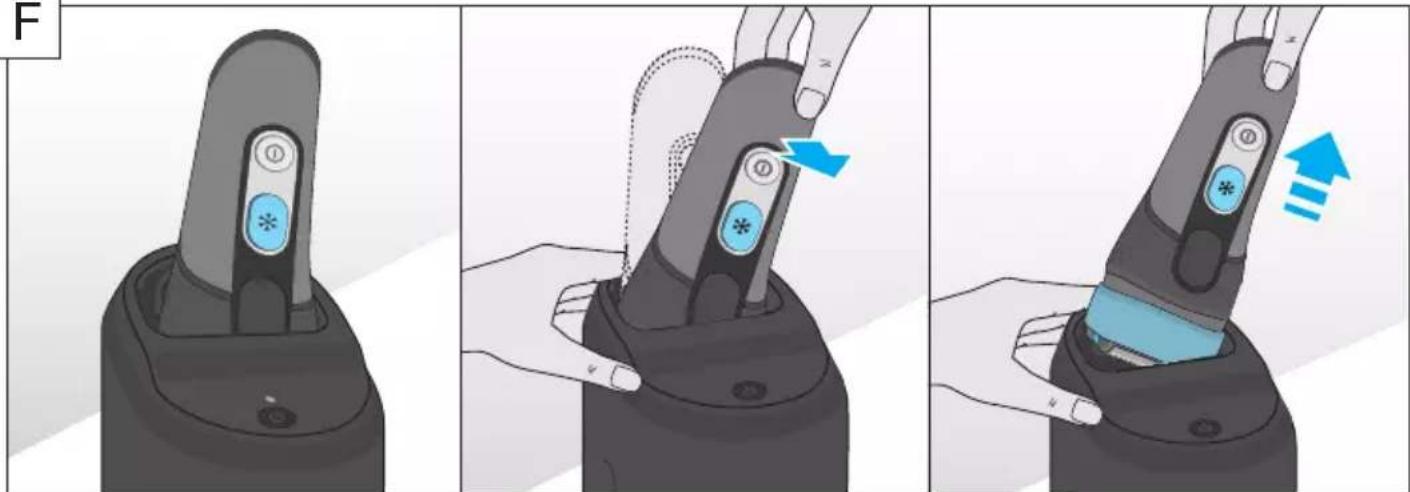
Removing the shaver from the Clean&Charge station (see fig. F)
Hold the Clean&Charge station with one hand and tilt the shaver slightly to the front to release it.
Cleaning Cartridge / Replacement (see fig. G)
When the level indicator lights up permanently red, the remaining fluid in the cartridge is sufficient for about 3 more cycles. When the level indicator blinks red, the cartridge needs to be replaced (about every 3–4 weeks when used daily).
After having pressed the lift button (14) to open the housing, wait for a few seconds before removing the used cartridge to avoid any dripping. Before discarding the used cartridge, make sure to close the openings using the lid of the new cartridge, since the used cartridge will contain contaminated cleaning solution.
The hygienic cleaning cartridge contains ethanol or isopropanol (specification see cartridge), which once opened will naturally evaporate slowly. Each cartridge, if not used daily, should be replaced after approximately 8 weeks to ensure optimal disinfection.
The cleaning cartridge also contains lubricants, for the shaving system which may leave residual marks on the outer foil frame and the cleaning chamber of the Clean&Charge station after cleaning. These marks can be removed easily by wiping gently with a damp cloth.
Accessories
Braun recommends changing your shaver's Foil & Cutter cassette every 18 months to maintain your shaver's maximum performance.
Available at your dealer or Braun Service Centres:
- Foil & Cutter cassette: 40S/40B
- Cleaning cartridge Clean&Charge: CCR
Environmental notice
Product contains batteries and/or recyclable electric waste. For environment protection do not dispose of in household waste, but for recycling take to electric waste collection points provided in your country.
The cleaning cartridge can be disposed of with regular household waste.
Subject to change without notice.
For electrical specifications, see printing on the special cord set.
Trouble-Shooting
| Problem Possible reason Remedy | ||
| SHAVER | ||
| Unpleasant smell from the shaver head. | 1. Shaver head is cleaned with water.2. Cleaning cartridge is in use for more than 8 weeks. | 1. When cleaning the shaver head with water only use hot water and from time to time some liquid soap (without abrasive substances). Remove Foil & Cutter cassette to let it dry.2. Change cleaning cartridge at least every 8 weeks. |
| Battery performance dropped significantly. | 1. Shaver head is regularly cleaned with water but not lubricated.2. Foil and cutter are worn which requires more power for each shave. | 1. If the shaver is regularly cleaned with water, apply a drop of light machine oil on top of the foil once a week for lubrication.2. Renew Foil & Cutter cassette. |
| Shaving performance dropped significantly. | 1. Shaving system is clogged.2. Foil and cutter are worn. | 1. Soak the Foil & Cutter cassette into hot water with a drop of dish liquid. Afterwards rinse it properly and tap it out. Once dry apply a drop of light machine oil on the foil.2. Renew Foil & Cutter cassette. |
| Cooling element is warm. | 1. Shaver was used with cooling function a couple of minutes before.2. Battery capacity is too low for the cooling function. | 1. You can use the shaver like this or turn on the cooling function and wait a few seconds until it is activated again.2. Charge the shaver after each shave to ensure sufficient battery capacity for the cooling function. |
| Shaver head is damp. | 1. Drying time after automatic cleaning was not sufficient.2. Drain of the Clean&Charge station is clogged. | 1. Clean directly after shaving to allow enough time for drying.2. Clean the drain with a wooden toothpick. |
| CLEAN&CHARGE STATION | ||
| Cleaning does not start when pressing the start button. | 1. Shaver is not placed properly in the Clean&Charge station.2. Cleaning cartridge contains not enough cleaning fluid (display lights red).3. Appliance is in stand-by mode. | 1. Insert shaver into the Clean&Charge station (contacts of the shaver need to align with contacts in the station).2. Insert new cleaning cartridge.3. Press start button twice. |
| Increased consumption of cleaning fluid. | Drain of the Clean&Charge station is clogged. | – Clean the drain with a wooden toothpick.– Regularly wipe the tub clean. |
Guarantee
We grant a 2 year guarantee on the product commencing on the date of purchase. Within the guarantee period we will eliminate any defects in the appliance resulting from faults in materials or workmanship, free of charge either by repairing or replacing the complete appliance at our discretion.
This guarantee extends to every country where this appliance is supplied by Braun or its appointed distributor.
This guarantee does not cover: damage due to improper use, normal wear or use as well as defects that have a negligible effect on the value or operation of the appliance. The guarantee becomes void if repairs are undertaken by unauthorised persons and if original Braun parts are not used.
To obtain service within the guarantee period, hand in or send the complete appliance with your sales receipt to an authorised Braun Customer Service Centre (address information available online at www.service.braun.com).
For UK only:
This guarantee in no way affects your rights under statutory law.
Français
Installation de la station Clean&Charge (cf fig. E)
Stanica Clean&Charge
(len modely CT6cc/CT5cc/CT4cc/CT3cc/CT2cc)
Stanica Clean&Charge bola vyvinutá na čistenie, dobíjanie, mazanie, dezinfekciu a uloženie holiaceho strojčeka Braun.
13 Zásuvka stanice
14 Tlačidlo zdvihnutia na výmenu kazety
15 Kontakty pre nabíjanie v stanici
16a Ukazovatel' hodnoty
16b Stavová kontrolka
17 Tlačidlo spustenia
18 Čistiaca kazeta
Country of origin: Germany Year of manufacture
To determine the year of manufacture, refer to the 3-digit production code located near the type plate. The first digit of the production code refers to the last digit of the year of manufacture. The next two digits refer to the calendar week in the year of manufacture. Example: "201" – The product was manufactured in week 01 of 2012.
بلد المنشأianoيا
تاريخ الصنع